sql
27 TopicsMicrosoft Defender for Cloud Customer Newsletter
*This will be the last monthly MDC newsletter. To keep up with the latest, please visit: What's new in MDC What's new in Defender for Cloud? Multiple container security features are now Generally Available: Container-level misconfiguration recommendations for Kubernetes, Upgrade AKS version recommendations, VA for runtime-discovered container images on EKS and GKE, Kubernetes notes VA for EKS and GKE, scanning support for Docker hardened container images. For more information, see this page here. Database-level recommendations for SQL VA now GA The SQL vulnerability assessment recommendations created as part of the transition from grouped to individual recommendations are now generally available. Each SQL vulnerability assessment rule is surfaced as its own recommendation, reported directly on the affected SQL database resource. For more details, please refer to this documentation . Blogs of the month In July, our team published the following blog posts we would like to share: 1. Built to Protect: The Architecture Behind Codename MDASH Customer journey Discover how other organizations successfully use Microsoft Defender for Cloud to protect their cloud workloads. This month we are featuring NTT Data. NTT Data, a top global IT services provider, leverages Azure, OpenAI and Microsoft Defender to launch their AI agents, adopting secure by design principles, to help enhance, competitiveness organization change and data usage. Defender for AI, and Defender CSPM, as part of the Defender family, address the emerging risks and threats like prompt injection and data poisoning that come with generative AI. Join our community! We offer several customer connection programs within our private communities. By signing up, you can help us shape our products through activities such as reviewing product roadmaps, participating in co-design, previewing features, and staying up-to-date with announcements. Sign up at aka.ms/JoinCCP. We greatly value your input on the types of content that enhance your understanding of our security products. Your insights are crucial in guiding the development of our future public content. We aim to deliver material that not only educates but also resonates with your daily security challenges. Whether it’s through in-depth live webinars, real-world case studies, comprehensive best practice guides through blogs, or the latest product updates, we want to ensure our content meets your needs. Please submit your feedback on which of these formats do you find most beneficial and are there any specific topics you’re interested in https://aka.ms/PublicContentFeedback. Note: If you want to stay current with Defender for Cloud and receive updates in your inbox, please consider subscribing to our monthly newsletter: https://aka.ms/MDCNewsSubscribeModern Database Protection: From Visibility to Threat Detection with Microsoft Defender for Cloud
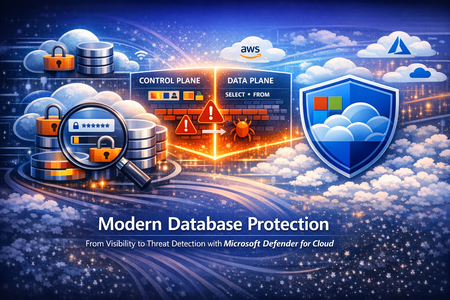
Databases sit at the heart of modern businesses. They support everyday apps, reports and AI tools. For example, any time you engage a site that requires a username and password, there is a database at the back end that stores your login information. As organizations adopt multi-cloud and hybrid architectures, databases are generated all the time, creating database sprawl. As a result, tracking and managing every database, catching misconfigurations and vulnerabilities, knowing where sensitive information lives, all becomes increasingly difficult leaving a huge security gap. And because companies store their most valuable data, like your login information, credit card and social security numbers, in databases, databases are the main target for threat actors. Securing databases is no longer optional, yet getting started can feel daunting. Database security needs to address the gaps mentioned above – help organizations see their databases to help them monitor for misconfigurations and vulnerabilities, sensitive information and any suspicious activities that occur within the database that are indicative of an attack. Further, database security must meet customers where they are – in multi-cloud and hybrid environments. This five part blog series will introduce and explore database-specific security needs and how Defender for Cloud addresses the gaps through its deep visibility into your database estate, detection of misconfiguration, vulnerabilities and sensitive information, threat protection with alerts and Integrated security platform to manage it all. This blog, part one, will begin with an overview of today’s database infrastructure security needs. Then we will introduce Microsoft Defender for Cloud’s unique database protection capabilities to help address this gap. Modern Database Architectures and Their Security Implications Modern databases can be deployed in two main ways: on your own infrastructure or as a cloud service. In an on-premises or IaaS (Infrastructure as a Service) setup, you manage the underlying server or virtual machine. For example, running a SQL Server on a self-managed Windows server—whether in your data center or on a cloud VM in Azure or AWS—is an IaaS deployment (Microsoft Defender for Cloud refers to these as “SQL servers on machines”) that require server maintenance. The other approach is PaaS (Platform as a Service), where a cloud provider manages the host server for you. In a PaaS scenario, you simply use a hosted database service (such as Azure SQL Database, Azure SQL Managed Instance, Azure Database for PostgreSQL, or Amazon RDS) without worrying about the operating system or server maintenance. In either case, you need to secure both the database host (the server or VM) and the database itself (the data and database engine). It’s also important to distinguish between a database’s control plane and data plane. The control plane includes the external settings that govern your database environment—like network firewall rules or who can access the system. The data plane involves information and queries inside the database. An attacker might exploit a weak firewall setting on the control plane or use stolen credentials to run malicious queries on the data plane. To fully protect a database, you need visibility into both planes to catch suspicious behavior. Effective database protection must span both IaaS and PaaS environments and monitor both the control plane and data plane because they are common targets for threat actors. Security teams can then detect suspicious activity such as SQL injections, brute-force attempts, and lateral movement through your environment. A Unified Approach to Database Protection Built for Multicloud Modern database environments are fragmented across deployment models, database ownership, and teams. Databases run across IaaS and PaaS, span control and data planes, and in multiple clouds, yet protection is often pieced together from disconnected point solutions Microsoft Defender for Cloud is a cloud native application protection platform (CNAPP) solution that provides a unified, cloud-native approach to database protection—bringing together discovery, posture management, and threat detection across SQL (Iaas and Paas), open-source relational databases (OSS), and Cosmos DB databases. Defender for Cloud’s database protection uses both agent-based and agentless solutions to protect database resources on-premises, hybrid, multi-cloud and Azure. A lightweight agent-based solution is used for SQL servers on Azure virtual machines or virtual machines hosted outside Azure and allows for deeper inspection, while an agentless approach for managed databases stored in Azure or AWS RDS resources provide protection with seamless integration. Additionally, Defender for Cloud brings in other signals from the cloud environment, surfacing a secure score for security posture, an asset inventory, regulatory compliance, governance capabilities, and a cloud security graph that allows for proactive risk exploration. The value of database security in Defender for Cloud starts with pre and post breach visibility. Vulnerability assessment and data security posture management helps security admins understand their database security posture and, by following Defender for Cloud’s recommendations, security admins can harden their environment proactively. Vulnerability assessments scans surface remediation steps for configurations that do not follow industry’s best practices. These recommendations may include enabling encryption when data is at rest where applicable or database server should restrict public access ranges. Data security posture management in Defender for Cloud automatically helps security admins prioritize the riskiest databases by discovering sensitive data and surfacing related exposure and risk. When databases are associated with certain risks, Defender for Cloud will provide its findings in three ways: risk-based security recommendations, attack path analysis with Defender CSPM and the data and AI dashboard. The risk level is determined by other context related to the resource like, internet exposure or sensitive information. This way, Security admins will have a solid understanding of their database environment pre-breach and will have a prioritized list of resources to remediate based on risk or posture level. While we can do our best to harden the environment, breaches can still happen. Timely post-breach response is just as important. Threat detection capabilities within Defender for Cloud will identify anomalous activity in near real time so SOC analytes can take action to contain the attack immediately. Defender for Cloud monitors both the control and the data plane for any anomalous activity that indicates a threat, from brute force attack detections to access and query anomalies. To provide a unified security experience, Defender for Cloud natively integrates with the Microsoft Defender Portal. The Defender portal brings signals from Defender for Cloud to provide a single cloud-agnostic security experience, equipping security teams with tools like secure score for security posture, attack paths, and incidents and alerts. When anomalous activities occur in the environment, time is of the essence. Security teams must have context and tools to investigate a database resource, both in the control plan and the data plane, to remediate and mitigate future attacks quickly. Defender for Cloud and the Defender portal brings together a security ecosystem that allows SOC analysts to investigate, correlate activities and incidents with alerts, contain and respond accordingly. Take Action: Close the Database Blind Spot Today Modern database environments demand more than isolated controls or point solutions. As databases span hybrid and multiple clouds, security teams need a unified approach that delivers visibility, context, and actionable protection where the data lives. Microsoft Defender for Cloud provides organizations the visibility into all of your databases in a centralized Defender portal using its unique control and data plane findings so that security teams can identify misconfigurations. prioritize them based on cloud-context risk-based recommendations or proactively identify other attack scenarios using the attack path analysis while SOC analysts can investigate alerts and act quickly. Follow this story for part two. We’ll go into Defender for Cloud’s unique visibility into database resources to find misconfiguration gaps, sensitive information exposure, and contextual risks that may exist in your environment. Resources: Get started with Defender for Databases. Learn more about SQL vulnerability assessment. Learn more about Data Security Posture Management Learn more about Advanced Threat Protection Reviewers: YuriDiogenes, lisetteranga, talberdahMicrosoft Defender for Cloud Customer Newsletter
Check out monthly news for the rest of the MTP suite here! What's new in Defender for Cloud? Now in public preview, Defender for Cloud provides threat protection for AI agents built with Foundry, as part of the Defender for AI Services plan. Learn more about this in our documentation. Defender for Cloud’s Defender for SQL on machines plan provides a simulated alert feature to help validate deployment and test prepared security team for detection, response and automation workflows. For more details, please refer to this documentation. Check out other updates from last month here. Blogs of the month In February, our team published the following blog post we would like to share: Extending Defender's AI Threat Protection to Microsoft Foundry Agents Defender for Cloud in the field Revisit the announcement on the new Secure Score model and the enhancements available in the Defender Portal. New Secure Score model and Defender portal enhancements GitHub Community Module 12 in Defender for Cloud’s lab has been updated to include alert simulation! Database protection lab - module 12 Customer journey Discover how other organizations successfully use Microsoft Defender for Cloud to protect their cloud workloads. This month we are featuring ContraForce. ContraForce, a cybersecurity startup, built its platform on Microsoft’s robust security and AI ecosystem. Contraforce, while participating in Microsoft for Startup Pegasus program, addressed the issue of traditional, complex, and siloed security stacks by leveraging Microsoft Sentinel, Defender XDR, Entra ID and Microsoft Foundry. ContraForce was able to deliver enterprise-grade protection at scale, without the enterprise-level overhead. As a result, measured key outcomes like 90%+ incident automation, 93% reduced cost per incident, and 60x faster incident response. Join our community! We offer several customer connection programs within our private communities. By signing up, you can help us shape our products through activities such as reviewing product roadmaps, participating in co-design, previewing features, and staying up-to-date with announcements. Sign up at aka.ms/JoinCCP. We greatly value your input on the types of content that enhance your understanding of our security products. Your insights are crucial in guiding the development of our future public content. We aim to deliver material that not only educates but also resonates with your daily security challenges. Whether it’s through in-depth live webinars, real-world case studies, comprehensive best practice guides through blogs, or the latest product updates, we want to ensure our content meets your needs. Please submit your feedback on which of these formats do you find most beneficial and are there any specific topics you’re interested in https://aka.ms/PublicContentFeedback. Note: If you want to stay current with Defender for Cloud and receive updates in your inbox, please consider subscribing to our monthly newsletter: https://aka.ms/MDCNewsSubscribe
Run a SQL Query with Azure Arc
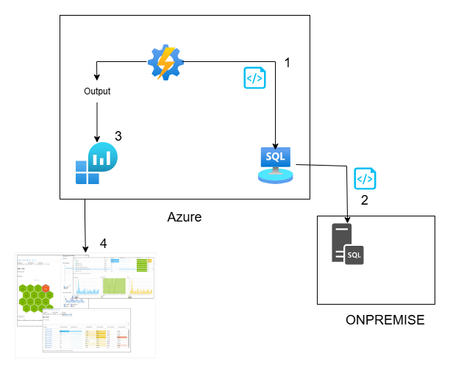
Hi All, In this article, you can find a way to retrieve database permission from all your onboarded databases through Azure Arc. This idea is born from a customer request around maintaining a standard permission set, in a very wide environment (about 1000 SQL Server). This solution is based on Azure Arc, so first you need to onboard your SQL Server to Azure Arc and enable the SQL Server extension. If you want to test Azure Arc in a test environment, you can use the Azure Jumpstart, in this repo you will find ready-to-deploy arm templates the deploy demos environments. The other solution components are an automation account, log analytics and a Data collection rule \ endpoint. Here you can find a little recap of the purpose of each component: Automation account: with this resource you can run and schedule a PowerShell script, and you can also store the credentials securely Log Analytics workspace: here you will create a custom table and store all the data that comes from the script Data collection Endpoint / Data Collection Rule: enable you to open a public endpoint to allow you to ingest collected data on Log analytics workspace In this section you will discover how I composed the six phases of the script: Obtain the bearer token and authenticate on the portal: First of all you need to authenticate on the azure portal to get all the SQL instance and to have to token to send your assessment data to log analytics $tenantId = "XXXXXXXXXXXXXXXXXXXXXXXXXXX" $cred = Get-AutomationPSCredential -Name 'appreg' Connect-AzAccount -ServicePrincipal -Tenant $tenantId -Credential $cred $appId = $cred.UserName $appSecret = $cred.GetNetworkCredential().Password $endpoint_uri = "https://sampleazuremonitorworkspace-weu-a5x6.westeurope-1.ingest.monitor.azure.com" #Logs ingestion URI for the DCR $dcrImmutableId = "dcr-sample2b9f0b27caf54b73bdbd8fa15908238799" #the immutableId property of the DCR object $streamName = "Custom-MyTable" $scope= [System.Web.HttpUtility]::UrlEncode("https://monitor.azure.com//.default") $body = "client_id=$appId&scope=$scope&client_secret=$appSecret&grant_type=client_credentials"; $headers = @{"Content-Type"="application/x-www-form-urlencoded"}; $uri = "https://login.microsoftonline.com/$tenantId/oauth2/v2.0/token" $bearerToken = (Invoke-RestMethod -Uri $uri -Method "Post" -Body $body -Headers $headers).access_token Get all the SQL instances: in my example I took all the instances, you can also use a tag to filter some resources, for example if a want to assess only the production environment you can use the tag as a filter $servers = Get-AzResource -ResourceType "Microsoft.AzureArcData/SQLServerInstances" When you have all the SQL instance you can run your t-query to obtain all the permission , remember now we are looking for the permission, but you can use for any query you want or in other situation where you need to run a command on a generic server $SQLCmd = @' Invoke-SQLcmd -ServerInstance . -Query "USE master; BEGIN IF LEFT(CAST(Serverproperty('ProductVersion') AS VARCHAR(1)),1) = '8' begin IF EXISTS (SELECT TOP 1 * FROM tempdb.dbo.sysobjects (nolock) WHERE name LIKE '#TUser%') begin DROP TABLE #TUser end end ELSE begin IF EXISTS (SELECT TOP 1 * FROM tempdb.sys.objects (nolock) WHERE name LIKE '#TUser%') begin DROP TABLE #TUser end end CREATE TABLE #TUser (DBName SYSNAME,[Name] SYSNAME,GroupName SYSNAME NULL,LoginName SYSNAME NULL,default_database_name SYSNAME NULL,default_schema_name VARCHAR(256) NULL,Principal_id INT); IF LEFT(CAST(Serverproperty('ProductVersion') AS VARCHAR(1)),1) = '8' INSERT INTO #TUser EXEC sp_MSForEachdb ' SELECT ''?'' as DBName, u.name As UserName, CASE WHEN (r.uid IS NULL) THEN ''public'' ELSE r.name END AS GroupName, l.name AS LoginName, NULL AS Default_db_Name, NULL as default_Schema_name, u.uid FROM [?].dbo.sysUsers u LEFT JOIN ([?].dbo.sysMembers m JOIN [?].dbo.sysUsers r ON m.groupuid = r.uid) ON m.memberuid = u.uid LEFT JOIN dbo.sysLogins l ON u.sid = l.sid WHERE (u.islogin = 1 OR u.isntname = 1 OR u.isntgroup = 1) and u.name not in (''public'',''dbo'',''guest'') ORDER BY u.name ' ELSE INSERT INTO #TUser EXEC sp_MSforeachdb ' SELECT ''?'', u.name, CASE WHEN (r.principal_id IS NULL) THEN ''public'' ELSE r.name END GroupName, l.name LoginName, l.default_database_name, u.default_schema_name, u.principal_id FROM [?].sys.database_principals u LEFT JOIN ([?].sys.database_role_members m JOIN [?].sys.database_principals r ON m.role_principal_id = r.principal_id) ON m.member_principal_id = u.principal_id LEFT JOIN [?].sys.server_principals l ON u.sid = l.sid WHERE u.TYPE <> ''R'' and u.TYPE <> ''S'' and u.name not in (''public'',''dbo'',''guest'') order by u.name '; SELECT DBName, Name, GroupName,LoginName FROM #TUser where Name not in ('information_schema') and GroupName not in ('public') ORDER BY DBName,[Name],GroupName; DROP TABLE #TUser; END" '@ $command = New-AzConnectedMachineRunCommand -ResourceGroupName "test_query" -MachineName $server1 -Location "westeurope" -RunCommandName "RunCommandName" -SourceScript $SQLCmd In a second, you will receive the output of the command, and you must send it to the log analytics workspace (aka LAW). In this phase, you can also review the output before sending it to LAW, for example, removing some text or filtering some results. In my case, I’m adding the information about the server where the script runs to each record. $array = ($command.InstanceViewOutput -split "r?n" | Where-Object { $.Trim() }) | ForEach-Object { $line = $ -replace '\', '\\' ù$array = $array | Where-Object { $_ -notmatch "DBName,Name,GroupName,LoginName" } | Where-Object {$_ -notmatch "------"} The last phase is designed to send the output to the log analytics workspace using the dce \ dcr. $staticData = @" [{ "TimeGenerated": "$currentTime", "RawData": "$raw", }]"@; $body = $staticData; $headers = @{"Authorization"="Bearer $bearerToken";"Content-Type"="application/json"}; $uri = "$endpoint_uri/dataCollectionRules/$dcrImmutableId/streams/$($streamName)?api-version=2023-01-01" $rest = Invoke-RestMethod -Uri $uri -Method "Post" -Body $body -Headers $headers When the data arrives in log analytics workspace, you can query this data, and you can create a dashboard or why not an alert. Now you will see how you can implement this solution. For the log analytics, dce and dcr, you can follow the official docs: Tutorial: Send data to Azure Monitor Logs with Logs ingestion API (Resource Manager templates) - Azure Monitor | Microsoft Learn After you create the dcr and the log analytics workspace with its custom table. You can proceed with the Automation account. Create an automation account using the creating wizard You can proceed with the default parameter. When the Automation Account creation is completed, you can create a credential in the Automation Account. This allows you to avoid the exposition of the credential used to connect to Azure You can insert here the enterprise application and the key. Now you are ready to create the runbook (basically the script that we will schedule) You can give the name you want and click create. Now go in the automation account than Runbooks and Edit in Portal, you can copy your script or the script in this link. Remember to replace your tenant ID, you will find in Entra ID section and the Enterprise application You can test it using the Test Pane function and when you are ready you can Publish and link a schedule, for example daily at 5am. Remember, today we talked about database permissions, but the scenarios are endless: checking a requirement, deploying a small fix, or removing/adding a configuration — at scale. At the end, as you see, Azure Arc is not only another agent, is a chance to empower every environment (and every other cloud provider 😉) with Azure technology. See you in the next techie adventure. **Disclaimer** The sample scripts are not supported under any Microsoft standard support program or service. The sample scripts are provided AS IS without warranty of any kind. Microsoft further disclaims all implied warranties including, without limitation, any implied warranties of merchantability or of fitness for a particular purpose. The entire risk arising out of the use or performance of the sample scripts and documentation remains with you. In no event shall Microsoft, its authors, or anyone else involved in the creation, production, or delivery of the scripts be liable for any damages whatsoever (including, without limitation, damages for loss of business profits, business interruption, loss of business information, or other pecuniary loss) arising out of the use of or inability to use the sample scripts or documentation, even if Microsoft has been advised of the possibility of such damages.
Ollama on HTTPS for SQL Server
Here is a quick procedure to deploy an Ubuntu container with Ollama and expose its API over HTTPS. The goal is to allow a fast deployment, even for those unfamiliar with Docker or Language Models, making it easy to set up an offline platform for generating embeddings and using Small Language Models This is particularly useful when testing SQL Server 2025 for fully on-premises environment use cases, since SQL Server only allows access to HTTPS endpoints. However, HTTP remains open for testing purposes. Please note that this example is CPU-based, as deploying with (integrated) GPU support involves additional, less straightforward steps. This example is provided solely to illustrate the concept, is not intended for production use, and comes without any guarantee of performance or security. Prerequisites To continue, you need to have Docker Desktop, WSL and SQL Server 2025 (currently Release Candidate 1) Docker Desktop Install WSL | Microsoft Learn SQL Server 2025 Preview | Microsoft Evaluation Center Create a Dockerfile First, create a working directory. In this example, C:\Docker\Ollama will be used. Simply create a file named Dockerfile (without an extension) and paste the following content into it. FROM ubuntu:25.10 RUN apt update && apt install -y curl gnupg2 ca-certificates lsb-release apt-transport-https software-properties-common unzip nano openssl net-tools RUN curl -fsSL https://ollama.com/install.sh | bash RUN curl -1sLf 'https://dl.cloudsmith.io/public/caddy/stable/gpg.key' | gpg --dearmor -o /usr/share/keyrings/caddy-stable-archive-keyring.gpg RUN curl -1sLf 'https://dl.cloudsmith.io/public/caddy/stable/debian.deb.txt' | tee /etc/apt/sources.list.d/caddy-stable.list RUN apt update && apt install -y caddy RUN mkdir -p /etc/caddy/certs RUN cat > /etc/caddy/certs/san.cnf <<EOF [req] default_bits = 2048 prompt = no default_md = sha256 req_extensions = req_ext distinguished_name = dn [dn] CN = 127.0.0.1 [req_ext] subjectAltName = @alt_names [alt_names] IP.1 = 127.0.0.1 DNS.1 = localhost EOF RUN openssl req -x509 -nodes -days 365 -newkey rsa:2048 -keyout /etc/caddy/certs/localhost.key -out /etc/caddy/certs/localhost.crt -config /etc/caddy/certs/san.cnf -extensions req_ext RUN echo "https://:443 {\n tls /etc/caddy/certs/localhost.crt /etc/caddy/certs/localhost.key\n reverse_proxy localhost:11434\n}" >> /etc/caddy/Caddyfile RUN echo "#!/bin/bash" > /usr/local/bin/entrypoint.sh && \ echo "set -e" >> /usr/local/bin/entrypoint.sh && \ echo "OLLAMA_HOST=0.0.0.0 ollama serve >> /var/log/ollama.log 2>&1 &" >> /usr/local/bin/entrypoint.sh && \ echo "caddy run --config /etc/caddy/Caddyfile --adapter caddyfile >> /var/log/caddy.log 2>&1 &" >> /usr/local/bin/entrypoint.sh && \ echo "tail -f /var/log/ollama.log /var/log/caddy.log" >> /usr/local/bin/entrypoint.sh && \ chmod 755 /usr/local/bin/entrypoint.sh ENTRYPOINT ["/usr/local/bin/entrypoint.sh"] For your information, this file allows the creation of an image based on Ubuntu 25.10 and includes: Ollama, for running the models Caddy, for the reverse proxy Creation of a certificate for the HTTPS endpoint on localhost Create the container After opening a Powershell terminal, execute the following commands: cd C:\Docker\Ollama #Build the image from the Dockerfile. docker build -t ollama-https . #Create a container based on the image ollama-https docker run --name ollama-https -d -it -p 443:443 -p 11434:11434 ollama-https #Copy the certificate created into the current Windows directory docker cp ollama-https:/etc/caddy/certs/localhost.crt . # Install the certificate in Trusted Root Certification Authorities Import-Certificate -FilePath "localhost.crt" -CertStoreLocation "Cert:\LocalMachine\Root" #Check Https (wget https://localhost).Content #Check Http (wget http://localhost:11434).Content Ollama is now running With a browser, connect to https://localhost Retrieve Models No model is retrieved when the image is created, as this depends on each use case, and for some models, the size can be substantial. Here’s a quick example for pulling an embedding model, Nomic, and a small language model, Phi3. Ollama Search docker exec ollama-https ollama pull nomic-embed-text docker exec ollama-https ollama pull phi3:mini A quick example with SQL Server 2025 A quick demonstration using the WideWorldImporters database (Wide World Importers sample database) use [master] GO ALTER DATABASE WideWorldImporters SET COMPATIBILITY_LEVEL = 170 WITH ROLLBACK IMMEDIATE GO DBCC TRACEON(466, 474, 13981, -1) GO Note: With RC1, you can use the PREVIEW_FEATURES database-scoped configuration T-SQL Declare an external model for embeddings. use [WideWorldImporters] GO CREATE EXTERNAL MODEL NomicLocal AUTHORIZATION dbo WITH ( LOCATION = 'https://localhost/api/embed', API_FORMAT = 'ollama', MODEL_TYPE = EMBEDDINGS, MODEL = 'nomic-embed-text' ) to enable semantic search capabilities on StockItems, we will create a dedicated table to store embeddings (no chunking in this example) along with a vector index optimized for cosine similarity use [WideWorldImporters] GO CREATE TABLE [Warehouse].[StockItemsEmbedding](StockItemEmbeddingID int identity (1,1) PRIMARY KEY, StockItemId int, SearchDetails nvarchar(max), Embedding vector(768)) GO INSERT INTO [Warehouse].[StockItemsEmbedding] SELECT si.StockItemID, si.SearchDetails, AI_GENERATE_EMBEDDINGS(si.SearchDetails USE MODEL NomicLocal) /* Generate embeddings from declared external model */ FROM [Warehouse].[StockItems] si GO /* Check */ SELECT * FROM [Warehouse].[StockItemsEmbedding] GO CREATE VECTOR INDEX IXV_1 ON [Warehouse].[StockItemsEmbedding] (Embedding) WITH (METRIC = 'cosine', TYPE = 'DiskANN') GO /* User Input */ DECLARE @UserInput varchar(max) = 'Which product is best suited for shipping small items?' /* and Generate embeddings for user input */ DECLARE @UserInputV vector(768) = AI_GENERATE_EMBEDDINGS(@UserInput USE MODEL NomicLocal) DECLARE @ModelInput nvarchar(max) DECLARE Payload nvarchar(max) DECLARE Response nvarchar(max) /* Similarity Search on StockItems and Model Input creation*/ SELECT @ModelInput = STRING_AGG('ProductDetails: ' + sie.SearchDetails + 'UnitPrice: ' + CAST(si.UnitPrice AS nvarchar(max)), ' \n\n') FROM VECTOR_SEARCH( TABLE = [Warehouse].[StockItemsEmbedding] as sie, COLUMN = Embedding, SIMILAR_TO = @UserInputV, METRIC = 'cosine', TOP_N = 10 ) JOIN [Warehouse].[StockItems] si ON si.StockItemId = sie.StockItemId /* Generate payload for response generation */ SELECT = '{"model": "phi3:mini", "stream": false, "prompt":"You are acting as a customer advisor responsible for recommending the most suitable products based on customer needs, providing clear and personalized suggestions. Question : ' + @UserInput + '\n\nList of Items : ' + @ModelInput + '"}'; EXECUTE sp_invoke_external_rest_endpoint @url = 'https://localhost/api/generate', @method = 'POST', = , @timeout = 230, = OUTPUT; PRINT JSON_VALUE(@response, '$.result.response') LangChain You can also have a try with LangChain. Same demo with a small difference, there is no vector index created on the vector store table. The table has been modified, but only for demonstration purposes. Reference: SQLServer | 🦜️🔗 LangChain # PREREQ #sudo apt-get update && sudo apt-get install -y unixodbc # sudo apt-get update # sudo apt-get install -y curl gnupg2 # curl https://packages.microsoft.com/keys/microsoft.asc | sudo apt-key add - # curl https://packages.microsoft.com/config/debian/11/prod.list | sudo tee /etc/apt/sources.list.d/mssql-release.list # sudo apt-get update # sudo ACCEPT_EULA=Y apt-get install -y msodbcsql18 # pip3 install langchain langchain-sqlserver langchain-ollama langchain-community import pyodbc from langchain_sqlserver import SQLServer_VectorStore from langchain_ollama import OllamaEmbeddings from langchain_ollama import ChatOllama from langchain.schema import Document from langchain_community.vectorstores.utils import DistanceStrategy #Prompt for testing _USER_INPUT = 'Which product is best suited for shipping small items?' ############### Params ########################################## print("\033[93mSetting up variables...\033[0m") _SQL_DRIVER = "ODBC Driver 18 for SQL Server" _SQL_SERVER = "localhost\\SQL2K25" _SQL_DATABASE = "WideWorldImporters" _SQL_USERNAME = "lc" _SQL_PASSWORD = "lc" _SQL_TRUST_CERT = "yes" _SQL_VECTOR_STORE_TABLE = "StockItem_VectorStore" # Table name for vector storage _MODIFY_TABLE_TO_USE_SQL_VECTOR_INDEX = True #As vector index not considered currently in langchain and structure does not match vector index requirements _CONNECTION_STRING = f"Driver={{{_SQL_DRIVER}}};Server={_SQL_SERVER};Database={_SQL_DATABASE};UID={_SQL_USERNAME};PWD={_SQL_PASSWORD};TrustServerCertificate={_SQL_TRUST_CERT}" _OLLAMA_API_URL = "https://localhost" _OLLAMA_EMBEDDING_MODEL = "nomic-embed-text:latest" _OLLAMA_EMBEDDING_VECTOR_SIZE = 768 _OLLAMA_SLM_MODEL = "phi3:mini" # Model for SLM queries ################################################################### #Define Ollama embeddings embeddings = OllamaEmbeddings( model=_OLLAMA_EMBEDDING_MODEL, base_url=_OLLAMA_API_URL ) conn = pyodbc.connect(_CONNECTION_STRING) cursor = conn.cursor() #Drop embeddings table if it exists print("\033[93mDropping existing vector store table if it exists...\033[0m") cursor.execute(f"DROP TABLE IF EXISTS Warehouse.{_SQL_VECTOR_STORE_TABLE};") print("\033[93mConnecting to SQL Server and fetching data...\033[0m") cursor.execute("SELECT StockItemId, SearchDetails, UnitPrice FROM Warehouse.StockItems;") rows = cursor.fetchall() print(f"\033[93mFound {len(rows)} records to process\033[0m") # Create documents from the fetched data documents = [ Document( page_content=row.SearchDetails, metadata={ "StockItemId": row.StockItemId, "UnitPrice": float(row.UnitPrice) # Convert Decimal to float } ) for row in rows ] conn.commit() #Creating vector store print("\033[93mCreating vector store...\033[0m") vector_store = SQLServer_VectorStore( connection_string=_CONNECTION_STRING, distance_strategy=DistanceStrategy.COSINE, # If not provided, defaults to COSINE embedding_function=embeddings, embedding_length=_OLLAMA_EMBEDDING_VECTOR_SIZE, db_schema = "Warehouse", table_name=_SQL_VECTOR_STORE_TABLE ) print("\033[93mAdding to vector store...\033[0m") try: vector_store.add_documents(documents) print("\033[93mSuccessfully added to vector store!\033[0m") except Exception as e: print(f"\033[91mError adding documents: {e}\033[0m") #Vector index not yet integrated in SQL Server VectorStore (drop auto-created nonclustered PK and generating int clustered PK if (_MODIFY_TABLE_TO_USE_SQL_VECTOR_INDEX): print("\033[93mModifying structure to create vector index...\033[0m") cursor.execute("DECLARE @AutoCreatedPK sysname, @SQL nvarchar(max);" f"SELECT @AutoCreatedPK = name FROM sys.key_constraints WHERE type = 'PK' AND parent_object_id = object_id('Warehouse.{_SQL_VECTOR_STORE_TABLE}');" f"SELECT @SQL = 'ALTER TABLE Warehouse.{_SQL_VECTOR_STORE_TABLE} DROP CONSTRAINT ' + @AutoCreatedPK + ';'" "EXEC sp_executesql @SQL;" f"ALTER TABLE Warehouse.{_SQL_VECTOR_STORE_TABLE} ADD Alt_Id int identity(1,1);" f"ALTER TABLE Warehouse.{_SQL_VECTOR_STORE_TABLE} ADD CONSTRAINT PK_{_SQL_VECTOR_STORE_TABLE} PRIMARY KEY (Alt_Id);") conn.commit() print("\033[93mCreating vector index...\033[0m") cursor.execute(f"CREATE VECTOR INDEX IV_{_SQL_VECTOR_STORE_TABLE} ON [Warehouse].[{_SQL_VECTOR_STORE_TABLE}] (embeddings) WITH (METRIC = 'cosine', TYPE = 'DiskANN');") conn.commit() #Generate prompt then answer print(f"\033[92mUser Input: {_USER_INPUT}\033[0m") context = [ { "Item": doc.page_content, "UnitPrice": doc.metadata.get("UnitPrice", None) } for doc in vector_store.similarity_search(_USER_INPUT, k=3) ] llm = ChatOllama(model=_OLLAMA_SLM_MODEL,base_url=_OLLAMA_API_URL) prompt = ( f"You are acting as a customer advisor responsible for recommending the most suitable products based on customer needs, providing clear and personalized suggestions" f"Context: {context}\n\nQuestion: {_USER_INPUT}\n\n") response = llm.invoke(prompt) print(f"\033[36m{response.content}\033[0m") Note : If using devcontainer with VSCode add "runArgs": [ "--network=host" ] to devcontainer.json to allow connections to “localhost”. Import and install the previously created certificat docker cp C:\Docker\Ollama\localhost.crt <devcontainer name>:/usr/local/share/ca-certificates/localhost.crt docker exec <devcontainer name> "update-ca-certificates" Disclaimer The sample scripts are not supported under any Microsoft standard support program or service. The sample scripts are provided AS IS without warranty of any kind. Microsoft further disclaims all implied warranties including, without limitation, any implied warranties of merchantability or of fitness for a particular purpose. The entire risk arising out of the use or performance of the sample scripts and documentation remains with you. In no event shall Microsoft, its authors, or anyone else involved in the creation, production, or delivery of the scripts be liable for any damages whatsoever (including, without limitation, damages for loss of business profits, business interruption, loss of business information, or other pecuniary loss) arising out of the use of or inability to use the sample scripts or documentation, even if Microsoft has been advised of the possibility of such damages.
Enhancements for protecting hosted SQL servers across clouds and hybrid environments
Introduction We are releasing an architecture upgrade for the Defender for SQL Servers on Machines plan. This upgrade is designed to simplify the onboarding experience and improve protection coverage. In this blog post, we will discuss details about the architecture upgrade and the key steps customers using the Defender for SQL Servers on Machine plan should take to adopt an optimal protection strategy following this update. Overview of Defender for Cloud database security and the Defender for SQL Servers on Machines plan Databases are an essential part of building modern applications. Microsoft Defender for Cloud, a Cloud Native Application Protection Platform (CNAPP), provides comprehensive database security capabilities to assist security and infrastructure administrators in identifying and mitigating security posture risks, and help Security Operation Center (SOC) analysts detect and respond to database cyberattacks. As organizations advance their digital transformation, a comprehensive database security strategy that covers hybrid and multicloud scenarios is essential. The Defender for SQL Servers on Machines plan delivers this by protecting SQL Server instances hosted on Azure, AWS, GCP, and on-premises machines. It provides database security posture management capabilities and threat protection capabilities to help you start secure and stay secure when building applications. More specifically, it helps to: Centralize discovery of managed and shadow databases across clouds and hybrid environments. Reduce database risks using risk-based recommendations and attack path analysis. Detect and respond to database threats including SQL injections, access anomaly, and suspicious queries. SOC teams can also detect and investigate attacks on databases using built-in integration with Microsoft Defender XDR. Benefits of the agent upgrade for the Defender for SQL Servers on Machine plan Starting from April 28, 2025, we began a gradual rollout of an upgraded agent architecture for the Defender for SQL Servers on Machines plan. This upgraded architecture is designed to simplify the onboarding process and improve protection coverage. This upgrade will eliminate the Azure Monitor framework dependency and replace it with a proven, native SQL extension infrastructure. Azure SQL VMs and Azure Arc-enabled SQL Servers will automatically migrate to the updated architecture. Actions required after the upgrade Although the agent architecture upgrade will be automatic, customers the have enabled the Defender for SQL Servers on Machines plan before April 28th, will need to take action to ensure they adopt optimal plan configurations to help detect and protect unregistered SQL Servers. 1) Update the Defender for SQL Servers on Machines plan configuration for optimal protection coverage To automatically discover unregistered SQL Servers, customers are required to update the plan configurations using this guide. This will ensure Defender for SQL Servers on Machines plan can detect and protect all SQL Server instances. Click the Enable button to update the agent configuration setting: 2) Verify the protection status of SQL virtual machines or Arc-enabled SQL servers Defender for Cloud provides a recommendation titled "The status of Microsoft SQL Servers on Machines should be protected” to help customers assess the protection status of all registered SQL Servers hosted on Azure, AWS, GCP, and on-premises machines within a specified Azure subscription and presents the protection status of each SQL Server instance. Technical context on the architecture upgrade Historically, the Defender for SQL Servers on Machines plan relied on the Azure Monitor agent framework (MMA/AMA) to deliver its capabilities. However, this architecture has proven to be sensitive to diverse customer environmental factors, often introducing friction during agent installation and configuration. To address these challenges, we are introducing an upgraded agent architecture designed to reduce complexity, improve reliability, and streamline onboarding across varied infrastructures. Simplifying enablement with a new agent architecture The SQL extension is a management tool that is available on all Azure SQL virtual machines and SQL servers connected through Azure Arc. It plays a key role in helping simplify the migration process to Azure, enabling large-scale management of your SQL environments and enhancing the security posture of your databases. With the new agent architecture, Defender for SQL utilizes the SQL extension as a backchannel to streamline the data from SQL server instances to the Defender for Cloud portal. Product performance implications Our assessments confirm that the new architecture does not negatively impact performance. For more information, please refer to Common Questions - Defender for Databases. Learn more To learn more about the Defender for SQL Servers on Machines architecture upgrade designed to simplify the onboarding experience and enhance protection coverage, please visit our documentation and review the actions needed to adopt optimal plan configurations after the agent upgrade.1.1KViews0likes0Comments
Defender for SQL for on-prem Azure Arc connected SQL servers
I am having trouble using the Azure Built-In policy "Configure Arc-enabled SQL Servers with DCR Association to Microsoft Defender for SQL user-defined DCR". I would assume a newly created DCR would work just fine, but I am unsure as when I use the policy that will automatically create a DCR and LA workspace, it works fine. Does my DCR need to be configured with a special data source and destination? (Similarly how Azure Monitor needs a special DCR for Arc machines)303Views0likes0CommentsMicrosoft Defender for Cloud PoC Series – Microsoft Defender for SQL
[Post updated on 8/22/2024] by Yura Lee Introduction This article is a continuation of Microsoft Defender PoC Series which provides you guidelines on how to perform a proof of concept for a specific Microsoft Defender plan. For a more holistic approach where you need to validate Microsoft Defender for Cloud, please read How to Effectively Perform a Microsoft Defender for Cloud PoC article. There can be many security vulnerabilities in databases that are sometimes taken advantage of by malicious actors. According to the Github 2020 report, a vulnerability typically goes undetected for 218 weeks (just over four years) before being disclosed and fixed. Injection attacks, such as those on SQL and NoSQL, are among the most popular types of cyberattacks for web applications (as per OWASP Top 10). SQL Injection attacks, brute-force attacks, SQL shell OS attacks leading to crypto-mining and ransomware, can be detected and remediated by the Microsoft Defender for SQL plan. Microsoft Defender for SQL has two main capabilities that together will protect your SQL environments from cyberattacks. These capabilities are: Vulnerability Assessment, which is a service that helps you identify and remediate vulnerabilities in your database environments to improve your security posture Advanced Threat Protection, which detects suspicious activities related to your databases and alerts you with details and recommended actions. There are other types of databases that will be protected via the advanced threat protection feature. Planning So, what actually gets protected through Microsoft Defender for SQL? There are two Microsoft Defender plans that are comprised as part of Microsoft Defender for SQL: Microsoft Defender for Azure SQL database servers protects: Azure SQL Database Azure SQL Managed Instance Dedicated SQL pool in Azure Synapse. Microsoft Defender for SQL servers on machines extends the protections for your to fully support hybrid environments and protects SQL servers hosted in Azure, other cloud environments, and even on-premises machines. It does this by protecting: SQL Server on Virtual Machines, On-premises SQL servers of Azure Arc enabled SQL Server SQL Server running on Windows machines without Azure Arc There is a third plan called Microsoft Defender for open-source relational databases that brings threat protection for: Azure Database for PostgreSQL Azure Database for MySQL Azure Database for MariaDB The final plan, Defender for Cosmos DB provides advanced threat detection capabilities for: Azure Cosmos DB, NoSQL API. Preparation You will need to first enable Microsoft Defender for SQL, and for this you need to have the role of Security Admin. For more information about roles and privileges, visit this article. You can enable the three plans for Microsoft for SQL (for Azure SQL database servers, SQL servers on machines, and open-source relational databases) by following the instructions here. If you are conducting this PoC in partnership with the SOC Team, make sure they are familiar with the alerts that may appear once you enable this plan. Review all alerts available at our Alerts Reference Guide. From the readiness perspective, make sure to review the following resources to better understand Microsoft Defender for SQL: Microsoft Defender for SQL Documentation Defender for SQL and the Vulnerability Assessment | Defender for Cloud in the Field #1 Microsoft Defender for Cloud webinar: Microsoft Defender for SQL Anywhere (new!) Enhancements in Defender for SQL Vulnerability Assessment | Defender for Cloud in the Field #24 - YouTube Special Note for Defender for SQL servers on machines Microsoft Defender for SQL servers on machines requires Azure Montior Agent (AMA) installed, as well as a SQL Iaas extension for discovery and registration and it should report to a workspace to hold data collection rules (DCR). This workspace can be specified or you can allow MDC to create a default one for you. For machines that are not in Azure, all the above are required in addition to Arc installation. Read more about Arc-enabled servers here. Workspace configuration and automatic SQL server instance registration (recommended) can be done in Settings & monitoring. Make sure that Log analytics deployment is turned OFF, and AMA for SQL server on machines is turned ON. Implementation and Validation There are two ways to validate alerts. First, you can use the out of box sample alert feature to validate. To create these sample alerts, you will need to have the role Security Admin or Subscription Contributor. To create sample alerts for Defender for SQL, go to Microsoft Defender for Cloud in the Security alerts section, click Sample alerts. Select your subscription, choose Azure SQL Database and SQL Server on machines on the Microsoft Defender plans, and click Create sample alerts. The other way is to run simulations against the server itself. Instructions for this is available on Github, as part of MDC labs here. Prevention Microsoft Defender for SQL allows you to remediate SQL vulnerabilities and prevent SQL incidents and alerts using SQL vulnerability assessment. To configure it on your Azure SQL databases and Azure SQL Managed Instance, go to the Recommendations page in Microsoft Defender for Cloud, and select one of the following recommendations under the control Remediate security configurations: For Azure SQL databases, select the recommendation Vulnerability assessment should be enabled on your SQL servers. For Azure SQL Manage Instances, select the recommendation Vulnerability assessment should be enabled on your SQL managed instances. When Microsoft Defender for SQL is enabled on your SQL Server on machines, SQL vulnerability assessment does not require initial configuration, as it is included with SQL Server. In this article, we will demo SQL vulnerability assessment for Azure SQL database. Select the recommendation SQL servers should have vulnerability assessment configured. From here, select the unhealthy resource that you’d like to configure vulnerability assessment on, and click Fix. In the pane that appears, click Fix 1 resource. Next, to remediate vulnerability findings from your SQL databases and SQL Server on machines, go to the Recommendations page in Microsoft Defender for Cloud. Under the control Remediate security configurations, select one of the following recommendations: For Azure SQL databases and Azure SQL Manage Instances, select the recommendation SQL databases should have vulnerability findings resolved. For SQL Server on machine, select the recommendation SQL servers on machines should have vulnerability findings resolved. In this article, we will demo SQL databases should have vulnerability findings resolved. From here, select any of the unhealthy resources. Then select the finding you wish to remediate. In this example, we’ll be selecting Auditing should be enabled at the server level. Then select the database. Once again, click the finding you wish to remediate, which in our case is Auditing should be enabled at the server level. Select Click here to remediate. Alternatively, you may decide that this finding does not pose a security risk for your environment. In this case, you should create an acceptable baseline, which is essentially a customisation that tells the Vulnerability Assessment what is expected in your environment. To do this, select Approve as Baseline, and follow the subsequent instructions. Vulnerability Assessment recurring scans in your environment, and in upcoming scans after this, any results that match the baseline you established are considered as passes. Only reports on deviations from this baseline will appear as findings in the Vulnerability Assessment dashboard. This allows you to focus your attention only on the relevant issues. Learn more about this here. Continue remediating and/or setting baselines across all the findings and databases to improve your SQL security posture. Automations Instead of following the manual process above to remediate recommendations on SQL databases, you can use the automated ways to remediate recommendations related to SQL like, Vulnerability assessment should be enabled on your SQL servers, Enable auditing on SQL server, Enable transparent data encryption on SQL databases and many more like these in our Microsoft Defender for Cloud Github repository. This repository gives you access to numerous sample security playbooks that will help in automating remediation for a recommendation. You can also utilize workflow automation feature in Microsoft Defender for Cloud which can trigger Logic Apps on Security alerts, recommendations, and changes to regulatory compliance. For example, when Microsoft Defender for Cloud detects a brute force attack, you may want this to be automatically taken care off, you can use this playbook as a starting point. To understand how to remediate security alerts using Microsoft Defender, make sure you check out this chapter from SC-200 certification exam learning guide. You can also create an automatic response to a specific security alert using an ARM template, read more about it in our documentation. Further Resources How Microsoft Defender for SQL can protect SQL servers anywhere - YouTube (new!) Defender for Open-Source Relational Databases Multicloud | Defender for Cloud in the Field #51 (youtube.com) Latest Updates (new!) Microsoft Defender for Open-Source Relational Databases Now Supports Multicloud (AWS RDS) (new!)Microsoft Defender for Cloud Adds Full Coverage for Azure Open-Source Relational Databases - Microsoft Community Hub (new!) Better Together = Defender CSPM + Database Protections - Microsoft Community Hub (new!) Microsoft Defender for SQL is now available on the SQL Virtual Machine blade. - Microsoft Tech Community Conclusion By the end of this PoC you should be able to determine the value proposition of Microsoft Defender for SQL and the importance to have this level of threat detection to your workloads. Stay tuned for more Microsoft Defender for Cloud PoC Series! P.S. Subscribe to our Microsoft Defender for Cloud Newsletter to stay up to date on helpful tips and new releases and join our Tech Community where you can be one of the first to hear the latest Microsoft Defender for Cloud news, announcements and get your questions answered by Azure Security experts. Reviewers Special Thanks to Yuri Diogenes, Safeena Begum, David Trigano and Michael Makhlevich for reviewing this article.