sql server
65 TopicsSQL Server has encountered I/O requests taking longer than 15 seconds
Most of us have seen these errors in the SQL Server error log pointing to a IO subsystem problem: 2015/06/15 12:43:01 spid8s SQL Server has encountered 1016 occurrence(s) of I/O requests taking longer than 15 seconds to complete on file [N:\ABCDATA8\ [ABCDATA8.ndf] in database [ABC] (5). The OS file handle is 0x000000000000172C. The offset of the latest long I/O is: 0x0000073234 For a customer case this message has to be analyzed in more detail, because the storage group at the customer insists to get more information as they don’t see these high numbers on the storage system at that time. A deeper investigation reveals these findings: the counter is collected and reported for each file separately the message is printed by the checkpoint, the background process that kicks in every 5 seconds it is printed in a minimum interval of 300 seconds (5 minutes) per file, means only one message per 5 minutes per file it checks the amount of ticks (milliseconds) IO requests were active and if this exceeds 15000 (15 seconds) this IO request is counted it is doing this for all parallel and asynchronously IO requests (per file) The problem is that these are not the amount of IO requests that are counted, but the amount of times IO request were seen during the reporting time. Imagine you have a very long IO request going on (only one). The reporting kicks in after 5 seconds (by the checkpoint) and after 3 times (15 seconds) the IO request is the first time counted, but no message is printed yet as the five-minute minimum per file is not reached yet. The very same IO request is counted at each reporting cycle (every 5 seconds) until the 300 seconds threshold is reached and the message is printed (and the counter is reset). Until then this one IO request is counted 57 times (300 seconds / 5 seconds reporting interval = 60 occurrences – 3 time free (first 15 seconds)). So if you have 1000 occurrences means that in this 60 reporting cycles of the 5 minutes reporting interval 1000 IO requests were seen that needed more than 15 seconds. That might were only a handful very long running IO requests (e.g. minimum is (1000 / 57) = 17.5 requests) or many shorter request (e.g. 1000 requests of 15 – 19 seconds). The message is misleading as it is talking of occurrences and not of IO requests, but it still points to a storage problem. Note well, however, when you see even one such message it means you had at least one event where an I/O took more than 15 SECONDs to complete. This is VERY SLOW . This indicates a problematic I/O event. But there are not so many IO requests hanging as stated in the message, but at least there are some. I hope this sheds some light on it.SQL Agent Jobs in an AlwaysOn / Mirroring Environment
Running SQL Agent Jobs in an AlwaysOn or Database Mirroring environment can be a challenge, as the database might be not accessible at the time when the job starts. This is especially the case for all SAP collector and backup jobs. On the other hand there might be jobs that should not run on primary server (e.g. DBCC Checks), but on a readable secondary or readonly standby database (Log Shipping). In the worst case either the jobs fail or run on the wrong server. To prevent this, SAP created a small stored procedure to control the run of these kind of jobs. To use the stored procedure, use this script use master; GO IF (OBJECT_ID(N'dbo.CheckAccess') IS NOT NULL ) DROP PROCEDURE [dbo].CheckAccess GO CREATE PROCEDURE dbo.CheckAccess @DBName AS NVARCHAR(128) = N'master', @RunOnPrimary AS TINYINT = 1, @RunOnSecondary AS TINYINT = 0, @RunOnReadonly AS TINYINT = 0, RC AS TINYINT = 0 OUTPUT AS BEGIN DECLARE @IsReadOnly TINYINT; DECLARE @State TINYINT; DECLARE @StandBy TINYINT; DECLARE @UserAccess TINYINT; DECLARE @AOState TINYINT; DECLARE @AORole TINYINT; DECLARE @Message NVARCHAR(50); SET RC = 0; SET @Message = N'Everything is OK.'; IF EXISTS(SELECT TOP 1 database_id FROM sys.databases WHERE database_id = DB_ID(@DBName)) BEGIN -- Check for the normal database state SELECT @IsReadOnly = is_read_only, @State = state, @StandBy = is_in_standby, @UserAccess = user_access FROM sys.databases WHERE name = @DBName; IF NOT ((@State + @UserAccess) = 0 AND (@IsReadOnly <= @RunOnReadonly) AND (@StandBy <= @RunOnReadonly)) BEGIN SET RC = 1; SET @Message = N'Database is NOT accessible.'; END; END ELSE BEGIN SET RC = 2; SET @Message = N'Database doesn''t exists.'; END -- Check if we are running in an AlwaysOn Configuration IF EXISTS(SELECT TOP 1 database_id FROM sys.dm_hadr_database_replica_states WHERE database_id = DB_ID(@DBName)) BEGIN SELECT @AOState = db.database_state, @AORole = rs.role FROM sys.dm_hadr_database_replica_states AS db INNER JOIN sys.dm_hadr_availability_replica_states AS rs ON db.group_id = rs.group_id WHERE db.is_local = 1 AND rs.is_local = 1 AND db.database_id = DB_ID(@DBName) IF NOT(@AOState = 0 AND ((@RunOnPrimary != 0 AND @RunOnPrimary = @AORole) OR (@RunOnSecondary != 0 AND @RunOnSecondary = @AORole - 1))) BEGIN SET RC = 3; SET @Message = N'The database is not in the required state for Always-ON access.'; END; END; PRINT @Message END; GO and run it on all nodes of the affected system (either AlwaysOn, Database Mirroring or Log Shipping). It will create a stored procedure CheckAccess in the master database. The procedure has 5 parameters: Parameter Data Type Default Value Description @DBName NVARCHAR(128) N'master' Database to check. @RunOnPrimary TINYINT 1 Should the job run on the primary database ? @RunOnSecondary TINYINT 0 Should the job run on the secondary database ? @RunOnReadonly TINYINT 0 Should the job run on the read only databases (Log Shipping) ? RC TINYINT 0 Return code (0 = Success, 1 = Failure) With the parameters @RunOnPrimary, @RunOnSecondary and @RunOnReadonly you can control in which state of the AlwaysOn database the Job should start. A combination of these parameters is possible, so the job can run on primary and secondary databases if you set both to 1. Even if you do not use AlwaysOn or readonly databases or if you set all the options to 0 the stored procedure will check for the availability of the database. It will return a failure (1) if the database is absent, offline, suspect, in recovery and all the other states that won't let you access the database. A valid call looks like this (Check the TST database if it is accessible and check if it is the primary database in an AlwaysOn configuration): exec dbo.CheckAccess N'TST',1,0,0,@RC OUTPUT To enable the CheckAccess stored procedure for jobs, we have to change the job a bit. In this example it is an SAP Collector Job (SAP_SCU_SAPMonitor_TST_MSSQL_COLLECTOR) for the TST SAP database. Open the properties for the job (right click -> Properties) Switch to the Steps branch on the left and edit the first step with the name DBCOLL. Change the database to master (as the stored procedure lives there) and change the script from EXECUTE sap_dbcoll to DECLARE @Msg NVARCHAR(128) DECLARE RC TINYINT exec dbo.CheckAccess N'TST',1,0,0,@RC OUTPUT IF RC = 0 exec( 'use [TST] EXECUTE sap_dbcoll' ) Ensure that you change the database accordingly (here TST) for your system. The step then should look like: On the advanced tab change the 'On failure action' field to 'Quit the job reporting failure' and save and exit the job definition. This will ensure that the DBCOLL part will only start when the database is accessible and is the primary database in the AlwaysOn Configuration. You can use this stored procedure for any job, when you follow this generic approach: DECLARE @Msg NVARCHAR(128) DECLARE RC TINYINT exec dbo.CheckAccess N'<Database in Question>',1,0,0,@RC OUTPUT IF RC = 0 exec( 'use [<Database in Question>] <Step definition>' ) Regards ClasAlways On - Synchronize SAP login, jobs and objects
SQL Server AlwaysOn is one of the High Availability solutions available for an SAP system. It consists of two or more computers each hosting a SQL Server with a copy of the SAP database. A listener points to the actual primary copy and is used from the SAP system as the only connection point. For details how to setup and configure an SAP system together with SQL Server AlwaysOn see this blog post and its referenced blog posts. During the setup the SAP System is configured from the current primary node and all non-database related objects such as SQL Server Agent Jobs, logins etc. are created only on the current primary database. In a case of a (automatic) failover to one of the secondary nodes of AlwaysOn these objects are then missing. Jürgen has introduced a script (sap_helprevlogin) in his initial blog post about the database load after setting up AlwaysOn. This script will transfer only the logins, but will fall short on transferring jobs, server level permissions and other assignments. One of the SAP developers working in our team has built a comprehensive PowerShell script (sap_synchronize_always_on.ps1) to perform all these tasks and to transfer all the SAP objects from the initial installation to all the other nodes of the AlwaysOn system. The script connects to the primary instance, reads the configuration of the secondary nodes and then synchronizes the objects and jobs with these nodes. The script must be executed by a domain administrator which has SQL Server sysadmin privileges on all AlwaysOn instances. The script uses up to three input variables: The server name of the SQL Server instance or the listener name of the High-Availability group. The default is (local) The name of the SAP database, which must be in an High-Availability group on the given server Single login (optional): Only one login gets copied along with SAP CCMS jobs owned by the login. By default all logins mapped to the database are copied. The script will execute: Create a procedure CheckAccess in the master database (see this blog about the details about it) Discover which logins are mapped to the database Discover which SAP CCMS jobs belong to those logins If the job does not use CheckAccess then change the job step to use CheckAccess and run the job step in master Open a connection to each secondary and: Create procedure CheckAccess in the master database Create the logins if they don't exist already using the same sid. Create the jobs if they don't exist already. If a job exists and if the job does not CheckAccess then change the job step to use CheckAccess and run in master If new SAP CCMS jobs are added because of remote monitoring from a different SAP system using DBACOCKPIT, the script can be re-executed. It will then copy only new objects which have not been copied before. You can find this useful script attached, which makes the synchronization of the SAP Systems in an AlwaysOn environment so much easier. Please ensure that you test the execution in your test environment first, before you run it in production. Neither SAP nor Microsoft takes any responsibility from using this script, you run it on your own risk. Update January 2017: New script version that copies the sid<adm> and SAPService<SID> logins from the SAP System as well. Best regards | Bless! Clas & GuðmundurDeadlock Analysis (Examples)
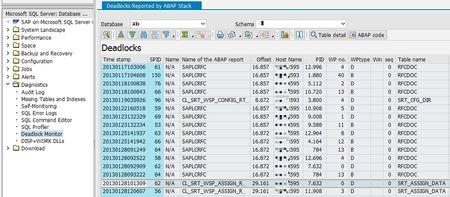
As promised in my former blog about Deadlock Analysis we proceed today with the deadlock serie with examples and their solutions. Update Locks The first example is a Deadlock with two identical statements, doing deletes on table BC_MON_AGREGATES The statements are: DELETE FROM BC_MON_AGREGATES WHERE AGR_INTERVAL = @P0 AND START_TIME < ; As you can see in the deadlock graph both threads are having (at least) a X locks on a index named PK__BC_MON_A__3214EC272B5F6B28, the primary key on this table. And both are requesting an U lock on the same index. As the U locks are only used for checking if the row matches the WHERE condition, this constellation is very often seen when the threads are scanning the table or index instead of seeking through an index to find the rows. In this case the solution was to create an fitting index for the WHERE clause to get the two thread to seek instead to scan the index. RID Locks In the next case we see, that both threads are requesting RID locks on table GENSETC: The statements were: UPDATE GENSETC SET NAME = ,COMPONENT = ,GENSTATUS = @P3 WHERE PGMID = @P4 AND OBJECT = @P5 AND OBJNAME = P6 RID locks are only used if there is no clustered index on that table. If there is an clustered index, we will see KEY locks. The root cause for this deadlock was the missing clustered index as defined in the SAP dictionary (PGMID, OBJECT, OBJNAME). PAGE locks Here we see PAGE locks on table /1OT/FDA12IT2001: Both statements were running a DELETE on that table: DELETE FROM /1OT/FDA12IT2001 WHERE CLIENT = AND ORDID IN ( ,.....,@P101 ) PAGE locks are used when the SQL Server Optimizer expects a lot of rows to process. The PAGE locks are used from the beginning, means this is not an lock escalation, as there are only lock escalations from PAGE to TABLE and from ROW to TABLE, but not from ROW to PAGE. In this case the solution can be to disallow PAGE locks on the table, to reduce the IN clause or to create an fitting index for the WHERE clause (index on ORDID). Deadlock with a SELECT In the next deadlock we have an UPDATE and a SELECT deadlocking each other: The SELECT is easy to identify by the S locks it is using, the right one is the UPDATE using an fitting index (no scanning). How can a SELECT be part of a deadlock, as SAP is reading most of the data in "READ UNCOMMITED" ? The answer is, that this SELECT runs in "READ COMMITED" mode, means it only reads data that is is already committed and it will be blocked through U and X locks. The application that issues the UPDATE and SELECT statement has to analyze this deadlock and to avoid the parallel execution of these two statement by e.g. semaphores. Multiple Tables A deadlock not only happens between two threads, the SQL Server can detect deadlocks in any depth. A deadlock between three threads is looking like: The SQL Server will kill the thread with the least amount of log used, in this case the left one. In some case the remaining threads will deadlock again as a two node deadlock, but most of the time the deadlock is resolved by kill one out of the chain. The most impressive deadlock I saw was this one: This is a deadlock with 103 threads, the left end with the victim looks like: The victim was an UPDATE on BC_JMSQUEUE and all the other waiting ones were a DELETE on the same table. The root cause was, that there was no fitting index for the DELETE statement, which causes the DELETE to scan the table instead using an index. After creating the index, the problem was resolved. Different tables Deadlock can happen not only on the same table, but between different tables as well: We see a deadlock between table CBS_ACCESSQUEUE and CBS_LOCK. The statements are UPDATE statements on each table. These kind of deadlock are not easy to understand as it only shows the end of the deadlock. The two statements that let to the two initial locks (the KEY lock ACCESSQUEUE from the victim and the KEY lock on CBS_LOCK of the winner) are not part of the deadlock, but might be part of the problem. How to analyse such deadlocks will be part of my third post of this deadlock serie.Very Large Database Migration to Azure – Recommendations & Guidance to Partners
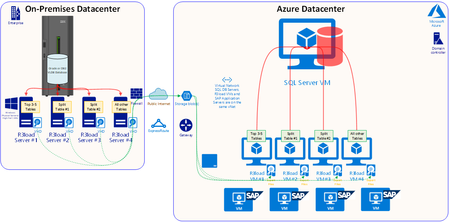
First published on MSDN on Apr 10, 2018 SAP systems moved onto Azure cloud now commonly include large multinational "single global instance" systems and are many times larger than the first customer systems deployed when the Azure platform was first certified for SAP workloads some years agoVery Large Databases (VLDB) are now commonly moved to Azure.Using Columnstore on ERP tables
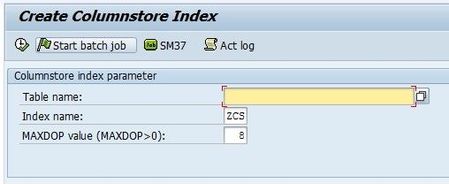
First published on MSDN on Apr 13, 2017 by Martin Merdes. This blog post might be outdated by now. The latest documentation regarding SQL Server Columnstore on SAP is available in https://www.sap.com/documents/2019/04/023e5928-487d-0010-87a3-c30de2ffd8ff.html and in https://launchpad.support.sap.com/#/notes/2116639SQL Server Column-Store for SAP BW: Status and Release Planning
First published on MSDN on Jan 08, 2015 by Martin Merdes. This blog post might be outdated by now. The latest documentation regarding SQL Server Columnstore on SAP is available in https://www.sap.com/documents/2019/04/023e5928-487d-0010-87a3-c30de2ffd8ff.html and in https://launchpad.support.sap.com/#/notes/2116639 The performance impact of SQL Server Columnstore is described in https://techcommunity.microsoft.com/t5/Running-SAP-Applications-on-the/Performance-evolution-of-SAP-BW-on-SQL-Server/ba-p/368073Increasing BW cube compression performance
First published on MSDN on Mar 13, 2014 by Martin Merdes. This blog post might be outdated by now. The latest documentation regarding SQL Server Columnstore on SAP is available in https://www.sap.com/documents/2019/04/023e5928-487d-0010-87a3-c30de2ffd8ff.html and in https://launchpad.support.sap.com/#/notes/2116639 The performance impact of SQL Server Columnstore is described in https://techcommunity.microsoft.com/t5/Running-SAP-Applications-on-the/Performance-evolution-of-SAP-BW-on-SQL-Server/ba-p/368073