sql server 2025
3 Topics
Managed Identity on SQL Server On-Prem: The End of Stored Secrets
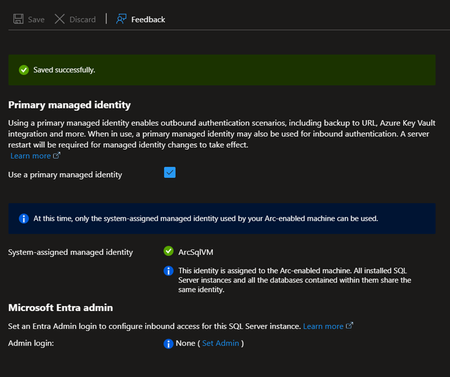
The Problem with Credentials in SQL Server For an On-Premises SQL Server to access Azure services, you traditionally need to store secrets: Common Scenarios Requiring Credentials Scenario Required Credential Backup to URL (Azure Blob) Storage account key or SAS token Extensible Key Management (Azure Key Vault) Service principal + secret Calling Azure OpenAI from T-SQL API key PolyBase to Azure Data Lake Service principal or key Associated Risks Manual Rotation Secrets expire. You need to plan and execute rotation and not forget to update all references. Secure Storage Where to store these secrets? In SQL Server via CREATE CREDENTIAL? In a config file? Each option has its risks. Attack Surface A compromised secret gives access to associated Azure resources. The more secrets you have, the larger the attack surface. Complex Auditing Who has access to these secrets? When were they used? Tracking is difficult. The Solution: Azure Arc + Managed Identity SQL Server 2025 connected to Azure Arc can geta Managed Identity : This identity: Is managed by Microsoft Entra ID Has no secret to store or rotate Can receive RBAC permissions on Azure resources Is centrally audited in Entra ID How It Works SQL Server 2025 On-Prem Azure Arc Agent installed on the server Managed Identity (automatically created in Entra ID) RBAC assignment on Azure resources -free access to Blob Storage, Key Vault, etc Step-by-Step Configuration Step 1: Enable Azure Arc on the Server and/or Register SQL Server in Azure Arc Follow the procedure describes in this article to onboard your server in Azure Arc. Connect Your SQL Server to Azure Arc Remember that you can also evaluate Azure Arc on a Azure VM (test use only) How to evaluate Azure Arc-enabled servers with an Azure virtual machine Step 2: Retrieve the Managed Identity The Managed Identity can be enabled and retrieved from Azure Arc | SQL Servers > “SQL Server instance” > Settings > Microsoft Entra ID Note: The Managed Identity is server-wide (not at the instance level) Step 3: Assign RBAC Roles Granting access to a Storage Account for backups $sqlServerId = (az resource show --resource-group "MyRG" --name "ServerName" --resource-type "Microsoft.HybridCompute/machines" --query identity.principalId -o tsv) az role assignment create --role "Storage Blob Data Contributor" ` --assignee-object-id $sqlServerId ` --scope "/subscriptions/xxx/resourceGroups/MyRG/providers/Microsoft.Storage/storageAccounts/mybackupaccount" Ex: Backup to URL Without Credential Before (with SAS token) -- Create a credential with a SAS token (expires, must be rotated) CREATE CREDENTIAL [https://mybackup.blob.core.windows.net/backups] WITH IDENTITY = 'SHARED ACCESS SIGNATURE', SECRET = 'sv=2022-11-02&ss=b&srt=sco&sp=rwdlacup...' BACKUP DATABASE [MyDB] TO URL = 'https://mybackup.blob.core.windows.net/backups/MyDB.bak' WITH COMPRESSION After (with Managed Identity --No secret anymore CREATE CREDENTIAL [https://mybackup.blob.core.windows.net/backups] WITH IDENTITY = 'Managed Identity' BACKUP DATABASE [MyDB] TO URL = 'https://mybackup.blob.core.windows.net/backups/MyDB.bak' WITH COMPRESSION Extensible Key Management with Key Vault EKM Configuration with Managed Identity CREATE CREDENTIAL [MyAKV.vault.azure.net] WITH IDENTITY = 'Managed Identity' FOR CRYPTOGRAPHIC PROVIDER AzureKeyVault_EKM_Prov; How Copilot Can Help Infrastructure Configuration Walk me through setting up Azure Arc for SQL Server 2025 to use Managed Identity for backups to Azure Blob Storage @mssql Generate the PowerShell commands to register my SQL Server with Azure Arc and configure RBAC for Key Vault access Identify Existing Credentials to Migrate List all credentials in my SQL Server that use SHARED ACCESS SIGNATURE or contain secrets, so I can plan migration to Managed Identity Migration Scripts I have backup jobs using SAS token credentials. Generate a migration script to convert them to use Managed Identity Troubleshooting My backup WITH MANAGED_IDENTITY fails with "Authorization failed". What are the steps to diagnose RBAC permission issues? @mssql The Azure Arc agent shows "Disconnected" status. How do I troubleshoot connectivity and re-register the server? Audit and Compliance Generate a report showing all Azure resources my SQL Server's Managed Identity has access to, with their RBAC role assignments Prerequisites and Limitations Prerequisites Azure Arc agent installed and connected SQL Server 2025, running on Windows Azure Extension for SQL Server. Current Limitations Failover cluster instances isn't supported. Disabling not recommended Only system-assigned managed identities are supported FIDO2 method not currently supported Azure public cloud access required Documentation Overview Managed identity overview Set Up Managed Identity and Microsoft Entra Authentication for SQL Server Enabled by Azure Arc Set up Transparent Data Encryption (TDE) Extensible Key Management with Azure Key VaultTLS 1.3 in SQL Server 2025: What It Really Changes for Security
Why TLS 1.3 matters TLS (Transport Layer Security) is the protocol that encrypts traffic between clients and servers. For many years, most SQL Server environments have relied on TLS 1.2, which dates back to 2008. TLS 1.3, finalized in 2018, is a significant evolution. It brings three main benefits: Better performance With fewer roundtrips and faster negotiation, secure connections are established much more quickly in practice Stronger security Old and weak algorithms are removed (RC4, SHA1, MD5, DES, 3DES…) Perfect Forward Secrecy (PFS) is mandatory. Even if a private key is compromised later, past sessions remain protected Simpler cipher suites: less configuration complexity, fewer chances to misconfigure Easier compliance Recommended by NIST Strongly encouraged by PCIDSS 4.0 Fewer exceptions to justify during audits What SQL Server 2025 adds SQL Server 2022 introduced TLS 1.3 through the new TDS 8.0 (Tabular Data Stream) protocol. And SQL Server 2025 makes it broadly usable across the SQL Server ecosystem, this is not limited to client connections only. Components that can use TLS 1.3 Client connections (ODBC, OLE DB, .NET) SQL Server Agent bcp utility sqlcmd utility Always On Availability Groups Always On Failover Cluster Instances Log Shipping Transactional replication Merge replication Peer-to-peer replication Snapshot replication Linked Servers PolyBase SQL Writer Service Prerequisites Valid certificates on all endpoints Selfsigned certificates are acceptable for testing In production, use certificates from a trusted CA or an internal PKI Updated drivers ODBC Driver 18+ for SQL Server OLE DB Driver 19+ for SQL Server Microsoft.Data.SqlClient 5.0+ Older drivers will either fall back to older TLS versions or fail to connect SQL Server configuration You can enforce encryption on all connections (Force Encryption) You can configure TDS 8.0 as the minimum protocol version (Force Strict Encryption) How Copilot can help I'm setting up log shipping between two SQL Server 2025 instances with TLS 1.3 enabled. What certificate requirements should I verify ? The MSSQL extension with GitHub Copilot can assist you when planning and rolling out TLS 1.3. Auditing the current state Analyze my current SQL Server encryption configuration. What TLS version are my connections using ? Are there any connections using deprecated protocols ? Copilot can generate and explain the queries that inspect the relevant DMVs and interpret the results. Generating configuration scripts Generate a script to configure SQL Server 2025 to require TLS 1.3 for all incoming connections, including the certificate configuration steps. Diagnosing compatibility issues My application fails to connect after enabling TDS 8.0. The error mentions "SSL Provider". What should I check and how do I fix it ? Reviewing linked servers Review my linked server configurations and identify which onesmight have issues with TLS 1.3 requirements. Documenting the changes Generate documentation for our security team explainingthe TLS configuration changes we're implementing for PCI-DSS compliance. It is possible that the AI generated content is incorrect. You remain responsible for reviewing, validating, and approving it before any use. Do not rely on this output without thorough human verification. Not intended for production use. Things to watch out for Linked Servers to legacy systems You may have linked servers that point to: Older SQL Server versions (2016 and earlier) ODBC sources that do not support TLS 1.2/1.3 Thirdparty servers with outdated TLS stacks If you enforce TLS 1.3 everywhere, these connections can fail. Possible approaches: Upgrade the remote systems Use temporary exceptions (not recommended longterm in production) Introduce a proxy or gateway that can handle protocol translation Replication to older versions Transactional or merge replication to subscribers running SQL Server 2019 or earlier may require mixed configurations. Legacy applications Applications using: .NET Framework with older System.Data.SqlClient versions Old ODBC/OLE DB drivers Thirdparty tools that are not updated may need to be upgraded or reconfigured before you enforce TLS 1.3. Suggested deployment strategy These steps are indicative; adapt them to your environment and change management process. Phase 1: Audit Inventory all inbound and outbound connections Identify client types and driver versions Document linked servers and replication paths Phase 2: Testing Enable TLS 1.3 in a staging or preproduction environment Test all critical applications and administrative tools Identify and resolve compatibility issues Phase 3: Progressive rollout Enable TLS 1.3 as an option without forcing it Monitor which connections still negotiate older TLS versions Once all key systems are compatible, enforce TLS 1.3 References TDS 8.0 - SQL Server Configure TLS 1.3 on SQL Server 2022 and later - SQL Server Encrypt Connections by Importing a Certificate - SQL Server Database Engine: Breaking Changes - SQL Server 2025 Certificate Requirements for SQL Server - SQL ServerOllama on HTTPS for SQL Server
Here is a quick procedure to deploy an Ubuntu container with Ollama and expose its API over HTTPS. The goal is to allow a fast deployment, even for those unfamiliar with Docker or Language Models, making it easy to set up an offline platform for generating embeddings and using Small Language Models This is particularly useful when testing SQL Server 2025 for fully on-premises environment use cases, since SQL Server only allows access to HTTPS endpoints. However, HTTP remains open for testing purposes. Please note that this example is CPU-based, as deploying with (integrated) GPU support involves additional, less straightforward steps. This example is provided solely to illustrate the concept, is not intended for production use, and comes without any guarantee of performance or security. Prerequisites To continue, you need to have Docker Desktop, WSL and SQL Server 2025 (currently Release Candidate 1) Docker Desktop Install WSL | Microsoft Learn SQL Server 2025 Preview | Microsoft Evaluation Center Create a Dockerfile First, create a working directory. In this example, C:\Docker\Ollama will be used. Simply create a file named Dockerfile (without an extension) and paste the following content into it. FROM ubuntu:25.10 RUN apt update && apt install -y curl gnupg2 ca-certificates lsb-release apt-transport-https software-properties-common unzip nano openssl net-tools RUN curl -fsSL https://ollama.com/install.sh | bash RUN curl -1sLf 'https://dl.cloudsmith.io/public/caddy/stable/gpg.key' | gpg --dearmor -o /usr/share/keyrings/caddy-stable-archive-keyring.gpg RUN curl -1sLf 'https://dl.cloudsmith.io/public/caddy/stable/debian.deb.txt' | tee /etc/apt/sources.list.d/caddy-stable.list RUN apt update && apt install -y caddy RUN mkdir -p /etc/caddy/certs RUN cat > /etc/caddy/certs/san.cnf <<EOF [req] default_bits = 2048 prompt = no default_md = sha256 req_extensions = req_ext distinguished_name = dn [dn] CN = 127.0.0.1 [req_ext] subjectAltName = @alt_names [alt_names] IP.1 = 127.0.0.1 DNS.1 = localhost EOF RUN openssl req -x509 -nodes -days 365 -newkey rsa:2048 -keyout /etc/caddy/certs/localhost.key -out /etc/caddy/certs/localhost.crt -config /etc/caddy/certs/san.cnf -extensions req_ext RUN echo "https://:443 {\n tls /etc/caddy/certs/localhost.crt /etc/caddy/certs/localhost.key\n reverse_proxy localhost:11434\n}" >> /etc/caddy/Caddyfile RUN echo "#!/bin/bash" > /usr/local/bin/entrypoint.sh && \ echo "set -e" >> /usr/local/bin/entrypoint.sh && \ echo "OLLAMA_HOST=0.0.0.0 ollama serve >> /var/log/ollama.log 2>&1 &" >> /usr/local/bin/entrypoint.sh && \ echo "caddy run --config /etc/caddy/Caddyfile --adapter caddyfile >> /var/log/caddy.log 2>&1 &" >> /usr/local/bin/entrypoint.sh && \ echo "tail -f /var/log/ollama.log /var/log/caddy.log" >> /usr/local/bin/entrypoint.sh && \ chmod 755 /usr/local/bin/entrypoint.sh ENTRYPOINT ["/usr/local/bin/entrypoint.sh"] For your information, this file allows the creation of an image based on Ubuntu 25.10 and includes: Ollama, for running the models Caddy, for the reverse proxy Creation of a certificate for the HTTPS endpoint on localhost Create the container After opening a Powershell terminal, execute the following commands: cd C:\Docker\Ollama #Build the image from the Dockerfile. docker build -t ollama-https . #Create a container based on the image ollama-https docker run --name ollama-https -d -it -p 443:443 -p 11434:11434 ollama-https #Copy the certificate created into the current Windows directory docker cp ollama-https:/etc/caddy/certs/localhost.crt . # Install the certificate in Trusted Root Certification Authorities Import-Certificate -FilePath "localhost.crt" -CertStoreLocation "Cert:\LocalMachine\Root" #Check Https (wget https://localhost).Content #Check Http (wget http://localhost:11434).Content Ollama is now running With a browser, connect to https://localhost Retrieve Models No model is retrieved when the image is created, as this depends on each use case, and for some models, the size can be substantial. Here’s a quick example for pulling an embedding model, Nomic, and a small language model, Phi3. Ollama Search docker exec ollama-https ollama pull nomic-embed-text docker exec ollama-https ollama pull phi3:mini A quick example with SQL Server 2025 A quick demonstration using the WideWorldImporters database (Wide World Importers sample database) use [master] GO ALTER DATABASE WideWorldImporters SET COMPATIBILITY_LEVEL = 170 WITH ROLLBACK IMMEDIATE GO DBCC TRACEON(466, 474, 13981, -1) GO Note: With RC1, you can use the PREVIEW_FEATURES database-scoped configuration T-SQL Declare an external model for embeddings. use [WideWorldImporters] GO CREATE EXTERNAL MODEL NomicLocal AUTHORIZATION dbo WITH ( LOCATION = 'https://localhost/api/embed', API_FORMAT = 'ollama', MODEL_TYPE = EMBEDDINGS, MODEL = 'nomic-embed-text' ) to enable semantic search capabilities on StockItems, we will create a dedicated table to store embeddings (no chunking in this example) along with a vector index optimized for cosine similarity use [WideWorldImporters] GO CREATE TABLE [Warehouse].[StockItemsEmbedding](StockItemEmbeddingID int identity (1,1) PRIMARY KEY, StockItemId int, SearchDetails nvarchar(max), Embedding vector(768)) GO INSERT INTO [Warehouse].[StockItemsEmbedding] SELECT si.StockItemID, si.SearchDetails, AI_GENERATE_EMBEDDINGS(si.SearchDetails USE MODEL NomicLocal) /* Generate embeddings from declared external model */ FROM [Warehouse].[StockItems] si GO /* Check */ SELECT * FROM [Warehouse].[StockItemsEmbedding] GO CREATE VECTOR INDEX IXV_1 ON [Warehouse].[StockItemsEmbedding] (Embedding) WITH (METRIC = 'cosine', TYPE = 'DiskANN') GO /* User Input */ DECLARE @UserInput varchar(max) = 'Which product is best suited for shipping small items?' /* and Generate embeddings for user input */ DECLARE @UserInputV vector(768) = AI_GENERATE_EMBEDDINGS(@UserInput USE MODEL NomicLocal) DECLARE @ModelInput nvarchar(max) DECLARE Payload nvarchar(max) DECLARE Response nvarchar(max) /* Similarity Search on StockItems and Model Input creation*/ SELECT @ModelInput = STRING_AGG('ProductDetails: ' + sie.SearchDetails + 'UnitPrice: ' + CAST(si.UnitPrice AS nvarchar(max)), ' \n\n') FROM VECTOR_SEARCH( TABLE = [Warehouse].[StockItemsEmbedding] as sie, COLUMN = Embedding, SIMILAR_TO = @UserInputV, METRIC = 'cosine', TOP_N = 10 ) JOIN [Warehouse].[StockItems] si ON si.StockItemId = sie.StockItemId /* Generate payload for response generation */ SELECT = '{"model": "phi3:mini", "stream": false, "prompt":"You are acting as a customer advisor responsible for recommending the most suitable products based on customer needs, providing clear and personalized suggestions. Question : ' + @UserInput + '\n\nList of Items : ' + @ModelInput + '"}'; EXECUTE sp_invoke_external_rest_endpoint @url = 'https://localhost/api/generate', @method = 'POST', = , @timeout = 230, = OUTPUT; PRINT JSON_VALUE(@response, '$.result.response') LangChain You can also have a try with LangChain. Same demo with a small difference, there is no vector index created on the vector store table. The table has been modified, but only for demonstration purposes. Reference: SQLServer | 🦜️🔗 LangChain # PREREQ #sudo apt-get update && sudo apt-get install -y unixodbc # sudo apt-get update # sudo apt-get install -y curl gnupg2 # curl https://packages.microsoft.com/keys/microsoft.asc | sudo apt-key add - # curl https://packages.microsoft.com/config/debian/11/prod.list | sudo tee /etc/apt/sources.list.d/mssql-release.list # sudo apt-get update # sudo ACCEPT_EULA=Y apt-get install -y msodbcsql18 # pip3 install langchain langchain-sqlserver langchain-ollama langchain-community import pyodbc from langchain_sqlserver import SQLServer_VectorStore from langchain_ollama import OllamaEmbeddings from langchain_ollama import ChatOllama from langchain.schema import Document from langchain_community.vectorstores.utils import DistanceStrategy #Prompt for testing _USER_INPUT = 'Which product is best suited for shipping small items?' ############### Params ########################################## print("\033[93mSetting up variables...\033[0m") _SQL_DRIVER = "ODBC Driver 18 for SQL Server" _SQL_SERVER = "localhost\\SQL2K25" _SQL_DATABASE = "WideWorldImporters" _SQL_USERNAME = "lc" _SQL_PASSWORD = "lc" _SQL_TRUST_CERT = "yes" _SQL_VECTOR_STORE_TABLE = "StockItem_VectorStore" # Table name for vector storage _MODIFY_TABLE_TO_USE_SQL_VECTOR_INDEX = True #As vector index not considered currently in langchain and structure does not match vector index requirements _CONNECTION_STRING = f"Driver={{{_SQL_DRIVER}}};Server={_SQL_SERVER};Database={_SQL_DATABASE};UID={_SQL_USERNAME};PWD={_SQL_PASSWORD};TrustServerCertificate={_SQL_TRUST_CERT}" _OLLAMA_API_URL = "https://localhost" _OLLAMA_EMBEDDING_MODEL = "nomic-embed-text:latest" _OLLAMA_EMBEDDING_VECTOR_SIZE = 768 _OLLAMA_SLM_MODEL = "phi3:mini" # Model for SLM queries ################################################################### #Define Ollama embeddings embeddings = OllamaEmbeddings( model=_OLLAMA_EMBEDDING_MODEL, base_url=_OLLAMA_API_URL ) conn = pyodbc.connect(_CONNECTION_STRING) cursor = conn.cursor() #Drop embeddings table if it exists print("\033[93mDropping existing vector store table if it exists...\033[0m") cursor.execute(f"DROP TABLE IF EXISTS Warehouse.{_SQL_VECTOR_STORE_TABLE};") print("\033[93mConnecting to SQL Server and fetching data...\033[0m") cursor.execute("SELECT StockItemId, SearchDetails, UnitPrice FROM Warehouse.StockItems;") rows = cursor.fetchall() print(f"\033[93mFound {len(rows)} records to process\033[0m") # Create documents from the fetched data documents = [ Document( page_content=row.SearchDetails, metadata={ "StockItemId": row.StockItemId, "UnitPrice": float(row.UnitPrice) # Convert Decimal to float } ) for row in rows ] conn.commit() #Creating vector store print("\033[93mCreating vector store...\033[0m") vector_store = SQLServer_VectorStore( connection_string=_CONNECTION_STRING, distance_strategy=DistanceStrategy.COSINE, # If not provided, defaults to COSINE embedding_function=embeddings, embedding_length=_OLLAMA_EMBEDDING_VECTOR_SIZE, db_schema = "Warehouse", table_name=_SQL_VECTOR_STORE_TABLE ) print("\033[93mAdding to vector store...\033[0m") try: vector_store.add_documents(documents) print("\033[93mSuccessfully added to vector store!\033[0m") except Exception as e: print(f"\033[91mError adding documents: {e}\033[0m") #Vector index not yet integrated in SQL Server VectorStore (drop auto-created nonclustered PK and generating int clustered PK if (_MODIFY_TABLE_TO_USE_SQL_VECTOR_INDEX): print("\033[93mModifying structure to create vector index...\033[0m") cursor.execute("DECLARE @AutoCreatedPK sysname, @SQL nvarchar(max);" f"SELECT @AutoCreatedPK = name FROM sys.key_constraints WHERE type = 'PK' AND parent_object_id = object_id('Warehouse.{_SQL_VECTOR_STORE_TABLE}');" f"SELECT @SQL = 'ALTER TABLE Warehouse.{_SQL_VECTOR_STORE_TABLE} DROP CONSTRAINT ' + @AutoCreatedPK + ';'" "EXEC sp_executesql @SQL;" f"ALTER TABLE Warehouse.{_SQL_VECTOR_STORE_TABLE} ADD Alt_Id int identity(1,1);" f"ALTER TABLE Warehouse.{_SQL_VECTOR_STORE_TABLE} ADD CONSTRAINT PK_{_SQL_VECTOR_STORE_TABLE} PRIMARY KEY (Alt_Id);") conn.commit() print("\033[93mCreating vector index...\033[0m") cursor.execute(f"CREATE VECTOR INDEX IV_{_SQL_VECTOR_STORE_TABLE} ON [Warehouse].[{_SQL_VECTOR_STORE_TABLE}] (embeddings) WITH (METRIC = 'cosine', TYPE = 'DiskANN');") conn.commit() #Generate prompt then answer print(f"\033[92mUser Input: {_USER_INPUT}\033[0m") context = [ { "Item": doc.page_content, "UnitPrice": doc.metadata.get("UnitPrice", None) } for doc in vector_store.similarity_search(_USER_INPUT, k=3) ] llm = ChatOllama(model=_OLLAMA_SLM_MODEL,base_url=_OLLAMA_API_URL) prompt = ( f"You are acting as a customer advisor responsible for recommending the most suitable products based on customer needs, providing clear and personalized suggestions" f"Context: {context}\n\nQuestion: {_USER_INPUT}\n\n") response = llm.invoke(prompt) print(f"\033[36m{response.content}\033[0m") Note : If using devcontainer with VSCode add "runArgs": [ "--network=host" ] to devcontainer.json to allow connections to “localhost”. Import and install the previously created certificat docker cp C:\Docker\Ollama\localhost.crt <devcontainer name>:/usr/local/share/ca-certificates/localhost.crt docker exec <devcontainer name> "update-ca-certificates" Disclaimer The sample scripts are not supported under any Microsoft standard support program or service. The sample scripts are provided AS IS without warranty of any kind. Microsoft further disclaims all implied warranties including, without limitation, any implied warranties of merchantability or of fitness for a particular purpose. The entire risk arising out of the use or performance of the sample scripts and documentation remains with you. In no event shall Microsoft, its authors, or anyone else involved in the creation, production, or delivery of the scripts be liable for any damages whatsoever (including, without limitation, damages for loss of business profits, business interruption, loss of business information, or other pecuniary loss) arising out of the use of or inability to use the sample scripts or documentation, even if Microsoft has been advised of the possibility of such damages.