speech
69 Topics
Introducing Dragon HD Omni: Azure Speech New Voice Type Now in Preview via Microsoft Foundry
Dragon HD Omni is Microsoft Azure Speech’s newest text‑to‑speech generation, delivering over 700 high‑quality voices with enhanced expressiveness, multi‑lingual fluency, and multi‑style control — all through a unified model built in Microsoft Foundry. It removes common developer pain points such as unnatural voice prosody, limited language coverage, and heavy SSML tuning effort. The result is a powerful value proposition: faster integration, richer user experiences, and production‑ready voice output with minimal effort. Azure speech offers a broad range of unique voices for applications like virtual agents, audiobooks, podcasts, and speech-to-speech tasks. Demo video 700+ prebuilt voices Dragon HD Omni offers a range of prebuilt voices with distinct personas and emotions, supporting diverse use cases from agent-based applications to content creation. These voices unlock endless possibilities, empowering users to enhance end-to-end applications. Full update for previous generation voices Dragon HD Omni merges a wide range of prebuilt voices into one, improving contextual adaptation, prosody, expression, and keeping each voice's unique character. This technology delivers more accurate, flexible, and lifelike speech for a variety of uses. Dragon HD Omni raises the standard for natural AI voices across customer service, accessibility, and creative projects, advancing human-computer interaction. You can explore some voices from voice list, such as: "en-US-Ava:DragonHDOmniLatestNeural" "en-US-Andrew:DragonHDOmniLatestNeural" "en-US-Dana:DragonHDOmniLatestNeural" "en-US-Caleb:DragonHDOmniLatestNeural" "zh-CN-Xiaoyue:DragonHDOmniLatestNeural" "zh-CN-Yunqi:DragonHDOmniLatestNeural" "en-US-Phoebe:DragonHDOmniLatestNeural" "en-US-Lewis:DragonHDOmniLatestNeural" They will be available to try directly via Speech Playground - Microsoft Foundry Or, you can use this voice name format by adding the suffix `:DragonHDOmniLatestNeural` to try the Omni version of the given voice via direct SSML call. For example: Previous neural voice Omni version voice name de-DE-ConradNeural de-DE-Conrad:DragonHDOmniLatestNeural AI-Generated Voices Dragon HD Omni now features nearly 300 brand‑new AI‑generated voices, carefully designed to deliver an unprecedented range of vocal diversity. These voices aren’t just more of the same — they’re built to give you choice, flexibility, and creative control. With variations across: Gender – male, female, and non‑binary options Age – youthful, mature, and senior tones Pitch & tone – from warm and friendly to authoritative and professional This expanded library means you can: Personalize experiences for different audiences, whether you’re building an educational app, a customer support bot, or a storytelling platform. Strengthen brand identity by selecting voices that reflect your company’s personality and values. Increase inclusivity with diverse vocal styles that resonate across cultures and communities. Unlock creativity by experimenting with unique voice personalities for podcasts, games, or immersive experiences. Speaker name – Description Sample en-us-graphiterhodium - A bold and dramatic male voice en-us-olivepoivre - An adult female voice that is calm and soothing. Check the full Dragon HD Omni voice list at here. Styles control Standard Azure voices have limited styles due to extensive tuning requirements. The Dragon HD Omni introduces automatic style prediction using natural language descriptions, enabling advanced customization, broader style support, reduced cost, and improved expressiveness. In the initial release, styles will launch for en-US-Ava and en-US-Andrew. Supported styles angry, chill surfer, confused, curious, determined, disgusted, embarrassed, emo teenager, empathetic, encouraging, excited, fearful, friendly, grateful, joyful, mad scientist, meditative, narration, neutral, new yorker, news, reflective, regretful, relieved, sad, santa, shy, soft voice, surprised Note that style result will be strongly influenced by the input content. SSML example <speak version="1.0" xmlns="http://www.w3.org/2001/10/synthesis" xmlns:mstts="http://www.w3.org/2001/mstts" xml:lang="en-US"> <voice name="en-us-ava:DragonHDOmniLatestNeural"> <mstts:express-as style="cheerful"> Wow! What an amazing day! I feel so full of energy, and everything around me seems brighter. My voice is bubbling with excitement, and I can’t stop smiling. I’m ready to take on anything that comes my way—let’s celebrate this wonderful moment together! </mstts:express-as> </voice> </speak> Multilingual and Accents All Dragon HD Omni voices support multiple languages, with the capability that can automatically predicting and generating output based on the input text. Additionally, you may utilize the tag to adjust speaking languages and accents, such as fr-FR for French, de-DE for German, etc. For a comprehensive list of supported languages and their associated syntax and attributes, please refer to the lang element. SSML example <speak version="1.0" xmlns="http://www.w3.org/2001/10/synthesis" xmlns:mstts="http://www.w3.org/2001/mstts" xml:lang="en-US"><voice name="en-us-ava:Dragon HD OmniLatestNeural"><lang xml:lang="fr-FR"> Bonjour ! Ce matin, j’ai pris un café au jardin du Luxembourg. Il faisait frais, mais très agréable. Ensuite, j’ai acheté une baguette et quelques macarons. Paris est vraiment charmant.</lang> </voice> </speak> Word Boundary Event Support Dragon HD Omni supports the word boundary event, which allows developers to track the precise timing of each word as it is spoken. This feature is essential for applications requiring word-level synchronization, such as karaoke, real-time captioning, or interactive voice experiences. When the event fires, it provides: Text: The word spoken AudioOffset: The time offset in the audio stream (milliseconds) TextOffset: The position of the word in the input text Example: Python Sample Using Wordboundary Event in Azure Speech SDK import azure.cognitiveservices.speech as speechsdk def word_boundary_cb(evt): print(f"Word: '{evt.text}', AudioOffset: {evt.audio_offset / 10000}ms, TextOffset: {evt.text_offset}") speech_config = speechsdk.SpeechConfig(subscription="YourSubscriptionKey", region="YourServiceRegion") synthesizer = speechsdk.SpeechSynthesizer(speech_config=speech_config) synthesizer.synthesis_word_boundary.connect(word_boundary_cb) ssml = """ <speak version="1.0" xmlns="http://www.w3.org/2001/10/synthesis" xmlns:mstts="http://www.w3.org/2001/mstts" xml:lang="en-US"> <voice name="en-us-ava:DragonHDOmniLatestNeural"> Hello Azure, welcome to Dragon HD Omni! </voice> </speak> """ result = synthesizer.speak_ssml_async(ssml).get() Sample Output: Word: 'Hello', AudioOffset: 110.0ms, TextOffset: 182 Word: 'Azure', AudioOffset: 590.0ms, TextOffset: 188 Word: ',', AudioOffset: 1110.0ms, TextOffset: 193 Word: 'welcome', AudioOffset: 1270.0ms, TextOffset: 195 Word: 'to', AudioOffset: 1750.0ms, TextOffset: 203 Word: 'Dragon HD Omni', AudioOffset: 1910.0ms, TextOffset: 206 Word: '!', AudioOffset: 2750.0ms, TextOffset: 216 Parameters Dragon HD Omni supports advanced parameter tuning to help you customize voice output for different scenarios. This guide explains each parameter in simple terms and provides recommendations for adjusting them based on your goals. Overview Parameter Default Range Purpose temperature 0.7 0.3 – 1.0 Controls creativity vs. stability top_p 0.7 0.3 – 1.0 Filters output for diversity top_k 22 1 – 50 Limits number of options considered cfg_scale 1.4 1.0 – 2.0 Adjusts relevance and speech speed Tuning for Expressiveness vs. Stability Higher values for temperature, top_p, and top_k result in more expressive, emotionally varied speech. Lower values produce more stable and predictable output. Recommendation: To increase expressiveness, raise all three parameters together. Keep top_p equal to temperature for best results. Tuning for Speed and Contextual Relevance cfg_scale affects how quickly the voice speaks and how well it aligns with the context. Higher values (e.g., 1.8–2.0): faster speech, stronger contextual relevance. Lower values (e.g., 1.0–1.2): slower speech, less contextual alignment. Suggested Tuning Strategies Goal Suggested Adjustment More expressive Increase temperature, top_p, and top_k together More stable Lower temperature first, then adjust top_p if needed Faster & relevant Increase cfg_scale Slower & neutral Decrease cfg_scale The following table describes the usage of the parameters above: Single parameter: <speak version="1.0" xmlns="http://www.w3.org/2001/10/synthesis" xmlns:mstts="http://www.w3.org/2001/mstts" xml:lang="en-US"> <voice name="en-us-ava:Dragon HD OmniLatestNeural" parameters="top_p=0.8"> Hello Azure! </voice> </speak> Multiple parameters: <speak version="1.0" xmlns="http://www.w3.org/2001/10/synthesis" xmlns:mstts="http://www.w3.org/2001/mstts" xml:lang="en-US"> <voice name="en-us-ava:Dragon HD OmniLatestNeural" parameters="top_p=0.8;top_k=22;temperature=0.7;cfg_scale=1.2"> Hello Azure! Hello Azure! </voice> </speak> Get Started In our ongoing journey to enhance multilingual capabilities in text to speech (TTS) technology, we strive to deliver the best voices to empower your applications. Our voices are designed to be incredibly adaptive, seamlessly switching between languages based on the text input. They deliver natural-sounding speech with precise pronunciation and prosody, making them invaluable for applications like language learning, travel guidance, and international business communication. Microsoft offers an extensive portfolio of over 600 neural voices, covering more than 150 languages and locales. These TTS voices can quickly add read-aloud functionality for a more accessible app design or provide a voice to chatbots, elevating the conversational experience for users. With the Custom Neural Voice capability, businesses can also create unique and distinctive brand voices effortlessly. With these advancements, we continue to push the boundaries of what’s possible in TTS technology, ensuring that our users have access to the most versatile, high-quality voices for their needs. For more information Try our demo to listen to existing neural voices Add Text to speech to your apps today Apply for access to Custom Neural Voice Join Discord to collaborate and share feedback Contact us ttsvoicefeedback@microsoft.com4.9KViews0likes1CommentVoice agents in Foundry Agent Service: architecture, trust boundaries, and real-audio latency
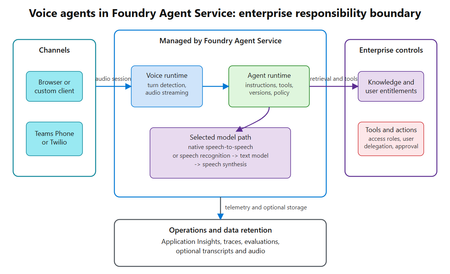
Assess where voice agents in Foundry Agent Service simplify the runtime, where enterprise trust boundaries remain, and what a 300-turn real-audio benchmark reveals about latency across six configurations.440Views0likes0CommentsIntroducing GPT-transcribe and GPT-live-transcribe in Microsoft Foundry
A transcription model hears “account number 8-4-7-2” but returns “account number eighty-four seventy-two.” A single error can break a downstream automation workflow. Developers building voice applications need transcription models that can handle real-world audio conditions, natural speech patterns, and business-critical details, including codes, dates, addresses, account numbers, mixed-language conversations, specialized terminology, and quiet or low-volume speech. GPT-transcribe and GPT-live-transcribe do just that and are available in Microsoft Foundry today. Two updates to the audio model family designed to improve automatic speech recognition across asynchronous transcription and live streaming scenarios. Built for More Accurate Transcription in Real-World Audio GPT-transcribe is the highest accuracy ASR model from Open AI, designed for asynchronous speech-to-text transcription of completed audio files and batch workloads. It accepts audio input and returns text output, making it a strong fit for workflows that process recorded, uploaded, or submitted audio, including meeting recordings, voicemails, and media files. GPT-live-transcribe is designed for low-latency streaming transcription through the Realtime API. It supports real-time audio input and text output, helping developers build live experiences where speech needs to be transcribed continuously as audio arrives. This model also introduces “tunable latency” where developers can adjust the latency/accuracy trade-off for streaming. It is a strong fit for live captions, voice assistants, contact center workflows, accessibility experiences, field service applications, real-time intake, and monitoring systems. Together, these models give developers transcription options in Microsoft Foundry for stored audio and live voice interactions. Their text output can support downstream workflows such as search, summarization, routing, analytics, automation, and quality review. What’s New in Both Models The features of the new transcription models focus on improving transcription quality in real-world audio environments where speech can be brief, noisy, accented, quiet, domain-specific, or mixed across languages. Key capabilities include: Background noise: Helps isolate speech in noisy environments so transcription quality can remain more reliable when audio conditions are not controlled. Short utterances: Improves recognition of brief commands, confirmations, interruptions, and clipped speech that can be difficult to capture accurately. Alphanumeric perception: Strengthens transcription of IDs, codes, phone numbers, dates, addresses, account numbers, and mixed letter-number sequences. Domain terminology understanding: Improves recognition of specialized vocabulary used in product, workflow, industry, and business-process contexts. Codemix: Improves understanding when speakers switch between languages within a conversation or utterance. Context awareness: Uses topic hints and past conversation context to improve transcription accuracy and help maintain consistency. Accent robustness: Improves handling of regional accents, non-native accents, dialects, and varied speaking styles. Whispering: Improves recognition of quiet or low-volume speech, including whispered commands and private dictation. Live captioning and accessibility experiences: Generate real-time captions for meetings, events, media experiences, and assistive applications. Contact center and voice workflows: Capture spoken details as conversations happen, supporting routing, quality review, summarization, and downstream automation. Monitoring, analytics, and compliance workflows: Provide text visibility into ongoing spoken input so teams can analyze, review, and act on conversation data. Also Available: GPT-realtime-2.1 and GPT-realtime-mini-2.1 gpt-realtime-2.1 and gpt-realtime-mini-2.1 are also available in Microsoft Foundry for developers building speech-to-speech applications. Unlike GPT-transcribe and GPT-live-transcribe, which return text, these models accept audio and generate audio for low-latency conversational experiences over the Realtime API. gpt-realtime-2.1 focuses on interaction quality and robustness, while gpt-realtime-mini-2.1 provides a smaller, faster, and more cost-efficient option for high-volume deployments. Together with GPT-transcribe and GPT-live-transcribe, these realtime audio updates give developers more flexibility to build voice applications that need both accurate transcription and responsive spoken interaction, whether the experience is centered on capturing speech as text, responding with audio, or combining both patterns in a single workflow. Use Cases by Model GPT-transcribe Use GPT-transcribe when the application needs accurate text transcripts from recorded, uploaded, or submitted audio. It is a strong fit for meeting and call transcription, media transcription, customer support intake, voicemail and message processing, quality review, compliance workflows, and domain-specific transcription where short utterances, structured alphanumeric details, specialized terminology, accents, background noise, code-mixed speech, or quiet audio can affect downstream accuracy. GPT-live-transcribe Use GPT-live-transcribe when the application needs live streaming transcription with low latency. It is designed for real-time captions, accessibility experiences, contact center transcription, voice-enabled workflows, live monitoring, operational dashboards, and agent-assist scenarios where spoken input needs to become text continuously as the interaction unfolds. Pricing The following pricing example shows Global Standard rates by model and modality. Rates for GPT-realtime-2.1 and GPT-realtime-mini-2.1 are listed per 1 million tokens. GPT-transcribe and GPT-live-transcribe are listed per audio hour. Model Deployment Modality Input Cached Input Output GPT-realtime-2.1 Global Standard Audio $32.00 $0.40 $64.00 Text $4.00 $0.40 $24.00 Image $5.00 $0.50 -- GPT-realtime-mini-2.1 Global Standard Audio $10.00 $0.30 $20.00 Text $0.60 $0.06 $2.40 Image $0.80 $0.08 -- GPT-live-transcribe Global Standard Audio -- -- $1.02/hour GPT-transcribe Global Standard Audio -- -- $0.27/hour Getting Started Choose GPT-transcribe when your application processes complete audio files asynchronously, or GPT-live-transcribe when it needs text continuously as speech arrives. Try the models in Microsoft Foundry, then use the resources below to explore the Realtime API, follow the audio quickstart, compare available models, and review Azure OpenAI in Foundry Models documentation. For asynchronous transcription, submit a complete audio file to GPT-transcribe and process the returned transcript after the request completes. This pattern works well for recordings, voicemails, and uploaded media. For streaming transcription, open a Realtime API session with GPT-live-transcribe, send audio as it is captured, and handle incremental transcript events. This pattern supports live captioning and agent-assist experiences that need text during an active interaction. Refer to the linked quickstart and Realtime API documentation for current SDK setup, authentication, request schemas, and supported audio formats. Explore Microsoft Learn documentation to learn more: Use GPT Realtime API for speech and audio with Azure OpenAI in Foundry Models GPT Realtime audio quickstart Azure OpenAI in Foundry Models overview3.8KViews0likes0CommentsPost-Stream Refinement is now generally available in Microsoft Foundry
When we introduced Post-Stream Refinement in public preview earlier this year, it closed the oldest trade-off in real-time speech: you could finally keep instant streaming results and get a highly accurate final transcript, with no penalty to first-token latency. A second recognition pass runs in parallel with streaming and replaces each final segment with a more accurate version once the utterance completes. Today, Post-Stream Refinement reaches general availability for Azure AI Speech in Microsoft Foundry, backed by a production SLA. Just as important, it now ships with the capabilities production transcription actually depends on: diarization to preserve who said what, phrase lists for your product names and domain vocabulary, and a much wider footprint of 19 locales across 22 Azure regions. Everything you already know about Post-Stream Refinement still applies. The real-time contract is unchanged, your partial results stream exactly as before, and you enable refinement by setting a single property on your existing SpeechConfig. What changes at GA is that the refined transcript is now production-grade and speaker-aware. 📖 Read the Documentation What's new at general availability If you have already used Post-Stream Refinement in preview, here is exactly what changes at GA, and what stays the same. The streaming path and SDK contract are untouched; the refinement pass is now production-ready and gains speaker and vocabulary features. How Post-Stream Refinement works Real-time and final results serve different needs. Partial results must appear quickly so captions, voice interfaces, and agent turn-taking stay responsive. Final results need enough context to support storage, search, summarization, and business workflows. Post-Stream Refinement runs both at once: a fast streaming pass and a deeper refinement pass over the same audio, in parallel. Because the two passes share one input stream, enabling refinement does not require a second transcription job or a separate client pipeline. Your existing recognition events and partial-result handling stay exactly as they are. Speaker attribution with diarization New at GA, diarization is supported on the Post-Stream Refinement path, so the refined final transcript keeps its speaker labels. That makes the release a strong fit for meetings, contact centers, interviews, and any workflow where the transcript needs to identify who spoke, not just what was said. The refinement pass improves the wording, including proper nouns and named entities, while every utterance stays attributed to the right speaker. Phrase lists for your vocabulary Phrase lists let the recognizer prioritize the names and terms that matter to your application: product catalogs, medical and technical vocabulary, organization names, and acronyms that general speech models might not recognize consistently. At GA you can pair phrase lists with refinement so the second pass has both broad audio context and your domain vocabulary to draw on, which is where the largest accuracy gains on named entities show up. Quality impact In internal testing and partner evaluations across supported locales, Post-Stream Refinement reduced final-transcript word error rate by double-digit relative percentages compared with standard real-time transcription, with the largest gains on the hardest content: long utterances, proper nouns, and domain-specific speech. Pairing phrase lists with refinement improves named-entity accuracy further. Partial-result latency is unchanged; only the final transcript is refined. The refined final result may add a small amount of latency to the final segment because refinement happens after the segment audio is received. Partial results are unaffected. Supported languages and regions General availability supports 19 locales. You declare one locale per session, so the service is tuned to the language you expect. Alongside the Tier-1 languages, GA adds Indic locales, including Bengali, Marathi, Punjabi, and Telugu. Post-Stream Refinement is generally available in 22 Azure regions across the Americas, Europe, and Asia Pacific. Proven at Microsoft scale The technology behind Post-Stream Refinement already powers meeting transcription and Microsoft 365 Copilot experiences in Microsoft Teams, serving millions of users across meetings, webinars, and live events every day. General availability brings the same quality bar to every Azure AI Speech customer through a supported SDK integration, not a research prototype. Preview customers across industries, including automotive, consumer electronics, and aviation, reported positive gains in transcription quality, with the clearest improvements on the hardest content: proper nouns, long-form speech, and domain-specific audio. Several are now moving those workloads into production on the GA release. Get started Enabling Post-Stream Refinement is a small configuration change on your existing SpeechConfig. You will need: Speech SDK 1.50 or later. Earlier versions do not support the refinement path. A Speech resource in one of the supported regions listed above. The session locale you expect, set on the recognizer. Set the post-processing option to PostRefinement. The example below also shows the optional phrase list for your domain vocabulary. import azure.cognitiveservices.speech as speechsdk speech_config = speechsdk.SpeechConfig( subscription="YourSpeechKey", region="YourSpeechRegion") # Declare one locale for the session speech_config.speech_recognition_language = "en-US" # 1) Refine the final transcript (Post-Stream Refinement) speech_config.set_property( speechsdk.PropertyId.SpeechServiceResponse_PostProcessingOption, "PostRefinement") audio_config = speechsdk.AudioConfig(use_default_microphone=True) recognizer = speechsdk.SpeechRecognizer( speech_config=speech_config, audio_config=audio_config) # 2) (Optional) Phrase list for names, acronyms, and domain terms phrase_list = speechsdk.PhraseListGrammar.from_recognizer(recognizer) for term in ["Contoso", "Fabrikam", "Foundry", "OAuth"]: phrase_list.addPhrase(term) Your existing recognition events and partial-result handling remain unchanged. For speaker attribution, enable diarization through the established real-time diarization path; refinement applies to the final transcript while speaker labels are preserved. Choose the right release for your workload Post-Stream Refinement now has two paths. They are the same product family with a different feature boundary, so match the path to what your customer needs. Monolingual PSR — generally available Multilingual PSR — public preview Language selection One locale declared per session Automatic detection and code-switching in a single stream (open-range, no locale declared) Supported locales 19 locales, including Indic bn / mr / pa / te 25 languages / 29 locales, auto-detected Azure regions 22 Azure regions across the Americas, Europe, and Asia Pacific 6 Azure regions Phrase lists & diarization Supported Only diarization is supported Working across languages? If a single stream needs to handle multiple languages or code-switching without a declared locale, use Multilingual Post-Stream Refinement, now in public preview. For a known session locale with phrase lists and diarization, monolingual GA is the right path. Try Post-Stream Refinement Today Turn on higher-accuracy, language-aware transcription in your Azure AI Speech applications with a single configuration change. 📖 Read the Documentation We would love your feedback. Try Post-Stream Refinement in your applications and tell us how it improves your transcription quality.872Views0likes0CommentsFor the first time, real-time transcription goes multilingual
When we introduced Post-Stream Refinement earlier this year, it closed the oldest gap in real-time speech: you could finally get instant streaming results and a highly accurate final transcript, with no latency penalty. But it kept one hard requirement — you had to tell the service, up front, which single language to expect. Real-world speech does not work that way. People code-switch mid-sentence, product and brand names cross languages, and a global app serves users who simply speak differently from one session to the next. Today we remove that requirement. Multilingual Post-Stream Refinement enters public preview for Azure AI Speech in Microsoft Foundry, and for the first time ever a single real-time stream can transcribe multiple languages in one session — the spoken language is detected automatically, no locale is declared in advance, and the final transcript is refined for accuracy. Everything you already know about Post-Stream Refinement still applies; what changes is that the refinement pass itself is now multilingual. 📖 Read the Documentation What's New in This Release If you have already used Post-Stream Refinement, here is exactly what changes with the multilingual preview — and what stays the same: Quality Impact In internal testing and partner evaluations across Tier-1 locales, multilingual Post-Stream Refinement reduced word error rate (WER) by approximately 10% relative on average, with double-digit relative reductions on the hardest cases — long utterances, proper nouns, and multilingual or code-switched speech. Partial-result latency is unchanged; only the final transcript is refined. Gains are relative reductions versus the standard real-time model and vary by language, acoustic conditions, and content type. The refined final result may add a small amount of latency to the final segment; partial results are unaffected. Supported Languages and Regions The public preview supports 15 Tier-1 locales. Because language is detected automatically, a single stream can contain any mix of them: Available in these Azure regions: Real-World Impact Preview customers across industries — including travel, consumer electronics, automotive, aviation, and media — have reported positive gains in transcription quality. Customers testing multilingual and domain-specific audio have observed the clearest improvements on the hardest content: proper nouns, code-switching, and long-form speech. Several are actively validating the feature on their own audio ahead of general availability. Get Started Enabling multilingual Post-Stream Refinement is a small configuration change on your existing SpeechConfig. You will need: Speech SDK 1.50 or later. Earlier versions do not support the multilingual path. A Speech resource in one of the supported regions listed above. Auto-detect language configuration (open range) so the service identifies the language from the audio — no candidate list required. Set the post-processing option to PostRefinement and pass an open-range AutoDetectSourceLanguageConfig when you create the recognizer. Here is a complete, copy-paste Python example, including the optional end-of-utterance detection line: import azure.cognitiveservices.speech as speechsdk speech_config = speechsdk.SpeechConfig( subscription="YourSpeechKey", region="YourSpeechRegion") # 1) Refine the final transcript (Post-Stream Refinement) speech_config.set_property( speechsdk.PropertyId.SpeechServiceResponse_PostProcessingOption, "PostRefinement") # 2) Multilingual auto-detect - no candidate language list needed auto_detect_config = speechsdk.languageconfig.AutoDetectSourceLanguageConfig() audio_config = speechsdk.AudioConfig(use_default_microphone=True) recognizer = speechsdk.SpeechRecognizer( speech_config=speech_config, auto_detect_source_language_config=auto_detect_config, audio_config=audio_config) 💡 Tip: Refinement matters most for applications that store or process the final transcript — meeting notes, call analytics, compliance archives, AI summarization. If you only use partial results for a live display and discard them, your real-time UX (already fast) is unchanged, while any final transcript you keep improves. Try Multilingual Post-Stream Refinement Today Turn on higher-accuracy, language-aware transcription in your Azure AI Speech applications with a single configuration change. Available now in public preview in Microsoft Foundry. 📖 Read the Documentation We would love your feedback. Try Post-Stream Refinement in your applications and tell us how it improves your transcription quality.819Views0likes0CommentsEvaluate before you ship: introducing the Voice Live Evaluation Harness
You've built a voice agent on Azure Voice Live. It demos beautifully. Then a teammate asks the question that keeps every voice-agent team up at night: "How do we know it's actually good — across 200 customer calls, not the three we just listened to?" Until today, the honest answer was: put on headphones. Manual listening. Subjective scoring in a spreadsheet. No baseline, no regression signal, no way to defend a model swap with data. We're releasing the Voice Live Evaluation Harness to change that. It's an open-source, deployable evaluation pipeline that runs pre-recorded multi-turn audio through your Voice Live agent and scores every turn with the same evaluators built into Microsoft Foundry — automatically, repeatably, and in parallel. TL;DR Two flavors, one repo. Run the CLI harness locally against a Foundry project for fast iteration, or deploy the evaluation agent into your Azure subscription with the Azure Developer CLI (azd) for a fully-hosted evaluation backend. 13 built-in evaluators score every turn — intent resolution, task adherence, task completion, response completeness, tool-call accuracy, groundedness, and more — viewable per-turn and in aggregate inside the Foundry portal. Supports the three Voice Live modes you actually ship in — Semantic VAD, Push-to-Talk, and Foundry Agent mode — including multi-turn conversations with tool calls and grounding. Grows with your agent. Start with the sample datasets, then layer in audio collected from user testing and production traffic so your evaluation set matures alongside the agent. 🔗 Repo: microsoft-foundry/voicelive-evaluation · Docs: Evaluate Voice Live agents (preview) Why systematic evaluation matters for voice agents Text agents have a mature evaluation story. Voice agents don't — and the gaps actually matter more, because every voice failure happens in real time, in front of a customer, on a phone line you can't easily replay. The Voice Live Evaluation Harness closes that gap with four concrete capabilities: Establish a quality baseline. Run a representative audio dataset through your agent and get scores you can publish as your launch bar. Compare configurations side-by-side. Swap the underlying model (GPT-Realtime 1.5, Azure-Realtime, MAI-Transcribe-1.5), change the voice, tune VAD thresholds — and see exactly which knobs moved which scores. Catch regressions before users do. Wire it into CI and fail the build when intent resolution drops below your threshold. Optimize with data, not vibes. When task-completion drops, drill into the per-turn scores to see whether the agent failed to call the right tool, misunderstood intent, or generated an incomplete response. Keep iterating as production data rolls in. Start with the sample datasets, then grow your evaluation set with audio captured from internal testing, pilot users, and real production traffic. Re-run after every prompt tweak or model swap so the harness becomes a continuous quality signal — not a one-time launch checklist. How it works The pipeline is a five-stage loop: Audio Dataset. Multi-turn audio + expected behaviors in a simple JSONL schema. Four sample datasets ship in the repo (travel planning, complex data analytics, tool-calling tests, batch multi-conversation) so you can run end-to-end on day one. Voice Live API. Pick your Voice Live mode (Semantic VAD, PTT, or Foundry Agent), model, voice, and turn-detection settings via a JSON config file, then stream each turn of audio through the API — locally with the CLI harness, or, if you've deployed the evaluation agent, via the hosted Container App for long-running batches in your own subscription. Transcript + Response. Every turn produces an agent transcript, the model's response, and any tool calls it made — captured automatically for scoring. Foundry Evaluators. 13 built-in evaluators — powered by the same Foundry evaluator models (GPT-4.1-mini and o4-mini) used across Microsoft Foundry — judge every turn on intent resolution, task adherence, tool-call accuracy, groundedness, and more. Quality Scores. Per-turn and aggregate scores land in the Microsoft Foundry portal under your project's Evaluation tab — sortable, filterable, comparable across runs. Then loop. Audio captured from internal testing, pilots, and production traffic feeds back into the dataset — each pass makes the next evaluation more representative of what users actually do. What gets measured The accelerator ships 13 built-in evaluators out of the box, covering the dimensions that matter most for production voice agents: Category Evaluators Intent & task quality Intent Resolution · Task Adherence · Task Completion · Response Completeness Tool calling Tool Call Accuracy · Tool Call Parameter Validity · Tool Result Usage · Tool Call Success Content quality Groundedness · Relevance · Fluency · Coherence Conversational dynamics Turn-taking quality Every evaluator runs against the same Foundry evaluator models (GPT-4.1-mini and o4-mini) that power evaluation across the rest of Microsoft Foundry — so your voice-agent scores are directly comparable to your text-agent scores. Run the CLI locally against your existing Voice Live endpoint If you already have a Voice Live agent deployed and just want fast iteration on a laptop: git clone https://github.com/microsoft-foundry/voicelive-evaluation.git cd voicelive-evaluation/evaluation_harness python -m venv .venv && source .venv/bin/activate pip install -r requirements.txt cp .sample_env .env # Edit .env with your AZURE_VOICELIVE_ENDPOINT python voice_agent_evaluation.py \ --config configs/sample_vad_realtime.json The full walkthrough — dataset schema, configuration reference, score interpretation, and troubleshooting — is in the documentation. Get started Repo: microsoft-foundry/voicelive-evaluation Docs: How to evaluate Voice Live agents (preview) We'd love your feedback — try it, file issues, and tell us which evaluators you wish you had.577Views0likes0CommentsModel Mondays S2E11: Exploring Speech AI in Azure AI Foundry
1. Weekly Highlights This week’s top news in the Azure AI ecosystem included: Lakuna — Copilot Studio Agent for Product Teams: A hackathon project built with Copilot Studio and Azure AI Foundry, Lakuna analyzes your requirements and docs to surface hidden assumptions, helping teams reflect, test, and reduce bias in product planning. Azure ND H200 v5 VMs for AI: Azure Machine Learning introduced ND H200 v5 VMs, featuring NVIDIA H200 GPUs (over 1TB GPU memory per VM!) for massive models, bigger context windows, and ultra-fast throughput. Agent Factory Blog Series: The next wave of agentic AI is about extensibility: plug your agents into hundreds of APIs and services using Model Connector Protocol (MCP) for portable, reusable tool integrations. GPT-5 Tool Calling on Azure AI Foundry: GPT-5 models now support free-form tool calling—no more rigid JSON! Output SQL, Python, configs, and more in your preferred format for natural, flexible workflows. Microsoft a Leader in 2025 Gartner Magic Quadrant: Azure was again named a leader for Cloud Native Application Platforms—validating its end-to-end runway for AI, microservices, DevOps, and more. 2. Spotlight On: Azure AI Foundry Speech Playground The main segment featured a live demo of the new Azure AI Speech Playground (now part of Foundry), showing how developers can experiment with and deploy cutting-edge voice, transcription, and avatar capabilities. Key Features & Demos: Speech Recognition (Speech-to-Text): Try real-time transcription directly in the playground—recognizing natural speech, pauses, accents, and domain terms. Batch and Fast transcription options for large files and blob storage. Custom Speech: Fine-tune models for your industry, vocabulary, and noise conditions. Text to Speech (TTS): Instantly convert text into natural, expressive audio in 150+ languages with 600+ neural voices. Demo: Listen to pre-built voices, explore whispering, cheerful, angry, and more styles. Custom Neural Voice: Clone and train your own professional or personal voice (with strict Responsible AI controls). Avatars & Video Translation: Bring your apps to life with prebuilt avatars and video translation, which syncs voice-overs to speakers in multilingual videos. Voice Live API: Voice Live API (Preview) integrates all premium speech capabilities with large language models, enabling real-time, proactive voice agents and chatbots. Demo: Language learning agent with voice, avatars, and proactive engagement. One-click code export for deployment in your IDE. 3. Customer Story: Hilo Health This week’s customer spotlight featured Helo Health—a healthcare technology company using Azure AI to boost efficiency for doctors, staff, and patients. How Hilo Uses Azure AI: Document Management: Automates fax/document filing, splits multi-page faxes by patient, reduces staff effort and errors using Azure Computer Vision and Document Intelligence. Ambient Listening: Ambient clinical note transcription captures doctor-patient conversations and summarizes them for easy EHR documentation. Genie AI Contact Center: Agentic voice assistants handle patient calls, book appointments, answer billing/refill questions, escalate to humans, and assist human agents—using Azure Communication Services, Azure Functions, FastAPI (community), and Azure OpenAI. Conversational Campaigns: Outbound reminders, procedure preps, and follow-ups all handled by voice AI—freeing up human staff. Impact: Hilo reaches 16,000+ physician practices and 180,000 providers, automates millions of communications, and processes $2B+ in payments annually—demonstrating how multimodal AI transforms patient journeys from first call to post-visit care. 4. Key Takeaways Here’s what you need to know from S2E11: Speech AI is Accessible: The Azure AI Foundry Speech Playground makes experimenting with voice recognition, TTS, and avatars easy for everyone. From Playground to Production: Fine-tune, export code, and deploy speech models in your own apps with Azure Speech Service. Responsible AI Built-In: Custom Neural Voice and avatars require application and approval, ensuring ethical, secure use. Agentic AI Everywhere: Voice Live API brings real-time, multimodal voice agents to any workflow. Healthcare Example: Hilo’s use of Azure AI shows the real-world impact of speech and agentic AI, from patient intake to after-visit care. Join the Community: Keep learning and building—join the Discord and Forum. Sharda's Tips: How I Wrote This Blog I organize key moments from each episode, highlight product demos and customer stories, and use GitHub Copilot for structure. For this recap, I tested the Speech Playground myself, explored the docs, and summarized answers to common developer questions on security, dialects, and deployment. Here’s my favorite Copilot prompt this week: "Generate a technical blog post for Model Mondays S2E11 based on the transcript and episode details. Focus on Azure Speech Playground, TTS, avatars, Voice Live API, and healthcare use cases. Add practical links for developers and students!" Coming Up Next Week Next week: Observability! Learn how to monitor, evaluate, and debug your AI models and workflows using Azure and OpenAI tools. Register For The Livestream – Sep 1, 2025 Register For The AMA – Sep 5, 2025 Ask Questions & View Recaps – Discussion Forum About Model Mondays Model Mondays is your weekly Azure AI learning series: 5-Minute Highlights: Latest AI news and product updates 15-Minute Spotlight: Demos and deep dives with product teams 30-Minute AMA Fridays: Ask anything in Discord or the forum Start building: Register For Livestreams Watch Past Replays Register For AMA Recap Past AMAs Join The Community Don’t build alone! The Azure AI Developer Community is here for real-time chats, events, and support: Join the Discord Explore the Forum About Me I'm Sharda, a Gold Microsoft Learn Student Ambassador focused on cloud and AI. Find me on GitHub, Dev.to, Tech Community, and LinkedIn. In this blog series, I share takeaways from each week’s Model Mondays livestream.513Views0likes0CommentsPower Up Your Open WebUI with Azure AI Speech: Quick STT & TTS Integration
Introduction Ever found yourself wishing your web interface could really talk and listen back to you? With a few clicks (and a bit of code), you can turn your plain Open WebUI into a full-on voice assistant. In this post, you’ll see how to spin up an Azure Speech resource, hook it into your frontend, and watch as user speech transforms into text and your app’s responses leap off the screen in a human-like voice. By the end of this guide, you’ll have a voice-enabled web UI that actually converses with users, opening the door to hands-free controls, better accessibility, and a genuinely richer user experience. Ready to make your web app speak? Let’s dive in. Why Azure AI Speech? We use Azure AI Speech service in Open Web UI to enable voice interactions directly within web applications. This allows users to: Speak commands or input instead of typing, making the interface more accessible and user-friendly. Hear responses or information read aloud, which improves usability for people with visual impairments or those who prefer audio. Provide a more natural and hands-free experience especially on devices like smartphones or tablets. In short, integrating Azure AI Speech service into Open Web UI helps make web apps smarter, more interactive, and easier to use by adding speech recognition and voice output features. If you haven’t hosted Open WebUI already, follow my other step-by-step guide to host Ollama WebUI on Azure. Proceed to the next step if you have Open WebUI deployed already. Learn More about OpenWeb UI here. Deploy Azure AI Speech service in Azure. Navigate to the Azure Portal and search for Azure AI Speech on the Azure portal search bar. Create a new Speech Service by filling up the fields in the resource creation page. Click on “Create” to finalize the setup. After the resource has been deployed, click on “View resource” button and you should be redirected to the Azure AI Speech service page. The page should display the API Keys and Endpoints for Azure AI Speech services, which you can use in Open Web UI. Settings things up in Open Web UI Speech to Text settings (STT) Head to the Open Web UI Admin page > Settings > Audio. Paste the API Key obtained from the Azure AI Speech service page into the API key field below. Unless you use different Azure Region, or want to change the default configurations for the STT settings, leave all settings to blank. Text to Speech settings (TTS) Now, let's proceed with configuring the TTS Settings on OpenWeb UI by toggling the TTS Engine to Azure AI Speech option. Again, paste the API Key obtained from Azure AI Speech service page and leave all settings to blank. You can change the TTS Voice from the dropdown selection in the TTS settings as depicted in the image below: Click Save to reflect the change. Expected Result Now, let’s test if everything works well. Open a new chat / temporary chat on Open Web UI and click on the Call / Record button. The STT Engine (Azure AI Speech) should identify your voice and provide a response based on the voice input. To test the TTS feature, click on the Read Aloud (Speaker Icon) under any response from Open Web UI. The TTS Engine should reflect Azure AI Speech service! Conclusion And that’s a wrap! You’ve just given your Open WebUI the gift of capturing user speech, turning it into text, and then talking right back with Azure’s neural voices. Along the way you saw how easy it is to spin up a Speech resource in the Azure portal, wire up real-time transcription in the browser, and pipe responses through the TTS engine. From here, it’s all about experimentation. Try swapping in different neural voices or dialing in new languages. Tweak how you start and stop listening, play with silence detection, or add custom pronunciation tweaks for those tricky product names. Before you know it, your interface will feel less like a web page and more like a conversation partner.2.8KViews3likes2Comments
Now in Foundry: Cohere Transcribe, Nanbeige 4.1-3B, and Octen Embedding
This week's Model Mondays edition spans three distinct layers of the AI application stack: Cohere's cohere-transcribe, a 2B Automatic Speech Recognition (ASR) model that ranks first on the Open ASR Leaderboard across 14 languages; Nanbeige's Nanbeige4.1-3B, a compact 3B reasoning model that outperforms models ten times its size on coding, math, and deep-search benchmarks; and Octen's Octen-Embedding-0.6B, a lightweight text embedding model that achieves strong retrieval scores across 100+ languages and industry-specific domains. Together, these three models illustrate how developers can build full AI pipelines—from audio ingestion to language reasoning to semantic retrieval—entirely with open-source models deployed through Microsoft Foundry. Each operates in a different modality and fills a distinct architectural role, making this week's selection especially well-suited for teams assembling production-grade systems across speech, text, and search. Models of the week Cohere's cohere-transcribe-03-2026 Model Specs Parameters / size: 2B Primary task: Automatic Speech Recognition (audio-to-text) Why it's interesting Top-ranked on the Open ASR Leaderboard: cohere-transcribe-03-2026 achieves a 5.42% average Word Error Rate (WER) across 8 English benchmark datasets as of March 26, 2026—placing it first among open models. It reaches 1.25% WER on LibriSpeech Clean and 8.15% on AMI (meeting transcription), demonstrating consistent accuracy across both clean speech and real-world, multi-speaker environments. Benchmarks: Open ASR Leaderboard. 14 languages with a dedicated encoder-decoder architecture: The model uses a large Conformer encoder for acoustic representation extraction paired with a lightweight Transformer decoder for token generation, trained from scratch on 14 languages covering European, East Asian (Chinese Mandarin, Japanese, Korean, Vietnamese), and Arabic. Unlike general-purpose models adapted for ASR, this dedicated architecture makes it efficient without sacrificing accuracy. Long-form audio with automatic chunking: Audio longer than 35 seconds is automatically split into overlapping chunks and reassembled into a coherent transcript—no manual preprocessing required. Batched inference, punctuation control, and per-language configuration are all supported through the standard API. Try it Click on the window above, upload an audio file, and watch how quickly the model transcribes it for you. Or click the link to experiment with the Cohere Transcribe Space and record audio directly from your device. Use Case Prompt Pattern Meeting transcription Submit recorded audio with language tag; retrieve timestamped transcript per speaker turn Call center quality review Batch-process customer call recordings, extract transcript, pass to classification model Medical documentation Transcribe clinical encounters; feed transcript into summarization or structured note pipeline Multilingual content indexing Process podcasts or video audio in any of 14 supported languages; store as searchable text Sample prompt for a legal services deployment: You are building a contract negotiation assistant. A client submits a recorded audio of a 45-minute supplier negotiation call. Using the cohere-transcribe-03-2026 endpoint deployed in Microsoft Foundry, transcribe the call with punctuation enabled for the English audio. Once the transcript is available, pass it to a downstream language model with the following instruction: "Identify all pricing commitments, delivery deadlines, and liability clauses mentioned in this negotiation transcript. For each, note the speaker's position (client or supplier) and flag any terms that appear ambiguous or require legal review." Nanbeige's Nanbeige4.1-3B Model Specs Parameters / size: 3B Context length: 131,072 tokens Primary task: Text generation (reasoning, coding, tool use, deep search) Why it's interesting Reasoning performance that exceeds its size class: Nanbeige4.1-3B scores 76.9 on LiveCodeBench-V6, these results suggest that targeted post-training using Supervised Fine-Tuning (SFT) and Reinforcement Learning (RL) on a focused dataset can yield improvements that scale-based approaches cannot replicate at equivalent parameter counts. Read the technical report: https://huggingface.co/papers/2602.13367. Strong preference alignment at the 3B scale: On Arena-Hard-v2, Nanbeige4.1-3B scores 73.2, compared to 56.0 for Qwen3-32B and 60.2 for Qwen3-30B-A3B—both significantly larger models. This indicates that the model's outputs consistently match human preference for response quality and helpfulness, not just accuracy on structured tasks. Deep-search capability previously absent from small general models: On xBench-DeepSearch-2505, Nanbeige4.1-3B scores 75—matching search-specialized small agents. The model can sustain complex agentic tasks involving more than 500 sequential tool invocations, a capability gap that previously required either specialized search agents or significantly larger models. Native tool-use support: The model's chat template and generation pipeline natively support tool call formatting, making it straightforward to connect to external APIs and build multi-step agentic workflows without additional scaffolding. Try it Use Case Prompt Pattern Code review and fix Provide failing test + stack trace; ask model to diagnose root cause and write corrected implementation Competition-style math Submit problem as structured prompt; use temperature 0.6, top-p 0.95 for consistent reasoning steps Agentic task execution Provide tool definitions as JSON + goal; let model plan and execute tool calls sequentially Long-document Q&A Pass full document (up to 131K tokens) with targeted factual questions; extract structured answers Sample prompt for a software engineering deployment: You are automating pull request review for a backend engineering team. Using the Nanbeige4.1-3B endpoint deployed in Microsoft Foundry, provide the model with a unified diff of a proposed code change and the following system instruction: "You are a senior software engineer reviewing a pull request. For each modified function: (1) summarize what the change does, (2) identify any edge cases that are not handled, (3) flag any security or performance regressions relative to the original, and (4) suggest a specific improvement if one is warranted. Format your output as a structured list per function." Octen's Octen-Embedding-0.6B Model Specs Parameters / size: 0.6B Context length: 32,768 tokens Primary task: Text embeddings (semantic search, retrieval, similarity) Why it's interesting Retrieval performance above larger proprietary models at 0.6B: On the RTEB (Retrieval Text Embedding Benchmark) public leaderboard, Octen-Embedding-0.6B achieves a mean task score of 0.7241—above voyage-3.5 (0.7139), Cohere-embed-v4.0 (0.6534), and text-embedding-3-large (0.6110), despite being a fraction of their parameter count. The model is fine-tuned from Qwen3-Embedding-0.6B via Low-Rank Adaptation (LoRA), demonstrating that targeted fine-tuning on retrieval-specific data can close the gap with larger embedding models. Vertical domain coverage across legal, finance, healthcare, and code: Octen-Embedding-0.6B was trained with explicit coverage of domain-specific retrieval scenarios—legal document matching, financial report Q&A, clinical dialogue retrieval, and code search including SQL. This makes it suitable for regulated-industry applications where generic embedding models tend to underperform on specialized terminology. 32,768-token context for long-document retrieval: The extended context window supports encoding entire legal contracts, earnings reports, or clinical case notes as single embeddings—removing the need to chunk long documents and re-aggregate scores at query time, which can introduce ranking errors. 100+ language support with cross-lingual retrieval: The model handles multilingual and cross-lingual retrieval natively, with strong coverage across languages including English, Chinese, and other major languages via its Qwen3-based architecture—practical for global enterprise applications that span multiple languages. Use Case Prompt Pattern Semantic search Encode user query and document corpus; rank documents by cosine similarity to query embedding Legal precedent retrieval Embed case briefs and query with legal question; retrieve most semantically relevant precedents Cross-lingual document search Encode multilingual document set; submit query in any supported language for cross-lingual retrieval Financial Q&A pipeline Embed earnings reports or filings; retrieve relevant passages to ground downstream language model responses Sample prompt for a global enterprise knowledge base deployment: You are building a clinical decision support tool. Using the Octen-Embedding-0.6B endpoint deployed in Microsoft Foundry, embed a corpus of 10,000 clinical case notes at ingestion time and store the resulting 1024-dimensional vectors in a vector database. At query time, encode an incoming patient presentation summary and retrieve the 5 most semantically similar historical cases. Pass the retrieved cases and the current presentation to a language model with the following instruction: "Based on these five similar cases and their documented outcomes, summarize the most common treatment approaches and flag any cases where the outcome differed significantly from the initial prognosis." Getting started You can deploy open-source Hugging Face models directly in Microsoft Foundry by browsing the Hugging Face collection in the Foundry model catalog and deploying to managed endpoints in just a few clicks. You can also start from the Hugging Face Hub. First, select any supported model and then choose "Deploy on Microsoft Foundry", which brings you straight into Azure with secure, scalable inference already configured. Learn how to discover models and deploy them using Microsoft Foundry documentation: Follow along the Model Mondays series and access the GitHub to stay up to date on the latest Read Hugging Face on Azure docs Learn about one-click deployments from the Hugging Face Hub on Microsoft Foundry Explore models in Microsoft Foundry901Views1like0CommentsNow in Foundry: NVIDIA Nemotron-3-Super-120B-A12B, IBM Granite-4.0-1b-Speech, and Sarvam-105B
This week's Model Mondays edition highlights three models now available in Hugging Face collection on Microsoft Foundry: NVIDIA's Nemotron-3-Super-120B-A12B, a hybrid Latent Mixture-of-Experts (MOE) model with 12B active parameters and context handling up to 1 million tokens; IBM Granite's Granite-4.0-1b-Speech, a compact Automatic Speech Recognition (ASR) and Automatic Speech Translation (AST) model that achieves a 5.52% average Word Error Rate (WER) at 280× real-time speed with runtime keyword biasing for domain adaptation; and Sarvam's Sarvam-105B, a 105B Mixture-of-Experts (MoE) model with 10.3B active parameters optimized for complex reasoning and 22 Indian languages, with comparable agentic performance compared to other larger proprietary models on web search and task-planning benchmarks. Models of the week NVIDIA Nemotron-3-Super-120B-A12B Model Specs Parameters / size: 120B total with 12B active Context length: Up to 1M tokens Primary task: Text generation (reasoning, agentic workflows, long-context tasks, tool use, RAG) Why it's interesting (Spotlight) Hybrid Latent MoE architecture with selective attention: Nemotron-3-Super combines interleaved Mamba-2 state-space layers and sparse MoE layers with a select number of full attention layers—a design called Latent MoE. Tokens are routed into a smaller latent space for computation, which improves accuracy per parameter while keeping only 12B parameters active at inference time. Multi-Token Prediction (MTP) heads where the model simultaneously predicts multiple upcoming tokens during training enable native speculative decoding, reducing time-to-first-token on long outputs without a separate draft model. Configurable reasoning mode: The model supports toggling extended chain-of-thought reasoning on or off via the chat template flag enable_thinking. This lets developers suppress the reasoning trace for latency-sensitive tasks while keeping it available for high-stakes or multi-step agentic use cases without loading a separate model. Sustained 1M-token context reliability: On RULER, the standard long-context evaluation suite, Nemotron-3-Super achieves 91.75% at 1M tokens. This makes it practical for full-document retrieval-augmented generation (RAG), long-form code analysis, and extended agentic sessions without chunking or windowing strategies. Try it Use cases Best practices Ultra‑long document ingestion & consolidation (e.g., end‑to‑end review of massive specs, logs, or multi‑volume manuals without chunking) Use the native 1M‑token context to avoid windowing strategies; feed full corpora in one pass to reduce stitching errors. Prefer default decoding for general analysis (NVIDIA recommends temperature≈1.0, top_p≈0.95) before tuning; this aligns with the model’s training and MTP‑optimized generation path. Leverage MTP for throughput (multi‑token prediction improves output speed on long outputs), making single‑pass synthesis practical at scale. Latency‑sensitive chat & tool‑calling at scale (e.g., high‑volume enterprise assistants where response time matters) Toggle reasoning traces intentionally via the chat template (enable_thinking on/off): turn off for low‑latency interactions; on for harder prompts where accuracy benefits from explicit reasoning. Use model‑recommended sampling for tool calls (many guides tighten temperature for tool use) to improve determinism while keeping top_p near 0.95. Rely on the LatentMoE + MTP design to sustain high tokens/sec under load instead of adding a draft model for speculative decoding. IBM Granite-4.0-1b-Speech Model Specs Parameters / size: ~1B Context length: 128K tokens (LLM backbone; audio processed per utterance through the speech encoder) Primary task: Multilingual Automatic Speech Recognition (ASR) and bidirectional Automatic Speech Translation (AST) Why it's interesting (Spotlight) Compact ASR with speculative decoding at near-real-time speed: At roughly 1B parameters, Granite-4.0-1b-Speech achieves a 5.52% average WER across eight English benchmarks at 280× real-time speed (RTFx—the ratio of audio duration processed to wall-clock time) on the Open ASR Leaderboard. Runtime keyword biasing for domain adaptation without fine-tuning: Granite-4.0-1b-Speech accepts a runtime keyword list—proper nouns, brand names, technical terms, acronyms—that adjusts decoding probabilities toward those terms. This allows domain-specific vocabulary to be injected at inference time rather than requiring a fine-tuning run, practical for legal transcription, medical dictation, or financial meeting notes where terminology changes across clients. Bidirectional speech translation across 6 languages in one model: Beyond ASR, the model supports translation both to and from English for French, German, Spanish, Portuguese, and Japanese, plus English-to-Italian and English-to-Mandarin. A single deployed endpoint handles ASR and AST tasks without routing audio to separate models, reducing infrastructure surface area. Try it Test the model in the Hugging Face space before deploying in Foundry here: Sarvam’s Sarvam-105B Model Specs Parameters / size: 105B total with 10.3B active (Mixture of Experts, BF16) Context length: 128K tokens (with YaRN-based long-context extrapolation, scale factor 40) Primary task: Text generation (reasoning, coding, agentic tasks, Indian language understanding) Why it's interesting (Spotlight) Broad Indian language coverage at scale: Sarvam-105B supports English and 22 Indian languages—Hindi, Bengali, Tamil, Telugu, Marathi, Gujarati, Kannada, Malayalam, Punjabi, Odia, Assamese, Urdu, Sanskrit, Maithili, Dogri, Manipuri, Santali, Kashmiri, Nepali, Sindhi, Konkani, and Tibetan—the broadest open-model coverage for this language set at this parameter range. Training explicitly prioritized the Indian context, resulting in reported state-of-the-art performance across these languages for models of comparable size. Strong agentic and web-search performance: Sarvam-105B scores 49.5% on BrowseComp (web research benchmark with search tool access)—substantially above GLM-4.5-Air (21.3%) and Qwen3-Next-80B-A3B-Thinking (38.0%). It also achieves 68.3% average on τ² Bench (multi-domain task-planning benchmark), above GPT-OSS-120B (65.8%) and GLM-4.5-Air (53.2%). This reflects training emphasis on multi-step agentic workflows in addition to standard reasoning. Try it Use cases Best practices Agentic web research & technical troubleshooting (multi-step reasoning, planning, troubleshooting) Use longer context when needed: the model is designed for long-context workflows (up to 128K context with YaRN-based extrapolation noted). Start from the model’s baseline decoding settings (as shown in the model’s sample usage) and adjust for your task: temperature ~0.8, top_p ~0.95, repetition_penalty ~1.0, and set an explicit max_new_tokens (sample shows 2048). Suggestion (general, not stated verbatim in the sources): For agentic tasks, keep the prompt structured (goal → constraints → tools available → required output format), and ask for a short plan + final answer to reduce wandering. Multilingual (Indic) customer support & content generation (English + 22 Indian languages; native-script / romanized / code-mixed inputs) Be explicit about the language/script you want back (e.g., Hindi in Devanagari vs romanized Hinglish), since training emphasized Indian languages and code-mixed/romanized inputs. Provide in-language examples (a short “good response” example in the target language/script) to anchor tone and terminology. (Suggestion—general best practice; not stated verbatim in sources.) Use the model’s baseline generation settings first (sample decoding params) and then tighten creativity for support use cases (e.g., lower temperature) if you see variability. Getting started You can deploy open-source Hugging Face models directly in Microsoft Foundry by browsing the Hugging Face collection in the Foundry model catalog and deploying to managed endpoints in just a few clicks. Or start from the Hugging Face Hub and choose the "Deploy on Microsoft Foundry" option, which brings you straight into Foundry. Learn how to discover models and deploy them using Microsoft Foundry here: Follow along the Model Mondays series and access the GitHub to stay up to date on the latest Read Hugging Face on Azure docs Learn about one-click deployments from the Hugging Face Hub on Microsoft Foundry Explore models in Microsoft Foundry766Views0likes0Comments