special characters
2 TopicsWhen Azure Portal/CLI Can’t Delete an Azure SQL DB: Check the Database Name (Unsupported Characters)
Scenario (from a real service request) A customer reported a General Purpose (Gen5, 2 vCores) Azure SQL Database that was incurring charges but could not be deleted using Azure Portal or Azure CLI. CLI output showed two entries, including one whose database name included a forward slash (example display: xxxx-xxx-sql/xxx-xxx-db). Symptoms you may see The database appears in listing outputs, but deletion via ARM/CLI fails with invalid resource ID formatting. The name looks like server/db (contains /), making it difficult for portal/CLI to target correctly. Why this happens? Databases created through T‑SQL/SSMS can sometimes allow characters that ARM-based creation would block, which can cause portal/CLI/ARM operations to fail for that database. In SQL, identifiers that don’t follow “regular” naming rules must be used as delimited identifiers (e.g., wrapped in brackets). The fix that worked We advised the customer to delete the database using T‑SQL, enclosing the database name in square brackets (delimited identifier). The customer confirmed the database was successfully dropped using this approach. If you want to prevent this going forward Prefer creating databases through portal/ARM/CLI, which enforces naming rules and avoids “unsupported character” edge cases. If you must keep a database that has unsupported characters, Microsoft’s public guidance notes that the long-term workaround is to rename the database using T‑SQL to a compliant name so it can be managed normally via portal/CLI again Key takeaway If an Azure SQL Database becomes “undeletable” through portal/CLI and the name contains unusual characters (like '<,>,*,%,&,:,\,/,?'), it may still be fully manageable from T‑SQL using delimited identifiers—and that can be the cleanest way to unblock deletion and stop unexpected costs.158Views0likes0Comments
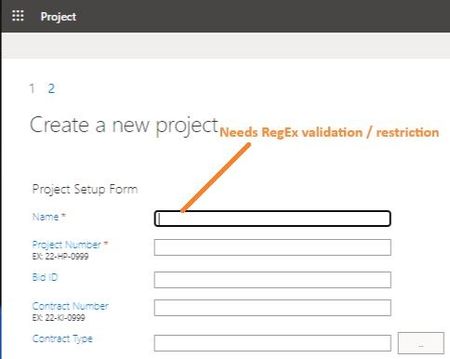
New Project - Regex on Project Name - Limit Special Characters
Greetings, I haven't been able to find any reference to this anywhere online... When creating a new Project in PoL/PWA, is there a way to apply RegEx to the 'Name' (Project Name) field? Basically: I would like to limit it to Alpha-Numeric, Spaces and Dashes...and definitely prevent '&' and brackets '()[]'. Either make it required or prevent 'finish' button (Create project) from functioning until it is valid. What might be a strategy to go about this validation? (Note: I am somewhat surprised this has never been discussed before...especially considering that PWA creates a sub-site & use the 'Name' field as the URL. Frankly, it is surprising that PWA even allows '&'.) Much appreciated, -TRSolved1KViews0likes2Comments