solutions
161 Topics
Growing our connector ecosystem with 500+ Microsoft Sentinel connectors
Connecting the modern security environment Having spent years working across Microsoft's cloud, AI, and customer-facing organizations. I have seen that technology delivers the greatest value when it works with the environments customers already operate. That's especially true in cybersecurity. Most organizations rely on a diverse mix of platforms, applications, and security solutions. Security teams need to bring signals from across that environment together so they can understand risk, investigate threats, and respond with confidence. As a Microsoft Security customer experience leader, one of my priorities is ensuring that we're helping connect these technologies and get more value from their existing investments. When security data remains fragmented across disconnected tools, teams can lose valuable context. When that data comes together, defenders gain a more complete view of their environment and can make faster, better-informed decisions. Expanding the connector ecosystem Microsoft recently announced the Integrated Security Operations Center (ISOC) in Microsoft Defender. ISOC brings together security signals, threat intelligence, AI, and protection capabilities into a unified experience. It gives humans defenders and AI agents shared context to reason across the environment, coordinate investigations, and strengthen protection. Today, we are expanding the connector ecosystem to more than 500 connectors that enable customers to bring data from Microsoft and diverse third-party sources into their security operations experience. By connecting more signals across the technology estate, organizations can build a more complete understanding of risk and uncover relationships that might otherwise remain fragmented across separate tools. Combined with Microsoft's threat intelligence, AI, and protection capabilities, those signals become actionable context that helps human defenders and AI agents make better decisions and coordinate protection at the speed of the threat. Growing through partnership The strength of this connector ecosystem reflects the work of Microsoft and our technology partners to support our shared customers. Together, we are helping organizations connect the technologies they rely on and bring more of their security data into a unified operational experience. Below we showcase just a portion of the many partners with solutions available in Microsoft Security Store today. We remain committed to expanding this ecosystem so customers can achieve can gain broader visibility and greater value from their security investments. How to Get Started For Customers If you are a Microsoft Sentinel or ISOC customer, or considering adopting it, we are committed that you have the security connectors and integrations you need to enable your use of the platform. If an integration with an independent software vendor, or ISV solution is not yet available, or you have an issue with a solution already published, we have a dedicated team that may be able to assist by working with ISVs to build new, or update existing, connectors. If you have such a need, submit a request here. For Software Companies If you are a software development partner, the Microsoft Sentinel Codeless Connector Framework, or CCF, provides a streamlined way to bring your product into the Microsoft Security ecosystem. Use our Sentinel connector builder agent now to turn your API documentation into a working connector in just minutes. Partners can also come to us directly for engineering guidance and support in getting a connector built or improved. Reach out to us via our intake form. Building a more connected foundation for security operations Our goal is simple: help customers protect their digital environments by giving human defenders and AI agents a more complete picture of risk. We'll continue investing in connectors, partnerships, and integrated security experiences to help customers defend their organizations with greater visibility, context, and confidence. Learn More Microsoft Sentinel What is Microsoft Sentinel Empower Real-Time Security with Microsoft Sentinel’s CCF Push Feature | Microsoft Community Hub Sentinel connector hands-on labs Building Microsoft Sentinel Connectors in Minutes with the Sentinel Connector Builder Agent Building a CCF Nested API Pull Connector: A Technical Lab Walkthrough Microsoft Sentinel features in public preview Accelerate connectors development using AI agent in Microsoft Sentinel | Microsoft Community Hub Extending Sentinel Data Integration: Azure Blob Storage Support for CCF Connectors | Microsoft Community Hub Public Preview: Nested API Support Comes to Microsoft Sentinel CCF | Microsoft Community Hub Public Preview: Multi-Account Support for Microsoft Sentinel Codeless Connectors | Microsoft Community Hub457Views0likes1CommentHow to maintain and update Azure Function Connector deployed via WEBSITE_RUN_FROM_PACKAGE?
Background We recently completed a migration from the legacy Microsoft Sentinel Box connector to the newer Box Events (CCP) connector. During the migration we discovered that the legacy Box connector was implemented using: Azure Functions JWT authentication WEBSITE_RUN_FROM_PACKAGE The Function App is configured as: WEBSITE_RUN_FROM_PACKAGE=https://aka.ms/sentinel-BoxDataConnector-functionapp and the Azure Function therefore operates in read-only mode because it is running directly from the package referenced by that URL. The migration to the new Box Events (CCP) connector has been successful and is now ingesting data into BoxEventsV2_CL using Client Credentials Grant (CCG) authentication. What prompted the question While reviewing the legacy Azure Function deployment, we noticed that: The Box Solution GitHub repository has received updates over time. The Box Solution itself has been updated (currently v3.16 in our environment). Analytics, parsers, and connector components have evolved. The legacy Azure Function deployment still appears to be tied to the original package referenced by WEBSITE_RUN_FROM_PACKAGE. This raised a broader lifecycle and maintenance question: Questions 1. Is the package referenced by: https://aka.ms/sentinel-BoxDataConnector-functionapp still actively maintained and republished by Microsoft? 2. If updates are made to the Box Solution source code or supporting files in the GitHub repository, are those updates expected to flow automatically to existing Azure Function deployments that use WEBSITE_RUN_FROM_PACKAGE? 3. If updates do not automatically flow to existing deployments, what was the intended maintenance model for customers using the legacy Azure Function connector? For example, were customers expected to: Continue using the Microsoft-hosted package URL indefinitely? Periodically redeploy using updated templates? Download and self-maintain the Function App package? Modify the Function App to stop using WEBSITE_RUN_FROM_PACKAGE? 4. Prior to the introduction of the Box Events (CCP) connector, how were customers expected to apply updates, dependency changes, security fixes, and other improvements to existing Box Azure Function deployments? 5. Is migration to the Box Events (CCP) connector now considered the only supported path for customers wishing to remain current with Microsoft Sentinel Box integrations? Reason for asking The goal is not to troubleshoot the new CCP connector. Rather, we are trying to better understand the support and maintenance lifecycle of the legacy Azure Function-based Box connector and how Microsoft intended customers to remain current when deployments were originally made using a Microsoft-hosted WEBSITE_RUN_FROM_PACKAGE endpoint. Any clarification from the Box Solution maintainers or Microsoft Sentinel team would be appreciated. NB I came across this notice after following some links from the Box Solution listed in Azure. https://github.com/Azure/Azure-Sentinel/blob/master/Solutions/known_issues.md#known-issue-2--solution-re-deployment-or-update That seems to indicate that somehow we are meant to Redeploy the entire package when there is an update and then somehow copy / update all the Custom Analytics Rules and Automations. Is there no way to merge the new modules and updates without basically having to start over with a side-by-side deployment?106Views0likes0Comments
XdrLogRaider Defender XDR portal telemetry
A Microsoft Sentinel custom data connector that ingests Microsoft Defender XDR portal-only telemetry — configuration, compliance, drift, exposure, governance — that public Microsoft APIs (Graph Security, Microsoft 365 Defender, MDE) don't expose. https://github.com/akefallonitis/xdrlograider— Defender XDR portal telemetry Happy Hunting 🥳 🎉594Views0likes2CommentsSentinel Foundry - MCP Server (Github Community Release)
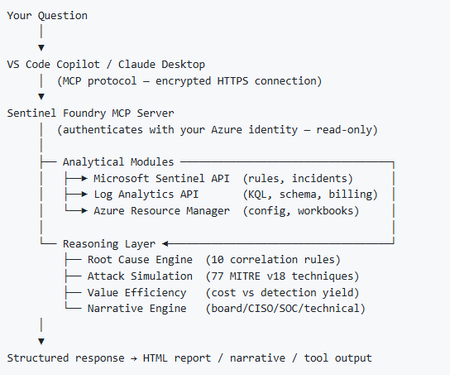
I’ve been cooking something that a lot of people in SOC have been struggling with — especially on the engineering side of Microsoft Sentinel. Thanks to the Microsoft Security team for shaping the capabilities of Sentinel even better with Sentinel Data Lake & Modern SecOps. Today’s the day I can finally share it. Note: This is not an official Microsoft product, but it is designed to make the Sentinel Build even better (complement) with much more intelligence. 🚀 Sentinel Foundry is now in public preview with 43 tools. (Sentinel Foundry - MCP Server) It’s an MCP server built to act like the brain of a strong Sentinel engineer — helping make building, improving, and operating Sentinel far more practical, faster, and honestly more enjoyable. For a lot of teams, the challenge is not understanding what Sentinel can do. The hard part is the engineering work around it: -> Deciding what data should actually be ingested -> Building a clean, scalable Sentinel foundation -> Writing useful detections instead of noisy ones -> Balancing security value with cost -> Turning ideas into deployable engineering outputs That is exactly why I built Sentinel Foundry to help communities grow stronger. It helps with the real engineering tasks behind Sentinel — from architecture thinking to detection design, deployment planning, ingestion strategy, automation ideas, and many of the workflows outlined in the GitHub project. How does it work? Here’s one of the flagship prompts I ran with it: “Give me a complete security posture report for our workspace. Score each pillar and tell me what to prioritise.” And within seconds, it produced a structured engineering blueprint that would normally take a lot longer to pull together manually. You can see the example prompts here in what it can do: https://github.com/prabhukiranveesam/Sentinel-Foundry#what-can-it-do I want building Sentinel to feel less like repetitive engineering overhead — and more like real security engineering that is fast, creative, and enjoyable. If you work with Sentinel as a SOC L2 analyst, engineer, detection engineer, consultant, or architect, I’d genuinely love for you to try it and tell me what you think. 🔗 Public Preview: https://github.com/prabhukiranveesam/Sentinel-Foundry This is just the start of an AI era — and I’m excited to keep shaping it with more powerful features over the coming days. This is very easy to set up and will be available to all of you at no cost during this month as part of the public preview, and your feedback is extremely valuable to shape this as a powerful solution.1.3KViews0likes2CommentsSecurity Copilot Integration with Microsoft Sentinel - Why Automation matters now
Security Operations Centers face a relentless challenge - the volume of security alerts far exceeds the capacity of human analysts. On average, a mid-sized SOC receives thousands of alerts per day, and analysts spend up to 80% of their time on initial triage. That means determining whether an alert is a true positive, understanding its scope, and deciding on next steps. With Microsoft Security Copilot now deeply integrated into Microsoft Sentinel, there is finally a practical path to automating the most time-consuming parts of this workflow. So I decided to walk you through how to combine Security Copilot with Sentinel to build an automated incident triage pipeline - complete with KQL queries, automation rule patterns, and practical scenarios drawn from common enterprise deployments. Traditional triage workflows rely on analysts manually reviewing each incident - reading alert details, correlating entities across data sources, checking threat intelligence, and making a severity assessment. This is slow, inconsistent, and does not scale. Security Copilot changes this equation by providing: Natural language incident summarization - turning complex, multi-alert incidents into analyst-readable narratives Automated entity enrichment - pulling threat intelligence, user risk scores, and device compliance state without manual lookups Guided response recommendations - suggesting containment and remediation steps based on the incident type and organizational context The key insight is that Copilot does not replace analysts - it handles the repetitive first-pass triage so analysts can focus on decision-making and complex investigations. Architecture - How the Pieces Fit Together The automated triage pipeline consists of four layers: Detection Layer - Sentinel analytics rules generate incidents from log data Enrichment Layer - Automation rules trigger Logic Apps that call Security Copilot Triage Layer - Copilot analyzes the incident, enriches entities, and produces a triage summary Routing Layer - Based on Copilot's assessment, incidents are routed, re-prioritized, or auto-closed (Forgive my AI-painted illustration here, but I find it a nice way to display dependencies.) +-----------------------------------------------------------+ | Microsoft Sentinel | | | | Analytics Rules --> Incidents --> Automation Rules | | | | | v | | Logic App / Playbook | | | | | v | | Security Copilot API | | +-----------------+ | | | Summarize | | | | Enrich Entities | | | | Assess Risk | | | | Recommend Action| | | +--------+--------+ | | | | | v | | +-----------------------------+ | | | Update Incident | | | | - Add triage summary tag | | | | - Adjust severity | | | | - Assign to analyst/team | | | | - Auto-close false positive| | | +-----------------------------+ | +-----------------------------------------------------------+ Step 1 - Identify High-Volume Triage Candidates Not every incident type benefits equally from automated triage. Start with alert types that are high in volume but often turn out to be false positives or low severity. Use this KQL query to identify your top candidates: SecurityIncident | where TimeGenerated > ago(30d) | summarize TotalIncidents = count(), AutoClosed = countif(Classification == "FalsePositive" or Classification == "BenignPositive"), AvgTimeToTriageMinutes = avg(datetime_diff('minute', FirstActivityTime, CreatedTime)) by Title | extend FalsePositiveRate = round(AutoClosed * 100.0 / TotalIncidents, 1) | where TotalIncidents > 10 | order by TotalIncidents desc | take 20 This query surfaces the incident types where automation will deliver the highest ROI. Based on publicly available data and community reports, the following categories consistently appear at the top: Impossible travel alerts (high volume, around 60% false positive rate) Suspicious sign-in activity from unfamiliar locations Mass file download and share events Mailbox forwarding rule creation Step 2 - Build the Copilot-Powered Triage Playbook Create a Logic App playbook that triggers on incident creation and leverages the Security Copilot connector. The core flow looks like this: Trigger: Microsoft Sentinel Incident - When an incident is created Action 1 - Get incident entities: let incidentEntities = SecurityIncident | where IncidentNumber == <IncidentNumber> | mv-expand AlertIds | join kind=inner (SecurityAlert | extend AlertId = SystemAlertId) on $left.AlertIds == $right.AlertId | mv-expand Entities | extend EntityData = parse_json(Entities) | project EntityType = tostring(EntityData.Type), EntityValue = coalesce( tostring(EntityData.HostName), tostring(EntityData.Address), tostring(EntityData.Name), tostring(EntityData.DnsDomain) ); incidentEntities Note: The <IncidentNumber> placeholder above is a Logic App dynamic content variable. When building your playbook, select the incident number from the trigger output rather than hardcoding a value. Action 2 - Copilot prompt session: Send a structured prompt to Security Copilot that requests: Analyze this Microsoft Sentinel incident and provide a triage assessment: Incident Title: {IncidentTitle} Severity: {Severity} Description: {Description} Entities involved: {EntityList} Alert count: {AlertCount} Please provide: 1. A concise summary of what happened (2-3 sentences) 2. Entity risk assessment for each IP, user, and host 3. Whether this appears to be a true positive, benign positive, or false positive 4. Recommended next steps 5. Suggested severity adjustment (if any) Action 3 - Parse and route: Use the Copilot response to update the incident. The Logic App parses the structured output and: Adds the triage summary as an incident comment Tags the incident with copilot-triaged Adjusts severity if Copilot recommends it Routes to the appropriate analyst tier based on the assessment Step 3 - Enrich with Contextual KQL Lookups Security Copilot's assessment improves dramatically when you feed it contextual data. Before sending the prompt, enrich the incident with organization-specific signals: // Check if the user has a history of similar alerts (repeat offender vs. first time) let userAlertHistory = SecurityAlert | where TimeGenerated > ago(90d) | mv-expand Entities | extend EntityData = parse_json(Entities) | where EntityData.Type == "account" | where tostring(EntityData.Name) == "<UserPrincipalName>" | summarize PriorAlertCount = count(), DistinctAlertTypes = dcount(AlertName), LastAlertTime = max(TimeGenerated) | extend IsRepeatOffender = PriorAlertCount > 5; userAlertHistory // Check user risk level from Entra ID Protection AADUserRiskEvents | where TimeGenerated > ago(7d) | where UserPrincipalName == "<UserPrincipalName>" | summarize arg_max(TimeGenerated, RiskLevel), RecentRiskEvents = count() | project RiskLevel, RecentRiskEvents Including this context in the Copilot prompt transforms generic assessments into organization-aware triage decisions. A "suspicious sign-in" for a user who travels internationally every week is very different from the same alert for a user who has never left their home country. Step 4 - Implement Feedback Loops Automated triage is only as good as its accuracy over time. Build a feedback mechanism by tracking Copilot's assessments against analyst final classifications: SecurityIncident | where Tags has "copilot-triaged" | where TimeGenerated > ago(30d) | where Classification != "" | mv-expand Comments | extend CopilotAssessment = extract("Assessment: (True Positive|False Positive|Benign Positive)", 1, tostring(Comments)) | where isnotempty(CopilotAssessment) | summarize Total = dcount(IncidentNumber), Correct = dcountif(IncidentNumber, (CopilotAssessment == "False Positive" and Classification == "FalsePositive") or (CopilotAssessment == "True Positive" and Classification == "TruePositive") or (CopilotAssessment == "Benign Positive" and Classification == "BenignPositive") ) by bin(TimeGenerated, 7d) | extend AccuracyPercent = round(Correct * 100.0 / Total, 1) | order by TimeGenerated asc For this query to work reliably, the automation playbook must write the assessment in a consistent format within the incident comments. Use a structured prefix such as Assessment: True Positive so the regex extraction remains stable. According to Microsoft's published benchmarks and community feedback, Copilot-assisted triage typically achieves 85-92% agreement with senior analyst classifications after prompt tuning - significantly reducing the manual triage burden. A Note on Licensing and Compute Units Security Copilot is licensed through Security Compute Units (SCUs), which are provisioned in Azure. Each prompt session consumes SCUs based on the complexity of the request. For automated triage at scale, plan your SCU capacity carefully - high-volume playbooks can accumulate significant usage. Start with a conservative allocation, monitor consumption through the Security Copilot usage dashboard, and scale up as you validate ROI. Microsoft provides detailed guidance on SCU sizing in the official Security Copilot documentation. Example Scenario - Impossible Travel at Scale Consider a typical enterprise that generates over 200 impossible travel alerts per week. The SOC team spends roughly 15 hours weekly just triaging these. Here is how automated triage addresses this: Detection - Sentinel's built-in impossible travel analytics rule flags the incidents Enrichment - The playbook pulls each user's typical travel patterns from sign-in logs over the past 90 days, VPN usage, and whether the "impossible" location matches any known corporate office or VPN egress point Copilot Analysis - Security Copilot receives the enriched context and classifies each incident Expected Result - Based on common deployment patterns, around 70-75% of impossible travel incidents are auto-closed as benign (VPN, known travel patterns), roughly 20% are downgraded to informational with a triage note, and only about 5% are escalated to analysts as genuine suspicious activity This type of automation can reclaim over 10 hours per week - time that analysts can redirect to proactive threat hunting. Getting Started - Practical Recommendations For teams ready to implement automated triage with Security Copilot and Sentinel, here is a recommended approach: Start small. Pick one high-volume, high-false-positive incident type. Do not try to automate everything at once. Run in shadow mode first. Have the playbook add triage comments but do not auto-close or re-route. Let analysts compare Copilot's assessment with their own for two to four weeks. Tune your prompts. Generic prompts produce generic results. Include organization-specific context - naming conventions, known infrastructure, typical user behavior patterns. Monitor accuracy continuously. Use the feedback loop KQL above. If accuracy drops below 80%, pause automation and investigate. Maintain human oversight. Even at 90%+ accuracy, keep a human review step for high-severity incidents. Automation handles volume - analysts handle judgment. The combination of Security Copilot and Microsoft Sentinel represents a genuine step forward for SOC efficiency. By automating the initial triage pass - summarizing incidents, enriching entities, and providing classification recommendations - analysts are freed to focus on what humans do best: making nuanced security decisions under uncertainty. Feel free to like or/and connect :)688Views1like0CommentsRSAC 2026: What the Sentinel Playbook Generator actually means for SOC automation
RSAC 2026 brought a wave of Sentinel announcements, but the one I keep coming back to is the playbook generator. Not because it's the flashiest, but because it touches something that's been a real operational pain point for years: the gap between what SOC teams need to automate and what they can realistically build and maintain. I want to unpack what this actually changes from an operational perspective, because I think the implications go further than "you can now vibe-code a playbook." The problem it solves If you've built and maintained Logic Apps playbooks in Sentinel at any scale, you know the friction. You need a connector for every integration. If there isn't one, you're writing custom HTTP actions with authentication handling, pagination, error handling - all inside a visual designer that wasn't built for complex branching logic. Debugging is painful. Version control is an afterthought. And when something breaks at 2am, the person on call needs to understand both the Logic Apps runtime AND the security workflow to fix it. The result in most environments I've seen: teams build a handful of playbooks for the obvious use cases (isolate host, disable account, post to Teams) and then stop. The long tail of automation - the enrichment workflows, the cross-tool correlation, the conditional response chains - stays manual because building it is too expensive relative to the time saved. What's actually different now The playbook generator produces Python. Not Logic Apps JSON, not ARM templates - actual Python code with documentation and a visual flowchart. You describe the workflow in natural language, the system proposes a plan, asks clarifying questions, and then generates the code once you approve. The Integration Profile concept is where this gets interesting. Instead of relying on predefined connectors, you define a base URL, auth method, and credentials for any service - and the generator creates dynamic API calls against it. This means you can automate against ServiceNow, Jira, Slack, your internal CMDB, or any REST API without waiting for Microsoft or a partner to ship a connector. The embedded VS Code experience with plan mode and act mode is a deliberate design choice. Plan mode lets you iterate on the workflow before any code is generated. Act mode produces the implementation. You can then validate against real alerts and refine through conversation or direct code edits. This is a meaningful improvement over the "deploy and pray" cycle most of us have with Logic Apps. Where I see the real impact For environments running Sentinel at scale, the playbook generator could unlock the automation long tail I mentioned above. The workflows that were never worth the Logic Apps development effort might now be worth a 15-minute conversation with the generator. Think: enrichment chains that pull context from three different tools before deciding on a response path, or conditional escalation workflows that factor in asset criticality, time of day, and analyst availability. There's also an interesting angle for teams that operate across Microsoft and non-Microsoft tooling. If your SOC uses Sentinel for SIEM but has Palo Alto, CrowdStrike, or other vendors in the stack, the Integration Profile approach means you can build cross-vendor response playbooks without middleware. The questions I'd genuinely like to hear about A few things that aren't clear from the documentation and that I think matter for production use: Security Copilot dependency: The prerequisites require a Security Copilot workspace with EU or US capacity. Someone in the blog comments already flagged this as a potential blocker for organizations that have Sentinel but not Security Copilot. Is this a hard requirement going forward, or will there be a path for Sentinel-only customers? Code lifecycle management: The generated Python runs... where exactly? What's the execution runtime? How do you version control, test, and promote these playbooks across dev/staging/prod? Logic Apps had ARM templates and CI/CD patterns. What's the equivalent here? Integration Profile security: You're storing credentials for potentially every tool in your security stack inside these profiles. What's the credential storage model? Is this backed by Key Vault? How do you rotate credentials without breaking running playbooks? Debugging in production: When a generated playbook fails at 2am, what does the troubleshooting experience look like? Do you get structured logs, execution traces, retry telemetry? Or are you reading Python stack traces? Coexistence with Logic Apps: Most environments won't rip and replace overnight. What's the intended coexistence model between generated Python playbooks and existing Logic Apps automation rules? I'm genuinely optimistic about this direction. Moving from a low-code visual designer to an AI-assisted coding model with transparent, editable output feels like the right architectural bet for where SOC automation needs to go. But the operational details around lifecycle, security, and debugging will determine whether this becomes a production staple or stays a demo-only feature. Would be interested to hear from anyone who's been in the preview - what's the reality like compared to the pitch?Solved439Views0likes1CommentThe Microsoft Copilot Data Connector for Microsoft Sentinel is Now in Public Preview
*Please note that this connector is now in GA status as of March, 2026* We are happy to announce a new data connector that is available to the public: the Microsoft Copilot data connector for Microsoft Sentinel. The new Microsoft Copilot data connector will allow for audit logs and activities generated by different offerings of Copilot to be ingested into Microsoft Sentinel and Microsoft Sentinel data lake. This allows for Copilot activities to be leveraged within Microsoft Sentinel features such as analytic rules/custom detections, Workbooks, automation, and more. This also allows for Copilot data to be sent to Sentinel data lake, which opens the possibilities for integrations with custom graphs, MCP server, and more while offering lower cost ingestion and longer retention as needed. Eligibility for the Connector The connector is available for all customers within Microsoft Sentinel, but will only ingest data for environments that have access to Copilot licenses and SCUs as the activities rely on Copilot being used. These logs are available via the Purview Unified Audit Log (UAL) feed, which is available and enabled for all users by default. A big value of this new connector is that it eliminates the need for users to go to the Purview Portal in order to see these activities, as they are proactively brought into the workspace, enabling SOCs to generate detections and proactively threat hunt on this information. Note: This data connector is a single-tenant connector, meaning that it will ingest the data for the entire tenant that it resides in. This connector is not designed to handle multi-tenant configurations. What’s Included in the Connector The following are record types from Office 365 Management API that will be supported as part of this connector: 261 CopilotInteraction 310 CreateCopilotPlugin 311 UpdateCopilotPlugin 312 DeleteCopilotPlugin 313 EnableCopilotPlugin 314 DisableCopilotPlugin 315 CreateCopilotWorkspace 316 UpdateCopilotWorkspace 317 DeleteCopilotWorkspace 318 EnableCopilotWorkspace 319 DisableCopilotWorkspace 320 CreateCopilotPromptBook 321 UpdateCopilotPromptBook 322 DeleteCopilotPromptBook 323 EnableCopilotPromptBook 324 DisableCopilotPromptBook 325 UpdateCopilotSettings 334 TeamCopilotInteraction 363 Microsoft365CopilotScheduledPrompt 371 OutlookCopilotAutomation 389 CopilotForSecurityTrigger 390 CopilotAgentManagement These are great options for monitoring users who have permission to make changes to Copilot across the environment. This data can assist with identifying if there are anomalous interactions taking place between users and Copilot, unauthorized attempts of access, or malicious prompt usage. How to Deploy the Connector The connector is available via the Microsoft Sentinel Content Hub and can be installed today. To find the connector: Within the Defender Portal, expand the Microsoft Sentinel navigation in the left menu. Expand Configuration and select Content Hub. Within the search bar, search for “Copilot”. Click on the solution that appears and click Install. Once the solution is installed, the connector can be configured by clicking on the connector within the solution and selecting Open Connector Page. To enable the connector, the user will need either Global Administrator or Security Administrator on the tenant. Once the connector is enabled, the data will be sent to the table named CopilotActivity. Note: Data ingestion costs apply when using this data connector. Pricing will be based on the settings for the Microsoft Sentinel workspace or at the Microsoft Sentinel data lake tier pricing. As this data connector is in Public Preview, users can start deploying this connector right now! As always, let us know what you think in the comments so that we may continue to build what is most valuable to you. We hope that this new data connector continues to assist your SOC with high valuable insights that best empowers your security. Resources: Office Management API Event Number List: https://learn.microsoft.com/en-us/office/office-365-management-api/office-365-management-activity-api-schema#auditlogrecordtype Purview Unified Audit Log Library: Audit log activities | Microsoft Learn Copilot Inclusion in the Microsoft E5 Subscription: Learn about Security Copilot inclusion in Microsoft 365 E5 subscription | Microsoft Learn Microsoft Sentinel: What is Microsoft Sentinel SIEM? | Microsoft Learn Microsoft Sentinel Platform: Microsoft Sentinel data lake overview - Microsoft Security | Microsoft Learn11KViews0likes1CommentThis Azure Cosmos DB discussion board will be migrating into the Azure partners board on December 12, 2025.
Hello Partners!! Please note this discussion board will be merged into our Azure Partners discussion board on Friday, December 12th, 2025. Please follow this new board and subscribe to the Azure Cosmos DB tag to get notified of new posts of this topic!😃172Views0likes0Comments
Understand New Sentinel Pricing Model with Sentinel Data Lake Tier
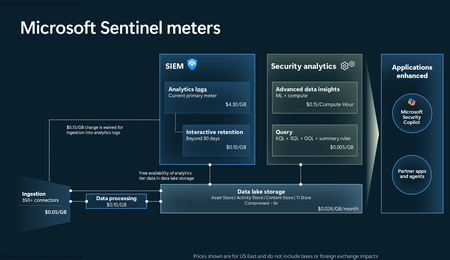
Introduction on Sentinel and its New Pricing Model Microsoft Sentinel is a cloud-native Security Information and Event Management (SIEM) and Security Orchestration, Automation, and Response (SOAR) platform that collects, analyzes, and correlates security data from across your environment to detect threats and automate response. Traditionally, Sentinel stored all ingested data in the Analytics tier (Log Analytics workspace), which is powerful but expensive for high-volume logs. To reduce cost and enable customers to retain all security data without compromise, Microsoft introduced a new dual-tier pricing model consisting of the Analytics tier and the Data Lake tier. The Analytics tier continues to support fast, real-time querying and analytics for core security scenarios, while the new Data Lake tier provides very low-cost storage for long-term retention and high-volume datasets. Customers can now choose where each data type lands—analytics for high-value detections and investigations, and data lake for large or archival types—allowing organizations to significantly lower cost while still retaining all their security data for analytics, compliance, and hunting. Please flow diagram depicts new sentinel pricing model: Now let's understand this new pricing model with below scenarios: Scenario 1A (PAY GO) Scenario 1B (Usage Commitment) Scenario 2 (Data Lake Tier Only) Scenario 1A (PAY GO) Requirement Suppose you need to ingest 10 GB of data per day, and you must retain that data for 2 years. However, you will only frequently use, query, and analyze the data for the first 6 months. Solution To optimize cost, you can ingest the data into the Analytics tier and retain it there for the first 6 months, where active querying and investigation happen. After that period, the remaining 18 months of retention can be shifted to the Data Lake tier, which provides low-cost storage for compliance and auditing needs. But you will be charged separately for data lake tier querying and analytics which depicted as Compute (D) in pricing flow diagram. Pricing Flow / Notes The first 10 GB/day ingested into the Analytics tier is free for 31 days under the Analytics logs plan. All data ingested into the Analytics tier is automatically mirrored to the Data Lake tier at no additional ingestion or retention cost. For the first 6 months, you pay only for Analytics tier ingestion and retention, excluding any free capacity. For the next 18 months, you pay only for Data Lake tier retention, which is significantly cheaper. Azure Pricing Calculator Equivalent Assuming no data is queried or analyzed during the 18-month Data Lake tier retention period: Although the Analytics tier retention is set to 6 months, the first 3 months of retention fall under the free retention limit, so retention charges apply only for the remaining 3 months of the analytics retention window. Azure pricing calculator will adjust accordingly. Scenario 1B (Usage Commitment) Now, suppose you are ingesting 100 GB per day. If you follow the same pay-as-you-go pricing model described above, your estimated cost would be approximately $15,204 per month. However, you can reduce this cost by choosing a Commitment Tier, where Analytics tier ingestion is billed at a discounted rate. Note that the discount applies only to Analytics tier ingestion—it does not apply to Analytics tier retention costs or to any Data Lake tier–related charges. Please refer to the pricing flow and the equivalent pricing calculator results shown below. Monthly cost savings: $15,204 – $11,184 = $4,020 per month Now the question is: What happens if your usage reaches 150 GB per day? Will the additional 50 GB be billed at the Pay-As-You-Go rate? No. The entire 150 GB/day will still be billed at the discounted rate associated with the 100 GB/day commitment tier bucket. Azure Pricing Calculator Equivalent (100 GB/ Day) Azure Pricing Calculator Equivalent (150 GB/ Day) Scenario 2 (Data Lake Tier Only) Requirement Suppose you need to store certain audit or compliance logs amounting to 10 GB per day. These logs are not used for querying, analytics, or investigations on a regular basis, but must be retained for 2 years as per your organization’s compliance or forensic policies. Solution Since these logs are not actively analyzed, you should avoid ingesting them into the Analytics tier, which is more expensive and optimized for active querying. Instead, send them directly to the Data Lake tier, where they can be retained cost-effectively for future audit, compliance, or forensic needs. Pricing Flow Because the data is ingested directly into the Data Lake tier, you pay both ingestion and retention costs there for the entire 2-year period. If, at any point in the future, you need to perform advanced analytics, querying, or search, you will incur additional compute charges, based on actual usage. Even with occasional compute charges, the cost remains significantly lower than storing the same data in the Analytics tier. Realized Savings Scenario Cost per Month Scenario 1: 10 GB/day in Analytics tier $1,520.40 Scenario 2: 10 GB/day directly into Data Lake tier $202.20 (without compute) $257.20 (with sample compute price) Savings with no compute activity: $1,520.40 – $202.20 = $1,318.20 per month Savings with some compute activity (sample value): $1,520.40 – $257.20 = $1,263.20 per month Azure calculator equivalent without compute Azure calculator equivalent with Sample Compute Conclusion The combination of the Analytics tier and the Data Lake tier in Microsoft Sentinel enables organizations to optimize cost based on how their security data is used. High-value logs that require frequent querying, real-time analytics, and investigation can be stored in the Analytics tier, which provides powerful search performance and built-in detection capabilities. At the same time, large-volume or infrequently accessed logs—such as audit, compliance, or long-term retention data—can be directed to the Data Lake tier, which offers dramatically lower storage and ingestion costs. Because all Analytics tier data is automatically mirrored to the Data Lake tier at no extra cost, customers can use the Analytics tier only for the period they actively query data, and rely on the Data Lake tier for the remaining retention. This tiered model allows different scenarios—active investigation, archival storage, compliance retention, or large-scale telemetry ingestion—to be handled at the most cost-effective layer, ultimately delivering substantial savings without sacrificing visibility, retention, or future analytical capabilities.Solved4KViews2likes6Comments
What’s New in Microsoft Sentinel: November 2025
Welcome to our new Microsoft Sentinel blog series! We’re excited to launch a new blog series focused on Microsoft Sentinel. From the latest product innovations and feature updates to industry recognition, success stories, and major events, you’ll find it all here. This first post kicks off the series by celebrating Microsoft’s recognition as a Leader in the 2025 Gartner Magic Quadrant for SIEM 1 . It also introduces the latest innovations designed to deliver measurable impact and empower defenders with adaptable, collaborative tools in an evolving threat landscape. Microsoft is recognized as a Leader in 2025 Gartner Magic Quadrant for Security Information and Event Management (SIEM) Microsoft Sentinel continues to drive security innovation—and the industry is taking notice. Microsoft was named a leader in the 2025 Gartner Magic Quadrant for Security Information and Event Management (SIEM) 1 , published on October 8, 2025. We believe this acknowledgment reinforces our commitment to helping organizations stay secure in a rapidly changing threat landscape. Read blog for more information. Take advantage of M365 E5 benefit and Microsoft Sentinel promotional pricing Microsoft 365 E5 benefit Customers with Microsoft 365 E5, A5, F5, or G5 licenses automatically receive up to 5 MB of free data ingestion per user per day, covering key security data sources like Azure AD sign-in logs and Microsoft Cloud App Security discovery logs—no enrollment required. Read more about M365 benefits for Microsoft Sentinel. New 50GB promotional pricing To make Microsoft Sentinel more accessible to small and mid-sized organizations, we introduced a new 50 GB commitment tier in public preview, with promotional pricing starting October 1, 2025, through March 31, 2026. Customers who choose the 50 GB commitment tier during this period will maintain their promotional rate until March 31, 2027. Available globally with regional variations in regional pricing it is accessible through EA, CSP, and Direct channels. For more information see Microsoft Sentinel pricing page. Partner Integrations: Strengthening TI collaboration and workflow automation Microsoft Sentinel continues to expand its ecosystem with powerful partner integrations that enhance security operations. With Cyware, customers can now share threat intelligence bi-directionally across trusted destinations, ISACs, and multi-tenant environments—enabling real-time intelligence exchange that strengthens defenses and accelerates coordinated response. Learn more about the Cyware integration. Learn more about the Cyware integration here. Meanwhile, BlinkOps integration combined with Sentinel’s SOAR capabilities empowers SOC teams to automate repetitive tasks, orchestrate complex playbooks, and streamline workflows end-to-end. This automation reduces operational overhead, cuts Mean Time to Respond (MTTR) and frees analysts for strategic threat hunting. Learn more about the BlinkOps integration. Learn more about the BlinkOps integration. Harnessing Microsoft Sentinel Innovations Security is being reengineered for the AI era, moving beyond static, rule-based controls and reactive post-breach response toward platform-led, machine-speed defense. To overcome fragmented tools, sprawling signals, and legacy architectures that cannot keep pace with modern attacks, Microsoft Sentinel has evolved into both a SIEM and a unified security platform for agentic defense. These updates introduce architectural enhancements and advanced capabilities that enable AI-driven security operations at scale, helping organizations detect, investigate, and respond with unprecedented speed and precision. Microsoft Sentinel graph – Public Preview Unified graph analytics for deeper context and threat reasoning. Microsoft Sentinel graph delivers an interactive, visual map of entity relationships, helping analysts uncover hidden attack paths, lateral movement, and root causes for pre- and post-breach investigations. Read tech community blog for more details. Microsoft Sentinel Model Context Protocol (MCP) server – Public Preview Context is key to effective security automation. Microsoft Sentinel MCP server introduces a standardized protocol for building context-aware solutions, enabling developers to create smarter integrations and workflows within Sentinel. This opens the door to richer automation scenarios and more adaptive security operations. Read tech community blog for more details. Enhanced UEBA with New Data Sources – Public Preview We are excited to announce support for six new sources in our user entity and behavior analytics algorithm, including AWS, GCP, Okta, and Azure. Now, customers can gain deeper, cross-platform visibility into anomalous behavior for earlier and more confident detection. Read our blog and check out our Ninja Training to learn more. Developer Solutions for Microsoft Sentinel platform – Public Preview Expanded APIs, solution templates, and integration capabilities empower developers to build and distribute custom workflows and apps via Microsoft Security Store. This unlocks faster innovation, streamlined operations, and new revenue opportunities, extending Sentinel beyond out-of-the-box functionality for greater agility and resilience. Read tech community blog for more details. Growing ecosystem of Microsoft Sentinel data connectors We are excited to announce the general availability of four new data connectors: AWS Server Access Logs, Google Kubernetes Engine, Palo Alto CSPM, and Palo Alto Cortex Xpanse. Visit find your Microsoft Sentinel data connector page for the list of data connectors currently supported. We are also inviting Private Previews for four additional connectors: AWS EKS, Qualys VM KB, Alibaba Cloud Network, and Holm Security towards our commitment to expand the breadth and depth to support new data sources. Our customer support team can help you sign up for previews. New agentless data connector for Microsoft Sentinel Solution for SAP applications We’re excited to announce the general availability of a new agentless connector for Microsoft Sentinel solution for SAP applications, designed to simplify integration and enhance security visibility. This connector enables seamless ingestion of SAP logs and telemetry directly into Microsoft Sentinel, helping SOC teams monitor critical business processes, detect anomalies, and respond to threats faster—all while reducing operational overhead. Events, Webinars and Training Stay connected with the latest security innovation and best practices. From global conferences to expert-led sessions, these events offer opportunities to learn, network, and explore how Microsoft is shaping AI-driven, end-to-end security for the modern enterprise. Microsoft Ignite 2025 Security takes center stage at Microsoft Ignite, with dedicated sessions and hands-on experiences for security professionals and leaders. Join us in San Francisco, November 17–21, 2025, or online, to explore our AI-first, end-to-end security platform designed to protect identities, devices, data, applications, clouds, infrastructure—and critically—AI systems and agents. Register today! Microsoft Security Webinars Stay ahead of emerging threats and best practices with expert-led webinars from the Microsoft Security Community. Discover upcoming sessions on Microsoft Sentinel SIEM & platform, Defender, Intune, and more. Sign up today and be part of the conversation that shapes security for everyone. Learn more about upcoming webinars. Onboard Microsoft Sentinel in Defender – Video Series Microsoft leads the industry in both SIEM and XDR, delivering a unified experience that brings these capabilities together seamlessly in the Microsoft Defender portal. This integration empowers security teams to correlate insights, streamline workflows, and strengthen defenses across the entire threat landscape. Ready to get started? Explore our video series to learn how to onboard your Microsoft Sentinel experience and unlock the full potential of integrated security. Watch Microsoft Sentinel is now in Defender video series. MDTI Convergence into Microsoft Sentinel & Defender XDR overview Discover how Microsoft Defender Threat Intelligence Premium is transforming cybersecurity by integrating into Defender XDR, Sentinel, and the Defender portal. Watch this session to learn about new features, expanded access to threat intelligence, and how these updates strengthen your security posture. Partner Sentinel Bootcamp Transform your security team from Sentinel beginners to advanced practitioners. This comprehensive 2-day bootcamp helps participants master architecture design, data ingestion strategies, multi-tenant management, and advanced analytics while learning to leverage Microsoft's AI-first security platform for real-world threat detection and response. Register here for the bootcamp. Looking to dive deeper into Microsoft Sentinel development? Check out the official https://aka.ms/AppAssure_SentinelDeveloper. It’s the central reference for developers and security teams who want to build custom integrations, automate workflows, and extend Sentinel’s capabilities. Bookmark this link as your starting point for hands-on guidance and tools. Stay Connected Check back each month for the latest innovations, updates, and events to ensure you’re getting the most out of Microsoft Sentinel. 1 Gartner® Magic Quadrant™ for Security Information and Event Management, Andrew Davies, Eric Ahlm, Angel Berrios, Darren Livingstone, 8 October 20253.8KViews2likes3Comments