software engineering
58 TopicsGitHub Copilot App Canvas Is a Runtime
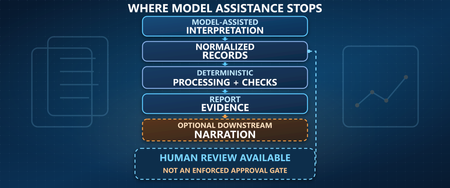
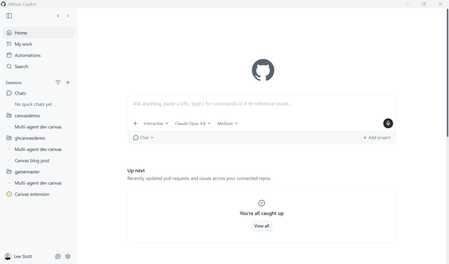
There is a quiet shift happening in how we build software with AI. We are moving from writing static code to orchestrating living systems where developers and AI agents co-create, observe, and evolve a solution in real time. This post is a working theory of what GitHub Copilot App Canvas is actually for, grounded in a real, runnable demo you can clone today: leestott/agent-runtime-canvas. The Agent Runtime canvas open beside the chat — control bar, activity spotlight, requirement & constraints, and the live agent roster. The headline claim, which the rest of this post defends with code: Traditional UIs are for using software. Canvas is for shaping software while it runs. 1. The misconception worth getting out of the way The first instinct most engineers have when they see Canvas is to build a UI with it a dashboard, a DevOps board, an admin panel. That is the wrong mental model, and it leads to disappointment. A Kanban board rendered in Canvas is just a worse version of a tool that already exists. Canvas is not where your users live. It is where your system becomes visible to you and to the AI while you are still figuring it out. The distinction matters: You don't build Canvas instead of your UI. You use Canvas to figure out, test, and evolve the UI and the system before and during building it. Canvas solves problems your final UI should never try to solve in a visible way agent coordination, intermediate state, test validation, failure propagation. These are observability concerns, not end-user features. Canvas is intended for test validation and the implementation of agent-driven solutions not for shipping a production control panel. A useful analogy: Figma is Human-to-Human one person designs a static artifact for another person to read. Canvas is Human-to-AI-to-System a shared surface where a human, an AI agent, and a running system all act on the same live model. Figma shows you a picture of the software. Canvas is a runtime where things actually execute. 2. The positioning, stated plainly Here is the thesis the demo is built to prove: Canvas redefines software development by shifting from writing static code to orchestrating living systems, where developers and AI co-create, observe, and evolve solutions in real time. Instead of building UIs for users, we build interactive environments for agents — turning debugging, testing, and execution into a continuous, visual feedback loop that accelerates innovation and brings ideas to production faster than ever. Read that again with the demo in mind, because the demo is not a slide, it is a working Copilot CLI extension that renders exactly this loop. 3. What we built: the Agent Runtime canvas agent-runtime-canvas is a GitHub Copilot CLI canvas extension called Agent Runtime. It turns Canvas into a runtime observability and control plane for a multi-agent software system that is being designed, tested, and evolved in real time. The canvas renders a single living SystemModel that both humans and the AI agent edit at the same time. The agent drives it through five canvas actions; the human drives it through panel controls. Every change streams to the iframe over Server-Sent Events (SSE), so the system visibly evolves through interaction. The seven panels: a system you can watch think Panel What it makes observable Requirement & constraints The feature under design plus editable policies and constraints Agents Active agents, their responsibilities, and live state (idle / working / done / error / blocked) Task Flow The dependency graph of tasks across agents, with live status Artifacts The intermediate outputs each task emits Validation Test cases, pass/fail, expected vs. actual, and the reasoning behind each verdict Live State The shared memory objects the agents read and write — directly human-editable Timeline A change-over-time log, including before→after state diffs None of these are things you would put in front of an end user. All of them are things you desperately want to see while you and an AI are co-designing an agentic system. The five agent actions The AI co-creates and evolves the system by calling five actions, declared in the canvas extension: Action Effect decompose_system Break a requirement into collaborating agents + a task-flow graph execute_workflow Coordinate agents to advance tasks ( step / run / pause / resume / reset ) validate_output Run evaluation tests, return structured pass/fail + reasoning update_system_design Modify architecture/logic: requirement, constraints, agents, tasks track_state Persist/update a shared state object, recording the diff on the timeline The critical detail is that human controls and agent actions funnel through the exact same store. There is no separate "AI view" and "human view" — one model, two kinds of participant. 4. How it actually works (the parts that matter) The extension is deliberately small and dependency-free. It uses only Node's built-in modules plus github/copilot-sdk , which the CLI auto-resolves. Three files do the work: .github/extensions/agent-runtime/ extension.mjs # wiring: loopback HTTP server, SSE, /control, 5 canvas actions store.mjs # durable SystemModel + execution engine + validation ui.mjs # iframe renderer (system view, validation, state, timeline) One shared model, broadcast on every mutation The heart of the demo is the SystemStore . It is an EventEmitter : every mutation bumps a version, appends a timeline entry, persists to disk, and broadcasts a fresh snapshot to all connected panels. This is the single line that makes "humans and AI edit the same live system" true rather than aspirational: // store.mjs — every change is versioned, logged, persisted, and broadcast. _commit(eventType, summary, detail) { this.model.version += 1; this.model.updatedAt = now(); if (eventType) { this.model.timeline.unshift({ id: uid("ev"), ts: now(), type: eventType, summary, detail: detail || null, }); this.model.timeline = this.model.timeline.slice(0, 200); } this._queueSave(); // best-effort JSON persistence under ~/.copilot this.emit("change", this.model); // fan out to every SSE client return this.model; } The agent action and the human button hit the same method In extension.mjs , the canvas action handler and the iframe's /control POST both call store.execute(...) . That symmetry is the whole point — neither the human nor the AI is privileged: // extension.mjs — a human control POST maps onto the same store method // the AI agent calls through the execute_workflow canvas action. function applyControl(store, body) { switch (body.action) { case "execute": return store.execute(body.mode || "step", body); case "validate": return store.validate(body.tests); case "decompose":return store.decompose(body.requirement, body); case "inject_failure": return store.injectFailure(body.taskKey); case "edit_state": return store.editState(body.key, body.value); // ...requirement, constraints, clear_failures, update_design } } Execution you can watch one task at a time The engine advances the task graph through a visible begin→dwell→finish lifecycle so the active agent is always observable. A ready task is one whose dependencies are all done : // store.mjs — the scheduler only starts a task when its deps are satisfied. _readyTask() { return this.model.tasks.find( (t) => t.status === "pending" && t.deps.every((d) => { const dep = this.model.tasks.find((x) => x.id === d); return dep && dep.status === "done"; }), ); } When a task finishes, its agent emits an artifact and writes to shared state; when a dependency fails, the engine walks the graph to a fixpoint and marks every downstream task blocked . That is failure propagation you can see — exactly the kind of thing a production UI would (correctly) hide, and exactly the kind of thing you need exposed while designing the system. Validation as a first-class, re-runnable citizen The default evaluation suite asserts properties of the running system, not of static code — every test returns an expected value, an actual value, and a human -readable reason: // store.mjs — tests assert properties of the live system model. _defaultTests() { const t = (name, target, assertion) => ({ id: uid("test"), name, target, assertion }); return [ t("All tasks reach a terminal state", "tasks", "no_pending"), t("No tasks failed", "tasks", "none_failed"), t("Every completed task emitted an artifact", "artifacts", "artifact_per_done"), t("Design state populated before build", "state", "design_before_build"), t("Decision recorded by Reviewer", "state", "has_decision"), ]; } This is the "continuous, visual feedback loop" from the thesis, made concrete: decompose → execute → validate → redesign → re-validate, with the Timeline recording every before→after transition. 5. Run it yourself You need a GitHub Copilot CLI / app with canvas support (the canvas-renderer capability) and this repo opened as your workspace. There is no npm install the SDK is auto-resolved and the extension uses only built-in Node modules. Clone and open the workspace. git clone https://github.com/leestott/agent-runtime-canvas.git cd agent-runtime-canvas The extension auto-discovers from .github/extensions/agent-runtime/ . Open the canvas with a requirement. Ask Copilot: Open the Agent Runtime canvas with the requirement "Add CSV export to the reports page". Walk the loop. Decompose into five agents and a six-task graph, press Run ▶, watch the spotlight track the active agent, press Run tests ✓ for 5/5 green, then Inject failure ⚡ to watch downstream tasks go blocked and validation drop to 4/5 — and recover. State persists per documentId under ~/.copilot/extensions/agent-runtime/artifacts/ , so a reload resumes exactly where you left off. The companion demoscript.md in the repo gives you a tight, timed walkthrough. 6. Why this is an observability story Once you accept that Canvas is a runtime rather than a UI, the most compelling use case becomes observability of agentic systems. Agentic software is notoriously hard to debug: the interesting behavior lives in intermediate state, coordination order, and the moments where one agent's failure cascades into another's. A production UI is designed to hide all of that. A Canvas is designed to surface it, temporarily, while you are shaping the system — and then get out of the way. This reframes Canvas alongside the broader Microsoft and GitHub agent tooling story. As teams adopt the GitHub Copilot SDK and patterns like the open Model Context Protocol to wire agents into real systems, the gap is rarely "can the agent act?" it is "can a human see what the agent did, judge it, and steer it?" Canvas is a candidate answer to that second question. When you take agents toward production on Azure with services like Microsoft Foundry, the same instinct applies: build the evaluation and observability loop first, and let it shape the system before you commit a single end-user pixel. 7. The open question: why can't Canvas be multi-user? There is an obvious next frontier, and it is worth stating as an honest open question rather than a finished feature. Everything that makes Canvas valuable also makes it a natural collaborative surface: It is a shared space. It is visual. It is collaborative. Multiple participants — human and AI — interact with the same surface. If Figma earned its place by making Human-to-Human design multiplayer, the provocative question is whether a project- or repo-scoped Canvas can make Human-to-AI-to-System development multiplayer too: several engineers and several agents shaping one running system on one surface. The demo here is single-user by design, but its architecture — one shared store, versioned, broadcast to every subscriber — is already the shape you would need. That is a genuine research direction, and worth experimenting with as licensing and access broaden. 8. Honest limitations In the spirit of building credibility rather than hype: This is a demonstration. The decomposition, artifacts, and state are synthesized to make the runtime loop legible — it models an agentic system rather than running arbitrary production agents. It is single-user and single-machine. The loopback HTTP server and per-document store are local by design; multi-user is an aspiration, not a shipped capability. Access is gated. Canvas support requires a Copilot CLI/app build with the canvas-renderer capability. Licensing and preview access are the biggest practical blockers to wider experimentation today. Persistence is best-effort. State is written to a local JSON artifact; treat it as demo durability, not a database. Key takeaways Don't build a UI in Canvas. Use Canvas to shape, test, and evolve a system — and the UI — while it runs. Traditional UIs are for using software; Canvas is for shaping software while it runs. Canvas is Human-to-AI-to-System, a runtime where things execute — not a static design surface. Its strongest use case is observability and validation of agentic systems: surface the intermediate state your production UI should hide. The shared-model architecture — one versioned store broadcast to every participant — is what makes human + AI co-editing real, and what hints at a multi-user future. Next steps Clone and run the demo: github.com/leestott/agent-runtime-canvas. Read the extension source under .github/extensions/agent-runtime/ — start with store.mjs . Explore the building blocks: the GitHub Copilot SDK, the Model Context Protocol, and Microsoft Foundry for taking agentic systems toward production. Try the multi-user thought experiment: fork the store, add a second subscriber, and ask what changes when two humans and two agents share one surface.415Views1like0CommentsAction Required: Migrate Your Copilot CLI MCP Config Away from .vscode/mcp.json
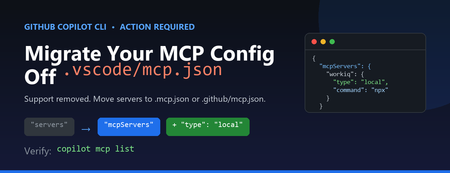
If you use the GitHub Copilot CLI with Model Context Protocol (MCP) servers, you may have hit this message on launch: Copilot CLI's incomplete support for .vscode/mcp.json has been removed. See https://gh.io/copilotcli-mcpmigrate to migrate to .mcp.json or .github/mcp.json . This is a quick, one-time fix. Here's what changed, why, and exactly what you need to do. What Changed The Copilot CLI previously made a best-effort attempt to read .vscode/mcp.json , the file VS Code uses to define MCP servers. That support was incomplete, so it has been removed. The CLI now loads MCP servers only from its own dedicated files: .mcp.json in your project root (or working directory) .github/mcp.json in your repository Your .vscode/mcp.json file is not deleted and still works for VS Code. The CLI simply no longer reads it. Why It Matters The VS Code and Copilot CLI configuration formats look similar but are not identical. Two differences trip people up: The top-level key is servers in VS Code, but mcpServers in the CLI. The CLI requires a type field on each server (for example, "local" for a stdio command-based server, or "http" for a remote server). Because of these differences, you can't just rename the file — you also need to adjust its contents. What You Need to Do Step 1: Find your existing config Locate the VS Code MCP file you've been using, for example: // .vscode/mcp.json (VS Code format) { "servers": { "workiq": { "command": "npx", "args": ["-y", "@microsoft/workiq", "mcp"], "tools": ["*"] } } } Step 2: Create .mcp.json in the same directory Convert it to the Copilot CLI format by renaming the top-level key and adding "type" : // .mcp.json (Copilot CLI format) { "mcpServers": { "workiq": { "type": "local", "command": "npx", "args": ["-y", "@microsoft/workiq", "mcp"], "tools": ["*"] } } } Prefer the change to live with your repository so teammates pick it up automatically? Put the same content in .github/mcp.json instead. Step 3: Verify From the directory containing the new file, list the servers the CLI can see: copilot mcp list You should see your server reported, for example workiq (local) , and the startup warning will stop. Quick Reference VS Code ( .vscode/mcp.json ) Copilot CLI ( .mcp.json / .github/mcp.json ) Top-level key servers Top-level key mcpServers No type field Add "type": "local" (stdio) or "http" (remote) Read by VS Code only Read by Copilot CLI only Don't Forget Your Other Repositories This setting is per-directory. If you run copilot inside multiple projects that each have a .vscode/mcp.json , repeat the migration in each one. The change is always the same: rename servers to mcpServers and add a type to every server. Key Takeaways The Copilot CLI no longer reads .vscode/mcp.json . Move your MCP servers into .mcp.json (project) or .github/mcp.json (repo). Change the key from servers to mcpServers and add "type" to each server. Leave .vscode/mcp.json in place so VS Code keeps working. Confirm with copilot mcp list . Learn More Copilot CLI MCP migration guidance GitHub Copilot CLI command reference Model Context Protocol545Views0likes0CommentsPart 1 - Develop a VS Code Extension for Your Capstone Project
API Guardian - My Capstone Project As software and APIs evolve, developers encounter significant difficulties in maintaining and updating API endpoints. Breaking changes can lead to system instability, while outdated or unclear documentation makes maintenance less efficient. These challenges are further compounded by the time-consuming nature of updating dependencies and the tendency to prioritize new features over maintenance tasks. The absence of effective tools and processes to tackle these issues reduces overall productivity and developer efficiency. To address this, API Guardian was created as a Visual Studio Code extension that identifies API endpoints in a project and checks their functionality before deployment. This solution was developed to help developers save time spent fixing issues caused by breaking or non-breaking changes and to alleviate the difficulties in performing maintenance due to unclear or outdated documentation. Features and Capabilities This extension has 3 main features: Feature 1. Developers can decide if the extension will scan or skip specified files in the project. Press “Enter” to scan/skip all files. Type the file name (e.g., main.py) and press “Enter” to scan/skip a single file. Type file names with a delimiter (e.g., main.py | pythonFile.py) and press “Enter” to scan/skip multiple files. Feature 2. Custom hover messages when developers mouse over identified APIs This hover message will vary based on the status of the APIs. If the API returns a success status, the hover message will only show the completed API and its status. However, if an error occurs, the hover message will include this additional information: (1) API Name, (2) Official API Link, (3) Error Message, (4) Title of Recommended Fix and (5) Link to the Recommended Fix. Feature 3. Excel Report with Details of Identified APIs After all the identified APIs have been tested, an excel report will exported with the following information to allow developers to easily identify the APIs in the project. What Technology and Products does it involved? Building a Visual Studio Code extension and publishing it to the Visual Studio Marketplace involves a mix of technologies and tools. The project was initiated using the NPM package, generator-code, to set up a JavaScript project for developing the extension. All the extension's logic will be developed and managed within the "extension.js" file generated during the setup process. Once ready for deployment, we will package the extension using "vsce" to generate a ".vsix" file, which will then be used for deployment to the Visual Studio Code Marketplace. The deployment process involves requiring the user to create a publishing account and using tools like vsce to upload and manage the extension's version, updates, and metadata. As part of this process, you would need to create a Personal Access Token (PAT) from Azure DevOps. This token is used to verify your identity and authenticate the publishing tool, allowing you to securely upload your extension to the Visual Studio Marketplace. The PAT provides the necessary permissions for tasks such as version management, publishing new releases, and updating the extension metadata. What did I learn? Throughout this journey, I learned not just about the technical stack but also about the value of detailed project setup and secure publishing processes. While the technical steps can be challenging, they’re incredibly rewarding, and I’m excited to dive deeper into it moving forward. I’m looking forward to exploring how the extension can be further improved and enhanced. If you're interested in learning more about how my API guidance was built, keep an eye out for my next post! API Guardian https://marketplace.visualstudio.com/items?itemName=APIGuardian-vsc.api About the Authors Main Author - Ms Joy Cheng Yee Shing, BSc (Hon) Computing Science Academic Supervisor - Dr Peter Yau, Microsoft MVP798Views0likes0Comments120 Days Study Plan to Become an AI-Focused Full-Stack Software Engineer
Hello there, my name is Oumaima, and I am an MLSA student ambassador from Morocco, studying at the University Of The People. Welcome to the first step in my exciting, unpredictable journey, one I’ve chosen to embark on with you! For the past three years, I’ve watched the AI industry evolve dramatically. Generative AI has shifted from a fascinating experiment to an integral part of our everyday lives, whether at school, work, or even in our personal routines. In fact, my ChatGPT app is now my go-to therapist, lawyer, and all-around advisor! As a software engineering student for over three years, I’ve seen the growth of generative AI up close. But this shift didn’t just inspire me; it made me realize that I don’t want to remain only a consumer of this technology. I want to contribute to it! Seeing AI’s ability to mimic human thought, draw connections from vast amounts of information, and deliver impressive results sparked something in me. It showed me that the best way to break into AI might just be to use AI itself as my guide. That’s when the idea came to ask ChatGPT O1-preview for a personalized study plan, crafted uniquely for me. It takes into account my available time, coding background, learning preferences, mental health, and energy. Here’s how my journey began with a simple prompt: I want to become an AI-focused full-stack software engineer and have 120 days to dedicate to this goal. Please create a detailed 120-day study plan tailored for me, dedicating 3-4 hours daily. The study plan should: - Cover all essential topics including programming foundations, data structures and algorithms (DS&A), mathematics for AI, machine learning fundamentals, deep learning, advanced AI topics, integrating AI into applications, web development basics for AI integration, advanced web development, full-stack project development, scripting, DevOps, and career development. - Include weekly breakdowns and daily tasks. - Provide recommended resources for each topic (e.g., online courses, tutorials, documentation). - Suggest hands-on projects or exercises to apply the concepts learned. - Incorporate tips for success, such as active engagement, seeking feedback, balancing depth and breadth, and maintaining well-being. - Emphasize developing all the skills that will make me an irreplaceable software developer, including scripting and DevOps skills. - Conclude with a summary and final advice. Please ensure the plan is structured, comprehensive, and practical for someone balancing work and study. Then it generated the following plan, that I tried to follow by using Microsoft Learn learning paths that offer in depth trainings on each topic I got: Days 1–25: Programming Foundations & Data Structures and Algorithms (DS&A) Microsoft Learn path suggestion: Python for beginners Days 26–50: Mathematics for AI & Machine Learning Fundamentals Microsoft Learn path suggestion: Introduction to machine learning Days 51–80: Deep Learning & Advanced AI Topics Microsoft Learn path suggestion: Train and evaluate deep learning models Days 81–100: Integrating AI into Applications Microsoft Learn path suggestion: Microsoft Azure AI Fundamentals: Generative AI Days 101–115: Advanced Web Development & Full-Stack Project Development Microsoft Learn path suggestion: Build an AI web app by using Python and Flask Days 116–120: Portfolio Projects and Industry Trends. Not going to lie, the roadmap turned out to be even more exciting than I’d expected! When I asked for it, I specified that it should guide me through developing problem-solving skills directly tied to full-stack development. I wanted a path that not only sharpens my abilities but also allows me to build interesting, hands-on applications where I can see the results of what I’m learning. And now, my friends, the journey has officially begun! I’ll be following the roadmap closely, documenting my weekly progress to learn AI, noting the challenges, and celebrating the accomplishments. The goal is to see if artificial intelligence can really help create a customized study plan that aligns with my personal goals, circumstances, and unique learning rhythm. So, stay tuned — this is only the beginning! See you in my first step with DSA!14KViews4likes4CommentsAI-900: Microsoft Azure AI Fundamentals Study Guide
This comprehensive study guide provides a thorough overview of the topics covered in the Microsoft Azure AI Fundamentals (AI-900) exam, including Artificial Intelligence workloads, fundamental principles of machine learning, computer vision and natural language processing workloads. Learn about the exam's intended audience, how to earn the certification, and the skills measured as of April 2022. Discover the important considerations for responsible AI, the capabilities of Azure Machine Learning Studio and more. Get ready to demonstrate your knowledge of AI and ML concepts and related Microsoft Azure services with this helpful study guide.41KViews11likes3CommentsEvaluating a RAG chat app: Can your app say "I don't know"?
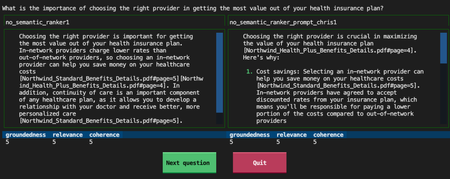
A RAG chat app should provide great answers if a question is answered by its knowledge base, but it should know how to say "I don't know" for all other questions. Let's explore how we can evaluate its ability to say "I don't know".2.4KViews0likes0Comments
Revolutionizing Accessibility: The Power of Facial Navigation Technology
Imagine that one of your colleagues lost arm mobility due to an accident, and now they are wondering how they will go back to their work. What if I could tell you that they will be able to use Teams and much more as they did before… 1.5KViews2likes0Comments
Online Medical Consultation and Reminder System using Custom Connectors in Power Apps
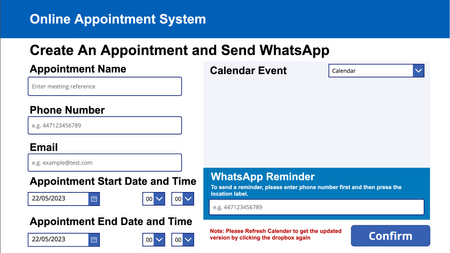
As a motivated team of Computer Science students from UCL, we built WhatsApp and Webex custom connectors, which we then used in a Canvas App to create an Online Consultation system as well as a reminder system for the NHS. Through this blog, we will walk you through our idea, how we built it using Power Apps, what we learned and our future plans.2.1KViews2likes1Comment