soar
161 Topics
The Hidden Reason Your Sentinel Playbook Won't Show Up in Automation Rules (It's Not RBAC)
If a Logic App using the native Microsoft Sentinel incident trigger doesn't show up in the "Run playbook" picker of an Automation Rule — even though permissions, region, and connection are all correct — check the internal action name of the trigger in the JSON code view. If the Logic App was created while the Azure portal was set to a non-English language, the designer may generate a localized action name instead of the expected Microsoft_Sentinel_incident, and the playbook won't be picked up. Environment Microsoft Sentinel (Log Analytics workspace) Logic Apps (Consumption plan) Trigger: native Microsoft Sentinel connector, "Incident" trigger (/incident-creation path) Authentication: system-assigned Managed Identity Same subscription, resource group, and region as the Sentinel workspace Problem Two Logic Apps, both triggered by the native Microsoft Sentinel incident trigger, both using a system-assigned managed identity with the Microsoft Sentinel Responder role granted on the workspace. Same subscription, same resource group, same region. Only one of the two appeared in the "Run playbook" dropdown when configuring an Automation Rule in Sentinel. The other was simply absent — no error message, no warning, nothing in the run history to explain it. Investigation The usual suspects were checked and ruled out one by one: API connection health — one azuresentinel connection was indeed in an "Error" state, but it turned out not to be the one referenced by the affected trigger. Managed identity RBAC — the Microsoft Sentinel Responder role was correctly assigned to the Logic App's managed identity on the Sentinel workspace. User's own RBAC/PIM role — the Logic App Contributor role (required for the account configuring the Automation Rule to even see the resource) was active via PIM at the time of testing. Region/subscription/resource group — identical for both Logic Apps. Trigger type — both used the native "Incident in Microsoft Sentinel" trigger added through the visual designer, not a generic HTTP trigger or a deprecated connector. Every documented requirement was met. The playbook was still invisible. Root Cause Comparing the raw JSON (Logic app > Development tools > Code view) revealed the actual difference. Working Logic App (visible in the picker): "triggers": { "Microsoft_Sentinel_incident": { "type": "ApiConnectionWebhook", "inputs": { "body": { "callback_url": "@{listCallbackUrl()}" }, "path": "/incident-creation" } } } Broken Logic App (invisible in the picker): "triggers": { "Incident_dans_Microsoft_Sentinel": { "type": "ApiConnectionWebhook", "inputs": { "body": { "callback_url": "@listCallbackUrl()" }, "path": "/incident-creation" } } } The connector type and the path (/incident-creation) are identical. The one meaningful structural difference is the trigger's action name: Microsoft_Sentinel_incident versus Incident_dans_Microsoft_Sentinel. The second Logic App's trigger had been added while the Azure portal was set to French. The designer generated a localized action name instead of the canonical English one. Everything points to Sentinel's playbook discovery mechanism scanning Logic App definitions for that exact canonical action name (Microsoft_Sentinel_incident) to identify a resource as a valid Sentinel playbook — rather than relying solely on the connector type or the webhook path, as one would reasonably expect. Fix Renaming the trigger's action key in the JSON to the canonical name was enough: "triggers": { "Microsoft_Sentinel_incident": { ... } } No permission, connection, or region change was required — only this rename. Takeaways The Sentinel Automation Rule playbook picker appears to depend on the exact trigger action name, not just its type or functional behavior — a dependency that isn't documented anywhere in the official Microsoft docs as of this writing. The Azure portal's display language at the time a trigger is added has a direct impact on that Logic App's compatibility with Sentinel Automation Rules. A playbook can be fully functional (running without errors when triggered manually or through an older automation mechanism) while still being invisible in the newer Automation Rule selector — which makes this particular issue easy to miss, since nothing explicitly flags it. Recommendations Temporarily switch the Azure portal to English (Portal settings > Language and region) before adding a Sentinel trigger to a Logic App, if your team usually works in another language. If an existing Logic App won't show up despite an otherwise correct configuration, check the trigger's action name in the JSON code view first — it's a 30-second check that can save hours of RBAC/connection troubleshooting. Document this in your internal runbooks if your team works in a localized portal — this kind of detail is easy to lose and can cost significant troubleshooting time down the line. Has anyone else run into similar localization-related quirks in Sentinel or Logic Apps? Would be curious to hear about other cases in the comments.92Views0likes0CommentsThe Hidden Reason Your Sentinel Playbook Won't Show Up in Automation Rules (It's Not RBAC)
If a Logic App using the native Microsoft Sentinel incident trigger doesn't show up in the "Run playbook" picker of an Automation Rule — even though permissions, region, and connection are all correct — check the internal action name of the trigger in the JSON code view. If the Logic App was created while the Azure portal was set to a non-English language, the designer may generate a localized action name instead of the expected Microsoft_Sentinel_incident, and the playbook won't be picked up. Environment Microsoft Sentinel (Log Analytics workspace) Logic Apps (Consumption plan) Trigger: native Microsoft Sentinel connector, "Incident" trigger (/incident-creation path) Authentication: system-assigned Managed Identity Same subscription, resource group, and region as the Sentinel workspace Problem Two Logic Apps, both triggered by the native Microsoft Sentinel incident trigger, both using a system-assigned managed identity with the Microsoft Sentinel Responder role granted on the workspace. Same subscription, same resource group, same region. Only one of the two appeared in the "Run playbook" dropdown when configuring an Automation Rule in Sentinel. The other was simply absent — no error message, no warning, nothing in the run history to explain it. Investigation The usual suspects were checked and ruled out one by one: API connection health — one azuresentinel connection was indeed in an "Error" state, but it turned out not to be the one referenced by the affected trigger. Managed identity RBAC — the Microsoft Sentinel Responder role was correctly assigned to the Logic App's managed identity on the Sentinel workspace. User's own RBAC/PIM role — the Logic App Contributor role (required for the account configuring the Automation Rule to even see the resource) was active via PIM at the time of testing. Region/subscription/resource group — identical for both Logic Apps. Trigger type — both used the native "Incident in Microsoft Sentinel" trigger added through the visual designer, not a generic HTTP trigger or a deprecated connector. Every documented requirement was met. The playbook was still invisible. Root Cause Comparing the raw JSON (Logic app > Development tools > Code view) revealed the actual difference. Working Logic App (visible in the picker): "triggers": { "Microsoft_Sentinel_incident": { "type": "ApiConnectionWebhook", "inputs": { "body": { "callback_url": "@{listCallbackUrl()}" }, "path": "/incident-creation" } } } Broken Logic App (invisible in the picker): "triggers": { "Incident_dans_Microsoft_Sentinel": { "type": "ApiConnectionWebhook", "inputs": { "body": { "callback_url": "@listCallbackUrl()" }, "path": "/incident-creation" } } } The connector type and the path (/incident-creation) are118Views0likes0CommentsThe Worm in the Supply Chain: How Defender for Endpoint and Sentinel for SAP BTP Caught Shai-Hulud
On 29 April 2026, malicious versions of multiple SAP ecosystem npm packages were briefly published, creating a supply-chain exposure for SAP Cloud Application Programming (CAP) development environments and CI/CD pipelines. For a brief window that morning, affected developers have executed a credential-stealing payload on a workstation or, in higher-impact cases, within a CI/CD pipeline. SAP developers don't usually think of themselves as a juicy npm target. CAP, BTP, Fiori - that's enterprise turf, not crypto-stealer type territory – Until it is. Join me for the ride. See our latest click-video for an even more dynamic experience of SAP compromises. Affected packages and scope Four official npm packages from the SAP development ecosystem were published in malicious versions that day. Security researchers are calling the campaign "Mini Shai-Hulud" - the little cousin of the worm family that has been chewing its way through open-source registries for months. So, the "mini" part is a generous description in my opinion. Shai-Hulud has wriggled directly into the SAP supply chain, and that detail alone deserves a pause... SAP CAP is now interesting enough to have become a target. Four packages, all wearing legitimate SAP branding, all quietly swapped for evil twins: @cap-js/sqlite v2.2.2 @cap-js/postgres v2.2.2 @cap-js/db-service v2.10.1 mbt v1.2.48 These packages are not peripheral dependencies. The @cap-js/* modules are part of the SAP CAP Model used across custom development on SAP BTP, while mbt is the Cloud MTA Build Tool commonly embedded in CI/CD workflows that package and deploy Multi-Target Applications to BTP and on-premises environments. At roughly 930,000 weekly downloads, the combined exposure created meaningful downstream attack surface. The good news: SAP spotted the compromise fast, yanked the bad versions, and shipped clean replacements. The official guidance lives in SAP Security Note 3747787 - which carries the list of indicators of compromise, file hashes, and mitigation steps. Enough theory and evidence talk! Now, SHOW ME the detection! When the worm stirs beneath the sand, weak defenses vanish first. Observed telemetry in Microsoft Security products See below excerpt of Microsoft Defender for Endpoint from a compromised developer machine. The worm was neutralized immediately. Check the detection time (same day of release): Windows Defender AV detected malware ToString: DefenderDetection: File: /Users/User***/Projects/dara-api-manager-ui/node_modules/mbt/File***.js, Sha256: *** [Trojan:JS/SPchnStlr.BB], BlockingStatus: Prevented, BlockingStatusPriority: 900 DetectionTime: 2026-04-29 11:52:11Z DetectorName: Microsoft.Cyber.ObservationDetectors.DefenderConcreteDetector Observations (2): DefenderObservation Description: Defender detected and quarantined 'Trojan:JS/SPchnStlr.BB' in file 'File***.js' ThreatCategory = Trojan, ThreatFamily = SPchnStlr, How the Threat Actors Operationalized the Stolen Data The compromise allowed harvesting GitHub tokens, AWS/Azure/GCP secrets, npm credentials, Kubernetes config, SSH keys, .npmrc and .git-credentials files, and CI/CD environment variables. The hackers created a public GitHub repository on the victim’s own account, tagged with the description “A Mini Shai-Hulud has Appeared“ to exfiltrate their reaping. Within hours, more than a thousand such repositories were visible in public GitHub search. For additional views on the topic check out the blogs of our Sentinel for SAP partners: Onapsis, Pathlock, and SecurityBridge. Containment and Impact Reduction If you were not as lucky as the developer using Defender for Endpoint and VS Code, you need end to end monitoring of your landscape in and around SAP. Once the worm is loose with cloud tokens it may appear in various unexpected places. Microsoft Sentinel Solution for SAP covers your ERP crown jewels, your SAP BTP landscape and allows informed correlation with the rest of your IT estate. Microsoft’s correlation engine: ensures traceability automatic attack disruption and just-in-time hardening of potential attack paths. Developers using the cloud-based IDE SAP Business Application Studio are out of reach by Defender for Endpoint but profit from threat monitoring through Sentinel for SAP BTP integrating SAP BTP’s malware scanner the same way. See this in action in this click-video and in below screenshot. SOC analysts get actionable insights and tailored guidance from Security Copilot once SAP BTP signals are added to the Microsoft incident graph - no matter where the threat involving SAP originates from. Getting Started with Sentinel Solution for SAP Rollout of Sentinel for SAP BTP can happen immediately. Learn more from our deployment guide. Check out the security content reference for more info out-of-the-box detections. Sentinel for SAP which covers your ERP solutions and more, requires configuration of SAP Integration Suite as intermediary step. Learn more from our deployment guide. Check out the security content reference for more info out-of-the-box detections Final Words This incident illustrates how far the SAP BTP attack surface now extends and why patching alone is insufficient once malicious code reaches developer tooling and build infrastructure. Effective defense also requires telemetry, correlation, and response coverage across SAP and non-SAP environments. See you out there folks! #Kudos to Mahesh Mandva and Cameron Gardiner on riding shai-holud with me. Feel free to reach out to talk more about SAP Cyber Security. Cheers, Martin Useful Links SAP Note 3747787 with mitigation guide Mini Shai-Hulud: Multi-Ecosystem Developer Supply Chain Attack – Lab Space Click-Demo for SAP Cyber Security with Microsoft Sentinel for SAP Security Content | Microsoft Learn Sentinel for SAP BTP Security Content | Microsoft Learn611Views0likes0Comments
MSSP migration to Unified portal: how are you sequencing your customer portfolio?
Following the automation and SOAR discussion, I wanted to open a conversation specifically focused on the MSSP and multi-tenant side of the migration, because this is where the coordination challenges are an order of magnitude higher than the technical ones. A few things I am working through before writing this up as Part 5 of the migration series. On Workspace Manager: Microsoft's own documentation now points you away from Workspace Manager at the point of onboarding to the Defender portal, directing you to Microsoft Defender multitenant management instead. For MSSPs who built their operating model around Workspace Manager, this is a significant structural change. For those implementing now, the recommendation is to go straight to the multitenant portal. I am interested in what the transition has looked like in practice for teams who were mid-flight on Workspace Manager when this became clear. On access delegation: one of the more honest framings I want to include in the article is around the GDAP plus Unified RBAC gap. A Microsoft employee confirmed in the RSAC 2026 thread that Unified RBAC support for GDAP in the Defender portal is on the roadmap with no firm date. MSSPs choosing between Entra B2B and the governance relationships model today are making an architectural call that is difficult to reverse. I want to present this accurately, and real experience from practitioners will sharpen that framing. On the connector deployment constraint: you cannot deploy connectors from a managed workspace configured with Azure Lighthouse alone, you also need GDAP. This makes a layered delegation architecture, Lighthouse plus GDAP plus B2B or governance relationships, necessary rather than optional. I am curious whether MSSPs are already running this layered model or whether most are still trying to make Lighthouse work as a single mechanism. On migration sequencing: the question I want to ask specifically is how teams are structuring their customer portfolio migration. Are you running waves based on customer complexity, based on contract renewal timing, based on customer risk appetite, or some other factor? And when something goes wrong in one tenant's migration, how are you containing the impact on the rest of the programme? Sharing the full article once it is written. Happy to discuss anything above in more detail in the thread.374Views0likes1CommentSentinel SOAR migration to Unified portal: what broke? anyone evaluated the AI playbook generator?
I want to open a conversation specifically focused on the automation and SOAR side of the migration, because this is the area where problems most commonly surface after onboarding rather than during it. A quick orientation: the Unified portal introduces a specific constraint that catches teams by surprise. Alert-triggered automation for alerts created by Microsoft Defender XDR is not available in the Defender portal. The main use case for alert-triggered automation in this context is responding to alerts from analytics rules where incident creation is disabled. If you had alert-triggered playbooks firing on Defender XDR signals, those need to be re-evaluated against the incident trigger model. This is documented by Microsoft, but it is easy to miss in the volume of migration guidance. The automation failure mode I have seen most consistently: automation rules built around incident title conditions. The Defender XDR correlation engine assigns its own incident names, so any condition keyed to "if incident title contains X" stops matching without throwing an error. The rule is still active, the automation is still enabled, and everything looks fine until someone notices a class of enrichment or response has gone quiet. Microsoft's recommendation is to use Analytic rule name as the condition instead. There is also a firm near-term deadline separate from the March 2027 portal retirement: queries and automation need to be updated by July 1, 2026 for standardised account entity naming. The Name field will consistently hold only the UPN prefix from that date. Any automation comparing AccountName against a full UPN will break. A few specific questions for practitioners: When you onboarded or reviewed your automation post-onboarding, what broke silently versus what produced a visible error? Silent failures are the dangerous ones and sharing specific patterns would be genuinely useful for the community. Has anyone evaluated the new AI playbook generator in the Defender portal? It requires Security Copilot with SCUs available and generates Python-based automation coauthored with Cline in an embedded VS Code environment. Interested in real-world comparisons against existing Logic Apps workflows for the same use case. For those who have migrated alert-triggered playbooks to automation rule invocation: did you find edge cases in the migration, particularly around playbooks used by multiple analytics rules simultaneously? Writing this up as Part 4 of the migration series. Sharing the article link once it is live for anyone who wants the full detail.375Views0likes2CommentsSentinel Foundry - MCP Server (Github Community Release)
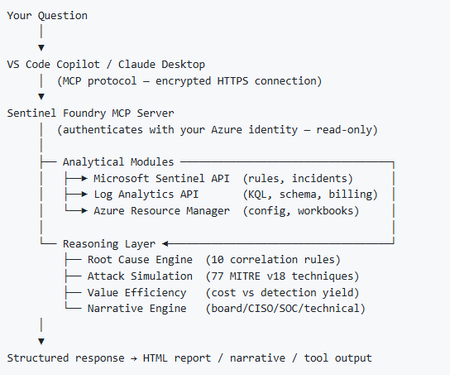
I’ve been cooking something that a lot of people in SOC have been struggling with — especially on the engineering side of Microsoft Sentinel. Thanks to the Microsoft Security team for shaping the capabilities of Sentinel even better with Sentinel Data Lake & Modern SecOps. Today’s the day I can finally share it. Note: This is not an official Microsoft product, but it is designed to make the Sentinel Build even better (complement) with much more intelligence. 🚀 Sentinel Foundry is now in public preview with 43 tools. (Sentinel Foundry - MCP Server) It’s an MCP server built to act like the brain of a strong Sentinel engineer — helping make building, improving, and operating Sentinel far more practical, faster, and honestly more enjoyable. For a lot of teams, the challenge is not understanding what Sentinel can do. The hard part is the engineering work around it: -> Deciding what data should actually be ingested -> Building a clean, scalable Sentinel foundation -> Writing useful detections instead of noisy ones -> Balancing security value with cost -> Turning ideas into deployable engineering outputs That is exactly why I built Sentinel Foundry to help communities grow stronger. It helps with the real engineering tasks behind Sentinel — from architecture thinking to detection design, deployment planning, ingestion strategy, automation ideas, and many of the workflows outlined in the GitHub project. How does it work? Here’s one of the flagship prompts I ran with it: “Give me a complete security posture report for our workspace. Score each pillar and tell me what to prioritise.” And within seconds, it produced a structured engineering blueprint that would normally take a lot longer to pull together manually. You can see the example prompts here in what it can do: https://github.com/prabhukiranveesam/Sentinel-Foundry#what-can-it-do I want building Sentinel to feel less like repetitive engineering overhead — and more like real security engineering that is fast, creative, and enjoyable. If you work with Sentinel as a SOC L2 analyst, engineer, detection engineer, consultant, or architect, I’d genuinely love for you to try it and tell me what you think. 🔗 Public Preview: https://github.com/prabhukiranveesam/Sentinel-Foundry This is just the start of an AI era — and I’m excited to keep shaping it with more powerful features over the coming days. This is very easy to set up and will be available to all of you at no cost during this month as part of the public preview, and your feedback is extremely valuable to shape this as a powerful solution.994Views0likes2CommentsSentinel RBAC in the Unified portal: who has activated Unified RBAC, and how did it go?
Following the RSAC 2026 announcements last month, I have been working through the full permission picture for the Unified portal and wanted to open a discussion here given how much has shifted in a short period. A quick framing of where things stand. The baseline is still that Azure RBAC carries across for Sentinel SIEM access when you onboard, no changes required. But there are now two significant additions in public preview: Unified RBAC for Sentinel SIEM itself (extending the Defender Unified RBAC model to cover Sentinel directly), and a new Defender-native GDAP model for non-CSP organisations managing delegated access across tenants. The GDAP piece in particular is worth discussing carefully, because I want to be precise about what has and has not changed. The existing limitation from Microsoft's onboarding documentation, that GDAP with Azure Lighthouse is not supported for Sentinel data in the Defender portal, has not changed. What is new is a separate, Defender-portal-native GDAP mechanism announced at RSAC, which is a different thing. These are not the same capability. If you were using Entra B2B as the interim path based on earlier guidance, that guidance was correct and that path remains the generally available option today. A few things I would genuinely like to hear from practitioners: For those who have activated Unified RBAC for a Sentinel workspace in the Defender portal: what did the migration from Azure RBAC roles look like in practice? Did the import function bring roles across cleanly, or did you find gaps particularly around custom roles? For environments using Playbook Operator, Automation Contributor, or Workbook Contributor role assignments: how are you handling the fact those three roles are not yet in Unified RBAC and still require Azure portal management? Is the dual-management posture creating operational friction? For MSSPs evaluating the new Defender-native GDAP model against their existing Entra B2B setup: what factors are driving the decision either way at your scale? Writing this up as Part 3 of the migration series and the community experience here is directly useful for making sure the practitioner angle is grounded.Solved625Views0likes3CommentsWhat caught you off guard when onboarding Sentinel to the Defender portal?
Following on from a previous discussion around what actually changes versus what doesn't in the Sentinel to Defender portal migration, I wanted to open a more specific conversation around the onboarding moment itself. One thing I have been writing about is how much happens automatically the moment you connect your workspace. The Defender XDR connector enables on its own, a bi-directional sync starts immediately, and if your Microsoft incident creation rules are still active across Defender for Endpoint, Identity, Office 365, Cloud Apps, and Entra ID Protection, you are going to see duplicate incidents before you have had a chance to do anything about it. That is one of the reasons I keep coming back to the inventory phase as the most underestimated part of this migration. Most of the painful post-migration experiences I hear about trace back to things that could have been caught in a pre-migration audit: analytics rules with incident title dependencies, automation conditions that assumed stable incident naming, RBAC gaps that only become visible when someone tries to access the data lake for the first time. A few things I would genuinely love to hear from practitioners who have been through this: - When you onboarded, what was the first thing that behaved unexpectedly that you had not anticipated from the documentation? - For those who have reviewed automation rules post-onboarding: did you find conditions relying on incident title matching that broke, and how did you remediate them? - For anyone managing access across multiple tenants: how are you currently handling the GDAP gap while Microsoft completes that capability? I am writing up a detailed pre-migration inventory framework covering all four areas and the community experience here is genuinely useful for making sure the practitioner angle covers the right ground. Happy to discuss anything above in more detail.Solved380Views2likes3CommentsRSAC 2026: What the Sentinel Playbook Generator actually means for SOC automation
RSAC 2026 brought a wave of Sentinel announcements, but the one I keep coming back to is the playbook generator. Not because it's the flashiest, but because it touches something that's been a real operational pain point for years: the gap between what SOC teams need to automate and what they can realistically build and maintain. I want to unpack what this actually changes from an operational perspective, because I think the implications go further than "you can now vibe-code a playbook." The problem it solves If you've built and maintained Logic Apps playbooks in Sentinel at any scale, you know the friction. You need a connector for every integration. If there isn't one, you're writing custom HTTP actions with authentication handling, pagination, error handling - all inside a visual designer that wasn't built for complex branching logic. Debugging is painful. Version control is an afterthought. And when something breaks at 2am, the person on call needs to understand both the Logic Apps runtime AND the security workflow to fix it. The result in most environments I've seen: teams build a handful of playbooks for the obvious use cases (isolate host, disable account, post to Teams) and then stop. The long tail of automation - the enrichment workflows, the cross-tool correlation, the conditional response chains - stays manual because building it is too expensive relative to the time saved. What's actually different now The playbook generator produces Python. Not Logic Apps JSON, not ARM templates - actual Python code with documentation and a visual flowchart. You describe the workflow in natural language, the system proposes a plan, asks clarifying questions, and then generates the code once you approve. The Integration Profile concept is where this gets interesting. Instead of relying on predefined connectors, you define a base URL, auth method, and credentials for any service - and the generator creates dynamic API calls against it. This means you can automate against ServiceNow, Jira, Slack, your internal CMDB, or any REST API without waiting for Microsoft or a partner to ship a connector. The embedded VS Code experience with plan mode and act mode is a deliberate design choice. Plan mode lets you iterate on the workflow before any code is generated. Act mode produces the implementation. You can then validate against real alerts and refine through conversation or direct code edits. This is a meaningful improvement over the "deploy and pray" cycle most of us have with Logic Apps. Where I see the real impact For environments running Sentinel at scale, the playbook generator could unlock the automation long tail I mentioned above. The workflows that were never worth the Logic Apps development effort might now be worth a 15-minute conversation with the generator. Think: enrichment chains that pull context from three different tools before deciding on a response path, or conditional escalation workflows that factor in asset criticality, time of day, and analyst availability. There's also an interesting angle for teams that operate across Microsoft and non-Microsoft tooling. If your SOC uses Sentinel for SIEM but has Palo Alto, CrowdStrike, or other vendors in the stack, the Integration Profile approach means you can build cross-vendor response playbooks without middleware. The questions I'd genuinely like to hear about A few things that aren't clear from the documentation and that I think matter for production use: Security Copilot dependency: The prerequisites require a Security Copilot workspace with EU or US capacity. Someone in the blog comments already flagged this as a potential blocker for organizations that have Sentinel but not Security Copilot. Is this a hard requirement going forward, or will there be a path for Sentinel-only customers? Code lifecycle management: The generated Python runs... where exactly? What's the execution runtime? How do you version control, test, and promote these playbooks across dev/staging/prod? Logic Apps had ARM templates and CI/CD patterns. What's the equivalent here? Integration Profile security: You're storing credentials for potentially every tool in your security stack inside these profiles. What's the credential storage model? Is this backed by Key Vault? How do you rotate credentials without breaking running playbooks? Debugging in production: When a generated playbook fails at 2am, what does the troubleshooting experience look like? Do you get structured logs, execution traces, retry telemetry? Or are you reading Python stack traces? Coexistence with Logic Apps: Most environments won't rip and replace overnight. What's the intended coexistence model between generated Python playbooks and existing Logic Apps automation rules? I'm genuinely optimistic about this direction. Moving from a low-code visual designer to an AI-assisted coding model with transparent, editable output feels like the right architectural bet for where SOC automation needs to go. But the operational details around lifecycle, security, and debugging will determine whether this becomes a production staple or stays a demo-only feature. Would be interested to hear from anyone who's been in the preview - what's the reality like compared to the pitch?Solved299Views0likes1CommentRSAC 2026: New Microsoft Sentinel Connectors Announcement
Microsoft Sentinel helps organizations detect, investigate, and respond to security threats across increasingly complex environments. With the rollout of the Microsoft Sentinel data lake in the fall, and the App Assure-backed Sentinel promise that supports it, customers now have access to long-term, cost-effective storage for security telemetry, creating a solid foundation for emerging Agentic AI experiences. Since our last announcement at Ignite 2025, the Microsoft Sentinel connector ecosystem has expanded rapidly, reflecting continued investment from software development partners building for our shared customers. These connectors bring diverse security signals together, enabling correlation at scale and delivering richer investigation context across the Sentinel platform. Below is a snapshot of Microsoft Sentinel connectors newly available or recently enhanced since our last announcement, highlighting the breadth of partner solutions contributing data into, and extending the value of, the Microsoft Sentinel ecosystem. New and notable integrations Acronis Cyber Protect Cloud Acronis Cyber Protect Cloud integrates with Microsoft Sentinel to bring data protection and security telemetry into a centralized SOC view. The connector streams alerts, events, and activity data - spanning backup, endpoint protection, and workload security - into Microsoft Sentinel for correlation with other signals. This integration helps security teams investigate ransomware and data-centric threats more effectively, leverage built-in hunting queries and detection rules, and improve visibility across managed environments without adding operational complexity. Anvilogic Anvilogic integrates with Microsoft Sentinel to help security teams operationalize detection engineering at scale. The connector streams Anvilogic alerts into Microsoft Sentinel, giving SOC analysts centralized visibility into high-fidelity detections and faster context for investigation and triage. By unifying detection workflows, reducing alert noise, and improving prioritization, this integration supports more efficient threat detection and response while helping teams extend coverage across evolving attack techniques. BigID BigID integrates with Microsoft Sentinel to extend data security posture management (DSPM) insights into security operations workflows. The solution brings visibility into sensitive, regulated, and critical data across cloud, SaaS, and on‑premises environments, helping security teams understand where high‑risk data resides and how it may be exposed. By incorporating data‑centric risk context into Sentinel, this integration supports more informed investigation and prioritization, enabling organizations to reduce data‑related risk and align security operations with data protection and compliance objectives. Commvault Cloud Commvault Cloud integrates with Microsoft Sentinel to bring data protection and cyber‑resilience telemetry into security operations workflows. The connector ingests security‑relevant signals from Commvault Cloud—such as backup anomalies, malware and ransomware indicators, and other threat‑related events—into Sentinel, enabling centralized detection, investigation, and automated response. By correlating backup intelligence with broader Sentinel telemetry, this integration helps security teams reduce blind spots, validate the scope of incidents, and improve coordination between security and recovery operations. CyberArk Audit CyberArk Audit integrates with Microsoft Sentinel to centralize visibility into privileged identity and access activity. By streaming detailed audit logs - covering system events, user actions, and administrative activity - into Microsoft Sentinel, security teams can correlate identity-driven risks with broader security telemetry. This integration supports faster investigations, improved monitoring of privileged access, and more effective incident response through automated workflows and enriched context for SOC analysts. Cyera Cyera integrates with Microsoft Sentinel to extend AI-native data security posture management into security operations. The connector brings Cyera’s data context and actionable intelligence across multi-cloud, on-premises, and SaaS environments into Microsoft Sentinel, helping teams understand where sensitive data resides and how it is accessed, exposed, and used. Built on Sentinel’s modern framework, the integration feeds context-rich data risk signals into the Sentinel data lake, enabling more informed threat hunting, automation, and decision-making around data, user, and AI-related risk. TacitRed CrowdStrike IOC Automation Data443 TacitRed CS IOC Automation integrates with Microsoft Sentinel to streamline the operationalization of compromised credential intelligence. The solution uses Sentinel playbooks to automatically push TacitRed indicators of compromise into CrowdStrike via Sentinel playbooks, helping security teams turn identity-based threat intelligence into action. By automating IOC handling and reducing manual effort, this integration supports faster response to credential exposure and strengthens protection against account-driven attacks across the environment. TacitRed SentinelOne IOC Automation Data443 TacitRed SentinelOne IOC Automation integrates with Microsoft Sentinel to help operationalize identity-focused threat intelligence at the endpoint layer. The solution uses Sentinel playbooks to automatically consume TacitRed indicators and push curated indicators into SentinelOne via Sentinel playbooks and API-based enforcement, enabling faster enforcement of high-risk IOCs without manual handling. By automating the flow of compromised credential intelligence from Sentinel into EDR, this integration supports quicker response to identity-driven attacks and improves coordination between threat intelligence and endpoint protection workflows. TacitRed Threat Intelligence Data443 TacitRed Threat Intelligence integrates with Microsoft Sentinel to provide enhanced visibility into identity-based risks, including compromised credentials and high-risk user exposure. The solution ingests curated TacitRed intelligence directly into Sentinel, enriching incidents with context that helps SOC teams identify credential-driven threats earlier in the attack lifecycle. With built-in analytics, workbooks, and hunting queries, this integration supports proactive identity threat detection, faster triage, and more informed response across the SOC. Cyren Threat Intelligence Cyren Threat Intelligence integrates with Microsoft Sentinel to enhance detection of network-based threats using curated IP reputation and malware URL intelligence. The connector ingests Cyren threat feeds into Sentinel using the Codeless Connector Framework (CCF), transforming raw indicators into actionable insights, dashboards, and enriched investigations. By adding context to suspicious traffic and phishing infrastructure, this integration helps SOC teams improve alert accuracy, accelerate triage, and make more confident response decisions across their environments. TacitRed Defender Threat Intelligence Data443 TacitRed Defender Threat Intelligence integrates with Microsoft Sentinel to surface early indicators of credential exposure and identity-driven risk. The solution automatically ingests compromised credential intelligence from TacitRed into Sentinel and can support synchronization of validated indicators with Microsoft Defender Threat Intelligence through Sentinel workflows, helping SOC teams detect account compromise before abuse occurs. By enriching Sentinel incidents with actionable identity context, this integration supports faster triage, proactive remediation, and stronger protection against credential-based attacks. Datawiza Access Proxy (DAP) Datawiza Access Proxy integrates with Microsoft Sentinel to provide centralized visibility into application access and authentication activity. By streaming access and MFA logs from Datawiza into Sentinel, security teams can correlate identity and session-level events with broader security telemetry. This integration supports detection of anomalous access patterns, faster investigation through session traceability, and more effective response using Sentinel automation, helping organizations strengthen Zero Trust controls and meet auditing and compliance requirements. Endace Endace integrates with Microsoft Sentinel to provide deep network visibility by providing always-on, packet-level evidence. The connector enables one-click pivoting from Sentinel alerts directly to recorded packet data captured by EndaceProbes. This helps SOC and NetOps teams reconstruct events and validate threats with confidence. By combining Sentinel’s AI-driven analytics with Endace’s always-on, full-packet capture across on-premises, hybrid, and cloud environments, this integration supports faster investigations, improved forensic accuracy, and more decisive incident response. Feedly Feedly integrates with Microsoft Sentinel to ingest curated threat intelligence directly into security operations workflows. The connector automatically imports Indicators of Compromise (IoCs) from Feedly Team Boards and folders into Sentinel, enriching detections and investigations with context from the original intelligence articles. By bringing analyst‑curated threat intelligence into Sentinel in a structured, automated way, this integration helps security teams stay current on emerging threats and reduce the manual effort required to operationalize external intelligence. Gigamon Gigamon integrates with Microsoft Sentinel through a new connector that provides access to Gigamon Application Metadata Intelligence (AMI), delivering high-fidelity network-derived telemetry with rich application metadata from inspected traffic directly into Sentinel. This added context helps security teams detect suspicious activity, encrypted threats, and lateral movement faster and with greater precision. By enriching analytics without requiring full packet ingestion, organizations can reduce noise, manage SIEM costs, and extend visibility across hybrid cloud infrastructure. Halcyon Halcyon integrates with Microsoft Sentinel to provide purpose-built ransomware detection and automated containment across the Microsoft security ecosystem. The connector surfaces Halcyon ransomware alerts directly within Sentinel, enabling SOC teams to correlate ransomware behavior with Microsoft Defender and broader Microsoft telemetry. By supporting Sentinel analytics and automation workflows, this integration helps organizations detect ransomware earlier, investigate faster using native Sentinel tools, and isolate affected endpoints to prevent lateral spread and reinfection. Illumio The Illumio platform identifies and contains threats across hybrid multi-cloud environments. By integrating AI-driven insights with Microsoft Sentinel and Microsoft Graph, Illumio Insights enables SOC analysts to visualize attack paths, prioritize high-risk activity, and investigate threats with greater precision. Illumio Segmentation secures critical assets, workloads, and devices and then publishes segmentation policy back into Microsoft Sentinel to ensure compliance monitoring. Joe Sandbox Joe Sandbox integrates with Microsoft Sentinel to enrich incidents with dynamic malware and URL analysis. The connector ingests Joe Sandbox threat intelligence and automatically detonates suspicious files and URLs associated with Sentinel incidents, returning behavioral and contextual analysis results directly into investigation workflows. By adding sandbox-driven insights to indicators, alerts, and incident comments, this integration helps SOC teams validate threats faster, reduce false positives, and improve response decisions using deeper visibility into malicious behavior. Keeper Security The Keeper Security integration with Microsoft Sentinel brings advanced password and secrets management telemetry into your SIEM environment. By streaming audit logs and privileged access events from Keeper into Sentinel, security teams gain centralized visibility into credential usage and potential misuse. The connector supports custom queries and automated playbooks, helping organizations accelerate investigations, enforce Zero Trust principles, and strengthen identity security across hybrid environments. Lookout Mobile Threat Defense (MTD) Lookout Mobile Threat Defense integrates with Microsoft Sentinel to extend SOC visibility to mobile endpoints across Android, iOS, and Chrome OS. The connector streams device, threat, and audit telemetry from Lookout into Sentinel, enabling security teams to correlate mobile risk signals such as phishing, malicious apps, and device compromise, with broader enterprise security data. By incorporating mobile threat intelligence into Sentinel analytics, dashboards, and alerts, this integration helps organizations detect mobile driven attacks earlier and strengthen protection for an increasingly mobile workforce. Miro Miro integrates with Microsoft Sentinel to provide centralized visibility into collaboration activity across Miro workspaces. The connector ingests organization-wide audit logs and content activity logs into Sentinel, enabling security teams to monitor authentication events, administrative actions, and content changes alongside other enterprise signals. By bringing Miro collaboration telemetry into Sentinel analytics and dashboards, this integration helps organizations detect suspicious access patterns, support compliance and eDiscovery needs, and maintain stronger oversight of collaborative environments without disrupting productivity. Obsidian Activity Threat The Obsidian Threat and Activity Feed for Microsoft Sentinel delivers deep visibility into SaaS and AI applications, helping security teams detect account compromise and insider threats. By streaming user behavior and configuration data into Sentinel, organizations can correlate application risks with enterprise telemetry for faster investigations. Prebuilt analytics and dashboards enable proactive monitoring, while automated playbooks simplify response workflows, strengthening security posture across critical cloud apps. OneTrust for Purview DSPM OneTrust integrates with Microsoft Sentinel to bring privacy, compliance, and data governance signals into security operations workflows. The connector enriches Sentinel with privacy relevant events and risk indicators from OneTrust, helping organizations detect sensitive data exposure, oversharing, and compliance risks across cloud and non-Microsoft data sources. By unifying privacy intelligence with Sentinel analytics and automation, this integration enables security and privacy teams to respond more quickly to data risk events and support responsible data use and AI-ready governance. Pathlock Pathlock integrates with Microsoft Sentinel to bring SAP-specific threat detection and response signals into centralized security operations. The connector forwards security-relevant SAP events into Sentinel, enabling SOC teams to correlate SAP activity with broader enterprise telemetry and investigate threats using familiar SIEM workflows. By enriching Sentinel with SAP security context and focused detection logic, this integration helps organizations improve visibility into SAP landscapes, reduce noise, and accelerate detection and response for risks affecting critical business systems. Quokka Q-scout Quokka Q-scout integrates with Microsoft Sentinel to centralize mobile application risk intelligence across Microsoft Intune-managed devices. The connector automatically ingests app inventories from Intune, analyzes them using Quokka’s mobile app vetting engines, and streams security, privacy, and compliance risk findings into Sentinel. By surfacing app-level risks through Sentinel analytics and alerts, this integration helps security teams identify malicious or high-risk mobile apps, prioritize remediation, and strengthen mobile security posture without deploying agents or disrupting users. Semperis Lightning Semperis Lightning integrates with Microsoft Sentinel to deliver deep visibility into identity‑centric risk across Active Directory and Microsoft Entra environments. The connector ingests identity security telemetry such as indicators of exposure, Tier 0 assets, and attack path insights into Sentinel, enabling security teams to correlate identity risks with broader security signals. By bringing rich identity context into Sentinel analytics, hunting, and investigations, this integration helps organizations detect, prioritize, and respond to identity‑driven attacks more effectively across hybrid identity infrastructures. Synqly Synqly integrates with Microsoft Sentinel to simplify and scale security integrations through a unified API approach. The connector enables organizations and security vendors to establish a bi‑directional connection with Sentinel without relying on brittle, point‑to‑point integrations. By abstracting common integration challenges such as authentication handling, retries, and schema changes, Synqly helps teams orchestrate security data flows into and out of Sentinel more reliably, supporting faster onboarding of new data sources and more maintainable integrations at scale. Versasec vSEC:CMS Versasec vSEC:CMS integrates with Microsoft Sentinel to provide centralized visibility into credential lifecycle and system health events. The connector securely streams vSEC:CMS and vSEC:CLOUD alerts and status data into Sentinel using the Codeless Connector Framework (CCF), transforming credential management activity into correlation-ready security signals. By bringing smart card, token, and passkey management telemetry into Sentinel, this integration helps security teams monitor authentication infrastructure health, investigate credential-related incidents, and unify identity security operations within their SIEM workflows. VirtualMetric DataStream VirtualMetric DataStream integrates with Microsoft Sentinel to optimize how security telemetry is collected, normalized, and routed across the Microsoft security ecosystem. Acting as a high-performance telemetry pipeline, DataStream intelligently filters and enriches logs, sending high-value security data to Sentinel while routing less-critical data to Sentinel data lake or Azure Blob Storage for cost-effective retention. By reducing noise upstream and standardizing logs to Sentinel ready schemas, this integration helps organizations control ingestion costs, improve detection quality, and streamline threat hunting and compliance workflows. VMRay VMRay integrates with Microsoft Sentinel to enrich SIEM and SOAR workflows with automated sandbox analysis and high-fidelity, behavior-based threat intelligence. The connector enables suspicious files and phishing URLs to be submitted directly from Sentinel to VMRay for dynamic analysis, while validated, high-confidence indicators of compromise (IOCs) are streamed back into Sentinel’s Threat Intelligence repository for correlation and detection. By adding detailed attack-chain visibility and enriched incident context, this integration helps SOC teams reduce investigation time, improve detection accuracy, and strengthen automated response workflows across Sentinel environments. XBOW XBOW integrates with Microsoft Sentinel to bring autonomous penetration testing insights directly into security operations workflows. The connector ingests automated penetration test findings from the XBOW platform into Sentinel, enabling security teams to analyze validated exploit activity alongside alerts, incidents, and other security telemetry. By correlating offensive testing results with Sentinel detections, this integration helps organizations identify monitoring gaps, validate detection coverage, and strengthen defensive controls using real‑world, continuously generated attack evidence. Zero Networks Segment Audit Zero Networks Segment integrates with Microsoft Sentinel to provide visibility into micro-segmentation and access-control activity across the network. The connector can collect audit logs or activities from Zero Networks Segment, enabling security teams to monitor policy changes, administrative actions, and access events related to MFA-based network segmentation. By bringing segmentation audit telemetry into Sentinel, this integration supports compliance monitoring, investigation of suspicious changes, and faster detection of attempts to bypass lateral-movement controls within enterprise environments. Zscaler Internet Access (ZIA) Zscaler Internet Access integrates with Microsoft Sentinel to centralize cloud security telemetry from web and firewall traffic. The connector enables ZIA logs to be ingested into Sentinel, allowing security teams to correlate Zscaler Internet Access signals with other enterprise data for improved threat detection, investigation, and response. By bringing ZIA web, firewall, and security events into Sentinel analytics and hunting workflows, this integration helps organizations gain broader visibility into internet-based threats and strengthen Zero Trust security operations. In addition to these solutions from our third-party partners, we are also excited to announce the following connector published by the Microsoft Sentinel team: GitHub Enterprise Audit Logs Microsoft’s Sentinel Promise For Customers Every connector in the Microsoft Sentinel ecosystem is built to work out of the box. In the unlikely event a customer encounters any issue with a connector, the App Assure team stands ready to assist. For Software Developers Software partners in need of assistance in creating or updating a Sentinel solution can also leverage Microsoft’s Sentinel Promise to support our shared customers. For developers seeking to build agentic experiences utilizing Sentinel data lake, we are excited to announce the launch of our Sentinel Advisory Service to guide developers across their Sentinel journey. Customers and developers alike can reach out to us via our intake form. Learn More Microsoft Sentinel data lake Microsoft Sentinel data lake: Unify signals, cut costs, and power agentic AI Introducing Microsoft Sentinel data lake What is Microsoft Sentinel data lake Unlocking Developer Innovation with Microsoft Sentinel data lake Microsoft Sentinel Codeless Connector Framework (CCF) Create a codeless connector for Microsoft Sentinel Public Preview Announcement: Microsoft Sentinel CCF Push What’s New in Microsoft Sentinel Monthly Blog Microsoft App Assure App Assure home page App Assure services App Assure blog App Assure Request Assistance Form App Assure Sentinel Advisory Services announcement App Assure’s promise: Migrate to Sentinel with confidence App Assure’s Sentinel promise now extends to Microsoft Sentinel data lake Ignite 2025 new Microsoft Sentinel connectors announcement Microsoft Security Microsoft’s Secure Future Initiative Microsoft Unified SecOps Editor's Note - April 7th, 2026: This blog was updated to include connector descriptions for BigID, Commvault, Semperis, and XBOW.2.3KViews0likes0Comments