small and medium business (smb)
8 TopicsHelp your customers get answers and support with Teams Phone Agent
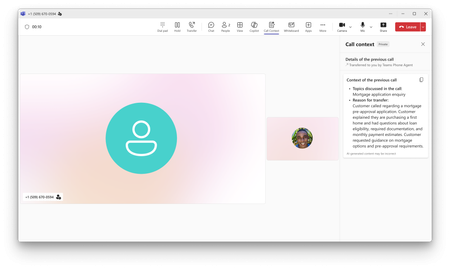
Now generally available, Teams Phone Agent is an AI-powered calling receptionist that helps organizations serve their customers. It answers incoming calls to help customers with common requests, such as answering questions and booking appointments. It also intelligently transfers callers to an employee or department with context notes when additional assistance is needed.999Views2likes1CommentWhat's New in Microsoft Teams | August - September 2026
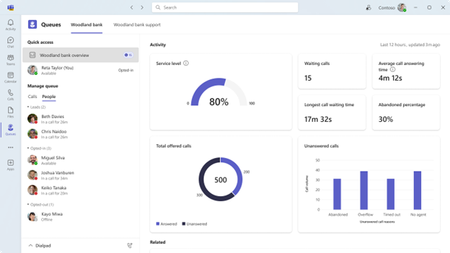
A quick note before we get into it: What's New in Teams is shifting from a monthly to a quarterly rhythm. You'll hear from us next in December, March, and June, and each edition will round up everything announced and released over the full quarter. One post, one fuller view of what's new. Two investments shape where Teams is heading, and you'll see both in this quarter's releases: AI transforming teamwork with agents as part of the team, and a simpler, smarter, more secure foundation underneath it all. AI in Teams is showing up in the flow of your work. Teams Phone Agent brings that to your phone line, helping callers with common requests in more than 60 languages and routing them with context attached, so a missed call turns into a next step instead of a lost one. Context carries forward, too. Video recap turns a meeting you missed into a short, narrated highlight reel, so what a meeting decided outlasts the conversation itself. And protection for everyday collaboration is always top of mind. The new Security Detection Report brings detections such as impersonation and malicious URLs into one view in the Teams admin center, so admins see the whole picture in one place. Read on for all the latest updates! Feature categories: (All features listed are generally available unless otherwise noted) Chat and Collaboration Meetings Teams Phone Workplace Teams Events Fundamentals and Security Teams Platform Certified devices Chat and Collaboration Ask Copilot in Teams conversations Stay in the flow of work and get help from Copilot directly within your conversations. Open Copilot from a message or selected text in a Teams conversation, with the relevant context already included, making it easier to gain insights, explore questions, and move work forward without needing to re-explain information. Find agents and apps faster through Teams search Discover the tools you need with agents and apps surfaced directly in Teams search results. As you type in the search bar, matching agents and apps appear alongside other relevant results, helping you spend less time searching and more time getting things done. Find and share files faster in Teams Locate the files you need while sharing content in Teams. Search for cloud-based files directly from the attachment experience, making it easier to find and share the right content without interrupting the flow of collaboration. Emoji shortcuts on iOS and Android Express yourself with emoji shortcuts. Desktop emoji shortcuts now work on iOS and Android. Insert emojis directly in the compose box by typing a word between colons, so :smile: becomes 😊. Autocomplete suggestions help speed up entry, and custom emojis are also supported. Clearer text highlighting in dark mode and high contrast mode Make highlighted text easier to read while composing messages in Teams. Improvements to text highlighting in dark mode and high contrast mode provide a more consistent and accessible editing experience, helping content stand out more clearly. Meetings Video recap in Teams Meeting recap now delivers a bite-sized video recap of with key highlights from your Teams meeting. It combines AI-generated voiceover summaries with video snippets, spotlighting the most important moments while preserving the original tone and flow, so you can catch up on key topics in a few minutes. Video recaps now support meetings in 23 languages across 31 regional variants, learn more. Translation button to change the language for intelligent meeting recaps After an intelligent meeting recap is generated, you can change the recap language at any time using a translation button, even if a different language was selected during the meeting. Multilingual teams get more flexibility to read meeting insights, action items, and discussion summaries in the language that is most comfortable for them. Teams Phone Teams Phone Agent Teams Phone Agent is an AI-powered receptionist for your business’s phone line, so callers can get help with common requests even after hours. For customer-facing organizations and departments using Teams Phone, such as bank branches or IT help desks, it takes repetitive calls off employees' plates so they can focus on the conversations that truly need a human touch. With support for over 60 languages and locales, Teams Phone Agent handles common requests such as answering routine questions or booking appointments. , And it can route a caller to the right department or employee with an AI-generated summary of the conversation, so customers do not have to navigate phone menus or repeat themselves. Custom voice agents are available for specialized workflows. Teams Phone Agent is now generally available, learn more. If the player doesn’t load, open the video in a new window: Open video Intelligent call recap in Queues app Intelligent call recaps in Queues app help you catch up on recorded or transcribed queue calls with AI-generated summary notes covering key discussion points and follow-up actions. To open a recap, find the call record in the Queues app call history and select Recap. Copilot in Queues app’s shared call history for post-call insights Quickly catch up on a call queue call and uncover key details with the ability to use Copilot in the shared call history in Queues app. After a recorded call is completed, users with Copilot can now open the call record in the shared call history, access the Copilot Chat sidecar from the Recap tab, and ask questions about the call. Automatic recording and transcription for call queues Capture customer interactions without requiring your organization’s calling representatives to manually start recording. Admins can enable automatic recording and transcription for individual Teams call queues and control access to recordings. Recordings are stored in SharePoint and accessible through call recaps in the shared call history in Queues app. View and manage auto attendant shared voicemails in Queues app Help your team stay on top of customer messages by managing auto attendant shared voicemails directly in Queues app. Calls routed from an auto attendant to voicemail will appear in Queues app, giving collaborative calling teams a centralized place to track, triage, and respond to messages. Customize recording and transcription notifications for Teams calls Give your organization greater control over how recording and transcription are communicated during Teams calls. IT admins can customize select user notification strings for recording and transcription in the Teams admin center, helping tailor the experience for participants in Teams VoIP calls. Enhance control of delegated calls with call lock and delegate join alerts Call delegation in Teams gains real controls: a delegator can lock an active call and see when a delegate joins. Locking prevents delegates from joining or resuming the call, and optional warning tones notify participants when a delegate joins or resumes. Workplace Interpreter agent support in Teams Rooms on Android The Interpreter agent acts as a translator in Microsoft Teams meetings, letting participants listen in their chosen language with real-time translation. It is now available in Teams Rooms on Android licensed for Teams Rooms Pro. Zero-touch provisioning on Teams MDEP-based Android devices IT teams can deploy MDEP-based Android devices at scale with automated, hands-off provisioning, cutting manual setup and applying security policies from first boot, similar to Autopilot for Windows. Deployment is managed from the Teams Rooms Pro Management portal. New room optimization mode in Teams desktop Room optimization mode makes it easier to use your laptop for meetings and collaboration in spaces such as focus or huddle rooms that do not yet have a Teams Rooms system. It replaces shared display mode, has a new location, and enables or disables room-specific features. When room peripherals are connected, Teams can automatically select audio and video devices, enable speaker recognition and shared display, and disable voice isolation. Meeting room join time comparison analytics in the Pro Management portal Admins can now compare meeting join times between Teams Rooms and bring-your-own-device rooms. These analytics help monitor the experience and plan workspaces, and the portal uses the comparison metrics to recommend actions proactively. Available with Teams Rooms Pro and Teams Shared Space licenses. Enhanced bookable desk experience with Teams panel-based desk hub devices The Teams panel app now enables devices to enhance bookable desk experiences, indicating at-a-glance availability and letting visitors book directly on the device, so people have better experiences in flexible work environments. Each device requires a Teams Shared Space license. Modernized Gallery view in Teams Rooms on Android The updated Gallery view in Teams Rooms on Android prioritizes video on the meeting stage, arranges participants in consistent aspect ratios, and minimizes movement of participant tiles on stage. You can hide the room self-preview video and choose to see audio and video participants equally on stage instead of prioritizing video participants. Admins can set the default behavior using local device settings and the Pro Management portal. Teams Events Breakout rooms in Teams Meetings & Events Breakout rooms are now supported in Teams Meetings & Teams Events with up to 1,000 participants across 100 rooms, increased from the previous limit of 300 participants across 50 rooms. Organizers can use breakout rooms to create smaller focused sessions within an event for more interaction and collaboration. Specify who has control of production tools in Teams Events Organizers can designate who controls production tools, granting chosen people access to Manage what attendees see and the green room so event production stays with the right crew. The setting is a new meeting option applied when the event is set up. Expanding presenter visibility in “Manage what attendees see” Producers can resize and expand the presenter panel in Manage what attendees see, making it easier to view, manage, and switch between presenters while a live event is running. New layout when sharing content for Teams events Organizers and presenters who have access to production tools now see updated layout options when sharing content in the “Manage what attendees see” experience for Teams events. The available layouts are speaker focused, content focused, and content only. The new speaker focused layout prioritizes presenter video alongside shared content for greater visibility. Available for Teams events organizers with a Teams Premium license, on Teams for Windows desktop and Mac desktop. Fundamentals and Security Enhanced real-time alerting rule management in Teams admin center Administrators can now duplicate an existing alerting rule to create a similar configuration without rebuilding it, bulk upload users when creating or editing a rule, and delete rules directly from the management experience. These capabilities are available for in-progress meetings and calls rule types, and organizations can configure monitoring for up to 500 users across their real-time alerting rules. Security Detection Report in Teams admin center A new Security Detection Report in the Teams admin center gives admins a unified view of messaging security detections across signals such as impersonation, malicious URLs, and weaponizable file types. Admins can review detection activity in one place and export detailed data for further investigation, improving visibility into threats in Teams. Single pane for monitoring and troubleshooting meetings and calls (Windows) Administrators can monitor meeting and call health across the organization from one place, identifying recurring issues, uncovering trends, and proactively troubleshooting problems affecting people in both live and past meetings and calls. Meeting participant detail audit records in all participating tenants Admins can now access participant-level audit records for their own users in cross-tenant meetings, helping investigate incidents even when another organization hosted the meeting. Teams audit logging now shares meeting participant detail records with all participating tenants, not just the organizer tenant, and each record includes organizer information so admins can tell whether a meeting was organized inside or outside their tenant. Teams optimization for VDI now supports Teams Events (Windows) Attendees joining Teams Events from virtualized Windows desktops can offload audio and video to their local device, supporting high definition playback while easing load on the virtual desktop. Optimization works on Windows endpoints connecting to Azure Virtual Desktop, Windows 365, Citrix, Omnissa, or Amazon. Captions, DVR, reactions, streaming chat, and Q&A are all supported, as are first-party and third-party eCDNs. Teams Platform Unified agent and app installation management across Microsoft 365 and Teams admin center (Windows) Administrators using the Microsoft 365 admin center and Teams admin center can apply app and agent installation changes once and have them enforced consistently across Teams, Outlook, and Microsoft 365 Copilot. Previously, installation changes made in the Microsoft 365 admin center applied only to Outlook and Microsoft 365, and changes made in the Teams admin center applied only to Teams. Identify custom Teams apps that need updates for private and shared channels Admins can view a list in Teams admin center of custom apps in their tenant that need updates to work in private and shared channels. The list helps admins identify impacted apps, understand which ones require developer action, and coordinate updates so people can keep using custom apps across all supported channel types. Prominent search for app and agent discovery in the Store Search now sits in the middle of the Store page, with improved type-ahead suggestions, a more informative results page, and natural language processing to surface the most relevant apps and agents. Add multiple steps when building a workflow from scratch When building a workflow from scratch, you can add several steps at once, so you can assemble multi-step automation without returning to edit it step by step, reducing repetitive setup work and simplifying the creation of more advanced automations. Collect information with List Form in Workflows A workflow can open with a form that gathers the details it needs up front, so automation runs on structured input rather than chasing information midway. Single-character keyboard shortcuts for focused message actions (Windows) Single-character shortcuts let you quickly take common messaging actions such as edit, delete, reply, forward, pin, save, mark unread, quote reply, and react when a message has keyboard focus. The shortcuts are a predefined messaging set, and they are discoverable and customizable in the keyboard shortcuts dialog. Certified devices EPOS IMPACT 1000 MS UC ANC WL USB-C+A On-ear Bluetooth® headset. Supplied with a BTD 900c dongle, a USB‑C to USB‑A adapter, and a USB‑C charging cable. Features ANC, EPOS BrainAdapt™ technologies, and EPOS AI™‑powered voice pickup and noise cancellation, ensuring your voice sounds natural and clear in any environment. EPOS IMPACT 1000 MS UC ANC WL USB-C+A Stand On-ear Bluetooth® headset. Supplied with a table stand for wireless charging, a BTD 900c dongle, a USB‑C to USB‑A adapter, and a USB‑C charging cable. Features ANC, EPOS BrainAdapt™ technologies, and EPOS AI™‑powered voice pickup and noise cancellation, ensuring your voice sounds natural and clear in any environment. EPOS IMPACT 1000 MS UC Mono WL / ANC WL Dongle-free Bluetooth® headsets available in monaural and binaural on-ear configurations. Supplied with a USB-C charging cable and a USB-C to USB-A adapter. Features EPOS BrainAdapt™ technologies and EPOS AI™-powered voice pickup and noise cancellation for clear, natural-sounding communication in any environment. The binaural ANC WL model also includes Active Noise Cancellation (ANC) to help reduce background distractions. EPOS IMPACT 1000 MS UC ANC WL Stand On-ear, dongle-free Bluetooth® headset. Supplied with a table stand for wireless charging, a USB‑C charging cable, and a USB‑C to USB‑A adapter. Features ANC, EPOS BrainAdapt™ technologies, and EPOS AI™‑powered voice pickup and noise cancellation, ensuring your voice sounds natural and clear in any environment. Q-SYS RoomSuite Collaboration Bar + Controller The Q-SYS RoomSuite Collaboration Bar and expansion devices provide a scalable AV solution for standard small-to-large meeting spaces. This Windows-based solution features built-in audio, video, and supports Microsoft Teams Rooms and bring-your-own-meeting conferencing. Includes a touch panel for control and allows for optional table microphones for extended audio coverage. Q-SYS RoomSuite Collaboration Bar + Controller + Expansion Mic The Q-SYS RoomSuite Collaboration Bar and expansion devices provide a scalable AV solution for standard small-to-large meeting spaces. This Windows-based solution features built-in audio, video, and supports Microsoft Teams Rooms and bring-your-own-meeting conferencing. Includes a touch panel for control and allows for optional table microphones for extended audio coverage. The Q-SYS RoomSuite Collaboration Bar can support up to 4 expansion mics. Shure IntelliMix Room Kit 30 | 50 | 70 | 80 Microsoft Teams Rooms-certified solutions for small, medium, and large meeting spaces. Shure IntelliMix Room Kits include a Windows-based Teams Rooms compute with Shure’s premium audio signal processing, an intuitive touch panel, an all-in-one ceiling array microphone and loudspeaker, and intelligent high-resolution video. Designed for streamlined deployment with zero-touch or low-touch setup, the kits provide high-quality audio and video experiences across a range of room sizes. Simply connect devices, power on, and sign in to get started. Shure IntelliMix™ Bar Pro Kit (Black) Clearly capture precise audio and video for AI-powered meetings in medium to large collaboration spaces with this powerful all-in-one Android based video conference bar. Enterprise ready with auto-setup and simple global management, IT managers can create meeting experiences focused on participants with reliable transcription for enhanced AI tools. Yealink MP66W Powered by the Microsoft Device Ecosystem Platform (MDEP) and Android 15, the Yealink MP66W offers accelerated performance and enterprise-level security. With an IP67 rating for water and dust resistance, 1.8-meter drop protection, and an antibacterial, chemical-cleaning-resistant housing, the MP66W is built for mobile workers in healthcare, manufacturing, retail, and warehouse environments. Armed with Yealink's Optima HD Audio and AI Noise Cancellation Technology, MP66W delivers distraction-free, natural-sounding calls even in loud environments. Moreover, MP66W keeps mobile teams connected thanks to its support for Wi-Fi 6E, Bluetooth 5.3, and up to 8 hours of talk time on a single charge. Neat Pad Generation 2 Neat Pad Generation 2 keeps Microsoft Teams meetings moving. As a meeting room controller or scheduling display, it gives teams instant, familiar control and IT a simple, scalable way to standardize rooms across every space. A built-in microphone extends audio pickup in the room, helping conversations sound clearer without extra hardware. Built-in sensors monitor temperature, humidity, and air quality for a healthier workspace. Mount it on a wall, table, or mullion and power it with a single PoE cable — plug in and go. Manage every device remotely with Neat Pulse, and count on Neat's next-generation P2 platform for lasting performance as your needs evolve. Compact, reliable, and easy to deploy, it delivers a consistent experience so every room just works. Barco ClickShare Hub Pro, Huddly® L1™ and Shure for Teams Rooms on Android This ClickShare Hub Pro, Huddly® L1™ and Shure bundle is a certified Microsoft Teams Rooms solution for medium meeting rooms. ClickShare Hub Pro enables one-click, wireless conferencing and 4K content sharing, with two next-gen ClickShare Buttons (featuring Wi-Fi 6E and USB-C DisplayPort™) and dual screen support. Built on the Microsoft Device Ecosystem Platform (MDEP), it’s designed for a secure meeting experience. Huddly® L1™ delivers engaging video collaboration with an on-device AI director, exceptional image quality, and software-defined longevity. The Shure MXA902 ceiling array microphone and loudspeaker with the ANIUSB-MATRIX USB audio network interface provide top-quality audio. Shure MXA925 Ceiling Array Microphone + MXP-6 Pendant Passive Loudspeaker + MXN-AMP PoE + IntelliMix P300 This Microsoft Teams–certified bundle combines the MXA925 ceiling array microphone, IntelliMix® P300 DSP, MXN‑AMP PoE+ multichannel amplifier, and MXP‑6 pendant loudspeakers to deliver a fully validated, end‑to‑end room audio solution for medium to large spaces. Designed to meet Microsoft’s performance and reliability requirements, it provides automatic, precise speech capture, enterprise‑grade echo cancellation, and evenly distributed sound reinforcement while simplifying deployment through networked audio, PoE+ power, and a single‑vendor ecosystem. Shure MXA925 Ceiling Array Microphone + MXP-5 Ceiling-Mount Passive Loudspeaker + MXN-AMP PoE + IntelliMix P300 This Microsoft Teams–certified bundle delivers a complete, scalable room audio solution by combining the MXA925 ceiling array microphone with IntelliMix P300 DSP, the MXN‑AMP PoE+ multichannel amplifier, and MXP‑5 ceiling speakers for clear speech capture and consistent sound coverage in medium to large meeting spaces. The MXA925 uses Automatic Coverage™ and advanced IntelliMix DSP to capture natural, intelligible speech without complex setup, while the P300 provides powerful echo cancellation, noise reduction, and USB connectivity to Teams Rooms systems. The MXN‑AMP and MXP‑5 speakers simplify installation with networked audio and PoE+ power, delivering balanced, room‑filling audio for both in‑room and remote participants. Shure MXA320 Table Array Microphone+MXN5-C Networked Loudspeaker + Intellimix P300 Audio Conferencing Processor The Shure MXA320 Table Array Microphone, MXN5‑C Networked Loudspeaker System, and IntelliMix P300 Conferencing Processor form a fully certified Microsoft Teams Rooms audio bundle designed for Medium meeting spaces. This integrated solution delivers clear, consistent, and intelligible audio through advanced DSP, Steerable Coverage™ technology, and optimized networked loudspeaker performance. The MXA320 captures voices with precision while minimizing ambient noise, the P300 enhances audio quality with powerful IntelliMix® processing, and the MXN5‑C ensures natural, room‑filling sound playback. Together, they provide a seamless, scalable, and easy‑to‑deploy conferencing experience that meets Microsoft’s stringent certification requirements for performance, reliability, and user experience. Shure MXA902 Ceiling Microphone & Loudspeaker + ANIUSB-MATRIX Audio Conferencing Ki High-quality, reliable meeting room audio is now easier than ever. Certified for Microsoft Teams, the Shure MXA902 Integrated Ceiling Array Microphone + Loudspeaker, paired with the ANIUSB-MATRIX Audio Network Interface, delivers a complete, easy to install, ready to use audio solution. Designed for small and medium sized spaces, it provides premium sound, full room coverage, and seamless connectivity. Shure MXW neXt 4&8 Wireless Microphone Systems with boundary microphone configuration + MXN5W-C Networked Loudspeaker This Microsoft Teams-certified solution combines MXW neXt wireless microphones, IntelliMix® DSP, and the MXN5W-C networked ceiling loudspeaker to deliver consistent speech capture and clear room audio for hybrid learning and collaboration spaces. With flexible wireless deployment, integrated signal processing, and cloud-based management, the solution simplifies installation while providing reliable audio performance for both in-room and remote participants. Shure MXW neXt 2 Wireless Microphone System with Boundary Microphone Configuration and MXN5W-C This Microsoft Teams certified bundle combines the MXW neXt 2 wireless microphone system with boundary microphones and the MXN5W-C networked ceiling loudspeaker to deliver clear speech capture and consistent room audio for classrooms and collaboration spaces. Easy to deploy and cloud enabled for remote management, the solution simplifies installation while providing reliable wireless performance for both in-room and remote participants. Barco ClickShare Hub Pro and Huddly ®C1™ Crew for Teams Rooms on Android The ClickShare Hub Pro, Huddly C1 Crew bundle is a certified Microsoft Teams Rooms solution for small-to-medium meeting rooms. ClickShare Hub Pro enables one-click, wireless conferencing and 4K content sharing, with two next-gen ClickShare Buttons (featuring Wi-Fi 6E and USB-C DisplayPort™) and dual screen support. Built on the Microsoft Device Ecosystem Platform (MDEP), it’s designed for a secure meeting experience. Huddly C1 Crew adds AI-driven multi-camera video with integrated audio. Its on-device AI director frames people naturally for inclusive meetings, with clear image and sound throughout the room. For meeting participants, this bundle ensures intuitive, engaging meetings. For IT managers, it provides modular flexibility, enterprise-grade security, compliance, and standardized integration. Logitech Zone Vibe Pro for Business Zone Vibe Pro for Business is certified for Microsoft Teams and offers the over-ear design that people love — purpose-built for open offices and wide deployment. Our AI-powered voice isolation uses machine learning to capture your voice clearly. Adaptive hybrid ANC minimizes distractions, while custom 40 mm drivers deliver vivid, true-to-life audio.602Views1like0CommentsServe customers with Queues app's collaborative calling for Microsoft Teams
Queues app for Microsoft Teams turns an existing call queue into a collaborative workspace where calling representatives and supervisors work the same set of customer conversations together in Teams. Eligible organizations can try it with a 90-day Teams Premium trial and discount opportunity. Terms and conditions apply.1.2KViews0likes0CommentsWhat’s New in Microsoft Teams | July 2026
I hope everyone is having a great summer - July has flown by. As we head into the second half of the year, we're continuing to innovate in Teams to help people collaborate with people and AI to get work done more efficiently. This month's updates bring together new ways to stay informed, simplify everyday tasks, and put AI to work across more scenarios and roles. One highlight is the new Meeting Recaps app, which makes it easier to find, revisit, and catch up on important conversations across your meetings. We're also expanding how organizations manage apps and agents in Teams with improved request experiences that provide greater transparency for users and more control for admins. You'll also find updates that make collaboration more seamless, from accessing Viva Engage communities directly in Teams to improving calling experiences on mobile. Read on to see everything that's new in Microsoft Teams this month. Feature categories: (All features listed are generally available unless otherwise noted) Chat and Collaboration Meetings Teams Phone Workplace - Places and Teams Rooms Fundamentals and Security Platform Frontline Workers Certified for Teams Devices Chat and Collaboration Access Viva Engage communities in Teams Staying connected to your communities meant leaving Teams to check Viva Engage. Now you can open and interact with your organization's communities straight from the Teams left rail and get notified in Activity when something relevant happens. Keyboard Shortcut Dialog has search functionality. Long shortcut lists are hard to scan when you just need one. The keyboard shortcut dialog now lets you search by shortcut name or by the key combination itself. LinkedIn Hiring Assistant integration for Microsoft Teams Recruiting teams can now bring LinkedIn Hiring Assistant directly into Microsoft Teams to streamline candidate review and hiring manager collaboration. Recruiters can share candidates in Teams, collect structured feedback, and keep hiring decisions moving without requiring hiring managers to switch tools. The integration helps teams reduce feedback delays, improve alignment earlier in the hiring process, and collaborate where work is already happening. Available for LinkedIn Hiring Assistant customers. Learn more: Hiring Assistant for LinkedIn Recruiter & Jobs Meetings Meeting Recaps app Stop hunting through chats and calendars for the meeting notes you need. The Meeting Recaps app brings your intelligent recaps together in one convenient, pinned app in the Teams sidebar, making it easier to find and catch up across your meetings. Browse meetings with Recap from the past 30 days and use quick filters to instantly surface the meetings that matter most, like when you were mentioned in the discussion. You can also generate a podcast-style Audio Recap summary across multiple meetings so that you can conveniently catch up on the go. Teams Phone Queues app for Microsoft Teams in GCC High Government organizations need advanced collaborative call handling without leaving their compliance boundary. Now available in the GCC High environment, the Queues app brings advanced queue management, reporting, and supervisor tools directly into Teams, helping agencies deliver faster, more efficient service to constituents calling government offices and to internal customers, such as employees contacting an IT Help Desk. Queues app is available through Teams Premium. View the interactive Queues App demo for more details. Teams Phone user multi-line on Teams Mobile (iOS) Juggling separate devices or accounts for different roles is a hassle. Teams Phone multi-line now works on Teams mobile iOS: admins can assign up to 10 numbers to one user, each appearing as its own tab, so you can stay organized across roles or regions from a single Teams account. If the player doesn't load, open the video in a new window: Open video Speed dial on Teams mobile Finding the right person to call should not slow you down. A dedicated speed dial tab in Teams mobile now lets users more easily add, edit, and label key contacts by role or priority, with updates synced across devices for a consistent calling experience. For frontline workers such as nurses, that means reaching the right contact faster to help accelerate patient care. Workplace - Places and Teams Rooms AI-powered notes for in-person meetings with Facilitator in Teams Rooms on Android and Windows Avoid ending in-person meetings with no record of what was decided. In Teams Rooms on Android, the Facilitator agent captures notes, decisions, and actions for in-person meetings alongside scheduled and hybrid ones. Invite it with one tap of the room console; notes appear on the front of room display or touch board and are available in meeting recap when shared, then deleted if no one keeps them. Nothing stays in the room. Available with Teams Rooms Pro. Bulk application of app settings to Teams Rooms on Android devices in the Pro Management portal Configuring rooms one at a time eats up an IT Admins day. Admins can now apply Teams Rooms on Android app settings to multiple devices in bulk from the Pro Management portal. Available in Teams Rooms Pro. Digital signage support for Teams panels Screens sitting dark outside meetings are a missed opportunity. Idle Teams panels can now display digital signage, just like Teams Rooms front of room displays, with source and settings managed in the Pro Management portal. Available with Teams Rooms Pro or Shared space licenses. Human interpreter listening mode supported in Teams Rooms on Windows Multilingual meetings lose nuance when there's no live interpretation. Professional interpreters can now listen in and translate in real time in Teams Rooms on Windows, without disrupting the speaker. Organizers preset the languages, and participants choose and switch among them. Available with Teams Rooms Pro. Teams Phone devices support for Interpreter (VoIP calls) Don’t let language barriers impact calls. With AI Interpreter, Teams Phone devices provide real‑time language interpretation directly within the call experience. Users can participate naturally in multilingual conversations while the device interprets spoken audio, reducing language barriers and supporting clearer communication in everyday calling scenarios. Entra passwordless resource account support for Teams Rooms on Windows devices Shared room accounts with passwords are a security weak spot. Teams Rooms on Windows now support Entra resource accounts for secure, passwordless sign-in that separates device and user identities. A migration wizard and Pro Management portal dashboard make moving over and tracking progress straightforward. Individual settings page with 2-way settings sync between device and the Pro management portal for Teams rooms on Android and panels Not knowing how a device is configured makes troubleshooting slow. A new individual settings page in the Pro Management portal shows how each Android-based device is set up, with two-way sync so changes flow between the device and the portal, for Teams Rooms on Android and panels. Call quality feedback surveys for Teams Rooms on Android Organizations can't fix call quality problems they never hear about. Users can now rate calls and meetings and give feedback on audio, video, and screen-sharing in Teams Rooms on Android, helping your organization keep experiences consistent. Join Google Meet meetings in Teams Rooms on Windows for GCC and GCC-H Cross-platform meetings shouldn't be off-limits for government organizations. GCC and GCC-High now get two-way Direct Guest Join between Google Meet and Teams: Teams Rooms on Windows can join Google Meet, and Google Meet devices can join Teams, with one-click join from the calendar or by meeting ID. Fundamentals and Security Choose how Teams on the web handles sign-in Teams on the web now honors a user's sign-in preference, giving them the choice to stay signed in across browser sessions or be prompted to sign in again when the browser is reopened. This helps balance convenience on personal devices with security on shared computers. Platform Improved request flows for apps and agents blocked by admins We're making it easier for users to request access to apps and agents that aren't currently available to them in Teams. A simplified and more transparent request experience helps users understand what action is needed, track the status of their requests, and receive updates when decisions are made. For admins, enhanced request management capabilities in Teams Admin Center and new request notifications make it easier to review and act on requests, helping organizations accelerate access to approved apps and agents. Frontline Workers Get Started Faster with Improved Onboarding First impressions matter, and the new onboarding experience makes day one in Shifts a breeze. The app adapts to who you are — frontline manager or worker — and surfaces the right next step exactly when you need it. Managers can now spin up a brand-new team and its first schedule in a single action. One-click access to help articles and clear guidance on permissions means no one hits a dead end. Whether it's your team's first day in Shifts or your hundredth, you'll be productive in moments. Easily Restore Deleted Schedules Accidental deletions happen, but getting back on track should not slow your team down. With schedule restore, managers can quickly recover a previously deleted schedule right from the schedule creation flow. Simply choose the version you want to bring back, restore it in a few clicks, and pick up where you left off — no rebuilding from scratch, no lost momentum, and no extra support needed. It is a simple safety net that helps teams move confidently, even when plans change or mistakes happen. Reach the right people and close the loop with Follow Up Frontline managers often spend too much time chasing updates across chats, messages, and meetings. With Follow Up in Frontline Agent, a manager can send a single Teams request, automatically collect responses by a set deadline, and review a consolidated summary in one place. This helps teams quickly confirm task completion, shift coverage, handoffs, compliance requirements, and operational readiness. Managers can also track responses, follow up with non-responders, edit requests, and add recipients, with support for up to 20 people per request. Run hands-free inspections with voice-driven Site Walkthrough Site Walkthrough transforms inspections, audits, and compliance checks into a hands-free, voice-driven experience. Workers can start a walkthrough with or without a checklist, speak observations naturally, and let Frontline Agent capture and organize everything automatically. When complete, Frontline Agent generates a structured report, checks off completed tasks, flags follow-up items, and records timestamps for audits and compliance. This helps teams complete checklists faster, stay focused on their environment, and capture critical insights without manual data entry. Experience Teams for Frontline with a new interactive demo Curious what Microsoft Teams looks like for frontline workers? The new Teams for Frontline demo experience lets you step into the shoes of a retail associate, nurse, or warehouse worker and explore a fully functional frontline environment in just one click. No purchase, trial, or sign-up required. Immerse yourself in the day-to-day experience of frontline work and see how Teams helps employees stay connected, manage schedules, and get work done with AI-powered assistance. Check it out at aka.ms/FLWdemo! Certified for Teams Devices Q-SYS Scheduling Panel The Q-SYS Scheduling Panel is built on the Microsoft Device Ecosystem Platform (MDEP), as a Microsoft Teams Panel. Displaying meeting details, availability, and allowing users to reserve meeting spaces on the spot. MAXHUB XT20-VB Kit The MAXHUB XT20-VB Kit integrates the XCore Kit Pro and XBar U50 to deliver a complete Microsoft Teams Rooms solution for small to medium meeting spaces. XCore Kit Pro includes an 11.6-inch touch console and a 12th gen Intel Core i5 mini-PC running Microsoft Teams Rooms for seamless collaboration, with 4K wired content sharing and dual-screen display capabilities. XBar U50 is a 100MP dual-lens USB videobar with 12 beamforming microphones, dual 15W speakers, AI video features including Auto Framing and Speaker Tracking, and FlexMount for easy installation. MAXHUB's Pivot Plus enables remote device management. The kit includes a 3-year warranty and local support. ThinkPad Dual-mode Wireless ANC Foldable Headset 8550 (USB-A & USB-C, Teams) Certified by Microsoft Teams for open office, ThinkPad Dual-Mode Wireless ANC Foldable Headset 8550 (Aura Edition) redefines best-in-class portable headset for hybrid work, featuring a foldable, lightweight design that’s effortless to carry anywhere. Adaptive hybrid ANC and AI-powered ENC keep distractions at bay, letting you enjoy crystal-clear calls and immersive sound for next-level focus. Sound by Bose technology delivers expertly tuned audio for both calls and music. Connect with tap or via Bluetooth® Receiver- and experience how seamless productivity can be. Lenovo Wireless Speakerphone 6000 Equipped with eight beam forming microphones and advanced AI noise cancellation, it ensures crystal-clear communication-ideal for today’s hybrid work environments. Its high-fidelity speaker provides rich, immersive sound, while Microsoft Teams certification guarantees reliable audio quality and exceptional voice pickup performance for seamless collaboration. Extron Medium and Extra-large conference rooms This system accommodates up to ten people for the medium conference room, and 18+ people in the Extra-large conference room, and includes Microsoft Teams Rooms conferencing capabilities, enabling participants in remote locations to join meetings. Extron AEC – acoustic echo cancellation, ceiling speakers, control processors, and power amplifiers deliver enterprise level security, intelligible speech, and consistent sound levels across the entire meeting area in conjunction with a Audio‑Technica Engineered Sound Wireless systems. This Design Solution has been designed and meticulously tested for best-in-class performance and ease of use. Logitech Express Install: Logitech Rally Bar & Ashton Bentley AB One65 for Teams Rooms on Windows & Android Logitech, in partnership with Ashton Bentley and Samsung, is simplifying room installations with Express Install solutions for Microsoft Teams Rooms on Windows and Android, making high-quality meeting spaces more accessible and easier to deploy. Logitech's Express Install kit for Medium rooms can be installed in under an hour, with minimal labor and no specialist help needed. MAXHUB Panel SP10 The MAXHUB Panel SP10 is a room scheduling solution with native Microsoft Teams integration, empowered by the MDEP. This 11-inch panel delivers a crystal-clear, real-time view of room availability, enabling seamless calendar synchronization and effortless on-the-spot reservations for efficient workspace management. High-visibility LED bars indicate room occupancy at a glance, while one-tap booking enables ad hoc reservations with real-time schedule sync. The mounting bracket is included as standard—no extra purchase needed—along with an industry-leading 3-year warranty that reduces lifecycle costs for bulk deployments. Adapt to any architecture with 4-way installation options: standard wall mount, glass partition, slim door frame, or a flush embedded aesthetic. AudioCodes C456HD Touch Expansion Unit Gen2 The AudioCodes C456HD is a native Microsoft Teams desk phone built on MDEP and Android OS for robust security and simplified, enterprise-grade management. Featuring a vibrant 5” color touch screen (1280 x 720) and a dedicated programmable emergency call button, it can deliver a seamless and intuitive user calling experience. For enhanced productivity, an optional multi-purpose expansion module with a 5” color touch screen is also available. The C456HD also features support for an optional hardware-based Mic Off for secure locations. AudioCodes C456HD Microsoft Native Teams Touchscreen Desk Phone The AudioCodes C456HD is a native Microsoft Teams desk phone built on MDEP and Android OS for robust security and simplified, enterprise-grade management. Featuring a vibrant 5” color touch screen (1280 x 720) and a dedicated programmable emergency call button, it delivers a seamless and intuitive user calling experience. For enhanced productivity, an optional multi-purpose expansion module with a 5” color touch screen is also available. The C456HD also features support for an optional hardware-based Mic Off for secure locations.7.4KViews1like4CommentsMicrosoft named a Leader in 2026 Gartner® Magic Quadrant™ for Unified Communications as a Service
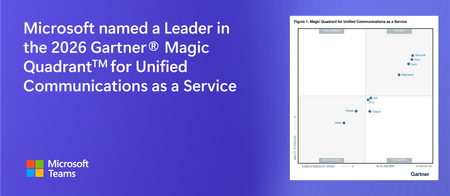
Microsoft has been recognized as a Leader in the 2026 Gartner® Magic Quadrant™ for Unified Communications as a Service—our eighth consecutive year with this recognition. We’re also excited to share that we are again positioned highest on the evaluation's Ability to Execute axis and furthest on the Completeness of Vision axis. Microsoft Teams is the AI-powered platform for work, and we’re grateful to the hundreds of millions of people who turn to it every month to get their work done. We’re also thankful for our global community of partners, whose expertise and dedication carry that impact even further into every industry and region we serve. It’s the trust our customers and partners place in us that makes a recognition like this possible. We believe this recognition reflects the past year of innovation we’ve delivered to make Teams simpler, smarter, more secure, and where humans and agents collaborate to get work done. Here’s a look at some of the key releases along that journey. Getting more from Copilot in Teams Copilot is AI built for work. This year we invested in innovations across the entire Teams experience so that Copilot feels like one connected assistant everywhere people work. Unified Microsoft 365 Copilot Chat experience: We unified the Copilot Chat experience in Teams across chats, channels, meetings, and calls, aligning it with the experience across other Microsoft apps. That gives people one consistent, familiar way to chat with Copilot, along with a single shared history of their conversation insights accessible within Teams or other Copilot Chat surfaces. Work IQ + Teams: AI is only as good as its context. Without it, even the best AI can give generic answers instead of ones grounded in how a person actually works. This year we rolled out Microsoft Work IQ, the intelligence layer that helps Copilot understand how work gets done across an organization by drawing on Microsoft 365 data, organizational context, and the tools people use every day. Teams is a crucial part of Work IQ, since the information exchanged through meetings, calls, and chat make up some of the richest signals of collaborative work in motion. Engage customers with AI-powered communication Much of the important communication in an organization happens beyond its own walls—with the customers it serves as well as external partners and vendors. Teams Phone brings more intelligence and simplicity to those conversations. These capabilities can help reduce missed connections and support faster issue resolution. Teams Phone Agent: During customer call surges, many businesses can’t answer every call right away, which can result in frustrating hold times for customers. Teams Phone Agent, now available in Frontier public preview, quickly greets callers and can resolve many requests on its own, such as answering common questions, scheduling appointments, and routing calls with full conversational context to the right human or department when assistance is needed. Teams Phone Agent also integrates with custom voice agents that organizations build in Microsoft Copilot Studio for specialized workflows, like paying bills over the phone. Multi-line calling: People juggling roles or regions often needed more than one phone number, but managing them meant separate devices or accounts. Admins can now assign up to ten numbers to a single user, with each appearing as its own tab in the Calls app, for one unified calling experience. Intelligent call delegation: Incoming calls don’t wait for a break in your day. Every incoming call forces a choice between losing momentum or missing something important. Intelligent call delegation, available in Frontier public preview, answers calls on a person’s behalf, engages the caller to determine intent, filters spam, and can schedule a follow-up via Microsoft Bookings when the person is unavailable. Unified call history in the Queues app: Without a shared view of call activity, customer service teams can struggle to track who had followed up on missed calls and voicemails, which can lead to duplicated effort and dropped follow-ups. The Queues app now offers shared call history, giving teams a unified view of that activity so that everyone can see what has been handled and what still needs attention. This can reduce duplicated effort and help teams respond to customers more quickly. Smarter collaboration that scales Teams brings people together to meet and collaborate. New AI-powered experiences help move work forward during meetings, while a redesigned Events experience means you no longer need a separate platform for your biggest moments. Organizations can run everything from team meetings to large-scale broadcasts on a single platform, reducing tool sprawl and operational overhead. Facilitator agent: Keeping a meeting on track while also capturing decisions and follow-ups is hard for any one person to do alone. Facilitator builds and tracks agendas, answers questions, and tracks tasks on behalf of everyone in the meeting. This enables participants to stay focused on the conversation instead of managing the mechanics of the meeting. Audio and video meeting recaps: Intelligent recaps with AI-generated notes are a great way to catch up on a missed meeting, but sometimes you need more flexibility, like when you’re on the go during your commute and can’t sit down to read through notes. Meeting recap now offers audio recap, which turns notes into a podcast-style narrated summary for up to eight meetings. Or want a short highlight reel of the most important meeting moments? You can now watch a video recap with narrated highlight clips from the meeting recording. New Teams events experience that scales for your largest meetings: Planning and producing webinars and employee town halls often meant juggling separate tools for each format, with configurations that didn’t carry over from planning to delivery. The new Teams events experience unifies these different experiences into one streamlined flow that supports the full event lifecycle, from setup and presenter prep, to live delivery and post-event follow-up. With Attendee Capacity Packs, Teams events can also support up to 100,000 concurrent attendees, which can help organizations scale communications and reduce tool sprawl. Built-in security and trust AI creates new opportunities for productivity, but it also opens up potential risks from bad actors looking to exploit it. Security remains our top priority. This year, we continued to build on this commitment through delivering new protections and controls that can help people meet, call, and collaborate more securely. Trust Indicators: As collaboration expands to external partners like customers and vendors, it can be hard to know at a glance who you’re really talking to. Trust Indicators now appear as visual badges next to external people across Teams, labeling them as external-familiar, external-unfamiliar, guest, email-verified, or unverified, so people can make informed decisions about what they share. Meeting bot detection and organizer controls: Unwanted bots slipping into a meeting can go unnoticed until after sensitive information has already been discussed. Teams can now detect bots and flag them to organizers in the lobby before anyone is admitted, with stronger controls to manage access and permissions throughout the meeting. This can help organizers limit sensitive conversations to the intended audience. Brand impersonation detection in calling: Scammers impersonating trusted brands put both employees and customers at risk. When a call shows signs of brand impersonation—someone posing as your IT helpdesk, for example—Teams can surface a warning that prompts you to verify before you act. You can also report a suspicious call directly from your call history. The AI-powered workplace This year marked a big leap forward for AI in the physical workplace. Microsoft Teams Rooms delivered new AI-powered experiences that help everyone participate more fully in hybrid meetings, while Microsoft Places continued to evolve with new capabilities for coordinating in-office work. Together, they can make time in the office easier to plan and meetings held there more inclusive for everyone joining, whether in the room or remote. Hybrid meetings where everyone is seen and heard: Remote attendees often squint at a wide room shot, unsure who is speaking. Cloud IntelliFrame now spans Windows and certified Android devices, giving remote participants individual gallery tiles that follow the conversation, and multi-camera switching brings the same clarity to larger spaces where a single camera can’t frame everyone naturally, to provide more meeting context for all. Speaker recognition, easier to roll out: AI-generated meeting notes from a room are only as useful as their attribution. Without knowing who said what, discussion summaries and action items can be hard to understand and act on. Speaker recognition now identifies individuals by name in live transcription on both Windows and Android, so Copilot, intelligent recap, and Facilitator can credit in-room contributions to the right people. Express enrollment makes setting up a voice and face profile fast and simple for users. And a new enrollment dashboard shows admins who is enrolled and where the gaps remain, so they can drive adoption across the organization. Microsoft Places, enhancing workplace experiences: Coordinating in-office days used to be guesswork. People can now book desks from an interactive map, see where colleagues plan to sit, or just plug into a desk’s peripherals to reserve it automatically. Copilot AI room booking turns finding the right space into a conversation and rebooks when plans change, while a new management portal and full Microsoft Graph API support for buildings, floors, rooms, and desks let IT manage the workplace at greater scale and connect with integration partners. User momentum This recognition rests on the trust of a growing community of customers. More than 320 million people rely on Teams each month as their AI-powered platform for work. That momentum extends into our advanced calling and meeting room capabilities as well. Over the past year, Teams Phone surpassed 26 million PSTN-enabled users. These are customers who have a Teams Phone license and an active phone number assigned. Microsoft Teams Rooms licenses now exceed 1.5 million, reflecting continued demand for modern, connected meeting spaces. Looking ahead We are grateful for this current recognition, and even more energized by what comes next. We remain committed to making Teams ever simpler, smarter, and more secure. As AI becomes a natural part of every workflow, Teams will continue to serve as the surface where people and agents collaborate together to communicate and move work forward. Thank you to the customers and partners who shape that direction with us. We’re just getting started. Start using Microsoft 365 Copilot today. Visit https://www.microsoft365.com/copilot or download the Microsoft 365 Copilot app for your desktop or mobile device. Enroll your organization in the Frontier program for early access to AI features. Upgrade to Teams Premium for more protected, engaging, and personalized meetings and calls. Read the full 2026 Gartner® Magic Quadrant™ for Unified Communications as a Service (UCaaS) report. ---------------------------------------------------------- Gartner, Magic Quadrant for Unified Communications as a Service, Worldwide, Pankil Sheth, Megan Fernandez, Rafael Benitez, Nitin Narang, 28 July 2026. Gartner and Magic Quadrant are trademarks of Gartner, Inc., and/or its affiliates. *This graphic was published by Gartner, Inc. as part of a larger research document and should be evaluated in the context of the entire document. The Gartner document is available upon request here.1.8KViews1like0Comments