slm
27 TopicsMicrosoft Semantic Kernel and AutoGen: Open Source Frameworks for AI Solutions
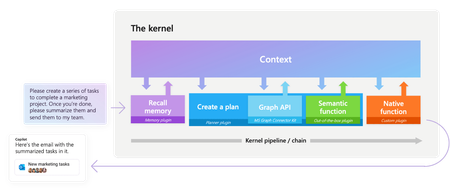
Explore Microsoft’s open-source frameworks, Semantic Kernel and AutoGen. Semantic Kernel enables developers to create AI solutions across various domains using a single Large Language Model (LLM). AutoGen, on the other hand, uses AI Agents to perform smart tasks through agent dialogues. Discover how these technologies serve different scenarios and can be used to build powerful AI applications.48KViews6likes1CommentFine-Tune and Integrate Custom Phi-3 Models with Prompt Flow in Azure AI Studio
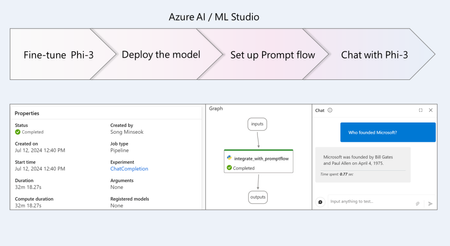
Phi-3 is a family of small language models (SLMs) developed by Microsoft that delivers exceptional performance and cost-effectiveness. In this tutorial, you will learn how to fine-tune the Phi-3 model and integrate the custom Phi-3 model with Prompt flow in Azure AI Studio. By leveraging Azure AI / ML Studio, you will establish a workflow for deploying and utilizing custom AI models.21KViews1like0CommentsExploring Microsoft's Phi-3 Family of Small Language Models (SLMs) with Azure AI
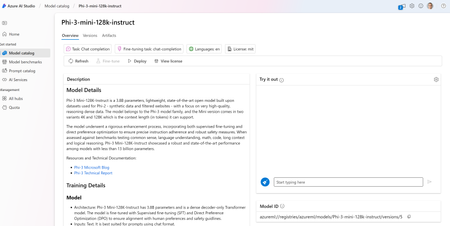
Dive into the world of small language models (SLMs) with Microsoft's Phi-3 family and learn how to integrate them into real-world applications using Azure AI. Discover step-by-step guidance, practical exercises, and a Gradio-powered chatbot interface to bolster your confidence in deploying and integrating AI. Keep learning and building with Azure AI17KViews2likes0CommentsGetting Started Using Phi-3-mini-4k-instruct-onnx for Text Generation with NLP Techniques
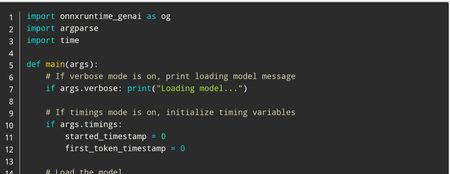
In this tutorial, we'll cover how to use the Phi-3 mini models for text generation using NLP techniques. Whether you're a beginner or an experienced AI developer, you'll learn how to download and run these powerful tools on your own computer. From setting up the Python environment to generating responses with the generate() API, we'll provide clear instructions and code examples throughout the tutorial. So, let's get started and see what the Phi-3 mini models can do!12KViews1like1CommentVisual Studio AI Toolkit : Building Phi-3 GenAI Applications
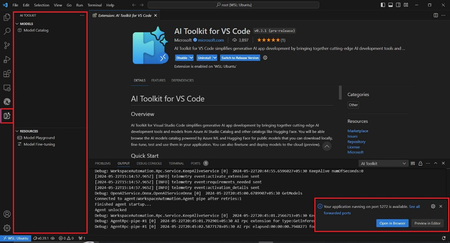
Port Forwarding, a valuable feature within the AI Toolkit, serves as a crucial gateway for seamless communication with the GenAI model. Whether it's through a straightforward API call or leveraging the SDKs, this functionality greatly enhances our ability to harness the power of the LLM/SLM. By enabling Port Forwarding, a plethora of new scenarios unfold, unlocking the full potential of our interactions with the model.10KViews2likes0CommentsBuilding AI Agents on edge devices using Ollama + Phi-4-mini Function Calling
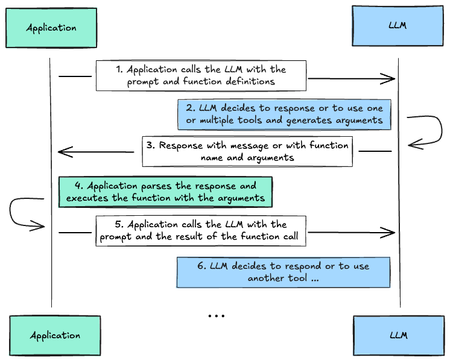
The new Phi-4-mini and Phi-4-multimodal now support Function Calling. This feature enables the models to connect with external tools and APIs. By deploying Phi-4-mini and Phi-4-multimodal with Function Calling capabilities on edge devices, we can achieve local expansion of knowledge capabilities and enhance their task execution efficiency. This blog will focus on how to use Phi-4-mini's Function Calling capabilities to build efficient AI Agents on edge devices. What‘s Function Calling How it works First we need to learn how Function Calling works Tool Integration: Function Calling allows LLM/SLM to interact with external tools and APIs, such as weather APIs, databases, or other services. Function Definition: Defines a function (tool) that LLM/SLM can call, specifying its name, parameters, and expected output. LLM Detection: LLM/SLM analyzes the user's input and determines if a function call is required and which function to use. JSON Output: LLM/SLM outputs a JSON object containing the name of the function to call and the parameters required by the function. External Execution: The application executes the function call using the parameters provided by LLM/SLM. Response to LLM: Returns the output of Function Calling to LLM/SLM, and LLM/SLM can use this information to generate a response to the user. Application scenarios Data retrieval: convert natural language queries into API calls to fetch data (e.g., "show my recent orders" triggers a database query) Operation execution: convert user requests into specific function calls (e.g., "schedule a meeting" becomes a calendar API call) Computational tasks: handle mathematical or logical operations through dedicated functions (e.g., calculate compound interest or statistical analysis) Data processing: chain multiple function calls together (e.g., get data → parse → transform → store) UI/UX integration: trigger interface updates based on user interactions (e.g., update map markers or display charts) Phi-4-mini / Phi-4-multimodal's Function Calling Phi-4-mini / Phi-4-multimodal supports single and parallel Function Calling. Things to note when calling You need to define Tools in System to start single or parallel Function Calling If you want to start parallel Function Calling, you also need to add 'some tools' to the System prompt The following is an example Single Function Calling tools = [ { "name": "get_match_result", "description": "get match result", "parameters": { "match": { "description": "The name of the match", "type": "str", "default": "Arsenal vs ManCity" } } }, ] messages = [ { "role": "system", "content": "You are a helpful assistant", "tools": json.dumps(tools), # pass the tools into system message using tools argument }, { "role": "user", "content": "What is the result of Arsenal vs ManCity today?" } ] Full Sample : Click Parallel Function Calling AGENT_TOOLS = { "booking_fight": { "name": "booking_fight", "description": "booking fight", "parameters": { "departure": { "description": "The name of Departure airport code", "type": "str", }, "destination": { "description": "The name of Destination airport code", "type": "str", }, "outbound_date": { "description": "The date of outbound flight", "type": "str", }, "return_date": { "description": "The date of return flight", "type": "str", } } }, "booking_hotel": { "name": "booking_hotel", "description": "booking hotel", "parameters": { "query": { "description": "The name of the city", "type": "str", }, "check_in_date": { "description": "The date of check in", "type": "str", }, "check_out_date": { "description": "The date of check out", "type": "str", } } }, } SYSTEM_PROMPT = """ You are my travel agent with some tools available. """ messages = [ { "role": "system", "content": SYSTEM_PROMPT, "tools": json.dumps(AGENT_TOOLS), # pass the tools into system message using tools argument }, { "role": "user", "content": """I have a business trip from London to New York in March 21 2025 to March 27 2025, can you help me to book a hotel and flight tickets""" } ] Full sample : click Using Ollama and Phi-4-mini Function Calling to Create AI Agents on Edge Devices Ollama is a popular free tool for deploying LLM/SLM locally and can be used in combination with AI Toolkit for VS Code. In addition to being deployed on your PC/Laptop, it can also be deployed on IoT, mobile phones, containers, etc. To use Phi-4-mini on Ollama, you need to use Ollama 0.5.13+. Different quantitative versions are supported on Ollama, as shown in the figure below: Using Ollama, we can deploy Phi-4-mini on the edge, and implement AI Agent with Function Calling under limited computing power, so that Generative AI can be applied more effectively on the edge. Current Issues A sad experience - If you directly use the interface to try to call Ollama in the above way, you will find that Function Calling will not be triggered. There are discussions on Ollama's GitHub Issue. You can enter the Issue https://github.com/ollama/ollama/issues/9437. By modifying the Phi-4-mini Template on the ModelFile to implement a single Function Calling, but the call to Parallel Function Calling still failed. Resolution We have implemented a fix by making a adjustments to the template. We have improved it according to Phi-4-mini's Chat Template and re-modified the Modelfile. Of course, the quantitative model has a huge impact on the results. The adjustments are as follows: TEMPLATE """ {{- if .Messages }} {{- if or .System .Tools }}<|system|> {{ if .System }}{{ .System }} {{- end }} In addition to plain text responses, you can chose to call one or more of the provided functions. Use the following rule to decide when to call a function: * if the response can be generated from your internal knowledge (e.g., as in the case of queries like "What is the capital of Poland?"), do so * if you need external information that can be obtained by calling one or more of the provided functions, generate a function calls If you decide to call functions: * prefix function calls with functools marker (no closing marker required) * all function calls should be generated in a single JSON list formatted as functools[{"name": [function name], "arguments": [function arguments as JSON]}, ...] * follow the provided JSON schema. Do not hallucinate arguments or values. Do to blindly copy values from the provided samples * respect the argument type formatting. E.g., if the type if number and format is float, write value 7 as 7.0 * make sure you pick the right functions that match the user intent Available functions as JSON spec: {{- if .Tools }} {{ .Tools }} {{- end }}<|end|> {{- end }} {{- range .Messages }} {{- if ne .Role "system" }}<|{{ .Role }}|> {{- if and .Content (eq .Role "tools") }} {"result": {{ .Content }}} {{- else if .Content }} {{ .Content }} {{- else if .ToolCalls }} functools[ {{- range .ToolCalls }}{{ "{" }}"name": "{{ .Function.Name }}", "arguments": {{ .Function.Arguments }}{{ "}" }} {{- end }}] {{- end }}<|end|> {{- end }} {{- end }}<|assistant|> {{ else }} {{- if .System }}<|system|> {{ .System }}<|end|>{{ end }}{{ if .Prompt }}<|user|> {{ .Prompt }}<|end|>{{ end }}<|assistant|> {{ end }}{{ .Response }}{{ if .Response }}<|user|>{{ end }} """ We have tested the solution using different quantitative models. In the laptop environment, we recommend that you use the following model to enable single/parallel Function Calling: phi4-mini:3.8b-fp16. Note: you need to bind the defined Modelfile and phi4-mini:3.8b-fp16 together to enable this to work. Please execute the following command in the command line: #If you haven't downloaded it yet, please execute this command firstr ollama run phi4-mini:3.8b-fp16 #Binding with the adjusted Modelfile ollama create phi4-mini:3.8b-fp16 -f {Your Modelfile Path} To test the single Function Calling and Parallel Function Calling of Phi-4-mini. Single Function Calling Parallel Function Calling Full Sample in notebook The above example is just a simple introduction. As we move forward with the development we hope to find simpler ways to apply it on the edge, use Function Calling to expand the scenarios of Phi-4-mini / Phi-4-multimodal, and also develop more usecases in vertical industries. Resources Phi-4 model on Hugging face https://huggingface.co/collections/microsoft/phi-4-677e9380e514feb5577a40e4 Phi-4-mini on Ollama https://ollama.com/library/phi4-mini Learn Function Calling https://huggingface.co/docs/hugs/en/guides/function-calling Phi Cookbook - Samples and Resources for Phi Models https://aka.ms/phicookbook8.7KViews4likes1CommentUnlock the Power of Small Language Models with Phi-3 and Azure AI Studio
Discover the exciting world of Small Language Models (SLMs) and learn how to get started with Phi-3, a revolutionary new architecture that redefines what's possible with language models. This step-by-step guide takes you through setting up your environment, installing Phi-3 models, building your first SLM-based application, and deploying it to the cloud.7.9KViews1like0CommentsA better Phi Family is coming - multi-language support, better vision, intelligence MOEs
After the release of Phi-3 at Microsoft Build 2024, it has received different attention, especially the application of Phi-3-mini and Phi-3-vision on edge devices. In the June update, we improved Benchmark and System role support by adjusting high-quality data training. In the August update, based on community and customer feedback, we brought Phi-3.5-mini-128k-instruct multi-language support, Phi-3.5-vision-128k with multi-frame image input, and provided Phi-3.5 MOE newly added for AI Agent. Next, let's take a look Multi-language support In previous versions, Phi-3-mini had good English corpus support, but weak support for non-English languages. When we tried to ask questions in Chinese, there were often some wrong questions, such as Obviously, this is a wrong answer But in the new version, we can have better understanding and corpus support with the new Chinese prediction support You can also try the enhancements in different languages, or in the scenario without fine-tuning and RAG, it is also a good model. Code Sample: https://github.com/microsoft/Phi-3CookBook/blob/main/code/09.UpdateSamples/Aug/phi3-instruct-demo.ipynb Better vision Phi-3.5-Vision enables Phi-3 to not only understand text and complete dialogues, but also have visual capabilities (OCR, object recognition, and image analysis, etc.). However, in actual application scenarios, we need to analyze multiple images to find associations, such as videos, PPTs, books, etc. In the new Phi-3-Vision, multi-frame or multi-image input is supported, so we can better complete the inductive analysis of videos, PPTs, and books in visual scenes. As shown in this video We can use OpenCV to extract key frames. We can extract 21 key frame images from the video and store them in an array. images = [] placeholder = "" for i in range(1,22): with open("../output/keyframe_"+str(i)+".jpg", "rb") as f: images.append(Image.open("../output/keyframe_"+str(i)+".jpg")) placeholder += f"<|image_{i}|>\n" Combined with Phi-3.5-Vision's chat template, we can perform a comprehensive analysis of multiple frames. This allows us to more efficiently perform dynamic vision-based work, especially in edge scenarios. Code Sample: https://github.com/microsoft/Phi-3CookBook/blob/main/code/09.UpdateSamples/Aug/phi3-vision-demo.ipynb Intelligence MOEs In order to achieve higher performance of the model, in addition to computing power, model size is one of the key factors to improve model performance. Under a limited computing resource budget, training a larger model with fewer training steps is often better than training a smaller model with more steps. Mixture of Experts Models (MoEs) have the following characteristics: Faster pre-training speed than dense models Faster inference speed than models with the same number of parameters Requires a lot of video memory because all expert systems need to be loaded into memory There are many challenges in fine-tuning, but recent research shows that instruction tuning for mixed expert models has great potential. Now there are a lot of AI Agents applications, we can use MOEs to empower AI Agents. In multi-task scenarios, the response is faster. We can explore a simple scenario where we want to use AI to help us write Twitter based on some content and translate it into Chinese and publish it to social networks. We can combine Phi-3.5 MOEs to complete this. We can use Prompt to set and arrange tasks, such as blog content publishing, translated content, and the best answer. """ sys_msg = """You are a helpful AI assistant, you are an agent capable of using a variety of tools to answer a question. Here are a few of the tools available to you: - Blog: This tool helps you describe a certain knowledge point and content, and finally write it into Twitter or Facebook style content - Translate: This is a tool that helps you translate into any language, using plain language as required - Final Answer: the final answer tool must be used to respond to the user. You must use this when you have decided on an answer. To use these tools you must always respond in JSON format containing `"tool_name"` and `"input"` key-value pairs. For example, to answer the question, "Build Muliti Agents with MOE models" you must use the calculator tool like so: { "tool_name": "Blog", "input": "Build Muliti Agents with MOE models" } Or to translate the question "can you introduce yourself in Chinese" you must respond: { "tool_name": "Search", "input": "can you introduce yourself in Chinese" } Remember just output the final result, ouput in JSON format containing `"agentid"`,`"tool_name"` , `"input"` and `"output"` key-value pairs .: [ { "agentid": "step1", "tool_name": "Blog", "input": "Build Muliti Agents with MOE models", "output": "........." }, { "agentid": "step2", "tool_name": "Search", "input": "can you introduce yourself in Chinese", "output": "........." }, { "agentid": "final" "tool_name": "Result", "output": "........." } ] The users answer is as follows. """ We can see that by telling the model what skills it needs to have and the arrangement of tasks, we can assign them to different tasks through Phi-3.5 MOEs to complete related work. Write something about Generative AI with MOEs , translate it to Chinese The result : [ { "agentid": "step1", "tool_name": "Blog", "input": "Generative AI with MOE", "output": "Generative AI with MOE (Mixture of Experts) is a powerful approach that combines the strengths of generative models and the flexibility of MOE architecture. This hybrid model can generate high-quality, diverse, and contextually relevant content, making it suitable for various applications such as content creation, data augmentation, and more." }, { "agentid": "step2", "tool_name": "Translate", "input": "Generative AI with MOE is a powerful approach that combines the strengths of generative models and the flexibility of MOE architecture. This hybrid model can generate high-quality, diverse, and contextually relevant content, making it suitable for various applications such as content creation, data augmentation, and more.", "output": "基于生成AI的MOE(Mixture of Experts)是一种强大的方法,它结合了生成模型的优势和MOE架构的灵活性。这种混合模型可以生成高质量、多样化且上下文相关的内容,使其适用于各种应用,如内容创建、数据增强等。" }, { "agentid": "final", "tool_name": "Result", "output": "基于生成AI的MOE(Mixture of Experts)是一种强大的方法,它结合了生成模型的优势和MOE架构的灵活性。这种混合模型可以生成高质量、多样化且上下文相关的内容,使其适用于各种应用,如内容创建、数据增强等。" } ] If conditions permit, we can more smoothly integrate the Phi-3 MOEs model into frameworks such as AutoGen, Semantic Kernel, and Langchain. Code Sample: https://github.com/microsoft/Phi-3CookBook/blob/main/code/09.UpdateSamples/Aug/phi3_moe_demo.ipynb Thoughts on SLMs SLMs do not replace LLMs but give GenAI a broader scenario. The update of Phi-3 allows more edge devices to have better support, including text, chat, and vision. In modern AI Agents application scenarios, we hope to have more efficient task execution efficiency. In addition to computing power, MoEs are the key to solving problems. Phi-3 is still iterating, and I hope everyone will pay more attention and give us better feedback. Resources 1. Download Microsoft Phi-3 Family https://huggingface.co/collections/microsoft/phi-3-6626e15e9585a200d2d761e3 2. Read the Phi-3 Cookbook https://aka.ms/phi-3cookbook 3. Learn about MOEs https://huggingface.co/blog/moe](https://huggingface.co/blog/moe 7.1KViews1like0Comments
Create your own Visual Studio Code Chat Participant with Phi-3.5 by GitHub Models
Visual Studio Code provides an API that allows companies and individuals to create different participants based on their business to expand their capabilities in different proprietary fields. In this article, we will focus on Phi-3.5-mini-instruct (128k) and Phi-3.5-vision-instruct (128k) of GitHub Models to create your own Visual Studio Code Chat Participant.5.4KViews0likes1CommentRunning Phi-4 Locally with Microsoft Foundry Local: A Step-by-Step Guide
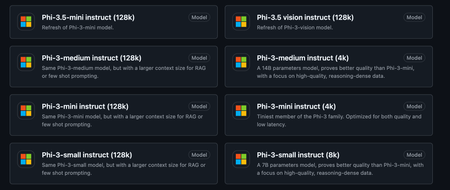
In our previous post, we explored how Phi-4 represents a new frontier in AI efficiency that delivers performance comparable to models 5x its size while being small enough to run on your laptop. Today, we're taking the next step: getting Phi-4 up and running locally on your machine using Microsoft Foundry Local. Whether you're a developer building AI-powered applications, an educator exploring AI capabilities, or simply curious about running state-of-the-art models without relying on cloud APIs, this guide will walk you through the entire process. Microsoft Foundry Local brings the power of Azure AI Foundry to your local device without requiring an Azure subscription, making local AI development more accessible than ever. So why do you want to run Phi-4 Locally? Before we dive into the setup, let's quickly recap why running models locally matters: Privacy and Control: Your data never leaves your machine. This is crucial for sensitive applications in healthcare, finance, or education where data privacy is paramount. Cost Efficiency: No API costs, no rate limits. Once you have the model downloaded, inference is completely free. Speed and Reliability: No network latency or dependency on external services. Your AI applications work even when you're offline. Learning and Experimentation: Full control over model parameters, prompts, and fine-tuning opportunities without restrictions. With Phi-4's compact size, these benefits are now accessible to anyone with a modern laptop—no expensive GPU required. What You'll Need Before we begin, make sure you have: Operating System: Windows 10/11, macOS (Intel or Apple Silicon), or Linux RAM: Minimum 16GB (32GB recommended for optimal performance) Storage: At least 5 - 10GB of free disk space Processor: Any modern CPU (GPU optional but provides faster inference) Note: Phi-4 works remarkably well even on consumer hardware 😀. Step 1: Installing Microsoft Foundry Local Microsoft Foundry Local is designed to make running AI models locally as simple as possible. It handles model downloads, manages memory efficiently, provides OpenAI-compatible APIs, and automatically optimizes for your hardware. For Windows Users: Open PowerShell or Command Prompt and run: winget install Microsoft.FoundryLocal For macOS Users (Apple Silicon): Open Terminal and run: brew install microsoft/foundrylocal/foundrylocal Verify Installation: Open your terminal and type. This should return the Microsoft Foundry Local version, confirming installation: foundry --version Step 2: Downloading Phi-4-Mini For this tutorial, we'll use Phi-4-mini, the lightweight 3.8 billion parameter version that's perfect for learning and experimentation. Open your terminal and run: foundry model run phi-4-mini You should see your download begin and something similar to the image below Available Phi Models on Foundry Local While we're using phi-4-mini for this guide, Foundry Local offers several Phi model variants and other open-source models optimized for different hardware and use cases: Model Hardware Type Size Best For phi-4-mini GPU chat-completion 3.72 GB Learning, fast responses, resource-constrained environments with GPU phi-4-mini CPU chat-completion 4.80 GB Learning, fast responses, CPU-only systems phi-4-mini-reasoning GPU chat-completion 3.15 GB Reasoning tasks with GPU acceleration phi-4-mini-reasoning CPU chat-completion 4.52 GB Mathematical proofs, logic puzzles with lower resource requirements phi-4 GPU chat-completion 8.37 GB Maximum reasoning performance, complex tasks with GPU phi-4 CPU chat-completion 10.16 GB Maximum reasoning performance, CPU-only systems phi-3.5-mini GPU chat-completion 2.16 GB Most lightweight option with GPU support phi-3.5-mini CPU chat-completion 2.53 GB Most lightweight option, CPU-optimized phi-3-mini-128k GPU chat-completion 2.13 GB Extended context (128k tokens), GPU-optimized phi-3-mini-128k CPU chat-completion 2.54 GB Extended context (128k tokens), CPU-optimized phi-3-mini-4k GPU chat-completion 2.13 GB Standard context (4k tokens), GPU-optimized phi-3-mini-4k CPU chat-completion 2.53 GB Standard context (4k tokens), CPU-optimized Note: Foundry Local automatically selects the best variant for your hardware. If you have an NVIDIA GPU, it will use the GPU-optimized version. Otherwise, it will use the CPU-optimized version. run the command below to see full list of models foundry model list Step 3: Test It Out Once the download completes, an interactive session will begin. Let's test Phi-4-mini's capabilities with a few different prompts: Example 1: Explanation Phi-4-mini provides a thorough, well-structured explanation! It starts with the basic definition, explains the process in biological systems, gives real-world examples (plant cells, human blood cells). The response is detailed yet accessible. Example 2: Mathematical Problem Solving Excellent step-by-step solution! Phi-4-mini breaks down the problem methodically: 1. Distributes on the left side 2. Isolates the variable terms 3. Simplifies progressively 4. Arrives at the final answer: x = 11 The model shows its work clearly, making it easy to follow the logic and ideal for educational purposes Example 3: Code Generation The model provides a concise Python function using string slicing ([::-1]) - the most Pythonic approach to reversing a string. It includes clear documentation with a docstring explaining the function's purpose, provides example usage demonstrating the output, and even explains how the slicing notation works under the hood. The response shows that the model understands not just how to write the code, but why this approach is preferred - noting that the [::-1] slice notation means "start at the end of the string and end at position 0, move with the step -1, negative one, which means one step backwards." This showcases the model's ability to generate production-ready code with proper documentation while being educational about Python idioms. To exit the interactive session, type `/bye` Step 4: Extending Phi-4 with Real-Time Tools Understanding Phi-4's Knowledge Cutoff Like all language models, Phi-4 has a knowledge cutoff date from its training data (typically several months old). This means it won't know about very recent events, current prices, or breaking news. For example, if you ask "Who won the 2024 NBA championship?" it might not have the answer. The good thing is, there's a powerful work-around. While Phi-4 is incredibly capable, connecting it to external tools like web search, databases, or APIs transforms it from a static knowledge base into a dynamic reasoning engine. This is where Microsoft Foundry's REST API comes in. Microsoft Foundry provides a simple API that lets you integrate Phi-4 into Python applications and connect it to real-time data sources. Here's a practical example: building a web-enhanced AI assistant. Web-Enhanced AI Assistant This simple application combines Phi-4's reasoning with real-time web search, allowing it to answer current questions accurately. Prerequisites: pip install foundry-local-sdk requests ddgs Create phi4_web_assistant.py: import requests from foundry_local import FoundryLocalManager from ddgs import DDGS import json def search_web(query): """Search the web and return top results""" try: results = list(DDGS().text(query, max_results=3)) if not results: return "No search results found." search_summary = "\n\n".join([ f"[Source {i+1}] {r['title']}\n{r['body'][:500]}" for i, r in enumerate(results) ]) return search_summary except Exception as e: return f"Search failed: {e}" def ask_phi4(endpoint, model_id, prompt): """Send a prompt to Phi-4 and stream response""" response = requests.post( f"{endpoint}/chat/completions", json={ "model": model_id, "messages": [{"role": "user", "content": prompt}], "stream": True }, stream=True, timeout=180 ) full_response = "" for line in response.iter_lines(): if line: line_text = line.decode('utf-8') if line_text.startswith('data: '): line_text = line_text[6:] # Remove 'data: ' prefix if line_text.strip() == '[DONE]': break try: data = json.loads(line_text) if 'choices' in data and len(data['choices']) > 0: delta = data['choices'][0].get('delta', {}) if 'content' in delta: chunk = delta['content'] print(chunk, end="", flush=True) full_response += chunk except json.JSONDecodeError: continue print() return full_response def web_enhanced_query(question): """Combine web search with Phi-4 reasoning""" # By using an alias, the most suitable model will be downloaded # to your device automatically alias = "phi-4-mini" # Create a FoundryLocalManager instance. This will start the Foundry # Local service if it is not already running and load the specified model. manager = FoundryLocalManager(alias) model_info = manager.get_model_info(alias) print("🔍 Searching the web...\n") search_results = search_web(question) prompt = f"""Here are recent search results: {search_results} Question: {question} Using only the information above, give a clear answer with specific details.""" print("🤖 Phi-4 Answer:\n") return ask_phi4(manager.endpoint, model_info.id, prompt) if __name__ == "__main__": # Try different questions question = "Who won the 2024 NBA championship?" # question = "What is the latest iPhone model released in 2024?" # question = "What is the current price of Bitcoin?" print(f"Question: {question}\n") print("=" * 60 + "\n") web_enhanced_query(question) print("\n" + "=" * 60) Run It: python phi4_web_assistant.py What Makes This Powerful By connecting Phi-4 to external tools, you create an intelligent system that: Accesses Real-Time Information: Get news, weather, sports scores, and breaking developments Verifies Facts: Cross-reference information with multiple sources Extends Capabilities: Connect to databases, APIs, file systems, or any other tool Enables Complex Applications: Build research assistants, customer support bots, educational tutors, and personal assistants This same pattern can be applied to connect Phi-4 to: Databases: Query your company's internal data APIs: Weather services, stock prices, translation services File Systems: Analyze documents and spreadsheets IoT Devices: Control smart home systems The possibilities are endless when you combine local AI reasoning with real-world data access. Troubleshooting Common Issues Service not running: Make sure Foundry Local is properly installed and the service is running. Try restarting with foundry --version to verify installation. Model downloads slowly: Check your internet connection and ensure you have enough disk space (5-10GB per model). Out of memory: Close other applications or try using a smaller model variant like phi-3.5-mini instead of the full phi-4. Connection issues: Verify that no other services are using the same ports. Foundry Local typically runs on http://localhost:5272. Model not found: Run foundry model list to see available models, then use foundry model run <model-name> to download and run a specific model. Your Next Steps with Foundry Local Congratulations! You now have Phi-4 running locally through Microsoft Foundry Local and understand how to extend it with external tools like web search. This combination of local AI reasoning with real-time data access opens up countless possibilities for building intelligent applications. Coming in Future Posts In the coming weeks, we'll explore advanced topics using Hugging Face: Fine-tuning Phi models on your own data for domain-specific applications Phi-4-multimodal: Analyze images, process audio, and combine multiple data types Advanced deployment patterns: RAG systems and multi-agent orchestration Resources to Explore EdgeAI for Beginners Course: Comprehensive 36-45 hour course covering Edge AI fundamentals, optimization, and production deployment Phi-4 Technical Report: Deep dive into architecture and benchmarks Phi Cookbook on GitHub: Practical examples and recipes Foundry Local Documentation: Complete technical documentation and API reference Module 08: Foundry Local Toolkit: 10 comprehensive samples including RAG applications and multi-agent systems Keep experimenting with Foundry Local, and stay tuned as we unlock the full potential of Edge AI! What will you build with Phi-4? Share your ideas and projects in the comments below!5.1KViews1like1Comment