skilling
13 TopicsFrom Demo to Production: Building Microsoft Foundry Hosted Agents with .NET
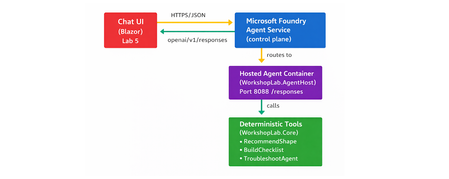
The Gap Between a Demo and a Production Agent Let's be honest. Getting an AI agent to work in a demo takes an afternoon. Getting it to work reliably in production, tested, containerised, deployed, observable, and maintainable by a team. is a different problem entirely. Most tutorials stop at the point where the agent prints a response in a terminal. They don't show you how to structure your code, cover your tools with tests, wire up CI, or deploy to a managed runtime with a proper lifecycle. That gap between prototype and production is where developer teams lose weeks. Microsoft Foundry Hosted Agents close that gap with a managed container runtime for your own custom agent code. And the Hosted Agents Workshop for .NET gives you a complete, copy-paste-friendly path through the entire journey. from local run to deployed agent to chat UI, in six structured labs using .NET 10. This post walks you through what the workshop delivers, what you will build, and why the patterns it teaches matter far beyond the workshop itself. What Is a Microsoft Foundry Hosted Agent? Microsoft Foundry supports two distinct agent types, and understanding the difference is the first decision you will make as an agent developer. Prompt agents are lightweight agents backed by a model deployment and a system prompt. No custom code required. Ideal for simple Q&A, summarisation, or chat scenarios where the model's built-in reasoning is sufficient. Hosted agents are container-based agents that run your own code .NET, Python, or any framework you choose inside Foundry's managed runtime. You control the logic, the tools, the data access, and the orchestration. When your scenario requires custom tool integrations, deterministic business logic, multi-step workflow orchestration, or private API access, a hosted agent is the right choice. The Foundry runtime handles the managed infrastructure; you own the code. For the official deployment reference, see Deploy a hosted agent to Foundry Agent Service on Microsoft Learn. What the Workshop Delivers The Hosted Agents Workshop for .NET is a beginner-friendly, hands-on workshop that takes you through the full development and deployment path for a real hosted agent. It is structured around a concrete scenario: a Hosted Agent Readiness Coach that helps delivery teams answer questions like: Should this use case start as a prompt agent or a hosted agent? What should a pilot launch checklist include? How should a team troubleshoot common early setup problems? The scenario is purposefully practical. It is not a toy chatbot. It is the kind of tool a real team would build and hand to other engineers, which means it needs to be testable, deployable, and extensible. The workshop covers: Local development and validation with .NET 10 Copilot-assisted coding with repo-specific instructions Deterministic tool implementation with xUnit test coverage CI pipeline validation with GitHub Actions Secure deployment to Azure Container Registry and Microsoft Foundry Chat UI integration using Blazor What You Will Build By the end of the workshop, you will have a code-based hosted agent that exposes an OpenAI Responses-compatible /responses endpoint on port 8088 . The agent is backed by three deterministic local tools, implemented in WorkshopLab.Core : RecommendImplementationShape — analyses a scenario and recommends hosted or prompt agent based on its requirements BuildLaunchChecklist — generates a pilot launch checklist for a given use case TroubleshootHostedAgent — returns structured troubleshooting guidance for common setup problems These tools are deterministic by design, no LLM call required to return a result. That choice makes them fast, predictable, and fully testable, which is the right architecture for business logic in a production agent. The end-to-end architecture looks like this: The Hands-On Journey: Lab by Lab The workshop follows a deliberate build → validate → ship progression. Each lab has a clear outcome. You do not move forward until the previous checkpoint passes. Lab 0 — Setup and Local Run Open the repo in VS Code or a GitHub Codespace, configure your Microsoft Foundry project endpoint and model deployment name, then run the agent locally. By the end of Lab 0, your agent is listening on http://localhost:8088/responses and responding to test requests. dotnet restore dotnet build dotnet run --project src/WorkshopLab.AgentHost Test it with a single PowerShell call: Invoke-RestMethod -Method Post ` -Uri "http://localhost:8088/responses" ` -ContentType "application/json" ` -Body '{"input":"Should we start with a hosted agent or a prompt agent?"}' Lab 0 instructions → Lab 1 — Copilot Customisation Configure repo-specific GitHub Copilot instructions so that Copilot understands the hosted-agent patterns used in this project. You will also add a Copilot review skill tailored to hosted agent code reviews. This step means every code suggestion you receive from Copilot is contextualised to the workshop scenario rather than giving generic .NET advice. Lab 1 instructions → Lab 2 — Tool Implementation Extend one of the deterministic tools in WorkshopLab.Core with a real feature change. The suggested change adds a stronger recommendation path to RecommendImplementationShape for scenarios that require all three hosted-agent strengths simultaneously. // In RecommendImplementationShape — add before the final return: if (requiresCode && requiresTools && requiresWorkflow) { return string.Join(Environment.NewLine, [ $"Recommended implementation: Hosted agent (full-stack)", $"Scenario goal: {goal}", "Why: the scenario requires custom code, external tool access, and " + "multi-step orchestration — all three hosted-agent strengths.", "Suggested next step: start with a code-based hosted agent, register " + "local tools for each integration, and add a workflow layer." ]); } You then write an xUnit test to cover it, run dotnet test , and validate the change against a live /responses call. This is the workshop's most important teaching moment: every tool change is covered by a test before it ships. Lab 2 instructions → Lab 3 — CI Validation Wire up a GitHub Actions workflow that builds the solution, runs the test suite, and validates that the agent container builds cleanly. No manual steps — if a change breaks the build or a test, CI catches it before any deployment happens. Lab 3 instructions → Lab 4 — Deployment to Microsoft Foundry Use the Azure Developer CLI ( azd ) to provision an Azure Container Registry, publish the agent image, and deploy the hosted agent to Microsoft Foundry. The workshop separates provisioning from deployment deliberately: azd owns the Azure resources; the Foundry control plane deployment is an explicit, intentional final step that depends on your real project endpoint and agent.yaml manifest values. Lab 4 instructions → Lab 5 — Chat UI Integration Connect a Blazor chat UI to the deployed hosted agent and validate end-to-end responses. By the end of Lab 5, you have a fully functioning agent accessible through a real UI, calling your deterministic tools via the Foundry control plane. Lab 5 instructions → Key Concepts to Take Away The workshop teaches concrete patterns that apply well beyond this specific scenario. Code-first agent design Prompt-only agents are fast to build but hard to test and reason about at scale. A hosted agent with code-backed tools gives you something you can unit test, refactor, and version-control like any other software. Deterministic tools and testability The workshop explicitly avoids LLM calls inside tool implementations. Deterministic tools return predictable outputs for a given input, which means you can write fast, reliable unit tests for them. This is the right pattern for business logic. Reserve LLM calls for the reasoning layer, not the execution layer. CI/CD for agent systems AI agents are software. They deserve the same build-test-deploy discipline as any other service. Lab 3 makes this concrete: you cannot ship without passing CI, and CI validates the container as well as the unit tests. Deployment separation The workshop's split between azd provisioning and Foundry control-plane deployment is not arbitrary. It reflects the real operational boundary: your Azure resources are long-lived infrastructure; your agent deployment is a lifecycle event tied to your project's specific endpoint and manifest. Keeping them separate reduces accidents and makes rollbacks easier. Observability and the validation mindset Every lab ends with an explicit checkpoint. The culture the workshop builds is: prove it works before moving on. That mindset is more valuable than any specific tool or command in the labs. Why Hosted Agents Are Worth the Investment The managed runtime in Microsoft Foundry removes the infrastructure overhead that makes custom agent deployment painful. You do not manage Kubernetes clusters, configure ingress rules, or handle TLS termination. Foundry handles the hosting; you handle the code. This matters most for teams making the transition from demo to production. A prompt agent is an afternoon's work. A hosted agent with proper CI, tested tools, and a deployment pipeline is a week's work done properly once, instead of several weeks of firefighting done poorly repeatedly. The Foundry agent lifecycle —> create, update, version, deploy —>also gives you the controls you need to manage agents in a real environment: staged rollouts, rollback capability, and clear separation between agent versions. For the full deployment guide, see Deploy a hosted agent to Foundry Agent Service. From Workshop to Real Project This workshop is not just a learning exercise. The repository structure, the tooling choices, and the CI/CD patterns are a reference implementation. The patterns you can lift directly into a production project include: The WorkshopLab.Core / WorkshopLab.AgentHost separation between business logic and agent hosting The agent.yaml manifest pattern for declarative Foundry deployment The GitHub Actions workflow structure for build, test, and container validation The azd + ACR pattern for image publishing without requiring Docker Desktop locally The Blazor chat UI as a starting point for internal tooling or developer-facing applications The scenario, a readiness coach for hosted agents. This is also something teams evaluating Microsoft Foundry will find genuinely useful. It answers exactly the questions that come up when onboarding a new team to the platform. Common Mistakes When Building Hosted Agents Having run workshops and spoken with developer teams building on Foundry, a few patterns come up repeatedly: Skipping local validation before containerising. Always validate the /responses endpoint locally first. Debugging inside a container is slower and harder than debugging locally. Putting business logic inside the LLM call. If the answer to a user query can be determined by code, use code. Reserve the model for reasoning, synthesis, and natural language output. Treating CI as optional. Agent code changes break things just like any other code change. If you do not have CI catching regressions, you will ship them. Conflating provisioning and deployment. Recreating Azure resources on every deploy is slow and error-prone. Provision once with azd ; deploy agent versions as needed through the Foundry control plane. Not having a rollback plan. The Foundry agent lifecycle supports versioning. Use it. Know how to roll back to a previous version before you deploy to production. Get Started The workshop is open source, beginner-friendly, and designed to be completed in a single day. You need a .NET 10 SDK, an Azure subscription, access to a Microsoft Foundry project, and a GitHub account. Clone the repository, follow the labs in order, and by the end you will have a production-ready reference implementation that your team can extend and adapt for real scenarios. Clone the workshop repository → Here is the quick start to prove the solution works locally before you begin the full lab sequence: git clone https://github.com/microsoft/Hosted_Agents_Workshop_dotNET.git cd Hosted_Agents_Workshop_dotNET # Set your Foundry project endpoint and model deployment $env:AZURE_AI_PROJECT_ENDPOINT = "https://<resource>.services.ai.azure.com/api/projects/<project>" $env:MODEL_DEPLOYMENT_NAME = "gpt-4.1-mini" # Build and run dotnet restore dotnet build dotnet run --project src/WorkshopLab.AgentHost Then send your first request: Invoke-RestMethod -Method Post ` -Uri "http://localhost:8088/responses" ` -ContentType "application/json" ` -Body '{"input":"Should we start with a hosted agent or a prompt agent?"}' When the agent answers as a Hosted Agent Readiness Coach, you are ready to begin the labs. Key Takeaways Hosted agents in Microsoft Foundry let you run custom .NET code in a managed container runtime — you own the logic, Foundry owns the infrastructure. Deterministic tools are the right pattern for business logic in production agents: fast, testable, and predictable. CI/CD is not optional for agent systems. Build it in from the start, not as an afterthought. Separate your provisioning ( azd ) from your deployment (Foundry control plane) — it reduces accidents and simplifies rollbacks. The workshop is a reference implementation, not just a tutorial. The patterns are production-grade and ready to adapt. References Hosted Agents Workshop for .NET — GitHub Repository Workshop Lab Guide Deploy a Hosted Agent to Foundry Agent Service — Microsoft Learn Microsoft Foundry Portal Azure Developer CLI (azd) — Microsoft Learn .NET 10 SDK Download463Views0likes0CommentsLevel up your Python + AI skills with our complete series
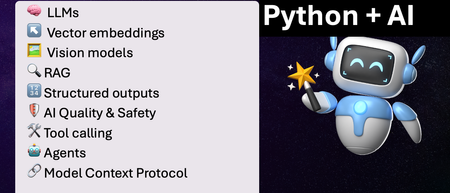
We've just wrapped up our live series on Python + AI, a comprehensive nine-part journey diving deep into how to use generative AI models from Python. The series introduced multiple types of models, including LLMs, embedding models, and vision models. We dug into popular techniques like RAG, tool calling, and structured outputs. We assessed AI quality and safety using automated evaluations and red-teaming. Finally, we developed AI agents using popular Python agents frameworks and explored the new Model Context Protocol (MCP). To help you apply what you've learned, all of our code examples work with GitHub Models, a service that provides free models to every GitHub account holder for experimentation and education. Even if you missed the live series, you can still access all the material using the links below! If you're an instructor, feel free to use the slides and code examples in your own classes. If you're a Spanish speaker, check out the Spanish version of the series. Python + AI: Large Language Models 📺 Watch recording In this session, we explore Large Language Models (LLMs), the models that power ChatGPT and GitHub Copilot. We use Python to interact with LLMs using popular packages like the OpenAI SDK and LangChain. We experiment with prompt engineering and few-shot examples to improve outputs. We also demonstrate how to build a full-stack app powered by LLMs and explain the importance of concurrency and streaming for user-facing AI apps. Slides for this session Code repository with examples: python-openai-demos Python + AI: Vector embeddings 📺 Watch recording In our second session, we dive into a different type of model: the vector embedding model. A vector embedding is a way to encode text or images as an array of floating-point numbers. Vector embeddings enable similarity search across many types of content. In this session, we explore different vector embedding models, such as the OpenAI text-embedding-3 series, through both visualizations and Python code. We compare distance metrics, use quantization to reduce vector size, and experiment with multimodal embedding models. Slides for this session Code repository with examples: vector-embedding-demos Python + AI: Retrieval Augmented Generation 📺 Watch recording In our third session, we explore one of the most popular techniques used with LLMs: Retrieval Augmented Generation. RAG is an approach that provides context to the LLM, enabling it to deliver well-grounded answers for a particular domain. The RAG approach works with many types of data sources, including CSVs, webpages, documents, and databases. In this session, we walk through RAG flows in Python, starting with a simple flow and culminating in a full-stack RAG application based on Azure AI Search. Slides for this session Code repository with examples: python-openai-demos Python + AI: Vision models 📺 Watch recording Our fourth session is all about vision models! Vision models are LLMs that can accept both text and images, such as GPT-4o and GPT-4o mini. You can use these models for image captioning, data extraction, question answering, classification, and more! We use Python to send images to vision models, build a basic chat-with-images app, and create a multimodal search engine. Slides for this session Code repository with examples: openai-chat-vision-quickstart Python + AI: Structured outputs 📺 Watch recording In our fifth session, we discover how to get LLMs to output structured responses that adhere to a schema. In Python, all you need to do is define a Pydantic BaseModel to get validated output that perfectly meets your needs. We focus on the structured outputs mode available in OpenAI models, but you can use similar techniques with other model providers. Our examples demonstrate the many ways you can use structured responses, such as entity extraction, classification, and agentic workflows. Slides for this session Code repository with examples: python-openai-demos Python + AI: Quality and safety 📺 Watch recording This session covers a crucial topic: how to use AI safely and how to evaluate the quality of AI outputs. There are multiple mitigation layers when working with LLMs: the model itself, a safety system on top, the prompting and context, and the application user experience. We focus on Azure tools that make it easier to deploy safe AI systems into production. We demonstrate how to configure the Azure AI Content Safety system when working with Azure AI models and how to handle errors in Python code. Then we use the Azure AI Evaluation SDK to evaluate the safety and quality of output from your LLM. Slides for this session Code repository with examples: ai-quality-safety-demos Python + AI: Tool calling 📺 Watch recording In the final part of the series, we focus on the technologies needed to build AI agents, starting with the foundation: tool calling (also known as function calling). We define tool call specifications using both JSON schema and Python function definitions, then send these definitions to the LLM. We demonstrate how to properly handle tool call responses from LLMs, enable parallel tool calling, and iterate over multiple tool calls. Understanding tool calling is absolutely essential before diving into agents, so don't skip over this foundational session. Slides for this session Code repository with examples: python-openai-demos Python + AI: Agents 📺 Watch recording In the penultimate session, we build AI agents! We use Python AI agent frameworks such as the new agent-framework from Microsoft and the popular LangGraph framework. Our agents start simple and then increase in complexity, demonstrating different architectures such as multiple tools, supervisor patterns, graphs, and human-in-the-loop workflows. Slides for this session Code repository with examples: python-ai-agent-frameworks-demos Python + AI: Model Context Protocol 📺 Watch recording In the final session, we dive into the hottest technology of 2025: MCP (Model Context Protocol). This open protocol makes it easy to extend AI agents and chatbots with custom functionality, making them more powerful and flexible. We demonstrate how to use the Python FastMCP SDK to build an MCP server running locally and consume that server from chatbots like GitHub Copilot. Then we build our own MCP client to consume the server. Finally, we discover how easy it is to connect AI agent frameworks like LangGraph and Microsoft agent-framework to MCP servers. With great power comes great responsibility, so we briefly discuss the security risks that come with MCP, both as a user and as a developer. Slides for this session Code repository with examples: python-mcp-demo10KViews6likes0CommentsChoosing the Right Intelligence Layer for Your Application
Introduction One of the most common questions developers ask when planning AI-powered applications is: "Should I use the GitHub Copilot SDK or the Microsoft Agent Framework?" It's a natural question, both technologies let you add an intelligence layer to your apps, both come from Microsoft's ecosystem, and both deal with AI agents. But they solve fundamentally different problems, and understanding where each excels will save you weeks of architectural missteps. The short answer is this: the Copilot SDK puts Copilot inside your app, while the Agent Framework lets you build your app out of agents. They're complementary, not competing. In fact, the most interesting applications use both, the Agent Framework as the system architecture and the Copilot SDK as a powerful execution engine within it. This article breaks down each technology's purpose, architecture, and ideal use cases. We'll walk through concrete scenarios, examine a real-world project that combines both, and give you a decision framework for your own applications. Whether you're building developer tools, enterprise workflows, or data analysis pipelines, you'll leave with a clear understanding of which tool belongs where in your stack. The Core Distinction: Embedding Intelligence vs Building With Intelligence Before comparing features, it helps to understand the fundamental design philosophy behind each technology. They approach the concept of "adding AI to your application" from opposite directions. The GitHub Copilot SDK exposes the same agentic runtime that powers Copilot CLI as a programmable library. When you use it, you're embedding a production-tested agent, complete with planning, tool invocation, file editing, and command execution, directly into your application. You don't build the orchestration logic yourself. Instead, you delegate tasks to Copilot's agent loop and receive results. Think of it as hiring a highly capable contractor: you describe the job, and the contractor figures out the steps. The Microsoft Agent Framework is a framework for building, orchestrating, and hosting your own agents. You explicitly model agents, workflows, state, memory, hand-offs, and human-in-the-loop interactions. You control the orchestration, policies, deployment, and observability. Think of it as designing the company that employs those contractors: you define the roles, processes, escalation paths, and quality controls. This distinction has profound implications for what you build and how you build it. GitHub Copilot SDK: When Your App Wants Copilot-Style Intelligence The GitHub Copilot SDK is the right choice when you want to embed agentic behavior into an existing application without building your own planning or orchestration layer. It's optimized for developer workflows and task automation scenarios where you need an AI agent to do things, edit files, run commands, generate code, interact with tools, reliably and quickly. What You Get Out of the Box The SDK communicates with the Copilot CLI server via JSON-RPC, managing the CLI process lifecycle automatically. This means your application inherits capabilities that have been battle-tested across millions of Copilot CLI users: Planning and execution: The agent analyzes tasks, breaks them into steps, and executes them autonomously Built-in tool support: File system operations, Git operations, web requests, and shell command execution work out of the box MCP (Model Context Protocol) integration: Connect to any MCP server to extend the agent's capabilities with custom data sources and tools Multi-language support: Available as SDKs for Python, TypeScript/Node.js, Go, and .NET Custom tool definitions: Define your own tools and constrain which tools the agent can access BYOK (Bring Your Own Key): Use your own API keys from OpenAI, Azure AI Foundry, or Anthropic instead of GitHub authentication Architecture The SDK's architecture is deliberately simple. Your application communicates with the Copilot CLI running in server mode: Your Application ↓ SDK Client ↓ JSON-RPC Copilot CLI (server mode) The SDK manages the CLI process lifecycle automatically. You can also connect to an external CLI server if you need more control over the deployment. This simplicity is intentional, it keeps the integration surface small so you can focus on your application logic rather than agent infrastructure. Ideal Use Cases for the Copilot SDK The Copilot SDK shines in scenarios where you need a competent agent to execute tasks on behalf of users. These include: AI-powered developer tools: IDEs, CLIs, internal developer portals, and code review tools that need to understand, generate, or modify code "Do the task for me" agents: Applications where users describe what they want—edit these files, run this analysis, generate a pull request and the agent handles execution Rapid prototyping with agentic behavior: When you need to ship an intelligent feature quickly without building a custom planning or orchestration system Internal tools that interact with codebases: Build tools that explore repositories, generate documentation, run migrations, or automate repetitive development tasks A practical example: imagine building an internal CLI that lets engineers say "set up a new microservice with our standard boilerplate, CI pipeline, and monitoring configuration." The Copilot SDK agent would plan the file creation, scaffold the code, configure the pipeline YAML, and even run initial tests, all without you writing orchestration logic. Microsoft Agent Framework: When Your App Is the Intelligence System The Microsoft Agent Framework is the right choice when you need to build a system of agents that collaborate, maintain state, follow business processes, and operate with enterprise-grade governance. It's designed for long-running, multi-agent workflows where you need fine-grained control over every aspect of orchestration. What You Get Out of the Box The Agent Framework provides a comprehensive foundation for building sophisticated agent systems in both Python and .NET: Graph-based workflows: Connect agents and deterministic functions using data flows with streaming, checkpointing, human-in-the-loop, and time-travel capabilities Multi-agent orchestration: Define how agents collaborate, hand off tasks, escalate decisions, and share state Durability and checkpoints: Workflows can pause, resume, and recover from failures, essential for business-critical processes Human-in-the-loop: Built-in support for approval gates, review steps, and human override points Observability: OpenTelemetry integration for distributed tracing, monitoring, and debugging across agent boundaries Multiple agent providers: Use Azure OpenAI, OpenAI, and other LLM providers as the intelligence behind your agents DevUI: An interactive developer UI for testing, debugging, and visualizing workflow execution Architecture The Agent Framework gives you explicit control over the agent topology. You define agents, connect them in workflows, and manage the flow of data between them: ┌─────────────┐ ┌──────────────┐ ┌──────────────┐ │ Agent A │────▶│ Agent B │────▶│ Agent C │ │ (Planner) │ │ (Executor) │ │ (Reviewer) │ └─────────────┘ └──────────────┘ └──────────────┘ Define Execute Validate strategy tasks output Each agent has its own instructions, tools, memory, and state. The framework manages communication between agents, handles failures, and provides visibility into what's happening at every step. This explicitness is what makes it suitable for enterprise applications where auditability and control are non-negotiable. Ideal Use Cases for the Agent Framework The Agent Framework excels in scenarios where you need a system of coordinated agents operating under business rules. These include: Multi-agent business workflows: Customer support pipelines, research workflows, operational processes, and data transformation pipelines where different agents handle different responsibilities Systems requiring durability: Workflows that run for hours or days, need checkpoints, can survive restarts, and maintain state across sessions Governance-heavy applications: Processes requiring approval gates, audit trails, role-based access, and compliance documentation Agent collaboration patterns: Applications where agents need to negotiate, escalate, debate, or refine outputs iteratively before producing a final result Enterprise data pipelines: Complex data processing workflows where AI agents analyze, transform, and validate data through multiple stages A practical example: an enterprise customer support system where a triage agent classifies incoming tickets, a research agent gathers relevant documentation and past solutions, a response agent drafts replies, and a quality agent reviews responses before they reach the customer, with a human escalation path when confidence is low. Side-by-Side Comparison To make the distinction concrete, here's how the two technologies compare across key dimensions that matter when choosing an intelligence layer for your application. Dimension GitHub Copilot SDK Microsoft Agent Framework Primary purpose Embed Copilot's agent runtime into your app Build and orchestrate your own agent systems Orchestration Handled by Copilot's agent loop, you delegate You define explicitly, agents, workflows, state, hand-offs Agent count Typically single agent per session Multi-agent systems with agent-to-agent communication State management Session-scoped, managed by the SDK Durable state with checkpointing, time-travel, persistence Human-in-the-loop Basic, user confirms actions Rich approval gates, review steps, escalation paths Observability Session logs and tool call traces Full OpenTelemetry, distributed tracing, DevUI Best for Developer tools, task automation, code-centric workflows Enterprise workflows, multi-agent systems, business processes Languages Python, TypeScript, Go, .NET Python, .NET Learning curve Low, install, configure, delegate tasks Moderate, design agents, workflows, state, and policies Maturity Technical Preview Preview with active development, 7k+ stars, 100+ contributors Real-World Example: Both Working Together The most compelling applications don't choose between these technologies, they combine them. A perfect demonstration of this complementary relationship is the Agentic House project by my colleague Anthony Shaw, which uses an Agent Framework workflow to orchestrate three agents, one of which is powered by the GitHub Copilot SDK. The Problem Agentic House lets users ask natural language questions about their Home Assistant smart home data. Questions like "what time of day is my phone normally fully charged?" or "is there a correlation between when the back door is open and the temperature in my office?" require exploring available data, writing analysis code, and producing visual results—a multi-step process that no single agent can handle well alone. The Architecture The project implements a three-agent pipeline using the Agent Framework for orchestration: ┌─────────────┐ ┌──────────────┐ ┌──────────────┐ │ Planner │────▶│ Coder │────▶│ Reviewer │ │ (GPT-4.1) │ │ (Copilot) │ │ (GPT-4.1) │ └─────────────┘ └──────────────┘ └──────────────┘ Plan Notebook Approve/ analysis generation Reject Planner Agent: Takes a natural language question and creates a structured analysis plan, which Home Assistant entities to query, what visualizations to create, what hypotheses to test. This agent uses GPT-4.1 through Azure AI Foundry or GitHub Models. Coder Agent: Uses the GitHub Copilot SDK to generate a complete Jupyter notebook that fetches data from the Home Assistant REST API via MCP, performs the analysis, and creates visualizations. The Copilot agent is constrained to only use specific tools, demonstrating how the SDK supports tool restriction. Reviewer Agent: Acts as a security gatekeeper, reviewing the generated notebook to ensure it only reads and displays data. It rejects notebooks that attempt to modify Home Assistant state, import dangerous modules, make external network requests, or contain obfuscated code. Why This Architecture Works This design demonstrates several principles about when to use which technology: Agent Framework provides the workflow: The sequential pipeline with planning, execution, and review is a classic Agent Framework pattern. Each agent has a clear role, and the framework manages the flow between them. Copilot SDK provides the coding execution: The Coder agent leverages Copilot's battle-tested ability to generate code, work with files, and use MCP tools. Building a custom code generation agent from scratch would take significantly longer and produce less reliable results. Tool constraints demonstrate responsible AI: The Copilot SDK agent is constrained to only specific tools, showing how you can embed powerful agentic behavior while maintaining security boundaries. Standalone agents handle planning and review: The Planner and Reviewer use simpler LLM-based agents, they don't need Copilot's code execution capabilities, just good reasoning. While the Home Assistant data is a fun demonstration, the pattern is designed for something much more significant: applying AI agents for complex research against private data sources. The same architecture could analyze internal databases, proprietary datasets, or sensitive business metrics. Decision Framework: Which Should You Use? When deciding between the Copilot SDK and the Agent Framework, or both, consider these questions about your application. Start with the Copilot SDK if: You need a single agent to execute tasks autonomously (code generation, file editing, command execution) Your application is developer-facing or code-centric You want to ship agentic features quickly without building orchestration infrastructure The tasks are session-scoped, they start and complete within a single interaction You want to leverage Copilot's existing tool ecosystem and MCP integration Start with the Agent Framework if: You need multiple agents collaborating with different roles and responsibilities Your workflows are long-running, require checkpoints, or need to survive restarts You need human-in-the-loop approvals, escalation paths, or governance controls Observability and auditability are requirements (regulated industries, enterprise compliance) You're building a platform where the agents themselves are the product Use both together if: You need a multi-agent workflow where at least one agent requires strong code execution capabilities You want Agent Framework's orchestration with Copilot's battle-tested agent runtime as one of the execution engines Your system involves planning, coding, and review stages that benefit from different agent architectures You're building research or analysis tools that combine AI reasoning with code generation Getting Started Both technologies are straightforward to install and start experimenting with. Here's how to get each running in minutes. GitHub Copilot SDK Quick Start Install the SDK for your preferred language: # Python pip install github-copilot-sdk # TypeScript / Node.js npm install @github/copilot-sdk # .NET dotnet add package GitHub.Copilot.SDK # Go go get github.com/github/copilot-sdk/go The SDK requires the Copilot CLI to be installed and authenticated. Follow the Copilot CLI installation guide to set that up. A GitHub Copilot subscription is required for standard usage, though BYOK mode allows you to use your own API keys without GitHub authentication. Microsoft Agent Framework Quick Start Install the framework: # Python pip install agent-framework --pre # .NET dotnet add package Microsoft.Agents.AI The Agent Framework supports multiple LLM providers including Azure OpenAI and OpenAI directly. Check the quick start tutorial for a complete walkthrough of building your first agent. Try the Combined Approach To see both technologies working together, clone the Agentic House project: git clone https://github.com/tonybaloney/agentic-house.git cd agentic-house uv sync You'll need a Home Assistant instance, the Copilot CLI authenticated, and either a GitHub token or Azure AI Foundry endpoint. The project's README walks through the full setup, and the architecture provides an excellent template for building your own multi-agent systems with embedded Copilot capabilities. Key Takeaways Copilot SDK = "Put Copilot inside my app": Embed a production-tested agentic runtime with planning, tool execution, file edits, and MCP support directly into your application Agent Framework = "Build my app out of agents": Design, orchestrate, and host multi-agent systems with explicit workflows, durable state, and enterprise governance They're complementary, not competing: The Copilot SDK can act as a powerful execution engine inside Agent Framework workflows, as demonstrated by the Agentic House project Choose based on your orchestration needs: If you need one agent executing tasks, start with the Copilot SDK. If you need coordinated agents with business logic, start with the Agent Framework The real power is in combination: The most sophisticated applications use Agent Framework for workflow orchestration and the Copilot SDK for high-leverage task execution within those workflows Conclusion and Next Steps The question isn't really "Copilot SDK or Agent Framework?" It's "where does each fit in my architecture?" Understanding this distinction unlocks a powerful design pattern: use the Agent Framework to model your business processes as agent workflows, and use the Copilot SDK wherever you need a highly capable agent that can plan, code, and execute autonomously. Start by identifying your application's needs. If you're building a developer tool that needs to understand and modify code, the Copilot SDK gets you there fast. If you're building an enterprise system where multiple AI agents need to collaborate under governance constraints, the Agent Framework provides the architecture. And if you need both, as most ambitious applications do, now you know how they fit together. The AI development ecosystem is moving rapidly. Both technologies are in active development with growing communities and expanding capabilities. The architectural patterns you learn today, embedding intelligent agents, orchestrating multi-agent workflows, combining execution engines with orchestration frameworks, will remain valuable regardless of how the specific tools evolve. Resources GitHub Copilot SDK Repository – SDKs for Python, TypeScript, Go, and .NET with documentation and examples Microsoft Agent Framework Repository – Framework source, samples, and workflow examples for Python and .NET Agentic House – Real-world example combining Agent Framework with Copilot SDK for smart home data analysis Agent Framework Documentation – Official Microsoft Learn documentation with tutorials and user guides Copilot CLI Installation Guide – Setup instructions for the CLI that powers the Copilot SDK Copilot SDK Getting Started Guide – Step-by-step tutorial for SDK integration Copilot SDK Cookbook – Practical recipes for common tasks across all supported languages1.4KViews3likes0Comments
Building a Multi-Agent System with Azure AI Agent Service: Campus Event Management
Personal Background My name is Peace Silly. I studied French and Spanish at the University of Oxford, where I developed a strong interest in how language is structured and interpreted. That curiosity about syntax and meaning eventually led me to computer science, which I came to see as another language built on logic and structure. In the academic year 2024–2025, I completed the MSc Computer Science at University College London, where I developed this project as part of my Master’s thesis. Project Introduction Can large-scale event management be handled through a simple chat interface? This was the question that guided my Master’s thesis project at UCL. As part of the Industry Exchange Network (IXN) and in collaboration with Microsoft, I set out to explore how conversational interfaces and autonomous AI agents could simplify one of the most underestimated coordination challenges in campus life: managing events across multiple departments, societies, and facilities. At large universities, event management is rarely straightforward. Rooms are shared between academic timetables, student societies, and one-off events. A single lecture theatre might host a departmental seminar in the morning, a society meeting in the afternoon, and a careers talk in the evening, each relying on different systems, staff, and communication chains. Double bookings, last-minute cancellations, and maintenance issues are common, and coordinating changes often means long email threads, manual spreadsheets, and frustrated users. These inefficiencies do more than waste time; they directly affect how a campus functions day to day. When venues are unavailable or notifications fail to reach the right people, even small scheduling errors can ripple across entire departments. A smarter, more adaptive approach was needed, one that could manage complex workflows autonomously while remaining intuitive and human for end users. The result was the Event Management Multi-Agent System, a cloud-based platform where staff and students can query events, book rooms, and reschedule activities simply by chatting. Behind the scenes, a network of Azure-powered AI agents collaborates to handle scheduling, communication, and maintenance in real time, working together to keep the campus running smoothly. The user scenario shown in the figure below exemplifies the vision that guided the development of this multi-agent system. Starting with Microsoft Learning Resources I began my journey with Microsoft’s tutorial Build Your First Agent with Azure AI Foundry which introduced the fundamentals of the Azure AI Agent Service and provided an ideal foundation for experimentation. Within a few weeks, using the Azure Foundry environment, I extended those foundations into a fully functional multi-agent system. Azure Foundry’s visual interface was an invaluable learning space. It allowed me to deploy, test, and adjust model parameters such as temperature, system prompts, and function calling while observing how each change influenced the agents’ reasoning and collaboration. Through these experiments, I developed a strong conceptual understanding of orchestration and coordination before moving to the command line for more complex development later. When development issues inevitably arose, I relied on the Discord support community and the GitHub forum for troubleshooting. These communities were instrumental in addressing configuration issues and providing practical examples, ensuring that each agent performed reliably within the shared-thread framework. This early engagement with Microsoft’s learning materials not only accelerated my technical progress but also shaped how I approached experimentation, debugging, and iteration. It transformed a steep learning curve into a structured, hands-on process that mirrored professional software development practice. A Decentralised Team of AI Agents The system’s intelligence is distributed across three specialised agents, powered by OpenAI’s GPT-4.1 models through Azure OpenAI Service. They each perform a distinct role within the event management workflow: Scheduling Agent – interprets natural language requests, checks room availability, and allocates suitable venues. Communications Agent – notifies stakeholders when events are booked, modified, or cancelled. Maintenance Agent – monitors room readiness, posts fault reports when venues become unavailable, and triggers rescheduling when needed. Each agent operates independently but communicates through a shared thread, a transparent message log that serves as the coordination backbone. This thread acts as a persistent state space where agents post updates, react to changes, and maintain a record of every decision. For example, when a maintenance fault is detected, the Maintenance Agent logs the issue, the Scheduling Agent identifies an alternative venue, and the Communications Agent automatically notifies attendees. These interactions happen autonomously, with each agent responding to the evolving context recorded in the shared thread. Interfaces and Backend The system was designed with both developer-focused and user-facing interfaces, supporting rapid iteration and intuitive interaction. The Terminal Interface Initially, the agents were deployed and tested through a terminal interface, which provided a controlled environment for debugging and verifying logic step by step. This setup allowed quick testing of individual agents and observation of their interactions within the shared thread. The Chat Interface As the project evolved, I introduced a lightweight chat interface to make the system accessible to staff and students. This interface allows users to book rooms, query events, and reschedule activities using plain language. Recognising that some users might still want to see what happens behind the scenes, I added an optional toggle that reveals the intermediate steps of agent reasoning. This transparency feature proved valuable for debugging and for more technical users who wanted to understand how the agents collaborated. When a user interacts with the chat interface, they are effectively communicating with the Scheduling Agent, which acts as the primary entry point. The Scheduling Agent interprets natural-language commands such as “Book the Engineering Auditorium for Friday at 2 PM” or “Reschedule the robotics demo to another room.” It then coordinates with the Maintenance and Communications Agents to complete the process. Behind the scenes, the chat interface connects to a FastAPI backend responsible for core logic and data access. A Flask + HTMX layer handles lightweight rendering and interactivity, while the Azure AI Agent Service manages orchestration and shared-thread coordination. This combination enables seamless agent communication and reliable task execution without exposing any of the underlying complexity to the end user. Automated Notifications and Fault Detection Once an event is scheduled, the Scheduling Agent posts the confirmation to the shared thread. The Communications Agent, which subscribes to thread updates, automatically sends notifications to all relevant stakeholders by email. This ensures that every participant stays informed without any manual follow-up. The Maintenance Agent runs routine availability checks. If a fault is detected, it logs the issue to the shared thread, prompting the Scheduling Agent to find an alternative room. The Communications Agent then notifies attendees of the change, ensuring minimal disruption to ongoing events. Testing and Evaluation The system underwent several layers of testing to validate both functional and non-functional requirements. Unit and Integration Tests Backend reliability was evaluated through unit and integration tests to ensure that room allocation, conflict detection, and database operations behaved as intended. Automated test scripts verified end-to-end workflows for event creation, modification, and cancellation across all agents. Integration results confirmed that the shared-thread orchestration functioned correctly, with all test cases passing consistently. However, coverage analysis revealed that approximately 60% of the codebase was tested, leaving some areas such as Azure service integration and error-handling paths outside automated validation. These trade-offs were deliberate, balancing test depth with project scope and the constraints of mocking live dependencies. Azure AI Evaluation While functional testing confirmed correctness, it did not capture the agents’ reasoning or language quality. To assess this, I used Azure AI Evaluation, which measures conversational performance across metrics such as relevance, coherence, fluency, and groundedness. The results showed high scores in relevance (4.33) and groundedness (4.67), confirming the agents’ ability to generate accurate and context-aware responses. However, slightly lower fluency scores and weaker performance in multi-turn tasks revealed a retrieval–execution gap typical in task-oriented dialogue systems. Limitations and Insights The evaluation also surfaced several key limitations: Synthetic data: All tests were conducted with simulated datasets rather than live campus systems, limiting generalisability. Scalability: A non-functional requirement in the form of horizontal scalability was not tested. The architecture supports scaling conceptually but requires validation under heavier load. Despite these constraints, the testing process confirmed that the system was both technically reliable and linguistically robust, capable of autonomous coordination under normal conditions. The results provided a realistic picture of what worked well and what future iterations should focus on improving. Impact and Future Work This project demonstrates how conversational AI and multi-agent orchestration can streamline real operational processes. By combining Azure AI Agent Services with modular design principles, the system automates scheduling, communication, and maintenance while keeping the user experience simple and intuitive. The architecture also establishes a foundation for future extensions: Predictive maintenance to anticipate venue faults before they occur. Microsoft Teams integration for seamless in-chat scheduling. Scalability testing and real-user trials to validate performance at institutional scale. Beyond its technical results, the project underscores the potential of multi-agent systems in real-world coordination tasks. It illustrates how modularity, transparency, and intelligent orchestration can make everyday workflows more efficient and human-centred. Acknowledgements What began with a simple Microsoft tutorial evolved into a working prototype that reimagines how campuses could manage their daily operations through conversation and collaboration. This was both a challenging and rewarding journey, and I am deeply grateful to Professor Graham Roberts (UCL) and Professor Lee Stott (Microsoft) for their guidance, feedback, and support throughout the project.931Views4likes1CommentGetting Started with AI Agents: A Student Developer’s Guide to the Microsoft Agent Framework
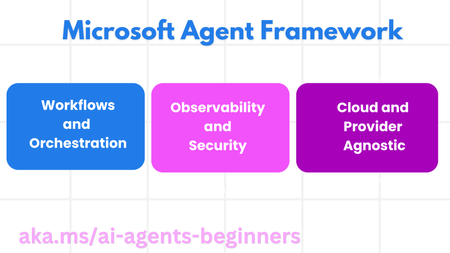
AI agents are becoming the backbone of modern applications, from personal assistants to autonomous research bots. If you're a student developer curious about building intelligent, goal-driven agents, Microsoft’s newly released Agent Framework is your launchpad. In this post, we’ll break down what the framework offers, how to get started, and why it’s a game-changer for learners and builders alike. What Is the Microsoft Agent Framework? The Microsoft Agent Framework is a modular, open-source toolkit designed to help developers build, orchestrate, and evaluate AI agents with minimal friction. It’s part of the AI Agents for Beginners curriculum, which walks you through foundational concepts using reproducible examples. At its core, the framework helps you: Define agent goals and capabilities Manage memory and context Route tasks through tools and APIs Evaluate agent performance with traceable metrics Whether you're building a research assistant, a coding helper, or a multi-agent system, this framework gives you the scaffolding to do it right. What’s Inside the Framework? Here’s a quick look at the key components: Component Purpose AgentRuntime Manages agent lifecycle, memory, and tool routing AgentConfig Defines agent goals, tools, and memory settings Tool Interface Lets you plug in custom tools (e.g., web search, code execution) MemoryProvider Supports semantic memory and context-aware responses Evaluator Tracks agent performance and goal completion The framework is built with Python and .NET and designed to be extensible, perfect for experimentation and learning. Try It: Your First Agent in 10 Minutes Here’s a simplified walkthrough to get you started: Clone the repo git clone https://github.com/microsoft/ai-agents-for-beginners Open the Sample cd ai-agents-for-beginners/14-microsoft-agent-framework Install dependencies pip install -r requirements.txt Run the sample agent python main.py You’ll see a basic agent that can answer questions using a web search tool and maintain context across turns. From here, you can customize its goals, memory, and tools. Why Student Developers Should Care Modular Design: Learn how real-world agents are structured—from memory to evaluation. Reproducible Workflows: Build agents that can be debugged, traced, and improved over time. Open Source: Contribute, fork, and remix with your own ideas. Community-Ready: Perfect for hackathons, research projects, or portfolio demos. Plus, it aligns with Microsoft’s best practices for agent governance, making it a solid foundation for enterprise-grade development. Why Learn? Here are a few ideas to take your learning further: Build a custom tool (e.g., a calculator or code interpreter) Swap in a different memory provider (like a vector DB) Create an evaluation pipeline for multi-agent collaboration Use it in a class project or student-led workshop Join the Microsoft Azure AI Foundry Discord https://aka.ms/Foundry/discord share your project and build your AI Engineer and Developer connections. Star and Fork the AI Agents for Beginners repo for updates and new modules. Final Thoughts The Microsoft Agent Framework isn’t just another library, it’s a teaching tool, a playground, and a launchpad for the next generation of AI builders. If you’re a student developer, this is your chance to learn by doing, contribute to the community, and shape the future of agentic systems. So fire up your terminal, fork the repo, and start building. Your first agent is just a few lines of code away.991Views0likes1CommentEdge AI for Student Developers: Learn to Run AI Locally
AI isn’t just for the cloud anymore. With the rise of Small Language Models (SLMs) and powerful local inference tools, developers can now run intelligent applications directly on laptops, phones, and edge devices—no internet required. If you're a student developer curious about building AI that works offline, privately, and fast, Microsoft’s Edge AI for Beginners course is your perfect starting point. What Is Edge AI? Edge AI refers to running AI models directly on local hardware—like your laptop, mobile device, or embedded system—without relying on cloud servers. This approach offers: ⚡ Real-time performance 🔒 Enhanced privacy (no data leaves your device) 🌐 Offline functionality 💸 Reduced cloud costs Whether you're building a chatbot that works without Wi-Fi or optimizing AI for low-power devices, Edge AI is the future of intelligent, responsive apps. About the Course Edge AI for Beginners is a free, open-source curriculum designed to help you: Understand the fundamentals of Edge AI and local inference Explore Small Language Models like Phi-2, Mistral-7B, and Gemma Deploy models using tools like Llama.cpp, Olive, MLX, and OpenVINO Build cross-platform apps that run AI locally on Windows, macOS, Linux, and mobile The course is hosted on GitHub and includes hands-on labs, quizzes, and real-world examples. You can fork it, remix it, and contribute to the community. What You’ll Learn Module Focus 01. Introduction What is Edge AI and why it matters 02. SLMs Overview of small language models 03. Deployment Running models locally with various tools 04. Optimization Speeding up inference and reducing memory 05. Applications Building real-world Edge AI apps Each module is beginner-friendly and includes practical exercises to help you build and deploy your own local AI solutions. Who Should Join? Student developers curious about AI beyond the cloud Hackathon participants looking to build offline-capable apps Makers and builders interested in privacy-first AI Anyone who wants to explore the future of on-device intelligence No prior AI experience required just a willingness to learn and experiment. Why It Matters Edge AI is a game-changer for developers. It enables smarter, faster, and more private applications that work anywhere. By learning how to deploy AI locally, you’ll gain skills that are increasingly in demand across industries—from healthcare to robotics to consumer tech. Plus, the course is: 💯 Free and open-source 🧠 Backed by Microsoft’s best practices 🧪 Hands-on and project-based 🌐 Continuously updated Ready to Start? Head to aka.ms/edgeai-for-beginners and dive into the modules. Whether you're coding in your dorm room or presenting at your next hackathon, this course will help you build smarter AI apps that run right where you need them on the edge.1KViews1like0CommentsFoundry Fridays: Your Gateway to Azure AI Discovery
🎓 What Is Foundry Fridays? Every Friday at 1:30 PM ET, join the Azure AI Foundry Discord Community https://aka.ms/model-mondays/discord for a 30-minute live Ask Me Anything (AMA) session. It’s your chance to connect with the experts behind Azure AI—Principal PMs, researchers, and engineers—who are building the tools you’ll use in classrooms, hackathons, and real-world projects. Whether you're experimenting with model fine-tuning, curious about local inference, or diving into agentic workflows and open-source tooling, this is where your questions get answered live and unscripted. 💡 Why Students & Educators Should Join Direct Access to Experts Ask your questions live and get real-time insights from the people building Azure AI. Weekly Themes That Matter From model routing and MCP registries to SAMBA architectures, AI Agents, Model Router, Deployment Templates each week brings a new topic to explore. Community-Led Conversations Hosted by leaders like Nitya Narasimhan and Lee Stott, these sessions are interactive, inclusive, and designed to spotlight your questions. No Slides, Just Substance Skip the lectures—this is about real talk, real tech, and real learning. 📚 Bonus Learning: Model Mondays Want even more? Catch up on the Model Mondays series on demand at https://aka.ms/model-mondays and get ready for Season 3, streaming every Monday at 1:30 PM ET. 🚀 How to Join Join the Discord: https://aka.ms/model-mondays/discord Find the AMA: Check the #community-calls and #model-mondays channels or look for pinned events. Ask Anything: Bring your questions, ideas, or just listen in. No registration needed. 💬 Final Thoughts Whether you're coding your first AI project, mentoring students, or researching the next big thing listen and ask the experts questions and hear from the wider community. Foundry Fridays is your space to learn, connect, and grow. So grab your headphones, jump into Discord, and let’s shape the future of AI—together. 🗓️ Fridays | 1:30 PM ET 📍 Azure AI Foundry Discord 🔗 https://aka.ms/model-mondays/discord211Views0likes0CommentsPreparing for Your Organization’s AI Workloads – Student Learning Pathways
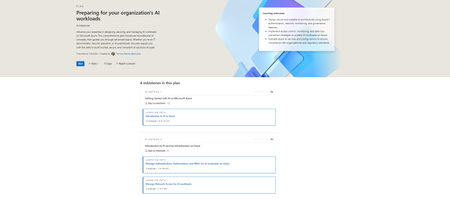
This structured plan helps students: Plans | Microsoft Learn Build foundational knowledge of AI in the cloud. Learn how enterprise-level infrastructure supports responsible, scalable AI deployments. Explore governance and monitoring strategies to ensure security and compliance. And the best part? It’s built using Microsoft’s existing training resources plus some brand-new modules to give you an edge. Your AI Readiness Journey on Azure 🎯 Milestone 1: Getting Started with AI on Azure https://learn.microsoft.com/training/paths/introduction-to-ai-on-azure/ Begin with the basics—from machine learning concepts to practical uses of Azure AI services. 🛡️ Milestone 2: Infrastructure Essentials https://learn.microsoft.com/training/paths/manage-iam-for-ai-workloads-on-azure/ https://learn.microsoft.com/training/paths/manage-network-access-ai-workloads/ Learn how enterprises secure access and manage identities—critical for real-world applications. 📊 Milestone 3: Monitoring AI Services https://learn.microsoft.com/training/paths/monitor-ai-workloads-on-azure/ Discover how businesses ensure their models perform safely and consistently at scale. 🏛️ Milestone 4: Advanced Management & Governance https://learn.microsoft.com/training/paths/ai-workloads-governance/ Master how organizations prevent data leaks and enforce responsible AI usage. 🆕 New Training Content Just for You To make this roadmap even more student-friendly, Microsoft has introduced updated and brand-new modules, including: Azure ML Authentication & Authorization Secure Azure AI Services Restrict Workspace Network Traffic Monitor Azure ML Prevent Data Exfiltration Govern AI Services with Azure Policy 🔗 Ready to Dive In? Whether you're exploring a career in AI or just getting started with Azure, these learning paths will level up your skills while helping you understand how real-world teams manage complex AI workloads. Start your journey on Microsoft Learn and become the architect of tomorrow’s intelligent systems. 💡 Would you like a version formatted for your internal newsletter or maybe something more conversational for social media? I can easily tailor it to fit the tone or medium you're aiming for.432Views0likes0CommentsCurious About Model Context Protocol? Dive into MCP with Us!
Global Workshops for All Skill Levels We’re hosting a series of free online workshops to introduce you to MCP—available in multiple languages and programming languages! You’ll get hands-on experience building your first MCP server, guided by friendly experts ready to answer your questions. Register now: https://aka.ms/letslearnmcp Who Should Join? This workshop is built for: Students exploring tech careers Beginner devs eager to learn how AI agents and MCP works Curious coders and seasoned pros alike If you’ve got some code curiosity and a laptop, you’re good to go. Workshop Schedule (English Sessions) Date Tech Focus Registration Link July 9 C# Join Here July 15 Java Join Here July 16 Python Join Here July 17 C# + Visual Studio Join Here July 21 TypeScript Join Here Multilingual Sessions We’re also hosting workshops in Spanish, Portuguese, Japanese, Korean, Chinese, Vietnamese, and more! Explore different tech stacks while learning in your preferred language: Date Language Technology Link July 15 한국어 (Korean) C# Join July 15 日本語 (Japanese) C# Join July 17 Español C# Join July 18 Tiếng Việt C# Join July 18 한국어 JavaScript Join July 22 한국어 Python Join July 22 Português Java Join July 23 中文 (Chinese) C# Join July 23 Türkçe C# Join July 23 Español JavaScript/TS Join July 23 Português C# Join July 24 Deutsch Java Join July 24 Italiano Python Join 🗓️ Save your seat: https://aka.ms/letslearnmcp What You’ll Need Before the event starts, make sure you’ve got: Visual Studio Code set up for your language of choice Docker installed A GitHub account (you can sign up for Copilot for free!) A curious mindset—no MCP experience required You can check out the MCP for Beginner course at https://aka.ms/mcp-for-beginners What’s Next? MCP Dev Days! Once you’ve wrapped up the workshop, why not go deeper? MCP Dev Days is happening July 29–30, and it’s packed with pro sessions from the Microsoft team and beyond. You’ll explore the MCP ecosystem, learn from insiders, and connect with other learners and devs. 👉 Info and registration: https://aka.ms/mcpdevdays Whether you're writing your first line of code or fine-tuning models like a pro, MCP is a game-changer. Come learn with us, and let’s build the future together339Views0likes0CommentsMulti-Agent Systems and MCP Tools Integration with Azure AI Foundry
The Power of Connected Agents: Building Multi-Agent Systems Imagine trying to build an AI system that can handle complex workflows like managing support tickets, analyzing data from multiple sources, or providing comprehensive recommendations. Sounds challenging, right? That's where multi-agent systems come in! The Develop a multi-agent solution with Azure AI Foundry Agent Services module introduces you to the concept of connected agents a game changing approach that allows you to break down complex tasks into specialized roles handled by different AI agents. Why Connected Agents Matter As a student developer, you might wonder why you'd need multiple agents when a single agent can handle many tasks. Here's why this approach is transformative: 1. Simplified Complexity: Instead of building one massive agent that does everything (and becomes difficult to maintain), you can create smaller, specialized agents with clearly defined responsibilities. 2. No Custom Orchestration Required: The main agent naturally delegates tasks using natural language - no need to write complex routing logic or orchestration code. 3. Better Reliability and Debugging: When something goes wrong, it's much easier to identify which specific agent is causing issues rather than debugging a monolithic system. 4. Flexibility and Extensibility: Need to add a new capability? Just create a new connected agent without modifying your main agent or other parts of the system. How Multi-Agent Systems Work The architecture is surprisingly straightforward: 1. A main agent acts as the orchestrator, interpreting user requests and delegating tasks 2. Connected sub-agents perform specialized functions like data retrieval, analysis, or summarization 3. Results flow back to the main agent, which compiles the final response For example, imagine building a ticket triage system. When a new support ticket arrives, your main agent might: - Delegate to a classifier agent to determine the ticket type - Send the ticket to a priority-setting agent to determine urgency - Use a team-assignment agent to route it to the right department All this happens seamlessly without you having to write custom routing logic! Setting Up a Multi-Agent Solution The module walks you through the entire process: 1. Initializing the agents client 2. Creating connected agents with specialized roles 3. Registering them as tools for the main agent 4. Building the main agent that orchestrates the workflow 5. Running the complete system Taking It Further: Integrating MCP Tools with Azure AI Agents Once you've mastered multi-agent systems, the next level is connecting your agents to external tools and services. The Integrate MCP Tools with Azure AI Agents module teaches you how to use the Model Context Protocol (MCP) to give your agents access to a dynamic catalog of tools. What is Dynamic Tool Discovery? Traditionally, adding new tools to an AI agent meant hardcoding each one directly into your agent's code. But what if tools change frequently, or if different teams manage different tools? This approach quickly becomes unmanageable. Dynamic tool discovery through MCP solves this problem by: 1. Centralizing Tool Management: Tools are defined and managed in a central MCP server 2. Enabling Runtime Discovery: Agents discover available tools during runtime through the MCP client 3. Supporting Automatic Updates: When tools are updated on the server, agents automatically get the latest versions The MCP Server-Client Architecture The architecture involves two key components: 1. MCP Server: Acts as a registry for tools, hosting tool definitions decorated with `@mcp.tool`. Tools are exposed over HTTP when requested. 2. MCP Client: Acts as a bridge between your MCP server and Azure AI Agent. It discovers available tools, generates Python function stubs to wrap them, and registers those functions with your agent. This separation of concerns makes your AI solution more maintainable and adaptable to change. Setting Up MCP Integration The module guides you through the complete process: 1. Setting up an MCP server with tool definitions 2. Creating an MCP client to connect to the server 3. Dynamically discovering available tools 4. Wrapping tools in async functions for agent use 5. Registering the tools with your Azure AI agent Once set up, your agent can use any tool in the MCP catalog as if it were a native function, without any hardcoding required! Practical Applications for Student Developers As a student developer, how might you apply these concepts in real projects? Classroom Projects: - Build a research assistant that delegates to specialized agents for different academic subjects - Create a coding tutor that uses different agents for explaining concepts, debugging code, and suggesting improvements Hackathons: - Develop a sustainability app that uses connected agents to analyze environmental data from different sources - Create a personal finance advisor with specialized agents for budgeting, investment analysis, and financial planning Personal Portfolio Projects: - Build a content creation assistant with specialized agents for brainstorming, drafting, editing, and SEO optimization - Develop a health and wellness app that uses MCP tools to connect to fitness APIs, nutrition databases, and sleep tracking services Getting Started Ready to dive in? Both modules include hands-on exercises where you'll build real working examples: - A ticket triage system using connected agents - An inventory management assistant that integrates with MCP tools The prerequisites are straightforward: - Experience with deploying generative AI models in Azure AI Foundry - Programming experience with Python or C# Conclusion Multi-agent systems and MCP tools integration represent the next evolution in AI application development. By mastering these concepts, you'll be able to build more sophisticated, maintainable, and extensible AI solutions - skills that will make you stand out in internship applications and job interviews. The best part? These modules are designed with practical, hands-on learning in mind - perfect for student developers who learn by doing. So why not give them a try? Your future AI applications (and your resume) will thank you for it! Want to learn more about Model Context Protocol 'MCP' see MCP for Beginners Happy coding!2.3KViews1like0Comments