site recovery
30 Topics
Azure Site recovery clearing locks
Recently had an issue in re-protecting VM's following failover to a secondary region. Tried everything and couldn't resolve eventually after speaking with Azure support i ran the below script and resolved the issue with locks not clearing on failed over VM's cls $subscriptionId = Read-Host 'What is your Azure Subscription ID?' $rgName = Read-Host 'Specify the name of the Resource group in which your VM is located' $vmName = Read-Host 'Specify the name of the VM' # Sign-in with Azure account credentials Login-AzureRmAccount # Select Azure Subscription Select-AzureRmSubscription -SubscriptionId $subscriptionId # Remove any locks $locks = Get-AzureRmResourceLock -ResourceGroupName $rgName -ResourceName $vmName -ResourceType Microsoft.Compute/virtualMachines if ($locks -ne $null -and $locks.Count -ge 0){ $canDelete = Read-Host 'The VM has locks that could prevent cleanup of Azure Site Recovery stale links left from previous protection. Do you want the locks deleted to ensure cleanup goes smoothly? Reply with Y/N.' if ($canDelete.ToLower() -eq "y"){ Foreach ($lock in $locks) { $lockId = $lock.LockId Remove-AzureRmResourceLock -LockId $lockId -Force Write-Host "Removed Lock $lockId for $vmName" } } } $linksResourceId = 'https://management.azure.com/subscriptions/' + $subscriptionId + '/providers/Microsoft.Resources/links' $vmId = '/subscriptions/' + $subscriptionId + '/resourceGroups/' + $rgName + '/providers/Microsoft.Compute/virtualMachines/' + $vmName + '/' Write-Host $("Deleting links for $vmId using resourceId: $linksResourceId") $links = @(Get-AzureRmResource -ResourceId $linksResourceId| Where-Object {$_.Properties.sourceId -match $vmId -and $_.Properties.targetId.ToLower().Contains("microsoft.recoveryservices/vaults")}) Write-Host "Links to be deleted" $links #Delete all links which are of type Foreach ($link in $links) { Write-Host $("Deleting link " + $link.Name) Remove-AzureRmResource -ResourceId $link.ResourceId -Force } $links = @(Get-AzureRmResource -ResourceId $linksResourceId| Where-Object {$_.Properties.sourceId -match $vmId -and $_.Properties.targetId.ToLower().Contains("/protecteditemarmid/")}) Write-Host "Cross subscription Links to be deleted" $links #Delete all links which are of type Foreach ($link in $links) { Write-Host $("Deleting link " + $link.Name) Remove-AzureRmResource -ResourceId $link.ResourceId -Force } Write-Host $("Deleted all links ")2.5KViews1like0CommentsRecovery Services vault limit increased to 500 vaults per subscription per region
Today, we are delighted to announce increased scale limits for Azure Backup. Users can now create as many as 500 recovery services vaults in each subscription per region as compared to the earlier limit of 25 vaults per region per subscription. Customers who have been hitting the vault limits due to a restriction of 25 vaults can now go ahead and create vaults to manage their resources better. In addition, the number of Azure virtual machines that can be registered against each vault has been increased to 1,000 from the earlier limit of 200 machines under each vault. Read about it in the Azure blog.2KViews0likes0CommentsGDPR offers one more reason to focus on your disaster recovery strategy
Has your organization failed to devise a business continuity and disaster recovery plan because of the perception that it’s complex or expensive? Or perhaps you have a disaster recovery plan, but maybe you're not testing it frequently enough because of concerns about impacting production systems. If you’re in either category, you’ll want to start developing a plan now. Especially if your company does business in the European Union (EU) or might have any data on EU citizens. The General Data Protection Regulation (GDPR), which goes into effect May 25, 2018, is the EU’s new data protection regulation. While it doesn’t explicitly require that you back up data or implement a site recovery solution, the GDPR requirements provide additional reasons to stop waiting and fine-tune your DR plan. Learn more about it in the Azure blog.1KViews0likes0Comments
Azure site recovery- replication policy for offline initial replication
Hi, I have 2 sites each site has one SCVMM configured to do Azure Site Recovery. ASR is configured to replicate the VM form one site to another. Here is the issue, my VM size is big and i want to do the initial replication offline instead of over the Network. And it just not allowing me to save the policy, saying permission issues can anyone help me to find, what could be going wrong here ?? ERROR MESSAGE Permissions couldn't be set for one or more hosts on the initial replication folder path. Provider error code: 31218 Provider error message: The VMM service couldn't provide permissions for cs\nimblhttps://i.stack.imgur.com/Kup5Y.jpgecs1$ on \nimblecs1\f$. Error: Object reference not set to an instance of an object.. During cloud configuration, the VMM service provides permissions for Hyper-V service accounts on the import and export paths used for initial replication. Provider error possible causes: The VMM service doesn't have the required privileges to modify the permissions on the import and export paths. Provider error recommended action: Ensure that the VMM service account has the required privileges to perform this operation. POSSIBLE CAUSES Verify that the initial replication path exists and is accessible.2.2KViews0likes1Comment
Azure Backup Server + Hyper-V + Linux VM + Storage Snapshot + Backup from Azure Cloud to on prem
Hi there, I need some help on the following questions: 1. Do I need to install backup agent at the Hyper-V host in order to manage it? Or by default Azure backup server will be able to manage Hyper-V host without any agent installed? 2. I can see my Hyper-V host and the Windows guest VM, but not Linux VM. The integration pkg for the Linux VM is installed but cannot see the Linux VM to configure protection group. 3. Is that a way I can leverage hardware storage (aka storage snapshot) as the backup data source instead of the backup server reading the data from my production volume(s)? If this is possible, please advise how to do it either via powershell scripts or other method. 4. Is it possible to backup my Azure data from the cloud back to my on-prem backup storage? Imagine most of my workloads are running in the cloud but i need to backup a copy of my online production data back to on-prem.737Views0likes0CommentsAzure Site Recovery Issue With vSphere Infrastructure
Hi all, I found two problems 1,) CP server (Ver: 9.13.1.0) is replicating vSphere, but if the name of vSphere virtual machine is ":" (colon) it seems to fail to acquire the inventory. This is the same even if you run Deployment Planner. 2,) I can not delete registered vCenter · · ·. If there are people who have become similar phenomena, let's talk about it!1KViews0likes1Comment
Issues signing in with Azure Site Recovery Tool
I am setting up ASR for an OnPrem VMWare setup. I have the OVF template imported and running, a VPN connection to our Azure instance, along with Internet access. The setup wizard validates the Internet connection and prompts for credentials. I enter the same creds I used to the create the vault, and it thinks for a while then prompts for my password again using our AD validation page. If I enter my password and hit enter, it immediately clears the screen and acts like it wants the password again. I have tried no password, and it figures that out. Also, an invalid password produces and error message. A valid password just causes the whole process to repeat. Any help with this issue would be appreciated. In a thought we could avoid this second prompting, we did join the VM to our domain and reboot. This did not effect this problem and we have the same behavior. Thanks.727Views0likes0CommentsProtect machines using managed disks between Azure regions using Azure Site Recovery
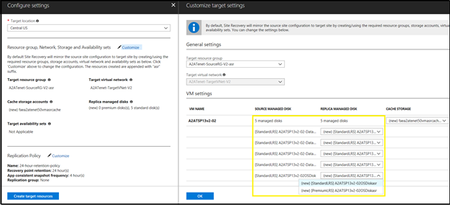
We are happy to announce that Azure Site Recovery (ASR) now provides you the ability to setup Disaster Recovery (DR) for IaaS VMs using managed disks. With this feature, ASR fulfills an important requirement to become an all-encompassing DR solution for all of your production applications hosted on laaS VMs in Azure, including applications hosted on VMs with managed disks. Managed disks provide several advantages including simplification of storage management and guaranteeing industry-leading durability and availability for disk storage. Read about it in the Azure blog.780Views0likes0CommentsStart replicating in under 30 minutes using Azure Site Recovery's new onboarding experience
We on the Azure Site Recovery product team are consistently striving to simplify the business continuity and disaster recovery to Azure solutions for our customers. With the latest release of the Azure Site Recovery service for VMware to Azure, we bring a new, intuitive and simplified getting started experience, which gets you setup and ready to replicate virtual machines in less than 30 minutes! Open Virtualization Format (OVF) template is an industry standard software distribution model for virtual machine templates. Starting January 2018, configuration server for the VMware to Azure scenario will be available to all our customers as an OVF template. Read about it in the Azure blog.843Views0likes0CommentsComprehensive monitoring for Azure Site Recovery now generally available
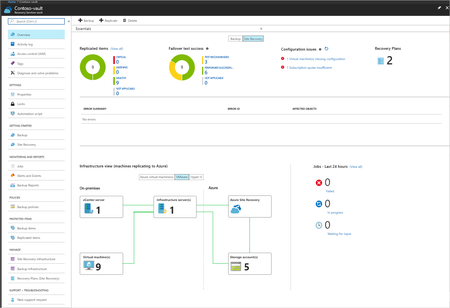
Azure Site Recovery is a vital part of the business continuity strategy of many Azure customers. Customers rely on Azure Site Recovery to protect their mission critical IT systems, maintain compliance, and ensure that their businesses aren’t impacted adversely in the event of a disaster. Operationalizing a business continuity plan and making sure that it meets your organization’s business continuity objectives is complex. The only way to know if the plan works is by performing periodic tests. Even with periodic tests, you can never be certain that it will work seamlessly the next time around due to variables such as configuration drift and resource availability, among others. Monitoring for something as critical should not to be so difficult. The comprehensive monitoring capabilities within Azure Site Recovery gives you full visibility into whether your business continuity objectives are being met. Not just that, with a failover readiness model that monitors resource availability and suggests configurations based on best practices, it also helps inform how prepared you are to react to a disaster today. Read about it in the Azure blog.2.7KViews0likes0Comments