siem
107 Topics
Building Microsoft Sentinel Connectors in Minutes with the Sentinel Connector Builder Agent
Overview We previously announced the public preview of the Microsoft Sentinel connector builder agent via VS code extension, that helps developers build Microsoft Sentinel codeless connectors faster with low-code and AI-assisted prompts. This post walks through a hands-on lab using a mock Network Log API to demonstrate how the Sentinel connector builder agent simplifies building Codeless Connector Framework (CCF) pull connectors. Instead of manually creating ingestion infrastructure and configuration files, you’ll use a guided, conversational workflow in VS Code to generate connector artifacts, test them against a live API, and deploy them into Microsoft Sentinel. The lab focuses on the end-to-end experience ranging from API setup to validated connector deployment so you can see how quickly a working integration can be produced. For additional guidance beyond this lab, refer to our MS Learn documentation. The Lab Environment This lab is built around a mock Network Log API hosted as an Azure Function App. The purpose of the lab environment is to give us a live API that we can use to build, validate, and test the Sentinel CCF connector builder agent against end to end. The API exposes 50 synthetic network activity records that look and behave like a real product data source, including web traffic, DNS requests, blocked remote access attempts, malware command-and-control blocks, VPN activity, and other common network events. That makes it a useful stand-in for the type of telemetry many teams want to onboard into Microsoft Sentinel. The API is intentionally shaped like the kind of source a customer might expose for telemetry retrieval. It uses API key authentication through the X-API-Key header, returns paginated results through a nextLink model, and provides a predictable response structure that the builder agent can map into a pull connector configuration. The repo contains everything needed for the walkthrough. There is an ARM template to deploy the Function App, reference documentation for the API, and a sample connector package showing the generated polling config, table schema, DCR, and connector definition. The end goal of the lab is straightforward: use the builder agent to generate a CCF pull connector that ingests this API into the custom NetworkLogAPIGetNetworkLogs_CL table in Sentinel. Prerequisites Before starting, make sure you have the following: Azure subscription -- with Contributor access on a resource group (for deploying the Function App) and Microsoft Sentinel Contributor access on a Sentinel-enabled workspace (for deploying the connector) Microsoft Sentinel workspace -- an existing Log Analytics workspace with Sentinel enabled. See Onboard Microsoft Sentinel to a Log Analytics workspace for more information. Azure CLI -- See How to install the Azure CLI for more information. VS Code with the Microsoft Sentinel for Visual Studio Code extension installed. GitHub Copilot -- with access to premium models. The connector builder agent requires Claude Sonnet 4.5 or 4.6, which uses Copilot premium model credits. Lab Repository -- Once the aforementioned prerequisites are met, you can access the lab repository here: Azure-Sentinel/Tools/CCF-Connector-Builder-Agent-Accelerator at master · Azure/Azure-Sentinel Deploying the Mock API The full CLI commands for this section are available in the repo. For a simpler option, you can use GitHub Copilot to handle the deployment. Enter this prompt: Follow the deployment instructions in Sentinel-CCF-Pull-Connector-Builder-Agent-Accelerator/agent-instructions.md. Let’s deploy the Network Log API and build a CCF pull connector. At a high level, the setup is four steps: clone the repo, create a resource group, ensure you have a Sentinel-enabled workspace, and deploy the Function App using the included ARM template. The template takes two parameters: an ApiKey of your choice (the secret the CCF connector will use to authenticate) and your Log Analytics workspace resource ID for Application Insights. Deployment takes about two to three minutes and outputs the FunctionAppName and endpoint URLs you will need later. Once deployed, verify the API is live: curl -s -H "X-API-Key: <your-api-key>" \ "https://<functionappname>.azurewebsites.net/api/GetNetworkLogs?page=1&pageSize=3" </functionappname></your-api-key> You should see a response like this: The API also exposes an /api/RefreshData endpoint that regenerates the 50 sample records with fresh timestamps. This is useful later in the walkthrough when you want to produce new events and trigger an immediate ingestion cycle without waiting for the next polling interval: curl -s -X POST -H "X-API-Key: <your-api-key>" \ "https://<functionappname>.azurewebsites.net/api/RefreshData" </functionappname></your-api-key> Building the Connector with the Sentinel Connector Builder Agent With the Microsoft Sentinel extension installed and GitHub Copilot running in agent mode, open a Copilot chat and enter a single prompt pointing at the API documentation file: That is the entire invocation. The agent takes it from there. It works through a structured seven-step sequence: preparation, polling config, table schema, DCR, connector definition, package validation, and summary. The agent produces four files in a sentinel-connectors/NetworkLogAPI_CCF/ output folder: NetworkLogAPI_PollingConfig.json – This is the API poller configuration. The agent reads the documentation and correctly identifies the GET /api/GetNetworkLogs endpoint, configures API Key authentication via the X-API-Key header, sets up NextPageUrl pagination using $.metadata.nextLink with a $.metadata.hasNextPage stop condition, and wires up the since query parameter for incremental delta pulls using the timestamp field. The RefreshData endpoint is correctly excluded, which the agent recognizes as a maintenance operation, not a security data stream. NetworkLogAPI_Table.json – This is the custom Log Analytics table schema for NetworkLogAPIGetNetworkLogs_CL . All 20 fields from the API response are mapped to the correct column types, with timestamp promoted to TimeGenerated as the standard Sentinel time column. NetworkLogAPI_DCR.json – This is the Data Collection Rule. This defines the stream declaration, the workspace destination, and the KQL transform that maps the raw snake_case API fields ( sourceIp , destinationIp , threatIndicator , etc.) to their PascalCase table columns. NetworkLogAPI_ConnectorDefinition.json – This is the connector UI configuration. This drives what the connector page looks like in Microsoft Sentinel: the title, description, prerequisite instructions, the BaseUrl and ApiKey input fields, sample KQL queries, and the connectivity status logic. The only point where the agent paused for input was to propose a connector description and ask for confirmation before writing it to the file. Everything else such as endpoint selection, auth type, pagination pattern, schema mapping, KQL transform, cross-file consistency was selected autonomously. To put that in perspective: without the agent, a developer building this connector from scratch would need to manually author four JSON files, understand the CCF schema for polling configs, DCRs, and connector definitions, write the KQL transform by hand, and validate that every cross-file reference lines up correctly. The agent compresses that work, typically hours of reading documentation, trial-and-error, and portal debugging, into a single prompt. Testing the Connector Before deploying anything to a Sentinel workspace, the Microsoft Sentinel connector builder agent lets you validate the generated polling config against the live API directly from your editor. Right-click the sentinel-connectors/NetworkLogAPI_CCF folder, select Microsoft Sentinel → Test Connector (Preview), and a Configuration Variables panel opens asking for the two template variables from the polling config: BaseUrl and apiKey . For other API patterns, there may be additional and different inputs. For example, apiKey input could be swapped with clientID and secret if the API supports OAUTH. Enter the Function App base URL and your API key, and the test runner connects immediately. The panel shows a live polling session. Poll #1 returns HTTP 200 with 50 events, and a countdown timer shows when the next poll will fire. Switching to the Events tab displays the ingested records in a tabular view with columns for timestamp , severity , action , bytesIn , bytesOut , category , and the rest of the mapped fields fresh from the API. Additionally, there are tabs for Headers, Payload, and Response, which can be useful for verifying that your pollerconfig.json configuration provides the expected request to your api with a working response. Data Extracted: The Test Connector feature can be used to visualize the response data in a table format to verify that data will land in a Sentinel table based on your configuration. Request from Poller: The Test Connector feature can be used to validate the request and response headers that will go out to the API based on the generated poller configuration. Request Response: The Test Connector feature shows you the live response from the API with respect to the request going to the API based on the poller configuration. This is a meaningful pre-flight check. It confirms that auth is working, the $.data events path resolves correctly, pagination is functional, and the polling interval fires as configured all before a single file is deployed to Azure. The most common connector configuration issues (wrong base URL, incorrect header name, mismatched JSON path) surface here in seconds rather than after a failed deployment and a 20-minute wait for Sentinel to attempt its first ingestion cycle. It is also the fastest way to troubleshoot if something goes wrong after deployment, far quicker than pushing changes to Azure and waiting for the connector to poll again. Deploying and Enabling the Connector With the connector tested and passing, deployment is the same right-click menu: right-click the sentinel-connectors/NetworkLogAPI_CCF folder, select Microsoft Sentinel → Deploy Connector (Preview). If you are not already signed in to Azure, the extension will prompt you to authenticate. The agent will also provide a clickbox in the chat window to invoke a connector deployment. Right Click Deploy Connector: UI Prompt Based Deploy Method: Once signed in, a workspace picker lists all available Log Analytics workspaces across your subscriptions. Select the one with Sentinel enabled and click Deploy. The extension deploys all four files to the workspace in the correct order: table schema first, then DCR, polling config, and connector definition. Once deployed, navigate to your Sentinel workspace via https://security.microsoft.com, go to Data Connectors, and find the Network Log API connector. The connector page shows the description, prerequisite notes, and the two credential fields generated by the agent: API Base URL and API Key. Enter your Function App base URL and API key and click Connect. The status updates to show the connector is connected and the deployment succeeded. Note: Data will appear in the workspace within 5 to 30 minutes depending on the polling interval. Run this query in Log Analytics to confirm ingestion. Note that the agent derives the table name from the vendor name and endpoint, so yours may differ slightly from the example below. Check the agent's summary output or the NetworkLogAPI_Table.json file for the exact name: NetworkLogAPIGetNetworkLogs_CL | sort by TimeGenerated desc | take 10 If you want to generate a fresh batch of events immediately rather than waiting for the next polling cycle, use the RefreshData endpoint to reset the sample records with new timestamps: curl -s -X POST -H "X-API-Key: " \ "https://.azurewebsites.net/api/RefreshData" Next Steps If you want to go further: Try it with your own API. The lab repo includes documentation on adapting the polling config, schema, and KQL transform to a real data source. Review the CCF connector schema documentation to understand the full range of supported configurations: pagination patterns, auth types, incremental pull strategies, and delta filter expressions. Explore the Microsoft Sentinel content hub to see how published connectors are structured and what the certification requirements look like for production submissions. Conclusion Following these steps, you saw how a working Sentinel connector can be generated, tested, and deployed in minutes rather than requiring days of manual configuration and infrastructure setup. If you are an ISV building a Sentinel integration and want hands-on support, Microsoft’s App Assure program is available to help. We partner with ISVs on connector development, validation, and deployment and provide guidance through implementation, testing, and readiness for production. You can get started by reaching out through our intake form. See our other Sentinel connector feature’s hands-on labs Building a CCF Nested API Pull Connector: A Technical Lab Walkthrough941Views0likes0CommentsWhat’s new in Microsoft Sentinel: June 2026
Welcome back to What's new in Microsoft Sentinel. In June, Sentinel SIEM’s Advanced Security Information Model (ASIM) broadens its normalization, so one analytic rule can reach more sources with less per-source work and, additionally, two new ASIM schemas can now bring asset inventory and AI agent telemetry into common form. In Microsoft Sentinel data lake, the Agent Identities Asset Connector adds the identity context behind your AI agents, helping you see who owns an agent and what permissions it holds. In Sentinel MCP, graph tools help security teams investigate threats and optimize security coverage by visualizing relationships across identities, devices, alerts, and signals in a unified graph experience. Read on for the details, and explore the resources at the end to go deeper. Sentinel innovations: Sentinel SIEM Sentinel data lake Sentinel MCP Microsoft Security Store Sentinel SIEM Advanced Security Information Model (ASIM) parsers and schemas [Generally available] The Advanced Security Information Model (ASIM) in Sentinel normalizes logs into common schemas, so one analytic rule can cover many sources without managing each native schema. ASIM coverage has expanded across more Azure services, broader AWS CloudTrail activity, and a range of third-party firewall, identity, and proxy products, so your detections reach more of your environment with less per-source work. Two schemas also join ASIM: Asset Entities normalizes asset inventory so you can correlate files and assets across investigations, and AI Agent Events normalizes telemetry from AI-driven workflows and autonomous agents. Browse the ASIM parsers on GitHub to explore, file issues, or contribute. Learn more in our blog. Sentinel transition to Defender blog series By March 31, 2027, all Microsoft Sentinel customers transition to Defender. This six-part series guides you through moving your Sentinel experience from the Azure portal to Defender, where SIEM, XDR, threat intelligence, AI, and automation come together in one experience. Your analytics rules, playbooks, workbooks, log analytics workspace, and access assignments all carry forward while the operational layer becomes more connected and intelligent. Starting early matters because you realize the benefits sooner, including a unified incident queue, cross-product correlation, Security Copilot, Sentinel data lake, and SOC optimization. Across the six-part blog series you get 1) the strategic shift, 2) the anatomy of incident and data changes, 3) detection and automation, 4) the governance shift across roles and access, 5) a readiness playbook with the adoption helper and cost guidance, and 6) a look at the AI-first SOC. Each part stands alone, so you can read in order or jump to what matters most to you. Sentinel data lake Agent Identities Asset Connector [Public preview] The Agent Identities Asset Connector brings identity context for AI agents into Sentinel. Activity connectors like Agent 365 and Microsoft 365 Copilot already show you what AI agents do, but activity alone cannot tell you who owns an agent, what permissions it holds, or how it is governed. This connector fills that gap with four asset tables covering agent owners, agent identities, agent blueprints, and the service principals tied to those blueprints. Together they form a connected agent identity graph you can trace from owner to identity to blueprint to permissions to the resources an agent touches. Joining this asset data with activity data in Sentinel data lake lets you detect anomalous behavior relative to permissions, spot over-permissioned or misconfigured agents, and follow full execution chains for end-to-end traceability. To get started, install the Agent 365 and Microsoft 365 Copilot solutions in Content Hub and enable the asset and activity connectors. Learn more. Sentinel MCP Sentinel MCP graph tools [Public preview] Microsoft Security Graph MCP tools, recently introduced in the Microsoft Sentinel MCP Server data exploration collection helps security teams investigate threats by exploring relationships between identities and device assets, and threat and activity signals ingested by data connectors and surfaced by analytic rules. Starting from an alert, analysts can follow the exposure path across connected entities — tracing lateral movement, understanding blast radius, and identifying configuration gaps — all from a single, interactive workspace. The tool provides a clear graph view that highlights dependencies and makes it easier to understand how content interacts across your environment. This helps security teams assess coverage, optimize content deployment, and identify areas that may need tuning or additional data sources. Executing graph queries via the MCP tools will trigger the graph meter. Learn more. Microsoft Security Store Partner testimonials from Adaquest and Glueckkanja For partners like Adaquest and Glueckkanja, the Microsoft Security Store helps not only put their years of knowledge, understanding, and best practices into a scalable, packaged solution, it gives them the ability to democratize that expertise and take it to market globally. Security Store operationalizes their expertise as always-on defenses — discoverable, deployable, and driving real outcomes inside the tools that security teams rely on every day. See how the Security Store is helping security teams act on threats faster with the right solutions and to be ready when it matters most: Watch: Adaquest unlocks faster response times for customers (testimonial) Watch: Glueckkanja builds agents with purpose (testimonial) Additional resources Blogs and documentation: The Advanced Security Information Model (ASIM) Process Event normalization schema reference How BlueVoyant's ASIM-First Strategy Simplifies Threat Detection in Microsoft Sentinel Migrate Sentinel to Defender – Why It Is a Security Architecture Decision, Not Just a Portal Change Connect Microsoft Sentinel to the Microsoft Defender portal Agent 365 connector: Monitor, hunt, and investigate AI agent activity in Microsoft Sentinel Get started with Microsoft Sentinel MCP server Upcoming webinars and events: July 15–16: Microsoft Virtual Training Day: Predict and Defend Against Cybersecurity Threats July 22: Microsoft Security Immersion Event: Shadow Hunter July 23-24: Microsoft Virtual Training Day: Introduction to Microsoft Security July 28: Tech Brief: Modernize security operations with a unified platform July 29: Security Immersion Event: Into the Breach Stay connected Check back each month for the latest innovations, updates, and events to ensure you’re getting the most out of Microsoft Sentinel. We’ll see you in the next edition!977Views2likes0CommentsThe Worm in the Supply Chain: How Defender for Endpoint and Sentinel for SAP BTP Caught Shai-Hulud
On 29 April 2026, malicious versions of multiple SAP ecosystem npm packages were briefly published, creating a supply-chain exposure for SAP Cloud Application Programming (CAP) development environments and CI/CD pipelines. For a brief window that morning, affected developers have executed a credential-stealing payload on a workstation or, in higher-impact cases, within a CI/CD pipeline. SAP developers don't usually think of themselves as a juicy npm target. CAP, BTP, Fiori - that's enterprise turf, not crypto-stealer type territory – Until it is. Join me for the ride. See our latest click-video for an even more dynamic experience of SAP compromises. Affected packages and scope Four official npm packages from the SAP development ecosystem were published in malicious versions that day. Security researchers are calling the campaign "Mini Shai-Hulud" - the little cousin of the worm family that has been chewing its way through open-source registries for months. So, the "mini" part is a generous description in my opinion. Shai-Hulud has wriggled directly into the SAP supply chain, and that detail alone deserves a pause... SAP CAP is now interesting enough to have become a target. Four packages, all wearing legitimate SAP branding, all quietly swapped for evil twins: @cap-js/sqlite v2.2.2 @cap-js/postgres v2.2.2 @cap-js/db-service v2.10.1 mbt v1.2.48 These packages are not peripheral dependencies. The @cap-js/* modules are part of the SAP CAP Model used across custom development on SAP BTP, while mbt is the Cloud MTA Build Tool commonly embedded in CI/CD workflows that package and deploy Multi-Target Applications to BTP and on-premises environments. At roughly 930,000 weekly downloads, the combined exposure created meaningful downstream attack surface. The good news: SAP spotted the compromise fast, yanked the bad versions, and shipped clean replacements. The official guidance lives in SAP Security Note 3747787 - which carries the list of indicators of compromise, file hashes, and mitigation steps. Enough theory and evidence talk! Now, SHOW ME the detection! When the worm stirs beneath the sand, weak defenses vanish first. Observed telemetry in Microsoft Security products See below excerpt of Microsoft Defender for Endpoint from a compromised developer machine. The worm was neutralized immediately. Check the detection time (same day of release): Windows Defender AV detected malware ToString: DefenderDetection: File: /Users/User***/Projects/dara-api-manager-ui/node_modules/mbt/File***.js, Sha256: *** [Trojan:JS/SPchnStlr.BB], BlockingStatus: Prevented, BlockingStatusPriority: 900 DetectionTime: 2026-04-29 11:52:11Z DetectorName: Microsoft.Cyber.ObservationDetectors.DefenderConcreteDetector Observations (2): DefenderObservation Description: Defender detected and quarantined 'Trojan:JS/SPchnStlr.BB' in file 'File***.js' ThreatCategory = Trojan, ThreatFamily = SPchnStlr, How the Threat Actors Operationalized the Stolen Data The compromise allowed harvesting GitHub tokens, AWS/Azure/GCP secrets, npm credentials, Kubernetes config, SSH keys, .npmrc and .git-credentials files, and CI/CD environment variables. The hackers created a public GitHub repository on the victim’s own account, tagged with the description “A Mini Shai-Hulud has Appeared“ to exfiltrate their reaping. Within hours, more than a thousand such repositories were visible in public GitHub search. For additional views on the topic check out the blogs of our Sentinel for SAP partners: Onapsis, Pathlock, and SecurityBridge. Containment and Impact Reduction If you were not as lucky as the developer using Defender for Endpoint and VS Code, you need end to end monitoring of your landscape in and around SAP. Once the worm is loose with cloud tokens it may appear in various unexpected places. Microsoft Sentinel Solution for SAP covers your ERP crown jewels, your SAP BTP landscape and allows informed correlation with the rest of your IT estate. Microsoft’s correlation engine: ensures traceability automatic attack disruption and just-in-time hardening of potential attack paths. Developers using the cloud-based IDE SAP Business Application Studio are out of reach by Defender for Endpoint but profit from threat monitoring through Sentinel for SAP BTP integrating SAP BTP’s malware scanner the same way. See this in action in this click-video and in below screenshot. SOC analysts get actionable insights and tailored guidance from Security Copilot once SAP BTP signals are added to the Microsoft incident graph - no matter where the threat involving SAP originates from. Getting Started with Sentinel Solution for SAP Rollout of Sentinel for SAP BTP can happen immediately. Learn more from our deployment guide. Check out the security content reference for more info out-of-the-box detections. Sentinel for SAP which covers your ERP solutions and more, requires configuration of SAP Integration Suite as intermediary step. Learn more from our deployment guide. Check out the security content reference for more info out-of-the-box detections Final Words This incident illustrates how far the SAP BTP attack surface now extends and why patching alone is insufficient once malicious code reaches developer tooling and build infrastructure. Effective defense also requires telemetry, correlation, and response coverage across SAP and non-SAP environments. See you out there folks! #Kudos to Mahesh Mandva and Cameron Gardiner on riding shai-holud with me. Feel free to reach out to talk more about SAP Cyber Security. Cheers, Martin Useful Links SAP Note 3747787 with mitigation guide Mini Shai-Hulud: Multi-Ecosystem Developer Supply Chain Attack – Lab Space Click-Demo for SAP Cyber Security with Microsoft Sentinel for SAP Security Content | Microsoft Learn Sentinel for SAP BTP Security Content | Microsoft Learn632Views0likes0CommentsWhat’s new in Microsoft Sentinel: May 2026
Welcome to the May edition of What's new in Microsoft Sentinel. This month’s updates focus on unified role-based access control (RBAC), ecosystem breadth, AI-agent security, and high-assurance identity. RBAC and row-level scoping are now generally available, giving security teams a single, granular permissions model across Sentinel and the Microsoft Defender portal and enabling multi-team SOC collaboration. The Sentinel connector catalog has passed 400 connectors, expanding coverage across Microsoft and third-party data sources and helping customers and partners onboard new data faster with the Codeless Connector Framework (CCF). The Agent 365 connector, now in public preview, brings AI agent telemetry into Sentinel data lake as first-class standardized signals so you can monitor agent behavior alongside identity, endpoint, and cloud activity. Finally, Entra Verified ID partner integrations in Microsoft Security Store are now generally available, delivering high‑assurance identity verification that makes account recovery after compromise far safer and significantly reduces the risk of re‑compromise. Read on for the full list of updates across Sentinel in May. Sentinel innovations: Sentinel SIEM Sentinel data lake Microsoft Security Store Sentinel SIEM Unified role-based access controls and row level scoping [Generally available] Sentinel now delivers general availability of two powerful access management capabilities: Unified RBAC and row-level data scoping. Together, these innovations provide a consistent, end-to-end model for controlling who can access data and what actions they can take — extending unified permissions management across the Defender portal while enabling granular, row-level visibility within a single Sentinel workspace. With Unified RBAC, organizations can simplify and centralize permissions across security workloads, reducing operational overhead, while row-level scoping enables secure collaboration across multiple teams by ensuring users only see data aligned to their role or scope. This milestone unlocks more scalable, multi-team SOC operations without the need for workspace segmentation, helping us to advance toward fully unified, granular access control across Microsoft Security. Tenant groups [Public preview] Managing security across multiple tenants just got simpler. Tenant Groups in the Microsoft Defender multi-tenant portal (MTO) give managed security service providers (MSSPs), cloud service partners (CSPs), and multi-tenant security teams a flexible way to organize tenants into logical groupings such as customer segment, geography, or operational priority, and instantly switch views with a single click. This streamlined experience reduces noise, improves investigation focus, and aligns to how teams actually work, all while respecting existing permissions and access controls. Learn more. Out-of-the-box integrations for Sentinel automation [Public preview] Out-of-the-box (OOTB) integrations for Sentinel automation brings a centralized catalog to easily discover, configure, and manage both Microsoft and third-party integrations. With simple, authentication-based setup, users can quickly add integrations and seamlessly incorporate them into playbooks. The experience places OOTB and custom integrations side by side, with enhanced with smart search, recommendations, and duplicate prevention to streamline automation workflows end to end. Learn more. UEBA enhancements [Public preview] Microsoft Sentinel UEBA continues to evolve with improvements that simplify management and expand detection coverage. A dedicated UEBA tab view in the Sentinel settings page consolidates UEBA and behaviors settings, making configuration easier to find and manage. Learn more. UEBA insights and anomalies now support the OktaV2_CL table alongside the existing Okta_CL table, extending anomalous activity and anomalous MFA failures detections to customers using the newer Okta connector format, without requiring new anomaly types. Learn more. UEBA extends GCP Audit Logs coverage with five anomaly detections for login activity, privileged actions, resource deployments, secret/KMS key access, and infrastructure usage. Learn more. Together, these updates make UEBA easier to operate while extending its visibility into identity and behavior signals from additional cloud and identity providers. Read the latest blog from the Microsoft Defender Research Team to learn more about Microsoft Sentinel UEBA and binary feature stacking, which uses clear binary signals to help establish behavioral context and inform investigation and detection decisions. Threat Intelligence – TAXII Export connector [Generally available] Sentinel supports threat intelligence export through the built-in Threat Intelligence – Trusted Automated Exchange of Intelligence Information (TAXII) Export connector, giving customers a standards-based way to share curated Structured Threat Information Expression (STIX) objects with supported TAXII 2.1 platforms. Configured from the Defender portal, the connector handles destination setup and intelligence delivery to external platforms. The capability supports cross-organization intelligence sharing for collective defense and centralized management in multi-tenant environments, with use cases across government, critical infrastructure, and large distributed organizations. Additional enhancements are planned, including more export options and expanded destination support. Learn more. Decision-stage resources for SIEM migration to Sentinel The AI-powered SIEM migration experience helps teams analyze detections, identify required data sources and connectors, and plan a phased move to Sentinel. But, customers still need help turning that analysis into a clear decision. To support that step, we’re introducing two new customer-facing resources: the Sentinel SIEM Migration Decision and Planning Guide, which explains the migration journey, outputs, and decision checkpoints before execution, and the Decision-Stage Customer FAQ, which answers common questions around disruption, cost, dual running, detection coverage, and delivery support. Together, these resources help make migration conversations more concrete and move teams more quickly from evaluation to a clearer, lower-risk next step. Learn more: Read the blog: AI-powered SIEM migration experience announcement Download the guide: Decision and planning guide Download the FAQ: Decision-stage customer FAQ Learn more: SIEM migration experience documentation Register for live AMA (Jun 23 at 9am PT): Live Microsoft Tech Community AMA on SIEM migration Sentinel data lake 400+ Sentinel data connectors The Sentinel connector catalog now includes 400+ connectors, providing broad, ready-to-deploy coverage across Microsoft and third-party data sources. Customers can flexibly ingest security data into Microsoft Sentinel analytics tier or the data lake tier. The Codeless Connector Framework (CCF) and VS code-based connector builder agent enables partners and customers to onboard new data sources faster and scale the catalog. Discover connectors in the Sentinel Content hub within the Defender portal or build custom connectors when needed. Learn more. Agent 365 connector [Public preview] Agent 365 connector streams AI agent telemetry from Agent 365 into Sentinel data lake, giving SOC teams visibility into agent behavior alongside identity, endpoint, and cloud signals. With the Agent 365 connector in place, Sentinel data lake becomes the system of record for agent security, turning activity such as data exposure or access drift into first-class security signals that analysts can correlate, hunt across, and investigate. Telemetry is normalized and to mapped to standard Advanced Security Information Model (ASIM) schemas, ready for analytics and detections, and end-to-end investigations can run through KQL, graph, and MCP-powered workflows. Install the connector with a single click from Sentinel Content Hub in the Defender portal. Learn more. CCF support for Azure Blob Storage [Public preview] Sentinel Codeless Connector Framework (CCF) supports Azure Blob Storage as a data source, providing an ingestion pattern designed for high-volume security data. Partners and customers can build CCF connectors that read from Blob Storage through a durable architecture that buffers spikes, handles backpressure, and reduces data loss risk during outages or throttling, making ingestion more reliable for variable or distributed pipelines. The pattern broadens compatibility with partners already streaming logs to Azure as part of their audit data delivery, with Cloudflare and Netskope as early adopters. App Assure further provides engineering-backed support for designing, validating, and remediating the Azure Blob Storage CCF connector integration. Learn more. Data filtering and splitting [Generally available] At RSAC, we announced built‑in filtering and splitting capabilities in Microsoft Sentinel, which is now generally available. As security teams ingest more data, it is important to optimize security data pipeline by controlling what data is ingested and in which tier. With filtering and splitting natively integrated into the Defender portal, security teams can shape data before it reaches Sentinel, without switching tools or managing custom JSON files. Using simple KQL‑based transformations directly in the UI, you can filter low‑value events and intelligently route data, making ingestion optimization faster, more intuitive, and easier to manage at scale. Filtering at ingest time allows you to remove low‑value or benign events to reduce noise, lower unnecessary processing, and ensure high‑signal data drives detections and investigations. Splitting enables intelligent routing of data between the analytics tier and the data lake tier based on relevance and usage. Together, these capabilities help you balance cost and performance while scaling data ingestion sustainably as your digital estate grows. Learn more. Transition your Sentinel connectors to the Codeless Connector Framework (CCF) [Action required] Azure has announced that the legacy Azure Data Collection API will be deprecated on September 14, 2026. Sentinel recommends customers review existing connectors and upgrade to the latest Codeless Connector Framework (CCF) versions to ensure continued access to the newest Sentinel capabilities. CCF delivers a fully managed SaaS experience with built-in health monitoring, centralized credential management, and improved performance. This enables partners and customers to onboard new data sources faster and at scale. Microsoft Security Store Entra Verified ID partner integrations via Security Store [Generally available] Security Store helps organizations secure one of the most critical steps in incident response: safe account recovery after compromise. Once a SOC team detects and contains a potential account takeover (ATO), restoring access requires high confidence that the user is legitimate. Through partner integrations with IDEMIA, AU10TIX, CLEAR, 1Kosmos, and WhoAmI, customers can extend Entra Verified ID with high-assurance identity verification (such as document and biometric checks) to validate users during recovery, onboarding, or helpdesk workflows. This helps replace weaker fallback methods that attackers often exploit, enabling SOC and IT teams to safely restore access while reducing risk of re-compromise. Learn more. Purview Data Security Triage Agent in Defender [Public preview] Security Store powers how customers discover and activate data security agents across Defender and Microsoft Purview, starting with the Data Security Triage Agent. This capability delivers AI-generated summaries and prioritization of Data Loss Prevention (DLP) alerts directly into Defender XDR, helping security teams reduce noise and focus on the incidents that matter most. By unifying discovery and activation through Security Store, customers can deploy data security agents in fewer steps and enable more integrated workflows across threat and data protection surfaces. Learn more. Additional resources Blogs and documentation: From idea to production: Building Security Store Advisor with an agentic SDLC Upcoming webinars: June 4: End-to-End Security in the Age of Agentic AI June 10: Deploy, optimize, and implement threat protection with Sentinel June 10: Security Foundations for AI Adoption June 24: Modern Security Made Simple: Stay Ahead of Threats with Sentinel Upcoming events: June 2–3: Microsoft Build, San Francisco (and free online) CEO Satya Nadella Day 1 keynote 90+ sessions, Microsoft Security experts onsite Register: build.microsoft.com Stay connected Check back each month for the latest innovations, updates, and events to ensure you’re getting the most out of Microsoft Sentinel. We’ll see you in the next edition!1.5KViews3likes0Comments
Agent 365 connector: Monitor, hunt, and investigate AI agent activity in Microsoft Sentinel
As enterprises scale the use of AI agents, SOC teams need visibility into AI agent behavior. The Agent 365 connector, now in public preview, streams rich agent telemetry from Agent 365 into Microsoft Sentinel data lake. Agent activity, such as agent data exposure or access drift, is surfaced alongside other security data, giving SOC teams a unified view across digital environments. AI Agent actions are correlated with agent identity, endpoint, and cloud signals, enabling analysts to run end‑to‑end investigations using KQL, graph, and MCP-powered workflows. Why this matters for organizations By centralizing security and AI agent telemetry in Sentinel data lake, organizations establish a unified control plane for securing AI agents. This enables security teams to analyze agent activity in context with broader signals and investigate using familiar Sentinel tools. This unlocks the ability for SOCs to detect risky or anomalous agent behavior early, understand impact quickly, and respond with speed and confidence. As AI agents take on real operational responsibility, this level of visibility is critical to prevent blind spots, reduce risk, and ensure agents operate safely at enterprise scale. End‑to‑end visibility into AI agent behavior: A centralized view of AI agent behavior allows AI agents to be treated as first-class entities alongside users, identities, endpoints, and workloads. Advanced hunting with KQL: Hunt using KQL to proactively uncover unusual AI agent execution patterns, sensitive actions, or activity without clear human context. These hunts help surface potential risk early using the same workflows already used for other security data. Analyzing blast radius and impact with Sentinel graph: Security teams can correlate AI agent activity with identities, endpoints, and cloud resources to understand blast radius and potential impact during an investigation. By pivoting across related entities in Sentinel, analysts can assess how agent actions connect to the broader environment and support deeper, end‑to‑end investigations. Querying agent data through MCP: Use MCP to surface agent observability data through AI assistants, letting analysts pull agent telemetry into investigation workflows alongside other Sentinel data. Agent 365 connector key capabilities Install the Agent 365 connector with a single click using Sentinel Content Hub in the Defender portal. Once enabled, two capabilities come online automatically: Unified agent telemetry across Agent 365 agent experiences: Rich Agent 365 agent telemetry streams into Sentinel data lake, ready to analyze alongside identity, endpoint, and cloud signals using familiar SOC workflows. ASIM unified schema for AI agent observability: Agent 365 agent observability data is normalized into an ASIM-aligned schema so it is consistent, queryable, and ready for analytics and detections. With the connector in place, Sentinel data lake becomes the system of record and the control plane for Agent 365 agent security—turning agent behavior into first-class security signals across SecOps workflows like hunting, investigation, detection engineering, and response. Use cases Prevent sensitive data exposure from misconfigured agents When an AI agent is granted broader access than intended, a crafted prompt could override safeguards and expose confidential data. With agent telemetry, security teams can trace the full execution path—from prompt to tools to data access—to quickly identify the root cause and contain the exposure. Detect and control agent access drift over time As agents take on new tasks, their permissions can expand beyond the original scope, often without clear visibility. Agent telemetry enables continuous behavioral baselining, making it easier to spot abnormal access patterns early and prevent privilege misuse before it escalates. Uncover hidden lateral movement across agent workflows Agents often collaborate and delegate tasks across systems, creating complex chains of execution that are difficult to track. Agent telemetry provides visibility into these interactions, mapping delegation paths and helping teams understand and limit the potential blast radius. Defend against prompt injection and manipulation attacks Attackers can craft prompts to override agent instructions and manipulate behavior. By capturing prompts and reasoning flows, agent telemetry enables detection of these attacks and provides the context needed to investigate and remediate quickly. Accelerate SOC investigations with end-to-end visibility When an agent is involved in a security alert, understanding its actions can be challenging. Agent telemetry correlates prompts, identities, tools, and data access into a unified timeline, giving SOC teams the clarity needed to investigate faster and respond with confidence. Strengthen governance and compliance for AI agents Organizations need visibility into what agents exist and what data they can access. Agent telemetry provides a comprehensive audit trail of agent activity and access patterns, supporting compliance reporting and policy enforcement. Enable proactive threat hunting on agent behavior Security teams need to stay ahead of emerging risks as agent usage grows. Agent telemetry enables advanced hunting across agent activity, helping detect anomalies, uncover patterns, and identify threats before they impact the organization. Get started with Agent 365 connector Getting started is straightforward. In the Microsoft Defender portal, navigate to Microsoft Sentinel Open Content hub and search for Agent 365 Install the Agent 365 Connector (if not already installed) Open the connector page and select Connect to begin ingestion Once connected, AI agent telemetry starts flowing into Sentinel, ready for hunting, investigation, and response. Data ingestion and analytics are billed using existing Sentinel meters. Learn more Find the Agent 365 data connector | Microsoft Learn Discover and manage Sentinel out-of-the-box content | Microsoft Learn Connect data sources to Sentinel by using data connectors | Microsoft Learn Sample KQL queries for Sentinel data lake | Microsoft Learn Watch the Sentinel data lake video playlist | Microsoft Security Get started with Sentinel data lake | Microsoft Learn2.7KViews1like0CommentsExtending Sentinel Data Integration: Azure Blob Storage Support for CCF Connectors
As organizations scale their security operations, the ability to ingest, process, and analyze high volumes of data reliably becomes increasingly critical. Microsoft Sentinel continues to expand its ecosystem through the Codeless Connector Framework (CCF), enabling ISVs to build and deliver integrations with Sentinel faster while simplifying deployment for customers. Today, CCF extends even further with support for Azure Blob Storage, introducing a new pattern for how data can be delivered into Sentinel. Expanding Connector Patterns with Azure Blob Storage CCF has traditionally enabled connectors that integrate directly with partner APIs and data sources. With this latest enhancement, ISVs can now build connectors that read data from Azure Blob Storage—unlocking new flexibility in how security data is collected and delivered. In this model, an ISV writes data to an Azure Blob Storage account. The Sentinel connector then reads from that storage layer, using Azure-native components such as Event Grid and storage queues to process events and forward them through data collection rules (DCR) into Log Analytics workspace. This approach introduces a durable data layer between the data source and Sentinel, enabling more resilient and scalable ingestion scenarios. Why a durable data layer matters By leveraging Azure Blob Storage as part of the ingestion pipeline, CCF connectors gain important operational advantages. This architecture allows data to be buffered and processed asynchronously, helping manage fluctuations in data volume and ensuring consistent delivery. Key benefits include: Resilience: Buffers spikes and handles backpressure to maintain steady ingestion Improved Compatibility: Supports widely adopted Azure Blob-based log streaming, enabling seamless integration with partners that already use Azure for audit data delivery Data protection: Reduces risk of data loss during outages or throttling Scalability: Supports high-volume ingestion scenarios across tenants Flexibility: Enables architectures that can support multiple SIEMs or data consumers Together, these capabilities make CCF Azure Blob Storage based connectors a strong fit for partners managing large, variable, or distributed data pipelines. Partner adoption Early partners are already taking advantage of this capability to modernize their integrations and support evolving customer needs. Cloudflare Cloudflare integrates with Microsoft Sentinel using the Codeless Connector Framework (CCF) to bring Cloudflare log data into centralized security operations workflows. The connector ingests Cloudflare logs—delivered via Logpush to Azure Blob Storage—into Sentinel for analysis, enabling security teams to correlate web, network, and application activity with other security signals. By combining Cloudflare’s global threat visibility with Sentinel analytics and automation, this integration supports more effective threat detection, investigation, and incident response across Cloudflare‑protected environments. Netskope Web Transaction Events Netskope integrates with Microsoft Sentinel to provide detailed visibility into web and cloud activity across users, applications, and SaaS services. The connector ingests Netskope web transaction logs into Sentinel—leveraging Azure Blob Storage as a staging layer for log streaming and ingestion—to enable near real‑time analysis of user behavior, policy violations, and potential threats. By combining Netskope’s inline web inspection with Sentinel’s analytics and correlation capabilities, this integration helps security teams detect risky activity, investigate incidents, and strengthen monitoring across modern cloud environments. These integrations demonstrate how Azure Blob Storage support can simplify ingestion architectures while improving reliability and scalability for customers. Here is what our partners say about the functionality. Cloudflare: Netskope: Get started Developers can begin building CCF Azure Blob Storage -enabled connectors today using the guidance on Microsoft Learn. This documentation provides step-by-step instructions for configuring storage, processing events, and connecting data to Sentinel. In the unlikely event that you encounter any issues in building or updating your connector, App Assure is here to help. We are an engineering-backed team committed to supporting customers and software development companies throughout their journey with Sentinel to streamline integration and accelerate time to market. Reach out to us via our intake form for assistance.1.1KViews0likes0CommentsWhat’s new in Microsoft Sentinel: April 2026
Welcome to the April 2026 edition of What's new in Microsoft Sentinel. April brings a broad set of updates, with RSAC 2026 announcements rolling out alongside new features. Highlights include cost limit enforcement to prevent runaway query costs, curated open-source intelligence in Threat Analytics, and new data connectors for CrowdStrike, Imperva, AWS, and Logstash. Together, these innovations help security teams control costs, stay ahead of emerging threats, and broaden visibility without added complexity. Read on to learn what's new with Sentinel. What's new OSINT reports in Threat Analytics [Preview] Customers can now consume curated OSINT articles alongside Microsoft-authored Threat Analytics reports, all in one place. (OSINT, or open-source intelligence, is any information readily available to the public.) These OSINT articles come enriched, as detailed in the following list, to help security teams move quickly from awareness to action. What’s included: Curated OSINT articles derived from trusted open-source research Clear summaries with links back to original sources Extracted indicators of compromise (IOCs) Mapped MITRE ATT&CK tactics and techniques Microsoft enrichment, analysis, and recommended actions (when available) By bringing OSINT directly into Threat Analytics, we’re reducing context switching, improving analyst efficiency, and helping customers operationalize open-source intelligence faster within their Defender workflows. Learn more. Cost limit enforcement for KQL queries and notebooks [Preview] Sentinel data lake cost policies do more than just send an alert when usage gets too high. You can set hard limits for KQL queries, jobs, and notebook sessions that block new work once a threshold is exceeded, eliminating surprise bills from runaway queries or heavy workloads. For example, instead of finding out about cost spikes after you run large queries against the data lake tier, enforcement stops further queries before the damage is done. Anything already running still finishes normally, and you get clear messaging about what happened and what to do next. You can lift guardrails temporarily, adjust thresholds, or disable enforcement on the fly. Learn more. Sentinel data connectors With 380 Sentinel data connectors, customers achieve broad visibility into complex digital environments and can expand their security operations effectively. Below are the latest updates. CrowdStrike API Connector [Generally Available] The CrowdStrike API Connector ingests logs from CrowdStrike APIs into Sentinel, fetching details on hosts, detections, incidents, alerts, and vulnerabilities from your CrowdStrike environment. Imperva Cloud WAF [Preview] The Imperva Cloud WAF data connector ingests Imperva logs into Sentinel through AWS S3 buckets, giving you visibility into web application traffic and threats detected by your Imperva deployment for monitoring, investigation, and threat hunting in Sentinel. AWS Elastic Load Balancer (ELB) [Preview] This connector allows you to ingest AWS Elastic Load Balancer (ALB, NLB, and GLB) logs into Sentinel. These logs contain detailed records for requests handled by your load balancers, including client IPs, latencies, request paths, and status codes. These logs are useful for monitoring traffic patterns, investigating anomalies, and ensuring security compliance. Logstash Output Plugin [Preview] For organizations that rely on Logstash to collect from on-premises, legacy, or air-gapped environments, the Sentinel Logstash Output Plugin has been rebuilt in Java to align with Microsoft's Secure Future Initiative (SFI) and provide improved security and long-term maintainability. The plugin uses the Azure Monitor Logs Ingestion API with Data Collection Rules (DCRs), giving you full schema control and the ability to ingest directly into Sentinel data lake as well as standard Sentinel tables. Learn more. Sentinel data federation [Preview] Sentinel data federation enables unified visibility and security analytics across federated and ingested data, without compromising data governance. Security teams can quickly query data in Microsoft Fabric, Azure Data Lake Storage (ADLS) Gen2, and Azure Databricks directly from Sentinel, no data movement required. This approach allows teams to explore data broadly through federation, then selectively ingest what matters most into Sentinel to unlock advanced detections, automation, and AI‑powered analytics. Learn more. Sentinel cost estimation tool [Preview] Customers and partners can confidently estimate Sentinel costs using the cost estimation tool. With meter-level guidance, you can model ingestion across analytics and data lake tiers, compare retention options, and estimate compute costs. Built‑in projections of up to three years offer transparency into spend, making it easier to plan, optimize, and share estimates. Try the Sentinel Cost Estimator. Microsoft Entra and Azure Resource Graph (ARG) connector enhancements [Preview] Enable new Entra assets (EntraDevices, EntraOrgContacts) and ARG assets (ARGRoleDefinitions) in existing asset connectors, expanding inventory coverage and powering richer, built‑in graph experiences for greater visibility. Create workbook reports directly from the data lake [Preview] Sentinel workbooks can directly run on the data lake using KQL, enabling you to visualize and monitor security data straight from the data lake. By selecting the data lake as the workbook data source, you can create trend analysis and executive reporting. Custom graphs [Preview] Custom graphs let you model relationships unique to your organization using data from Sentinel data lake, non-Microsoft sources, and federated data sources, all powered by Fabric. Instead of stitching together dozens of tables manually, you can build graphs that surface blast radius, trace attack paths, map privilege chains, and spot structural outliers like unusually broad access or anomalous email exfiltration. You can generate custom graphs using AI-assisted coding in the Microsoft Sentinel VS Code extension, persist them via a schedule job, and access them in the graphs experience in the Defender portal. Run Graph Query Language (GQL) queries, visualize results, and interactively traverse the graph to the next hop with a single click. These graphs also provide the knowledge context that enables AI-powered agent experiences to work more effectively, speeding investigations and helping you move from disconnected alerts to confident decisions at scale. Custom graph API usage for creating and querying graphs is billed according to the Sentinel graph meter. Learn more. MCP entity analyzer [General availability] Entity analyzer provides reasoned, out-of-the-box risk assessments that help you quickly understand whether a URL or user identity represents potential malicious activity. It analyzes data across threat intelligence, prevalence, and organizational context to generate clear, explainable verdicts you can trust. Entity analyzer integrates with your agents through Sentinel MCP server connections to first-party and third-party AI runtime platforms, or with your SOAR workflows through Logic Apps. It also serves as a trusted foundation for the Defender Triage Agent, delivering more accurate alert classifications and deeper investigative reasoning. Entity analyzer is billed based on Security Compute Units (SCU) consumption. Learn more about entity analyzer and MCP billing. Claude MCP connector [Preview] Anthropic Claude can connect to Sentinel through a custom MCP connector, giving you AI-assisted analysis across your Sentinel environment. Microsoft provides step-by-step guidance for configuring a custom connector in Claude that securely connects to a Sentinel MCP server. With this connection you can summarize incidents, investigate alerts, and reason over security signals while keeping data inside Microsoft's security boundary. Access to large language models (LLMs) is managed through Microsoft authentication and role-based controls, supporting faster triage and investigation workflows while maintaining compliance and visibility. CVEs of interest in the Threat Intelligence Briefing Agent [Preview] The Threat Intelligence Briefing Agent delivers curated intelligence based on your organization’s configuration, preferences, and unique industry and geographic needs. The agent surfaces Common Vulnerabilities and Exposures (CVEs) of interest, highlighting vulnerabilities actively discussed across the security landscape and assessing their potential impact on your environment for more timely threat intelligence insights. The agent automatically incorporates internet exposure data powered by the Sentinel platform to surface threats targeting technologies exposed in your organization. Together, these enhancements help you focus faster on the threats that matter most, without manual investigation. Additional resources Blogs and documentation: Featured blog: App Assure launches its Sentinel Advisory Service Agentic use cases for developers on Microsoft Sentinel The Unified SecOps Transition: Why It Is a Security Architecture Decision, Not Just a Portal Change What's new in Microsoft Defender – April 2026 Webinars and training: Featured webinar: Powering the Agentic SOC with Scott Woodgate, General Manager, Microsoft Threat Protection Featured training: Introducing the Microsoft Sentinel Training Lab. Hands-On Security Operations in Minutes Beyond KQL – Unlocking SOC Insights with Sentinel data lake Jupyter Notebooks Hyper scale your SOC: Manage delegated access and role-based scoping in Microsoft Defender Stay connected Check back each month for the latest innovations, updates, and events to ensure you’re getting the most out of Microsoft Sentinel. We’ll see you in the next edition!1.7KViews2likes0Comments
Enforce Cost Limits on KQL Queries and Notebooks in the Microsoft Sentinel Data Lake
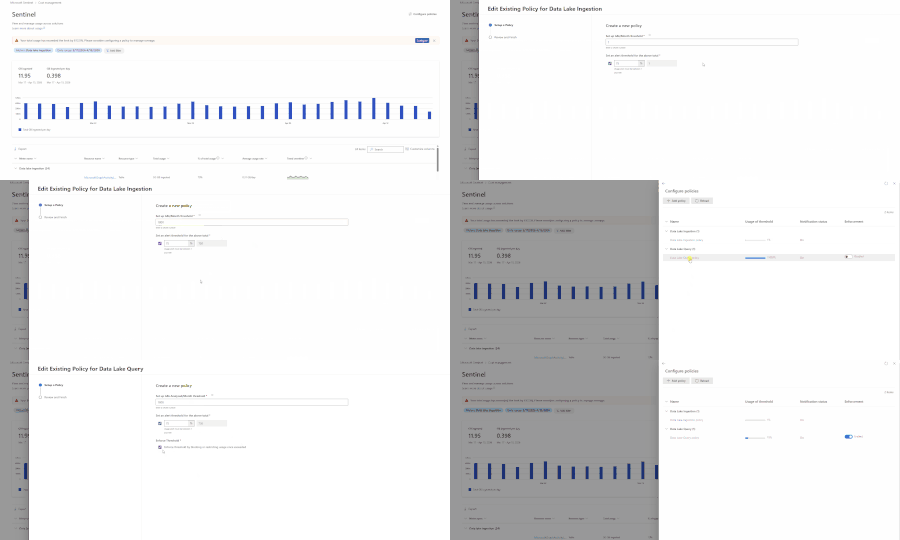
Security teams face a constant tension: run the advanced analytics you need to stay ahead of threats, or hold back to keep costs predictable. Until now, Microsoft Sentinel let you set alerts to get notified when data lake usage approached a threshold — useful for awareness, but not enough to prevent budget overruns. Today, we're excited to announce threshold enforcement for KQL queries and notebooks in the Microsoft Sentinel data lake. With this release, you can go beyond notifications and automatically block new queries and jobs when your configured usage limits are exceeded. Your analysts keep working confidently, and your budgets stay protected. What's new Previously, the Configure Policies experience in Microsoft Sentinel let you set threshold-based alerts for data lake usage. You'd receive an email notification when consumption approached a limit — but nothing stopped usage from continuing past that point. Now, you can enable enforcement on those same policies. When enforcement is turned on and a threshold is exceeded, Microsoft Sentinel blocks new queries, jobs, and notebook sessions with a clear "Limit exceeded" error. No more surprise cost spikes from runaway queries or analysts who mistakenly run heavy workloads against data lake data. Enforcement is supported for two data lake capability categories: Data Lake Query — interactive KQL queries and KQL jobs (scheduled and ad hoc) Advanced Data Insights — notebook runs and notebook jobs How it works Consistent controls across KQL queries and notebooks Cost controls are enforced consistently across Sentinel data lake workloads, regardless of how analysts access the data. The same policy applies whether someone is running a quick investigation or executing a long-running job. Controls apply to: Interactive KQL queries in the data lake explorer in the Defender portal KQL jobs, including scheduled and ad-hoc jobs Notebook queries run through the Microsoft Sentinel VS Code extension Notebook jobs running as background or scheduled workloads This ensures advanced analytics remain powerful — but predictable and governed. Clear enforcement without disruption Enforcement is applied at execution and validation boundaries — not retroactively. This means: Queries or jobs already running are not interrupted. In-flight work completes normally. New queries, jobs, or notebook sessions are blocked once limits are exceeded. Failures occur early (for example, during validation), avoiding wasted compute. From an analyst's perspective, enforcement is explicit and consistent. Clear messaging appears in query editors, job validation responses, and notebooks when limits are reached — so your team always understands what happened and what to do next. How to set it up Prerequisites To configure enforcement policies, ensure you have the necessary permissions that are outlined here: Manage and monitor costs for Microsoft Sentinel | Microsoft Learn. Where to access Navigate to Microsoft Sentinel > Cost management > Configure Policies in the Microsoft Defender portal (https://security.microsoft.com). Step-by-step configuration In Microsoft Sentinel > Cost management, select Configure Policies. Select the policy you want to edit (Data Lake Query or Advanced Data Insights). Enter the total threshold value for the policy. Enter an alert percentage to receive email notifications before the threshold is reached. Enable the Enforcement toggle to block usage after the threshold is exceeded. Review your settings and select Submit. Once enforcement is active, administrators receive advance notifications as usage approaches the threshold. If circumstances change — for example, during an active breach — you can adjust the threshold, disable enforcement temporarily, or modify the policy to give your SOC the room it needs to respond without being blocked. Real-world scenario: Preventing unexpected cost spikes Consider a large SOC that ingests roughly 6 TB of data per day, with 1 TB going to the Sentinel Analytics tier and the remaining 5 TB going to the Sentinel data lake. Analysts are proactively hunting for threats, performing investigations, and running automation. Tier 3 analysts are also running Jupyter Notebooks against the Sentinel data lake to build graphs, execute queries, and automate incident investigation and remediation with code. Last month, the SOC experienced a cost spike after a newly hired analyst ran large, frequent queries against data lake data — mistakenly thinking it was Analytics tier. The SOC manager needs to prevent this from happening again. With enforcement now available, the SOC manager can navigate to Microsoft Sentinel > Cost management > Configure Policies in the Defender portal and set up two policies: A Data Lake Query policy to cap data processing for KQL queries An Advanced Data Insights policy to cap notebook compute consumption With these policies in place, the SOC manager gets notified in advance when consumption approaches the threshold while having confidence that the thresholds set will be enforced to prevent unexpected consumption and cost. Analysts can continue their day-to-day work without worrying about accidental overages. Should a breach scenario demand more capacity, the SOC manager can quickly adjust or temporarily disable the policies — keeping the team unblocked while maintaining overall budget governance. Outside of a breach scenario, should the same SOC analyst generate large amounts of data scanned, the threshold will take action and prevent queries from being performed. Learn more With enforceable KQL and notebook guardrails, Microsoft Sentinel data lake helps security teams scale advanced analytics with confidence. You can control usage in production and keep investigations moving — without tradeoffs between visibility, analytics, and budget. To get started, visit the documentation: Manage and monitor costs for Microsoft Sentinel | Microsoft Learn We'd love to hear your feedback. Share your thoughts in the comments below or reach out through your usual Microsoft support channels.1.3KViews1like0CommentsIntroducing the New Microsoft Sentinel Logstash Output Plugin (Public Preview!)
Many organizations rely on Logstash as a flexible, trusted data pipeline for collecting, transforming, and forwarding logs from on-premises and hybrid environments. Microsoft Sentinel has long supported a Logstash output plugin, enabling customers to send data directly into Sentinel as part of their existing pipelines. The original plugin was implemented in Ruby, and while it has served its purpose, it no longer meets Microsoft’s Secure Future Initiative (SFI) standards and has limited engineering support. To address both security and sustainability, we have rebuilt the plugin from the ground up in Java, a language that is more secure, better supported across Microsoft, and aligned with long-term platform investments. To ensure a seamless transition, the new implementation is still packaged and distributed as a standard Logstash Ruby gem. This means the installation and usage experience remains unchanged for customers, while benefiting from a more secure and maintainable foundation. What's New in This Version Java‑based and SFI‑compliant Same Logstash plugin experience, now rebuilt on a stronger foundation. The new implementation is fully Java‑based, aligning with Microsoft’s Secure Future Initiative (SFI) and providing improved security, supportability, and long-term maintainability. Modern, DCR‑based ingestion The plugin now uses the Azure Monitor Logs Ingestion API with Data Collection Rules (DCRs), replacing the legacy HTTP Data Collection API (For more info, see Migrate from the HTTP Data Collector API to the Log Ingestion API - Azure Monitor | Microsoft Learn). This gives customers full schema control, enables custom log tables, and supports ingestion into standard Microsoft Sentinel tables as well as Microsoft Sentinel data lake. Flexible authentication options Authentication is automatically determined based on your configuration, with support for: Client secret (App registration / service principal) Managed identity, eliminating the need to store credentials in configuration files Sovereign cloud support: The plugin supports Azure sovereign clouds, including Azure US Government, Azure China, and Azure Germany. Standard Logstash distribution model The plugin is published on RubyGems.org, the standard distribution channel for Logstash plugins, and can be installed directly using the Logstash plugin manager, no change to your existing installation workflow. What the Plugin Does Logstash plugin operates as a three-stage data pipeline: Input → Filter → Output. Input: You control how data enters the pipeline, using sources such as syslog, filebeat, Kafka, Event Hubs, databases (via JDBC), files, and more. Filter: You enrich and transform events using Logstash’s powerful filtering ecosystem, including plugins like grok, mutate, and Json, shaping data to match your security and operational needs. Output: This is where Microsoft comes in. The Microsoft Sentinel Logstash Output Plugin securely sends your processed events to an Azure Monitor Data Collection Endpoint, where they are ingested into Sentinel via a Data Collection Rule (DCR). With this model, you retain full control over your Logstash pipeline and data processing logic, while the Sentinel plugin provides a secure, reliable path to ingest data into Microsoft Sentinel. Getting Started Prerequisites Logstash installed and running An Azure Monitor Data Collection Endpoint (DCE) and Data Collection Rule (DCR) in your subscription Contributor role on your Log Analytics workspace Who Is This For? Organizations that already have Logstash pipelines, need to collect from on-premises or legacy systems, and operate in distributed/hybrid environments including air-gapped networks. To learn more, see: microsoft-sentinel-log-analytics-logstash-output-plugin | RubyGems.org | your community gem host1.6KViews1like2CommentsAccelerate Agent Development: Hacks for Building with Microsoft Sentinel data lake
As a Senior Product Manager | Developer Architect on the App Assure team working to bring Microsoft Sentinel and Security Copilot solutions to market, I interact with many ISVs building agents on Microsoft Sentinel data lake for the first time. I’ve written this article to walk you through one possible approach for agent development – the process I use when building sample agents internally at Microsoft. If you have questions about this, or other methods for building your agent, App Assure offers guidance through our Sentinel Advisory Service. Throughout this post, I include screenshots and examples from Gigamon’s Security Posture Insight Agent. This article assumes you have: An existing SaaS or security product with accessible telemetry. A small ISV team (2–3 engineers + 1 PM). Focus on a single high value scenario for the first agent. The Composite Application Model (What You Are Building) When I begin designing an agent, I think end-to-end, from data ingestion requirements through agentic logic, following the Composite application model. The Composite Application Model consists of five layers: Data Sources – Your product’s raw security, audit, or operational data. Ingestion – Getting that data into Microsoft Sentinel. Sentinel data lake & Microsoft Graph – Normalization, storage, and correlation. Agent – Reasoning logic that queries data and produces outcomes. End User – Security Copilot or SaaS experiences that invoke the agent. This separation allows for evolving data ingestion and agent logic simultaneously. It also helps avoid downstream surprises that require going back and rearchitecting the entire solution. Optional Prerequisite You are enrolled in the ISV Success Program, so you can earn Azure Credits to provision Security Compute Units (SCUs) for Security Copilot Agents. Phase 1: Data Ingestion Design & Implementation Choose Your Ingestion Strategy The first choice I face when designing an agent is how the data is going to flow into my Sentinel workspace. Below I document two primary methods for ingestion. Option A: Codeless Connector Framework (CCF) This is the best option for ISVs with REST APIs. To build a CCF solution, reference our documentation for getting started. Option B: CCF Push (Public Preview) In this instance, an ISV pushes events directly to Sentinel via a CCF Push connector. Our MS Learn documentation is a great place to get started using this method. Additional Note: In the event you find that CCF does not support your needs, reach out to App Assure so we can capture your requirements for future consideration. Azure Functions remains an option if you’ve documented your CCF feature needs. Phase 2: Onboard to Microsoft Sentinel data lake Once my data is flowing into Sentinel, I onboard a single Sentinel workspace to data lake. This is a one-time action and cannot be repeated for additional workspaces. Onboarding Steps Go to the Defender portal. Follow the Sentinel Data lake onboarding instructions. Validate that tables are visible in the lake. See Running KQL Queries in data lake for additional information. Phase 3: Build and Test the Agent in Microsoft Foundry Once my data is successfully ingested into data lake, I begin the agent development process. There are multiple ways to build agents depending on your needs and tooling preferences. For this example, I chose Microsoft Foundry because it fit my needs for real-time logging, cost efficiency, and greater control. 1. Create a Microsoft Foundry Instance Foundry is used as a tool for your development environment. Reference our QuickStart guide for setting up your Foundry instance. Required Permissions: Security Reader (Entra or Subscription) Azure AI Developer at the resource group After setup, click Create Agent. 2. Design the Agent A strong first agent: Solves one narrow security problem. Has deterministic outputs. Uses explicit instructions, not vague prompts. Example agent responsibilities: To query Sentinel data lake (Sentinel data exploration tool). To summarize recent incidents. To correlate ISVs specific signals with Sentinel alerts and other ISV tables (Sentinel data exploration tool). 3. Implement Agent Instructions Well-designed agent instructions should include: Role definition ("You are a security investigation agent…"). Data sources it can access. Step by step reasoning rules. Output format expectations. Sample Instructions can be found here: Agent Instructions 4. Configure the Microsoft Model Context Protocol (MCP) tooling for your agent For your agent to query, summarize and correlate all the data your connector has sent to data lake, take the following steps: Select Tools, and under Catalog, type Sentinel, and then select Microsoft Sentinel Data Exploration. For more information about the data exploration tool collection in MCP server, see our documentation. I always test repeatedly with real data until outputs are consistent. For more information on testing and validating the agent, please reference our documentation. Phase 4: Migrate the Agent to Security Copilot Once the agent works in Foundry, I migrate it to Security Copilot. To do this: Copy the full instruction set from Foundry Provision a SCU for your Security Copilot workspace. For instructions, please reference this documentation. Make note of this process as you will be charged per hour per SCU Once you are done testing you will need to deprovision the capacity to prevent additional charges Open Security Copilot and use Create From Scratch Agent Builder as outlined here. Add Sentinel data exploration MCP tools (these are the same instructions from the Foundry agent in the previous step). For more information on linking the Sentinel MCP tools, please refer to this article. Paste and adapt instructions. At this stage, I always validate the following: Agent Permissions – I have confirmed the agent has the necessary permissions to interact with the MCP tool and read data from your data lake instance. Agent Performance – I have confirmed a successful interaction with measured latency and benchmark results. This step intentionally avoids reimplementation. I am reusing proven logic. Phase 5: Execute, Validate, and Publish After setting up my agent, I navigate to the Agents tab to manually trigger the agent. For more information on testing an agent you can refer to this article. Now that the agent has been executed successfully, I download the agent Manifest file from the environment so that it can be packaged. Click View code on the Agent under the Build tab as outlined in this documentation. Publishing to the Microsoft Security Store If I were publishing my agent to the Microsoft Security Store, these are the steps I would follow: Finalize ingestion reliability. Document required permissions. Define supported scenarios clearly. Package agent instructions and guidance (by following these instructions). Summary Based on my experience developing Security Copilot agents on Microsoft Sentinel data lake, this playbook provides a practical, repeatable framework for ISVs to accelerate their agent development and delivery while maintaining high standards of quality. This foundation enables rapid iteration—future agents can often be built in days, not weeks, by reusing the same ingestion and data lake setup. When starting on your own agent development journey, keep the following in mind: To limit initial scope. To reuse Microsoft managed infrastructure. To separate ingestion from intelligence. What Success Looks Like At the end of this development process, you will have the following: A Microsoft Sentinel data connector live in Content Hub (or in process) that provides a data ingestion path. Data visible in data lake. A tested agent running in Security Copilot. Clear documentation for customers. A key success factor I look for is clarity over completeness. A focused agent is far more likely to be adopted. Need help? If you have any issues as you work to develop your agent, please reach out to the App Assure team for support via our Sentinel Advisory Service . Or if you have any other tips, please comment below, I’d love to hear your feedback.844Views2likes0Comments