siem
458 TopicsYour Sentinel AMA Logs & Queries Are Public by Default - AMPLS Architectures to Fix That
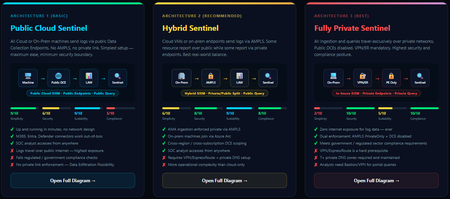
When you deploy Microsoft Sentinel, security log ingestion travels over public Azure Data Collection Endpoints by default. The connection is encrypted, and the data arrives correctly — but the endpoint is publicly reachable, and so is the workspace itself, queryable from any browser on any network. For many organisations, that trade-off is fine. For others — regulated industries, healthcare, financial services, critical infrastructure — it is the exact problem they need to solve. Azure Monitor Private Link Scope (AMPLS) is how you solve it. What AMPLS Actually Does AMPLS is a single Azure resource that wraps your monitoring pipeline and controls two settings: Where logs are allowed to go (ingestion mode: Open or PrivateOnly) Where analysts are allowed to query from (query mode: Open or PrivateOnly) Change those two settings and you fundamentally change the security posture — not as a policy recommendation, but as a hard platform enforcement. Set ingestion to PrivateOnly and the public endpoint stops working. It does not fall back gracefully. It returns an error. That is the point. It is not a firewall rule someone can bypass or a policy someone can override. Control is baked in at the infrastructure level. Three Patterns — One Spectrum There is no universally correct answer. The right architecture depends on your organisation's risk appetite, existing network infrastructure, and how much operational complexity your team can realistically manage. These three patterns cover the full range: Architecture 1 — Open / Public (Basic) No AMPLS. Logs travel to public Data Collection Endpoints over the internet. The workspace is open to queries from anywhere. This is the default — operational in minutes with zero network setup. Cloud service connectors (Microsoft 365, Defender, third-party) work immediately because they are server-side/API/Graph pulls and are unaffected by AMPLS. Azure Monitor Agents and Azure Arc agents handle ingestion from cloud or on-prem machines via public network. Simplicity: 9/10 | Security: 6/10 Good for: Dev environments, teams getting started, low-sensitivity workloads Architecture 2 — Hybrid: Private Ingestion, Open Queries (Recommended for most) AMPLS is in place. Ingestion is locked to PrivateOnly — logs from virtual machines travel through a Private Endpoint inside your own network, never touching a public route. On-premises or hybrid machines connect through Azure Arc over VPN or a dedicated circuit and feed into the same private pipeline. Query access stays open, so analysts can work from anywhere without needing a VPN/Jumpbox to reach the Sentinel portal — the investigation workflow stays flexible, but the log ingestion path is fully ring-fenced. You can also split ingestion mode per DCE if you need some sources public and some private. This is the architecture most organisations land on as their steady state. Simplicity: 6/10 | Security: 8/10 Good for: Organisations with mixed cloud and on-premises estates that need private ingestion without restricting analyst access Architecture 3 — Fully Private (Maximum Control) Infrastructure is essentially identical to Architecture 2 — AMPLS, Private Endpoints, Private DNS zones, VPN or dedicated circuit, Azure Arc for on-premises machines. The single difference: query mode is also set to PrivateOnly. Analysts can only reach Sentinel from inside the private network. VPN or Jumpbox required to access the portal. Both the pipe that carries logs in and the channel analysts use to read them are fully contained within the defined boundary. This is the right choice when your organisation needs to demonstrate — not just claim — that security data never moves outside a defined network perimeter. Simplicity: 2/10 | Security: 10/10 Good for: Organisations with strict data boundary requirements (regulated industries, audit, compliance mandates) Quick Reference — Which Pattern Fits? Scenario Architecture Getting started / low-sensitivity workloads Arch 1 — No network setup, public endpoints accepted Private log ingestion, analysts work anywhere Arch 2 — AMPLS PrivateOnly ingestion, query mode open Both ingestion and queries must be fully private Arch 3 — Same as Arch 2 + query mode set to PrivateOnly One thing all three share: Microsoft 365, Entra ID, and Defender connectors work in every pattern — they are server-side pulls by Sentinel and are not affected by your network posture. Please feel free to reach out if you have any questions regarding the information provided.942Views3likes2Comments
Log Ingestion Options
Hi, Is anyone ingesting Fortinet Firewalls, ZScaler, and Cisco Meraki logs into Sentinel? All three data sources require a log forwarder (Linux Syslog). I might use the below flow as a scalable design Data Sources -> Load Balancer -> VMSS or Individual Forwarders (With AMA & RSyslog/syslog-ng Daemon) --- sentinel workspace As Meraki uses a different port "22033 by default" and file "meraki.conf". For example, CEF (Fortinet and Zscaler) uses TCP port 25226 or 25224 for forwarding traffic to the workspace, need assistance on the below queries please: - Which option would be the best and cost-effective, VMSS-based log ingestion, or have two separate forwarders (One for CEF and another for Meraki)? - In the case of the based method, can we set it up to accommodate traffic from all three sources? - How can we manage encryption from data sources ->Load Balancer? thanks790Views3likes0Comments
What caught you off guard when onboarding Sentinel to the Defender portal?
Following on from a previous discussion around what actually changes versus what doesn't in the Sentinel to Defender portal migration, I wanted to open a more specific conversation around the onboarding moment itself. One thing I have been writing about is how much happens automatically the moment you connect your workspace. The Defender XDR connector enables on its own, a bi-directional sync starts immediately, and if your Microsoft incident creation rules are still active across Defender for Endpoint, Identity, Office 365, Cloud Apps, and Entra ID Protection, you are going to see duplicate incidents before you have had a chance to do anything about it. That is one of the reasons I keep coming back to the inventory phase as the most underestimated part of this migration. Most of the painful post-migration experiences I hear about trace back to things that could have been caught in a pre-migration audit: analytics rules with incident title dependencies, automation conditions that assumed stable incident naming, RBAC gaps that only become visible when someone tries to access the data lake for the first time. A few things I would genuinely love to hear from practitioners who have been through this: - When you onboarded, what was the first thing that behaved unexpectedly that you had not anticipated from the documentation? - For those who have reviewed automation rules post-onboarding: did you find conditions relying on incident title matching that broke, and how did you remediate them? - For anyone managing access across multiple tenants: how are you currently handling the GDAP gap while Microsoft completes that capability? I am writing up a detailed pre-migration inventory framework covering all four areas and the community experience here is genuinely useful for making sure the practitioner angle covers the right ground. Happy to discuss anything above in more detail.Solved474Views2likes3Comments
Ingest Microsoft XDR Advanced Hunting Data into Microsoft Sentinel
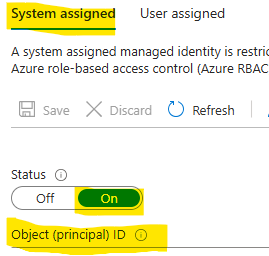
I had difficulty finding a guide that can query Microsoft Defender vulnerability management Advanced Hunting tables in Microsoft Sentinel for alerting and automation. As a result, I put together this guide to demonstrate how to ingest Microsoft XDR Advanced Hunting query results into Microsoft Sentinel using Azure Logic Apps and System‑Assigned Managed Identity. The solution allows you to: Run Advanced Hunting queries on a schedule Collect high‑risk vulnerability data (or other hunting results) Send the results to a Sentinel workspace as custom logs Create alerts and automation rules based on this data This approach avoids credential storage and follows least privilege and managed identity best practices. Prerequisites Before you begin, ensure you have: Microsoft Defender XDR access Microsoft Sentinel deployed Azure Logic Apps permission Application Administrator or higher in Microsoft Entra ID PowerShell with Az modules installed Contributor access to the Sentinel workspace Architecture at a Glance Logic App (Managed Identity) ↓ Microsoft XDR Advanced Hunting API ↓ Logic App ↓ Log Analytics Data Collector API ↓ Microsoft Sentinel (Custom Log) Step 1: Create a Logic App In the Azure Portal, go to Logic Apps Create a new Consumption Logic App Choose the appropriate: Subscription Resource Group Region Step 2: Enable System‑Assigned Managed Identity Open the Logic App Navigate to Settings → Identity Enable System‑assigned managed identity Click Save Note the Object ID This identity will later be granted permission to run Advanced Hunting queries. Step 3: Locate the Logic App in Entra ID Go to Microsoft Entra ID → Enterprise Applications Change filter to All Applications Search for your Logic App name Select the app to confirm it exists Step 4: Grant Advanced Hunting Permissions (PowerShell) Advanced Hunting permissions cannot be assigned via the portal and must be done using PowerShell. Required Permission AdvancedQuery.Read.All PowerShell Script # Your tenant ID (in the Azure portal, under Azure Active Directory > Overview). $TenantID=”Your TenantID” Connect-AzAccount -TenantId $TenantID # Get the ID of the managed identity for the app. $spID = “Your Managed Identity” # Get the service principal for Microsoft Graph by providing the AppID of WindowsDefender ATP $GraphServicePrincipal = Get-AzADServicePrincipal -Filter "AppId eq 'fc780465-2017-40d4-a0c5-307022471b92'" | Select-Object Id # Extract the Advanced query ID. $AppRole = $GraphServicePrincipal.AppRole | ` Where-Object {$_.Value -contains "AdvancedQuery.Read.All"} # If AppRoleID comes up with blank value, it can be replaced with 93489bf5-0fbc-4f2d-b901-33f2fe08ff05 # Now add the permission to the app to read the advanced queries New-AzADServicePrincipalAppRoleAssignment -ServicePrincipalId $spID -ResourceId $GraphServicePrincipal.Id -AppRoleId $AppRole.Id # Or New-AzADServicePrincipalAppRoleAssignment -ServicePrincipalId $spID -ResourceId $GraphServicePrincipal.Id -AppRoleId 93489bf5-0fbc-4f2d-b901-33f2fe08ff05 After successful execution, verify the permission under Enterprise Applications → Permissions. Step 5: Build the Logic App Workflow Open Logic App Designer and create the following flow: Trigger Recurrence (e.g., every 24 hours Run Advanced Hunting Query Connector: Microsoft Defender ATP Authentication: System‑Assigned Managed Identity Action: Run Advanced Hunting Query Sample KQL Query (High‑Risk Vulnerabilities) Send Data to Log Analytics (Sentinel) On Send Data, create a new connection and provide the workspace information where the Sentinel log exists. Obtaining the Workspace Key is not straightforward, we need to retrieve using the PowerShell command. Get-AzOperationalInsightsWorkspaceSharedKey ` -ResourceGroupName "<ResourceGroupName>" ` -Name "<WorkspaceName>" Configuration Details Workspace ID Primary key Log Type (example): XDRVulnerability_CL Request body: Results array from Advanced Hunting Step 6: Run the Logic app to return results In the logic app designer select run, If the run is successful data will be sent to sentinel workspace. Step 7: Validate Data in Microsoft Sentinel In Sentinel, run the query: XDRVulnerability_CL | where TimeGenerated > ago(24h) If data appears, ingestion is successful. Step 8: Create Alerts & Automation Rules Use Sentinel to: Create analytics rules for: CVSS > 9 Exploit available New vulnerabilities in last 24 hours Trigger: Email notifications Incident creation SOAR playbooks Conclusion By combining Logic Apps, Managed Identities, Microsoft XDR, and Microsoft Sentinel, you can create a powerful, secure, and scalable pipeline for ingesting hunting intelligence and triggering proactive detections.410Views2likes1CommentThe Sentinel migration mental model question: what's actually retiring vs what isn't?
Something I keep seeing come up in conversations with other Sentinel operators lately, and I think it's worth surfacing here as a proper discussion. There's a consistent gap in how the migration to the Defender portal is being understood, and I think it's causing some teams to either over-scope their effort or under-prepare. The gap is this: the Microsoft comms have consistently told us *what* is happening (Azure portal experience retires March 31, 2027), but the question that actually drives migration planning, what is architecturally changing versus what is just moving to a different screen, doesn't have a clean answer anywhere in the community right now. The framing I've been working with, which I'd genuinely like to get other practitioners to poke holes in: What's retiring: The Azure portal UI experience for Sentinel operations. Incident management, analytics rule configuration, hunting, automation management: all of that moves to the Defender portal. What isn't changing: The Log Analytics workspace, all ingested data, your KQL rules, connectors, retention config, billing. None of that moves. The Defender XDR data lake is a separate Microsoft-managed layer, not a replacement for your workspace. Where it gets genuinely complex: MSSP/multi-tenant setups, teams with meaningful SOAR investments, and anyone who's built tooling against the SecurityInsights API for incident management (which now needs to shift to Microsoft Graph for unified incidents). The deadline extension from July 2026 to March 2027 tells its own story. Microsoft acknowledged that scale operators needed more time and capabilities. If you're in that camp, that extra runway is for proper planning, not deferral. A few questions I'd genuinely love to hear about from people who've started the migration or are actively scoping it: For those who've done the onboarding already: what was the thing that caught you most off guard that isn't well-documented? For anyone running Sentinel across multiple tenants: how are you approaching the GDAP gap while Microsoft completes that capability? Are you using B2B authentication as the interim path, or Azure Lighthouse for cross-workspace querying? I've been writing up a more detailed breakdown of this, covering the RBAC transition, automation review, and the MSSP-specific path, and the community discussion here is genuinely useful for making sure the practitioner perspective covers the right edge cases. Happy to share more context on anything above if useful.Solved751Views2likes7Comments
Understand New Sentinel Pricing Model with Sentinel Data Lake Tier
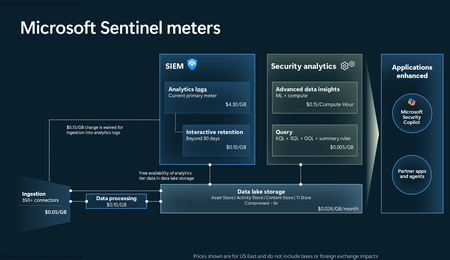
Introduction on Sentinel and its New Pricing Model Microsoft Sentinel is a cloud-native Security Information and Event Management (SIEM) and Security Orchestration, Automation, and Response (SOAR) platform that collects, analyzes, and correlates security data from across your environment to detect threats and automate response. Traditionally, Sentinel stored all ingested data in the Analytics tier (Log Analytics workspace), which is powerful but expensive for high-volume logs. To reduce cost and enable customers to retain all security data without compromise, Microsoft introduced a new dual-tier pricing model consisting of the Analytics tier and the Data Lake tier. The Analytics tier continues to support fast, real-time querying and analytics for core security scenarios, while the new Data Lake tier provides very low-cost storage for long-term retention and high-volume datasets. Customers can now choose where each data type lands—analytics for high-value detections and investigations, and data lake for large or archival types—allowing organizations to significantly lower cost while still retaining all their security data for analytics, compliance, and hunting. Please flow diagram depicts new sentinel pricing model: Now let's understand this new pricing model with below scenarios: Scenario 1A (PAY GO) Scenario 1B (Usage Commitment) Scenario 2 (Data Lake Tier Only) Scenario 1A (PAY GO) Requirement Suppose you need to ingest 10 GB of data per day, and you must retain that data for 2 years. However, you will only frequently use, query, and analyze the data for the first 6 months. Solution To optimize cost, you can ingest the data into the Analytics tier and retain it there for the first 6 months, where active querying and investigation happen. After that period, the remaining 18 months of retention can be shifted to the Data Lake tier, which provides low-cost storage for compliance and auditing needs. But you will be charged separately for data lake tier querying and analytics which depicted as Compute (D) in pricing flow diagram. Pricing Flow / Notes The first 10 GB/day ingested into the Analytics tier is free for 31 days under the Analytics logs plan. All data ingested into the Analytics tier is automatically mirrored to the Data Lake tier at no additional ingestion or retention cost. For the first 6 months, you pay only for Analytics tier ingestion and retention, excluding any free capacity. For the next 18 months, you pay only for Data Lake tier retention, which is significantly cheaper. Azure Pricing Calculator Equivalent Assuming no data is queried or analyzed during the 18-month Data Lake tier retention period: Although the Analytics tier retention is set to 6 months, the first 3 months of retention fall under the free retention limit, so retention charges apply only for the remaining 3 months of the analytics retention window. Azure pricing calculator will adjust accordingly. Scenario 1B (Usage Commitment) Now, suppose you are ingesting 100 GB per day. If you follow the same pay-as-you-go pricing model described above, your estimated cost would be approximately $15,204 per month. However, you can reduce this cost by choosing a Commitment Tier, where Analytics tier ingestion is billed at a discounted rate. Note that the discount applies only to Analytics tier ingestion—it does not apply to Analytics tier retention costs or to any Data Lake tier–related charges. Please refer to the pricing flow and the equivalent pricing calculator results shown below. Monthly cost savings: $15,204 – $11,184 = $4,020 per month Now the question is: What happens if your usage reaches 150 GB per day? Will the additional 50 GB be billed at the Pay-As-You-Go rate? No. The entire 150 GB/day will still be billed at the discounted rate associated with the 100 GB/day commitment tier bucket. Azure Pricing Calculator Equivalent (100 GB/ Day) Azure Pricing Calculator Equivalent (150 GB/ Day) Scenario 2 (Data Lake Tier Only) Requirement Suppose you need to store certain audit or compliance logs amounting to 10 GB per day. These logs are not used for querying, analytics, or investigations on a regular basis, but must be retained for 2 years as per your organization’s compliance or forensic policies. Solution Since these logs are not actively analyzed, you should avoid ingesting them into the Analytics tier, which is more expensive and optimized for active querying. Instead, send them directly to the Data Lake tier, where they can be retained cost-effectively for future audit, compliance, or forensic needs. Pricing Flow Because the data is ingested directly into the Data Lake tier, you pay both ingestion and retention costs there for the entire 2-year period. If, at any point in the future, you need to perform advanced analytics, querying, or search, you will incur additional compute charges, based on actual usage. Even with occasional compute charges, the cost remains significantly lower than storing the same data in the Analytics tier. Realized Savings Scenario Cost per Month Scenario 1: 10 GB/day in Analytics tier $1,520.40 Scenario 2: 10 GB/day directly into Data Lake tier $202.20 (without compute) $257.20 (with sample compute price) Savings with no compute activity: $1,520.40 – $202.20 = $1,318.20 per month Savings with some compute activity (sample value): $1,520.40 – $257.20 = $1,263.20 per month Azure calculator equivalent without compute Azure calculator equivalent with Sample Compute Conclusion The combination of the Analytics tier and the Data Lake tier in Microsoft Sentinel enables organizations to optimize cost based on how their security data is used. High-value logs that require frequent querying, real-time analytics, and investigation can be stored in the Analytics tier, which provides powerful search performance and built-in detection capabilities. At the same time, large-volume or infrequently accessed logs—such as audit, compliance, or long-term retention data—can be directed to the Data Lake tier, which offers dramatically lower storage and ingestion costs. Because all Analytics tier data is automatically mirrored to the Data Lake tier at no extra cost, customers can use the Analytics tier only for the period they actively query data, and rely on the Data Lake tier for the remaining retention. This tiered model allows different scenarios—active investigation, archival storage, compliance retention, or large-scale telemetry ingestion—to be handled at the most cost-effective layer, ultimately delivering substantial savings without sacrificing visibility, retention, or future analytical capabilities.Solved3.8KViews2likes6Comments
Unified SecOps XDR
Hi, I am reaching out to community to seek understanding regarding Unified SecOps XDR portal for Multi-tenant Multi-workspace. Our organization already has a Azure lighthouse setup. My question is if M365 lighthouse license also required for the Multi-tenant Multi-workspace in unified SecOps XDR portal?433Views2likes4Comments[DevOps] dps.sentinel.azure.com no longer responds
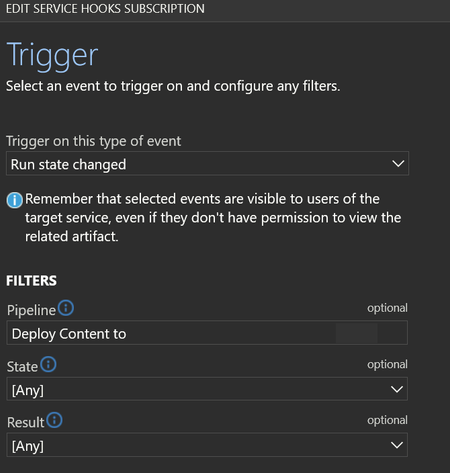
Hello, Ive been using Repository connections in sentinel to a central DevOps for almost two years now. Today i got my first automated email on error for a webhook related to my last commit from the central repo to my Sentinel intances. Its a webhook that is automticly created in connections that are made the last year (the once from 2 years ago dont have this webhook automaticly created). The hook is found in devops -> service hooks -> webhooks "run state change" for each connected sentinel However, after todays run (which was successfull, all content deployed) this hook generates alerts. It says it cant reach: (EU in my case) eu.prod.dps.sentinel.azure.com full url: https://eu.prod.dps.sentinel.azure.com/webhooks/ado/workspaces/[REDACTED]/sourceControls/[REDACTED] So, what happened to this domain? why is it no longer responding and when was it going offline? I THINK this is the hook that sets the status under Sentinel -> Repositories in the GUI. this success status in screenshoot is from 2025/02/06, no new success has been registered in the receiving Sentinel instance. For the Sentinel that is 2 year old and dont have a hook in my DevOps that last deployment status says "Unknown" - so im fairly sure thats what the webhook is doing. So a second question would be, how can i set up a new webhook ? (it want ID and password of the "Azure Sentinel Content Deployment App" - i will never know that password....) so i cant manually add ieather (if the URL ever comes back online or if a new one exists?). please let me know.354Views2likes3Comments
Backing up Sentinel and the Security subscription
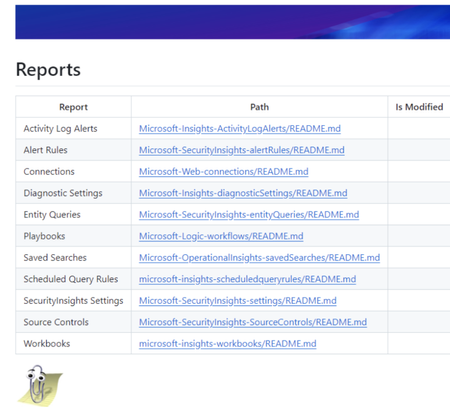
A lot of people ask about how Security Operations can effectively back up all of the Sentinel related objects. One option is to use GitHub or Azure DevOps pipelines to get a daily backup. I've been doing this for a very long time and it seems like a good forum to share that code. The trick behind it has been to use PowerShell to derive the current API versions for Azure objects. Once you do that, you can recursively download the whole subscription to a repo and then scripts can renerate reports using markdown and yaml. I've been backing up my subscription reliably since 2021. The default project creates reports for all the Sentinel related elements. Markdown lets the object reports be drilled down into... And KQL is presented as YAML for readability. It's actually easy to deploy all the backedup JSON files through REST if needed but for most of us, being able to have readable KQL and Git History of changes in files is probably all we need. This project is completely written in PowerShell with no compiled modules & anyone is freely welcome to it. I've written more about it here: https://www.laurierhodes.info/node/168 ... and the source code and install documentation can be found here: https://github.com/LaurieRhodes/PUBLIC-Subscription-Backup I hope this is of use to the community! 🙂 Best Regards Laurie1.6KViews2likes3CommentsLocal IPs ( 10.60.0.0/24 ) in ClientIP field in OfficeActivity logs?
Started seeing this more often recently and it started to cause some uptick in alerts across multiple customers (we are an MSP). It seems to me like a backend workflow is failing to write true source IPs to OfficeActivity logs, resulting in some 10.60.0.0/24 IPs being recorded as the ClientIP. Could this be some backend IP belonging to a Microsoft services? This can't be related to the customer since we see the same thing across up to 37 tenants/customers. This includes FileDownloaded operations which is what caused alerts and brought the issue to our attention. To make sure this also wasn't some kind of correlation to device, I checked the logs further and it's happening where IsManagedDevice == false and even anonymous file access. Is anyone else seeing this and can anyone from Microsoft confirm whether this is a mistake or bug somewhere upstream? Sample KQL: // Query 1 OfficeActivity | where TimeGenerated >=ago(30d) | where ipv4_is_private( ClientIP ) | where IsManagedDevice == false | summarize min(TimeGenerated), max(TimeGenerated), Operations=make_set(Operation), NumberUsers=dcount(UserId), make_set(UserId), UserAgents=make_set(UserAgent) by ClientIP // Query 2 OfficeActivity | where TimeGenerated >=ago(60d) | where isnotempty( ClientIP ) and ipv4_is_private( ClientIP ) | summarize count() by bin(TimeGenerated, 1d)5KViews2likes8Comments