shadow copy
2 Topics
Shadow Copy with 6 days delay
a { text-decoration: none; color: #464feb; } tr th, tr td { border: 1px solid #e6e6e6; } tr th { background-color: #f5f5f5; } Shadow Copy Windows Server 2022 Datacenter (VMWare 7.1) The MaxShadowCopies registry value has been increased to 256. Shadow Copies have been redirected to a different hard disk; FS=NTFS. The schedule is set to run three times per day. The maximum size is set to “Limit” with 1,700,000 MB. Current issue: Shadow Copies were available normally for several months. Now, suddenly, the Shadow Copies are displayed with a 6‑day delay.56Views0likes1Comment
Windows 2016 VMware slow performance. Disks listed as unspecified
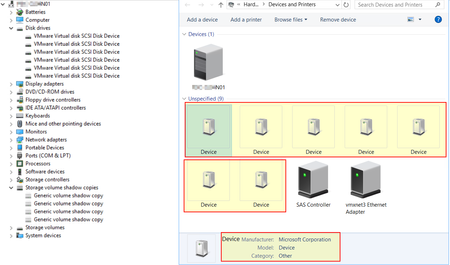
Hi Everyone, I am having performance issue with Node 1 in a two nodes database cluster. They both has identical VM hardware settings and sitting on the same datastore. However, I noticed differences on Node1 compare to Node2 is that all VM disks on listed as unspecified devices under Devices and Printers While Node 2 seems to be fine as expected. Also, on Node 1, there are some volume shadow copies (does not exist on Node2) that has error 45 as below My concerns are: What could cause Windows listed all disks as unspecified on Node 1. Have already reinstalled latest VM Tools Volume shadow is disabled on disks, what are those shadow copies in the list? Do they cause disks become unspecified. Is the slow performance (read/write to any disks, login, Windows update ) on Node 1 because of the unspecified disks? Any ideas to solve the problem is very much appreciated. Regards, Ken.3.1KViews0likes9Comments