service fabric
12 TopicsUsing Keycloak with Azure AD to integrate AKS Cluster authentication process
Integrating Azure Kubernetes Service (AKS) with Keycloak through Azure Active Directory (Azure AD) as an intermediary leverages Azure AD’s support for OpenID Connect (OIDC) to handle authentication and authorization. This integration enhances security, streamlines user management, and simplifies the authentication process for users accessing the AKS cluster.
Why Data Platforms Must Become Intelligence Platforms for AI Agents to Work
The promise and the gap Your organization has invested in an AI agent. You ask it: "Prepare a summary of Q3 revenue by region, including year-over-year trends and top product lines." The agent finds revenue numbers in a SQL warehouse, product metadata in Dataverse, regional mappings in SharePoint, historical data in Azure Blob Storage, and organizational context in Microsoft Graph. Five data sources. Five schemas. No shared definitions. The result? The agent hallucinates, returns incomplete data, or asks a dozen clarifying questions that defeat its purpose. This isn't a model limitation — modern AI models are highly capable. The real constraint is that enterprise data is not structured for reasoning. Traditional data platforms were built for humans to query. Intelligence platforms must be built for agents to _reason_ over. That distinction is the subject of this post. What you'll understand Why fragmented enterprise data blocks effective AI agents What distinguishes a storage platform from an intelligence platform How Microsoft Fabric and Azure AI Foundry work together to enable trustworthy, agent-ready data access The enterprise pain: Fragmented data breaks AI agents Enterprise data is spread across relational databases, data lakes, business applications, collaboration platforms, third-party APIs, and Microsoft Graph — each with its own schema and security model. Humans navigate this fragmentation through institutional knowledge and years of muscle memory. A seasoned analyst knows that "revenue" in the data warehouse means net revenue after returns, while "revenue" in the CRM means gross bookings. An AI agent does not. The cost of this fragmentation isn't hypothetical. Each new AI agent deployment can trigger another round of bespoke data preparation — custom integrations and transformation pipelines just to make data usable, let alone agent-ready. This approach doesn't scale. Why agents struggle without a semantic layer To produce a trustworthy answer, an AI agent needs: (1) **data access** to reach relevant sources, (2) **semantic context** to understand what the data _means_ (business definitions, relationships, hierarchies), and (3) **trust signals** like lineage, permissions, and freshness metadata. Traditional platforms provide the first but rarely the second or third — leaving agents to infer meaning from column names and table structures. This is fragile at best and misleading at worst. Figure 1: Without a shared semantic layer, AI agents must interpret raw, disconnected data across multiple systems — often leading to inconsistent or incomplete results. From storage to intelligence: What must change The fix isn't another ETL pipeline or another data integration tool. The fix is a fundamental shift in what we expect from a data platform. A storage platform asks: "Where is the data, and how do I access it?" An intelligence platform asks: "What does the data mean, who can use it, and how can an agent reason over it?" This shift requires four foundational pillars: Pillar 1: Unified data access OneLake, the data lake built into Microsoft Fabric, provides a single logical namespace across an organization. Whether data originates in a Fabric lakehouse, a warehouse, or an external storage account, OneLake makes it accessible through one interface — using shortcuts and mirroring rather than requiring data migration. This respects existing investments while reducing fragmentation. Pillar 2: Shared semantic layer Semantic models in Microsoft Fabric define business measures, table relationships, human-readable field descriptions, and row-level security. When an agent queries a semantic model instead of raw tables, it gets _answers_ — like `Total Revenue = $42.3M for North America in Q3` — not raw result sets requiring interpretation and aggregation. Before vs After: What changes for an agent? Without semantic layer: Queries raw tables Infers business meaning Risk of incorrect aggregation With semantic layer: Queries `[Total Revenue]` Uses business-defined logic Gets consistent, governed results Pillar 3: Context enrichment Microsoft Graph adds organizational signals — people and roles, activity patterns, and permissions — helping agents produce responses that are not just accurate, but _relevant_ and _appropriately scoped_ to the person asking. Pillar 4: Agent-ready APIs Data Agents in Microsoft Fabric (currently in preview) provide a natural-language interface to semantic models and lakehouses. Instead of generating SQL, an AI agent can ask: "What was Q3 revenue by region?" and receive a structured, sourced response. This is the critical difference: the platform provides structured context and business logic, helping reduce the reasoning burden on the agent. Figure 2: An intelligence platform adds semantic context, trust signals, and agent-ready APIs on top of unified data access — enabling AI agents to combine structured data, business definitions, and relationships to produce more consistent responses. Microsoft Fabric as the intelligence layer Microsoft Fabric is often described as a unified analytics platform. That description is accurate but incomplete. In the context of AI agents, Fabric's role is better understood as an **intelligence layer** — a platform that doesn't just store and process data, but _makes data understandable_ to autonomous systems. Let's look at each capability through the lens of agent readiness. OneLake: One namespace, many sources OneLake provides a single logical namespace backed by Azure Data Lake Storage Gen2. For AI agents, this means one authentication context, one discovery mechanism, and one governance surface. Key capabilities: **shortcuts** (reference external data without copying), **mirroring** (replicate from Azure SQL, Cosmos DB, or Snowflake), and a **unified security model**. For more on OneLake architecture, see [OneLake documentation on Microsoft Learn](https://learn.microsoft.com/fabric/onelake/onelake-overview). Semantic models: Business logic that agents can understand Semantic models (built on the Analysis Services engine) transform raw tables into business concepts: Raw Table Column Semantic Model Measure `fact_sales.amount` `[Total Revenue]` — Sum of net sales after returns `fact_sales.amount / dim_product.cost` `[Gross Margin %]` — Revenue minus COGS as a percentage `fact_sales.qty` YoY comparison `[YoY Growth %]` — Year-over-year quantity growth Code Snippet 1 — Querying a Fabric Semantic Model with Semantic Link (Python) import sempy.fabric as fabric # Query business-defined measures — no need to know underlying table schemas dax_query = """ EVALUATE SUMMARIZECOLUMNS( 'Geography'[Region], 'Calendar'[FiscalQuarter], "Total Revenue", [Total Revenue], "YoY Growth %", [YoY Growth %] ) """ result_df = fabric.evaluate_dax( dataset="Contoso Sales Analytics", workspace="Contoso Analytics Workspace", dax_string=dax_query ) print(result_df.head()) # NOTE: Output shown is illustrative and based on the semantic model definition # Output (illustrative): # Region FiscalQuarter Total Revenue YoY Growth % # North America Q3 FY2026 42300000 8.2 # Europe Q3 FY2026 31500000 5.7 Key takeaway: The agent doesn’t need to know that revenue is in `fact_sales.amount` or that fiscal quarters don’t align with calendar quarters. The semantic model handles all of this. Code Snippet 2 — Discovering Available Models and Measures (Python) Before an agent can query, it needs to _discover_ what data is available. Semantic Link provides programmatic access to model metadata — enabling agents to find relevant measures without hardcoded knowledge. import sempy.fabric as fabric # Discover available semantic models in the workspace datasets = fabric.list_datasets(workspace="Contoso Analytics Workspace") print(datasets[["Dataset Name", "Description"]]) # NOTE: Output shown is illustrative and based on the semantic model definition # Output (illustrative): # Dataset Name Description # Contoso Sales Analytics Revenue, margins, and growth metrics # Contoso HR Analytics Headcount, attrition, and hiring pipeline # Contoso Supply Chain Inventory, logistics, and supplier data # Inspect available measures — these are the business-defined metrics an agent can query measures = fabric.list_measures( dataset="Contoso Sales Analytics", workspace="Contoso Analytics Workspace" ) print(measures[["Table Name", "Measure Name", "Description"]]) # Output (illustrative): # Table Name Measure Name Description # Sales Total Revenue Sum of net sales after returns # Sales Gross Margin % Revenue minus COGS as a percentage # Sales YoY Growth % Year-over-year quantity growth Key takeaway: An agent can programmatically discover which semantic models exist and what measures they expose — turning the platform into a self-describing data catalog that agents can navigate autonomously. For more on Semantic Link, see the Semantic Link documentation on Microsoft Learn. Data Agents: Natural-language access for AI (preview) Note: Fabric Data Agents are currently in preview. See [Microsoft preview terms](https://learn.microsoft.com/legal/microsoft-fabric-preview) for details. A Data Agent wraps a semantic model and exposes it as a natural-language-queryable endpoint. An AI Foundry agent can register a Fabric Data Agent as a tool — when it needs data, it calls the Data Agent like any other tool. Important: In production scenarios, use managed identities or Microsoft Entra ID authentication. Always follow the [principle of least privilege](https://learn.microsoft.com/entra/identity-platform/secure-least-privileged-access) when configuring agent access. Microsoft Graph: Organizational context Microsoft Graph adds the final layer: who is asking (role-appropriate detail), what’s relevant (trending datasets), and who should review (data stewards). Fabric’s integration with Graph brings these signals into the data platform so agents produce contextually appropriate responses. Tying it together: Azure AI Foundry + Microsoft Fabric The real power of the intelligence platform concept emerges when you see how Azure AI Foundry and Microsoft Fabric are designed to work together. The integration pattern Azure AI Foundry provides the orchestration layer (conversations, tool selection, safety, response generation). Microsoft Fabric provides the data intelligence layer (data access, semantic context, structured query resolution). The integration follows a tool-calling pattern: 1.User prompt → End user asks a question through an AI Foundry-powered application. 2.Tool call → The agent selects the appropriate Fabric Data Agent and sends a natural-language query. 3.Semantic resolution → The Data Agent translates the query into DAX against the semantic model and executes it via OneLake. 4.Structured response → Results flow back through the stack, with each layer adding context (business definitions, permissions verification, data lineage). 5.User response → The AI Foundry agent presents a grounded, sourced answer to the user. Why these matters No custom ETL for agents — Agents query the intelligence platform directly No prompt-stuffing — The semantic model provides business context at query time No trust gap — Governed semantic models enforce row-level security and lineage No one-off integrations — Multiple agents reuse the same Data Agents Code Snippet 3 — Azure AI Foundry Agent with Fabric Data Agent Tool (Python) The following example shows how an Azure AI Foundry agent registers a Fabric Data Agent as a tool and uses it to answer a business question. The agent handles tool selection, query routing, and response grounding automatically. from azure.ai.projects import AIProjectClient from azure.ai.projects.models import FabricTool from azure.identity import DefaultAzureCredential # Connect to Azure AI Foundry project project_client = AIProjectClient.from_connection_string( credential=DefaultAzureCredential(), conn_str="<your-ai-foundry-connection-string>" ) # Register a Fabric Data Agent as a grounding tool # The connection references a Fabric workspace with semantic models fabric_tool = FabricTool(connection_id="<fabric-connection-id>") # Create an agent that uses the Fabric Data Agent for data queries agent = project_client.agents.create_agent( model="gpt-4o", name="Contoso Revenue Analyst", instructions="""You are a business analytics assistant for Contoso. Use the Fabric Data Agent tool to answer questions about revenue, margins, and growth. Always cite the source semantic model.""", tools=fabric_tool.definitions ) # Start a conversation thread = project_client.agents.create_thread() message = project_client.agents.create_message( thread_id=thread.id, role="user", content="What was Q3 revenue by region, and which region grew fastest?" ) # The agent automatically calls the Fabric Data Agent tool, # queries the semantic model, and returns a grounded response run = project_client.agents.create_and_process_run( thread_id=thread.id, agent_id=agent.id ) # Retrieve the agent's response messages = project_client.agents.list_messages(thread_id=thread.id) print(messages.data[0].content[0].text.value) # NOTE: Output shown is illustrative and based on the semantic model definition # Output (illustrative): # "Based on the Contoso Sales Analytics model, Q3 FY2026 revenue by region: # - North America: $42.3M (+8.2% YoY) # - Europe: $31.5M (+5.7% YoY) # - Asia Pacific: $18.9M (+12.1% YoY) — fastest growing # Source: Contoso Sales Analytics semantic model, OneLake" Key takeaway: The AI Foundry agent never writes SQL or DAX. It calls the Fabric Data Agent as a tool, which resolves the query against the semantic model. The response comes back grounded with source attribution — matching the five-step integration pattern described above. Figure 3: Each layer adds context — semantic models provide business definitions, Graph adds permissions awareness, and Data Agents provide the natural-language interface. Getting started: Practical next steps You don't need to redesign your entire data platform to begin this shift. Start with one high-value domain and expand incrementally. Step 1: Consolidate data access through OneLake Create OneLake shortcuts to your most critical data sources — core business metrics, customer data, financial records. No migration needed. [Create OneLake shortcuts](https://learn.microsoft.com/fabric/onelake/create-onelake-shortcut) Step 2: Build semantic models with business definitions For each major domain (sales, finance, operations), create a semantic model with key measures, table relationships, human-readable descriptions, and row-level security. [Create semantic models in Microsoft Fabric](https://learn.microsoft.com/fabric/data-warehouse/semantic-models) Step 3: Enable Data Agents (preview) Expose your semantic models as natural-language endpoints. Start with a single domain to validate the pattern. Note: Review the [preview terms](https://learn.microsoft.com/legal/microsoft-fabric-preview) and plan for API changes. [Fabric Data Agents overview](https://learn.microsoft.com/fabric/data-science/concept-data-agent) Step 4: Connect Azure AI Foundry agents Register Data Agents as tools in your AI Foundry agent configuration. Azure AI Foundry documentation Conclusion: The bottleneck isn't the model — it's the platform Models can reason, plan, and hold multi-turn conversations. But in the enterprise, the bottleneck for effective AI agents is the data platform underneath. Agents can’t reason over data they can’t find, apply business logic that isn’t encoded, respect permissions that aren’t enforced, or cite sources without lineage. The shift from storage to intelligence requires unified data access, a shared semantic layer, organizational context, and agent-ready APIs. Microsoft Fabric provides these capabilities, and its integration with Azure AI Foundry makes this intelligence layer accessible to AI agents. Disclaimer: Some features described in this post, including Fabric Data Agents, are currently in preview. Preview features may change before general availability, and their availability, functionality, and pricing may differ from the final release. See [Microsoft preview terms](https://learn.microsoft.com/legal/microsoft-fabric-preview) for details.Azure Skilling at Microsoft Ignite 2025
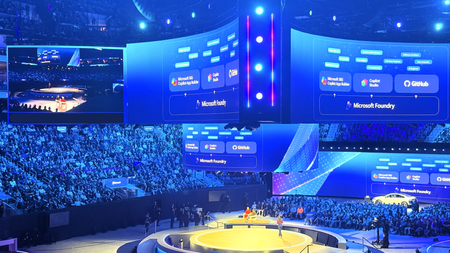
The energy at Microsoft Ignite was unmistakable. Developers, architects, and technical decision-makers converged in San Francisco to explore the latest innovations in cloud technology, AI applications, and data platforms. Beyond the keynotes and product announcements was something even more valuable: an integrated skilling ecosystem designed to transform how you build with Azure. This year Azure Skilling at Microsoft Ignite 2025 brought together distinct learning experiences, over 150+ hands-on labs, and multiple pathways to industry-recognized credentials—all designed to help you master skills that matter most in today's AI-driven cloud landscape. Just Launched at Ignite Microsoft Ignite 2025 offered an exceptional array of learning opportunities, each designed to meet developers anywhere on the skilling journey. Whether you joined us in-person or on-demand in the virtual experience, multiple touchpoints are available to deepen your Azure expertise. Ignite 2025 is in the books, but you can still engage with the latest Microsoft skilling opportunities, including: The Azure Skills Challenge provides a gamified learning experience that lets you compete while completing task-based achievements across Azure's most critical technologies. These challenges aren't just about badges and bragging rights—they're carefully designed to help you advance technical skills and prepare for Microsoft role-based certifications. The competitive element adds urgency and motivation, turning learning into an engaging race against the clock and your peers. For those seeking structured guidance, Plans on Learn offer curated sets of content designed to help you achieve specific learning outcomes. These carefully assembled learning journeys include built-in milestones, progress tracking, and optional email reminders to keep you on track. Each plan represents 12-15 hours of focused learning, taking you from concept to capability in areas like AI application development, data platform modernization, or infrastructure optimization. The Microsoft Reactor Azure Skilling Series, running December 3-11, brings skilling to life through engaging video content, mixing regular programming with special Ignite-specific episodes. This series will deliver technical readiness and programming guidance in a livestream presentation that's more digestible than traditional documentation. Whether you're catching episodes live with interactive Q&A or watching on-demand later, you’ll get world-class instruction that makes complex topics approachable. Beyond Ignite: Your Continuous Learning Journey Here's the critical insight that separates Ignite attendees who transform their careers from those who simply collect swag: the real learning begins after the event ends. Microsoft Ignite is your launchpad, not your destination. Every module you start, every lab you complete, and every challenge you tackle connects to a comprehensive learning ecosystem on Microsoft Learn that's available 24/7, 365 days a year. Think of Ignite as your intensive immersion experience—the moment when you gain context, build momentum, and identify the skills that will have the biggest impact on your work. What you do in the weeks and months following determines whether that momentum compounds into career-defining expertise or dissipates into business as usual. For those targeting career advancement through formal credentials, Microsoft Certifications, Applied Skills and AI Skills Navigator, provide globally recognized validation of your expertise. Applied Skills focus on scenario-based competencies, demonstrating that you can build and deploy solutions, not simply answer theoretical questions. Certifications cover role-based scenarios for developers, data engineers, AI engineers, and solution architects. The assessment experiences include performance-based testing in dedicated Azure tenants where you complete real configuration and development tasks. And finally, the NEW AI Skills Navigator is an agentic learning space, bringing together AI-powered skilling experiences and credentials in a single, unified experience with Microsoft, LinkedIn Learning and GitHub – all in one spot Why This Matters: The Competitive Context The cloud skills race is intensifying. While our competitors offer robust training and content, Microsoft's differentiation comes not from having more content—though our 1.4 million module completions last fiscal year and 35,000+ certifications awarded speak to scale—but from integration of services to orchestrate workflows. Only Microsoft offers a truly unified ecosystem where GitHub Copilot accelerates your development, Azure AI services power your applications, and Azure platform services deploy and scale your solutions—all backed by integrated skilling content that teaches you to maximize this connected experience. When you continue your learning journey after Ignite, you're not just accumulating technical knowledge. You're developing fluency in an integrated development environment that no competitor can replicate. You're learning to leverage AI-powered development tools, cloud-native architectures, and enterprise-grade security in ways that compound each other's value. This unified expertise is what transforms individual developers into force-multipliers for their organizations. Start Now, Build Momentum, Never Stop Microsoft Ignite 2025 offered the chance to compress months of learning into days of intensive, hands-on experience, but you can still take part through the on-demand videos, the Global Ignite Skills Challenge, visiting the GitHub repos for the /Ignite25 labs, the Reactor Azure Skilling Series, and the curated Plans on Learn provide multiple entry points regardless of your current skill level or preferred learning style. But remember: the developers who extract the most value from Ignite are those who treat the event as the beginning, not the culmination, of their learning journey. They join hackathons, contribute to GitHub repositories, and engage with the Azure community on Discord and technical forums. The question isn't whether you'll learn something valuable from Microsoft Ignite 2025-that's guaranteed. The question is whether you'll convert that learning into sustained momentum that compounds over months and years into career-defining expertise. The ecosystem is here. The content is ready. Your skilling journey doesn't end when Ignite does—it accelerates.Essential Microsoft Resources for MVPs & the Tech Community from the AI Tour
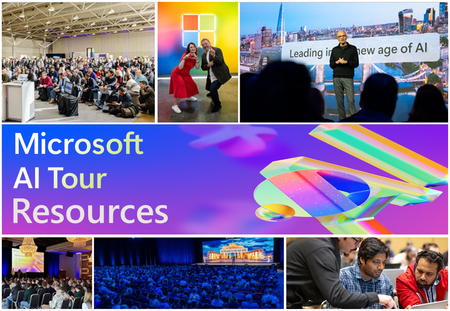
Unlock the power of Microsoft AI with redeliverable technical presentations, hands-on workshops, and open-source curriculum from the Microsoft AI Tour! Whether you’re a Microsoft MVP, Developer, or IT Professional, these expertly crafted resources empower you to teach, train, and lead AI adoption in your community. Explore top breakout sessions covering GitHub Copilot, Azure AI, Generative AI, and security best practices—designed to simplify AI integration and accelerate digital transformation. Dive into interactive workshops that provide real-world applications of AI technologies. Take it a step further with Microsoft’s Open-Source AI Curriculum, offering beginner-friendly courses on AI, Machine Learning, Data Science, Cybersecurity, and GitHub Copilot—perfect for upskilling teams and fostering innovation. Don’t just learn—lead. Access these resources, host impactful training sessions, and drive AI adoption in your organization. Start sharing today! Explore now: Microsoft AI Tour Resources.Azure Fabric cluster is not accessible through Explorer
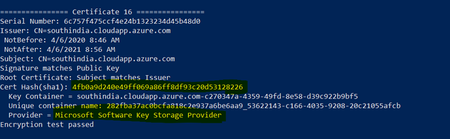
I am trying to access the Azure fabric cluster through its explorer. Unfortunately, It getting failed with the certificate issue. Do we have to import the certificate through the browser to access the fabric cluster explorer? Is the Microsoft learn document for accessing the fabric cluster? ? ThanksSolved714Views1like1CommentThe FlixOne Bookstore Journey - WIN AN EBOOK PART 2: Hands-On Microservices with C# and .NET Core
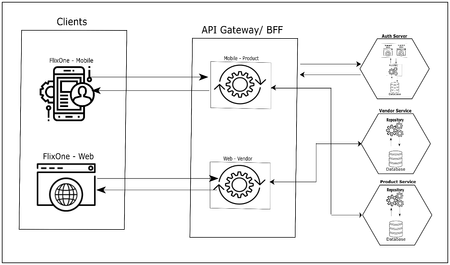
This is a second post of the series, in the last post WIN AN EBOOK - Hands-On Microservices with C# 8 and .NET Core 3, Ed Price announced the survey. I would like to share a small story about the application we developed in the book. Our imaginary organization FlixOne Inc. is into an eCommerce business and they run an online store in the name of FlixOne Book Store. The FlixOne Book Store has a classic software built with monolith architecture.Learn all about Containers for HPC Cambridge - Events for June 2017
First published on MSDN on May 05, 2017 Singularity - Containers for HPC Workshop - Titan Teaching Rooms, New Museum Site, Cambridge, 29th and 30th June, 2017 Thursday 29 June - Day 1 9:00 - 10:00 Introduction to Containers What are containers.438Views0likes0Comments