servers
64 TopicsGenerally Available: Windows Server 2012 and 2012 R2 Extended Security Updates enabled by Azure Arc
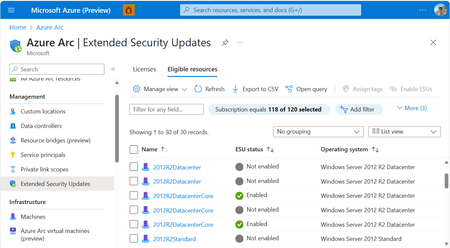
Secure your End-of-Life Windows Server infrastructure on your own terms with Azure Arc. Benefit from the flexibility of a monthly Azure billed service and free access to Azure management services by leveraging Extended Security Updates enabled by Azure Arc for your Windows Server 2012 and 2012 R2 machines.44KViews3likes3CommentsNew options for Extended Security Updates enabled by Azure Arc
Today, we’re announcing Extended Security Updates enabled by Azure Arc for Windows Server 2012/R2 and SQL Server 2012 (year 2 onwards), a new and enhanced cloud experience alternative to traditional Extended Security Updates (classic). With this new option, security updates will be natively available in the Azure Portal through Azure Arc for resources for up to 3 .42KViews2likes26CommentsAnnouncing General Availability: Windows Server Management enabled by Azure Arc
Windows Server Management enabled by Azure Arc offers customers with Windows Server licenses that have active Software Assurances or Windows Server licenses that are active subscription licenses the following key benefits: Azure Update Manager Azure Change Tracking and Inventory Azure Machine Configuration Windows Admin Center in Azure for Arc Remote Support Network HUD Best Practices Assessment Azure Site Recovery (Configuration Only) Upon attestation, customers receive access to the following at no additional cost beyond associated networking, compute, storage, and log ingestion charges. These same capabilities are also available for customers enrolled in Windows Server 2025 Pay as you Go licensing enabled by Azure Arc. Learn more at Windows Server Management enabled by Azure Arc - Azure Arc | Microsoft Learn or watch Video: Free Azure Services for Non-Azure Windows Servers Covered by SA Powered by Azure Arc! To get started, connect your servers to Azure Arc, attest for these benefits, and deploy management services as you modernize to Azure's AI-enabled set of server management capabilities across your hybrid, multi-cloud, and edge infrastructure!20KViews10likes10CommentsIn preview: SSH access to Azure Arc-enabled servers
Remote server management is a critical tool for server administrators. Whether you are running automation or using interactively, SSH based remoting is to connect to your remote server. Starting today, you can now securely SSH into your Arc enabled servers without a public IP address or additional ports from an external network! 12KViews4likes6Comments
A closer look at Azure Arc enabled servers
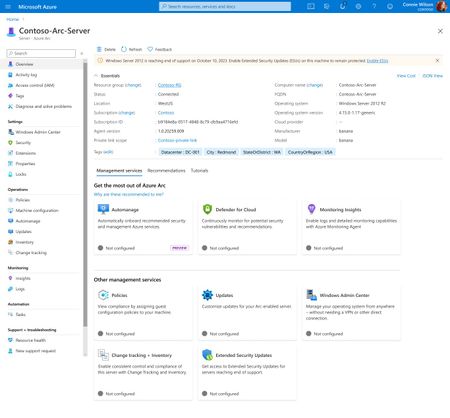
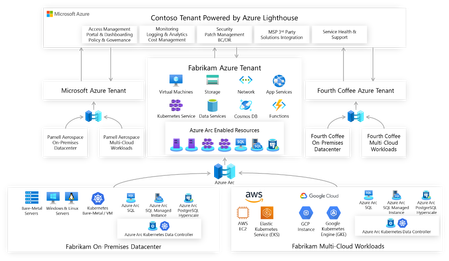
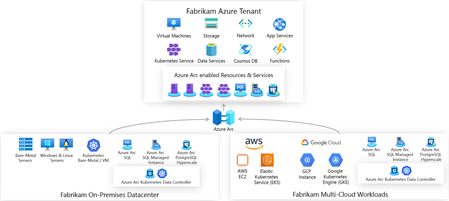
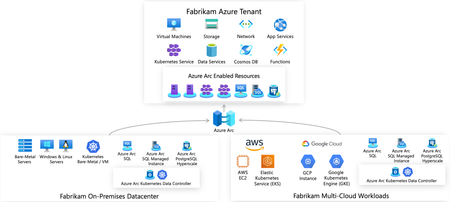
Its an exciting September for cloud architects! At this year's all-virtual Microsoft Ignite, Microsoft announced many Azure Arc updates. Azure Arc is particularly interesting to me because in many ways it represents the future of hybrid and edge cloud computing with Azure. Azure Arc enables deployment of Azure services anywhere and extends Azure management to any infrastructure. But what does this really mean? Let's take a closer look at Azure Arc enabled servers, which has just been announced as generally available.11KViews3likes1CommentSimplify certificate management of on-prem IIS server with Azure Arc & Azure Key Vault VM extension
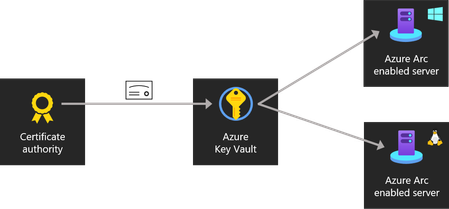
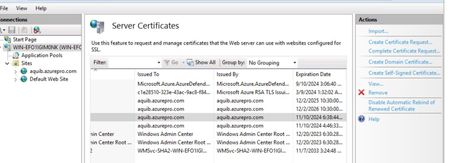
One common question which I’ve come across is certificate management for web servers. Usually when servers are hosted on Azure there are ways like storing certificates and secrets in Azure Key vault is a viable solution. I’ve come across customers who’re running servers in hybrid and few servers would still remain on-premises because of dependencies. For these web servers managing certificates is a costly affair. Common practice which I’ve seen is admin sharing the certificate with application team on some file share. This has few disadvantages. Storing the certificate in file share or on email. Based on the number of application team a lot of team gets access to certificates. Manually applying updated certificates once the expiry is near also finding which all servers this certificate is being used is a pain if you’ve a big environment with lots of web service. One better way to handle this scenario is to Store certificate in Azure Key vault centrally and Arc Enable the web server. One last step which will do the magic is Azure Key vault VM Extension. Which can be enabled on Arc Server as extension. This setup provides the advantages below. All the certificates are stored centrally in Azure Key Vault which is protected. No application team has got manual access to certificates, on-prem server will pull the certificate based on the managed identity assigned via Azure Arc. Once the cert expiry is near Admin/app team need to just goto Azure Key Vault and update the certificate with the latest version. Azure Key vault VM Extension will pull the latest certificate and apply the same to the website. $Settings = @{ secretsManagementSettings = @{ observedCertificates = @( "https://keyvaultname.vault.azure.net/secrets/certificatename" # Add more here in a comma separated list ) certificateStoreLocation = "LocalMachine" certificateStoreName = "My" pollingIntervalInS = "3600" # every hour } authenticationSettings = @{ # Don't change this line, it's required for Arc enabled servers msiEndpoint = "http://localhost:40342/metadata/identity" } } $ResourceGroup = "ARC_SERVER_RG_NAME" $ArcMachineName = "ARC_SERVER_NAME" $Location = "ARC_SERVER_LOCATION (e.g. eastus2)" New-AzConnectedMachineExtension -ResourceGroupName $ResourceGroup -MachineName $ArcMachineName -Name "KeyVaultForWindows" -Location $Location -Publisher "Microsoft.Azure.KeyVault" -ExtensionType "KeyVaultForWindows" -Setting (ConvertTo-Json $Settings) For auto renewal of certificate, we’ll need to enable IIS Rebind. This is how Arc VM Extension looks like when it’s enabled. Assigning permission to Arc server to fetch the certificate from keyvault. You can use access policy on Keyvault as well, it’s supported. Versions of the certificate/new certificate can be uploaded from key vault certificate blade and looks like below. If you’re renewing certificates and wanted to see if certificates are getting pulled down properly or not you can check error logs located here. C:\ProgramData\Guestconfig\extension_logs\Microsoft.Azure.Keyvault.keyvaultforwindows If you’re running Azure VM similar thing can be achieved : https://learn.microsoft.com/en-us/azure/virtual-machines/extensions/key-vault-windows Cert Rebind in IIS: https://learn.microsoft.com/en-us/iis/get-started/whats-new-in-iis-85/certificate-rebind-in-iis85 Visit my Blog: https://www.azuredoctor.com/ Public blogpost: https://www.azuredoctor.com/posts/arc-keyvault/11KViews8likes5Comments