servers
67 TopicsGenerally Available: Transition to WS2012 / R2 ESUs enabled by Azure Arc from Volume Licensing
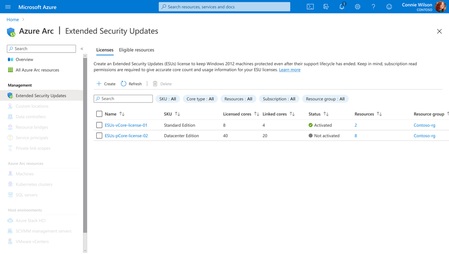
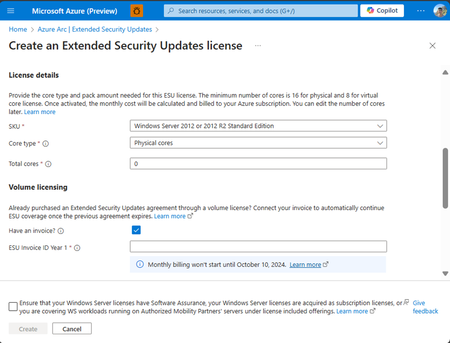
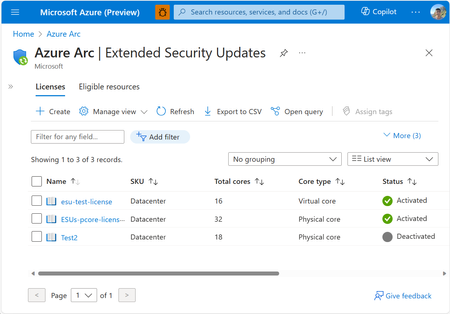
Customers that have enrolled in WS2012/ R2 ESUs through Volume Licensing for Year 1 can transition to Azure Arc for Year 2 of the program by specifying their Volume Licensing entitlements (Invoice Ids) in provisioning new Azure Arc WS2012/R2 ESU licenses. Extended Security Updates afford customers with critical security patches for end of support Windows Server 2012/R2 machines.6.1KViews3likes4CommentsFive Key Updates on WS2012 ESUs enabled by Azure Arc
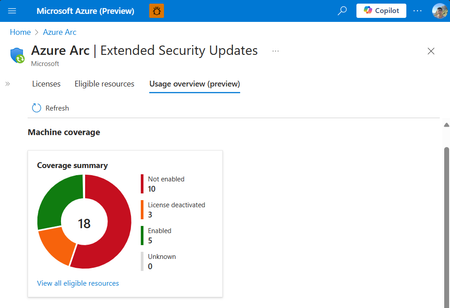
We’re excited to announce the public preview of the Azure Arc ESU Usage View and Transition Scenario from Year 1 Volume Licensing. Additionally, we have made a breadth of improvements to pre-requisites, billing service, and included capabilities.4KViews4likes3CommentsGenerally Available: Windows Server 2012 and 2012 R2 Extended Security Updates enabled by Azure Arc
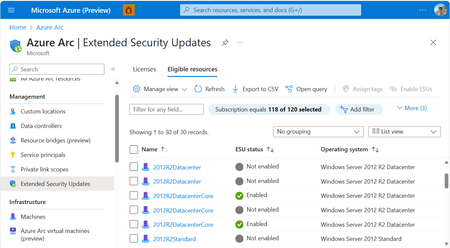
Secure your End-of-Life Windows Server infrastructure on your own terms with Azure Arc. Benefit from the flexibility of a monthly Azure billed service and free access to Azure management services by leveraging Extended Security Updates enabled by Azure Arc for your Windows Server 2012 and 2012 R2 machines.44KViews3likes4CommentsThe first Windows Server 2012/R2 ESU Patches are out! Are you protected?
Receive critical security patches for your WS2012/R2 machines enrolled in ESUs enabled by Azure Arc. Follow these detailed instructions outlining all of the enrollment and prerequisites, so you are protecting your EOL infrastructure.10KViews1like6CommentsEpisode 1: Onboarding Azure Arc at Scale | The Azure Arc Check-In
Once a month the Azure Arc team will release an episode covering a variety of topics. To request a topic or view additional episodes please visit: aka.ms/the-azure-arc-check-in Episode 1: Onboarding Azure Arc at Scale Scenario: Imagine your organization has 1,000 Windows and Linux servers spread across multiple locations. You want them all in Azure Arc, but first you need to deploy the Azure Connected Machine agent at scale. Try now in Azure aka.ms/aaci-episode1 Why onboarding strategy matters Interactive sign-in works well for testing and proof-of-concepts, but it quickly becomes impractical when you’re onboarding large server estates. At scale, organizations need a deployment model that can: Automate onboarding across many machines Align with existing management tooling Apply consistent configuration and governance from day one Minimize manual effort and human error This episode focuses on using non-interactive authentication and automation to onboard large server fleets efficiently. One of the key recommendations is to use a dedicated authentication mechanism designed for scale rather than relying on interactive administrator sign-ins. Onboard a Linux fleet with Ansible The Ansible deployment begins with an Ansible node that is already connected to Azure Arc. The deployment uses the credential on the Ansible node to deploy the Azure Connected Machine agent to the Linux fleet. To enable this, the managed identity of the Ansible node has the Azure Connected Machine Onboarding role in Azure assigned. Below are the steps for role assignment in the Azure portal: Open the resource group where the servers will be deployed. In Access control, add a role assignment. Select the Azure Connected Machine Onboarding role. Choose managed identities, select Machine - Azure Arc, and find the Ansible node. Review and assign the role. Configure the Ansible playbook With the permissions in place, the deployment uses three files: inventory.ini: Represents the machines configured by the playbook. arc-vars.yml: Contains non-secret configuration, including the resource group name, subscription and tenant IDs, location, and tags. arc-onboard.yml: References arc-vars.yml and configures the playbook to use managed identity, or MSI, for authentication. After the playbook runs, Ansible deploys the Azure Connected Machine agent to the Linux fleet. You can return to the resource group, refresh the view, and verify that your Linux machines appear as Azure Arc connected servers. Onboard Windows machines with Group Policy For Windows Server environments joined to Active Directory, Group Policy remains one of the simplest and most scalable deployment mechanisms. The process includes: Creating the required onboarding identity Preparing a shared location for deployment assets Downloading the Azure Arc GPO deployment package Generating a Group Policy Object with the required settings Linking that GPO to the appropriate organizational unit (OU) Allowing targeted servers to automatically onboard during policy refresh cycles For organizations that already manage Windows Server through Active Directory, this approach enables onboarding at scale without introducing additional management infrastructure. FAQs What is the best way to onboard servers to Azure Arc at scale? For large Windows and Linux server environments, use automated deployment with non-interactive authentication rather than signing in interactively on each machine. This approach lets you deploy the Azure Connected Machine agent consistently across many servers while reducing manual effort and human error. Azure Connected Machine Agent Deployment Options - Azure Arc Can I use Ansible to onboard Linux servers to Azure Arc? Yes. You can use an Azure Arc-enabled Ansible node to deploy the Azure Connected Machine agent across a Linux server fleet. In the approach demonstrated here, the Ansible node uses its managed identity, which is assigned the Azure Connected Machine Onboarding role, to authenticate the deployment. Connect machines to Azure Arc at scale using Ansible - Azure Arc Can I use Group Policy to onboard Windows servers to Azure Arc? Yes. Group Policy can automate Azure Arc onboarding for Windows Server machines that are joined to Active Directory. The process uses a Group Policy Object linked to the appropriate organizational unit, allowing targeted servers to onboard automatically during Group Policy refresh cycles. Connect machines at scale using Group Policy with a PowerShell script - Azure Arc What files are needed to onboard Linux servers to Azure Arc with Ansible? The Ansible deployment shown in this episode uses three files: inventory.ini to identify the target machines, arc-vars.yml to store non-secret configuration such as subscription, tenant, resource group, location, and tags, and arc-onboard.yml to run the onboarding playbook using managed identity authentication. Should I use Ansible or Group Policy for Azure Arc onboarding? Use Ansible when onboarding Linux servers in an environment that already uses Ansible playbooks and automation. Use Group Policy when onboarding domain-joined Windows servers managed through Active Directory. Both approaches help organizations automate Azure Connected Machine agent deployment by using tools already present in their server-management environment. Additional options are available for onboarding servers at scale. See Azure Connected Machine Agent deployment options.419Views1like0CommentsGenerally Available: Windows Server 2016 Extended Security Updates enabled by Azure Arc
Today, the Azure Arc team is pleased to announce that Extended Security Updates (ESUs) enabled by Azure Arc is now generally available for Windows Server 2016. By connecting your Windows Server 2016 machines to Azure Arc-enabled servers, you can enroll in ESUs and receive security updates. Enroll machines into ESUs through the Azure portal, a streamlined, cloud-connected experience that protects your on-premises and multicloud workloads while you plan your upgrade or migration journey. Extended Security Updates give you access to Critical and Important security updates for Windows Server 2016 for up to three years after end of support, covering January 12, 2027 through January 2030. They provide a supported bridge for business-critical applications that need more time to migrate, without new features or non-security fixes, and without leaving systems exposed while you plan your move. Extended Security Updates enabled by Azure Arc Once your servers are connected to Azure Arc, ESUs enabled by Azure Arc provide flexible pricing and simpler delivery. Key benefits include: Pay-as-you-go billing means a monthly subscription you can stop when a server is migrated or decommissioned, so you only pay for the coverage you use. Azure-billed pricing draws down from your existing Microsoft Azure Consumption Commitment (MACC) and lets you analyze spend with Microsoft Cost Management and Billing. Built-in asset inventory shows the coverage and enrollment status of your machines directly in the Azure portal, highlighting gaps at a glance. Keyless delivery removes the need to acquire, install, or activate keys on each server. Access to Azure management services When you enroll eligible Azure Arc-enabled servers in Windows Server 2016 ESUs or you have Windows Server Software Assurance, you also gain free access to a set of Azure services that help you manage and secure those machines from the Azure portal: Azure Update Manager is a unified service which provides assessing, scheduling, deploying and managing OS updates across Azure and hybrid machines, including visibility into ESU patch compliance for your Windows Server 2016 estate. Change Tracking and Inventory provides a centralized asset inventory and tracks changes to servers hosted in Azure, on-premises, and other public cloud environments. Azure Policy guest configuration helps define, enforce, and audit compliance rules for Azure resources and guest OS settings across hybrid environments. It includes out of the box policy rules to help meet standards like CIS Benchmark. How to get started Everything starts by connecting your servers to Azure Arc, whether they run on-premises or in other public clouds. Getting started takes only a few steps: Connect your Windows Server 2016 machines to Azure Arc by installing the Azure Connected Machine agent. Enroll eligible servers in Extended Security Updates from the Azure portal, or at scale using Azure Policy (no keys required). Check out our click through demo to see how to apply Extended Security Updates using the Azure portal. Deliver ESU patches through Azure Update Manager or your existing patching solution once servers are enrolled. Extended Security Updates support the Standard and Datacenter editions of Windows Server 2016 and generally require Software Assurance through a Volume Licensing program (machines licensed through SPLA or a Server Subscription do not). For larger estates, you can onboard at scale using Configuration Manager, a Group Policy scheduled task, or VMware vCenter and SCVMM integration with Azure Arc. Beyond Extended Security Updates Enrolling in ESUs is often a customer's first step into Azure Arc — and it opens the door to more. Because your Windows Server 2016 machines are now attached to Azure Arc, you can manage, secure, and govern them alongside your wider hybrid and multicloud estate with Azure Policy, Azure Update Manager, and Microsoft Defender for Cloud. That same Arc foundation makes your next step easier when you are ready: upgrading to Windows Server 2025 or migrating to Azure. Learn more To plan for Windows Server 2016 end of support, explore these resources: Extended security updates enabled by Azure Arc guide Planning ahead for Windows Server 2016 end of support Windows Server and SQL Server End of Support | Microsoft Prepare to deliver Extended Security Updates through Azure Arc Join the Azure Arc customer and engineering virtual meetup Fill in this short intake form to join the quarterly Azure Arc and Windows Server customer meetup: https://aka.ms/arcserverforumsignup2.8KViews2likes0CommentsAzure Arc Server June Forum
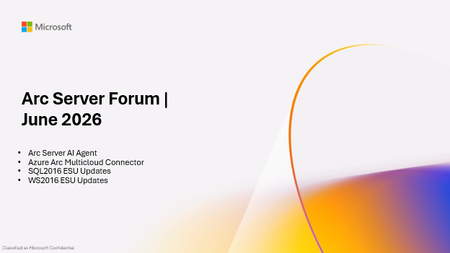
Please find the recording for the monthly Azure Arc Server Forum on YouTube! During the June 2026 Azure Arc Server Forum, we discussed: Arc Server AI Agent assists with onboarding and troubleshooting through an integrated LLM with plans for surfacing the experience through Azure Copilot and in Azure Portal. Azure Arc Multicloud Connector Updates focused on both the Public Preview of the Google Cloud Platform (GCP) Connector and Public Preview of Azure Arc-enablement of detected EKS Clusters. WS 2016 ESU Updates with planned changes versus WS 2012 ESUs and expected timelines anticipating the WS 2016 end-of-support date of January 2027. Note, WS 2012 ESUs will end in October 2026. SQL 2016 ESU Updates discussed enrollment processes, licensing basics, and overall guidance with end-of-support in July 2026. To sign up for the Azure Arc Server Forum and newsletter, please register with contact details at https://aka.ms/arcserverforumsignup/. For the latest agent release notes, check out What's new with Azure Connected Machine agent - Azure Arc | Microsoft Learn. We are skipping July and August, and will resume after summer holidays with the September forum to be held on Thursday, September 17 at 9:30 AM PST / 12:30 PM EST. Finally, I wanted to thank everyone for the attendance and community over the last few years, I will no longer be leading the community calls. Please stay in touch, and Mason Torres, Yunis Hussein, and Meagan McCrory from the Arc PM team will be taking the community forward. We look forward to you joining us, thank you!283Views1like0CommentsBuild, deploy, and govern sovereign AI with Foundry Local on Azure Local
Not every AI workload can run in the cloud. For many of our customers, data needs to stay within defined boundaries, connectivity may be limited or absent, and latency, governance, and auditability are non-negotiable. With Foundry Local on Azure Local, you can use the same model catalog, developer workflows, and governance capabilities you know from Azure, while running AI entirely within your own environment where your data resides. Foundry Local provides the model catalog and developer experience. Azure Local provides the customer-managed infrastructure. Azure Arc provides unified policy, governance, and lifecycle management across cloud and local environments. This gives developers a consistent way to build, deploy, and operate AI. The same az commands, the same model catalog, the same Arc policies, all running on hardware you control. Expansion of Foundry Local on Azure Local We're expanding the Foundry Local model offering on Azure Local, with support for multi-node deployments and new agents and tools that run locally, in preview. Deploy and run AI models locally. Run models with Foundry Local in customer-managed environments on Azure Local, across sovereign, private, and edge scenarios, including fully disconnected operation. Choose from a flexible, high-performance model catalog. Access proprietary and community models through Foundry Local, now expanded with vLLM-optimized models alongside ONNX-based offerings. You explore and deploy through the same catalog API experience, then operate locally on Azure Local. Build for production realities. Bring governance, identity, and auditability into your applications while keeping execution inside your controlled boundary. See what’s new in Foundry Local on Azure Local in the Tech Community blog. From intelligence to action: agents and tools inside the enterprise boundary Most production AI use cases need two things: grounded answers and the ability to act on them, without sending data outside the environment. Here's how we're enabling that locally. Preview: Agentic retrieval with Foundry Local: Ground agents in enterprise data using retrieval-augmented generation across local Microsoft 365 services, including Exchange and SharePoint. Read the Tech Community blog to learn more. Preview: Agents and tools with Foundry Local: Build AI systems that reason, retrieve information, and take action within customer-controlled environments. Learn more. Preview: Developer acceleration templates: Jump-start local AI application development with new Foundry solution templates, including local chat experiences and video agents, powered by Azure AI Video Indexer. Read the Tech Community to learn more. GitHub Enterprise Local: Now available in public preview Sovereign AI is also about how systems are built and secured, not just where they run. With GitHub Enterprise Local on Azure Local, you can bring your full software development lifecycle on-premises: Source control and repositories CI/CD pipelines Security and DevSecOps workflows GitHub Enterprise Local deploys entirely within customer-owned infrastructure, so teams get the developer tools they expect without compromising on data residency or operational control. This extends modern DevSecOps practice into sovereign environments and pairs naturally with the AI development workflows above: build, secure, and ship your AI applications within the same boundary where they run. Read the tech community blog to learn more about GitHub Enterprise Local and how to join the preview. Accelerating High-performance AI at the Edge with NVIDIA We are expanding our collaboration with NVIDIA to deliver high-performance AI capabilities directly at the edge. At Build, we are bringing: Azure Local and Foundry Local on NVIDIA-powered GPUs, including NVIDIA RTX PRO 6000 Blackwell Server Edition, with expanded GPU support coming soon Integration with Nemotron models, optimized for enterprise performance A scalable foundation for data-intensive, low-latency workloads This partnership ensures that organizations can run advanced AI workloads where data is generated - without dependency on centralized cloud infrastructure. Hardware options: AI factory configurations are available now in the catalog Alongside our hardware partners, we’re bringing integrated solutions to customers building AI within sovereign environments. The Azure Local hardware catalog now includes AI factory configurations from our OEM partners, including NVIDIA-certified 8xH100 systems, with options from DataON, Dell, HPE, and Lenovo. These configurations are sized for the performance that model serving and agentic workloads require on customer-managed infrastructure. Together with Microsoft, we are advancing sovereign AI by bringing the open NVIDIA Nemotron model family to Microsoft Foundry Local on Azure Local. This collaboration gives organizations a production-ready AI platform that enables them to deploy AI where their data resides while maintaining the governance, control, and performance needed to scale AI across the enterprise.” Kari Briski, VP Generative AI Software Products, NVIDIA ”Sovereign AI is becoming increasingly important for governments, regulated industries, and enterprises that want to use AI while maintaining control of their data, location, and operations. Lenovo’s ThinkAgile MX Series delivers trusted, enterprise-grade infrastructure with global deployment expertise to help customers run AI wherever their data resides. Co-engineered with Foundry Local and Azure Local, this solution provides an optimized platform to deploy, run, and scale AI locally with greater simplicity, consistency, and control, while helping meet strict data residency, security, and compliance requirements." Scott Patti - VP Infrastructure Solutions Group (ISG), Lenovo From AI models to trusted, mission-critical systems: what this unlocks for developers and operators AI is evolving from systems that answer questions to systems that plan, reason, and take action across workloads. These capabilities move AI from a cloud-only assumption to something you can deploy where sensitive work actually happens, with governance and operational controls intact. For our customers, this means you can now: Keep data, identities, and audit trails inside your sovereign boundary. Run AI inference and agentic workloads in connected, intermittently connected, or fully disconnected modes. Apply consistent policy and governance across cloud and local environments through Azure Arc. Use the same Foundry catalog and developer experience you already know, on infrastructure you own. Build, secure, and ship your AI applications with GitHub Enterprise Local, keeping source control, CI/CD, and DevSecOps workflows inside the same sovereign boundary. Resources Join us at Build OD837 Shipping physical AI to the edge with Azure Local and Foundry Local https://github.com/microsoft/build26-OD837 OD839 Foundry Local: AI solutions for industrial and sovereign needs https://github.com/microsoft/build26-OD839 LTG425 Expanding horizons: Foundry Local for devices and on-prem https://build.microsoft.com/en-US/sessions/LTG425 Request to join the Foundry Local on Azure Local preview Hands-on walkthrough: Your first model deployment on Foundry Local on Azure Local: from catalog to inference in 10 minutes | Microsoft Community Hub Read our Tech Community blogs: Foundry Local announcing multi-node and vLLM support Agentic Retrival with Foundry Local blog: https://aka.ms/AgentsAndToolsBuildBlog2026 Code sample / model catalog blog: https://aka.ms/foundry-local-model-catalog-blog For more details on the expanded capabilities of Foundry Local for highly secure environments, contact your Microsoft account team Discover Microsoft Sovereign Cloud Explore product documentation at: Foundry Local models on Azure Local: https://aka.ms/FoundryLocalonAzureLocal_documentation Local Agentic retrieval with Foundry Local: https://aka.ms/edge-agentic-retrieval-docs1.7KViews0likes1CommentPlan for Upcoming Changes to Extended Security Updates on Azure Local
Beginning April 1 2026, Microsoft introduced a consistent pricing model for Extended Security Updates (ESU) for SQL Server and Windows products, including SQL Server 2016, Windows 10 Enterprise LTSB 2016 and Windows Server 2016. This update aims to simplify the Extended Security Update pricing so that customers pay the same list price for ESUs regardless of deployment location (Azure, on-premises, or other public clouds) or purchasing channel (Microsoft Customer Agreement, Enterprise agreements, Cloud Solution Provider program, or other licensing programs). ESUs on Azure Local This pricing change affects any new Extended Security Update offerings starting on or after April 1, 2026, including Windows 10 Enterprise LTSB 2016 (reaching end of support October 13, 2026) and Windows Server 2016 (reaching end of support January 12, 2027). Existing ESU offerings, including Windows Server 2012 or Windows 10 version 22H2, are not affected by this pricing change. This means that customers who already leverage ESUs will continue to have them available on Azure Local at no cost through Azure Verification for VMs. Next Steps As products reach end of support, it is recommended to upgrade your servers to the latest release available. For customers needing to remain on older versions after the end of support date has passed, further guidance on pricing and availability of ESUs will be shared in the coming months. Keep an eye on Extended Security Updates on Azure Local for more details. For More Information Microsoft Services: Pricing Consistency Update | Microsoft Licensing Resources Plan for Windows Server 2016 and Windows 10 2016 LTSB end of support - Windows IT Pro Blog678Views0likes0Comments