servers
67 Topics
Simplified access to Hotpatching enabled by Azure Arc for Windows Server 2025
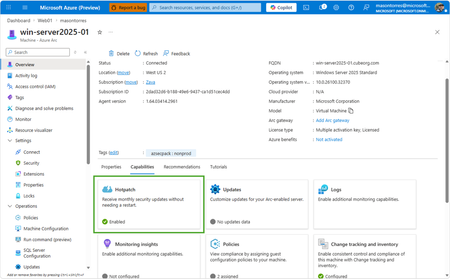
With Windows Server 2025, we introduced hotpatch enabled by Azure Arc, delivering security updates to Windows Server across hybrid and multicloud environments – minimizing downtime (no reboot), accelerating protection, and unifying patch management. We know that keeping your servers updated with the latest patches is one of the critical tasks that IT teams perform day-to-day. We want to make it simpler to install the latest operating system (OS) updates without rebooting machines after every installation. The resounding feedback we have received from you underscored the criticality of this feature in the lifecycle management and security of your infrastructure. We are now taking it one step further to reduce the friction to deploying these critical updates: hotpatch enabled by Azure Arc is now available at no additional cost for Windows Server 2025. Which machines are eligible for this offer? To use hotpatch for Windows Servers running on-premises or in multicloud environments, you must be using Windows Server 2025 Standard or Datacenter, and your server must be connected to Azure Arc. With this announcement, enabling and usage of the hotpatching service is available at no additional charge. Please take note that there are no charges for customers running on Azure IaaS, or Azure Local, wherein hotpatching is available as part of the functionality of Windows Server Datacenter: Azure Edition. This feature is already included both with Windows Server 2022 Datacenter: Azure Edition and Windows Server 2025 Datacenter: Azure Edition. How do I manage hotpatches enabled by Azure Arc for Windows Server 2025? If your Windows Server 2025 machines aren't already connected to Azure Arc, install the Azure Connected Machine agent — it takes just a few minutes per server and supports at-scale rollout via Group Policy, service principal, or Terraform. Once connected, enable Hotpatch from the Azure portal, Azure PowerShell, Azure CLI, or the REST API — just confirm Virtualization-based security (VBS is enabled) first. From there, use Azure Update Manager to schedule and monitor rollouts at scale. For instructions on how to enable hotpatch for Azure Arc-enabled machines using group policy or scripts, learn more here: https://aka.ms/ws-hotpatch For patch orchestration at scale, you can use Azure Update Manager to deliver hotpatches enabled by Azure Arc for Windows server 2025 machines. This enables greater uptime with fewer reboots and faster deployment of updates with easy patch orchestration. Alternatively, you can use APIs or other management tools to manage hotpatches. Centralized management of hotpatch updates across hybrid and multicloud environments enabled by Azure Arc Once your machines are connected to Azure Arc, you can also use the cloud-native services from Azure to manage your windows machines running on-prem. Azure Arc enables you to standardize security and governance across a wide range of resources so you can easily organize, govern and secure Windows, Linux, SQL servers, and Kubernetes clusters running across data centers, edge, and multi-cloud environments – using Azure services such as Azure Policy, Azure Monitor, Microsoft Defender and more. At no additional cost for machines attached to Azure Arc Basic inventory across on-prem and multi-cloud Tag your resources, organize them into resource groups, subscriptions, and management groups, and query at scale with Azure Resource Graph to unify your environments. Infra as Code (Bicep, Terraform) Infra as code for provisioning and management of resources. VM Self Service Perform lifecycle management such as (create, resize, update and delete) and power cycle operations such as (start, stop, and restart on VMware vCenter and System Center Virtual Machine Manager Virtual Machines. Hotpatch for Windows Server 2025 NEW Windows Server hot patching enables you to apply security updates without rebooting, keeping systems secure while maintaining continuous uptime. VM Management Administrate your servers anywhere using SSH for Azure Arc, Run Command, and Custom Script Extension. Mgmt. Services included for no additional costs with Windows Server Software Assurance or Extended Security Updates Azure Update Manager Provides a unified, centralized service to monitor, orchestrate, and automate patching across Azure, on‑prem, and multi‑cloud environments ensuring security, compliance, and minimal downtime at scale. Azure Machine Configuration (Policy) Policy‑driven auditing and enforcement of OS and application settings as code across Azure and hybrid machines—ensuring consistent, compliant state at scale. Including compliance policies like CIS Benchmark and WinRE Change Tracking & Inventory Real‑time visibility into configuration changes and system state across your fleet enabling faster troubleshooting, improved security, and continuous compliance at scale. VM insights from Azure Monitor Delivers a unified, pre‑built observability experience that provides real‑time performance, health, and dependency visibility across VMs—enabling faster troubleshooting, optimization, and capacity planning at scale. Windows Admin Center Unified, browser‑based management plane to securely manage Windows servers, VMs, and hybrid infrastructure from anywhere—simplifying operations and improving efficiency at scale. Best Practices Assessment Continuously evaluation your server configurations against Microsoft-recommended standards to proactively identify risks and provide actionable remediation guidance—improving security, performance, and operational health at scale. Frequently Asked Questions What are hotpatch updates? Hotpatch updates are monthly security updates that take effect without requiring you to restart the device. They contain a full set of security updates equivalent to the standard updates released the same day. What is the hotpatch update cycle? All eligible Windows Server 2025 machines enrolled in hotpatch are offered up to 8 monthly hotpatch updates in a calendar year in a quarterly cycle: Baseline month: In January, April, July, and October, devices install the monthly cumulative security update and must restart for the update to take effect. This update includes the latest security fixes, cumulative new features, and enhancements since the last baseline. Subsequent two months: Devices receive hotpatch updates, which only include security updates and don't require a restart for the update to take effect. These devices will catch up on features and enhancements with the next cumulative baseline month (quarterly). Will billing be stopped for existing enrolled machines? Yes, as of 15 th May 2026 all billing for hotpatch has been stopped for all existing machines enrolled in hotpatch. What action do we need to take if we have machines enrolled in hotpatch already? There is no additional action needed for machines that are currently enrolled in hotpatch. These machines will remain enrolled in hotpatch and receive hotpatch updates when available. I want all my Windows Server 2025 machines to get hotpatches. How do I do it? If you have Windows Server 2025 machines on-premises or on cloud (other than Azure) then you can enable hotpatch on them. To do so, ensure these machines have Virtualization Based Security enabled and are connected to Azure Arc and then you can use Azure Arc portal, Azure Update manager or APIs to enable hotpatch. Learn more: https://aka.ms/ws-hotpatch Is anything changing for Hotpatching on Azure? Hotpatch continues to be available on Azure for your Windows Server 2022 and Windows Server 2025 VMs when using Azure Edition. There is no fee associated with Hotpatching on Azure. Learn more here. Is there a community forum for Arc? Yes, you can join the Azure Arc Monthly Forum here: aka.ms/ArcServerForumSignup6KViews10likes5CommentsAnnouncing General Availability: Windows Server Management enabled by Azure Arc
Windows Server Management enabled by Azure Arc offers customers with Windows Server licenses that have active Software Assurances or Windows Server licenses that are active subscription licenses the following key benefits: Azure Update Manager Azure Change Tracking and Inventory Azure Machine Configuration Windows Admin Center in Azure for Arc Remote Support Network HUD Best Practices Assessment Azure Site Recovery (Configuration Only) Upon attestation, customers receive access to the following at no additional cost beyond associated networking, compute, storage, and log ingestion charges. These same capabilities are also available for customers enrolled in Windows Server 2025 Pay as you Go licensing enabled by Azure Arc. Learn more at Windows Server Management enabled by Azure Arc - Azure Arc | Microsoft Learn or watch Video: Free Azure Services for Non-Azure Windows Servers Covered by SA Powered by Azure Arc! To get started, connect your servers to Azure Arc, attest for these benefits, and deploy management services as you modernize to Azure's AI-enabled set of server management capabilities across your hybrid, multi-cloud, and edge infrastructure!20KViews10likes10CommentsAnnouncing Preview of Run Command on Arc-enabled servers
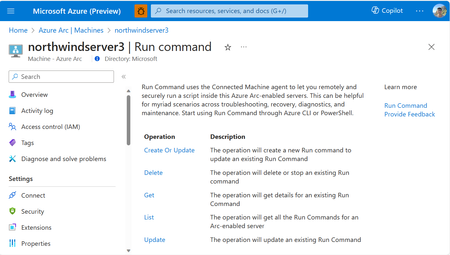
We are excited to announce the Public Preview of Run Command on Azure Arc-enabled servers. This feature is a game-changer for remotely and securely managing your Azure Arc-enabled servers. You can start using Azure CLI or API for Run Command today, without requiring any additional extensions or configurations, and at no additional cost.6.9KViews9likes0CommentsSimplify certificate management of on-prem IIS server with Azure Arc & Azure Key Vault VM extension
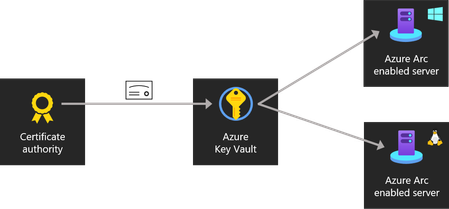
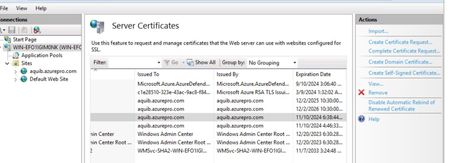
One common question which I’ve come across is certificate management for web servers. Usually when servers are hosted on Azure there are ways like storing certificates and secrets in Azure Key vault is a viable solution. I’ve come across customers who’re running servers in hybrid and few servers would still remain on-premises because of dependencies. For these web servers managing certificates is a costly affair. Common practice which I’ve seen is admin sharing the certificate with application team on some file share. This has few disadvantages. Storing the certificate in file share or on email. Based on the number of application team a lot of team gets access to certificates. Manually applying updated certificates once the expiry is near also finding which all servers this certificate is being used is a pain if you’ve a big environment with lots of web service. One better way to handle this scenario is to Store certificate in Azure Key vault centrally and Arc Enable the web server. One last step which will do the magic is Azure Key vault VM Extension. Which can be enabled on Arc Server as extension. This setup provides the advantages below. All the certificates are stored centrally in Azure Key Vault which is protected. No application team has got manual access to certificates, on-prem server will pull the certificate based on the managed identity assigned via Azure Arc. Once the cert expiry is near Admin/app team need to just goto Azure Key Vault and update the certificate with the latest version. Azure Key vault VM Extension will pull the latest certificate and apply the same to the website. $Settings = @{ secretsManagementSettings = @{ observedCertificates = @( "https://keyvaultname.vault.azure.net/secrets/certificatename" # Add more here in a comma separated list ) certificateStoreLocation = "LocalMachine" certificateStoreName = "My" pollingIntervalInS = "3600" # every hour } authenticationSettings = @{ # Don't change this line, it's required for Arc enabled servers msiEndpoint = "http://localhost:40342/metadata/identity" } } $ResourceGroup = "ARC_SERVER_RG_NAME" $ArcMachineName = "ARC_SERVER_NAME" $Location = "ARC_SERVER_LOCATION (e.g. eastus2)" New-AzConnectedMachineExtension -ResourceGroupName $ResourceGroup -MachineName $ArcMachineName -Name "KeyVaultForWindows" -Location $Location -Publisher "Microsoft.Azure.KeyVault" -ExtensionType "KeyVaultForWindows" -Setting (ConvertTo-Json $Settings) For auto renewal of certificate, we’ll need to enable IIS Rebind. This is how Arc VM Extension looks like when it’s enabled. Assigning permission to Arc server to fetch the certificate from keyvault. You can use access policy on Keyvault as well, it’s supported. Versions of the certificate/new certificate can be uploaded from key vault certificate blade and looks like below. If you’re renewing certificates and wanted to see if certificates are getting pulled down properly or not you can check error logs located here. C:\ProgramData\Guestconfig\extension_logs\Microsoft.Azure.Keyvault.keyvaultforwindows If you’re running Azure VM similar thing can be achieved : https://learn.microsoft.com/en-us/azure/virtual-machines/extensions/key-vault-windows Cert Rebind in IIS: https://learn.microsoft.com/en-us/iis/get-started/whats-new-in-iis-85/certificate-rebind-in-iis85 Visit my Blog: https://www.azuredoctor.com/ Public blogpost: https://www.azuredoctor.com/posts/arc-keyvault/11KViews8likes5CommentsAnnouncing HCIBox support for Azure Stack HCI 23H2
Not a day goes by without the Jumpstart team being asked "When is HCIBox 23H2 coming?" You want to get hands-on with Azure Stack HCI 23H2 and the new cloud deployment, lifecycle management capabilities, and out-of-the-box Arc-enabled services. We have heard the demand loud and clear, and the wait is now over!5KViews6likes2CommentsAzure Best Practices delivered to machines anywhere with new Azure Arc and Automanage integration.
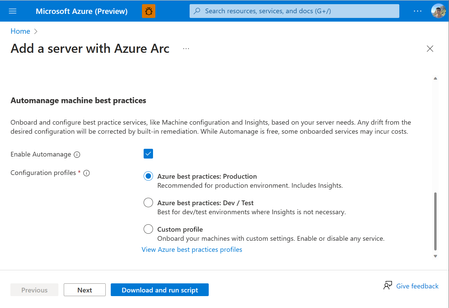
Tired of manually onboarding and configuring Azure services for your Arc-enabled servers? With Azure Automanage Machine Best Practices, you can point, click, set, and forget to extend Azure security, monitoring, and governance services to servers anywhere.6.1KViews6likes2Comments