sensor
55 TopicsNo updates to "Stop clear text credentials exposure" after migrating our MDI sensors to v3
Since migrating our domain controllers to the v3 sensor, the "Stop clear text credentials exposure" recommendation is no longer updating. The latest "Last seen" date correlates with the date we performed the migration, and I know we have a couple entities that have not yet been remediated. If I run a query on the IdentityQueryEvents table in Advanced Hunting, I'm still seeing LDAP queries. Anyone else seeing this?Solved
VPN Integration not persistent
Hello, We tried to configure https://learn.microsoft.com/en-us/defender-for-identity/vpn-integration from supported Cisco VPN GW. We established the RADIUS Accounting logs to be sent to DC with MDI sensors installed. Yet when we enabled this in Defender Portal (Settings > Identities > VPN) by checking the box and inserting the shared secret, the configuration is not persistent. We hit save, and we are presented with the success green message, but once we refresh the page or go elsewhere in the portal, the checkbox is not checked. Has anyone encountered the same issue? Thanks, Simon
IdentityLogonEvents - IsNtlmV1
Hi, I cannot find documentation on how the IdentityLogonEvents table's AdditionalFields.IsNtlmV1 populated. In a demo environment, I intentionally "enforced" NTLMv1 and made an NTLMv1 connection to a domain controller. On the DC's Security log, event ID 4624 shows correct info: Detailed Authentication Information: Logon Process: NtLmSsp Authentication Package: NTLM Transited Services: - Package Name (NTLM only): NTLM V1 Key Length: 128 On MDI side however it looks like this: (using the following KQL to display relevant info here: IdentityLogonEvents | where ReportId == @"f70dbd37-af8e-4e4e-a77d-b4250f9e0d0b" | extend todynamic(AdditionalFields) | project TimeGenerated, ActionType, Application, LogonType, Protocol,IsNtlmV1 = AdditionalFields.IsNtlmV1 ) TimeGenerated ActionType Application LogonType Protocol IsNtlmV1 Nov 28, 2025 10:43:05 PM LogonSuccess Active Directory Credentials validation Ntlm false Can someone please explain, under which circumstances will the IsNtlmV1 property become "true"? Thank you in advance968Views0likes8CommentsDefender for Identity health issues - Not Closing
We have old issues and they're not being "Closed" as reported. Are we missing something or is this "Microsoft Defender for Identity" Health Issues process broken? Thanks! Closed: A health issue is automatically marked as Closed when Microsoft Defender for Identity detects that the underlying issue is resolved. If you have the Azure ATP (workspace name) Administrator role, you can also manually close a health issue.847Views0likes2Comments
Very High Increase in CPU activity after Update Microsoft Defender for Identity sensor
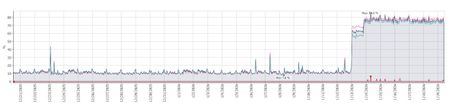
All our servers that are running this sensor (DCs, Certificate servers, AD Connect servers) showed a massive increase in average CPU utilization from virtually straight after the sensor was automatically updated to version 2.254.19112.470 (late night UK time). Two of our DCs are sitting on 100% CPU today and we can't find anything to resolve it. Has anyone else seen this since running this version and if so what actions did you take ? How would we go back to rolling back to the previous version when it appears it will just be automatically updated soon after ? This is our monitoring of CPU utilization from one of the majorly affected DCs but every server with the sensor had the exact same graph showing a major increase in CPU at the same date and time i.e. just after the sensor was updated.Solved1.7KViews4likes7CommentsMDI AD CS sensor not switching from removed DC
We are in the process of replacing our Domain Controllers. What I found is that the MDI sensor on our PKI server is still stuck with a domain controller which has been demoted and removed from the domain. (Sensor version: 2.250.18972.18405) I guess, if I reinstall the sensor, it will find a new domain controller - but what if it finds a DC that is to be decommissioned? Should I reinstall the sensor until it choses a "new" DC? Thank you in advance, DanielSolved623Views0likes2Comments
Agent install error
Hi Everyone, One of the servers running the agent was failing to update so I attempted a reinstall. During install it fails / rollsback with an error in the log stating "failed connecting to service. The issue can be caused by a transparent proxy configuration". The device does use a proxy set via netsh, and I've tried specifying it on the command line of the install. I have read elsewhere that this can be related to SSL inspection or an issue with Root CAs on the device. I know there is no inspection going on in this case. I have compared the Root CA list on this device to working devices and don't see anything related to Microsoft that is different. Any ideas?523Views0likes1CommentSensor install failing, error log indicates proxy issue
Hi Everyone, I was re-installing a sensor that was stuck on updates and I get an error in the logs - failed connecting to service. The issue can be caused by a transparent proxy configuration From what I can find that's related to either missing certificates or SSL inspection. The proxy works fine for other sensors and I know it's not inspecting this traffic anyway. I found a troubleshooting page that calls out the specific Root CA - "DigiCert Global Root G2" which exists on this machine. https://learn.microsoft.com/en-us/defender-for-identity/troubleshooting-known-issues#proxy-authentication-problem-presents-as-a-connection-error I believe this sChannel error is related The remote server has requested SSL client authentication, but no suitable client certificate could be found. I am stumped at this point, any help is appreciated.317Views0likes0Comments
Defender for Identity Certificate Requirements
One of the required certificates for the MDI sensor to run is this certificate: Subject : CN=Baltimore CyberTrust Root, OU=CyberTrust, O=Baltimore, C=IE Issuer : CN=Baltimore CyberTrust Root, OU=CyberTrust, O=Baltimore, C=IE Thumbprint : D4DE20D05E66FC53FE1A50882C78DB2852CAE474 FriendlyName : DigiCert Baltimore Root NotBefore : 5/12/2000 11:46:00 AM NotAfter : 5/12/2025 4:59:00 PM Extensions : {System.Security.Cryptography.Oid, System.Security.Cryptography.Oid, System.Security.Cryptography.Oid} It expires in a little over 2 weeks. I still see it listed as required here: https://learn.microsoft.com/en-us/defender-for-identity/troubleshooting-known-issues Does anyone know if that requirement will be going away and/or will the certificate be updated before this one expires? I haven't been able to find anything related to its replacement through my various searches so I apologize if this has been covered already. Thanks.618Views0likes1Comment