security
16 TopicsWindows 11 24H2 Sec Baseline → Broken SSO to on‑prem (Root cause: PKINIT SHA‑1 baseline)
Hi all, I ran into an issue with Entra-joined devices using Windows Hello for Business (Cloud Kerberos Trust) that might help others working with Windows 11 24H2 security baselines. Scenario Windows 11 25H2 devices Entra-joined (not hybrid) Intune-managed Windows Hello for Business (WHfB) enabled Cloud Kerberos Trust configured On-prem AD (Windows Server 2019/2022 DCs) Access to SMB shares / on-prem applications Symptoms SSO to on-prem resources fails Users get credential/PIN prompt instead of SSO Error message: “The system cannot contact a domain controller to service the authentication request” Client-side observations: klist → no tickets (initially) After enabling Cloud Kerberos Trust: klist get krbtgt → works klist get cifs/server.domain → fails Error: 0xc000a100 / 0x3bc4 Hash generation for the specified version and hash type is not enabled on server Root Cause The issue was caused by a Windows 11 24H2 security baseline setting related to Kerberos/PKINIT. The 24H2 baseline introduces a policy for configuring hash algorithms for certificate-based Kerberos authentication (PKINIT). This setting allows environments to disable SHA-1 and require SHA-2 algorithms. [applepie.se] Important detail: This configuration only works if the domain controllers fully support PKINIT with SHA-2, which effectively requires Windows Server 2025 domain controllers across the environment. If SHA-1 is disabled while running: Windows Server 2019 or 2022 DCs Mixed environments then PKINIT authentication fails, which directly impacts: Windows Hello for Business Cloud Kerberos Trust Any passwordless Kerberos-based authentication Why this is difficult to troubleshoot Cloud Kerberos Trust appears correctly configured AzureADKerberos object exists PRT is valid Network connectivity is fine However: Kerberos tickets are not issued correctly Service tickets (CIFS, HTTP, etc.) fail Errors are misleading and point to KDC/hash issues No explicit warning is provided in baseline guidance that mixed environments will break Resolution Revert the baseline change and allow SHA-1 for PKINIT again. Policy location: Computer Configuration → System → Kerberos / KDC → Configure hash algorithms for certificate logon Ensure: SHA-1 is set to Allowed/Default After reverting: Kerberos ticket issuance works SSO to on-prem resources is restored Recommendation Do not disable SHA-1 for PKINIT unless: All domain controllers are Windows Server 2025, and PKINIT SHA-2 support has been fully validated Treat this setting as future hardening, not production-safe for mixed environments today. Takeaway If you experience: WHfB + Cloud Kerberos Trust SSO failures klist get errors with hash generation issues Missing or failing Kerberos service tickets check the PKINIT hash configuration from the 24H2 security baseline first.970Views1like4Comments
Microsoft Zero Trust Assessment v2: Operationalizing Security with Precision
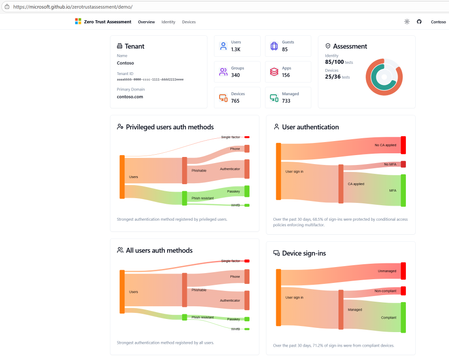
In an era where cyber threats evolve faster than ever, organizations can’t afford blind spots. Zero Trust is no longer optional it’s the foundation of modern security. With the release of the Microsoft Zero Trust Assessment v2, enterprises now have a powerful tool to measure, prioritize, and remediate security gaps with actionable intelligence. What Is Zero Trust Assessment v2? The Zero Trust Assessment is a security posture evaluation tool designed to help organizations operationalize Zero Trust principles. It automates checks across hundreds of configuration items aligned with: Secure Future Initiative (SFI) Zero Trust pillars: Identity, Devices, Applications, Data, Infrastructure and Networks Industry standards: NIST, CISA, CIS Microsoft’s internal security baselines Insights from thousands of real-world customer implementations How Does It Work? The assessment follows a structured, automated workflow: 1. Data Collection & Configuration Analysis Scans your Microsoft 365 environment and connected workloads. Evaluates identity configurations (e.g., MFA enforcement, conditional access policies). Reviews device compliance (e.g., Intune policies, OS hardening). Pulls telemetry from Azure AD, Microsoft Defender, and other integrated services. 2. Automated Testing Against Standards Runs hundreds of tests mapped to Zero Trust principles. Benchmarks your settings against: NIST Cybersecurity Framework CISA Zero Trust Maturity Model Microsoft security baselines Flags misconfigurations and policy gaps. 3. Risk Scoring & Prioritization Assigns risk levels based on: Impact (how critical the gap is) Effort (complexity of remediation) Provides a prioritized list of actions so you can focus on what matters most. 4. Actionable Recommendations Generates clear remediation steps not vague advice. Links to Microsoft Learn and security documentation for quick implementation. Suggests policy templates and automation scripts where applicable. 5. Comprehensive Reporting Delivers a detailed report with: Trends over time Risk heatmaps Compliance scores Enables executive dashboards for leadership visibility. Integration with Microsoft Security Tools Zero Trust Assessment v2 doesn’t operate in isolation it integrates seamlessly with Microsoft’s security ecosystem: Microsoft Defender for Endpoint Detects device vulnerabilities and feeds compliance data into the assessment. Microsoft Intune Ensures device configuration policies align with Zero Trust principles. Microsoft Sentinel Correlates assessment findings with threat intelligence for proactive incident response. Azure AD Conditional Access Validates identity policies like MFA and session controls. Microsoft Purview Extends Zero Trust to data governance and compliance. This integration ensures that remediation steps can be automated and enforced across your environment, reducing manual effort and accelerating security posture improvement. Sample Remediation Workflow Diagram Below is a simplified view of how remediation flows after an assessment: This closed-loop process ensures continuous improvement and operationalization of Zero Trust. Key Benefits Speed: Automates what used to take weeks of manual audits. Accuracy: Aligns with global standards and Microsoft’s own security posture. Operationalization: Moves Zero Trust from theory to practice with actionable steps. Future-Ready: Tests will soon be available enabling continuous improvement. Why This Matters Blind spots in identity or device security can lead to breaches, financial loss and reputational damage. Zero Trust Assessment v2 helps you: Respond faster to evolving threats. Reduce risk with prioritized remediation. Build resilience by embedding Zero Trust principles into daily operations.1.5KViews2likes1CommentStart strong with MCSB v2
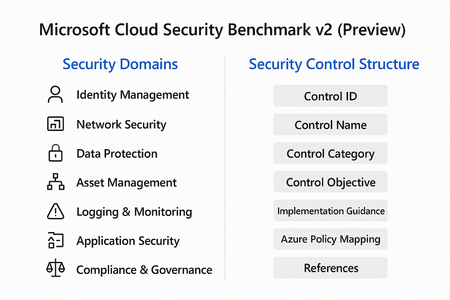
Cloud adoption is accelerating, but so are threats. Organizations often rush to deploy workloads without a clear security baseline, leaving critical gaps that attackers can exploit. Enter Microsoft Cloud Security Benchmark (MCSB) v2, now in public preview, designed to help you start well-protected and evolve securely. What Is Microsoft Cloud Security Benchmark v2? MCSB v2 is a comprehensive set of best practices and controls for securing cloud resources across Azure and hybrid environments. It aligns with: Industry standards: NIST, CIS, ISO Microsoft Secure Future Initiative (SFI) Zero Trust principles This benchmark provides prescriptive guidance for identity, network, data, and workload security helping organizations establish a strong foundation before customizing for their unique needs. Security Domains in MCSB v2 The benchmark organizes guidance into security domains, each representing a critical area of cloud security: Identity Management MFA enforcement, Conditional Access, privileged identity management. Network Security Segmentation, firewall rules, private endpoints. Data Protection Encryption at rest and in transit, key management. Asset Management Resource inventory, tagging, and governance. Logging & Monitoring Centralized logging, alerting, and SIEM integration. Incident Response Playbooks, automation, and escalation workflows. Application Security Secure coding practices, vulnerability scanning. Compliance & Governance Policy enforcement, regulatory alignment. Security Control Structure Each control in MCSB v2 follows a structured format for clarity and implementation: Control ID: Unique identifier for tracking. Control Name: Descriptive title (e.g., “Enable MFA for all users”). Control Category: Maps to a security domain. Control Objective: What the control aims to achieve. Implementation Guidance: Detailed steps for configuration. Azure Policy Mapping: Built-in policy definitions for automation. References: Links to Microsoft Learn and industry standards. This structure ensures consistency, traceability and ease of adoption across large environments. Integration with Azure Policy & Defender for Cloud One of the most powerful aspects of MCSB v2 is its native integration with Azure governance and security tools: Azure Policy Pre-built policy initiatives mapped to MCSB controls. Enables policy-as-code for automated enforcement across subscriptions. Supports compliance dashboards for visibility and reporting. Microsoft Defender for Cloud Monitors compliance against MCSB controls in real time. Provides secure score and recommendations for remediation. Integrates with workflows for alerting and automation. How to Get Started Review the Benchmark Explore the full guidance here: https://learn.microsoft.com/en-us/security/benchmark/azure/overview Apply Built-In Policies Use Azure Policy initiatives mapped to MCSB controls for quick enforcement. Monitor Compliance Leverage Microsoft Defender for Cloud to track adherence and remediate gaps. Tune for Your Needs Start with the baseline, then customize based on workload sensitivity and business requirements. Best Practices for Organizations Enable MFA and Conditional Access for all identities. Segment networks and enforce least privilege. Encrypt data at rest and in transit using Azure-native capabilities. Enable Defender for Cloud for continuous posture management. Automate compliance with policy-as-code. Cloud security isn’t static. Threats evolve, and so should your defenses. MCSB v2 gives you a future-ready foundation that scales with your business and integrates with Microsoft’s security ecosystem.435Views2likes0Comments
Server 2025 Security Baseline breaks Failover Cluster
Hello everyone, while testing the Server 2025 Security Baseline with our Hyper-V Hosts in a Failover Cluster, we noticed the Cluster Service (ClusSvc) was unable to start correctly. It failed with Event 7024 - "A specified authentication package is unknown". From testing and the event logs, we noticed that the .dll file "CLUSAUTHMGR.DLL" was unable to load. After setting "Allow Custom SSPs and APs to be loaded into LSASS" to "Disabled", we were able to start the service again. I assume that the cluster auth manager .dll is not recognized as a trusted Microsoft SSP/AP and therefore blocked as "custom" when enabling this setting. Has anyone tested this using Hyper-V clusters and/or made similar observations? (P.S.: Before debugging, we should have googled, since apparently we are not the only one to have this issue: https://jigsolving.com/failover-cluster-service-wont-start-server-2025/4.4KViews0likes3CommentsWindows 10/11 22h2 Security Baseline missing in Intune
Hi, can you please enlighten when the Windows 10/11 Security Baseline will be updated to 22H2? The current baseline is of November 2021, I am sure that there are new recommedations in the new baseline ( Windows 10, version 22H2 Security baseline - Microsoft Community Hub ) that would be helpful while managing Windows in a more modern way. As an example, currently missing the 22H2 option "Allow Administrator account lockout" to manage it without the need of a GPO.9KViews4likes24CommentsSecurity Baselines for Linux
Currently only Windows OS is in scope of the Security Baseline assessments. Are there any plans to expand it for Linux (RedHat) as well? I mean our organization has deployed Defender on Linux, so it might be possible Microsoft will support this on Linux OS'es as well. Thanks, Dragi3.2KViews2likes5Comments
Exploit Prevention Blocking EXE files
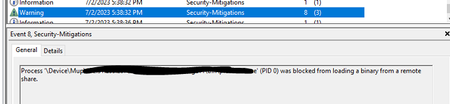
My environment is having an issue where exe files are being blocked when executed via a remote share. It appears Exploit Prevention is blocking but it does not happen for every user. I have placed an exclusion using Set-ProcessMitigation -Name filename.exe -Disable BlockRemoteImageLoads and the issues still persist. We do not use Defender for Endpoint as a solution and are not managing Exploit Guard policy via GPO, SCCM, or InTune. Also I have verified the process mitigation is disabled using PowerShell. ImageLoad: BlockRemoteImageLoads : OFF AuditRemoteImageLoads : NOTSET Override BlockRemoteImages : False BlockLowLabelImageLoads : OFF AuditLowLabelImageLoads : NOTSET Override BlockLowLabel : False PreferSystem32 : NOTSET AuditPreferSystem32 : NOTSET Override PreferSystem32 : False This randomly started a few days ago and I'm at a loss for how to move forward and why this occured all the sudden.1.2KViews0likes0CommentsSecurity reasons to upgrade domain controllers to 2022
Can anyone point me to any documentation that lists the security features provided in Server 2022 that should be considered when planning an upgrade from older domain controllers? e.g. why should we go to 2022 instead of 20192.9KViews0likes3Comments
collecting activity logs via API for security
Hello Everyone! We are planning to collect MCAS activity event logs for security monitoring via API for applications we connected (O365, Azure, Workday, Salesforce, Service Now, Docusign). Can you please sare information about best practises, playbooks or guides regarding this scenario? Or if you have experience in similiar cases, I'll be thankful for information 🙂1.1KViews0likes0Comments