security
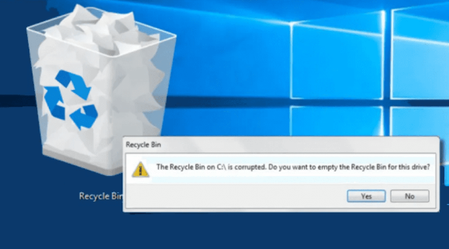
5793 TopicsWhy is the recycle bin showing errors?
It sometimes shows error messages or behaves unpredictably. Despite trying to reset or restart the system, the errors persist, disrupting my ability to manage deleted files effectively. The Recycle Bin often shows errors when I attempt to open or empty it, and some files refuse to be deleted or recovered properly. This issue affects my overall file management and causes frustration, especially when trying to free up disk space or recover accidentally deleted files. I am seeking troubleshooting steps or solutions to fix the errors related to my Recycle Bin and restore its normal functionality.3Views0likes0Comments
Passkeys stored in password manager - Windows instead wants mobile or hardware key
https://support.microsoft.com/en-us/account-billing/create-and-save-a-passkey-e92cd3e0-11fa-4630-a5ea-3ccc0396b3d9 notes that Windows passkeys can be stored in password managers. However, when I am challenged for a passkey Windows only provides two options 1) a mobile device, or 2) a physical hardware key. Given these two exclusive options, the question is how to authenticate using passkeys stored in a password manager? Thanks very much3Views0likes0CommentsSave the date: Secure Boot Q&A in July
To help, Microsoft is continuing its Q&A series with several opportunities to connect directly with Microsoft experts. Whether you're managing physical servers, virtualized workloads, or working with your hardware partners on firmware readiness, you can get answers to the questions that matter most to your environment. Learn more and add the events to your calendar: 8:00 AM PDT July 1 - Windows Server Secure Boot AMA 8:00 AM PDT July 8 - Secure Boot Office Hours for virtualized environments 7:00 AM - 7:00 PM PDT July 15 - OEM Secure Boot Office Hours If there's a question that's been holding up your rollout—or one you simply want to validate before moving forward—this is a great opportunity to ask. Feel free to post questions ahead of time or join the conversation live. We look forward to seeing you there.20Views0likes0CommentsSecure Boot Q&A opportunities continue in July
If you're still working through Secure Boot certificate update rollouts, Microsoft is continuing the conversation throughout July with three opportunities to get your questions answered by the people closest to the technology. Whether you're focused on Windows Server deployments, virtualization platforms, or OEM updates, these upcoming events are designed to help you navigate planning, validation, troubleshooting, and implementation questions in a live, interactive format. Microsoft engineers and subject matter experts will be available to respond directly to questions from the community. Coming up in July: July 1 - Windows Server Secure Boot AMA Ask Microsoft engineers about Secure Boot certificate updates in Windows Server environments, including deployment planning, monitoring, troubleshooting, and more. July 8 - Secure Boot Office Hours for virtualized environments Bring your questions about Hyper-V, Azure offerings, Windows 365, VMware, and other virtualization scenarios. July 15 - OEM Secure Boot Office Hours Connect with experts to discuss OEM-specific questions, such as firmware considerations, as you prepare for or validate Secure Boot certificate updates. Questions don't have to wait until the events start. With community events, you can post your questions and comments ahead of time, then join the discussion live or catch up when it's convenient for you. Hope you find these events helpful. You can also catch up on demand with the series of Secure Boot AMAs that have taken place over the past several months. Here are the three most recent editions: Ask Microsoft Anything: Secure Boot - June 2026 Ask Microsoft Anything: Secure Boot - May 2026 Ask Microsoft Anything: Secure Boot - April 202619Views0likes0Comments
Introducing Windows Ready Print and Modernized Driver Selection
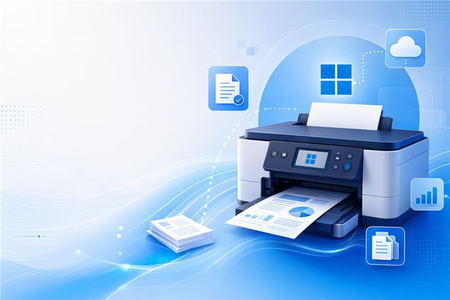
Windows Ready Print: A clearer path to modern printing on Windows Printing on Windows is evolving. As printing environments modernize, customers and partners are asking for solutions that are reliable, secure, and easy to manage across today’s devices. To reflect this shift and make the value of our platform clearer, we are evolving the Modern Print Platform under a new name: Windows Ready Print. Windows Ready Print highlights what matters most: a streamlined, dependable printing experience built for modern Windows environments. It represents our commitment to simplifying printing, aligning modern standards, and delivering consistent, forward-looking experiences for users, IT admins, and partners. Driving the transition to Windows Ready Print with driver selection controls At the core of Windows Ready Print is a transition away from legacy, third party drive-based workflows toward modern, standards-based printing with IPP (Internet Printing Protocol) using the Windows inbox IPP printer driver. Starting in July 2026, new printer installations will default to Windows Ready Print where supported, enabling a simpler and more reliable setup experience. This change reduces the need for traditional driver management and lays the foundation for a more scalable and predictable print experience. However, we recognize that not all environments can move to Windows Ready Print immediately. To ensure a smooth and flexible transition, we are introducing the ability for users to configure Windows to install their printers using Windows Ready Print (if supported) or the OEM printer driver during installation. You can find this setting under Settings > Bluetooth & Devices > Printers & Scanners > Default install printer using Windows Ready Print. This feature enables users and IT admins to control how Windows selects drivers when installing printers: When “Default install printers using Windows Ready Print” is enabled, Windows Ready Print installation is preferred When “Default install printers using Windows Ready Print” is disabled, default driver selection is used The configuration applies to new printer installations only, without affecting existing devices. To enable/disable this feature via group policy, go to: Launch Group Policy Editor Navigate to Local Computer Policy -> Administrative Templates -> Printers Find and select 'Configure Windows Ready Print driver ranking' -> double click to open it Select 'Enabled' (if you wish to enable Windows Ready Print driver selection) or 'Disabled' (if you wish to explicitly disable Windows Ready Print driver selection). Select Apply Select OK How driver selection configuration works with Windows protected print mode When you enable "Default install printers using Windows Ready Print”, new printer installations will default to Windows inbox IPP printer driver when supported. When you enable Windows protected print mode, printers are exclusively installed with Windows Ready Print. Devices that do not support Windows Ready Print cannot be installed. Note: When you’ve enabled Windows protected print mode, you cannot disable "Default install printers using Windows Ready Print".7.4KViews1like3Comments
Microsoft Leads a New Era of Software Supply Chain Transparency
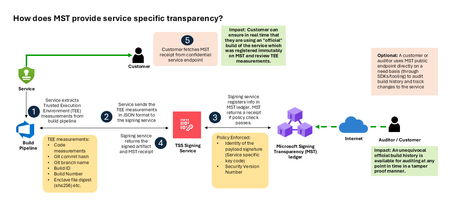
Today, Microsoft announces the general availability of Microsoft’s Signing Transparency (MST) – a first-of-its-kind capability that brings unprecedented visibility and trust to our software supply chain. With this release, Microsoft is leading the industry by recording the build of critical cloud services into a publicly readable and verifiable SCITT standard (Supply Chain Integrity, Transparency, and Trust) compliant blockchain ledger. This means every production software build for in scope services like Azure Attestation and Azure Managed HSM (Hardware Security Module), Azure confidential ledger, Microsoft Signing Transparency itself (and others over time) – is now logged in an immutable, tamper-evident record. Only builds that are in the MST ledger are deployed to production; this gives customers confidence that the supply chain for these critical services can be audited at anytime. Notably, the MST ledger is fully open source and built to align with the emerging IETF SCITT standard. By embracing SCITT’s principles and open protocols, Microsoft ensures that MST not only secures our own ecosystem but also contributes to a broader industry movement toward standardized supply chain transparency. The open-source MST ledger serves as a verifiable trust anchor that any organization or researcher can inspect, audit, or even integrate with their own tooling. MST itself meets the highest levels of transparency, backed by a tamper-proof confidential ledger, open-source, and independently verified. Specifically, we are making the foundation of our trust model transparent and accessible to everyone – reinforcing that trust must be earned through proof, not just promises. This launch marks a major milestone in our commitment to Zero Trust principles, extending “never trust, always verify” all the way into the build itself. Building on a public preview introduced late last year, MST’s general availability delivers verifiable transparency at the software level. It transforms traditional code signing with an additive trust layer that is accessible via an open verification model. Every new software update is accompanied by a publicly auditable proof of integrity, enabling security teams to proactively confirm that each update is authentic and unaltered. To help organizations get the most out of this capability, we are also introducing a free tool to explore the contents – Ledger Explorer – an offline tool that allows security teams to examine MST ledger entries, verify cryptographic proofs, and even validate the ledger’s integrity independently. This tool, combined with MST’s open design, ensures that every Microsoft customer – and the broader community – can hold us accountable in real time for the software we run on their behalf. Key Benefits of Microsoft’s Signing Transparency (MST) Verified Code Integrity – Every software release is cryptographically logged in MST’s ledgers. This makes each build tamper-evident and traceable. If an attacker attempts to inject malicious code or sign an unauthorized update, it will be evident through the well-defined validation step built into the SCITT standard. Organizations gain the assurance that code integrity can be independently confirmed at any time. Independent Verification & Zero Trust – MST enables customers and auditors to verify software authenticity on their own, without having to solely rely on vendor attestations. For each update, Microsoft provides a transparency “receipt” (proof of logging) that you can use to prove the update was officially published and unaltered. This fosters a “don’t just trust, verify” approach, empowering security teams to double-check everything running in their environment aligns with what Microsoft intended. Audit-Trail & Compliance – The transparency ledger creates a permanent, auditable timeline of code deployments. Every entry is a record of what was released and when, backed by cryptographic proofs. This simplifies compliance reporting and accelerates forensic analysis. In the event of an incident, you can quickly audit the ledger to see if any unexpected code was introduced. For highly regulated industries, MST offers concrete evidence of software integrity and policy compliance over time. Leadership & Open Standards – We are delivering real transparency now, encouraging a future where all critical software is released with verifiable integrity. MST’s open source implementation and SCITT-compliant design exemplify our commitment to openness and collaboration. We believe widespread adoption of these standards will strengthen supply chain security for everyone, making trust verification a universal practice. Next Steps Microsoft’s Signing Transparency is more than a new security feature and shapes the advances in trust technology. As threats grow more sophisticated, we must evolve the way we assure our customers about the software they depend on. With MST now generally available, we are leading by example: proving that it is possible to open up the traditionally opaque process of software deployment and turn it into a source of strength and trust, i.e., empowering each person with verifiable transparency. We invite the industry to join us on this journey and get started by reading the documentation and exploring Ledger Explorer today! Together, by embracing transparency and open standards, we can turn “trust but verify” from a slogan into an everyday reality for digital infrastructure.1.9KViews2likes3CommentsAsk Microsoft Anything: The Microsoft Sentinel SIEM Migration Experience
Join us for a live demo and AMA on the Microsoft Sentinel SIEM migration experience. We’ll show how the experience helps teams move from legacy SIEMs like Splunk and QRadar into Microsoft Sentinel with a more guided, lower-friction path. We’ll cover what it does today, how it works, and the questions customers ask most, then open it up for live Q&A. What is an AMA? An 'Ask Microsoft Anything' (AMA) session is an opportunity for you to engage directly with Microsoft employees! This AMA will consist of a short presentation followed by taking questions on-camera from the comment section down below! Ask your questions/give your feedback and we will have our awesome Microsoft Subject Matter Experts engaging and responding directly in the video feed. We know this timeslot might not work for everyone, so feel free to ask your questions at any time leading up to the event and the experts will do their best to answer during the live hour. This page will stay up so come back and use it as a resource anytime. We hope you enjoy!1.8KViews4likes12Comments