security
36 TopicsAzure Security Center Webinar: Secure Score
Want to learn about Secure Score in Azure Security Center? Join our webinar. Details and registration at https://aka.ms/ASCSSWebinar. Azure Secure Score is a simple but elegant tool that will help you improve your infrastructure security by identifying and ranking the highest impact configuration changes you can make. We have recently introduced tools such as "virtual analyst" which enable you to increase your Secure Score in an automated fashion. More details can be found at https://docs.microsoft.com/en-us/azure/security-center/security-center-secure-score. We are hosting two identical sessions at the following times: Tuesday, September 10, 2019 at 08:00 PT / 11:00 ET / 15:00 GMT, and Wednesday, September 11, 2019 at 09:00 GMT / 11:00 CEST / 17:00 HKT Afterward, recordings will be posted to https://aka.ms/ASCRecordings. We hope you’ll join us!1.4KViews3likes0CommentsAnnouncing our Microsoft Defender for Cloud AMA on August 16th!
Join us on Wednesday 8/16 at 9:00AM PST for an AMA (Ask Microsoft Anything) with the Microsoft Defender for Cloud team! This will be a text-based live hour of answering all your questions relating to the product. Please join us to learn more about: Microsoft's point of view on the Cloud Native Application Protection Platform(CNAPP). Microsoft's new innovation in Multicloud(GCP) Posture Management in Defender Cloud Security Posture Management(CSPM). How to leverage Microsoft Defender for Cloud to enable multicloud compliance management. Join here: aka.ms/DefForCloudAMA Note: If you are unable to attend the live hour, you can ask your question at any time on the event page below and the team will get to it during the event.685Views2likes0Comments
Automate Defender for Cloud settings: FIM, Vulnerability Assessment, and Guest Configuration Agent
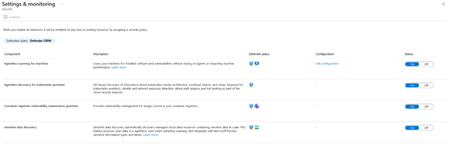
I’m working on automating the configuration of Microsoft Defender for Cloud – Server Plans across multiple subscriptions (100+), including any newly deployed subscriptions. The goal is to avoid manual changes and ensure compliance from day one. Current Setup: I’ve used the built-in policy: Configure Microsoft Defender for Servers plan, which successfully enables: Defender for Cloud Plan P2 Endpoint Protection Agentless scanning I attempted to copy this policy and add parameters for Vulnerability Assessment, but the assignment fails with an error. What I’ve Tried: For File Integrity Monitor: Policy name → Configure ChangeTracking Extension for Windows virtual machines For Vulnerability Assessment: Policy name → Configure machines to receive a vulnerability assessment provider Assigning these policies works on my non-prod subscription, but the toggle in Defender for Cloud → Environment Settings remains No. Challenge: How can I ensure these options (File Integrity Monitoring, Vulnerability Assessment, and preferably Guest Configuration Agent) are automatically enabled for: All existing subscriptions Any new subscriptions created in the future Goal: No manual intervention in Defender for Cloud portal Fully automated via Azure Policy or another recommended approach uestions: Is there a way to extend the built-in policy or create a custom initiative that enforces these settings at the subscription level? Are there ARM templates, Bicep modules, Powershell scripts or REST API calls that can toggle these settings programmatically? Any best practices for ensuring compliance across multiple subscriptions? Any help is much appreciated and looking forward to your expertise! Thank you in advance. Best Regards, Pascal Slot296Views1like0CommentsAbout Defender for Cloud aggregated logs in Advanced Hunting
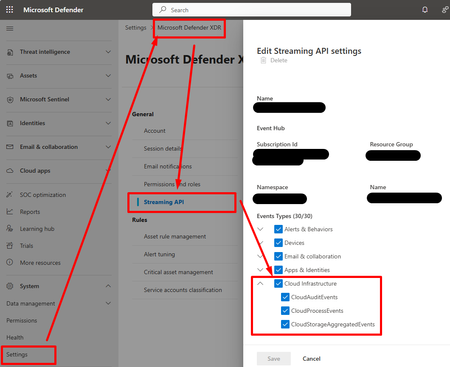
Hi, I create this threat hoping that the Microsoft team will read and hopefully provide insights about future changes and roadmap. When SOC teams use a non-Microsoft SIEM/SOAR, they need to export logs from M365 and Azure, and send them to the third-party SIEM/SOAR solution. • For M365 logs, there is the M365XDR connector that allows exporting logs using an Event Hub. • For Azure logs, we used to configure diagnostics settings and send them to an Event Hub. This began to change with new features within Defender for Cloud (c.f. picture).: • Defender for Resource Manager now sends Azure Activity logs to M365XDR portal, and can be exported using M365XDR Streaming API • Defender for Storage now sends logs to M365XDR portal, and can be exported using M365XDR Streaming API (c.f. https://www.youtube.com/watch?v=Yraeks8c8hg&t=1s). This is great as it is easy to configure and doesn't interfere with infrastructure teams managing operational logs through diagnostic settings. I have two questions : • Is there any documentation about this? I didn't find any? • What can we expect in the future weeks, months regarding this native logs collection feature through various Defender for Cloud products? For example, can we expect Defender for SQL to send logs to M365XDR natively? Thanks for you support!132Views1like0Comments
New Blog | Microsoft Power BI and Microsoft Defender for Cloud
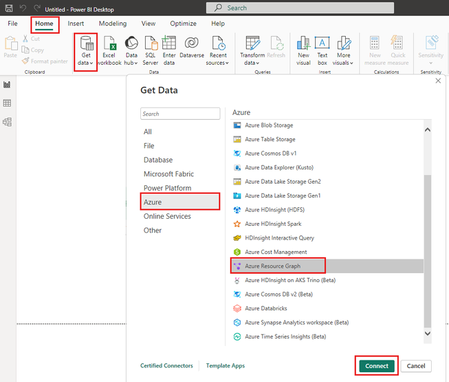
By Giulio Astori Introduction As cloud environments grow more complex and threats increase, organizations need robust tools to monitor, analyze, and respond to security issues effectively. Microsoft Defender for Cloud (MDC) offers robust security management, but to unlock its full potential, organizations need powerful visualization and analysis tools. While Azure Workbooks provide valuable visualizations for MDC data, integrating Microsoft Power BI offers an enhanced approach to data analysis and visualization. Power BI's advanced features, such as customizable dashboards, interactive elements, and seamless integration with various data sources, make it ideal for enhancing the value derived from MDC data. This article is the first in a series of correlated blogs that will explore scenarios and applicability in depth. As an introduction to the series, this article provides the foundation on how to start leveraging Power BI to report and dashboard MDC insights. Benefits of Using Power BI with Microsoft Defender for Cloud Advanced Data Visualization: Power BI provides a wide array of visualization options, allowing security teams to create highly customized and visually rich dashboards that effectively communicate insights to different stakeholders. Enhanced Data Analysis: Power BI's robust analytical tools, including DAX (Data Analysis Expressions) and built-in AI capabilities, enable security teams to perform complex data analysis and uncover deeper insights. Seamless Integration: Power BI integrates with various data sources, including Azure Resource Graph, allowing you to consolidate data from multiple platforms into a single, unified view. Collaborative Features: Power BI facilitates collaboration by enabling teams to share dashboards and reports easily, with role-based access controls ensuring data security. Ease of Use: Power BI's intuitive drag-and-drop functionality makes it simple for users to create and customize visualizations without extensive technical knowledge, making it accessible to users of all skill levels. Step-by-Step Guide to Integrating MDC Data into Power BI To integrate MDC data into Power BI, follow these steps: Step 1: Set Up Power BI and Azure Resource Graph Install Power BI Desktop: Download Power BI Desktop. Enable Azure Resource Graph: Ensure that you have the necessary permissions to access Azure Resource Graph. Step 2: Connect Power BI to Azure Resource Graph Open Power BI Desktop: Launch Power BI Desktop on your computer. Get Data: Click on Get Data on the Home tab. Select Azure Resource Graph: In the Get Data window, search for Azure Resource Graph and select it. Connect: Click Connect and sign in with your Azure credentials. Read the full post here: Microsoft Power BI and Microsoft Defender for Cloud677Views1like0Comments
New Blog | Enhanced Cloud Security: Value-Added with Defender CSPM's Agentless Features
In this article, we will outline how integrating the agentless approach into Defender for CSPM fosters a more robust and efficient cloud security posture. By utilizing agentless features, organizations can enhance visibility of their cloud resources, simplify deployment, maintain compatibility with diverse cloud platforms, and ensure thorough security coverage. By the end of this article, you will have a clear understanding of the benefits and considerations of leveraging agentless security in your cloud environment. Read the blog: Enhanced Cloud Security: Value-Added with Defender CSPM's Agentless Features - Microsoft Community Hub735Views1like0CommentsLog Analytics workspace
Hello, can anyone help me understand the workspace used for Defender for Cloud How to identify which workspace is Defender for cloud connected to, older version of Defender for cloud has clear mention of the workspace name to which it is connected, the latest version just displays it as "Default Workspace" not the actual name of the workspace, as there are multiple "Default workspaces" in a subscription/Tenant. Thanks in Adv.1.8KViews1like1Comment