security testing & offensive research at microsoft (storm)
2 TopicsState Explosion Security Problem in AI-Era Software Supply Chains
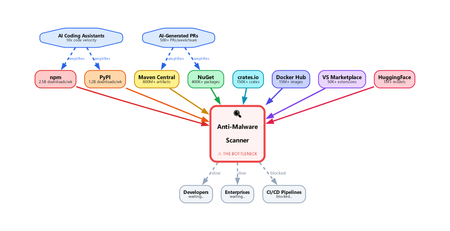
Introduction To see why this problem scales so quickly, start with the smallest possible change: a single line of code. In modern software, even a tiny edit is rarely just a local modification. It can change execution flow, introduce a new dependency, expose sensitive data, or quietly shift the purpose of the package itself. What looks trivial in a diff can create a materially different security outcome. That is why supply chain defenders cannot afford to treat small code changes as small security events. How a Single Line Changes Package Intent Every software package exists in a particular state at a particular moment in time. Imagine a benign version — State X — that behaves exactly as intended. Now add one line of code. That small edit can shift the package into a new state with different behavior and, potentially, a very different risk profile. The security issue is not the added line by itself. It is the fact that the package now has to be interpreted differently. A tiny diff can change the role of the entire component, which means defenders have to reason about the resulting behavior, not just the textual change. That is why file-level scanning breaks down so quickly. A change in one file can alter the behavior of the entire package because software semantics emerge from how components interact. Security systems therefore need to analyze packages as composed systems, not as a series of isolated file edits. Why the whole package matters This matters even more in modern supply chain attacks, where malicious intent is rarely concentrated in one obvious file. More often, the behavior is distributed across several files that look harmless when viewed independently. File A defines an encoded string constant. Looks like a config value. File B provides a decode function. Looks like a utility. File C (setup.py / postinstall) imports both, decodes, and executes. Viewed independently, each file may appear benign. No single file has to trigger a clear signature, rule, or heuristic. The malicious behavior only becomes visible when you reconstruct how the files interact as a system. Any scanner that evaluates files one by one without rebuilding that interaction is likely to miss the real behavior. Why every change demands re-analysis Every meaningful state change — a commit, pull request, version bump, or package publish — can alter the semantics of the software. That means defenders cannot stop at diff inspection or lightweight pattern matching. The real question is not only what changed, but what the software now does. Quantifying the problem The scale of the problem becomes clearer when you look at how many software state changes occur across the ecosystem every day: GitHub alone recorded nearly 1 billion commits in 2025, merged an average of 43.2 million pull requests per month, and now hosts roughly 630 million repositories. In 2026, GitHub was projected to reach roughly 38 million commits per day. npm has grown to well over 2 million packages, making JavaScript one of the largest public package ecosystems. PyPI published more than 130,000 new projects in 2025 and more than 3.9 million new files in the same year. NuGet serves package downloads at massive operational scale, with recent weekly totals in the 5 to 6 billion range. Maven Central indexed more than 20 million packages and published more than 3.2 million packages in 2025. Taken together, these ecosystems are generating an enormous stream of new software states. Some numbers describe repositories, some describe publishes, and some describe downloads, but they all point to the same reality: the scale of software movement is already massive before you even account for the acceleration from AI-assisted development. The number of state changes is already enormous, and AI-assisted development is increasing it even further. The result is not just more code, but more package states that may require meaningful security interpretation. Why the math breaks traditional scanning Assume a single semantic package analysis takes 30 seconds, which is a reasonable range for LLM-based inference. Scanning 50,000 packages would require roughly 1.5 million seconds of compute time per day — about 417 hours. But the ecosystem only gives defenders 24 hours before the next wave of packages arrives. Without aggressive parallelism and purpose-built infrastructure, backlog becomes inevitable. The scanning bottleneck This leaves modern scanning systems with a fundamental bottleneck: Heuristic and signature-based scanners are fast. They can match known patterns in milliseconds and work well for familiar malware families or repeated behaviors. Some systems also use emulation or detonation, but these approaches still struggle to deliver deep reasoning at ecosystem scale. That makes them easier to bypass with novel, well-structured, or AI-generated code that behaves maliciously without resembling previously known samples. LLM-based semantic analysis can reason about intent. It can follow behavior across files, recognize obfuscated exfiltration paths, and explain why a package is suspicious even when the code appears ordinary at first glance. The tradeoff is cost, latency, and trust: inference takes seconds rather than milliseconds, and a single package may require multiple reasoning passes. At ecosystem scale, that becomes a serious infrastructure challenge. Neither approach is sufficient on its own. Heuristics provide speed without deep understanding, while semantic models provide understanding without inherent scale. Closing the gap requires systems that combine both: package-level reasoning with the latency and throughput needed for production supply chains. Heuristics often miss novel attacks, while LLM-based approaches remain too slow to apply inline at large scale. That gap between understanding and throughput is where supply chain malware can persist. What needs to change Closing that gap will require a different class of supply chain security systems. Detonation can help in some cases, but it is too slow and expensive to apply inline to every package state change. What is needed is a system that can: Analyze entire packages as a unit — not individual files. The intent lives in the interaction between files, not within any single one. Run semantic analysis at data-plane speed — every package, every version, on the hot path, with latency low enough for inline enforcement. Not async advisories. Not CI-time checks. Inline, before delivery. Handle the state explosion — millions of state changes per day, each requiring full re-analysis. This is an infrastructure problem as much as a security problem: rate limiting, backpressure, connection pooling, regional failover, model versioning — the same hard distributed systems problems, with security stakes. Maintain high accuracy under evasion — attackers deliberately use encoding, string splitting, dynamic imports, polyglot files, and similar techniques to reduce detection quality. The scanner must continue to classify packages accurately even when the code is designed to obscure intent. The Latency-Accuracy Tradeoff: Malware Detection as an ML Problem At cloud scale, malware detection is governed by a hard tradeoff between latency, accuracy, throughput, and cost. The fastest detectors are typically shallow: signatures, heuristics, and lightweight models can make decisions in milliseconds, but they often miss novel, compositional, or intent-level attacks. Deeper semantic analysis can improve recall and resilience against evasion, but it also increases inference time, compute cost, and operational complexity. As a result, defenders cannot optimize for accuracy in isolation; they must deliver strong detection quality within strict performance constraints. This makes malware detection not just a cybersecurity problem, but a machine learning and distributed systems problem. In modern software supply chains, AI-assisted development increases the number of package states and enables attackers to generate variants at high speed, expanding the space defenders must reason over. The challenge is therefore to build detection architectures that preserve semantic depth while remaining fast enough for inline use at global scale. The gap between the rate of software change and the capacity to analyze it is widening. That gap is the attack surface. If defenders cannot inspect software at the speed it is being produced and published, attackers will continue to exploit the delay. What the industry needs now is a cloud-scale malware analysis capability that can deliver low latency, low cost, high accuracy, and the flexibility to meet different operational requirements , such as SLAs, false-positive tolerance, and enforcement policies , without compromising on package-level semantic analysis.BitUnlocker: Leveraging Windows Recovery to Extract BitLocker Secrets
Table of Contents Introduction BitLocker Overview WinRE Overview Attacking Boot.sdi Parsing Attacking ReAgent.xml Parsing Attacking Boot Configuration Data (BCD) Parsing Vulnerability Fixes BitLocker Countermeasures About the STORM Researchers Introduction In Windows, the cornerstone of data protection is BitLocker, a Full Volume Encryption technology designed to secure sensitive data on disk. This ensures that even if an adversary gains physical access to the device, the data remains secure and inaccessible. One of the most critical aspects of any data protection feature is its ability to support recovery operations in case of failure. To enable BitLocker recovery, significant design changes were implemented in the Windows Recovery Environment (WinRE). This led us to a pivotal question: did these changes introduce any new attack surfaces impacting BitLocker? Our recent research project - first presented at Black Hat USA 2025 and DEF CON 33 (2025) – set out to explore the WinRE attack surfaces impacting BitLocker: finding new vulnerabilities, developing exploits, implementing fixes and ultimately hardening and further securing both WinRE and BitLocker. The research resulted in new vulnerabilities identified in WinRE and its boot procedure – most of which fall into the class of logical vulnerabilities. In this blog post, we will share the research journey: we will begin with an overview of the WinRE architecture, followed by a retrospective analysis of the attack surfaces exposed with the introduction of BitLocker. We will then discuss our methodology for effectively researching and exploiting these exposed attack surfaces. We will reveal how we identified new vulnerabilities and developed exploits, enabling us to bypass BitLocker and extract the protected data. To conclude this blog post, we will outline countermeasure that you can apply today to further harden BitLocker and highlight our commitment to continue our proactive and continues security work around WinRE, BitLocker and the related components. BitLocker Overview BitLocker is a Windows security feature that provides data-at-rest protection for disk volumes. BitLocker protection is based on Full Volume Encryption (FVE) technology that once enabled, encrypts the target volume, protecting all the data stored on it. Users have the flexibility to choose which volumes to encrypt based on their specific needs. By default, BitLocker targets the OS volume, ensuring that all data within the OS environment is protected. Figure 1: Volume layout and BitLocker encryption BitLocker Threat Model BitLocker aims to defend against theft scenarios, where a thief steals your laptop, aiming to extract your sensitive information, compromise your machine and even backdoor it. Consequently, the BitLocker threat model assumes an attacker like a common thief - Full physical access No advanced credentials (usernames, passwords, etc.) BitLocker is one of the few Windows features that explicitly considers physical attackers in its threat model. Protecting against physical attacker significantly raises the bar for countermeasures, as these possess far greater capabilities than remote ones. The Hidden Attack Surface – Windows Recovery Environment (WinRE) Naturally, BitLocker’s attack surfaces are shaped by interfaces accessible to an attacker fitting within the BitLocker threat model. As we examined the different interfaces one stood out – the Windows Recovery Environment (WinRE). Any BitLocker attacker can directly boot into WinRE by holding the Shift key while selecting “Restart” from the logon screen. Figure 2: Booting into WinRE from to logon screen Given WinRE’s fit within the BitLocker threat model, the lack of prior research, and its high vulnerability potential, we decided to conduct security review focused on finding new vulnerabilities, exploiting them, fixing them, and hardening WinRE by mitigating common vulnerability and exploitation patterns. Our end goal was to increase the security and resiliency of both WinRE and BitLocker. With that in mind, let’s dive into the research journey. WinRE Overview WinRE Introduction WinRE is Windows’s recovery platform – it’s designed to recover from critical system issues such as startup failures, persistent crashes, BitLocker errors, and more. For example, if your machine crashes, WinRE is the component responsible for analyzing the issue, identifying corruption and resolving it by using its recovery tools. If you use Windows, chances are that you’ve encountered WinRE at least a few times in your lifetime. Figure 3: WinRE UI WinRE Architecture Architecturally, WinRE operates with its own standalone OS, known as the Recovery OS. This Recovery OS is a lean version of Windows with recovery-specific customizations. The recovery customizations include a unique set of recovery tools that are integrated into the known blue screened recovery UI. Among the exposed recovery tools are familiar options such as Startup Repair, System Reset, System Restore, and others. For storage, the entire Recovery OS - including all executables, DLLs, and drivers - is compressed into a single WIM file named WinRE.wim, which is stored on disk. Figure 4: Recovery OS compression into WinRE.wim Then, when WinRE boots, the entire WIM file is decompressed from disk into RAM, creating a temporary RAM disk that hosts the Recovery OS runtime. Any changes made within this environment are not saved back to the original WinRE.wim file, making the Recovery OS runtime inherently volatile - modifications are discarded upon reboot. Figure 5: WinRE.wim RAM disk boot WinRE BitLocker Design Changes When BitLocker was first introduced, WinRE had to evolve to support recovery from BitLocker-related failures. This led to several architectural and design changes to enable that recovery functionality. Let’s briefly review these changes. WinRE Design Change #1 – WinRE.wim Relocation The first design change focused on the location of the compressed Recovery OS –WinRE.wim. This file was moved from residing in the OS volume - now encrypted by BitLocker - to a dedicated unencrypted recovery volume. This change was required because WinRE must remain accessible in the event of BitLocker failures. If the OS volume is BitLocker-encrypted and becomes unreadable due to a decryption issue, placing WinRE on that volume would block recovery. Since WinRE is a critical component that must be available, it was moved to a separate recovery volume. This helps ensure it can function even if the OS volume is not accessible. Figure 6: WinRE.wim relocation WinRE Design Change #2 – Trusted WIM Boot The second design change focused on the integrity of the WinRE.wim file. To support integrity verification of WinRE.wim, a feature called Trusted WIM Boot was introduced. It verifies WinRE’s integrity by comparing its hash to a known-trusted hash. If the hashes match - the OS volume is automatically unlocked. If hashes don’t match - the OS volume remains locked. Figure 7: Trusted WIM boot hash comparison The two states - auto-unlocked and locked - define the level of access WinRE has to the main OS. In the auto-unlocked state, WinRE has full access to the OS, whereas in the locked state, it has no access at all. This change was necessary because WinRE now resides on the unencrypted recovery volume and can no longer be blindly trusted. With Trusted WIM Boot, any unauthorized modification to WinRE.wim breaks its trust - effectively blocking any tempering. WinRE Design Change #3 – Volumes Re-Lock The third design change focused on limiting recovery tools that are inherently risky to BitLocker. For example, among the exposed recovery tools is the Command Prompt. To prevent a scenario where an attacker abuses the command prompt to access BitLocker protected data, a volume re-lock functionality was added to WinRE. This functionality is triggered every time that a risky recovery tool is selected and it re-locks the OS volume. To re-gain access to the OS volume, the user must manually enter the BitLocker recovery key - otherwise, all contents remain completely inaccessible. Figure 8: WinRE UI Volumes Re-Lock Functionality For example, if an attacker launches the Command Prompt recovery tool without inserting the BitLocker recovery key, access to BitLocker-encrypted volumes will be denied, resulting in the following lock error: Figure 9: WinRE UI Volumes Re-Lock Demonstration WinRE Design Changes Summary To summarize the impact of the design changes, as long as WinRE.wim is trusted, and no risky recovery tools are triggered, the OS volume is auto-unlocked allowing WinRE to recover it without requiring any user intervention. In contrast, If WinRE.wim is modified without authorization or a risky recovery tool is triggered, the OS volume is re-locked, preventing WinRE from accessing it. Exposed Attack Surfaces So now the critical question arises – were any attack surfaces exposed because of these design adjustments? As it turned out, during the auto-unlock state, WinRE parses files from unprotected volumes - specifically the EFI volume and the recovery volume. Figure 10: WinRE parsing files from unprotected volumes This parsing presents a very interesting attack surface, which wasn’t valuable to explore before BitLocker’s introduction – since there was no security boundary to cross. Before BitLocker, even full code execution within WinRE didn’t grant a physical attacker any new capabilities. In contrast, with BitLocker, any code execution within WinRE during the auto-unlock state can be utilized to bypass BitLocker and extract all the protected secrets. This Blog Focus In this blog, we will focus on exploring 3 such external files – Boot.sdi – located on the recovery volume ReAgent.xml – located on the recovery volume Boot Configuration Data (BCD) store – located on the EFI volume Figure 11: Files focused on this blog post The rest of this blog post will be focused on attacking the parsers of each of these files. Attacking Boot.sdi Parsing The SDI extension stands for System Deployment Image. SDI files are optionally used when booting from RAM disk. RAM disk boot is the procedure of extracting and creating a RAM-based disk from a static OS image. Unlike traditional boot scenarios where the OS disk is on a physical storage, in this case, the OS disk is entirely in RAM. Subsequently, disk I/O requests are routed to the RAM disk instead of the physical storage. One example of RAM disk boot is WinRE boot – where WinRE.wim is the static OS image. Figure 12: RAM disk boot demonstration In terms of SDI usage - when specified, the SDI file gets prepended to the virtual disk within the allocated RAM disk memory region. Figure 13: RAM disk buffer layout with an SDI file The SDI file format primarily consists of binary blobs, organized through a “blob table” that holds metadata for each blob, including its type, size and relative offset within the file. While we won’t delve into the full SDI format, we’ll focus on the specific blobs specified in the SDI when used to boot WinRE.wim: WIM blob – a blob describing the WIM image NTFS blob – a blob describing an NTFS volume Below is a demonstration of the entire RAM disk buffer layout. First, the SDI file, containing a WIM blob which points to the WinRE.wim file, and an NTFS blob which points to an empty NTFS volume. Figure 14: RAM disk buffer layout in WinRE.wim boot At this stage, you might wonder why an empty NTFS volume is necessary. It's required to maintain compatibility with Windows components that cannot operate directly on a WIM volume as the OS volume. The empty NTFS volume allows the WIM volume to be presented as a standard NTFS volume, enabling seamless interaction with Windows components that cannot operate directly on WIM volumes. With better understanding of the SDI file, and the overall RAM disk boot procedure, let’s take a closer look at the code responsible for the RAM disk loading. Figure 15: RAM Disk loading pseudo code The code first allocates the RAM disk buffer large enough for both the SDI and WIM files. Then, it loads the SDI file into the allocated buffer. Then, it loads the WIM file into the allocated buffer, following the SDI. The loading API calculates the hash of the loaded WIM file, and this hash is later used as part of the Trusted WIM boot integrity verification. Lastly, the address of the WIM to boot from is calculated by adding the SDI WIM blob specified offset to the start of the RAM disk buffer. Notably, there is no correlation linking between the verified hashed WIM, and the booted WIM. The lack of correlation allows setting the WIM offset arbitrarily. Since we can set the WIM offset arbitrarily, we can append an untrusted WIM to the SDI file and adjust the WIM offset accordingly. As Trusted WIM boot hash verification uses the hash of the WIM on stored disk rather than the one indicated by the SDI WIM offset, the hash verification will succeed - because the trusted WIM on disk remains unchanged. However, the system will boot using the untrusted WIM specified by the SDI WIM offset. Below is a demonstration of the entire RAM disk buffer layout the exploitation scenario. Figure 16: RAM disk buffer layout in exploitation scenario This vulnerability allows bypassing the Trusted WIM boot verification – we can boot an untrusted WIM as trusted, and have our untrusted WIM benefit the auto-unlock functionality – thereby bypassing BitLocker and extracting the secrets. To demonstrate secrets extraction, we created a clone of WinRE.wim with and changed its launch app to the Command Prompt, instead of the recovery environment program. Then, appended this WIM to Boot.sdi, verified offsets are correct, and booted into WinRE. The result was the Command Prompt being launched in auto-unlock state. Figure 17: Demo – cmd.exe in auto-unlock – launched from untrusted WIM This vulnerability was patched in 2025’s July Patch Tuesday and received the ID of CVE-2025-48804. Attacking ReAgent.xml Parsing The ReAgent.xml file represents the current recovery state and configuration of WinRE. Figure 18: ReAgent.xml In the early stages of WinRE runtime, it parses this XML file. ReAgent.xml Scheduled Operations Among the interesting fields in the XML file is the “ScheduledOperation” field. This field instructs WinRE to run a recovery operation by ID. The supported operations include the known recovery tools such as startup repair, system reset and others. Simply, scheduled operations offer an alternative method to execute recovery tools in WinRE. As opposed to the known execution method, which is triggered manually through the WinRE UI, scheduled operations, if specified, execute automatically before the UI is displayed. Additionally, risky scheduled operations (e.g. Command Prompt), would trigger the re-lock functionality. Figure 19: Scheduled Operations In this blog post, we will focus on two scheduled operations – Offline Scanning WinRE Apps Offline Scanning Scheduled Operation The offline scanning scheduled operation allows running Anti-Virus scan from within WinRE against the OS volume. This functionality is beneficial against malware that does not persist in WinRE runtime. Figure 20: Offline Scanning Scheduled Operation Demonstration To avoid misuse of this feature, which runs in the auto-unlock state, there are multiple limitations that narrow down the apps allowed to perform Offline Scanning – Offline Scanning apps are executed from the offline OS volume Offline Scanning apps must be digitally signed by Microsoft or WHQL The digital signature must be embedded in the app (not catalog signed) Of course, a BitLocker attacker can’t insert his own signed app, as the OS volume is assumed BitLocker encrypted, and out of attacker’s reach. Figure 21: Offline Scanning App Execution and Limitations We enumerated the applicable apps and discovered approximately 30. No, the Command Prompt is not among them. Additionally, most of the applicable applications could not execute in WinRE mainly due to compatibility reasons. We reviewed allowed and applicable apps one by one to see if they could potentially be mis-used. That’s when we found that the tttracer.exe app fits within the limitation. Tttracer.exe is a time-travel debugging utility that supports tracing arbitrary apps. WinRE does not enforce strict validation of the Offline Scanning app arguments, which is reasonable given that each app may use a different argument format. As a result, it's possible to trace Command Prompt (cmd.exe) under tttracer.exe without triggering the re-lock functionality. The traced cmd.exe will benefit the auto-unlock functionality – thereby bypassing BitLocker and extracting the secrets. Figure 22: Exploiting the allowed tttracer.exe to proxy-execute cmd.exe Figure 23: Demo – cmd.exe in auto-unlock - traced by tttracer.exe This vulnerability was patched in 2025’s July Patch Tuesday and received the ID of CVE-2025-48800. WinRE Apps Scheduled Operation The WinRE apps scheduled operation simply allows running apps within WinRE. Specified apps are verified before benefiting from the auto-unlock functionality. Only those that pass verification can leverage auto-unlock, which is particularly useful for apps that require access to the BitLocker-encrypted OS volume. Figure 24: WinRE Apps Scheduled Operation Demonstration The trust verification is based on a simple comparison of the executed app name and hash against a pre-defined list of allowed entries. The list of allowed entries is stored in the WinRE registry, which is part of the WinRE.wim file. Since WinRE.wim is integrity-protected by Trusted WIM boot verification, a BitLocker attacker cannot modify the registry to insert unauthorized entries - doing so would break the WIM trust. Figure 25: WinRE Apps Verification Similarly to the Offline Scanning operation research – we find that the verifications are implemented correctly, and we can’t directly execute our own custom apps. That said, the same question arises: any existing trusted apps that could be mis-used? We enumerated the allowed entries list and found one registered trusted app - SetupPlatform.exe. This app is registered as trusted during Windows Upgrade. Only once the upgrade is completed, the trusted app entry remains in the allowed list and is not removed. This adds SetupPlatform.exe as a potential attack surface, since it can be executed in the auto-unlock state. We then delve deeper into SetupPlatform.exe and found that it has an execution path that registers the Shift+F10 hotkey as cmd.exe launcher. When triggered, this hotkey launches cmd.exe without re-locking the OS volume. This mechanism is used to facilitate troubleshooting during upgrade failures. The first thing we tried to do is to schedule the SetupPlatform.exe WinRE app and see if we can trigger the Shift+F10 hotkey to interact with cmd.exe. We failed. It turned out that even though the desired execution path is triggered, it immediately exits due to missing configuration on the OS volume. Figure 26: SetupPlatform.exe execution flow Of course, a BitLocker attacker can’t create the configuration, as the OS volume is assumed BitLocker encrypted, and out of attacker’s reach. The time window between the hotkey registration and the termination is too short, making it impossible to manually trigger. Figure 27: Impossible time Window We decided to dig even deeper into SetupPlatform.exe, to see if other execution paths may help widening the short time window. That’s when we discovered an interesting flow. It turned out that after the hotkey registration, the app can spawn a blocking message box. The decision on whether to spawn this message box is based on an INI file that is searched for in the recovery volume, which is under out full control. Figure 28: Creating an infinite time window By configuring this INI file correctly, we can create an infinite time window that would allow triggering the Shift+F10 hotkey to launch and interact with cmd.exe. The launched cmd.exe will benefit the auto-unlock functionality – thereby bypassing BitLocker and extracting the secrets. Figure 29: Demo – cmd.exe in auto-unlock – launched via Shift+F10 hotkey This vulnerability was patched in 2025’s July Patch Tuesday and received the ID of CVE-2025-48003. Attacking Boot Configuration Data (BCD) Parsing BCD stands for Boot Configuration Data, and it’s the file that defines how Windows boots. It stores boot entries, controls the boot parameters, recovery settings and many more boot-related configurations. Figure 30: BCD store In the context of WinRE, the usage of BCD is minimal - as most BCD parsing occurs during the boot phase - prior to the WinRE runtime. WinRE uses BCD mainly to determine the location of the target OS volume on disk, so that it knows which volume to aim the recovery operations to. Specifically, the OS device BCD element is the element queried by WinRE to calculate the target volume location. This element can point to any volume on disk, though by default, it points to the OS volume – commonly mapped to the C: drive. Figure 31: WinRE BCD Usage Demonstration The first question that came into our minds when we investigated WinRE BCD usage, is what can we potentially gain from targeting BCD in the context of WinRE? As it turned out - WinRE fully trusts the target OS it recovers, and it sometimes queries sensitive configuration from that target OS, assuming it’s out of attacker’s reach. This assumption is solid from a design perspective, because with BitLocker enabled, the target OS is encrypted, and the attacker has no access whatsoever. Having said that, we wondered, can we challenge this assumption that target OS is out of attacker’s reach? Hunting Target OS Location Impersonation Primitive What if we could trick WinRE into thinking that an attacker-controlled volume is the trusted BitLocker-encrypted one? Our focus has shifted toward identifying a primitive that allows impersonation of the target OS location. The goal is to manipulate the osdevice element so that it points to an attacker-controlled volume - such as the Recovery volume - instead of pointing to the trusted, BitLocker-encrypted volume. This primitive, if gained, would break the trust assumption. Figure 32: Desired Primitive Demonstration We already know that the OS device is controlled in the BCD store, which we can directly modify – as it resides on the EFI volume. One might think, why can’t you just change the device directly in the BCD? Well, theoretically, it’s possible, but it isn’t valuable. Let me explain - the OS device location isn’t used only by WinRE, but also by the Boot Manager – which uses it to know which volume it should auto-unlock. The challenge here is that the same store is used in both the boot and OS phases, so any change will affect both. In this scenario, modifying the OS device location to point to the Recovery volume prevents the Boot Manager from auto-unlocking the BitLocker-encrypted OS volume that contains the secrets. This is because the OS volume is no longer associated with the WinRE boot. While this scenario could theoretically break the trust assumption, it still wouldn’t allow extraction of BitLocker secrets - even with full code execution in WinRE. Figure 33: Directly Modifying OS device – not valuable Our primitive must not interfere with the boot procedure and the auto-unlock functionality. We must go deeper. We decided to dig deeper into the way WinRE searches for the BCD store. Any potential flaws at this stage wouldn’t interfere with the boot procedure or the auto-unlock functionality, as it occurs after the boot is completed. To locate the BCD store - WinRE iterates over disk volumes and searches each one for a BCD store. The first store found is the one used to further calculate the target OS location. Figure 34: WinRE BCD lookup logic demonstration This volume iteration is an interesting point to further inspect – because only EFI volume contain the BCD store. Any attempt to locate the store on other volumes could be potentially abused. The functions used to iterate over volumes are FindFirstVolume and FindNextVolume. Notably, the remarks section highlights a very interesting point: “You should not assume any correlation between the order of the volumes that are returned by these functions and the order of the volumes that are on the computer. In particular, do not assume any correlation between volume order and drive letters as assigned by the BIOS (if any) or the Disk Administrator.” Under the hood, these functions perform further filtering which causes an inconsistency in the returned volume order. The typical volume order, returned by diskpart list vol command is as follows – OS volume EFI volume Recovery volume Figure 35: diskpart list vol command output However, the volume iteration functions would return a different order – OS volume Recovery volume EFI volume Can you spot the inconsistency? With the volume iteration functions, the Recovery volume is iterated over and checked for a BCD store before the EFI volume. By placing a custom, attacker-controlled store in the recovery volume – we can trick WinRE into using it, instead of using the boot store. With this setup, WinRE doesn’t even reach the point of querying the EFI volume. Figure 36: Exploiting the volume iteration order Any modification or corruption we make to that attacker store will only impact WinRE and will not disrupt the boot procedure at all! This flaw allows us to achieve the desired primitive: during the boot phase, the boot manager locates and uses a legitimate BCD store from the EFI volume to unlock BitLocker-encrypted OS volume. In the boot phase, there are no issues in the BCD store lookup logic. Figure 37: BCD usage in boot phase – EFI volume BCD store is used However, during the OS phase, WinRE instead locates and uses the attacker-controlled BCD store in the recovery volume - leading it to recover an attacker-controlled volume. Figure 38: BCD usage in WinRE phase – Recovery volume BCD store is used Going Beyond Theoretical Concepts – Exploitation Strategy We successfully gained the desired primitive, but can it be further leveraged to extract BitLocker secrets? The reason we went after this primitive is because it allows us to break WinRE’s assumption that the target OS is out of attacker’s reach. However, given its novelty and unexplored exploitability, it was our responsibility to move beyond theoretical concepts and develop a fully functional exploit. To do so, we came up with the following exploitation strategy: Find a WinRE flow with two characteristics - A flow that does not trigger the volumes re-lock functionality A flow that queries configuration from the target OS to perform operations The idea is to chain this WinRE flow with the gained impersonation primitive – to trigger sensitive operations in the auto-unlock state. After exploring different WinRE behaviors, we found a potential candidate - the Push Button Reset (PBR) feature. PBR is Windows’s system reset tool, and it provides various reset functionalities. Figure 39: Push Button Reset Demonstration PBR supports multiple trigger modes, with one of its modes, known as “Online PBR” meeting the characteristics we defined for the exploit - It does not trigger the re-lock functionality – thereby benefited the auto-unlock functionality It queries configuration from the target OS to perform sensitive operations – thereby can be controlled with the impersonation primitive Additionally, Online PBR can be scheduled freely through ReAgent.xml’s scheduled operations. With full control over the PBR configuration, the remaining task was to determine the exact sensitive directive required to extract BitLocker secrets. We found that the ResetSession.xml file - responsible for defining all operations executed by PBR - includes the DecryptVolume directive, which instructs PBR to decrypt any arbitrary BitLocker-encrypted volume - Figure 40: PBR ResetSession.xml BitLocker Volume Decryption Full Exploit Chain We now have all the pieces required for the full BitLocker bypass exploit chain. The exploit required creating and modifying few files on the Recovery volume - The BCD store – with the OS device element pointing to the Recovery volume The PBR configuration – with the DecryptVolume PBR operation specifying the BitLocker-encrypted OS volume as the volume to decrypt The ReAgent.xml file – with Online PBR scheduled operation Figure 41: Exploitation setup With this setup, the next WinRE boot will go through the Online PBR flow. During the BCD store lookup, PBR will locate the attacker's BCD store and mistakenly identify its target volume as the Recovery volume. Consequently, PBR will load its configuration from the Recovery volume, which instructs it to decrypt the BitLocker-encrypted OS volume. Once PBR completes its process, BitLocker secrets become freely accessible, as BitLocker was disabled by PBR. Figure 42: Exploitation flow Figure 43: Demo – cmd.exe with OS volume fully-decrypted This vulnerability and the entire exploitation chain was patched in 2025’s July Patch Tuesday and received the ID of CVE-2025-48818. Vulnerability Fixes All the discovered vulnerabilities and exploitation techniques were fixed in 2025’s July Patch Tuesday. The assigned IDs are – CVE-2025-48800 CVE-2025-48003 CVE-2025-48804 CVE-2025-48818 BitLocker Countermeasures To further enhance the security of BitLocker, we recommend enabling TPM+PIN for pre-boot authentication. This significantly reduces the BitLocker attack surfaces by limiting exposure to only the TPM. To mitigate BitLocker downgrade attacks, we advise enabling the REVISE mitigation. This mechanism enforces secure versioning across critical boot components, preventing downgrades that could reintroduce known vulnerabilities in BitLocker and Secure Boot. For more information about BitLocker countermeasures, please read the “BitLocker Countermeasures” article: BitLocker countermeasures | Microsoft Learn Closing Remarks To wrap up - we want to emphasize that our journey never ends, we continue to proactively research BitLocker, WinRE and the related components with the never-ending goal of increasing their security and resiliency. About the STORM Researchers This blog is a joint work by Netanel Ben Simon and Alon Leviev, security researchers working with the Security Testing & Offensive Research at Microsoft (STORM). The STORM team mission is to unlock engineers’ security excellence and focus our expertise to ensure Azure Edge & Platform products are secure and trusted. We aim to reduce security risks in shipped and soon-to-be-shipped products.