security copilot
56 TopicsWelcome to the Microsoft Security Community!
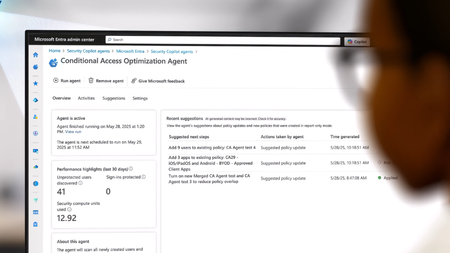
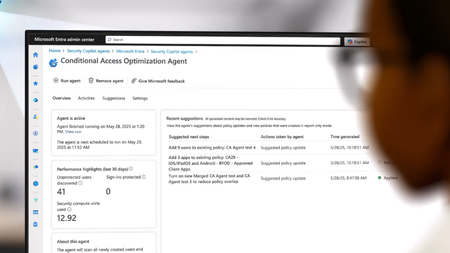
Protect it all with Microsoft Security Eliminate gaps and get the simplified, comprehensive protection, expertise, and AI-powered solutions you need to innovate and grow in a changing world. The Microsoft Security Community is your gateway to connect, learn, and collaborate with peers, experts, and product teams. Gain access to technical discussions, webinars, and help shape Microsoft’s security products. Get there fast To stay up to date on upcoming opportunities and the latest Microsoft Security Community news, make sure to subscribe to our email list. Find the latest skilling content and on-demand videos – subscribe to the Microsoft Security Community YouTube channel. Catch the latest announcements and connect with us on LinkedIn – Microsoft Security Community and Microsoft Entra Community. Index Community Calls: March 2026 Upcoming Community Calls March 2026 Mar. 5 | 8:00am | Security Copilot Skilling Series | Conditional Access Optimization Agent: What It Is & Why It Matters Get a clear, practical look at the Conditional Access Optimization Agent—how it automates policy upkeep, simplifies operations, and uses new post‑Ignite updates like Agent Identity and dashboards to deliver smarter, standards‑aligned recommendations. Mar. 11 | 8:00am | Microsoft Security Store | A Day in the Life of an Identity Governance Manager Powered by Security Agents In this session, you’ll see how agents from the Microsoft Security Store help governance teams streamline reviews, reduce standing privilege, and close lifecycle gaps. Co‑presented with identity governance experts from the Microsoft MVP community, we’ll walk through a day‑in‑the‑life of an identity governance manager—covering scenarios like excessive access accumulation, offboarding gaps, and privileged role sprawl. You’ll see how agents can automate governance workflows while keeping you in control. Mar. 11 | 8:00am | Microsoft Entra | QR code authentication: Fast, simple sign‑in designed for Frontline Workers Frontline teams often work on shared mobile devices where typing long usernames and passwords slows everyone down. In this session, we’ll introduce the QR code authentication method in Microsoft Entra ID—a streamlined way for workers to sign in by scanning their unique QR code and entering a PIN on shared iOS/iPadOS or Android devices. No personal phones or complex credentials required. We’ll walk through the end‑to‑end experience, from enabling the method in your tenant and issuing codes to workers (via the Entra admin center or My Staff), to the on‑device sign‑in flow that gets your teams productive quickly. We’ll also cover best‑practice controls—like using Conditional Access and Shared device mode—to help you deploy with confidence. Bring your questions—we’ll host Q&A and collect product feedback to help prioritize upcoming investments. Mar. 11 | 5:00pm | Microsoft Entra | Building MCP on Entra: Design Choices for Enterprise Agents Explore approaches for integrating MCP with Microsoft Entra Agent ID. We’ll outline key considerations for identity, consent, and authorization, discuss patterns for scalable and auditable agent architectures, and share insights on interoperability. Expect practical guidance, common pitfalls, and an open forum for questions and feedback. Mar. 12 | 12:00pm (BRT) | Microsoft Intune | Novidades do Microsoft Intune - Últimos lançamentos Junte-se a nós para explorar as novidades do Microsoft Intune, incluindo os lançamentos mais recentes anunciados no Microsoft Ignite e a integração do Microsoft Security Copilot no Intune. A sessão contará com demonstrações ao vivo e um espaço interativo de perguntas e respostas, onde você poderá tirar suas dúvidas com especialistas. Mar. 18 | 1:00pm (AEDT) | Microsoft Entra | From Lockouts to Logins: Modern Account Recovery and Passkeys Lost phone, no backup? In a passwordless world, users can face total lockouts and risky helpdesk recovery. This session shows how Entra ID Account Recovery uses strong identity verification and passkey profiles to help users safely regain access. Mar. 19 | 8:00am | Microsoft Purview | Insider Risk Data Risk Graph We’re excited to share a new capability that brings Microsoft Purview Insider Risk Management (IRM) together with Microsoft Sentinel through the data risk graph (public preview) What it is: The data risk graph gives you an interactive, visual map of user activity, data movement, and risk signals—all in one place. Why it matters: Quickly investigate insider risk alerts with clear context, understand the impact of risky activities on sensitive data, accelerate response with intuitive, graph-based insights Getting started: Requires onboarding to the Sentinel data lake & graph. Needs appropriate admin/security roles and at least one IRM policy configured This session will provide practical guidance on onboarding, setup requirements, and best practices for data risk graph. Mar. 24 | 8:00am | Microsoft Purview | eDiscovery recent updates to the modern UX Join us to learn all about the recent updates to the modern UX, from new features and managing generative AI content. Mar. 24 | 9:00am | Microsoft Intune | Accelerate your Mac Management POC in Intune with Intune my Macs Intune my Macs enables you to stand up a complete Microsoft Intune macOS proof‑of‑concept in minutes. Using a single script, it deploys policies, compliance settings, scripts, PKG apps, and optionally Microsoft Defender for Endpoint (MDE). In this session, you’ll learn how to use the solution and see exactly what it delivers. Mar. 26 | 8:00am | Azure Network Security | What's New in Azure Web Application Firewall Azure Web Application Firewall (WAF) continues to evolve to help you protect your web applications against ever-changing threats. In this session, we’ll explore the latest enhancements across Azure WAF, including improvements in ruleset accuracy, threat detection, and configuration flexibility. Whether you use Application Gateway WAF or Azure Front Door WAF, this session will help you understand what’s new, what’s improved, and how to get the most from your WAF deployments. Mar. 31 | 8:00am | Microsoft Entra | Developer Tools for Agent ID: SDKs, CLIs & Samples Accelerate agent identity projects with Microsoft Entra’s developer toolchain. Explore SDKs, sample repos, and utilities for token acquisition, consent flows, and downstream API calls. Learn techniques for debugging local environments, validating authentication flows, and automating checks in CI/CD pipelines. Share ready-to-run samples, resources, and guidance for filing new tooling requests—helping you build faster and smarter. Looking for more? Join the Security Advisors! As a Security Advisor, you’ll gain early visibility into product roadmaps, participate in focus groups, and access private preview features before public release. You’ll have a direct channel to share feedback with engineering teams, influencing the direction of Microsoft Security products. The program also offers opportunities to collaborate and network with fellow end users and Microsoft product teams. Join the Security Advisors program that best fits your interests: www.aka.ms/joincommunity. Additional resources Microsoft Security Hub on Tech Community Virtual Ninja Training Courses Microsoft Security Documentation Azure Network Security GitHub Microsoft Defender for Cloud GitHub Microsoft Sentinel GitHub Microsoft Defender XDR GitHub Microsoft Defender for Cloud Apps GitHub Microsoft Defender for Identity GitHub Microsoft Purview GitHub33KViews6likes9CommentsStrengthen your data security posture in the era of AI with Microsoft Purview
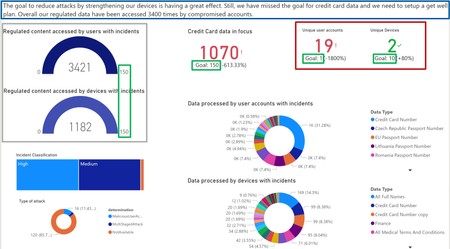
Organizations face challenges with fragmented data security solutions and the amplified risks due to generative AI. We are now introducing Microsoft Purview Data Security Posture Management (DSPM) in public preview, which provides comprehensive visibility into sensitive data, contextual insights, and continuous risk assessment. DSPM is integrated with Microsoft 365 and Windows devices, leveraging generative AI through Security Copilot for deeper investigations and efficient risk management, and provides several capabilities across centralized visibility, actionable policy recommendations, and continuous risk assessment to enhance data security.Microsoft Copilot for Security and NIST 800-171: Access Control
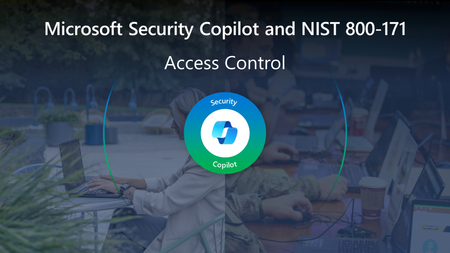
The second blog in this series will dive into the very first requirement family - Access Control (3.1) - and how organizations may deploy Microsoft Copilot for Security (Security Copilot) to meet the requirements entailed. This requirement family is arguably one of the most paramount because of the remarkable growth in identity-based attacks and the need for identity architects and teams to work more closely with the Security Operations Center (SOC). Microsoft Entra data noted in the Microsoft Digital Defense Report shows the number of “attempted attacks increased more than tenfold compared to the same period in 2022, from around 3 billion per month to over 30 billion. This translates to an average of 4,000 password attacks per second targeting Microsoft cloud identities [2023]”.15KViews2likes3CommentsMicrosoft Security Copilot and NIST 800-171
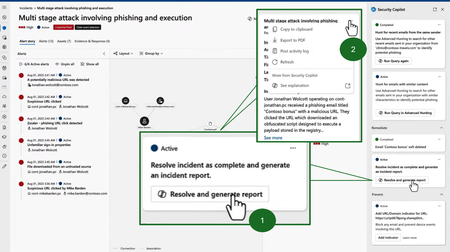
Microsoft Security Copilot can help commercial businesses in the Defense Industrial Base (DIB) meet the security requirements of NIST 800-171r3 and prepare for CMMC 2.0. Features and benefits of Security Copilot, such as automated threat detection, real-time alerts, advanced analytics, attack path analysis, and natural language explanations can improve the productivity and accuracy of security analysts. Explore how companies in the DIB may use these AI-powered capabilities to meet NIST 800-171r3 security requirements, detect and respond to threats more efficiently, and ultimately defend against threats with finite or limited resources.15KViews7likes2Comments