security copilot agents
2 TopicsMicrosoft Security Copilot agents
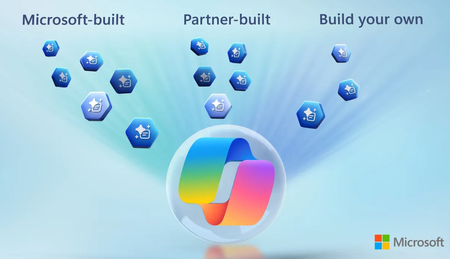
Automate phishing triage, prioritize alerts, streamline access reviews, and close policy gaps while keeping full control through natural language feedback and recommendations. Reduce repetitive work, cut through alert noise, and focus on the most critical risks facing your organization. Stay ahead of vulnerabilities and evolving threats by proactively identifying at-risk devices, deploying patches, and optimizing access policies as your environment changes. Build custom agents tailored to your workflows, connecting tools and data to automate your most time-consuming security tasks. Dilip Radhakrishnan, Microsoft Security Copilot Partner Director, shares how to keep your organization protected with Security Copilot agents. Spend less time chasing false alarms. Spend more time stopping real threats. See how Microsoft Security Copilot’s Phishing Triage Agent works. Simplify access reviews. Allow users to approve or revoke permissions in Microsoft Teams with natural language. See how with the Access Review Agent. No gaps, no guesswork. Spot misaligned users & apps, fix with one click. See how the Conditional Access Optimization Agent keeps organizations secure. QUICK LINKS: 00:00 — Security Copilot agents 01:02 — Phishing Triage Agent 02:17 — Alert Triage Agents 03:24 — Access governance 04:41 — Conditional Access Optimization Agent 05:57 — Vulnerability Remediation Agent 06:57 — Build your own specialized agents 07:54 — Wrap up Link References Get started at https://aka.ms/securitycopilotadoptionhub Unfamiliar with Microsoft Mechanics? As Microsoft’s official video series for IT, you can watch and share valuable content and demos of current and upcoming tech from the people who build it at Microsoft. Subscribe to our YouTube: https://www.youtube.com/c/MicrosoftMechanicsSeries Talk with other IT Pros, join us on the Microsoft Tech Community: https://techcommunity.microsoft.com/t5/microsoft-mechanics-blog/bg-p/MicrosoftMechanicsBlog Watch or listen from anywhere, subscribe to our podcast: https://microsoftmechanics.libsyn.com/podcast Keep getting this insider knowledge, join us on social: Follow us on Twitter: https://twitter.com/MSFTMechanics Share knowledge on LinkedIn: https://www.linkedin.com/company/microsoft-mechanics/ Enjoy us on Instagram: https://www.instagram.com/msftmechanics/ Loosen up with us on TikTok: https://www.tiktok.com/@msftmechanics Video Transcript: -What if your security tools could think like your best analysts and could augment your team skills and capacity to triage alerts faster, respond more effectively, and manage more incidents? That’s what Microsoft Security Copilot enables you to do, where we have both pre-built autonomous agents embedded across Microsoft’s security stack, along with verified agents developed by our security partners, which you can access from a brand new security store. And of course, you now have the option to build your own agents too. Microsoft Security Copilot agents work alongside you to help reduce manual work and accelerate your response times. -And you can secure these agents using a unique agent identity with its own permissions. Importantly, the agents learn from your instructions and feedback keeping you and your team in control. And they offer proven productivity benefits with reporting available to visualize the impact of each agent, like time savings to reduce alert triage times and more. So let’s start by making this real with some of the prebuilt autonomous agents embedded across the Microsoft security stack. -I’ll start with the Phishing Triage Agent in the Microsoft Defender portal designed to tackle one of the most difficult and evolving challenges for security analysts where phishing emails are reported by users every day, but many of those reports come from cautious employees flagging safe messages as threats. These false alarms drain time and distract from real attacks. To solve for this, the Phishing Triage Agent autonomously reviews each alert, applies advanced reasoning and built-in security expertise and precisely distinguishes true threats from harmless bulk or spam. You can trust the results because of the built-in feedback loop that helps you to tune agent outputs. As an analyst, you can provide feedback in natural language like, “this email is harmless,” and the agent will then adapt making future triage more tuned to your organization. The agent also provides a natural language explanation and visual workflow mapping the steps behind its assessment. With every interaction, the agent gets smarter removing the alert noise so you can focus on real phishing threats and hardening your defenses. -Next, let’s look at the Alert Triage Agents in Microsoft Purview, specifically, for Data Loss Prevention and Insider Risk Management. Each day your team might receive dozens of alerts, and often you might only be able to address a fraction of them due to time constraints. Prioritizing which alerts to tackle first can also be a challenge, because the importance of an alert may not be clear on the surface. -That’s where Alert Triage Agents work to analyze alerts based on the priorities you give it. This can range from user behavior, content sensitivity, activity context or other parameters in order to identify which alerts pose the greatest risk. And you can also fine-tune the agent’s triage criteria using natural language. For example you might specify, “Prioritize alerts involving finance documents accessed outside business hours.” Each alert is also accompanied by a detailed explanation of why it was prioritized to help you make data-driven decisions quickly. By mirroring how an analyst on your team would evaluate risk, these Alert Triage Agents help you focus on the alerts that matter most. So we’ve seen how agents help cut through noise, identifying real phishing threats and prioritizing risky alerts. -That same intelligence also powers access governance in Microsoft Entra. Access reviews are critical to reducing risk, but they’re often delayed, too difficult to navigate or approved in bulk with little scrutiny. This leads to over-permissioned users and missed compliance requirements. The Access Review Agent instead brings reviews directly into Microsoft Teams, giving business users clear guidance to complete them accurately and on time. In the background, the agent analyzes user data, summarizes context and provides informed recommendations based on signals like past decisions, role changes and sign-in activity. Reviewers can validate or override any recommendation with natural language input, ensuring accuracy and flexibility. -Admins can also configure which reviews the agent supports, such as recurring reviews for critical apps, privileged groups or compliance-bound access packages. Each review concludes with a clear summary of actions and explanations. By streamlining decisions and prioritizing risk, the Access Review Agent helps you complete reviews faster with more accuracy and less overhead. -Now let’s switch gears to discovering gaps in your security posture with the Conditional Access Optimization Agent in Microsoft Entra. We’ve all faced this. As your directory grows new users, contractors and apps are added constantly. Stale or unused accounts with access to your resources could be leveraged by attackers. Or maybe an entity wasn’t added to the right groups used for policy scoping, leaving a gap in protection. -Keeping conditional access policies aligned with these changes isn’t easy. And that’s where the Conditional Access Optimization agent helps by continuously scanning for new users and applications or changing attributes, then checking their alignment with existing conditional access policies. As it uncovers risks, it flags them automatically, for example users without MFA or apps with excessive permissions, then it even provides actionable recommendations that you often apply with a single click streamlining policy updates and reducing manual work. And now you can chat with the agent and you can more gradually roll out its recommendations over time. The agent helps ensure that your access policies evolve with your environment to close gaps before they become liabilities. -Next, you can bring together the worlds of trending threat intelligence with endpoint management using the Vulnerability Remediation Agent in Microsoft Intune to stay ahead of emerging threats. There might be trending OS or app-related vulnerabilities that could impact your managed devices and it’s difficult to map which specific devices are at risk. That’s where the Vulnerability Remediation Agent comes in. This agent continuously monitors known vulnerabilities and reevaluates them as new threats emerge. It assesses the impact of each vulnerability to prioritize which endpoints are at risk and need attention. For each CVE, the agent provides clear reasoning for urgency and suggests appropriate fixes that you can deploy. Its recommendations are designed to be effective and minimize disruption. This agent transforms vulnerability management from a reactive process into a repeatable and proactive approach, helping you to deploy patches faster and smarter. -Next, let me show you how easy it is to build your own specialized agents. This is an early look at the Security Copilot agent builder experience. Here, you can use natural language with Security Copilot to author an agent. From there, you have an option to edit or customize the agent further. Where in addition to your instructions from chat, you can refine and add inputs with the context needed to execute your tasks. -You can also add more tools to your agent for additional functionality where you can connect to MCP servers and access the tools within them. And if you’re an advanced developer, you can use your preferred tools like Visual Studio Code or others. Once complete and published, your in-house developed agents will be available alongside other Security Copilot agents and you can activate them to run autonomously based on triggers like events or schedules. So you have the complete flexibility to help automate your most time-consuming and important work. -Microsoft Security Copilot agents help prioritize the most critical risks, help you mitigate them and even offload time-consuming repetitive tasks. To get started, visit aka.ms/securitycopilotadoptionhub and subscribe to Microsoft Mechanics for the latest updates on AI-powered security. Thanks for watching.484Views0likes0Comments
Security Copilot RBAC for Embedded Experience in Unified Security Platform
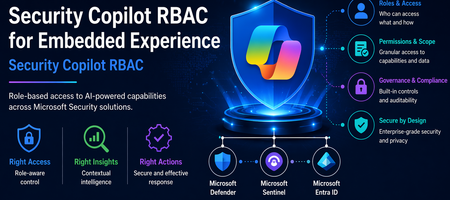
Introduction The evolution of Security Operations Centers (SOC) is increasingly driven by AI-powered capabilities that improve efficiency, accuracy, and response time. Microsoft Security Copilot represents a significant advancement in this space by embedding AI-driven assistance directly within security platforms such as Microsoft Defender XDR, Microsoft Sentinel, and Microsoft Entra. The concept of embedded experience is central to this transformation. Rather than operating as a standalone interface, Security Copilot is integrated within existing security tools, allowing analysts to invoke AI-generated insights directly during investigations. This reduces the need for tool switching and accelerates decision-making. The purpose of this document is to define and explain the Role-Based Access Control (RBAC) model required to securely enable this embedded experience. It provides a structured understanding of how access is governed across multiple layers, how these layers interact, and how organizations can align permissions with SOC workflows while maintaining a least-privilege security posture. Understanding Embedded Experience Security Copilot in embedded mode operates within the context of the host platform. When invoked from Defender or Sentinel, it does not function independently but instead consumes data already accessible to the user. This model ensures that Copilot enhances visibility without expanding access boundaries. This behavior is governed by an On-Behalf-Of (OBO) model, where Security Copilot leverages the permissions of the authenticated user. It does not introduce new entitlements or override existing RBAC configurations. As a result, the insights generated by Copilot are always limited to what the user is already authorized to see, reinforcing Zero Trust principles and preventing unauthorized data exposure. Prerequisites for Embedded Experience To enable Security Copilot in an embedded environment, organizations must establish foundational prerequisites that ensure seamless and secure operation. First, access to underlying platforms such as Microsoft Defender XDR, Microsoft Sentinel, and Microsoft Entra must already be provisioned. Since Copilot is not a standalone data source, it cannot function without these integrations. Second, RBAC alignment across identity, platform, and service layers must be configured correctly. Misalignment can lead to incomplete results, restricted functionality, or inconsistent analyst experiences. Finally, governance processes such as access review, monitoring, and adherence to least privilege principles should be implemented. These controls ensure that Copilot usage remains compliant, auditable, and aligned with organizational security policies. RBAC Framework for Security Copilot Security Copilot adopts a multi-layer RBAC model consisting of three tightly integrated layers. These layers collectively determine whether a user can access Copilot features and what data they can retrieve. RBAC Layer Mapping RBAC Layer Role Type Purpose Example Roles Access Impact Security Copilot Platform Feature access control Determines who can use Copilot capabilities Security Copilot Owner, Security Copilot Contributor Enables use of Copilot features but does not grant data access Microsoft Entra ID Identity and directory governance Controls access to identity data and reports Security Reader, Reports Reader, Security Administrator Governs identity insights and directory visibility Service-Specific RBAC Data access control Defines access to security data within services Defender Security Reader, Sentinel Reader Determines what Copilot can retrieve and present This layered approach ensures that no single role grants full access. All three layers must align for complete functionality. Security Copilot Platform Roles Security Copilot platform roles control who can interact with the Copilot interface and execute AI-driven workflows. The Security Copilot Owner role provides administrative control over Copilot configuration, including access management and platform-level settings. This role is typically assigned to administrators responsible for governance and operational enablement. The Security Copilot Contributor role enables analysts to run prompts, perform investigations, and interact with Copilot features during daily SOC operations. However, this role does not grant visibility into security data by itself. This clear separation ensures that Copilot remains a controlled interface layer rather than a source of privilege escalation. Microsoft Entra ID Roles Microsoft Entra roles govern access to identity-related data, which is critical for security operations involving user behavior, sign-in logs, and directory insights. Roles such as Security Reader provide read-only visibility into security data, while Reports Reader enables access to reporting and analytics capabilities. In certain advanced cases, the Security Administrator role may be required for configuration-level actions. The document emphasizes avoiding excessive privilege assignment, particularly the use of Global Administrator roles for daily operations, as this conflicts with least privilege principles. Service-Specific RBAC Roles Service-level roles determine the data sources that Security Copilot can access when embedded in platforms. In Microsoft Defender XDR, roles such as Security Reader allow access to alerts, incidents, and endpoint data. In Microsoft Sentinel, Sentinel Reader provides access to log data, analytics, and incidents. In Microsoft Entra, roles like Reports Reader provide access to identity insights. Copilot cannot retrieve or analyze data beyond what these roles permit. The output it generates is always constrained to the user’s effective permissions across these services. Unified RBAC Behavior in Embedded Experience In an embedded scenario, all three RBAC layers are evaluated simultaneously. When a SOC analyst invokes Copilot in Defender, the system validates whether the user has permission to use Copilot, access identity data, and retrieve Defender-specific insights. Only when all these conditions are satisfied does Copilot provide a comprehensive output. This ensures that Copilot responses are both contextually rich and access-compliant, eliminating the risk of unauthorized data exposure while maintaining operational efficiency. Security Copilot Core Use Cases Security Copilot enables a layered set of capabilities that span both analyst interaction patterns and agent-driven execution models. These use cases collectively enhance SOC efficiency, decision-making, and operational scalability. Use Case Mapping Table Use Case Description Embedded / Agent Example Value to SOC Summarization Transforms complex alerts, incidents, and telemetry into structured, human-readable insights by correlating signals across multiple sources Summarizing a Defender XDR incident involving endpoint, identity, and cloud alerts into a unified attack narrative Reduces analyst fatigue and significantly accelerates triage by eliminating manual data aggregation Guided Response Provides contextual, step-by-step investigative guidance and recommended remediation actions based on observed patterns and threat intelligence Suggesting investigation paths in Sentinel, including pivoting to identity logs, device timeline, and lateral movement indicators Improves consistency in investigations and enables less experienced analysts to operate effectively Script Analysis Evaluates scripts, queries, and command-line activities to identify malicious patterns, errors, or optimization opportunities Analyzing PowerShell scripts or KQL queries used in threat hunting scenarios to detect obfuscation or suspicious logic Enhances detection accuracy and reduces the risk of missing critical indicators Reporting Generates structured incident summaries, executive reports, and compliance-ready documentation with contextual insights Producing incident summaries for leadership or compliance teams with both technical and business context Improves communication, supports audit readiness, and reduces manual reporting overhead Agent-Driven SOC Use Cases (Expanded Capabilities) With the introduction of Security Copilot agents, the platform extends beyond assistance into orchestrated, intelligence-driven operations across SOC workflows. Agent-Based Use Case Description Real Agent Example SOC Impact Dynamic Threat Detection Continuously analyzes telemetry to identify previously undetected or weak signals across the attack surface Dynamic Threat Detection Agent correlates signals across Defender workload telemetry to surface hidden threats Improves detection coverage and reduces the likelihood of missed attacks Threat Intelligence Correlation & Briefing Aggregates internal and external intelligence sources to generate contextual threat insights aligned to organizational risk Threat Intelligence Briefing Agent produces structured intelligence reports based on attack patterns and exposure context Enhances situational awareness and supports proactive defense strategies Advanced Threat Hunting Enables hypothesis-driven and AI-assisted threat hunting by generating queries, exploring telemetry, and correlating historical data Advanced Threat Hunting Agent builds and executes queries across Defender and Sentinel datasets for proactive investigation and telemetry exploration Accelerates threat discovery and reduces reliance on manual query development Security Analysis & Threat Prioritization Performs AI-driven analysis of security telemetry to identify high-risk patterns, prioritize threats, assess risk exposure, and recommend investigative actions Security Analyst Agent analyses password spray attacks, ransomware activity, malware campaigns, identity abuse, and other security risks by generating telemetry-driven assessments and recommendations Improves analyst productivity, prioritizes high-impact threats, and enables faster decision making Security Triage Automation Automates alert prioritization and classification by adding contextual enrichment and reducing noise Security Triage Agent / Phishing Triage Agent evaluates alerts and distinguishes between real threats and false positives Reduces alert fatigue and improves prioritization accuracy in high-volume environments End-to-End Investigation Orchestration Performs multi-step investigation by gathering signals, correlating activity, and building attack timelines Security Analyst Agent investigates incidents across identity, endpoint, email, cloud, and data signals to produce a consolidated incident narrative Reduces Mean Time to Investigate (MTTI) and ensures consistent investigation outcomes Cross-Domain Threat Correlation Connects signals across identity, endpoint, cloud, email, and data domains to identify multi-stage attack chains Agents operating across Defender, Entra, Sentinel, and Security Copilot correlate activities such as phishing leading to identity compromise and lateral movement Breaks down silos and enables holistic threat visibility across the environment Remediation & Response Enablement Identifies vulnerable assets and supports remediation workflows through contextual recommendations Agents integrated with endpoint and policy systems suggest patching actions, containment actions, and configuration changes based on detected risks Improves response effectiveness and strengthens overall security posture Each of these use cases operates within the RBAC boundaries defined earlier, ensuring secure and context-aware outputs. Mapping Use Cases to SOC Processes The four core use cases align directly with SOC operational stages, enabling a consistent and repeatable analysis model. Summarization plays a significant role during the detection and triage phase, where analysts need quick clarity on incoming alerts. Instead of manually analyzing raw data, Copilot provides a structured overview, helping analysts determine priority and relevance. Guided response becomes critical during the investigation and response phase, where decision-making speed is essential. By suggesting next steps and correlating data points, Copilot assists analysts in navigating complex attack scenarios. Script analysis supports both threat hunting and investigation, allowing analysts to validate scripts, queries, or automation logic. This reduces the risk of overlooking malicious behavior embedded in scripts. Reporting aligns with the post-incident and compliance phase, where structured documentation is required. Copilot generates summaries that can be shared with leadership or compliance teams, ensuring clarity and consistency. Together, these use cases create a continuous cycle of detection, investigation, response, and reporting, fully integrated with SOC workflows. Summary Security Copilot’s embedded experience represents a transformative shift in how AI is integrated into security operations. By embedding intelligence directly within platforms such as Defender and Sentinel, it enhances analyst productivity while maintaining strict governance controls. The three-layer RBAC model, consisting of Security Copilot roles, Microsoft Entra roles, and service-specific roles, ensures that access is both secure and compliant with least privilege principles. The On-Behalf-Of model further guarantees that Copilot does not expand access beyond existing permissions. The inclusion of structured use cases such as summarization, guided response, script analysis, and reporting enables organizations to operationalize Copilot effectively across SOC processes. When RBAC is properly aligned and integrated with SOC workflows, Security Copilot becomes a powerful enabler of faster investigations, improved accuracy, and enhanced security posture—all while maintaining strict control over data access and governance.