search
35 Topics
New Tab search UI (Ctrl + Shift + A) has changed - how to revert to previous behavior ?
Since the latest Microsoft Edge update, the Tab Search panel opened with Ctrl + Shift + A has changed. It now opens on the side instead of the center, and arrow key navigation no longer works. Only Tab navigation works now. this makes it much harder to use quickly. Is there any way to restore the previous centered Tab Search UI, or re-enable up and down arrow navigation, or undo this specific UI change ? The old version worked perfectly for my workflow. The new version slows everything down. Thanks Michael129Views2likes0Comments
[MS Edge Android] UI Glitch: Suggestions Misaligned in Bottom Search Bar Mode
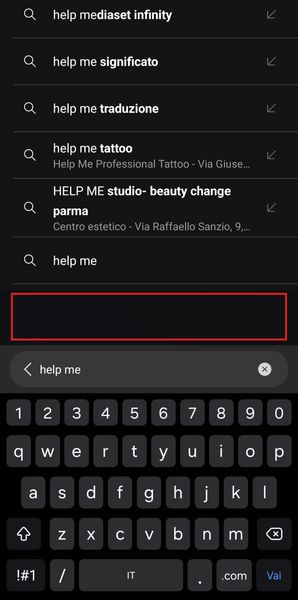
Hi everyone! I'm experiencing a strange issue with the search suggestions when using bottom bar mode. In Microsoft Edge, there's a blank space between the input bar and the suggestions above it, as shown in the attached image (see the red line). Is anyone else seeing this bug? Any idea how to fix it? Thanks in advance425Views0likes1CommentIssues with address bar suggestion search
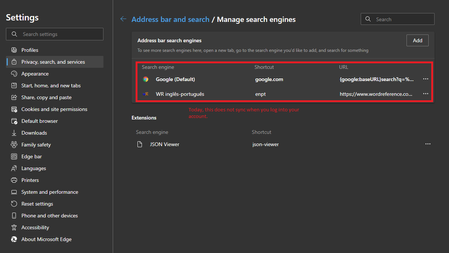
Using Edge Version 106.0.1370.34 (Official build) (64-bit) on Windows 11. I started noticing that the address bar suggestion feature is not working properly. This is the functionality that suggests stuff as you type. It just searches in my favorites and history and not in general. I am expecting to type something and then get a lot of suggestions in the address bar to pick from - now it shows only a couple suggestions from history/favorites. I have checked that both these are enabled in settings: * Show me search and site suggestions using my typed character * Show me suggestions from history, favorites and other data on this device using my typed characters When I disable the second one, I do not get any suggestions at all when typing in the address bar. When I enable it again, it shows suggestions from my history and favorites. Toggling the first setting has no effect at all. Tried both Google and Bing as search engine for address bar. No change. When running Google Chrome it works as expected. Any ideas?1.6KViews0likes1Comment
Issue with searching in PDF using Microsoft Edge
Say I'm searching for the keyword "apple" in a PDF document using Microsoft Edge. The search immediately starts as I type in the first letter of the keyword, in this case "a". Edge then struggles to find all the numerous instances of this letter, which takes it about 10 seconds, during which Edge is not responding. This makes searching PDFs using Edge very tedious, rendering Edge irrelevant for PDF viewing and editing. Please advise. Aviram3.5KViews0likes1Comment
Adicionar recurso de pesquisa em Coleções | Add Search Feature to Collections
Gostaria de dar uma sugestão de algo essencial para adicionar em Coleções. Seria colocar um campo para pesquisar de forma fácil as coleções que eu já cadastrei. É uma chatice ficar rolando a barra e procurando o conteúdo que eu tinha salvo a um tempo atras. Traduzido para o inglês: Gostaria de sugerir algo essencial para adicionar às coleções. Seria para colocar um campo para procurar facilmente as coleções que eu já registrei. É um arrasto para rolar e procurar conteúdo que eu tinha guardado há um tempo atrás.813Views1like1Comment
[Search Engines] Favicons do not appear next to the built-in providers by-default
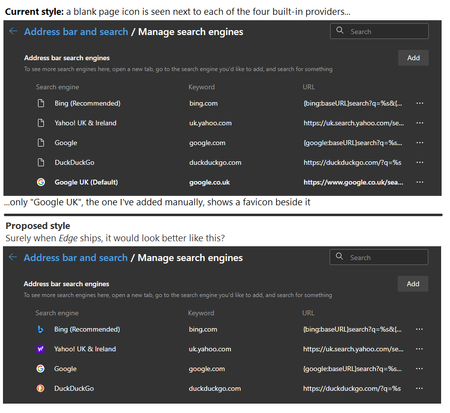
Describe the problem: Edge ships with some built-in search-engines. These vary by-country, but for UK users they are "Bing", "Yahoo!", "Google US" and "DuckDuckGo". None of the built-in engines will initially show any icons next to them -- all just show a blank-page icon, making the feature look broken. Suggest a solution: Either one of the following: Edge should ship with the favicons for each built-in search-engine already cached Or the first time Edge is ran, where a valid Internet-connection is present, it should immediately retrieve the favicon for each one silently, in the background Any workarounds? After the user has visited the website of one of the search-engines that comes built-in, the favicon will get cached. If the user were to return to the "Manage search engines" screen, you will then see the icon next to each one you have visited. However, given many users are unlikely to have visited all of the sites before they first access the "Manage search engines" screen, the result will be blank-page icons for most, if not all, of them. Before posting on this site, have you suggested this previously using the "Send Feedback" feature built-into Edge? I have, yes. Browser and OS versions Edge Stable v90.0.818.62 (Official build) (64-bit) Windows 10 Home (64-bit) Version 20H2 (Build 19042.985; May 2021) Screenshot1.7KViews1like1CommentNew floating button for the Web Widget in Edge
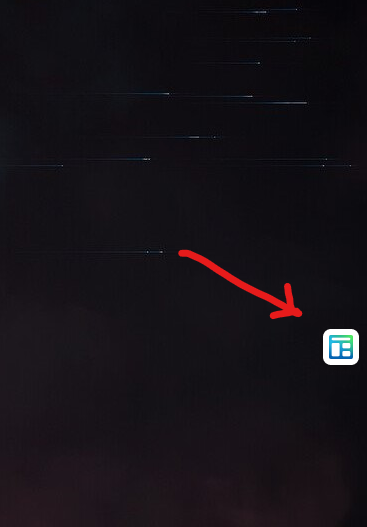
you can drag and drop it you can put it anywhere on the screen but it's sticky, so it automatically sticks to sides. if you drag and drop it on the center of your screen, it automatically sticks to one of the 3 sides, (Top, Right, Left), also got smooth animation when it sticks. it stays always on top of other windows (except for full screen games which I just tested) can be turned on and off using the option shown in the screenshot below How do you launch Web Widget? it launches automatically on Windows startup (unless you disable it from Edge settings or Windows settings) you can launch it by right-clicking on Edge canary shortcut on Start menu and selecting "Launch Web Widget" you can launch it from Edge settings page: edge://settings/newTabPage you can launch it by pressing Edge's (...) menu button => More tools => Launch Web Widget Microsoft Edge Version 90.0.816.0 (Official build) canary (64-bit) This might be a Controlled feature rollout7.4KViews2likes2CommentsNew Web Widget layout in Edge version 90.0.815.0 canary
This one only shows the search area, even when Edge window is closed, no news feed. pretty useful for performing quick searches, what do you think? by the way, you can also use the search area in Windows 10 taskbar to search the web, just like the Web Widget of Edge. but, since Edge is multiplatform, other OSes like Linux and Mac can benefit from this too.1.5KViews0likes6Comments