sdk
63 TopicsCopilot Managed Runtime is now generally available, with additional new preview features
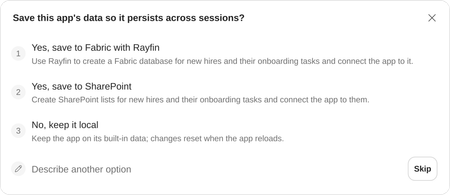
AI is making it easier to turn ideas into working apps in Copilot Cowork, Copilot Code, Copilot Studio and the dev tools you already use. Running those apps for work still requires security, governance and ongoing operations. In September we introduced Microsoft Copilot Managed Runtime in public preview to bring those requirements together. Today at Microsoft Ignite, we’re announcing that Microsoft Copilot Managed Runtime is generally available and beginning to roll out to tenants. Copilot Managed Runtime brings Microsoft-operated hosting together with identity, governed data access, and app lifecycle management, giving teams the foundation for turning the apps they create into managed apps they can use for enterprise work and IT can trust. Build in the tools that fit your team Makers can start in Copilot Code, Copilot Cowork, Copilot Studio, GitHub Copilot, VS Code or third-party development platforms and tools. Copilot Managed Runtime provides Microsoft-managed hosting and execution for published apps across these paths. That gives teams room to choose how they build, and open collaboration opportunities across products all while bringing their published apps onto a common operating foundation. “AI agents can now build many of the web apps enterprise teams need, and many organizations want those apps to run in their own environment. With Copilot Managed Runtime, apps built with Manus will run in an organization’s own Microsoft environment and automatically inherit existing security and compliance policies, giving teams the capability and speed of an AI agent with enterprise-grade control.” Tao Zhang, Co-founder and Chief Product Officer at Manus Microsoft operates the platform, hosting, scaling and availability are handled for you, with no cloud services to configure, so teams can focus on the app and the work it needs to do. Entra sign-in and sharing make it easier to put that app in colleagues’ hands. Governed connections give the app access to the organizational data and services it needs within the boundaries set by IT. The governance controls exist in the platform to allow IT to federate and scale development and operations, all guided by IT. Regardless of the entry point, Copilot or third-party tools, the code stays editable and Git-backed. This allows makers to keep iterating on the app, while the published app stays live, then promote changes when they're ready. Organizations using GitHub Enterprise can connect their own repositories, so apps follow the same branching, review and release practices as the rest of their software. Give IT one place to see and govern every app For apps on Copilot Managed Runtime, Entra identity, sharing and access sit alongside policy enforcement and audit logging. Organizational policies govern connector, data and endpoint access. These capabilities bring the operating requirements of an app into its managed foundation, so makers and IT can work from the same boundaries. App inventory and monitoring in Microsoft 365 admin center give administrators a central view of the apps teams have published. That visibility helps IT oversee apps created through different tools without organizing its inventory around each authoring experience. Makers retain flexibility in how they create, and administrators have a common place to see and manage those apps. Give apps a place for their own business records Moving onto our preview features, some apps also need to keep data of their own, such as the owners, dates and status updates behind a team’s launch tracker. A new frontier public preview of Microsoft Fabric integration adds an out-of-the-box option for persistent app storage and backend capabilities for those business records; this is in addition to existing connectivity with SharePoint and Dataverse. Teams can choose this data layer when an app needs it, alongside the hosting and execution provided by Copilot Managed Runtime. Now supporting agents and additional artifacts Create Copilot Studio agents and workflows locally Now in public preview, Copilot Managed Runtime dev tooling will allow users to build custom Copilot Studio agents and workflows locally, make modifications with their developer tool of choice and then publish to Copilot Studio using the CLI. This enables makers and developers using Copilot Studio to easily work with other members of their team, some who may be using the browser based UX or those working locally on their machine. Developers can continue using their developer tools and pushing changes directly from their machine, working together on a single source of truth integrated into their existing version control platforms such as GitHub. For organizations like Qualcomm, this approach brings together familiar developer workflows with new ways to build and manage agents: "What excites us about the CLI is bringing code-first development to Copilot Studio. For Qualcomm users and engineers, the combination of the CLI and coding agents offers a fast and natural way to build and test agents, while also supporting more mature ALM practices and complementing the Copilot Studio UI experience. Together, these approaches give teams the flexibility to build and manage agents in the way that works best for them” - Paulo Joaquim, IT Architect, Principal, Qualcomm Incorporated Get started with the CLI here: https://aka.ms/msagent-cli Create custom agents in code For makers and developers who want to author an agent directly in code, we’re introducing Code Agents in early-access preview (this will require signing up and being accepted). Coming soon, these custom agents are created and hosted on Copilot Managed Runtime, with a choice of model, orchestrator or harness within the preview’s supported scope. This lets teams reuse the AI stack, developer tools and workflows they already have, while Microsoft provides hosting, Microsoft Entra identity, channels, monitoring and lifecycle management. Customers and partners can sign up at aka.ms/cmrcodeagents-signup. From idea to the show floor Consider an event team creating a show-floor operations app in Copilot Cowork. In this illustrative scenario, an interactive 3D map shows booth readiness and open help requests. The team reviews and publishes the app for colleagues with Microsoft Entra identity access, governed connections, IT control and hosting all through Copilot Managed Runtime. The team chooses to use the new Fabric integration to store the app's records. A developer could clone the code locally with Git and improve it using their preferred tools while colleagues continue using the published app. For an agent project, the developer could edit Copilot Studio agent definitions locally, keep changes in source control and push the updated project back to Copilot Studio, keeping the agent and associated workflows together. These paths support collaboration across Copilot Code, Copilot Cowork, Copilot Studio and third-party tools as teams create, publish and maintain solutions. Start with the artifact your team needs today Start with a business process your team wants to improve. Consider who will use the artifact, what information it needs, and how your team will maintain it. Choose the authoring experience that fits the work, then use Copilot Managed Runtime to bring the result to your colleagues, with a foundation for building more connected solutions over time. Already have an app created and want to use it with your enterprise business? Then use Copilot Managed Runtime and check out the Copilot Managed Runtime CLI to get started: https://aka.ms/cmrrepo General availability makes Copilot Managed Runtime a foundation for the apps teams put to work. The new previews expand the options for local agent development and custom app data. Together, these steps give makers more ways to create useful tools, collaborate more than ever, all while keeping app and agent operations secured and governed for your enterprise.4.1KViews0likes0CommentsBuild a dual-mode voice agent in Microsoft Foundry with native subagents
Voice agents are changing how companies interact with customers. From service questions to technical support, the expectation is the same: a natural conversation that leads to useful, reliable answers. But responding quickly and resolving a complex request are not always the same task. Some questions can be answered directly. Others require information from backend systems, specialized analysis, or several steps to determine what should happen next. The challenge is to support that deeper work without putting the conversation on hold, or giving an answer before the necessary information is available. In this blog, I will walk through a dual-mode voice-agent pattern in Microsoft Foundry. A frontline agent manages the real-time conversation, while a backend agent handles specialized work. We will explore how these responsibilities work together, how the frontline can continue interacting while backend processing runs, and how to configure and verify the experience. The pattern is broadly applicable, with particular relevance to telecom customer service and support. You will learn how to: Separate real-time conversation from specialized backend work. Configure a native voice subagent Understand how Voice Agents build on Voice Live Test delayed responses, interruptions, missing information, and backend failures. How voice agents work Before we look at our full workflow. Lets have a look at the voice experience in Microsoft Foundry. A voice application needs to carry audio, manage the conversation, and connect that conversation to useful information or actions. Those responsibilities work together, but they are not the same layer. A browser or contact-center connector handles audio capture and playback The voice runtime manages streaming and turn-taking Instructions, knowledge, and authorized tools determine what the agent can say and do. In Microsoft Foundry, Voice Live provides the real-time speech foundation. Voice Agents build on it with a named, versioned agent definition and capabilities such as tools, tracing, and evaluation. The diagram below shows the underlying voice pipeline. Audio arrives from the client Before anything else, Voice Live cleans up that audio. It uses conversational enhancements that can reduce background noise and echo and help detect when a speaker has finished a turn. The exact combination depends on the selected model, pipeline, and audio settings; not every session uses all the processing stages shown The conversation can then either follow a native speech-to-speech path. A model in the GPT Realtime family processes spoken input directly and produces a spoken response. Supported configurations can also use Azure Speech voices for output, so choosing a realtime model does not mean we must use its native output voice. Alternatively, a cascaded pipeline converts speech to text, sends that text to a language model or agent, and synthesizes the response as speech. This separates the recognition, conversation model, and voice choices. Voice Live can manage that pipeline without us writing the streaming and turn-taking loop ourselves. In either path, useful answers may also require knowledge sources or external tools. These connections give the agent access to information and actions beyond the conversation itself. Configure the required permissions and safety controls for the selected model and application; a tool or content-safety box in the diagram is not a substitute for those decisions. On the return path, speech streams back to the client for playback. Where supported, Azure Speech provides standard and HD voices, with custom voice subject to access requirements. These choices describe how the spoken conversation runs. The dual-mode pattern adds a different separation: the frontline owns that conversation, while a backend agent handles a focused task. It does not require two speech-to-speech models, and the backend does not speak directly to the caller. How the frontline and backend work together To keep the conversation responsive while specialized work runs, we separate the caller-facing interaction from the backend task. Each agent has a clear responsibility: The frontline agent is responsible for the interaction. It listens, takes turns, answers supported questions, and explains what happens next. The backend agent has a different job: work through a focused task, such as reviewing incident evidence or recommending a troubleshooting sequence. The important part is that delegation does not have to take the caller out of the conversation. The frontline can remain active while the backend works. In the native subagent pattern, this behavior is configured through the agent definitions, instructions, and response policy rather than a separate routing model The following diagram shows how those responsibilities fit together: The voice client captures and streams the caller’s audio: The client connects the caller to the frontline voice agent, sends microphone audio, and plays returned speech. It can also display transcripts and runtime events. The client can send audio and receive events concurrently. The frontline voice agent decides whether to answer directly or delegate: The frontline owns the live conversation. It handles straightforward requests within its configured knowledge and permissions without invoking the backend. When a request needs specialized work, the frontline uses its instructions and the configured subagent’s description to determine when to delegate. Direct answers return through the voice client without a backend invocation. Foundry invokes the configured backend subagent. The voice agent’s subagent_config references a backend in the same Foundry project by name. Foundry invokes that backend for the delegated task. The frontline retains ownership of the voice conversation; the caller is not transferred to the backend. The backend performs the task and uses its tools. A prompt or hosted agent follows its own instructions and can retrieve data, call APIs, or execute supported functions. Access to service information, incident records, or diagnostics must be explicitly configured and authorized. Meanwhile, the frontline keeps the voice interaction active. Its response_policy controls an immediate acknowledgment, gap-filling speech, and supported progress updates. The basic sample enables only immediate_ack=True; additional behavior requires configuration. The frontline can receive further caller input, but it must not invent backend findings while waiting. Further caller input does not automatically update an in-flight backend task. Results and supported progress return through Foundry. The backend returns its output to the frontline through managed delegation. Where supported and enabled, progress can also inform the conversation before completion. The diagram’s return arrow does not mean every backend automatically streams intermediate findings. The frontline presents the result to the caller. Following its instructions, it explains the findings, communicates uncertainty, and identifies appropriate next actions. Speech streams back through the client for playback. The backend does not speak directly to the caller, and its output is not necessarily identical to the spoken response. Note: The GPT Live samples demonstrate an alternative implementation of the conversation/backend split. They use VoiceAgentLiveDefinition and live.connect(), with direct Responses or managed prompt-agent delegation. The design goal is responsiveness without sacrificing depth. A fast acknowledgment improves perceived waiting time; it does not shorten the underlying investigation or guarantee an accurate answer. Measure conversational responsiveness and backend task quality separately. Decide when the frontline should ask for help With the flow in place, the next question is when the frontline should ask for help. Define clear boundaries in the frontline agent’s instructions and the subagent’s capability description. Rule 1: Answer directly when the frontline has sufficient grounded information and permission to respond. Rule 2: Delegate when the backend owns the required capability. This might include combining information from several systems, assessing service impact, investigating symptoms, or developing a troubleshooting plan. Rule 3: Escalate when the request exceeds the automated workflow’s boundaries. Define what should happen when an action requires human approval, evidence remains insufficient, or a tool failure prevents progress. Implement and test the human-handoff or failure path; instructions alone do not provide it. From the caller’s perspective, this should feel like one conversation, not a handoff between agents. The frontline listens, clarifies the request, and brings in specialized help when needed. The caller does not need to understand which backend agent or tool is doing the work. When backend processing begins, an enabled acknowledgment can make that transition clear: “Let me check that for you.” If gap-filling speech or supported progress updates are configured, the frontline can keep the caller informed while the task runs. Those updates should reflect what is actually known, without implying that a check has completed or a result has been confirmed. Once the backend returns, the frontline explains the outcome in language suited to the conversation. That might be a confirmed finding, a recommended next step, or a clear statement that more information is needed. The goal is not to fill every pause with speech. It is to keep the caller oriented while specialized work happens in the background, and to make the eventual answer useful, understandable, and grounded in evidence. Build the native voice-subagent workflow Now that we have defined the conversation flow, let’s configure the agents behind it. We will use native voice subagents throughout this walkthrough: a VoiceAgentDefinition for the frontline, a prompt agent for the backend, and subagent_config to connect them. Voice subagents are currently in preview. Microsoft does not recommend features in preview for production workloads. Step 1: Give the backend one focused responsibility Start with the work the frontline should delegate. A useful backend has a clear responsibility. The subagent can be a Foundry prompt agent or a hosted agent in the same project. For our example here we will create a prompt agent that can analyze information supplied to it. It can be connected to knowledge bases and different tools to help. You can also create a subagent in the Microsoft Foundry portal or deploy a code-based hosted agent. Keep the instructions specific to the backend’s actual capabilities. If it can only analyze supplied information, say so. If you later add an incident lookup, update the instructions and capability description to reflect that change. Instructions guide model behavior; they do not enforce permissions or guarantee an output schema. Restrict access in the tools and services themselves, and validate any structured fields your application relies on. Separate read-only investigation from actions that change a customer account or service. Step 2: Connect the backend to the frontline Next, we can create the caller-facing voice-based agent. We can create this using the SDK. In its instructions we should explain when to delegate to the backend agent and we should add the backend agent to its subagent_config. In the subagent_config, you identify the backend agent by name and describe when the voice-based agent should delegate a request to it in the agent_capabilities, which describes the specialist’s responsibility. You can use the following code to spin up such an agent (Also see: Use a subagent in a Voice-based agent - Microsoft Foundry | Microsoft Learn) import os from azure.ai.projects import AIProjectClient from azure.ai.projects.models import ( RealtimeAudioFormatsAudioPcm, VoiceAgentAudioConfig, VoiceAgentAudioInputConfig, VoiceAgentAudioOutputConfig, VoiceAgentDefinition, VoiceAgentInputTranscription, VoiceAgentServerVadTurnDetection, VoiceAgentSubagent, VoiceAgentSubagentConfig, VoiceAgentSubagentResponsePolicy, ) from azure.identity import DefaultAzureCredential endpoint = os.environ["FOUNDRY_PROJECT_ENDPOINT"] model = os.environ.get("FOUNDRY_VOICE_MODEL", "gpt-realtime-2.1") definition = VoiceAgentDefinition( model_type="managed", model=model, instructions=( "You are a real-time customer support assistant for service incidents. " "Handle straightforward factual and support-process questions directly. " "For complex troubleshooting, SLA-risk triage, root-cause hypotheses, " "or multi-step remediation planning, call forward_to_subagent for " "the configured telco support agent. " "After the subagent returns, provide a concise, customer-safe summary " "and next actions. " "Do not present uncertain reasoning as confirmed fact." ), store=True, output_modalities=["audio"], audio=VoiceAgentAudioConfig( input=VoiceAgentAudioInputConfig( format=RealtimeAudioFormatsAudioPcm(rate=24000), turn_detection=VoiceAgentServerVadTurnDetection( threshold=0.5, prefix_padding_ms=300, silence_duration_ms=1000, ), transcription=VoiceAgentInputTranscription( model="azure-speech", ), ), output=VoiceAgentAudioOutputConfig( format=RealtimeAudioFormatsAudioPcm(rate=24000), voice="en-US-JennyNeural", voice_type="azure-standard", ), ), subagent_config=VoiceAgentSubagentConfig( subagents=[ VoiceAgentSubagent( agent_name="[BACKEND AGENT NAME]", agent_capabilities=( "Performs deeper SLA-risk triage and troubleshooting " "reasoning, including structured cause hypotheses " "and remediation planning." ), response_policy=VoiceAgentSubagentResponsePolicy( immediate_ack=True, ), ) ], ), ) with ( DefaultAzureCredential() as credential, AIProjectClient( endpoint=endpoint, credential=credential, allow_preview=True, ) as project_client, ): voice_agent = project_client.agents.create_version( agent_name="frontline-voice-agent", definition=definition, description="Voice frontline with subagent delegation", ) print( f"Created voice agent '{voice_agent.name}', " f"version {voice_agent.version}" ) While you currently can't link these subagents through the portal You can see the subagents linked and its instructions in the portal by clicking on the YAML button. Step 3: Configure what the caller hears while waiting With the basic connection in place, we can decide how the frontline should support the caller during backend work. Use the optional response_policy object to control what the voice agent says while it waits for a subagent: immediate_ack: Specifies whether the voice agent immediately acknowledges that it forwarded the request. ack_instructions Provides instructions for generating the immediate acknowledgment. enable_delta_progress Emits progress incrementally instead of waiting for the subagent invocation to finish. The default is false. gap_filling_interval Sets the period without subagent content or user input before a gap-filling response. Use a value from 5 through 120 seconds. gap_filling_instructions Provides instructions for speech generated while the voice agent waits for progress. progress_instructions Provides instructions for summarizing streamed subagent progress as speech. progress_update_interval Sets the minimum time between spoken progress updates. Use a value from 5 through 300 seconds. Step 4: Start a conversation with the voice agent With the frontline and its subagent configured, we can now test the spoken experience. The quickest starting point is the Foundry playground: open the project containing both agents, go to Build → Agents, select frontline-voice-agent, and open it in the playground. Start a voice session and allow microphone access. This tests the saved agent configuration without building a local audio client. For a custom application, we can use the shared native microphone client linked here (Native voice client: dependencies, launch commands, and event handling) or the complete client in the Microsoft Learn walkthrough. Configure it with the same Foundry project endpoint and the name created in Step 2: frontline-voice-agent. The client connects through beta.voice_agents.realtime.connect(), sends microphone audio, and receives speech and events concurrently. The example uses 24 kHz PCM audio and plays the returned audio chunks as they arrive. Follow the setup and readiness sequence of the client we choose rather than combining snippets from different clients. Voice activity detection identifies speech boundaries; the frontline instructions and subagent configuration still determine when to delegate. Start with a general support question, then ask for analysis that should use the backend. Check the execution evidence as well as the spoken answer: an acknowledgment alone does not prove that the subagent ran. In our current configuration, only immediate_ack is enabled, so additional gap filling or progress narration should not be assumed. Use headphones to prevent speaker audio from feeding back into the microphone. Then introduce a delayed response, a caller correction, missing evidence, and a backend failure. Check how the frontline responds and what the execution trace shows. Test interruptions separately: stopping audio playback does not prove that the backend task was canceled. From a microphone to a contact-center call The microphone client helps us validate the agent. Connecting it to a contact center adds another layer: a channel integration that bridges call audio and call-control events to the voice runtime. The division between frontline and backend remains useful, but a working local conversation does not automatically provide telephony routing or human transfer. The Azure-Samples Call Center Voice Agent Accelerator documents browser testing and multiple telephony providers, including Genesys Cloud, Azure Communication Services, and Twilio. It provides a reference for the channel-integration layer. There are also call-center-specific accelerators e.g. This Genesys Voice Live Connector sample. This integration option uses Genesys Cloud AudioConnector and a connector service between Genesys and Azure Voice Live. The connector handles the channel protocol and audio conversion; the agent handles the conversation and its configured tools. Conclusion A dual-mode voice agent separates responsibilities that operate on different timelines. The frontline keeps the conversation clear and responsive; the backend performs specialized work. Native subagent delegation connects them without handing the caller over to another speaking agent. The value is not constant speech or an instant answer to every request. It is an interaction that stays understandable while the necessary work happens, then delivers a response grounded in what that work actually established. Next Steps Ready to go deeper? Use a subagent in a Voice-based agent (preview) – Follow the end-to-end walkthrough to create a backend subagent, configure delegation, and test the spoken experience. Configure a voice agent – Explore model selection, audio settings, turn detection, voices, and agent behavior. Native voice-subagent samples – Explore working examples that connect a frontline voice agent to prompt or hosted backend agents. Voice Live overview – Learn about the underlying speech capabilities, supported models, and regional availability. Genesys Cloud Voice Live Connector – Explore a sample audio bridge between Genesys Cloud and Azure Voice Live, with a simulator for local testing. Call Center Voice Agent Accelerator – Explore deployment guidance and reference integrations for browser-based conversations and supported telephony providers.280Views0likes0CommentsPost-Stream Refinement is now generally available in Microsoft Foundry
When we introduced Post-Stream Refinement in public preview earlier this year, it closed the oldest trade-off in real-time speech: you could finally keep instant streaming results and get a highly accurate final transcript, with no penalty to first-token latency. A second recognition pass runs in parallel with streaming and replaces each final segment with a more accurate version once the utterance completes. Today, Post-Stream Refinement reaches general availability for Azure AI Speech in Microsoft Foundry, backed by a production SLA. Just as important, it now ships with the capabilities production transcription actually depends on: diarization to preserve who said what, phrase lists for your product names and domain vocabulary, and a much wider footprint of 19 locales across 22 Azure regions. Everything you already know about Post-Stream Refinement still applies. The real-time contract is unchanged, your partial results stream exactly as before, and you enable refinement by setting a single property on your existing SpeechConfig. What changes at GA is that the refined transcript is now production-grade and speaker-aware. 📖 Read the Documentation What's new at general availability If you have already used Post-Stream Refinement in preview, here is exactly what changes at GA, and what stays the same. The streaming path and SDK contract are untouched; the refinement pass is now production-ready and gains speaker and vocabulary features. How Post-Stream Refinement works Real-time and final results serve different needs. Partial results must appear quickly so captions, voice interfaces, and agent turn-taking stay responsive. Final results need enough context to support storage, search, summarization, and business workflows. Post-Stream Refinement runs both at once: a fast streaming pass and a deeper refinement pass over the same audio, in parallel. Because the two passes share one input stream, enabling refinement does not require a second transcription job or a separate client pipeline. Your existing recognition events and partial-result handling stay exactly as they are. Speaker attribution with diarization New at GA, diarization is supported on the Post-Stream Refinement path, so the refined final transcript keeps its speaker labels. That makes the release a strong fit for meetings, contact centers, interviews, and any workflow where the transcript needs to identify who spoke, not just what was said. The refinement pass improves the wording, including proper nouns and named entities, while every utterance stays attributed to the right speaker. Phrase lists for your vocabulary Phrase lists let the recognizer prioritize the names and terms that matter to your application: product catalogs, medical and technical vocabulary, organization names, and acronyms that general speech models might not recognize consistently. At GA you can pair phrase lists with refinement so the second pass has both broad audio context and your domain vocabulary to draw on, which is where the largest accuracy gains on named entities show up. Quality impact In internal testing and partner evaluations across supported locales, Post-Stream Refinement reduced final-transcript word error rate by double-digit relative percentages compared with standard real-time transcription, with the largest gains on the hardest content: long utterances, proper nouns, and domain-specific speech. Pairing phrase lists with refinement improves named-entity accuracy further. Partial-result latency is unchanged; only the final transcript is refined. The refined final result may add a small amount of latency to the final segment because refinement happens after the segment audio is received. Partial results are unaffected. Supported languages and regions General availability supports 19 locales. You declare one locale per session, so the service is tuned to the language you expect. Alongside the Tier-1 languages, GA adds Indic locales, including Bengali, Marathi, Punjabi, and Telugu. Post-Stream Refinement is generally available in 22 Azure regions across the Americas, Europe, and Asia Pacific. Proven at Microsoft scale The technology behind Post-Stream Refinement already powers meeting transcription and Microsoft 365 Copilot experiences in Microsoft Teams, serving millions of users across meetings, webinars, and live events every day. General availability brings the same quality bar to every Azure AI Speech customer through a supported SDK integration, not a research prototype. Preview customers across industries, including automotive, consumer electronics, and aviation, reported positive gains in transcription quality, with the clearest improvements on the hardest content: proper nouns, long-form speech, and domain-specific audio. Several are now moving those workloads into production on the GA release. Get started Enabling Post-Stream Refinement is a small configuration change on your existing SpeechConfig. You will need: Speech SDK 1.50 or later. Earlier versions do not support the refinement path. A Speech resource in one of the supported regions listed above. The session locale you expect, set on the recognizer. Set the post-processing option to PostRefinement. The example below also shows the optional phrase list for your domain vocabulary. import azure.cognitiveservices.speech as speechsdk speech_config = speechsdk.SpeechConfig( subscription="YourSpeechKey", region="YourSpeechRegion") # Declare one locale for the session speech_config.speech_recognition_language = "en-US" # 1) Refine the final transcript (Post-Stream Refinement) speech_config.set_property( speechsdk.PropertyId.SpeechServiceResponse_PostProcessingOption, "PostRefinement") audio_config = speechsdk.AudioConfig(use_default_microphone=True) recognizer = speechsdk.SpeechRecognizer( speech_config=speech_config, audio_config=audio_config) # 2) (Optional) Phrase list for names, acronyms, and domain terms phrase_list = speechsdk.PhraseListGrammar.from_recognizer(recognizer) for term in ["Contoso", "Fabrikam", "Foundry", "OAuth"]: phrase_list.addPhrase(term) Your existing recognition events and partial-result handling remain unchanged. For speaker attribution, enable diarization through the established real-time diarization path; refinement applies to the final transcript while speaker labels are preserved. Choose the right release for your workload Post-Stream Refinement now has two paths. They are the same product family with a different feature boundary, so match the path to what your customer needs. Monolingual PSR — generally available Multilingual PSR — public preview Language selection One locale declared per session Automatic detection and code-switching in a single stream (open-range, no locale declared) Supported locales 19 locales, including Indic bn / mr / pa / te 25 languages / 29 locales, auto-detected Azure regions 22 Azure regions across the Americas, Europe, and Asia Pacific 6 Azure regions Phrase lists & diarization Supported Only diarization is supported Working across languages? If a single stream needs to handle multiple languages or code-switching without a declared locale, use Multilingual Post-Stream Refinement, now in public preview. For a known session locale with phrase lists and diarization, monolingual GA is the right path. Try Post-Stream Refinement Today Turn on higher-accuracy, language-aware transcription in your Azure AI Speech applications with a single configuration change. 📖 Read the Documentation We would love your feedback. Try Post-Stream Refinement in your applications and tell us how it improves your transcription quality.967Views0likes0CommentsMigrating to GPT-5.x Without Breaking GPT-4: A Practical, Backward-Compatible Playbook
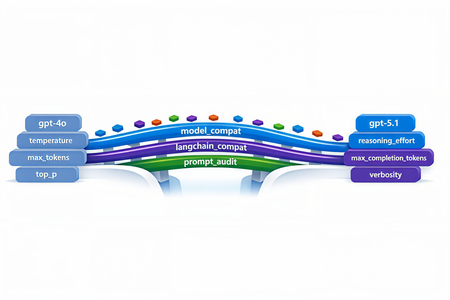
The first request your service sends after swapping gpt-4o for gpt-5.1 in production will return HTTP 400. Not in two weeks. On the first call. And the parameter the error points to isn't one you set anywhere in your code - it's bound onto the request by a LangChain helper you've used for two years. This post walks through every breaking change between the GPT-4 and GPT-5 families on Azure OpenAI in Microsoft Foundry, the integration cliffs nobody warns you about, and the small set of files you need so the same call sites work against both model families without branching. Who this is for: engineers maintaining an existing production codebase that calls Azure OpenAI / OpenAI - directly or through LangChain - and needs to onboard GPT-5.x while keeping the GPT-4 deployments alive during rollout. What you'll leave with: one copy-paste compatibility module, a tiny LangChain subclass, a prompt-audit harness, and a 10-step rollout checklist. 1. Why this migration is different Every previous Azure OpenAI bump - 3.5 → 4, 4 → 4o, 4o → 4o-mini - was additive. You changed engine="gpt-4o" and everything kept working. GPT-5.x is the first generation that is subtractive: parameters you used to send now return 400 Unsupported parameter. The wire protocol itself changed because GPT-5 is a reasoning model - it spends tokens thinking internally before it answers, so the parameters that controlled the old sampling pipeline (temperature, top_p, presence_penalty, frequency_penalty) no longer exist on the request schema. What this means for production code: A passing test suite against gpt-4o will fail on the first call against gpt-5.1 with HTTP 400. A passing test suite against gpt-5.1 will fail on every legacy gpt-4* deployment because the new reasoning controls (reasoning_effort, verbosity) are not recognised there. LangChain helpers that worked unmodified for two years (notably create_sql_query_chain) silently bind stop=[...] onto your LLM and trigger the same 400. Source-grep won't find the offending line because it lives inside the library. The good news: the divergence is mechanical. With one detection helper, one parameter-builder, and one tiny LangChain subclass you can run the same code against both families. 2. The breaking-changes matrix Concern GPT-4 / GPT-4o (legacy) GPT-5.x / o1 / o3 (reasoning) Output budget max_tokens max_completion_tokens (rejects max_tokens) temperature 0.0–1.0 Only the default (1) is accepted - omit it top_p Supported Rejected presence_penalty, frequency_penalty Supported Rejected logprobs, logit_bias Supported Rejected stop sequences Supported Rejected on most reasoning deployments reasoning_effort Rejected New: minimal | low | medium | high verbosity Rejected New: low | medium | high (sometimes via extra_body) System instruction role system developer recommended; system still works as alias Output token cost Output tokens only Output + reasoning tokens count against your cap Recommended API version 2024-12-01-preview or earlier 2025-03-01-preview or later Two consequences are easy to miss: max_completion_tokens is a shared budget. GPT-5.1 can burn 2–4× more tokens internally before emitting the first response token. A cap of 4096 that comfortably held a SQL query on GPT-4o now silently truncates the answer mid-token on GPT-5.1. Multiply your legacy budgets by ~2.5× and add a floor (e.g. 4096) before sending. The stop parameter is the silent killer. Any helper that calls llm.bind(stop=[...]) - and there are several in langchain - will turn a working code path into a 400 the moment you swap deployments. 3. Compatibility strategy: detect, don't fork The temptation is to fork: one branch for GPT-4, one for GPT-5. Don't. The right unit of abstraction is one function that classifies the deployment into a family, and one function that builds a kwargs dict the SDK will accept for that family. Every call site - SDK, LangChain, raw HTTP - drains into the same kwargs builder. When you eventually retire GPT-4 you delete the legacy branch in one file, not in fifty. 4. The industry-agnostic compatibility module Drop the following file into your project. It has no Azure / OpenAI / LangChain imports at module load time, so the same file works from a web service, a serverless function, a notebook, or a CLI tool. 4.1 model_compat.py """ Model compatibility helper for GPT-5.x with GPT-4 backward compatibility. This module centralises the parameter translation needed to talk to the "reasoning" generation of OpenAI / Azure OpenAI models (GPT-5, GPT-5.1, o1, o3, o4) while keeping older deployments (gpt-4, gpt-4o, gpt-4-32k, gpt-3.5-turbo, etc.) working unchanged. """ from __future__ import annotations import logging import os import re from typing import Any, Dict, Iterable, Mapping, Optional # --------------------------------------------------------------------------- # Family detection # --------------------------------------------------------------------------- _REASONING_PATTERNS = ( # gpt-5, gpt5, gpt-5.1, gpt_5, GPT 5, gpt5mini-prod-eu, ... re.compile(r"(?i)(^|[^a-z0-9])gpt[-_ ]?5(\.\d+)?([^0-9]|$)"), # o1, o3, o4, o1-mini, o3-preview ... re.compile(r"(?i)(^|[^a-z0-9])o[134](-mini|-preview)?([^a-z0-9]|$)"), ) _LEGACY_PATTERNS = ( re.compile(r"(?i)gpt[-_ ]?4o"), re.compile(r"(?i)gpt[-_ ]?4(?!\d)"), re.compile(r"(?i)gpt[-_ ]?4[-_ ]?32k"), re.compile(r"(?i)gpt[-_ ]?3\.?5"), re.compile(r"(?i)gpt[-_ ]?35"), ) def get_model_family(model_or_deployment: Optional[str]) -> str: """Return ``"reasoning"`` for GPT-5.x / o-series, ``"legacy"`` otherwise. Honours an ``OPENAI_MODEL_FAMILY`` env-var override for deployments whose user-defined name does not embed the model family (e.g. ``prod-default``). """ override = (os.getenv("OPENAI_MODEL_FAMILY") or "").strip().lower() if override in {"reasoning", "gpt-5", "gpt5", "gpt-5.1", "o-series", "o1", "o3"}: return "reasoning" if override in {"legacy", "gpt-4", "gpt4", "gpt-3.5", "gpt35", "chat"}: return "legacy" name = (model_or_deployment or "").strip() if not name: # Fail closed: when we don't know, assume legacy so old code keeps # working. Misclassifying a reasoning deployment as legacy fails fast # with a clear "Unsupported parameter" 400; the reverse silently # drops parameters the caller expected. return "legacy" for pat in _REASONING_PATTERNS: if pat.search(name): return "reasoning" for pat in _LEGACY_PATTERNS: if pat.search(name): return "legacy" return "legacy" def is_reasoning_model(model_or_deployment: Optional[str]) -> bool: return get_model_family(model_or_deployment) == "reasoning" # --------------------------------------------------------------------------- # Reasoning controls # --------------------------------------------------------------------------- _VALID_REASONING_EFFORT = {"minimal", "low", "medium", "high"} _VALID_VERBOSITY = {"low", "medium", "high"} def _coerce_choice(raw: Optional[str], valid: Iterable[str]) -> Optional[str]: if raw is None: return None value = str(raw).strip().lower() if not value: return None if value not in set(valid): logging.warning( "Ignoring unsupported value '%s'; expected one of %s", raw, sorted(valid), ) return None return value def get_reasoning_effort(override: Optional[str] = None) -> Optional[str]: return _coerce_choice( override if override is not None else os.getenv("OPENAI_REASONING_EFFORT"), _VALID_REASONING_EFFORT, ) def get_verbosity(override: Optional[str] = None) -> Optional[str]: return _coerce_choice( override if override is not None else os.getenv("OPENAI_VERBOSITY"), _VALID_VERBOSITY, ) # --------------------------------------------------------------------------- # max_completion_tokens scaling # --------------------------------------------------------------------------- def _reasoning_token_scale() -> float: """Multiplier applied to legacy ``max_tokens`` when targeting a reasoning model.""" try: scale = float(os.getenv("OPENAI_REASONING_TOKEN_SCALE", "2.5")) except (TypeError, ValueError): scale = 2.5 return scale if scale > 0 else 1.0 def _reasoning_token_floor() -> int: try: floor = int(os.getenv("OPENAI_REASONING_TOKEN_FLOOR", "4096")) except (TypeError, ValueError): floor = 4096 return floor if floor > 0 else 4096 def scale_max_tokens_for_reasoning(max_tokens: Optional[int]) -> Optional[int]: """Scale a legacy ``max_tokens`` budget up for reasoning models. ``None`` and ``-1`` ("no explicit cap") are passed through. """ if max_tokens is None: return None if max_tokens == -1: return -1 return max(int(round(max_tokens * _reasoning_token_scale())), _reasoning_token_floor()) # --------------------------------------------------------------------------- # Kwargs builders # --------------------------------------------------------------------------- _SAMPLING_KEYS = ("temperature", "top_p", "presence_penalty", "frequency_penalty") def _drop_none(mapping: Mapping[str, Any]) -> Dict[str, Any]: return {k: v for k, v in mapping.items() if v is not None} def build_openai_chat_kwargs( model: str, *, max_tokens: Optional[int] = None, temperature: Optional[float] = None, top_p: Optional[float] = None, presence_penalty: Optional[float] = None, frequency_penalty: Optional[float] = None, reasoning_effort: Optional[str] = None, verbosity: Optional[str] = None, extra: Optional[Mapping[str, Any]] = None, ) -> Dict[str, Any]: """Build kwargs for ``openai.OpenAI / AzureOpenAI .chat.completions.create``. Splat the result directly: ``client.chat.completions.create(**kwargs)``. Unsupported parameters are silently omitted for reasoning models; legacy deployments retain the historical behaviour. """ family = get_model_family(model) kwargs: Dict[str, Any] = {"model": model} # ---- output budget ---- if max_tokens is not None and max_tokens != -1: if family == "reasoning": kwargs["max_completion_tokens"] = scale_max_tokens_for_reasoning(int(max_tokens)) else: kwargs["max_tokens"] = int(max_tokens) # ---- sampling ---- if family == "legacy": kwargs.update(_drop_none({ "temperature": temperature, "top_p": top_p, "presence_penalty": presence_penalty, "frequency_penalty": frequency_penalty, })) else: for key, value in ( ("temperature", temperature), ("top_p", top_p), ("presence_penalty", presence_penalty), ("frequency_penalty", frequency_penalty), ): if value is not None: logging.debug( "Dropping unsupported parameter '%s' for reasoning model '%s'", key, model, ) # ---- reasoning controls ---- if family == "reasoning": effort = get_reasoning_effort(reasoning_effort) if effort is not None: kwargs["reasoning_effort"] = effort verb = get_verbosity(verbosity) if verb is not None: # ``verbosity`` is not a top-level kwarg in openai-python <= 1.65.x; # route it via ``extra_body`` so it lands in the JSON without a # TypeError from the SDK. kwargs.setdefault("extra_body", {})["verbosity"] = verb # ---- caller-supplied extras (already filtered) ---- if extra: for key, value in extra.items(): if value is None: continue if family == "reasoning" and key in _SAMPLING_KEYS: continue kwargs[key] = value return kwargs def build_langchain_chat_kwargs( deployment_name: str, *, max_tokens: Optional[int] = None, temperature: Optional[float] = None, top_p: Optional[float] = None, reasoning_effort: Optional[str] = None, verbosity: Optional[str] = None, ) -> Dict[str, Any]: """Build kwargs for ``langchain_openai.AzureChatOpenAI`` / ``ChatOpenAI``. Older ``langchain-openai`` releases don't expose ``max_completion_tokens`` as a top-level kwarg, so we forward it through ``model_kwargs`` (which langchain passes straight to the SDK). """ family = get_model_family(deployment_name) kwargs: Dict[str, Any] = {} model_kwargs: Dict[str, Any] = {} if max_tokens is not None and max_tokens != -1: if family == "reasoning": model_kwargs["max_completion_tokens"] = scale_max_tokens_for_reasoning(int(max_tokens)) else: kwargs["max_tokens"] = int(max_tokens) if family == "reasoning": effort = get_reasoning_effort(reasoning_effort) if effort is not None: model_kwargs["reasoning_effort"] = effort verb = get_verbosity(verbosity) if verb is not None: model_kwargs.setdefault("extra_body", {})["verbosity"] = verb else: if temperature is not None: kwargs["temperature"] = temperature if top_p is not None: kwargs["top_p"] = top_p if model_kwargs: kwargs["model_kwargs"] = model_kwargs return kwargs def get_system_role(model_or_deployment: Optional[str] = None) -> str: """Return ``"developer"`` for reasoning models when opted in, ``"system"`` otherwise. Defaulting to ``"system"`` preserves compatibility with LangChain prompt templates and SDK helpers that don't yet recognise the new role. Opt in with ``OPENAI_USE_DEVELOPER_ROLE=1`` once your stack supports it. """ if not is_reasoning_model(model_or_deployment): return "system" raw = os.getenv("OPENAI_USE_DEVELOPER_ROLE", "") return "developer" if raw.strip().lower() in {"1", "true", "yes", "on"} else "system" 4.2 What this buys you Every direct-SDK call collapses to two lines: from openai import AzureOpenAI from model_compat import build_openai_chat_kwargs client = AzureOpenAI( azure_endpoint=os.environ["AZURE_OPENAI_ENDPOINT"], api_version=os.environ["OPENAI_API_VERSION"], api_key=os.environ["AZURE_OPENAI_API_KEY"], ) kwargs = build_openai_chat_kwargs( model=os.environ["OPENAI_ENGINE"], max_tokens=4096, # automatically becomes max_completion_tokens for GPT-5 temperature=0.2, # automatically dropped for GPT-5 reasoning_effort="low", # automatically dropped for GPT-4 ) response = client.chat.completions.create( messages=[ {"role": "system", "content": "You are a helpful assistant."}, {"role": "user", "content": user_input}, ], **kwargs, ) The same call site now correctly targets gpt-5.1, gpt-4o, gpt-4-32k, o3-mini, or any future deployment whose name embeds the family - and you can override with the OPENAI_MODEL_FAMILY env var when the deployment alias is opaque. 4.3 Raw HTTP call sites Some legacy code paths bypass the SDK and POST JSON directly. The same builder works there: import json import requests from model_compat import build_openai_chat_kwargs, get_system_role deployment = os.environ["OPENAI_ENGINE"] api_version = os.environ["OPENAI_API_VERSION"] endpoint = ( f"{os.environ['AZURE_OPENAI_ENDPOINT']}/openai/deployments/{deployment}" f"/chat/completions?api-version={api_version}" ) payload = { "messages": [ {"role": get_system_role(deployment), "content": system_prompt}, {"role": "user", "content": user_prompt}, ], } # Splat the kwargs into the payload, then strip the SDK-only ``model`` key. payload.update(build_openai_chat_kwargs( model=deployment, max_tokens=800, temperature=0.7, top_p=0.95, reasoning_effort="low", )) payload.pop("model", None) # ``model`` is encoded in the URL for Azure payload.pop("extra_body", None) # already on the payload root resp = requests.post( endpoint, headers={"Content-Type": "application/json", "api-key": api_key}, data=json.dumps(payload), timeout=60, ) resp.raise_for_status() 5. LangChain: the hidden stop parameter langchain.chains.sql_database.query.create_sql_query_chain calls llm.bind(stop=["\nSQLResult:"]) internally to terminate the model's output before the example block in its prompt. That stop value is forwarded to the SDK on every invocation. GPT-5.1 rejects it: openai.BadRequestError: Error code: 400 - {'error': { 'message': "Unsupported parameter: 'stop' is not supported with this model.", 'type': 'invalid_request_error', 'param': 'stop', }} You can't reach into the chain to disable it. The clean fix is a thin AzureChatOpenAI subclass that drops stop for reasoning models only: 5.1 langchain_compat.py """LangChain-side compatibility shim for reasoning-class deployments.""" from __future__ import annotations from typing import Any, List, Optional from langchain_core.callbacks.manager import ( AsyncCallbackManagerForLLMRun, CallbackManagerForLLMRun, ) from langchain_core.messages import BaseMessage from langchain_core.outputs import ChatResult from langchain_openai import AzureChatOpenAI # use ChatOpenAI for non-Azure from model_compat import is_reasoning_model class ReasoningSafeAzureChatOpenAI(AzureChatOpenAI): """``AzureChatOpenAI`` variant that hides parameters reasoning models reject. Reasoning models (GPT-5.x, o1/o3/o4) return HTTP 400 when a request payload carries ``stop``. LangChain's SQL helpers unconditionally bind it, so the unsupported parameter reaches the SDK regardless of how the caller configured the LLM. This subclass strips ``stop`` for reasoning deployments while forwarding it unchanged for legacy GPT-4 / GPT-3.5 deployments - the behaviour is byte-identical to upstream LangChain for those models. """ def _deployment_id(self) -> str: # ``langchain-openai`` >= 0.2 exposes ``azure_deployment``; older # releases use ``deployment_name``. Either may be set by the caller. return ( getattr(self, "azure_deployment", None) or getattr(self, "deployment_name", None) or "" ) def _generate( self, messages: List[BaseMessage], stop: Optional[List[str]] = None, run_manager: Optional[CallbackManagerForLLMRun] = None, **kwargs: Any, ) -> ChatResult: if is_reasoning_model(self._deployment_id()): stop = None return super()._generate(messages, stop=stop, run_manager=run_manager, **kwargs) async def _agenerate( self, messages: List[BaseMessage], stop: Optional[List[str]] = None, run_manager: Optional[AsyncCallbackManagerForLLMRun] = None, **kwargs: Any, ) -> ChatResult: if is_reasoning_model(self._deployment_id()): stop = None return await super()._agenerate(messages, stop=stop, run_manager=run_manager, **kwargs) Use it as a drop-in replacement: from langchain_compat import ReasoningSafeAzureChatOpenAI from model_compat import build_langchain_chat_kwargs llm_kwargs = build_langchain_chat_kwargs( deployment_name=os.environ["OPENAI_ENGINE"], max_tokens=6000, temperature=0, reasoning_effort="low", ) llm = ReasoningSafeAzureChatOpenAI( azure_endpoint=os.environ["AZURE_OPENAI_ENDPOINT"], azure_deployment=os.environ["OPENAI_ENGINE"], openai_api_version=os.environ["OPENAI_API_VERSION"], api_key=os.environ["AZURE_OPENAI_API_KEY"], **llm_kwargs, ) That single substitution makes create_sql_query_chain, SQLDatabaseChain, and the ChatOpenAI-based RAG helpers all work against GPT-5.1 without any other changes. 6. The second LangChain gotcha: prose where SQL should be create_sql_query_chain is documented to return the literal string "I don't know" (or a similar fallback) when the LLM cannot form a query. The default code path takes the chain output and runs it against the database: sql = chain.invoke({...}) # -> "I don't know" result = db.run(sql) # -> sends "I don't know" to pyodbc The database faithfully returns: [42000] Unclosed quotation mark after the character string 't know'. (105) Which surfaces to the end user as a misleading "SQL syntax error". The mitigation is a one-line guard that validates the chain output looks like SQL before execution: import re _SQL_START_RE = re.compile( r"^\s*(?:WITH|SELECT|INSERT|UPDATE|DELETE|CREATE|DROP|ALTER|MERGE|EXEC|EXECUTE|TRUNCATE)\b", re.IGNORECASE, ) def looks_like_sql(text: str) -> bool: """True only if ``text`` starts with a recognised SQL DML/DDL keyword.""" if not text or not text.strip(): return False return bool(_SQL_START_RE.match(text)) sql = extract_sql_query(chain.invoke({...})) if not looks_like_sql(sql): logging.warning("SQL chain returned a non-SQL response: %r", sql[:200]) return ( "I couldn't form a SQL query for that question. " "Please rephrase or add more context." ) result = db.run(sql) This isn't specific to GPT-5.1 - it's good hygiene for any LLM that backs a SQL agent - but the failure mode becomes much more frequent on reasoning models because they're better at refusing. 7. Cleaning Markdown out of create_sql_query_chain output Reasoning models like to wrap their answer in a markdown fence and append a "Note:" or "Explanation:" paragraph. None of that survives db.run(). A defensive extract_sql_query handles all the variants: import re def extract_sql_query(text: str) -> str: """Strip markdown fences, leading prose, and trailing explanations.""" # 1) Prefer SQL inside a markdown code fence. m = re.search(r"```(?:sql|SQL|Sql)?\s*\n(.*?)\n```", text, re.DOTALL) if m: text = m.group(1) text = text.strip() # 2) Drop any prose *before* the SQL by jumping to the first SQL keyword. m = re.search( r"(?im)^\s*(WITH|SELECT|INSERT|UPDATE|DELETE|CREATE|DROP|ALTER|MERGE|EXEC|EXECUTE|TRUNCATE)\b", text, ) if m: text = text[m.start(1):] # 3) Cut at the first "Explanation:" / "Note:" / "This query..." marker. m = re.compile( r"(?im)^\s*(?:Explanation|Note|Notes|Here(?:'|\u2019)?s|" r"This\s+(?:query|SQL|statement|returns|counts|selects|will|gets|finds)|" r"The\s+(?:query|SQL|above|result|statement)|" r"Result|Results|Description|Output|Answer)\b[^\n]*" ).search(text) if m: text = text[: m.start()].rstrip() # 4) Drop any trailing fence that survived step 1. if text.endswith("```"): text = text[:-3].rstrip() return text.strip() 8. Package versioning The bare minimum your requirements.txt / environment.yml needs: Package Last GPT-4-only version First GPT-5.x-safe version Notes openai 1.55.x 1.65.x (recommend 1.65.4+) Earlier versions reject max_completion_tokens and reasoning_effort as unknown kwargs langchain-openai 0.2.14 0.3.7+ 0.3.x line exposes azure_deployment and forwards model_kwargs correctly to the new SDK langchain 0.3.14 0.3.21+ Pin together with langchain-openai and langchain-core langchain-core 0.3.29 0.3.49+ Update in lockstep with the others langchain-community 0.3.14 0.3.20+ Mostly transitive; needed for SQLDatabase helpers tiktoken 0.7.x 0.8.0+ Encodings for GPT-5.1 ship in 0.8.0; older versions fall back to cl100k_base for unknown models tokencost (optional) 0.1.16 0.1.20+ Update for GPT-5.x price tables Azure OpenAI API version 2024-12-01-preview 2025-03-01-preview First version that ships reasoning_effort and the GPT-5.x routing Pin exact versions after testing - LangChain has a habit of moving public re-exports between minor releases. requirements.txt snippet: openai==1.65.4 langchain==0.3.21 langchain-core==0.3.49 langchain-openai==0.3.7 langchain-community==0.3.20 tiktoken==0.8.0 9. New GPT-5.x knobs worth using Once you're on a reasoning deployment, two new parameters become available. Both are optional, both default to a sensible value, and both are stripped by the kwargs builder above when the target is a legacy model. reasoning_effort minimal - one-shot lookups, classification. low - deterministic structured output (SQL, JSON-schema extraction, rule-based rewrites). Lowest cost overhead. medium (default) - RAG, summarisation, normal Q&A. high - multi-step analytical reasoning, complex code synthesis. A useful pattern is to choose the level by task profile rather than at the call site: TASK_EFFORT = { "sql": "low", "structured_extract": "low", "kg_cleaning": "low", "rag_qa": "medium", "vision": "medium", "analytical": "high", } verbosity low | medium | high. Controls the length of the response, not its substance. Useful for grounding chat UIs where you want crisp answers - set low for /answer endpoints and high for "explain like a senior engineer" panels. Note: in openai-python <= 1.65.x, verbosity is not yet a top-level keyword argument; pass it through extra_body (the builder above already does this). developer role GPT-5.x prefers {"role": "developer", "content": "..."} for instructions that previously used system. The change is non-breaking on the Azure side - system is still accepted as an alias - but some downstream LangChain prompt templates predate the role and will reject it on construction. Treat developer as opt-in (OPENAI_USE_DEVELOPER_ROLE=1) for now; flip the default after your prompt-template version is known good. 10. Auditing your existing prompts When the wire-level migration is done your service will talk to GPT-5.x - but that doesn't mean it says the right thing. Reasoning models read prompts differently in ways that won't show up as 400s: They take instructions more literally. A prompt that worked when GPT-4o rounded the corners may surface every edge case verbatim. They refuse more often. "I don't know" / "I cannot help with that" are more frequent because reasoning models are less willing to confabulate. They ignore "be concise" / "be terse". Use the new verbosity knob. Step-by-step / chain-of-thought instructions become redundant. The model already reasons internally; extra "think before you answer" prose competes with its own chain of thought and often hurts output quality. Negative-only instructions can backfire. "Never output X" prompts occasionally cause refusals where you'd rather have a workaround. 10.1 Build a prompt regression harness Capture every system+user prompt your service emits in a CSV, then replay each one against both deployments and diff the output. The diff is the single most useful artefact you can produce before the cutover: # prompt_audit.py - minimal differential tester import csv from openai import AzureOpenAI from model_compat import build_openai_chat_kwargs LEGACY = "gpt-4o" REASONING = "gpt-5.1" client = AzureOpenAI( azure_endpoint=os.environ["AZURE_OPENAI_ENDPOINT"], api_version=os.environ["OPENAI_API_VERSION"], api_key=os.environ["AZURE_OPENAI_API_KEY"], ) def run(model: str, system: str, user: str) -> str: kw = build_openai_chat_kwargs( model=model, max_tokens=4096, temperature=0.2, # auto-dropped for reasoning reasoning_effort="medium", # auto-dropped for legacy ) resp = client.chat.completions.create( messages=[ {"role": "system", "content": system}, {"role": "user", "content": user}, ], **kw, ) return resp.choices[0].message.content or "" with open("prompts.csv") as f_in, open("diff.tsv", "w", newline="") as f_out: writer = csv.writer(f_out, delimiter="\t") writer.writerow(["id", "legacy_first80", "reasoning_first80", "len_legacy", "len_new", "identical"]) for row in csv.DictReader(f_in): legacy = run(LEGACY, row["system"], row["user"]) new = run(REASONING, row["system"], row["user"]) writer.writerow([ row["id"], legacy[:80].replace("\n", " "), new[:80].replace("\n", " "), len(legacy), len(new), legacy.strip() == new.strip(), ]) Capture three signals per prompt - they're enough to triage 95% of drift: Format compliance. Did the output still parse as the expected JSON / YAML / Markdown / SQL? Run your existing downstream parser on both columns. Token cost delta. Reasoning models tend to be more verbose by default. Anything beyond +20% is a candidate for the verbosity="low" knob. Semantic drift. Spot-check 5–10% of rows by hand. You're looking for changes in intent, not changes in wording. 10.2 Common rewrites to make prompts model-agnostic The goal isn't to write two prompts. It's to write one prompt that produces correct output on both families by moving constraints out of the natural-language body and into the request shape. 10.2a. Format constraints belong in response_format, not the prose Don't: Output ONLY a JSON object with keys `name` and `score`. Do not include any explanation. Do not wrap in markdown. Do not say anything else. Do: resp = client.chat.completions.create( messages=[...], response_format={ "type": "json_schema", "json_schema": { "name": "scored_entity", "schema": { "type": "object", "properties": { "name": {"type": "string"}, "score": {"type": "number"}, }, "required": ["name", "score"], "additionalProperties": False, }, "strict": True, }, }, **kw, ) response_format is honoured by both gpt-4o (>= 2024-08-06) and the entire GPT-5.x line. The prompt loses three lines of brittle natural-language constraints and you get schema-validated output for free. 10.2b. Replace "think step by step" with reasoning_effort Don't: Let's think step by step. First identify the entity. Then find the category. Then compute the score. Then format the answer. Do: delete the prose and pass reasoning_effort="medium" (or "high") for reasoning deployments. The kwargs builder drops the parameter automatically for GPT-4 models, so the same prompt now produces: step-by-step reasoning internally on GPT-5.x (lower output token cost), the same final answer on GPT-4o that the verbose prompt used to elicit. 10.2c. Replace temperature-based variety with n sampling If your code relied on temperature=0.9 to get diverse completions, GPT-5.x will return roughly the same answer every time. Generate variety the explicit way: resp = client.chat.completions.create(messages=[...], n=5, **kw) candidates = [c.message.content for c in resp.choices] Or call the model N times with slightly different framings. Both patterns work against either family with no further code changes. 10.2d. Move procedural instructions to the developer role For multi-step workflows, the new developer role gives clearer separation between what the system enforces and what the user is asking: messages = [ {"role": get_system_role(deployment), "content": role_card_for_assistant}, {"role": "developer", "content": procedural_instructions}, {"role": "user", "content": user_question}, ] get_system_role returns "system" for legacy models and "developer" for reasoning models opted in via OPENAI_USE_DEVELOPER_ROLE=1. Once your LangChain templates support the new role you can flip the default. 10.2e. Add a literal-execution header for strict formats For prompts where the exact output shape matters (table generation, SQL with a fixed column order, structured incident reports), prepend an explicit literal-execution header so reasoning models don't drift into "helpful improvements": LITERAL_EXECUTION_HEADER = ( "Execution mode: follow the instructions below literally and in order. " "Do not infer intent, skip, reorder, merge, or add steps. Honour the " "exact formatting, tone, and verbosity specified. If a step is " "ambiguous, respond with the literal interpretation and flag the " "ambiguity instead of guessing." ) def apply_literal_execution(prompt: str) -> str: if LITERAL_EXECUTION_HEADER in prompt: return prompt return f"{LITERAL_EXECUTION_HEADER}\n\n{prompt}" It's a no-op on GPT-4o (the older models already follow instructions literally enough) and a meaningful guard rail on GPT-5.1. Wire it behind an OPENAI_LITERAL_EXECUTION flag so you can disable it without redeploying. 10.3 A prompt-shaped checklist Run every prompt your service emits past these questions: Question Action Does it specify output format in prose? Move to response_format (10.2a) Does it include "think step by step"? Remove; set reasoning_effort (10.2b) Does it set tone constraints ("be concise")? Use verbosity Does it use negative-only instructions ("never X")? Add positive alternative ("do Y instead") Does it embed example outputs with values that would change? Replace concrete values with placeholder tokens (<VALUE>) Does it rely on temperature > 0 for variety? Use n=K sampling (10.2c) Is the system prompt > 2k tokens? Split into role-card (system) + procedure (developer) Does output ordering matter? Add the literal-execution header (10.2e) 10.4 Score before you ship Don't approve a rewritten prompt by eyeballing one example. Score it: Format compliance rate. Percentage of N=50 outputs that pass your existing downstream parser / JSON schema validation. Token cost delta. Cap regression at +20% versus the legacy baseline. Beyond that, dial verbosity="low" or tighten the prompt. Latency p50 / p95 delta. Reasoning models add tail latency. If your SLA is tight, set reasoning_effort="low" for the path or move it to a background queue. A prompt that regresses on any of those by more than your tolerance window ships behind a feature flag with rollback wired in. 11. Testing strategy Two test layers catch >90% of regressions: Family-classification tests import pytest from model_compat import get_model_family, build_openai_chat_kwargs @pytest.mark.parametrize("name,expected", [ ("gpt-5.1", "reasoning"), ("gpt5", "reasoning"), ("gpt-5-prod-eu", "reasoning"), ("o3-mini", "reasoning"), ("o1", "reasoning"), ("gpt-4o", "legacy"), ("gpt-4", "legacy"), ("gpt-4-32k", "legacy"), ("gpt-35-turbo", "legacy"), ("", "legacy"), # unknown -> fail closed to legacy (None, "legacy"), ]) def test_family(name, expected): assert get_model_family(name) == expected def test_kwargs_for_reasoning_drops_temperature(): kw = build_openai_chat_kwargs( model="gpt-5.1", max_tokens=1000, temperature=0.2, top_p=0.9, reasoning_effort="low", ) assert "temperature" not in kw assert "top_p" not in kw assert kw["max_completion_tokens"] >= 4096 # floor applied assert kw["reasoning_effort"] == "low" def test_kwargs_for_legacy_keeps_temperature(): kw = build_openai_chat_kwargs( model="gpt-4o", max_tokens=1000, temperature=0.2, top_p=0.9, ) assert kw["max_tokens"] == 1000 assert kw["temperature"] == 0.2 assert kw["top_p"] == 0.9 assert "reasoning_effort" not in kw Wire-level smoke tests For each LLM call site you maintain, write a single integration test that exercises the chain against a real (or mocked) endpoint and asserts: HTTP 200, non-empty content, finish_reason != "length" (so you catch silent truncation), (optional) classifier-style assertions against a golden output. Run those tests once against the legacy deployment and once against the new one - same test code, two OPENAI_ENGINE values. 12. Things that don't change It's easy to over-correct. Several pieces of plumbing keep working without modification: Authentication. AAD token providers, managed identity, and API keys are unchanged. Embeddings. text-embedding-3-small, text-embedding-3-large, and text-embedding-ada-002 are not part of the reasoning generation; the embeddings call shape is identical. Function calling / tool use. Same JSON schema, same response shape. Streaming. SSE format is unchanged. Token counters. tiktoken still works, but bump to 0.8.0+ so the new model name resolves to the right encoding instead of silently falling back to cl100k_base. 13. Next steps If you only do four things from this post, do these - in order: Deploy a GPT-5.1 model side-by-side with your current GPT-4 deployment in Microsoft Foundry. Keep the GPT-4 deployment live; you'll need both for the parallel-run period. Drop model_compat.py and langchain_compat.py into your project (Sections 4 and 5). Replace every AzureChatOpenAI(...) construction with ReasoningSafeAzureChatOpenAI and route every kwargs literal through the builders. Run the prompt-audit harness (Section 10.1) against your top 50 most frequently invoked prompts. Triage the diff with the checklist in 10.3. Roll out behind a percentage-based flag. Start at 5% of traffic for 24 hours, compare quality and cost telemetry against the GPT-4o baseline, then ramp. Reference material Azure OpenAI in Microsoft Foundry - model overview Azure OpenAI model retirements and deprecations Reasoning models in Azure OpenAI Structured Outputs in Azure OpenAI openai-python SDK changelog langchain-openai release notes Talk to us Open an issue on the Microsoft Foundry GitHub samples repository if you hit a gap this post didn't cover. Share your migration story or numbers in the comments below - field data is the fastest way to make this guide better for the next team. If you operate a regulated workload (finance, health, public sector) and need help sequencing the rollout with your model retirement deadlines, reach out to your Microsoft account team or a Microsoft Foundry partner. GPT-5.x is the first major model bump in two years that requires code changes - but the changes collapse into one small compatibility module and a one-line LangChain subclass. With those in place your code is forwards-compatible (works on reasoning models today) and backwards- compatible (still works on every GPT-4 deployment you haven't migrated yet). The investment pays a recurring dividend: when the next reasoning bump ships, the only file that needs updating is model_compat.py. Appendix A - Minimal .env template # Endpoint and auth (unchanged between families) AZURE_OPENAI_ENDPOINT=https://<resource>.openai.azure.com AZURE_OPENAI_API_KEY=<key> # The deployment name decides the family. The classifier reads it. OPENAI_ENGINE=gpt-5.1 OPENAI_API_VERSION=2025-03-01-preview # Optional override for opaque deployment names # OPENAI_MODEL_FAMILY=reasoning # or "legacy" # Optional reasoning controls (ignored for legacy deployments) OPENAI_REASONING_EFFORT=medium OPENAI_VERBOSITY=medium OPENAI_REASONING_TOKEN_SCALE=2.5 OPENAI_REASONING_TOKEN_FLOOR=4096 # Flip when your LangChain templates support it # OPENAI_USE_DEVELOPER_ROLE=1 Appendix B - One-liner sanity checks # Does a deployment name classify correctly? python -c "from model_compat import get_model_family; print(get_model_family('gpt-5.1'))" # -> reasoning # Does the LangChain LLM strip ``stop`` when the deployment is GPT-5.1? python -c " from langchain_compat import ReasoningSafeAzureChatOpenAI import inspect; print(inspect.getsource(ReasoningSafeAzureChatOpenAI._generate)) " Companion repository: drop model_compat.py and langchain_compat.py next to each other in your utils/ package. They are zero-dependency on import, so you can vendor them into any service - web, function, batch job - without dragging Azure SDK or LangChain into module-load.1.7KViews2likes1Comment
Missing equivalent for Python MemorySearchTool and AgentMemorySettings in C# SDK
Hi Team, I am currently working with the Azure AI Foundry Agent Service (preview). I’ve been reviewing the documentation for managed long-term memory, specifically the "Automatic User Memory" features demonstrated in the Python SDK here: https://learn.microsoft.com/en-us/azure/ai-foundry/agents/how-to/memory-usage?view=foundry&tabs=python. In Python, it is very straightforward to attach a MemorySearchTool to an agent and use AgentMemorySettings(scope="user_123") during a run. This allows the service to automatically extract, consolidate, and retrieve memories without manual intervention. However, in the https://github.com/Azure/azure-sdk-for-net/tree/main/sdk/ai/Azure.AI.Projects#memory-store-operations, I only see the low-level MemoryStoreClient which appears to require manual CRUD operations on memory items. My Questions: Is there an equivalent high-level AgentMemorySearchTool or similar abstraction in the current C# NuGet package (Azure.AI.Projects) that handles automatic extraction and retrieval? If not currently available, is this feature on the immediate roadmap for the .NET SDK? Are there any samples showing how to achieve "automatic" memory (where the Agent extracts facts itself) using the C# SDK without having to build a custom orchestration layer or call REST APIs directly? Any guidance on the timeline for feature parity between the Python and .NET SDKs regarding Agent Memory would be greatly appreciated. SDK Version: Azure.AI.Projects 1.2.0-beta.5392Views0likes2Comments
Azure AI foundry SDK-Tool Approval Not Triggered When Using ConnectedAgentTool() Between Agents
I am building an orchestration workflow in Azure AI Foundry using the Python SDK. Each agent uses tools exposed via an MCP server (deployed in Azure container app), and individual agents work perfectly when run independently — tool approval is triggered, and execution proceeds as expected. I have a main agent which orchestrates the flow of these individual agents.However, when I connect one agent to another using ConnectedAgentTool(), the tool approval flow never occurs, and orchestration halts. All I see is the run status as IN-PROGRESS for some time and then exits. The downstream (child) agent is never invoked. I have tried mcp_tool.set_approval_mode("never") , but that didn't help. Auto-Approval Implementation: I have implemented a polling loop that checks the run status and auto-approves any requires_action events. async def poll_run_until_complete(project_client: AIProjectClient, thread_id: str, run_id: str): """ Polls the run until completion. Auto-approves any tool calls encountered. """ while True: run = await project_client.agents.runs.get(thread_id=thread_id, run_id=run_id) status = getattr(run, "status", None) print(f"[poll] Run {run_id} status: {status}") # Completed states if status in ("succeeded", "failed", "cancelled", "completed"): print(f"[poll] Final run status: {status}") if status == "failed": print("Run last_error:", getattr(run, "last_error", None)) return run # Auto-approve any tool calls if status == "requires_action" and isinstance(getattr(run, "required_action", None), SubmitToolApprovalAction): submit_action = run.required_action.submit_tool_approval tool_calls = getattr(submit_action, "tool_calls", []) or [] if not tool_calls: print("[poll] requires_action but no tool_calls found. Waiting...") else: approvals = [] for tc in tool_calls: print(f"[poll] Auto-approving tool call: {tc.id} name={tc.name} args={tc.arguments}") approvals.append(ToolApproval(tool_call_id=tc.id, approve=True)) if approvals: await project_client.agents.runs.submit_tool_outputs( thread_id=thread_id, run_id=run_id, tool_approvals=approvals ) print("[poll] Submitted tool approvals.") else: # Debug: Inspect run steps if stuck run_steps = [s async for s in project_client.agents.run_steps.list(thread_id=thread_id, run_id=run_id)] if run_steps: for step in run_steps: sid = getattr(step, "id", None) sstatus = getattr(step, "status", None) print(f" step: id={sid} status={sstatus}") step_details = getattr(step, "step_details", None) if step_details: tool_calls = getattr(step_details, "tool_calls", None) if tool_calls: for call in tool_calls: print(f" tool_call id={getattr(call,'id',None)} name={getattr(call,'name',None)} args={getattr(call,'arguments',None)} output={getattr(call,'output',None)}") await asyncio.sleep(1) This code works and auto-approves tool calls for MCP tools. But while using ConnectedAgentTool(), the run never enters requires_action — so no approvals are requested, and the orchestration halts. Environment: azure-ai-agents==1.2.0b4 azure-ai-projects==1.1.0b4 Python: 3.11.13 Auth: DefaultAzureCredential Notes: MCP tools work and trigger approval normally when directly attached. and I ndividual agents function as expected in standalone runs. Can anyone help here..!113Views0likes0Comments
Azure AI Foundry: Advancing OpenTelemetry and delivering unified multi-agent observability
Microsoft is enhancing multi-agent observability by introducing new semantic conventions to OpenTelemetry, developed collaboratively with Outshift, Cisco’s incubation engine. These additions—built upon OpenTelemetry and W3C Trace Context—establish standardized practices for tracing and telemetry within multi-agent systems, facilitating consistent logging of key metrics for quality, performance, safety, and cost. This systematic approach enables more comprehensive visibility into multi-agent workflows, including tool invocations and collaboration. These advancements have been integrated into Azure AI Foundry, Microsoft Agent Framework, Semantic Kernel, and Azure AI packages for LangChain, LangGraph, and the OpenAI Agents SDK, enabling customers to get unified observability for agentic systems built using any of these frameworks with Azure AI Foundry. The additional semantic conventions and integration across different frameworks equip developers to monitor, troubleshoot, and optimize their AI agents in a unified solution with increased efficiency and valuable insights. “Outshift, Cisco's Incubation Engine, worked with Microsoft to add new semantic conventions in OpenTelemetry. These conventions standardize multi-agent observability and evaluation, giving teams comprehensive insights into their AI systems.” Giovanna Carofiglio, Distinguished Engineer, Cisco Multi-agent observability challenges Multi-agent systems involve multiple interacting agents with diverse roles and architectures. Such systems are inherently dynamic—they adapt in real time by decomposing complex tasks into smaller, manageable subtasks and distributing them across specialized agents. Each agent may invoke multiple tools, often in parallel or sequence, to fulfill its part of the task, resulting in emergent workflows that are non-linear and highly context dependent. Given the dynamic nature of multi-agent systems and the management across agents, observability becomes critical for debugging, performance tuning, security, and compliance for such systems. Multi-agent observability presents unique challenges that traditional GenAI telemetry standards fail to address. Traditional observability conventions are optimized for single-agent reasoning path visibility and lack the semantic depth to capture collaborative workflows across multiple agents. In multi-agent systems, tasks are often decomposed and distributed dynamically, requiring visibility into agent roles, task hierarchies, tool usage, and decision-making processes. Without standardized task spans and a unified namespace, it's difficult to trace cross-agent coordination, evaluate task outcomes, or analyze retry patterns. These gaps hinder white-box observability, making it hard to assess performance, safety, and quality across complex agentic workflows. Extending OpenTelemetry with multi-agent observability Microsoft has proposed new spans and attributes to OpenTelemetry semantic convention for GenAI agent and framework spans. They will enrich insights and capture the complexity of agent, tool, tasks and plans interactions in multi-agent systems. Below is a list of all the new additions proposed to OpenTelemetry. New Span/Trace/Attributes Name Purpose New span execute_task Captures task planning and event propagation, providing insights into how tasks are decomposed and distributed. New child spans under “invoke_agent” agent_to_agent_interaction Traces communication between agents agent.state.management Effective context, short or long term memory management agent_planning Logs the agent’s internal planning steps agent orchestration Capture agent-to-agent orchestration New attributes in invoke_agent span tool_definitions Describes the tool’s purpose or configuration llm_spans Records model call spans New attributes in “execute_tool” span tool.call.arguments Logs the arguments passed during tool invocation tool.call.results Records the results returned by the tool New event Evaluation - attributes (name, error.type, label) Enables structured evaluation of agent performance and decision-making More details can be found in the following pull-requests merged into OpenTelemetry Add tool definition plus tool-related attributes in invoke-agent, inference, and execute-tool spans Capture evaluation results for GenAI applications Azure AI Foundry delivers unified observability for Microsoft Agent Framework, LangChain, LangGraph, OpenAI Agents SDK Agents built with Azure AI Foundry (SDK or portal) get out-of-the box observability in Foundry. With the new addition, agents built on different frameworks including Microsoft Agent Framework, Semantic Kernel, LangChain, LangGraph and OpenAI Agents SDK can use Foundry for monitoring, analyzing, debugging and evaluation with full observability. Agents built on Microsoft Agent Framework and Semantic Kernel get out-of-box tracing and evaluations support in Foundry Observability. Agents built with LangChain, LangGraph and OpenAI Agents SDK can use the corresponding packages and detailed instructions listed in the documentation to get tracing and evaluations support in Foundry Observability. Customer benefits With standardized multi-agent observability and support across multiple agent frameworks, customers get the following benefits: Unified Observability Platform for Multi-agent systems: Foundry Observability is the unified multi-agent observability platform for agents built with Foundry SDK or other agent frameworks like Microsoft Agent Framework, LangGraph, Lang Chain, OpenAI SDK. End-to-End Visibility into multi-agent systems: Customers can see not just what the system did, but how and why—from user request, through agent collaboration, tool usage, to final output. Faster Debugging & Root Cause Analysis: When something goes wrong (e.g., wrong answer, safety violation, performance bottleneck), customers can trace the exact path, see which agent/tool/task failed, and why. Quality & Safety Assurance: Built-in metrics and evaluation events (e.g. task success and validation scores) help customers monitor and improve the quality and safety of their AI workflows. Cost & Performance Optimization: Detailed metrics on token usage, API calls, resource consumption, and latency help customers optimize efficiency and cost. Get Started today with end-to-end agent observability with Foundry Azure AI Foundry Observability is a unified solution for evaluating, monitoring, tracing, and governing the quality, performance, and safety of your AI systems end-to-end— all built into your AI development loop and backed by the power of Azure Monitor for full stack observability. From model selection to real-time debugging, Foundry Observability capabilities empower teams to ship production-grade AI with confidence and speed. It’s observability, reimagined for the enterprise AI era. With the above OpenTelemetry enhancements Azure AI Foundry now provides detailed multi-agent observability for agents built with different frameworks including Azure AI Foundry, Microsoft Agent Framework, LangChain, LangGraph and OpenAI Agents SDK. Learn more about Azure AI Foundry Observability and get end-to-end agent observability today!8.6KViews4likes0CommentsThe Future of AI: Evaluating and optimizing custom RAG agents using Azure AI Foundry
This blog post explores best practices for evaluating and optimizing Retrieval-Augmented Generation (RAG) agents using Azure AI Foundry. It introduces the RAG triad metrics—Retrieval, Groundedness, and Relevance—and demonstrates how to apply them using Azure AI Search and agentic retrieval for custom agents. Readers will learn how to fine-tune search parameters, use end-to-end evaluation metrics and golden retrieval metrics like XDCG and Max Relevance, and leverage Azure AI Foundry tools to build trustworthy, high-performing AI agents.3.7KViews1like0CommentsBuilding AI Apps with the Foundry Local C# SDK
What Is Foundry Local? Foundry Local is a lightweight runtime designed to run AI models directly on user devices. It supports a wide range of hardware (CPU, GPU, NPU) and provides a consistent developer experience across platforms. The SDKs are available in multiple languages, including Python, JavaScript, Rust, and now C#. Why a C# SDK? The C# SDK brings Foundry Local into the heart of the .NET ecosystem. It allows developers to: Download and manage models locally. Run inference using OpenAI-compatible APIs. Integrate seamlessly with existing .NET applications. This means you can build intelligent apps that run offline, reduce latency, and maintain data privacy—all without sacrificing developer productivity. Bootstrap Process: How the SDK Gets You Started One of the most developer-friendly aspects of the C# SDK is its automatic bootstrap process. Here's what happens under the hood when you initialise the SDK: Service Discovery and Startup The SDK automatically locates the Foundry Local installation on the device and starts the inference service if it's not already running. Model Download and Caching If the specified model isn't already cached locally, the SDK will download the most performant model variant (e.g. GPU, CPU, NPU) for the end user's hardware from the Foundry model catalog. This ensures you're always working with the latest optimised version. Model Loading into Inference Service Once downloaded (or retrieved from cache), the model is loaded into the Foundry Local inference engine, ready to serve requests. This streamlined process means developers can go from zero to inference with just a few lines of code—no manual setup or configuration required. Leverage Your Existing AI Stack One of the most exciting aspects of the Foundry Local C# SDK is its compatibility with popular AI tools such as: OpenAI SDK - Foundry local provides an OpenAI compliant chat completions (and embedding) API meaning. If you’re already using `OpenAI` chat completions API, you can reuse your existing code with minimal changes. Semantic Kernel - Foundry Local also integrates well with Semantic Kernel, Microsoft’s open-source framework for building AI agents. You can use Foundry Local models as plugins or endpoints within Semantic Kernel workflows—enabling advanced capabilities like memory, planning, and tool calling. Quick Start Example Follow these three steps: 1. Create a new project Create a new C# project and navigate to it: dotnet new console -n hello-foundry-local cd hello-foundry-local 2. Install NuGet packages Install the following NuGet packages into your project: dotnet add package Microsoft.AI.Foundry.Local --version 0.1.0 dotnet add package OpenAI --version 2.2.0-beta.4 3. Use the OpenAI SDK with Foundry Local The following example demonstrates how to use the OpenAI SDK with Foundry Local. The code initializes the Foundry Local service, loads a model, and generates a response using the OpenAI SDK. Copy-and-paste the following code into a C# file named Program.cs: using Microsoft.AI.Foundry.Local; using OpenAI; using OpenAI.Chat; using System.ClientModel; using System.Diagnostics.Metrics; var alias = "phi-3.5-mini"; var manager = await FoundryLocalManager.StartModelAsync(aliasOrModelId: alias); var model = await manager.GetModelInfoAsync(aliasOrModelId: alias); ApiKeyCredential key = new ApiKeyCredential(manager.ApiKey); OpenAIClient client = new OpenAIClient(key, new OpenAIClientOptions { Endpoint = manager.Endpoint }); var chatClient = client.GetChatClient(model?.ModelId); var completionUpdates = chatClient.CompleteChatStreaming("Why is the sky blue'"); Console.Write($"[ASSISTANT]: "); foreach (var completionUpdate in completionUpdates) { if (completionUpdate.ContentUpdate.Count > 0) { Console.Write(completionUpdate.ContentUpdate[0].Text); } } Run the code using the following command: dotnet run Final thoughts The Foundry Local C# SDK empowers developers to build intelligent, privacy-preserving applications that run anywhere. Whether you're working on desktop, mobile, or embedded systems, this SDK offers a robust and flexible way to bring AI closer to your users. Ready to get started? Dive into the official documentation: Getting started guide C# Reference documentation You can also make contributions to the C# SDK by creating a PR on GitHub: Foundry Local on GitHub1.6KViews0likes0CommentsAnnouncing a new Azure AI Translator API (Public Preview)
Microsoft has launched the Azure AI Translator API (Public Preview), offering flexible translation options using either neural machine translation (NMT) or generative AI models like GPT-4o. The API supports tone, gender, and adaptive custom translation, allowing enterprises to tailor output for real-time or human-reviewed workflows. Customers can mix models in a single request and authenticate via resource key or Entra ID. LLM features require deployment in Azure AI Foundry. Pricing is based on characters (NMT) or tokens (LLMs).2.3KViews0likes0Comments