scanner
2 Topics
Application filter in the activity explorer no longer populated correctly?
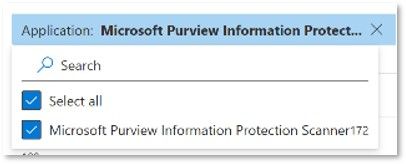
To distinguish between discovery findings in a setup that has both endpoint DLP and the Information Protection Scanner deployed, typically the "Application" filter in the activity explorer is used: It seems that recently the filter behavior changed and the list of applications the filter can use is built incorrectly. 'Microsoft Purview Information Protection Scanner' is no longer listed although documents with that property are present: The filter options are typically populated by the properties from documents within range and I have verified documents discovered by the MIP scanner exist: I am wondering if more people are seeing this and if a possible workaround is available.Solved324Views0likes2Comments
Lineage Limitation on Wide Power BI Semantic Models & Built-in Classification Rule Sets
Hello everyone, I’m evaluating the new Microsoft Purview Governance Portal for our finance data governance needs. Previously with the Azure Purview classic version we had a couple of blocking issues such as it failed to scan wide semantic models. But now we're migrating to Fabric and we'd like to try the new Microsoft Purview Governance Portal. I’d appreciate any insights or confirmation from the product team or the community. Lineage Limitation on Wide Power BI Semantic Models Background: When we first ran the Purview Data Map Scanner against our finance semantic model, it failed once the total column count across all tables exceeded roughly 500 columns. In our case, a single SAP table alone has about 450 columns—so the scan wouldn’t complete, and we couldn’t capture any lineage. Questions: Has Purview removed or raised any “hidden” column-count limits for Power BI semantic models? Is there any official documentation on maximum supported column counts (e.g. 200, 500, or otherwise)? Are there recommended workarounds for very wide models—such as splitting into sub-datasets, using incremental scans, etc. to get full lineage? 2. Built-in Classification Rule Sets Background: Purview ships with a set of Microsoft-provided “Sensitive Information Types” that appear in every scan rule set. In many of our scans these defaults aren’t needed, and they clutter the results. Questions: Can we delete or permanently disable the built-in classification rules? If not, what’s the best way to ensure they’re not applied during a full scan? Are there any APIs or PowerShell commands that let us automate the exclusion of Microsoft’s defaults from our scan rule sets? Thank you in advance for any pointers, documentation links, or best-practice advice!387Views0likes1Comment