sap on azure
63 TopicsSAP on Azure Product Announcements Summary – SAP TechEd 2026
Today at SAP TechEd, we announced a new wave of innovations deepening the Microsoft–SAP partnership – advancing RISE with SAP on Azure, our SAP S/4HANA integrations, and surrounded by our shared Data, AI and Security platform. AI: Bringing Intelligence into SAP-Connected Workflows Cemex built Consult HR with Microsoft Copilot Studio, connecting Teams, ServiceNow, and SAP SuccessFactors to give 800 employees 24/7 HR self-service. “Consult HR reflects how we are reimagining employee support at Cemex, making reliable HR information available when people need it and helping our teams focus on work with greater business impact.” — Alberto Luis de Armas, SVP of Human Resources, Cemex Rio Tinto connected Power BI, Power Apps, and Power Automate with SAP, reducing month-end close for its largest product group from three-to-four days to two. “Our ambition is not to automate for the sake of automation. It is to fundamentally simplify how we work, remove unnecessary effort, and give people more time to focus on where they can create the greatest value.” — Sharlene Cosgrave, Head of Group Services, Rio Tinto Data & AI: Turning the SAP Core into Enterprise Intelligence Al-Futtaim combines RISE with SAP S/4HANA on Azure, Azure Databricks, Microsoft Fabric, Microsoft 365 Copilot, and SAP Joule to turn SAP data into real-time insights and AI-assisted workflows. “Using data, AI, and automation, we’re redefining customer engagement and driving incremental value across our diverse portfolio. Whether it’s shopping for the latest fashion at Marks & Spencer, exploring new real estate opportunities, or booking a test-drive in a Volvo, we can engage them and guide them every step of the way” — Himanshu Shrivastava, Group CIO and CTO, Al-Futtaim Running SAP at Scale: Modernizing the Foundation SAP Commerce Cloud runs on Azure SQL Database Hyperscale, processing $17.8 billion in merchandise during its peak shopping day. This shows Microsoft cloud technology powering SAP’s own mission-critical commerce platform at global scale. “$17.8 billion worth of gross merchandise went through the system with 100% uptime. The peak number of orders was 648,000 orders per hour, which is almost 11,000 orders per minute.” — Conner Helton, Senior Manager of Product Management for Commerce Cloud, SAP We're pleased to share the product updates behind these outcomes: Expanding Microsoft’s end-to-end SAP security platform toward an integrated Security Operations Center (ISOC), unifying protection, threat signals, identity lifecycle, and access governance across SAP applications, through Microsoft Sentinel, Defender, and Entra ID Governance, including migration from SAP IDM Setup of Single Sign-On with Copilot Studio and Power Platform towards SAP is now simplified with additional authentication mechanism for the SAP OData Connector Aligned SAP reference architectures for an end-to-end Integration of Copilot (Studio) with SAP, specifically the MCP Gateway in SAP Integration Suite bringing SAP and Microsoft AI closer together Deployment Automation Framework now brings SAP deployment and validation together by integrating automated testing into deployment workflows, with expanded platform and high-availability support. SAP Testing Automation Framework has expanded automated quality assurance for SAP workloads with broader configuration checks, platform coverage, and AI-assisted testing and validation. Support for SAP HANA scale-out databases backup on Azure virtual machines in preview providing a unified backup chain across all nodes in the scale-out system, eliminating the need for node-level backup management. Enhanced Observability Dashboards, RAP assessments, customer-specific AIOps, and OpsIQ for SAP (Intelligent Agents), leveraging Azure expertise and AI-driven insights to strengthen architecture, deployment readiness, proactive optimization, and operational resilience. Let's dive into the summary of product updates and services. Extend and Innovate SAP Joule and Microsoft 365 Copilot Since general availability at the beginning of this year, we have seen tremendous interest from hundreds of customers in the integration between SAP Joule and Microsoft 365 Copilot. The out-of-the-box Joule agent lets customers ask SAP-related questions directly from Microsoft 365 Copilot. At the same time, employees working in Joule can use Copilot integration to get information directly from their Microsoft 365 tenant. We are now enhancing this integration by moving to Work IQ, Microsoft's workplace intelligence layer that connects Copilot and agents to an organization's knowledge, context, people, and work, with built-in, permission-aware governance, SAP with Microsoft: AI SAP Joule & Microsoft Copilot Integration . We also continue to address customer requests to make the integration more flexible. Many customers have already built agents in Microsoft Copilot Studio and Microsoft Foundry, as well as Cowork plugins. To enrich these existing agents with SAP data and processes, we are working closely with SAP on two complementary approaches. The SAP Agent Gateway integration, based on the Agent2Agent (A2A) protocol, is currently being tested with selected customers. The integration through the MCP Gateway in SAP Integration Suite is already live and documented (Copilot Studio with MCP Gateway in SAP Integration Suite). It lets customers connect their Microsoft 365 Copilot, Copilot Studio, or Microsoft Foundry agents through the Model Context Protocol (MCP), often reusing architectures they already run on SAP Business Technology Platform (BTP). In parallel, we see many customers extending their existing architectures with MCP themselves and using it to connect their Microsoft agents directly to SAP systems, for example through MCP servers built on SAP API Management, SAP Cloud Application Programming Model (CAP) services, or ABAP-based MCP servers. For more see About SAP with Microsoft AI. Power Platform & Copilot Studio – SAP OData While Microsoft Foundry and Microsoft 365 Copilot are top of mind for many customers, deterministic, app-based integration with SAP data remains highly relevant. We have updated the SAP OData connector to make integration from Power Platform and Copilot Studio simpler. The connector now supports OAuth 2.0 authentication, in preview. Users sign in interactively, and the connector passes the resulting token on to SAP. Sign-in can go through SAP Cloud Identity Services – Identity Authentication (SAP IAS), which can hand off to Microsoft Entra ID. This enables single sign-on without Azure API Management or a SAML token exchange policy. Set up OAuth 2.0 authentication for the SAP OData connector (preview) - Power Platform. SAP Models available on Microsoft Foundry Customers who want to use tabular foundation models from Prior Labs, an SAP company, can now access them directly from the Microsoft Foundry model catalog. TabPFN models are built for predictions on structured business data, such as classification, regression, and forecasting, without dataset-specific training. They sit right next to frontier models from OpenAI, Anthropic, and others, so customers can build agents that combine the right model for each task: language models for reasoning and conversation, and tabular foundation models for accurate predictions on business data. Integrated Security Operations Center and Microsoft Sentinel Solution for SAP Microsoft Sentinel for SAP continues to expand coverage of the SAP core, SAP BTP, SAP LogServ and the broader SAP ecosystem — giving SOC teams broader, deeper, and more contextualized SAP signal inside their existing Microsoft XDR workflows. SAP SuccessFactors solution release with pre-packaged detections rounding out the existing coverage for SAP S/4HANA in RISE, SAP BTP and SAP Ariba. Community version already out. SAP’s official connector follows later this year. Agentless Data Connector: pivots towards a push-only solution. Customers can now validate audit log retrieval before they onboard, and get more forgiving experience on slower ECC systems. SAP LogServ integration for RISE now includes SAP’s Firewall-as-a-Service activating Microsoft’s built-in detections. Orca security findings are the first onboarded source from SAP Project RAVEN. Through that inspect and correlate your RISE tenants cloud vulnerability findings with Sentinel for SAP and Defender signals. Read more here. SAP BTP solution adds integration for SAP’s first party cloud app code scanning solution Application Vulnerability Report service. Partner Solution update: With Security Bridge AI Companion integrated into Microsoft Security Copilot, analysts can pull SAP-specific threat intelligence and vulnerability context directly into their investigation. Comes in handy when the SAP basis team is off and burning SAP questions arise during blue team agent triage. The result: more out-of-the-box coverage, better re-use of existing Microsoft and partner detection investments, and richer correlation between SAP and the rest of the Microsoft Defender estate. SAP IDM replacement with Entra ID Governance Organizations moving on from SAP Identity Management (SAP IDM) can modernize identity lifecycle management and SAP access governance with Microsoft Entra ID Governance. The integration with SAP Identity Access Governance (SAP IAG) is now generally available. People can request SAP business roles through Microsoft Entra access packages, while SAP IAG applies its own approval and risk checks. The SAP Access Control (SAP AC) integration is in public preview, with general availability planned for the coming weeks. We’re also expanding provisioning options with SAP Cloud Identity Services. Recent improvements include more flexible provisioning patterns, custom extension attributes for SAP-specific data, and account discovery to find accounts that are not yet linked to Microsoft Entra users. OAuth 2.0 client credentials secure service-to-service communication. Together, these capabilities help connect lifecycle automation and access governance across SAP and non-SAP apps. Cenibra shows how customers can make this transition with the right partner. Working with TrustSis, one of our partners, Cenibra completed its migration from SAP IDM to Microsoft Entra ID Governance across more than 80 systems, including SAP. In its first wave, Cenibra reported a 46% operational gain, alongside less manual work and improved audit readiness. If you haven’t started your SAP IDM migration, work with one of our joint partners to plan your path forward. Start with the SAP IDM migration guidance, where you can also explore partners who can support you through this journey. API Management You can now convert your SAP OData into OpenAPI definitions on the fly to unlock the full Azure API platform for your SAP estate. SAP APIs exposed as MCP servers for agent consumption Protected by Microsoft Defender for APIs against API OWASP top 10 with continuous API security posture assessment Governed through the AI Gateway for token limits, semantic caching and model routing Built-in SAP principal propagation carries the caller's identity all the way into the SAP backend New SAP Certified Compute Thousands of organizations today trust the Azure M-Series virtual machines to run some of their largest mission-critical SAP workloads, including SAP HANA. Updates on Medium Memory Series We are excited to announce the public preview in Q3 2026 of Mv4 Medium Memory and Mbv4 Virtual Machines, based on the 6th generation Intel® Xeon® Scalable processors, scale for workloads up to 4TB. The Mv4 Medium Memory and Mbv4 Virtual Machines are built on the latest M-series platform to deliver enhanced performance, scalability, security, and efficiency for mission-critical workloads. Mv4 Medium Memory offers a balanced compute, memory, storage configuration optimized for demanding workloads such as in-memory SAP HANA, while Mbv4 delivers premium remote storage performance for data-intensive workloads. Both VM families are planned for SAP certification, expanding the M-series options available to SAP customers running mission-critical workloads on Azure. Blog details are available here: Public Preview of new Mv4 Medium Memory Virtual Machines and Public Preview of new Mbv4 Virtual Machines SAP on Azure Software Products and Services SAP Deployment Automation Framework SDAF and STAF now more tightly integrate deployment with validation. Quality assurance is built into deployment workflows, high-availability support for new providers extends to RHEL, and platform support includes SLES 16, NVMe-enabled VMs, and Azure Government. Both frameworks provide AI skills and plugins for guided deployment, validation, and operations across multiple AI clients and agent frameworks. Key highlights: SDAF integrates STAF into Azure DevOps and local workflows for configuration checks and functional testing. SDAF and STAF AI skills and plugins support deployment, validation, and troubleshooting across multiple AI clients and agent frameworks. Both frameworks extend SAPHanaSR-angi and simple-mount support to RHEL. Platform support now includes SLES 16, NVMe shared-disk SBD, and Azure Government. STAF Configuration Checks expand coverage for Oracle, HANA storage, Azure Shared Disk fencing, and Windows SAP systems, approaching parity with the legacy Quality Checks tool. SAP Deployment Automation Framework (SDAF) SDAF can now run STAF directly in deployment pipelines. Teams can select database HA, central services HA, or Azure Backup functional tests; filter by group or test case; and capture results in Azure DevOps or local workflows. GitHub Actions also supports Azure Government through cloud-specific OIDC settings, US Government regions, and Pacemaker fencing parameters. Infrastructure support has also been expanded. The SAP HANA ANGI resource is now available on SLES and RHEL, and RHEL-based SCS/ERS clusters support simple mount. SDAF adds support for SLES 16, iSCSI temporary disks, shared-disk SBD on NVMe-enabled VMs, and application-tier SAP home directories on Azure Files or Azure NetApp Files. Utility storage accounts can optionally use WORM retention and version-level immutability. An optional SDAF skills plugin provides guidance on deployment readiness, infrastructure stages, SAP installation, quality assurance, high availability, state management, and failure triage. It also includes routing evaluations and automated validation. SAP Testing Automation Framework (STAF) STAF expands validation checks across Oracle databases, HANA filesystems and storage, RHEL Mellanox kernel safeguards, Azure Shared Disk fencing, and Azure VM Extension for SAP provider health. It also supports Windows SAP validation through WinRM/CredSSP connectivity and Windows Server Failover Clustering (WSFC), while broader RHEL coverage includes SAPHanaSR-angi and simple-mount configurations for SCS/ERS. Azure Backup testing is also improved through enhanced backup-item discovery and restore selection for HSR and cross-VM scenarios. For more flexible execution, teams can use CLI flags to override runtime parameters without modifying vars.yaml, and a container image is available through GitHub Container Registry. STAF also provides AI-assisted testing and troubleshooting. Using natural-language prompts, teams can run tests, perform configuration checks, and troubleshoot execution issues. These skills are packaged for multiple AI clients and agent frameworks across Windows and Linux. Azure Backup for SAP We continue to expand Azure Backup support for SAP workloads. Building on the protection for SAP HANA and SAP ASE running on Azure VMs, we have added capabilities that strengthen SAP application data availability and resiliency. Azure Backup now provides broader native protection for complex SAP HANA deployments on Azure VMs. We now have in preview, snapshot-based backup supports HANA System Replication (HSR), delivering application-consistent protection for supported HSR configurations. Also in preview, Azure Backup now supports SAP HANA scale-out databases on Azure virtual machines. Azure Backup provides a unified backup chain across all nodes in the scale-out system, eliminating the need for node-level backup management. Frameworks and Tools Microsoft continues to advance SAP on Azure engineering through Tools and Frameworks Incubation initiatives, driving continuous observability, proactive optimization and AI-powered operations. Key innovations: Observability Dashboard: Continuous enhancements to the existing Azure Workbook-based dashboard, expanding observability, operational insights and AI readiness while enabling customers to tailor capabilities to their requirements and shape future features through feedback. RISE Acceleration Program (RAP): Enhanced Well-Architected Framework assessments strengthening architecture, security, resilience and go-live readiness. Customer-Specific AIOps: AI-assisted optimization of Premium SSD v2 and Azure NetApp Files, with evidence-based recommendations and human-approved execution. OpsIQ for SAP [Intelligent Agents for SAP]: Emerging capabilities for Bill of Materials (BOM) validation, Azure deployment reviews, landscape design and SAP EarlyWatch Alert (EWA) trend analysis. The vision is a connected SAP engineering lifecycle, from intelligent design and deployment assurance to continuous observability and governed AI-driven optimization. By combining deep SAP engineering expertise, Azure-native capabilities and responsible AI, Microsoft is helping customers build more resilient, efficient and future-ready SAP landscapes. To learn more, visit the Microsoft sessions at SAP TechEd 2026 and check out our SAP on Azure learning page.
Introducing the ABAP Cloud SDK for Azure: a native, secure path from SAP ABAP Cloud to Azure
Overview The ABAP Cloud SDK for Azure is now available as open source. It gives developers building on SAP Business AI Platform, ABAP environment and S/4HANA Cloud a first-class way to call Azure REST APIs — through a layered HTTP pipeline, pluggable Microsoft Entra ID credentials, typed exceptions, and strongly typed service clients — instead of hand-rolling if_web_http_client calls. SAP runs some of the largest enterprise workloads on Azure, and teams regularly ask for "better together" integrations — archiving documents to Storage, managing Compute, or querying their resource estate. Until now, doing this from ABAP Cloud (the restricted, released-API-only model behind SAP Business AI Platform, ABAP environment and S/4HANA Cloud) meant reinventing HTTP, authentication, and parsing in every program. This SDK closes that gap with a reusable, secure, and testable runtime, so developers can focus on their scenario instead of the plumbing. The first release ships three service clients — Azure Storage (Blob), Compute, and Resource Graph — backed by ABAP Unit tests, runnable demos, and full Microsoft open-source governance. Why it matters Accelerate SAP-on-Azure integration — give ABAP Cloud developers a native, low-friction way to call Azure REST APIs, cutting boilerplate and time to value. Bring Azure SDK patterns to ABAP — offer the same pipeline, credential, and typed-client model as the official Azure SDKs, so SAP teams feel at home quickly. Advance the Azure and SAP partnership — deepen Azure's value for the large SAP customer base and enable "better together" scenarios across storage, compute, and resource management. ABAP Cloud compliance — provide a released, cloud-ready SDK that complements the classic on-premises ABAP SDK for Azure for modern SAP Business AI Platform, ABAP environment and S/4HANA Cloud environments. Security-forward by default — encourage Microsoft Entra ID–based authentication, with a User Delegation SAS as the recommended path over account keys. Community-driven — ship an open-source MVP to gather feedback, validate demand, and shape the roadmap together with SAP and Azure customers. Relationship to the classic ABAP SDK for Azure This SDK is the ABAP Cloud counterpart to the established ABAP SDK for Azure. The classic SDK targets classic and on-premises ABAP; the new one is written entirely in ABAP for Cloud Development using only released APIs, so it activates cleanly on SAP Business AI Platform, ABAP environment and S/4HANA Cloud. Whichever platform your team runs on, there is a fitting option. Authentication: Microsoft Entra ID first Security is a design constraint here, not an afterthought. Authentication is built around Microsoft Entra ID (formerly Azure Active Directory). Every credential implements a single interface, zif_az_token_credential: a client-secret (service principal) credential, a managed-identity credential, and a default credential that resolves whatever is available in the environment. A token cache avoids re-fetching tokens that are still valid. For Storage Blob data-plane access, the SDK documents — and its demos and tests follow — a recommended order of authentication: prefer a User Delegation SAS (a short-lived SAS signed by a Microsoft Entra ID identity, with no account key involved), then a direct Microsoft Entra ID credential. Plain SAS and Shared Key (the storage account key) remain supported for compatibility, but are the least-recommended options. The guidance is simple and identity-first: prefer an Entra ID identity (ideally signing a User Delegation SAS); fall back to account keys only when no identity is available. DATA(lo_credential) = NEW zcl_az_client_secret_cred( " a Microsoft Entra ID identity iv_client_id = '<client-id>' iv_client_secret = '<client-secret>' iv_tenant_id = '<tenant-id>' ). DATA(lo_udk) = NEW zcl_az_blob_udk_sas( iv_account_name = '<storage-account>' io_credential = lo_credential ). " Entra ID identity signs the SAS DATA(lo_blob) = lo_udk->create_blob_client( iv_container = '<container>' iv_permissions = 'rl' " read + list iv_start = '2026-07-24T00:00:00Z' iv_expiry = '2026-07-25T00:00:00Z' ). DATA(lo_result) = lo_blob->list_blobs( iv_container = '<container>' ). " no account key Architecture at a glance The SDK is layered so each concern is isolated, testable, and reused across every service client. HTTP pipeline (zcl_az_http_pipeline) — a request flows through an ordered chain of policies before it hits the wire. Shipped policies cover retry, authentication, logging, and the transport itself. Credentials — everything authenticates through zif_az_token_credential, so any credential type plugs into any client. Typed exceptions (zcx_az_*) — callers handle meaningful SDK errors with context, not raw HTTP status codes. Typed models — responses deserialize into ABAP structures and result objects, so consumers work with fields, not strings. Injection seam — every client and credential constructor accepts an optional transport, so unit tests can substitute a double and run without a network. A service client stays thin — build a typed request, hand it to the pipeline, map the typed response back — while retry, auth, logging, and error translation are shared infrastructure. Anyone who has used the Azure SDKs for .NET or Java will recognize the shape immediately. Implemented services (first release) Service Client What you get Storage Blob zcl_az_blob_client Four convenient typed methods — list_containers, list_blobs, download_blob, upload_blob — with typed models and XML deserialization, plus the full generated REST surface (containers, leases, blocks, pages, append, service operations). Binary-safe for images and arbitrary bytes. Compute zcl_az_compute_client The Virtual Machines / Scale Sets / Images / Hosts surface with typed responses, path and query building, body serialization, and action endpoints such as start, deallocate, and restart. Resource Graph zcl_az_resourcegraph_client A streamlined query_resources interface (primitives in, object result out), plus the typed resources( body ) request/response and operations_list. Getting started Prerequisites An SAP Business AI Platform, ABAP environment or S/4HANA Cloud system with ABAP for Cloud Development. A Microsoft Entra ID identity (for example a service principal: client ID, client secret, tenant ID) with appropriate Azure RBAC roles for the resources you intend to access. The target Azure resources (a storage account and container, a subscription, etc.). Import Clone the repository and import the ABAP objects into your system (for example via abapGit). The objects are organized under a clean package hierarchy rooted at ZABAP_SDK_AZURE, with sub-packages for the core runtime, identity, services, tests, and demos. On import, assign the root package to your target parent package. A guided walkthrough 1. Blob access with a direct Entra ID credential Pass an Entra ID credential straight to the blob client. The identity needs a Storage Blob Data RBAC role on the account. DATA(lo_blob) = NEW zcl_az_blob_client( iv_account_name = '<storage-account>' io_credential = lo_credential ). " Microsoft Entra ID bearer token DATA(lo_result) = lo_blob->list_blobs( iv_container = '<container>' ). LOOP AT lo_result->mt_blobs INTO DATA(ls_blob). " ls_blob-name / ls_blob-content_type / ls_blob-content_length ... ENDLOOP. 2. Uploading a document to Blob storage A frequent SAP-to-Azure scenario is archiving a generated document into a storage container. With upload_blob, that is a single typed call: provide the container, blob name, content bytes, and content type, and the SDK handles the request, auth, and response mapping. The bundled blob demo shows this end to end — say, a PDF invoice upload (see below). 3. Running a Resource Graph query Query your Azure resource estate with KQL and get a typed result back: DATA(lo_rg) = NEW zcl_az_resourcegraph_client( io_credential = lo_credential ). DATA(lo_result) = lo_rg->query_resources( iv_query = `Resources | project name, type, location | limit 5` it_subscriptions = VALUE #( ( '<subscription-id>' ) ) ). Try it in minutes: the bundled demos The ZABAP_AZ_DEMO package contains three ready-to-run, self-contained example classes — one per service. Each is an if_oo_adt_classrun class, so you run it directly from ABAP Development Tools with F9 (Run As → ABAP Application (Console)). Demo class Service What it does zcl_az_demo_blob_ops Storage Blob Document upload: builds an in-memory PDF "invoice", uploads it to a container, lists blobs, and downloads it back. Demonstrates all auth modes and defaults to User Delegation SAS. zcl_az_demo_compute_vm Compute Lists the VMs in a resource group and deallocates a VM. zcl_az_demo_rg_quer Resource Graph Runs a KQL query three ways: the ergonomic facade, the typed resources( body ), and operations_list. Before running, replace the <YOUR_...> placeholder constants with your own environment values (storage account, container, subscription, resource group, VM name, and the Entra ID client ID / tenant ID / client secret). The demos ship with placeholders only — never commit real credentials, account names, or SAS tokens. Tested by design The SDK ships with ABAP Unit test methods, all RISK LEVEL HARMLESS DURATION SHORT, plus self-skipping integration tests for optional live verification. Because every client and credential accepts an optional transport, tests substitute a double and assert on the exact request that would go on the wire — URL, headers, body — and on how a canned response is parsed, all offline and deterministic. The runtime core (pipeline, policies, credentials, crypto, HTTP helpers) and each service client are covered. Open source and governance The project follows Microsoft open-source practice and is developed in the open under the Azure organization: License: MIT. Security: please report vulnerabilities privately per SECURITY.md (MSRC), not via public issues. Code of Conduct and Contributing guidelines are in the repository. This is an initial release This is a first / MVP release, published deliberately early so the community can use it, test it against real scenarios, and help steer it. APIs may evolve based on what we hear. What's next is community-driven. The same runtime — pipeline, credentials, typed exceptions, and models — is designed to be extended to additional Azure services beyond the initial three. Which services come next will be prioritized by what practitioners actually need, so early feedback has the most influence. Get involved Feedback and participation happen in the open on GitHub: Browse the code and docs: https://github.com/Azure/ABAP-Cloud-SDK-for-Azure Report a bug or request a feature: open a GitHub Issue. Ask questions, share scenarios, discuss ideas: start a thread in GitHub Discussions. Whether it is a bug, a missing operation, an awkward API, or a service you wish were covered — please tell us. Early, specific feedback is the fastest way to make this SDK genuinely useful for SAP-on-Azure integration. Get the SDK https://github.com/Azure/ABAP-Cloud-SDK-for-Azure Import it, run a demo, and let us know what you think.From Downtime Risk to Enterprise Resilience: SAP NetWeaver Java HA Journey with SUSE
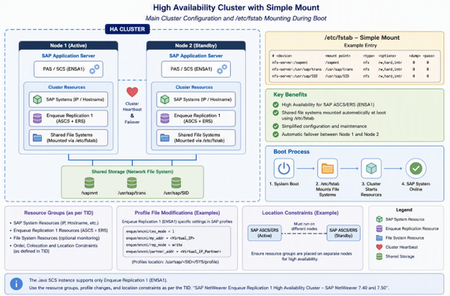
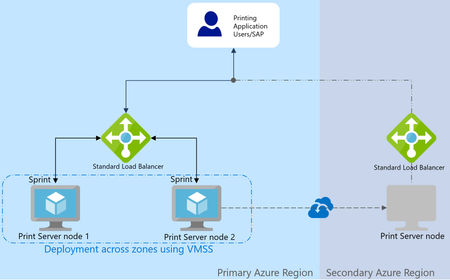
Introduction: For years, the IT team at a global manufacturing company had relied on SAP NetWeaver 7.50 Java to support critical business processes. The environment handled everything from employee self-service applications to business integrations across multiple regions. While the infrastructure was stable, one concern remained constant: SAP Central Services instance represented a potential single point of failure. Every maintenance window required careful planning. Any unexpected server outage could disrupt business operations, impact users worldwide, and create pressure on support teams to restore services as quickly as possible. Challenge: The SAP landscape was growing, and business stakeholders expected continuous availability. Traditional backup and recovery procedures could restore services, but you could not eliminate the downtime associated with infrastructure failures. The architecture team identified SAP Java Central Services as a critical component that needed enhanced protection. The objective was simple: Eliminate single points of failure. Automate failover during infrastructure issues. Minimize business disruption. Improve operational confidence. Solution: You adopted a SUSE High Availability solution built around clustered architecture. Multiple nodes were configured to work together, continuously monitoring the health of SAP services and infrastructure resources. Using SUSE HA, the environment could automatically detect failures and transfer workloads to a healthy node whenever required. Instead of relying on manual intervention, recovery became a coordinated and automated process. The architecture provided: Continuous monitoring of critical SAP components. Automated failover capabilities. Resource management through cluster policies. Improved service continuity during unplanned outages. Implementation: Deployment required close collaboration between SAP administrators, Linux engineers, and infrastructure architects. You carefully validated cluster configurations, tested failover scenarios, and documented operational procedures. Several disaster recovery simulations were conducted: Server shutdown tests. Network interruption scenarios. Service failure simulations. Planned maintenance activities. Each test demonstrated how the cluster could maintain application availability while reducing recovery times. Results: As the solution moved into production, confidence across the organization increased significantly. Business users experienced uninterrupted access to critical SAP services, while operations teams gained greater visibility into system health and cluster status. The organization realized several key benefits: Higher platform availability. Faster recovery from failures. Reduced operational risk. Improved maintenance flexibility. Enhanced business continuity. Lessons Learned: The project reinforced an important principle for enterprise SAP environments: High availability is not simply about recovering from failure, it's about designing systems that continue operating when failures occur. By combining SAP NetWeaver 7.50 Java Central Services with SUSE High Availability technology, the company transformed a potential business risk into a resilient and reliable platform capable of supporting mission-critical operations around the clock. Key Benefits of SUSE HA for SAP NetWeaver Java Central Services Elimination of Single Points of Failure SAP NetWeaver Java Central Services (SCS) is a critical component of the SAP Java stack. SUSE High Availability (HA) protects the SCS instance by clustering resources across multiple nodes, reducing the risk of service interruption caused by server failures. Automated Failover and Faster Recovery When a node or service fails, SUSE Pacemaker automatically detects the issue and transfers SAP services to a healthy node. This minimizes manual intervention and significantly decreases recovery time. Increased Business Continuity By maintaining service availability during infrastructure outages, SUSE HA helps ensure that business-critical SAP applications remain accessible to users, reducing operational disruptions. Reduced Downtime During Planned Maintenance Organizations can perform maintenance activities on cluster nodes with minimal impact to SAP services. Workloads can be shifted between nodes, helping ensure uninterrupted operations. Continuous Monitoring and Health Checks SUSE HA continuously monitors cluster resources, SAP processes, virtual IP addresses, and storage components. Early detection of issues helps improve overall system reliability. Improved Operational Efficiency Automated resource management reduces the need for manual failover procedures and allows administrators to focus on proactive platform management rather than reactive troubleshooting. Enhanced System Resilience The cluster architecture is designed to withstand hardware, operating system, network, and service failures, creating a more robust SAP landscape. Better Disaster Recovery Readiness Regular failover testing and cluster validation capabilities help organizations verify their recovery procedures and improve preparedness for unexpected outages. Enterprise-Grade Reliability for Mission-Critical Workloads For organizations running critical SAP business processes, SUSE HA provides the foundation for achieving high availability and meeting stringent uptime requirements. Conclusion: In modern SAP landscapes, resilience is a business requirement rather than a technical luxury. SUSE High Availability provides organizations with a robust foundation for protecting SAP NetWeaver Java workloads, reducing downtime, and ensuring that critical business services remain available when they are needed most. SUSE High Availability for SAP NetWeaver 7.50 Java Central Services enables organizations to build a resilient SAP platform by eliminating single points of failure, automating failover, and minimizing downtime. Through continuous monitoring, intelligent resource management, and cluster-based protection, businesses can improve service continuity, simplify operations, and ensure that mission-critical SAP workloads remain available when they are needed most. Reference links: SUSE HA for SAP NetWeaver 7.50 Java central services | SUSE | Support Center For the main cluster configuration and the automatic mounting of shared file systems during startup using entries defined in /etc/fstab, see the "High Availability Cluster with Simple Mount" section at the link below: https://documentation.suse.com/sbp/sap-15/html/SAP-S4HA10-setupguide-simplemount-sle15/index.html Refer to the resource groups outlined in the TID, together with the necessary SAP profile file modifications and location constraints documented in the "SAP NetWeaver Enqueue Replication 1 High Availability Cluster – SAP NetWeaver 7.40 and 7.50" guide linked below. These configurations are applicable since the Java SCS instance supports Enqueue Replication 1 (ENSA1) only: https://documentation.suse.com/sbp/sap-15/html/SAP-nw740-sle15-setupguide/index.htmlEnabling AI-Driven SAP Development with GitHub Copilot: Plans and Usage-Based Billing Transformation
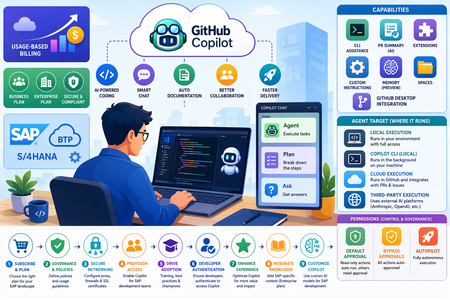
Introduction: Empower SAP customers with a strategic understanding of GitHub Copilot offerings, including plan options, value realization, account models, and key considerations for enterprise adoption. Through a guided, step-by-step setup in Visual Studio Code, SAP developers will gain hands-on experience with GitHub Copilot and Copilot Chat in real-world development scenarios. In addition, a practical exercise demonstrates how to configure and optimize Copilot within Visual Studio Code enabling SAP teams to effectively adopt AI-assisted development and accelerate application delivery. Imagine you are an SAP developer working within a fast-paced enterprise environment, tasked with delivering a new feature or extension for a business-critical application, such as SAP S/4HANA or SAP BTP. With limited familiarity with the existing codebase and tight delivery timelines, ensuring quality, performance, and reliability is essential. GitHub Copilot provides a powerful AI-assisted development experience that can help SAP developers accelerate delivery while maintaining high standards. It can interpret complex code, generate documentation, and assist in writing efficient, error-free code enabling teams to meet deadlines and deliver high-quality solutions with confidence. GitHub Copilot plans for SAP Customers: Starting June 1, 2026, GitHub is transitioning GitHub Copilot from a request-based billing model to a usage-based billing model. For SAP customers, this shift enables more granular cost alignment with actual AI usage across development teams, supporting improved transparency and budget control within SAP programs. Organizations and enterprises can leverage this model to better manage consumption across SAP development scenarios such as S/4HANA extensions, BTP applications, and integrations while optimizing costs based on real usage patterns. Individual SAP developers will also benefit from flexible billing aligned to their actual Copilot usage. GitHub Copilot Capabilities for SAP Development: GitHub Copilot offers a range of capabilities designed to support SAP developers across the entire development lifecycle from coding and testing to collaboration and deployment. GitHub Copilot in the CLI: SAP developers can use a chat-like interface directly in the terminal to interact with command-line tools. Copilot provides command suggestions and explanations, helping streamline development workflows for SAP integrations, deployments, and automation tasks. AI-Generated Pull Request Summaries: Copilot generates intelligent summaries of pull requests, highlighting key changes, impacted files, and areas requiring attention. This enables SAP teams to accelerate code reviews and improve collaboration especially in complex enterprise environments. (Not available in the Free plan.) GitHub Copilot Extensions Copilot Extensions allow SAP customers to integrate external tools and systems such as SAP BTP services or other enterprise platforms into the development workflow. These extensions can be customized and shared to support organization-specific SAP scenarios. Custom Instructions SAP teams can tailor Copilot responses by providing context about development standards, tools and project requirements ensuring outputs align with SAP best practices and enterprise guidelines. GitHub Copilot Memory (Public Preview) Copilot can learn from and retain context about a repository, improving the relevance and quality of suggestions. This is particularly valuable for SAP projects with complex codebases and domain-specific logic. GitHub Copilot Spaces Organize SAP project assets such as code, documentation, and specifications into contextual “Spaces.” This ensures Copilot delivers responses grounded in the appropriate SAP business and technical context. GitHub Copilot in GitHub Desktop Automatically generate commit messages and descriptions based on SAP code changes, improving consistency, traceability, and developer efficiency. GitHub Copilot Agents for SAP Development: GitHub Copilot Chat in Visual Studio Code provides specialized agents designed to support different stages of the SAP development lifecycle ranging from planning to implementation and knowledge exploration. Agent (Execution Agent) Use the Agent when you need to implement a specific SAP development task, such as building extensions, integrations, or enhancements for SAP S/4HANA or SAP BTP. The Agent can autonomously identify relevant files, propose code changes, execute supporting commands, and iteratively refine outputs to complete the task efficiently. Plan (Planning Agent) Use the Plan agent when you want to define a structured, step-by-step approach before implementation. This is particularly useful for SAP scenarios requiring careful design such as complex integrations or multi-system workflows. The Plan agent breaks down requirements into clear steps that can be executed by the Agent. Ask (Knowledge Agent) Use the Ask agent to explore SAP-related code, development patterns, or general technical concepts without making changes. This is ideal for understanding unfamiliar codebases, learning new SAP development paradigms, or clarifying architecture and best practices. Implementing GitHub Copilot in SAP Environments: SAP organizations can follow a structured approach to successfully set up and scale GitHub Copilot across development teams: Subscribe and Select the Right Plan Begin by subscribing to GitHub Copilot and selecting the appropriate plan (Business or Enterprise) based on your SAP landscape, governance needs, and scale of adoption. Establish Governance and Policies Define organizational policies to control how GitHub Copilot is used across SAP development scenarios. This includes enabling or restricting specific features to align with compliance, security, and SAP development standards. Configure Secure Networking Ensure secure connectivity by configuring proxy servers or firewalls to allow required Copilot endpoints. SAP customers may also need to manage SSL certificates to align with enterprise security requirements. Provision Access to Development Teams Enable GitHub Copilot for selected SAP developers or teams such as those working on SAP BTP extensions, integrations, or modernization initiatives. A phased rollout can help identify challenges and demonstrate early value before scaling organization wide. Drive Adoption Across SAP Teams Establish a structured enablement strategy including training, best practices, and internal champions to promote effective usage of Copilot within SAP development workflows. A self-service licensing model can further accelerate adoption. Support Developer Authentication In enterprise environments, ensure SAP developers complete the required authentication steps to access Copilot from their development tools, such as Visual Studio Code. Enhance the Copilot Experience SAP organizations can further optimize value by: Integrating knowledge bases to provide SAP-specific context (Enterprise plan) Customizing Copilot through tailored AI models aligned to SAP development needs Leveraging Copilot Extensions to integrate SAP tools and other enterprise systems into the development workflow Set Up GitHub Copilot in Visual Studio Code: For SAP developers, setting up GitHub Copilot is a simple process: Ensure you are using the latest version of Visual Studio Code to support modern SAP development workflows (e.g., SAP BTP and full-stack development). In the Status Bar, select the GitHub Copilot icon and choose Use AI Features to begin setup. Sign in with your GitHub account and follow the authentication prompts to enable access. If your account is already authenticated, select Set up Copilot to complete activation. Follow the guided steps to authorize Copilot within your development environment. If no subscription is assigned, SAP developers will be onboarded to the GitHub Copilot Free plan for initial evaluation. Once setup is complete, GitHub Copilot is ready to assist with SAP development tasks such as code generation, documentation, and optimization. Customize GitHub Copilot Settings for SAP Development: SAP developers can tailor GitHub Copilot behavior to align with enterprise development standards and project requirements: Access Settings by selecting the gear icon in the lower-left corner of Visual Studio Code. Navigate to GitHub Copilot configurations, organized into key areas: Code Editing Settings Configure inline code suggestions, next-edit predictions, and language-specific behaviors to support SAP development languages and frameworks. Chat Settings Customize how Copilot Chat behaves, including terminal integration helpful for managing SAP build, deployment, and integration tasks. Agent Settings Control advanced capabilities such as agent mode, request limits, and tool approvals to align with SAP governance, security, and compliance requirements. Selecting Where GitHub Copilot Agents Run in SAP Development: In addition to selecting the appropriate Copilot agent for a specific task, SAP developers can control where the agent executes using the Agent Target option in the Chat view. This capability determines how the agent interacts with SAP development environments and when results are delivered. Local Execution Runs directly within the developer’s environment with full access to the workspace, tools, and codebase. Ideal for SAP developers working on real-time coding tasks, exploring complex SAP codebases, or making controlled updates where step-by-step review is required. GitHub Copilot CLI (Local Background Execution) Executes tasks in the background on the developer’s machine. Suitable for SAP scenarios where predefined tasks such as script generation, automation, or batch updates can run while developers continue working on other SAP components. Cloud Execution Runs remotely in GitHub and integrates with workflows such as issues and pull requests. This option is well-suited for SAP teams collaborating on large-scale projects, enabling developers to delegate tasks, generate pull requests, and streamline code reviews across distributed teams. Third-Party Execution Uses external AI platforms (such as Anthropic or OpenAI) to run agents either locally or in the cloud. This provides flexibility for SAP customers to integrate advanced AI capabilities into their development workflows, depending on enterprise architecture and governance requirements. Controlling Agent Permissions (for SAP Customers): You can define how much autonomy your digital agents have by using the Permissions settings within the Chat experience. Adjusting these levels allows you to balance operational efficiency with governance and oversight an important consideration in SAP-driven business processes. Permission Level Description Default Approval Only low-risk, read-only actions are executed automatically. Most agent-initiated actions require user confirmation, ensuring control over business-critical operations and data changes. Bypass Approvals All agent actions are automatically approved without user prompts. This setting streamlines workflows but should be used with appropriate governance controls, especially in sensitive SAP environments. Autopilot Enables fully autonomous execution. The agent handles actions end-to-end, including responding to clarification requests, without user intervention. Ideal for well-defined scenarios, but requires strong trust, monitoring, and compliance alignment. Conclusion: GitHub Copilot offers SAP organizations a powerful way to modernize development through AI-assisted engineering. It combines intelligent code generation, contextual insights, and advanced features like agents, CLI integration, and memory to accelerate delivery while maintaining enterprise-grade quality and compliance. It’s usage-based billing model further enhances value by aligning costs with actual adoption, providing transparency, scalability, and control across scenarios such as S/4HANA extensions, SAP BTP applications, and integrations. With a structured approach, covering plan selection, governance, secure configuration, and phased rollout, organizations can integrate Copilot effectively while meeting SAP-specific standards. Ultimately, Copilot enables SAP teams to boost productivity, enhance collaboration, and drive innovation at scale, delivering faster time to market and sustained business value. Reference links: Plans for GitHub Copilot - GitHub Docs Usage-based billing for individuals - GitHub Docs Usage-based billing for organizations and enterprises - GitHub DocsMANA support for Existing VM SKUs:Why Now Is the Right Time to Update Linux on your SAP on Azure VMs
Microsoft Azure Network Adapter (MANA) support for existing VM SKUs Microsoft recently announced support for Microsoft Azure Network Adapter (MANA) for existing VM SKUs. You can read the full announcement here . This article provides information about which existing Azure VM SKUs are eligible to run on MANA-capable hardware. This approach enables continued use of familiar VM SKUs, while benefiting from newer underlying platform capabilities. It also provides a transition path rather than forcing immediate infrastructure changes. M-series VMs are a popular choice for many SAP customers. The Mv3 family also runs on MANA capable hardware. Also, recently the Mv2 High Memory family was enabled to run on MANA-capable hardware. Staying Current Matters Many SAP on Azure environments today run on Linux distributions and service packs (SPs) that remain supported by SUSE and RedHat . That said, support status is not the same as optimal readiness for Microsoft Azure Network Adapter (MANA). Updating to the latest patch level for a Linux service pack, categorized by Microsoft as supported for MANA, brings tangible benefits for SAP workloads, including: Improved compatibility with newer Azure platform features, including MANA Access to performance optimizations and networking enhancements Ongoing security and reliability improvements Reduced operational risk as the platform continues to modernize For SAP systems that are expected to run for many years, staying current helps ensure that infrastructure changes remain predictable rather than disruptive. To understand more about the considerations around running existing VM SKUs on MANA capable hardware, review this article: Microsoft Azure Network Adapter (MANA) support for existing VM Sizes. We highly recommend updating VMs, running SAP workloads to a Linux kernel supporting MANA : Linux VMs with the Microsoft Azure Network Adapter. You can see the translation to Linux SPs here: Azure Accelerated Networking Overview and Benefits Use the Opt-Out Period for existing VM SKUs Strategically As part of this transition, customers have access to a temporary opt-out for VM SKUs, as explained in Temporary MANA Exception with LegacyVMNVA. It is important to note the published deadlines for applying the exception tag, as well as the point after which the tag will no longer be honored. Note that this opt-out exception tag is not applicable for M-series VM SKUs. This is not just a safety net – it is a time limited opportunity. We strongly encourage SAP on Azure customers to use this time to: Plan and validate Linux SP upgrades in non‑production systems Align OS updates with existing SAP maintenance windows Reduce future urgency by upgrading on your timeline, not in reaction to a deadline Proactively updating during the opt-out period allows teams to move deliberately, test thoroughly, and minimize risk to Production SAP systems.SAP on Azure Product Announcements Summary – SAP Sapphire 2026
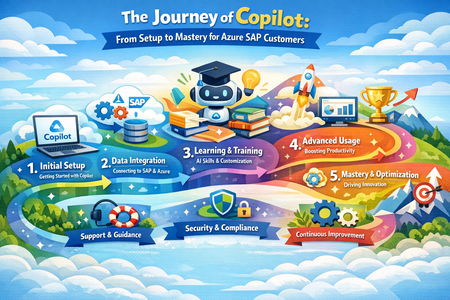
Introduction Today at SAP Sapphire, we announced a new wave of innovations deepening the Microsoft–SAP partnership – advancing RISE with SAP on Azure, our SAP S/4HANA integrations, and our shared AI platform. With more than three decades of co-engineering, Microsoft and SAP continue to help customers modernize their ERP estate and build new value on top of it. Below is a look at the latest product updates, alongside customer evidence of what is possible when SAP and Microsoft come together. Customer Evidence AI: From ERP Data to Intelligence in the Flow of Work KONE is running an AI-driven contract workflow on Power Platform that validates documents against SAP records and auto-creates contracts in SAP — processing 54,000+ contracts per year with a 33% reduction in handling time. To support their 3,000+ citizen developers, KONE developed an agent with Microsoft Copilot Studio that guides makers through building solutions, generating prompts and surfacing existing apps to avoid duplication. "Power Platform is enabling us to integrate highly effective AI models into our automation solutions and that is helping us streamline increasingly complex processes — efficiently and at scale." — Lulu Zhang, Director, Head of Technology & Services, KONE Security: Protecting the SAP Core MAIRE, a global engineering group operating across 50 countries, deployed Microsoft Sentinel for SAP to secure its accounts payable environment — the heartbeat of over 10,000 employees. With 50+ active detection rules and cross-environment event correlation now automated, MAIRE has shifted from reactive incident response to continuous, AI-ready threat intelligence. "SAP generates an impressive amount of logs, and with the Microsoft solution, we are able to detect suspicious events before they can become a problem." — Andrea Sgarlata, Identity Manager, Tecnimont Services, MAIRE Group Cenibra replaced SAP Identity Management with Microsoft Entra ID Governance, integrating 80+ systems and achieving a 46% operational gain — with 60–70% of manual IAM effort projected to be eliminated as automation expands. Running SAP at Scale: Migration as a Strategic Foundation Maersk migrated 500 SAP servers and a petabyte of data to Azure in six months — with near 100% uptime and zero incidents — and is now using Azure OpenAI with SAP to let teams query invoice and shipment data in natural language. "This wasn't just a migration. It was a mindset shift. We needed to move from managing infrastructure to driving engineering innovation." — Roman Kulczykowski, Senior Director, SAP Technology Platform, Maersk We're pleased to share the product updates behind these outcomes: From SAP Joule + Microsoft Copilot to agent-to-agent workflows, SAP and Microsoft are turning SAP processes into reusable AI-powered building blocks. Microsoft Fabric’s SAP footprint just grew: SAP BDC Data Connect, Datasphere replication, certified partners. Microsoft Sentinel for SAP:Expanded SAP detections, richer SAP ETD cross-signal correlation, and upcoming LogServ/ASIM integration bring SAP telemetry natively into your XDR workflows. SAP Deployment Automation Framework expands support for highly available SAP architectures with HANA scale-out and HSR capabilities, enabling GitHub-native deployments and centralized configuration management. SAP Testing Automation Framework advances high availability validation with scale-out HANA testing, backup validation, and integrated configuration checks to enable continuous reliability assurance. Extended the Observability Dashboard with additional infrastructure checks and introduced a reusable AIOps pattern to move from observability insights to governed operational action. Let's dive into the summary of product updates and services. Extend and Innovate Copilot Studio & Power Platform Joule & Microsoft Copilot: Adoption and Enablement The Joule and Microsoft 365 Copilot integration reached general availability in late 2025, and we now see hundreds of customers actively exploring and onboarding the solution. To accelerate adoption, SAP and Microsoft are delivering: Updated onboarding guidance such as the SAP Discovery Center Mission – Integrate Joule and Microsoft 365 Copilot Dedicated SAP services to support customers getting started. First Agent-to-Agent (A2A) Scenarios with Nestlé We are continuing to evolve the integration beyond chat-based experiences toward true agent interoperability. At SAPPHIRE, Nestlé is showcasing early Agent-to-Agent (A2A) scenarios, where: SAP services are exposed via the agent gateway Copilot Studio acts as the orchestration layer, consuming Joule services using an open, vendor-neutral A2A protocol. This marks an important step toward a multi-agent ecosystem across SAP and Microsoft. Easier SAP Integration with Copilot Studio Many SAP customers expose standard and custom APIs using the SAP Business Technology Platform connected via SAP Cloud Connector to their SAP systems like SAP S/4HANA or even older SAP ECC systems. Using SAP API Management customers can already today expose these SAP OData Services and soon also MCP Servers which can be consumed in Copilot Studio. More information about SAP with Microsoft can be found on Microsoft Learn. Microsoft Fabric We continue to deepen the integration between Microsoft Fabric and SAP solutions by evolving our strategy to offer options to leverage their SAP data in Fabric: We are expanding aligned integration options with Mirroring for SAP Datasphere, generally available since March 2026. This technology integrates SAP Datasphere replications flows into the mirroring capabilities of Microsoft Fabric. With these technologies you can seamlessly integrate the data integration tools of SAP with the power of Microsoft Fabric. In addition, we are collaborating closely with SAP to make SAP Business Data Cloud Connect for Microsoft Fabric available for customers in the second half of 2026. This will allow bi-directional, zero-copy sharing between SAP Business Data Cloud and Microsoft Fabric, significantly simplifying many use cases that previously required moving and managing copies of data. Sentinel Solution for SAP Microsoft Sentinel for SAP continues to expand coverage of the SAP core, SAP BTP, SAP LogServ and the broader SAP ecosystem — giving SOC teams broader, deeper, and more contextualized SAP signal inside their existing Microsoft XDR workflows. New SAP detections — catalog of out-of-the-box detection expanded to high profile targets such as Integration Suite, Build WorkZone, and Cloud Identity Services SAP Logserv roadmap — solution will allow re-use of Microsoft’s Advanced Security Information Model (ASIM) and other standard tables so customers and partners can profit from black-box detections apply existing XDR investments directly to their SAP telemetry. SAP ETD correlation with Microsoft XDR — the SAP Enterprise Threat Detection solution now ships email artifacts alongside IP and host, enabling deeper cross-signal correlation across SAP and Microsoft Defender (previously limited to IP and host only) The result: more out-of-the-box coverage, better re-use of existing Microsoft and partner detection investments, and richer correlation between SAP and the rest of the Microsoft Defender estate. Microsoft Entra Microsoft Entra ID and Entra ID Governance extend identity lifecycle and entitlement management into SAP via integration with SAP Cloud Identity Services (SCI), SAP Identity Access Governance (IAG), and SAP Access Control (AC). Microsoft and SAP have significantly deepened their collaboration in identity governance — delivering an end-to-end solution that extends Microsoft Entra into SAP landscapes at enterprise scale. End-to-end integration with SAP Identity Access Governance (IAG) now available in public preview, enabling customers to: o Publish SAP business roles into Entra entitlement catalogs and assign SAP access through Entra access packages o Enforce approval workflows and Separation of Duties (SoD) policies natively o Integration with SAP IAG also supports environments still relying on SAP AC, providing a phased migration path toward cloud-first governance. General availability of the improved SAP Cloud Identity Services Connector in Microsoft Entra featuring SCIM 2.0 support, provisioning of Groups & Group Memberships and OAuth 2.0-based authentication replacing basic authentication Day-zero visibility through account discovery allowing customers to correlate SAP accounts with Entra identities via SAP Cloud Identity Services and get immediate transparency into existing SAP identities. It also accelerates onboarding into governance workflows The result is a modern, cloud-based identity governance platform for SAP, combining Microsoft’s identity lifecycle automation with SAP-native compliance controls, and a clear migration path as SAP IDM approaches end of maintenance. Purview Microsoft Purview allows uniform data governance and compliance across the enterprise including SAP sources. Purview released several notable updates for SAP since the last edition: SAP Calculation View support for metadata scans, relevant for HANA DB and a major customer ask is now generally available. Scoped scanning (configure exactly which metadata to scan) for ECC and S/4HANA is now in Public Preview BW/4HANA connector is also now generally available Modern Authentication for SAP Integrations As the ecosystem evolves away from legacy authentication models, Microsoft and SAP are enabling secure, cloud-native integrations by replacing Basic Authentication with OAuth 2.0-based patterns across key scenarios. These innovations establish best security practices by replacing Basic Authentication with the secure OAuth 2.0 protocol and avoid the use of shared credentials that have an expiration. The outcome: A modern, secure integration layer for SAP, aligned with Zero Trust principles and ready for AI-driven and API-based enterprise architectures. Secure Email Integration: SAP ↔ Exchange Online With the deprecation of Basic Authentication, SAP systems now integrate with Exchange Online using OAuth 2.0 and Microsoft Entra ID for outbound email scenarios. The SAP ABAP systems authenticate using client credentials or certificate-based (JWT) flows. Also communication is secured via SMTP OAuth 2.0, eliminating password-based authentication. This modern approach ensures authentication without the need for password for SAP outbound communication and alignment with SAP and Microsoft. Extending Modern Authentication to SAP SuccessFactors APIs Beyond infrastructure scenarios, modern authentication is also being adopted across SAP SaaS integrations with new integration patterns using OAuth-secured access to SAP SuccessFactors OData APIs the Microsoft Entra ID acts as the central identity provider and token issuer enabling secure, governed API access without credential-based authentication. SAP on Azure Software Products and Services SAP Deployment and Testing Automation Framework The first half of 2026 marks the most significant release cycle for both the SAP Deployment Automation Framework (SDAF) and the SAP Testing Automation Framework (STAF) since their inception. The latest releases deliver broad platform expansion, deeper high-availability coverage, and a matured testing capability that extends well beyond initial scope. Highlights at a glance: SDAF now supports GitHub Actions as a first-class deployment path alongside Azure DevOps and CLI Azure App Configuration integration provides centralized, single-source-of-truth configuration management Deep investment in HANA scale-out with Pacemaker and HSR, including SAPHanaSR-angi support for SLES Platform coverage expanded to RHEL 10, OracleLinux9, and newer SLES release. STAF adds scale-out HSR testing, and Azure Backup Testing integration for SAP HANA Configuration Checks capability, a rewrite of the open-source Quality Checks tool, now ships natively within STAF. Introduced scheduling support for both HA functional tests and configuration checks SAP Deployment Automation Framework (SDAF) SDAF now supports GitHub Actions end-to-end, including automated workflow setup, container-based execution, and built-in secret management; providing deployment experience on GitHub equivalent to Azure DevOps. Azure App Configuration integration centralizes deployment parameters across control planes and workload zones, eliminating parameter configuration drift across environments. High-availability infrastructure coverage has seen its deepest investment to date. HANA scale-out with Pacemaker and HSR now supports SAPHanaSR-angi on SLES, adds conditional resource movement based on instance name and Pacemaker version, and enhances replication stability with improved retry and error-clearing logic. Additional updates include Azure Files NFS encryption in transit, hardened Oracle Data Guard automation with idempotent post-processing and dynamic SID handling, and improved networking logic for both greenfield and brownfield scenarios. SAP Testing Automation Framework (STAF) STAF continues to expand its SAP workload validation coverage and automation capabilities - making it easier to validate high availability designs, schedule tests at scale, and verify backup and restore readiness in Azure. STAF has introduced three major capabilities in the past few months: Expanded high availability validation for SAP HANA with scale-out HANA System Replication (HSR) support (including the SAPHanaSR-ScaleOut provider and updated HA test coverage for scale-out topologies) Test scheduling and run management via REST API and CLI (with containerized deployment improvements to simplify operating the service). Azure Backup validation and functional testing for HANA through a dedicated Ansible module that enables end-to-end backup discovery and restore workflows (including restore monitoring and cross-VM restore scenarios). The Configuration Checks capability, integrated natively into STAF from the open-source Quality Checks tool previewed in November 2025, now includes enhanced telemetry with duration tracking, updated disk performance thresholds, and improved HTML reporting. Azure Center for SAP solutions Tools and Frameworks We continue to enhance our scripts and supporting tools and frameworks outside the core product experience. These updates are designed to help customers and partners bridge the gap between evolving operational needs and available product capabilities. The Observability Dashboard has evolved into a more actionable operational view for Azure workload reviews, bringing security, network, and infrastructure signals into one place to improve visibility, reduce manual follow-ups, and support faster decision-making. o The Security Dashboard now highlights key exposure and hygiene risks such as public inbound access, orphaned public IPs, storage accounts without Private Endpoint, and Basic tier load balancers. o The Network Dashboard now includes VNet peering status, helping teams quickly validate connectivity posture alongside ExpressRoute, gateway, public IP SKU, UDR, subnet, and remote access checks. The Infrastructure Summary Dashboard helps identify configuration gaps such as VMs that support NVMe but are still using SCSI, failed VM extensions, and disabled Accelerated Networking. o The extended dashboard also adds visibility into AFS subnet configuration, giving teams a clearer view of platform readiness and operational consistency across customer environments. Operation Excellence AIOps Custom Agent: As part of our AIOps work, we are exploring how AI can move beyond generic operational insights and help customers think differently about managing complex Azure workloads. The focus is on enabling customer-specific AI agents to use cases that reflect real operational challenges, business priorities, and environment-specific patterns, rather than applying a one-size-fits-all model. By combining observability, automation, Azure resource insights, operational telemetry, and approval-driven actions, customers can identify risks earlier, reduce manual investigation effort, and accelerate decision-making across their estate. This approach creates a practical path for customers to experiment safely, address targeted operational scenarios, and shape AI-enabled operations around the needs of their own workloads, teams, and governance models. For more, see From Observability to Action: Building an AI-Powered AIOps Agent for Customer-Specific Operations To learn more, visit the Microsoft sessions at SAP Sapphire 2026 and check out our SAP on Azure learning page.The Journey of Copilot: From Setup to Mastery for Azure SAP customers
Introduction: GitHub Copilot integrates as an extension or plugin within developer tools commonly used in SAP and Azure scenarios, such as Visual Studio, Visual Studio Code, and other supported IDEs. These tools are often used alongside SAP development (e.g., ABAP, CAP, or integrations with S/4HANA and Azure services). Before you begin, ensure you have access to Copilot, through an organizational license (common in enterprise environments). Install GitHub Copilot Step 1: Install Required Extensions Open Visual Studio Code Go to Extensions (Ctrl + Shift + X) Install the following extensions: GitHub Copilot GitHub Copilot Chat GitHub Copilot for Azure (Microsoft extension) When installing the Azure extension, it may prompt you to install additional Azure tools, accepting all required components. Step 2: Sign in and Authenticate Sign in to your GitHub account Sign in to your Azure account Complete authentication in the browser Return to VS Code Both logins are required: GitHub → enables Copilot Azure → enables Azure resource access and tools Step 3: Enable and Verify Setup Open Copilot Chat (Ctrl + Alt + I) Check that Copilot is active Verify Azure integration by typing a test prompt: What Azure resources are deployed and running in my subscription? If you get a response → setup is successful Step 4: Configure Azure Context (Important for SAP) Set your Azure tenant / subscription (Entra ID) Ensure correct environment for: SAP on Azure (S/4HANA, SAP NetWeaver) SAP BTP extensions Optional: Enable Agent Mode for automation tasks (deployments, scripts) Get Started in Your SAP Development Environment Open your preferred IDE (Visual Studio, VS Code, or Eclipse with SAP tooling) Access the Copilot chat or assistant panel within the IDE Sign in with your GitHub account (and organizational account if required) Start using Copilot in your SAP development scenarios Use Copilot for SAP Workloads Inline suggestions Get real-time code suggestions for SAP-related languages (e.g., JavaScript, Java, ABAP extensions, CAP models) Ask questions in chat Understand existing logic, SAP APIs, or integration patterns (e.g., “Explain this service” or “How does this SAP function work?”) Generate and improve code Create boilerplate logic, unit tests, and integration code faster Identify performance or design improvements in existing SAP code Enhance with SAP Context Provide additional context (files, APIs, or SAP objects) to improve suggestions Optionally connect Copilot to SAP data or services using enterprise integrations Use Copilot to support: SAP BTP extensions S/4HANA integrations Fiori/UI5 development and APIs Once you start interacting with Copilot, it acts as an AI assistant within your SAP development workflow, helping you write code faster, understand existing logic, and accelerate innovation across your SAP and Azure landscape. The Hidden Layer: Network Configuration for SAP Customers As you begin using GitHub Copilot within your SAP development and integration environment, you may notice performance differences, especially when working within corporate networks. In most cases, Copilot connects securely to GitHub services over the internet using HTTPS, without requiring additional setup. However, in SAP enterprise environments where strict governance, security policies, and compliance controls are in place, network traffic is often routed through proxies, firewalls, or VPNs. What You Need to Know Copilot may require additional configuration when operating behind corporate proxies or firewalls Proxy settings can be configured: Directly within your IDE Or through environment variables such as HTTP_PROXY and HTTPS_PROXY Authentication to enterprise proxies may require: Basic credentials Or enterprise mechanisms such as Kerberos-based authentication Enterprise Considerations for SAP Landscapes Organizations may require custom SSL certificates for secure outbound connections Network security policies may restrict access to external services Required Copilot and GitHub endpoints must be allowed to ensure connectivity Why This Matters for SAP Customers In SAP environments especially those involving S/4HANA, SAP BTP, or hybrid/on‑premise systems network security is tightly controlled. Proper configuration ensures that Copilot can securely interact with external services while still complying with enterprise security standards. Once configured correctly, Copilot integrates seamlessly into your SAP development workflow, enabling secure, reliable, and high‑performance AI-assisted development within your governed enterprise environment. Configure Network Settings (if required) for Azure SAP Environments In Azure‑hosted SAP landscapes (such as S/4HANA on Azure, SAP BTP, or hybrid environments), network configuration plays a critical role in enabling GitHub Copilot securely. Network setup is primarily required in enterprise environments where security controls such as proxies, firewalls, VPNs, or Azure networking policies are enforced. Default Behavior GitHub Copilot connects securely over HTTPS No additional configuration is required in open network environments Proxy & Enterprise Network Configuration If your Azure SAP environment uses controlled outbound access: Configure proxy settings: HTTP_PROXY HTTPS_PROXY Directly within your IDE (Visual Studio, VS Code) Or via environment variables: Supported authentication methods: Basic authentication Kerberos (common in enterprise identity setups) Additional considerations: Ensure required GitHub/Copilot endpoints are allowed in Azure firewall or network security groups Install custom SSL certificates if your organization uses SSL inspection Note: Visual Studio typically inherits Windows/Azure VM proxy settings Troubleshooting Network Issues in Azure SAP Scenarios If Copilot stops responding or behaves inconsistently, the issue is often related to enterprise network controls in Azure or hybrid SAP architectures. Common Causes Proxy or firewall blocking outbound connectivity SSL certificate validation failures VPN or private network restrictions (ExpressRoute / private endpoints) Quick Diagnostics: Test connectivity from your Azure VM or development machine: curl --verbose https://copilot-proxy.githubusercontent.com/_ping If using a proxy: curl --verbose -x http://PROXY:PORT -i -L https://copilot-proxy.githubusercontent.com/_ping HTTP 200 → Connectivity is working Errors → Network blocking or configuration issue Recommended Troubleshooting Steps Verify proxy settings are correctly configured Check SSL certificates and trust chain Review Azure firewall, NSG, or proxy rules Validate required endpoints are reachable Enable verbose logs or diagnostics in your IDE for deeper analysis Best Practice for Azure SAP Customers Adopt a structured troubleshooting approach: Validate connectivity Trace the network path (proxy, firewall, DNS) Fix configuration issues systematically This aligns with the governance and operational discipline already used in SAP and Azure environments. Outcome: A Confident Copilot User in Azure SAP By following this approach, you move beyond basic usage and gain full control of Copilot within your enterprise landscape. You will be able to: Deploy and use Copilot across Azure SAP environments Integrate it securely within enterprise networking constraints Troubleshoot issues with confidence using systematic diagnostics Conclusion: GitHub Copilot is no longer a black box, it becomes a trusted, secure, and intelligent AI assistant seamlessly integrated into your Azure and SAP development ecosystem. As you adopt it into your workflow, development becomes faster, cleaner, and more efficient. More importantly, you gain a reliable partner that enhances productivity and supports innovation, ensuring that you are no longer coding alone, but collaborating with AI to deliver better outcomes. Reference links: https://docs.github.com/en/copilot/how-tos/set-up/install-copilot-extension Get Started with GitHub Copilot - Visual Studio (Windows) | Microsoft Learn https://learn.microsoft.com/en-us/azure/developer/github-copilot-azure/get-started?pivots=visual-studio-code Network settings for GitHub Copilot - GitHub Docs Troubleshooting network errors for GitHub Copilot - GitHub Docs GitHub Copilot for SAP ABAP in VS Code: Setup Guid... - SAP CommunityEnabling Agentic Data Governance with Hybrid Cloud Flexibility in Azure
The “Why” Do you manage data in a complex multi-cloud environment? Are you struggling with data silos, evolving regulations, and the pressure to maintain control and compliance across on-prem and multiple clouds? Do you ever wish an intelligent assistant could help shoulder the load of data governance? If so, I can relate. Let me tell you a story that might sound familiar. Meet Mark (pictured above). He is a data governance officer at Contoso (a fictional but very representative enterprise). Mark’s day job is ensuring data governance and compliance across his company’s vast hybrid cloud estate – think around ~2 million data assets sprawled across 12+ datacenters on-premises and in different public clouds. Regulatory requirements are constantly shifting. Customer data is increasingly sensitive. Each department and region has its own way of doing things. Mark is fighting an uphill battle with data silos and disconnected cloud operations. He bounces between a patchwork of tools – spreadsheets, cloud consoles, governance portals – trying to answer basic questions: Where is our data? Who’s using it? Are we in compliance? Armed with an old desk calculator and a pile of paper-based reports (a perfect 1990s backdrop), he is dealing with the data around him that has exploded in volume and complexity. What if Mark had a single pane of glass. The glass that reflects and acts. It reflects your governance state and enforces compliance – a self-hydrating pane of glass accompanied by a conversational AI. And he’s not alone. We’re all living in a data overload era. Every day, organizations generate and ingest more information than ever before. Transistors and mainframes gave way to the internet boom of the ’90s, then an explosion of mobile devices in the 2000s, social media in the 2010s, and now widespread cloud computing – all funneling data into our systems at an exponential rate. On top of that, a new wave of AI and conversational interfaces has arrived here in the mid-2020s, making data more accessible but also increasing expectations for real-time insight. It’s no wonder modern IT leaders feel overwhelmed. But these challenges are also opportunities. The way I see it, the incredible growth of data and cloud capabilities means we have a chance to reimagine data governance. The fact that I’m writing about this right now is no coincidence. My customers are looking to resolve problems in this space. In my conversations with them, I hear the same needs: We want better governance, more visibility, streamlined oversight… and cherry on top, we want it in an “agentic” fashion. In other words, they want to delegate the grunt work to the platform toolset augmented by AI, so they can focus on higher-value tasks. The “What” That vision – agentic data governance with hybrid cloud flexibility – became the driver for this work. This is a modular solution, and you have these building block style components (cloud services, governance tools, AI agents), which you can snap them together into an intended solution. Think of it as a jumpstart kit for continuous data governance across multiple clouds, with autonomous (“agentic”) assistance baked in that you can leverage and build upon. It’s not the final, productized solution – more a vision of what’s possible. Contoso’s Requirements These are the high-level requirements from Contoso: Data governance across clouds under one roof A single pane of glass dashboard consolidating reporting on the 5 governance domains: o Visibility on data residency and lineage o PII (Personally Identifiable Information) must run on a CC (Confidential Compute) o Security software (Defender) compliance o Resource tagging compliance (foundational for a good governance posture) o OS updates compliance Ability to enforce compliance in an agentic manner with a human in the loop Agentic enforcement of compliance pertaining to residency and confidential compute Solution – The breakdown The solution is comprised of 8 modules addressing these requirements. These solution modules are: Foundational (Landing zones, Data Sources, Operational setup, Policies, etc.) Dashboard Hydration + Agentic Reporting – Residency Compliance Dashboard Hydration + Agentic Reporting – Confidential Compute for PII Compliance Dashboard Hydration + Agentic Reporting – MS Defender Compliance Dashboard Hydration + Agentic Reporting – Resource Tag Compliance Dashboard Hydration + Agentic Reporting – OS Updates/Patch Compliance Enforce Compliance via Copilot Agent - Residency Compliance Enforce Compliance via Copilot Agent – CC PII Compliance Solution – The architecture view These are the main technical components that make up the solution architecture: Data sources of all shapes and sizes on the left, governed by the native Azure or the Arc plane. Additional Azure services across the bottom layer for the foundational governance posture Microsoft Purview, in the top middle, as the unified data governance platform Microsoft Fabric, in the bottom middle, as the end-to-end ingestion and analytics platform Microsoft Power Platform, on the right, as the low code/no code business flow and the copilot agent experience Solution – The end user view So how does Mark see this solution as a data governance officer? He doesn’t see all the intricacies of the solution integration and the logic execution. He sees two things: A Power BI dashboard running on Microsoft Fabric with A compliance dashboard with an overall score in each of the five compliance domains alongside scores for each of the data products across these domains Additional reporting views for more granular reporting Fabric-based pipeline that hydrates the underlying semantic models from various sources to keep the reports fresh and current A Copilot agent (in Teams) for both: Reporting on all compliance domains Enforcing in-scope compliance across selected domains The agent takes care of it - queries Fabric’s semantic model, calls Azure Function endpoints, updates Purview glossary terms, applies Azure tags, and sends Teams notifications. The “How” – Residency Compliance Let’s pick a few modules to walk through how these solution modules work together to give a cohesive agentic governance experience to Mark. It’s Monday morning, and Mark logs into the Contoso governance portal with a cup of coffee in hand. Instead of a dozen browser tabs, he has two main tools opened: the Data Governance Dashboard and the Contoso Governance Copilot agent. To address some inquiries that came as an assigned action to him, he interacted with the agent. During this interaction, not only did he validate if there were any residency missing in the unified data governance platform (Purview), but he was also able to address a mismatch between Purview and Azure resource, based on the designed principles. Here is the snippet of the chat: Now, under the hood, several components have worked on behalf of the agent in performing this governance checking and applying the necessary course of action: Even before Mark's conversation with the agent, an ongoing hydration process keeps the Fabric Power BI dashboard up to date. Dashboard Hydration + Agentic Reporting – Residency Compliance A Fabric notebook runs the residency scorecard code block through a pipeline. It reads two Lakehouse tables containing latest residency information from Purview and the approved region list Then, the notebook gets a Microsoft Entra bearer token Once acquired, the notebook then calls an Azure Function endpoint This endpoint, then searches for the Azure resources associated with the data products in Purview using an Azure resource tag. The notebook then compares the declared Purview residency with the approved region list and the associated resource’s region The notebook then calculates the final 0 / 25 / 50 / 75 / 100 residency compliance score and a reason. For example: A data product without an associated Azure resource gets a 0, while a data product whose residency in Purview is an approved region by Contoso, and also matches with the associated Azure resource, gets a 100. It then writes the results to the relevant residency compliance Lakehouse tables The dedicated compliance table then feeds to the semantic model for reporting The compliance Power BI dashboard is hydrated Enforce Compliance via Copilot Agent - Residency Compliance With the dashboard data regularly updated, the agent follows this logic, the updated reporting data, and the actions at its disposal, during the earlier conversation with Mark : Mark initiates the conversation with the agent The agent calls a Power Automate flow This flow retrieves Purview’s residency information stored in the Fabric semantic model 5, 6, 7 and 8. When Mark asks to investigate further on a data product, the agent carries the conversation using a topic, which then leverages a flow, which uses a Power Automate custom connector to access an Azure Function endpoint. This endpoint then retrieves latest glossary (residency) information about the data product in question, from Purview, and provides a preview back to the user 10, 11, 12, and 13. If the update criteria are met, and if there is no conflict, and with Mark’s blessings, the topic then calls another flow to access the Functions Purview Update endpoint, and make the glossary (residency) update in Purview for that data product The “How” – Confidential Compute for PII Compliance Dashboard Hydration + Agentic Reporting – Confidential Compute for PII Compliance The following snippet shows how Mark addresses the compliance risk with a critical data product (application), S/4 HANA, and performed the necessary compliance actions, such as tagging the associated resources and notifying the data product owners via Teams channel. The following diagram shows the under-the-hood hydration flow for confidential compute compliance: Enforce Compliance via Copilot Agent – CC PII Compliance Finally, the diagram below shows how Mark’s conversation flows through the main solution components: Outcome Stepping back, what did we accomplish for Mark and Contoso? We turned an onslaught of governance challenges into an opportunity to modernize how data is managed. This gave Mark: Centralized Visibility into data assets across the landscape through Purview and a unified dashboard Proactive compliance enabled with automated checks - controlled with Purview exports and Fabric pipeline schedules And compliance enforcement using an agent Hybrid Cloud Consistency. By using Azure Arc and a foundational data plane management setup Reduced Operational overhead with agentic reporting and compliance Though the solution is comprised of wide variety of components/services, it is built from standard building blocks and is relatively simple to implement. In total, the solution combined around a dozen Azure services and over 40 distinct components (from Purview catalogs to data pipelines, to custom functions and flows). You can choose to implement some or all the compliance domains. Or, better yet, build upon and create new domains and pave new paths. Wrap-up I believe many enterprises could take a similar journey. If you’re facing these issues, consider this an invitation to think differently about data governance. Start with the pieces you already have – your own building blocks of cloud services and data – and imagine what you could build. Chances are that a lot of the heavy lifting can be orchestrated with today’s technology. And with the rise of AI copilots, the dream of agentic data governance – where your policies are continuously enforced by smart agents – is no longer science fiction. It’s here, right now, waiting for you to take it for a spin. Next steps Watch the video narrative on SAP on Azure YouTube channel: Build it with the GitHub Repository: https://github.com/moazmirza/data-sov-and-hyb-cloud Comments/questions: Here, or @ LinkedIn /moazmirza Solution Selfies Azure Policy Compliance - Foundational Governance Posture Purview Data Product Catalog and Data Lineage Purview Governance Metadata à Fabric Lakehouse Fabric Semantic Model Additional Fabric Power BI Dashboard Copilot Studio Topic Flow Azure Function Endpoints547Views0likes0CommentsChaos Engineering vs. STAF for SAP: Resilience Validation vs. Functional Assurance
Introduction: As SAP environments transition to cloud platforms such as Azure, one strategic question consistently surfaces: “STAF proves SAP works, Chaos Engineering proves it survives. Why do we need both?” The short answer: STAF and Chaos Engineering serve different purposes and treating them as interchangeable can expose SAP production environments to unseen risk. A Quick Comparison for Mission Critical SAP Engagements In the world of SAP on Azure, reliability and resilience are non-negotiable. Two powerful approaches. Chaos Engineering for SAP and SAP Testing Automation Framework (STAF) help ensure mission-critical workloads remain robust. But what sets them apart, and how do they complement each other? Why This Matters SAP workloads often underpin core business processes. Downtime or misconfiguration can lead to significant operational and financial impact. While both Chaos Engineering and STAF aim to improve system reliability, they do so in very different ways. Chaos Engineering for SAP Chaos Engineering is about proactively testing resilience by introducing controlled failures into your environment. Using tools like Azure Chaos Studio, engineers simulate real-world disruptions such as VM shutdowns, DNS failures, or network latency, to validate how SAP systems recover under stress. Key Benefits: Identifies hidden weaknesses in architecture. Improves operational resilience through real-world failure scenarios. Enables game days and BCDR drills for mission-critical workloads. SAP Testing Automation Framework (STAF) STAF focuses on automating high availability (HA) and configuration compliance testing for SAP clusters on Azure. It uses Ansible playbooks and Python modules to execute controlled failover scenarios like node crashes or process termination and generates auditable reports. Key Benefits: Speeds up deployment readiness. Reduces manual testing effort. Validates HA configurations against best practices. Side-by-Side Comparison Aspect Chaos Engineering for SAP SAP Testing Automation Framework (STAF) Primary Goal Validate resiliency under unpredictable conditions Automate HA and configuration compliance testing Scope Infrastructure-level stress and failure injection SAP cluster failover and HA validation Approach Simulate real-world outages (VM shutdown, DNS failure) Controlled failover scenarios (node crash, process kill) Tools Used Azure Chaos Studio Ansible playbooks + Python modules Output Observability insights, recovery behavior reports Auditable HTML compliance reports Use Case BCDR drills, game days, proactive risk identification Pre-go-live readiness, periodic HA audits Complementarity Tests resilience beyond planned scenarios Ensures HA configuration meets best practices When to Use Each STAF → Before go-live or during periodic audits to validate HA setup. Chaos Engineering → For resilience testing under unexpected failures and operational stress. Key Takeaway These approaches are complementary, not competing. Use STAF for structured HA validation and compliance. Use Chaos Engineering for real-world resilience testing and operational confidence. Next Steps Explore Azure Chaos Studio for chaos experiments. Download STAF from GitHub and integrate it into your SAP deployment pipeline. Combine both for a comprehensive resiliency strategy. Conclusion: The two concepts of STAF and Chaos Engineering are not alternatives but complements to each other. While the former tests the accuracy of the SAP system and the business processes involved in its functionality, the latter tests the system in the real world with failures to confirm its ability to cope with such failures in the cloud environment of Azure. Therefore, the use of the STAF concept alone gives us the confidence that the SAP system works as expected, but the addition of Chaos Engineering gives us the confidence that the system will still work even when things go wrong. Ref links: SAP Testing Automation Framework (STAF): About SAP Testing Automation Framework | Microsoft Learn SAP Testing Automation Framework High Availability Testing | Microsoft Learn anukarnam/SAPTesting-Automation-Framework-: The SAP Test Automation Framework is a set of tools and solutions developed to simplify and automate the process of testing SAP systems and other associated third-party applications. It helps to overcome the challenges associated with manual testing by offering strong automation solutions. Chaos Engineering – Resilience & Failure Readiness: What is Azure Chaos Studio? - Azure Chaos Studio | Microsoft Learn Understand chaos engineering and resilience with Chaos Studio - Azure Chaos Studio | Microsoft Learn Using Azure Chaos Studio to Fortify SAP Systems Testing and Resiliency | Microsoft Community Hub