rules
7 Topics
How to block image only spam in outlook?
Keywords aren’t working as any text that appears in the “from” or “subject” field, or message body, is encoded, and/or the body is just an embedded image hosted on a random rotating website. The email domains rotate every single email (they are all just random word + random word @ random word + random word . com) The spam filter is catching them and moving them to junk but I’d like to know if there’s a way to block them or delete them so I don’t even have to see them. I receive so many of these daily from affiliate marketers for the same companies: National Debt Relief, Optima Tax, TruGreen, Amerisave, First American Home Warranty, Thermivest, Keranique, Orangetheory, Miracle Sheets, eHarmony, Empire Today, VSP Vision Plans, Canvas Prints, Jacuzzi Bath Remodel, AARP, Blissy, Healthcare.com, Debt Relief, Life Line Screening, Leaf Filter, JG Wentworth. I never want to see the names of any of these companies in any folder in my email again. Is this possible or am I going to have to go through the hellish process of starting a new email and moving everything over?263Views0likes1Comment
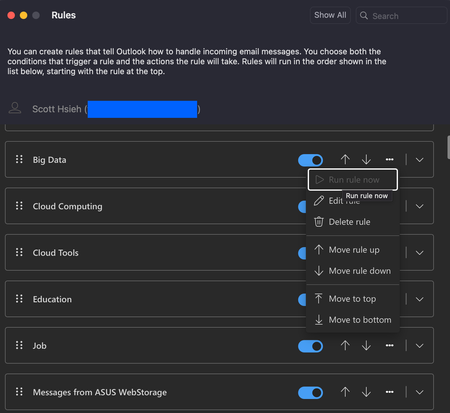
Run rule now is grayed out
My rules in Outlook are grayed out again. The part of manual execution. And this status has been remained for at least 3 days. I encountered this circumstance before like few months ago and here we go again. My account is personal account (Outlook.com). When I use Microsoft Outlook for Mac, Version 16.101 (25091314), to see my rules and wanna execute one of the rules, it's greyed out, a.k.a, cannot be executed. When I open a browser, say Edge, (Version 140.0.3485.66 (Official build) (arm64)), the same status as well. My findings so far: All of rules that will categorize email cannot be executed manually now. Rules that will delete emails can be executed manually. It's manual execution that won't work. Coming emails will still be categorized by the rules automatically. Any clue how to solve this? Or somewhere is wrong internally in the system so far?Solved4.6KViews14likes20CommentsReceiving replies from emails processed in Public Folder
Dear community, Im trying to do someting and I hope that i can get the answer here! Me and my colleague are responsible for replying to emails in a shared Outlook folder. I want to be able to read my colleague's replies to some of the emails for training purposes. I want to be notified or have my colleague's replies sent to a specific folder. I am open to different methods of selecting which emails answer's I want to read, such as assigning a category. Essentially, I am seeking a way to monitor and access my colleague's replies to certain emails in the shared Outlook folder for training purposes without having to keep in mind which email's replies I want to read. How can this be done?465Views0likes0Comments
Applying S/MIME sign/encryption based on email rules
Hi, on the latest version of Outlook for Windows is it possible to apply S/MIME signature or encryption based on email rules? For example, create a sending email rule that sign the mail if the recipient matches a specific domain or email address.1.7KViews0likes3Comments
Categorise mail based on an address in the cc field when sending and receiving mail in Outlook 365
Hi, I'd like to know if this is possible please. I send many emails directly (to) and indirectly (cc) to someone and would like to group them all together for reference in a category. I can't figure out how to apply a rule to a cc field, is this possible? I'd also like to add mail received indirectly (cc) from this person to the same category. If there is another way to achieve this result then please let me know.1.6KViews0likes2Comments
Embedded Attachment Extraction?
Hello All, I'm trying to setup some email rules and Microsoft Automate to save pdfs. My problem is that the pdf is embedded in an email attachment, inside another email attachment setup like this: Email --> email --> pdf My supplier sends these from their system so there's no way to have them change. Does anyone have any idea of how to extract the pdf automatically? The rules and Automate run off the first email attachment, not 2nd embedded attachment (pdf). Therefore it doesn't work. Thanks, See picture.738Views0likes0CommentsRule to save attachment
We have an email that comes in from a customer and is always from the same email address. The email has an Excel attachment. Is there a way to setup a rule to save the attachment to a specific folder on our network automatically? Thank you for your help!Solved2.4KViews0likes1Comment