restore backup
5 Topics
Query Store transaction preventing restoring database
I have a database backup that was taken on SQL Server 2019 instance. While trying to restore it to a SQL Server 2025 instance, the files restored without issue, but it remained "In Recovery" for three days before I tried to take it to Emergency, Single User, and back online, though it still remained in recovery. I then took the backup to a SQL Server 2019 instance and was able to restore it and bring it online there. Though the logs on both servers had shown similar errors to these two. The Page and Log record Id were consistant. ```text Database ID 5, Page (1:47416) is marked RestorePending, which may indicate disk corruption. During undoing of logged operation in database (page(1:301040) if any), an error occurred at log record ID (15885:36832:180). ``` Doing some investigation has provided that there is a stuck transaction, and I was able to pin this down to Query Store. OPENTRAN (This spid was from the original server.): ```text ransaction information for database 'BrokenDatabase'. Oldest active transaction: SPID (server process ID): 26s UID (user ID) : -1 Name : DELETE LSN : (15885:19072:1) Start time : Mar 1 2025 7:27:58:633PM SID : 0x01 DBCC execution completed. If DBCC printed error messages, contact your system administrator. ``` I had the Top and bottom 50 of 938 transactions from fn_dblog, but since it contains data this community will not allow it. Makes it harder to get an answer without the data showing that query store is the issue, but to play by the rules you have give lackluster information, because the guidelines are even searching through code blocks, markdown, and tables. With Query Store in the Read_Write mode, I was unable to return anything from sys.query_store_plan and / or sys.query_store_runtime_stats, because they were locked by the ASYNC_LOAD of QDS. All that I have collected show that is internal to the Query Store. sys.internal_tables: | name | object_id | principal_id | schema_id | parent_object_id | type | type_desc | create_date | modify_date | is_ms_shipped | is_published | is_schema_published | internal_type | internal_type_desc | parent_id | parent_minor_id | lob_data_space_id | filestream_data_space_id | | :--- | :--- | :--- | :--- | :--- | :--- | :--- | :--- | :--- | :--- | :--- | :--- | :--- | :--- | :--- | :--- | :--- | :--- | | plan_persist_runtime_stats | 213575799 | NULL | 4 | 0 | IT | INTERNAL_TABLE | 2019-09-24 | 2019-12-28 | 0 | 0 | 0 | 243 | QUERY_DISK_STORE_RUNTIME_STATS | 0 | 0 | 0 | NULL | sys.dm_tran_active_transactions: | transaction_id | database_id | database_transaction_begin_time | database_transaction_type | database_transaction_state | database_transaction_status | database_transaction_status2 | database_transaction_log_record_count | database_transaction_replicate_record_count | database_transaction_log_bytes_used | database_transaction_log_bytes_reserved | database_transaction_log_bytes_used_system | database_transaction_log_bytes_reserved_system | database_transaction_begin_lsn | database_transaction_last_lsn | database_transaction_most_recent_savepoint_lsn | database_transaction_commit_lsn | database_transaction_last_rollback_lsn | database_transaction_next_undo_lsn | | :--- | :--- | :--- | :--- | :--- | :--- | :--- | :--- | :--- | :--- | :--- | :--- | :--- | :--- | :--- | :--- | :--- | :--- | :--- | | 255756374 | 5 | NULL | 1 | 4 | 524289 | 1 | 0 | 0 | 0 | 10677320 | 0 | 0 | 15885-00000-19072-00001 | 15885-00000-36952-00023 | NULL | NULL | NULL | 15885-00000-36832-00179 | Last Thursday, I was able to force the database to turn query store off, I tried after that setting it for Read_only and then clearing Query Store, but the clearing went into a lock for ASYNC_LOAD of QDS, after 6 hours of nothing happening and checking requests and seeing the lock, I ended that task. It was not actively doing anything just sleeping. My ultimate goal is to be able to get his database to the SQL Server 2025 instance and have it online. What can I do with the original backup or currently the online version of the database on the SQL Server 2019 instance to be able to make that happen?627Views1like7CommentsAzure PostgreSQL Lesson Learned #10: Why PITR Networking Rules Matter
Co‑authored with angesalsaa Symptoms Customer attempted to restore a server configured with public access into a private virtual network. Restore operation failed with an error indicating unsupported configuration. Root Cause Azure enforces strict networking rules during PITR to maintain security and consistency: Public access servers can only be restored to public access. Private access servers can be restored to the same virtual network or a different virtual network, but not to public access. Why This Happens Networking mode is tied to the original server configuration. Mixing public and private access during restore could expose sensitive data or break connectivity assumptions. Contributing Factors Customer assumed PITR could switch networking modes. No prior review of Azure documentation on restore limitations. Specific Conditions We Observed Source server: Private access with VNet integration. Target restore: Attempted to switch to public access. Operational Checks Before initiating PITR: Confirm the source server’s networking mode (Public vs Private). Review restore options in the Azure portal → Restore. Mitigation Goal: Align restore strategy with networking rules. If source is Public: Restore only to Public access. If source is Private: Restore to same or different VNet (within the same region). Post-Resolution Customer successfully restored to a different VNet after adjusting expectations. Prevention & Best Practices Document networking mode for all PostgreSQL servers. Train teams on PITR limitations before disaster recovery drills. Avoid assumptions always check official guidance. Why This Matters Ignoring these rules can delay recovery during critical incidents. Knowing the constraints upfront ensures faster restores and compliance with security policies. Key Takeaways Issue: PITR does not allow switching between Public and Private access. Fix: Restore within the same networking category as the source server. References Backup and Restore in Azure Database for PostgreSQL Flexible Server293Views0likes0Comments
SQL MI Restore with valid SAS key failing with Operating System Error 86
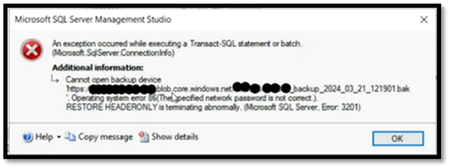
We will provide details about a workaround for resolving the "Operating System Error 86" encountered during database restoration from Azure Storage on SQL Managed Instance. In this scenario, the Storage Account was not behind firewall and the credential already had a valid SAS token.3.4KViews0likes1Comment
SCDPM workgroup(untrusted domain) machine system state backup can't restore application.
I've encountered an issue with DPM Workgroup untrusted machine backup. After backing up the system state, I couldn't locate my application. While I can see that all the programs are installed, I'm unable to find the shortcut to run the program. I'm uncertain whether a workgroup untrusted machine can successfully back up the application/program.648Views0likes1Comment