rest
25 Topics
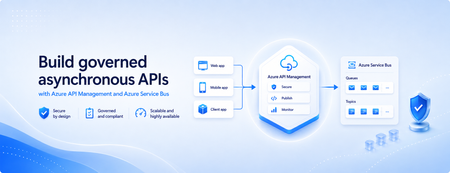
Build governed asynchronous APIs with Azure API Management and Azure Service Bus
Many applications use Azure Service Bus to decouple services, handle traffic spikes, and process workloads asynchronously. However, securely exposing messaging capabilities to applications, partners, and internal teams can require custom middleware or messaging-specific client implementations. Today, we’re announcing the general availability of native Azure Service Bus integration in Azure API Management. With the send-service-bus-message policy, developers can publish messages directly from an Azure API Management gateway to an Azure Service Bus queue or topic. This provides a secure and governed HTTP interface for Service Bus workloads—without requiring teams to build and operate a separate adapter service. Connect APIs directly to Azure Service Bus Azure API Management can act as the governed entry point for applications that submit work to Azure Service Bus. A client sends a standard HTTP request to API Management. The gateway can authenticate and authorize the caller, validate or transform the request, and apply policies such as rate limits and quotas before publishing the message to a Service Bus queue or topic. Once the message is accepted, API Management can immediately respond to the caller while downstream services process the message asynchronously. Alternatively, message publication can be added to an existing API flow while the request continues to its primary backend. This integration brings together API governance in Azure API Management and reliable asynchronous messaging in Azure Service Bus—without adding another intermediary service. Greater control over Service Bus messages As part of general availability, we’re introducing additional controls for building production messaging workflows. 1. Control how messages are processed Developers can configure the following Service Bus message properties directly in the policy: Message IDs to correlate messages and support duplicate-detection or idempotent processing patterns. Session IDs to group related messages for ordered or stateful processing. Time-to-live to prevent messages from being processed after they are no longer relevant. These values can be generated dynamically using API Management policy expressions, allowing them to reflect request IDs, customer identifiers, transactions, or other application context. 2. Capture the send result The response-variable-name attribute captures information about the Service Bus send operation in an API Management context variable. Subsequent policies can use the result to add correlation information to an API response, emit telemetry, record an operational event, or apply conditional logic when a message cannot be sent. 3. Choose how failures affect the API Different messaging scenarios require different failure behavior. When publishing the message is the primary purpose of an API, a send failure can stop policy execution and invoke the API Management error-handling path. When publishing is secondary—such as sending an audit event or initiating optional downstream processing—the ignore-error option can allow the primary API request to continue. Information about the send operation remains available through the response variable for logging or subsequent policy logic. 4. Secure access with managed identity API Management authenticates to Azure Service Bus using a Microsoft Entra managed identity. Customers can use the system-assigned identity of the API Management service or specify a user-assigned managed identity. The selected identity is granted the Azure Service Bus Data Sender role for the appropriate namespace, queue, or topic. This removes the need to store Service Bus connection strings or shared access keys in API policies and makes it easier to apply least-privilege access using Azure role-based access control. Send a message with an API Management policy The following example sends the incoming request body to an orders queue. It assigns a message ID and expiration time, captures the result of the send operation, and treats successful publication as a required part of the API request. <send-service-bus-message queue-name="orders" namespace="contoso-messaging.servicebus.windows.net" message-id="@(context.RequestId.ToString())" time-to-live="00:10:00" response-variable-name="serviceBusResult" ignore-error="false"> <payload> @(context.Request.Body.As<string>(preserveContent: true)) </payload> </send-service-bus-message> A session ID can also be added when related messages need to be grouped for ordered or stateful processing. For a fully asynchronous API, the policy can be followed by return-response so that API Management acknowledges the request immediately after sending the message. For an existing API, the request can continue to its configured backend after the message is published. Common integration scenarios Create asynchronous APIs: Accept an order, document, or processing request through an HTTP API, publish it to a queue, and return immediately while downstream services complete the work. Govern partner integrations: Provide partners with a managed API contract instead of exposing the underlying Service Bus namespace. API Management can authenticate callers, validate requests, and apply quotas before publishing messages. Publish business events: Publish events to a Service Bus topic so multiple subscriptions and downstream services can process them independently. Handle bursts of incoming traffic: Use Service Bus to buffer messages when incoming API traffic temporarily exceeds the rate at which downstream services can process requests. Add events to existing API operations: Publish audit, notification, analytics, or workflow events while allowing the primary API request to continue to its configured backend. Preserve workflow affinity: Use Service Bus sessions to group related messages for ordered or stateful processing based on a customer, transaction, order, or workflow identifier. Get started To send messages from Azure API Management to Azure Service Bus: Create or select an Azure Service Bus queue or topic. Enable a system-assigned or user-assigned managed identity on the API Management service. Assign the identity the Azure Service Bus Data Sender role. Add the send-service-bus-message policy to an API operation. Configure the message payload, processing properties, output variable, and failure behavior. With native Azure Service Bus integration, Azure API Management provides a secure and governed way to connect HTTP APIs with asynchronous messaging workloads—without requiring additional middleware. Learn more Send Service Bus message policy reference Send messages to Azure Service Bus from Azure API Management Azure API Management June 2026 release notes Azure Service Bus documentation940Views0likes0Comments
Clean up idle and always-failing Azure Logic App Consumption
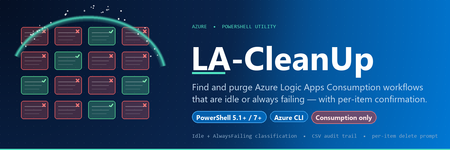
If you’ve inherited an Azure subscription that’s been collecting Logic Apps Consumption workflows for a couple of years, you already know the shape of the problem: dozens of TestLA, webhook-test-2, poc-for-jira-FINAL workflows in the portal, half of them still Enabled, half of them quietly failing every five minutes against a connection that was rotated last quarter. They’re cheap, but they’re not free — polling triggers keep firing, alert rules keep paging, abandoned Microsoft.Web/connections keep pinning permissions, and the portal’s workflow list keeps getting harder to read. Source + full docs: GitHub - dengyanbo/LA-CleanUp What it gives you Two color-coded tables — Idle (no runs in the last -IdleDays days; never-run workflows land here too) and AlwaysFailing (ran in the window, but not a single Succeeded ). An optional, timestamped CSV ( LogicAppCleanup-Candidates-<yyyyMMdd-HHmmss>.csv ) with a stable column set, easy to drop in a Teams channel or PR for owner review before you delete anything. A per-item y/N/q deletion loop — y deletes, N /Enter skips, q quits the loop without touching anything else. A final summary with scanned / idle / always-failing / deleted / skipped / failed counts. Server-side OData $filter on run history so the scan is fast even on a subscription with thousands of workflow runs in the window. Lazy State lookup (Enabled/Disabled) — only fetched for actual candidates, not for every healthy workflow. What it is not: it does not touch Logic Apps Standard ( Microsoft.Web/sites with kind=workflowapp ) — those store run history in storage tables and need a completely different tool (see LogicAppAdvancedTool). It also does not GC Microsoft.Web/connections , and it does not iterate subscriptions — one invocation, one subscription, deliberately. Quick start Prerequisites PowerShell 5.1+ (Windows PowerShell or PowerShell 7 — both fine). Azure CLI on PATH: https://aka.ms/azcli An interactive az login against the subscription that owns the Logic Apps. Logic App Contributor on the relevant RGs (or plain Contributor) is enough — you need list + delete on Microsoft.Logic/workflows , plus the ARM token your az login already grants. Get the script git clone https://github.com/dengyanbo/LA-CleanUp.git cd LA-CleanUp One-liner — defaults (90-day idle, 90-day failure window, current sub) .\Invoke-LogicAppCleanup.ps1 A typical run looks like this: [INFO] Active subscription: Contoso-Integration (1111-2222-...) [INFO] Signed in as : alice@contoso.com [INFO] Idle cutoff : runs older than 2026-02-20T03:08:00Z (>90 days) [INFO] Failure window : checking runs since 2026-02-20T03:08:00Z (last 90 days) [INFO] Listing Logic App (Consumption) workflows... [ OK ] Found 13 workflow(s). [ 1/13] order-processor (rg-integration) [ 2/13] webhook-test (MyTest) ... [ OK ] Scan complete. Idle: 9, AlwaysFailing: 1, Errors: 0 === Idle Logic Apps (no runs in last 90 days) === Name ResourceGroup Location State LastStatus LastRunTime ---- ------------- -------- ----- ---------- ----------- webhook-test MyTest australiaeast Enabled Never poc-for-jira rg-integration eastus Enabled Succeeded 2025-09-04T... ... === Always-Failing Logic Apps (no successful run in last 90 days) === Name ResourceGroup Location State LastStatus LastRunTime ---- ------------- -------- ----- ---------- ----------- nightly-export rg-integration eastus Enabled Failed 2026-05-20T... Export the 10 candidate(s) to CSV? (y/N): y [ OK ] CSV written: ...\LogicAppCleanup-Candidates-20260521-110800.csv Starting per-item deletion review. Answer y to delete, N (or Enter) to skip, q to quit. (1/10) Delete [Idle] webhook-test in MyTest ? (y/N/q): y [INFO] Deleting webhook-test ... [ OK ] Deleted: webhook-test (2/10) Delete [Idle] poc-for-jira in rg-integration ? (y/N/q): N Skipped. ... === Summary === Scanned : 13 Idle : 9 Always-failing : 1 Scan errors : 0 Deleted : 4 Skipped : 6 Delete failures : 0 That’s the whole workflow. The commands you’ll actually use 1. Scope to one resource group with a tighter idle threshold .\Invoke-LogicAppCleanup.ps1 -IdleDays 60 -ResourceGroup rg-integration 2. Only review always-failing apps (skip the idle pile) .\Invoke-LogicAppCleanup.ps1 -SkipIdle 3. Only review idle apps (skip always-failing) .\Invoke-LogicAppCleanup.ps1 -SkipAlwaysFailing 4. Incident-driven cleanup — tight window, focused RG .\Invoke-LogicAppCleanup.ps1 -IdleDays 30 -FailureWindowDays 7 ` -ResourceGroup rg-integration-prod This answers: “Within prod-integration, which workflows haven’t run in a month, and which have been failing all week?” 5. Dry-run (there is no -WhatIf ) The per-item y/N/q prompt is the safety model. To dry-run, just answer N to every prompt — or q at the first one. The CSV is still written before the deletion loop starts, so you walk away with the report and zero deletions. Parameters — cheat sheet Parameter Default Meaning -IdleDays 90 No runs in this many days ⇒ flagged Idle. Never-run workflows land here too. -FailureWindowDays 90 Ran in this window but no Succeeded ⇒ flagged AlwaysFailing. -ResourceGroup (none) Restrict the scan to a single RG. -SkipIdle switch Skip the Idle bucket entirely. -SkipAlwaysFailing switch Skip the AlwaysFailing bucket entirely. Why Invoke-RestMethod instead of az rest This is the gotcha I want every other Logic Apps scripter to know about, because it eats hours. The Logic Apps Management REST API is queried with OData — $top , $filter , the usual: GET /subscriptions/.../workflows/{wf}/runs ?api-version=2016-06-01 &$top=1 &$filter=startTime ge 2026-02-20T03:08:00Z and status eq 'Succeeded' On Windows PowerShell, az is a .cmd shim. The URL you pass to az rest --uri "..." is re-parsed by cmd.exe , and the & characters separating OData query parameters get interpreted as command separators. Symptoms range from '$filter' is not recognized as an internal or external command to silent wrong-page returns where the filter is just dropped and you get the most recent N runs instead. Quoting heroics — single quotes, double quotes, triple-escaped ^& — don’t fully solve it across PS 5.1 and PS 7. The fix is to skip az rest entirely. The script grabs an ARM token once with az account get-access-token , caches it on a script-scoped variable, refreshes it proactively at the 45-minute mark (ARM tokens last ~60), and calls Invoke-RestMethod directly: $tok = az account get-access-token --resource 'https://management.azure.com/' -o json | ConvertFrom-Json Invoke-RestMethod -Method Get -Uri $url ` -Headers @{ Authorization = "Bearer $($tok.accessToken)" } That bypasses cmd.exe entirely. Bonus: caching the token makes the script noticeably faster on subscriptions with many candidates, since we’re no longer shelling out to az for every REST call. Why $top=1 matters more than you’d think The script never pages run history. For each surviving workflow it asks two existence questions: ?api-version=2016-06-01&$top=1&$filter=startTime ge <cutoff> ?api-version=2016-06-01&$top=1&$filter=startTime ge <cutoff> and status eq 'Succeeded' If the first one returns zero rows ⇒ the workflow is Idle. Otherwise, if the second one returns zero rows ⇒ AlwaysFailing. Both queries are O(1) server-side because startTime is indexed and the response is capped at one row. Even on a chatty workflow with tens of thousands of runs in the window, the answer comes back in tens of milliseconds. This is also why the script can afford to be sequential per workflow — there’s no need for parallelism when each existence check is essentially free. Why “AlwaysFailing” is defined the way it is The bucket is “ran in the window, but not a single Succeeded run in the window” — not “all runs are Failed ”. That distinction matters: Workflows whose runs are Running , Waiting , or Cancelled but never Succeeded get classified as AlwaysFailing. That’s usually what you want — a workflow that has been “Waiting” for 30 days is just as broken as one that’s been failing for 30 days. Long-running workflows that legitimately haven’t completed yet look the same to the classifier. If you operate that kind of workflow, widen -FailureWindowDays so a slow but eventually-Succeeded run shows up in the window. The reported LastStatus column in the table is the status of the most recent run, so you can usually eyeball the difference between “failing” and “still running.” A field-tested rollout If you’re running this on a subscription you don’t fully own, this multi-pass rollout has worked well: Run with -SkipAlwaysFailing first. Idle workflows are the safe pile — if they haven’t done anything in 90+ days, deleting them rarely surprises anyone. Export the CSV. Don’t delete yet — answer q at the first delete prompt. Drop the CSV in a Teams channel or PR. Give owners a few days to object. Re-run and actually delete the ones nobody claimed. Then run with -SkipIdle for the AlwaysFailing bucket. These often have an owner who just hasn’t noticed the breakage — treat the first pass as a bug-bash list, not a delete list. Things to know before you run it Consumption only. Logic Apps Standard is out of scope — different model, different APIs, run history in storage tables. Use LogicAppAdvancedTool for those. No -Force , no -WhatIf . The per-item y/N/q prompt is the entire safety model. That’s deliberate — cleanup tools that take a -Force get used with -Force . One subscription per invocation. The script operates on whatever az account show returns. Use az account set --subscription <id> to switch deliberately. Microsoft.Web/connections are not deleted. API connections are typically shared; the script intentionally leaves them alone. GC them with a separate pass. Run history disappears with the workflow. Once you delete the Logic App, Azure removes its run history too. Export the CSV first if you want any record. Enabled vs. Disabled is reported, not enforced. A Disabled workflow can still be Idle. The script shows the state in the table so you can decide. Where to go next The GitHub repo has the full reference — parameter table, CSV schema, the “how it works” deep dive on lazy State fetch, bearer-token caching, server-side $filter , considerations and limitations, and the recommended rollout: 👉 https://github.com/dengyanbo/LA-CleanUp Issues and PRs welcome. A few directions on the roadmap: an optional disable-instead-of-delete mode for the first pass ( PATCH ...?api-version=2019-05-01 with properties.state = 'Disabled' ), a cross-subscription mode that iterates az account list with a confirmation per sub, and a companion API-connection GC script that uses Resource Graph to join connections against workflow definitions in one query.316Views0likes0Comments🚀 New in Azure API Management: MCP in v2 SKUs + external MCP-compliant server support
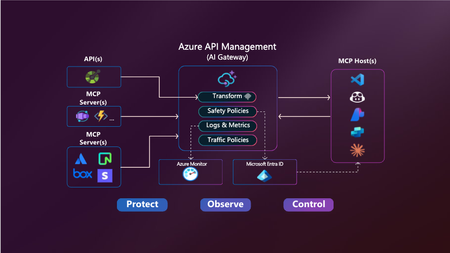
Your APIs are becoming tools. Your users are becoming agents. Your platform needs to adapt. Azure API Management is becoming the secure, scalable control plane for connecting agents, tools, and APIs — with governance built in. -------------------------------------------------------------------------------------------------------------------------------------------------------------------- Today, we’re announcing two major updates to bring the power of the Model Context Protocol (MCP) in Azure API Management to more environments and scenarios: MCP support in v2 SKUs — now in public preview Expose existing MCP-compliant servers through API Management These features make it easier than ever to connect APIs and agents with enterprise-grade control—without rewriting your backends. Why MCP? MCP is an open protocol that enables AI agents—like GitHub Copilot, ChatGPT, and Azure OpenAI—to discover and invoke APIs as tools. It turns traditional REST APIs into structured, secure tools that agents can call during execution — powering real-time, context-aware workflows. Why API Management for MCP? Azure API Management is the single, secure control plane for exposing and governing MCP capabilities — whether from your REST APIs, Azure-hosted services, or external MCP-compliant runtimes. With built-in support for: Security using OAuth 2.1, Microsoft Entra ID, API keys, IP filtering, and rate limiting. Outbound token injection via Credential Manager with policy-based routing. Monitoring and diagnostics using Azure Monitor, Logs, and Application Insights. Discovery and reuse with Azure API Center integration. Comprehensive policy engine for request/response transformation, caching, validation, header manipulation, throttling, and more. …you get end-to-end governance for both inbound and outbound agent interactions — with no new infrastructure or code rewrites. ✅ What’s New? 1. MCP support in v2 SKUs Previously available only in classic tiers (Basic, Standard, Premium), MCP support is now in public preview for v2 SKUs — Basic v2, Standard v2, and Premium v2 — with no pre-requisites or manual enablement required. You can now: Expose any REST API as an MCP server in v2 SKUs Protect it with Microsoft Entra ID, keys or tokens Register tools in Azure API Center 2. Expose existing MCP-compliant servers (pass-through scenario) Already using tools hosted in Logic Apps, Azure Functions, LangChain or custom runtimes? Now you can govern those external tool servers by exposing them through API Management. Use API Management to: Secure external MCP servers with OAuth, rate limits, and Credential Manager Monitor and log usage with Azure Monitor and Application Insights Unify discovery with internal tools via Azure API Center 🔗 You bring the tools. API Management brings the governance. 🧭 What’s Next We’re actively expanding MCP capabilities in API Management: Tool-level access policies for granular governance Support for MCP resources and prompts to expand beyond tools 📚 Get Started 📘 Expose APIs as MCP servers 🌐 Connect external MCP servers 🔐 Secure access to MCP servers 🔎 Discover tools in API Center Summary Azure API Management is your single control plane for agents, tools and APIs — whether you're building internal copilots or connecting external toolchains. This preview unlocks more flexibility, less friction, and a secure foundation for the next wave of agent-powered applications. No new infrastructure. Secure by default. Built for the future.4.1KViews2likes3Comments
Sending Messages to Confluent Cloud topic using Logic App
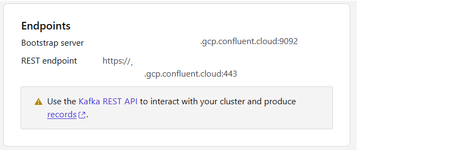
With Logic Apps, we can create workflows that connect to various services and systems, allowing us to automate tasks and streamline the business operations. In this blog post, we will explore how to use Azure Logic Apps to send messages to Kafka Confluent topic. Currently, there is no out-of-box Kafka Confluent connector in logic app. We found that Kafka Confluent provides REST API Confluent Cloud API Reference Documentation. This sample shows how to use HTTP action in workflow to call the Kafka Confluent API which produce record to topic. Prerequisites Azure Account and access to Azure Portal. Access to Confluent Cloud. Confluent Cloud is a fully managed pay-as-you-go Kafka service. You can get a free trial here. Setup the Kafka cluster and topic If you are new to Confluent Kafka, you can check their tutorials: Quick Start for Confluent Cloud | Confluent Documentation. Create a new Kafka cluster on Confluent Cloud. Navigate to the cluster and click Cluster settings. Note the REST endpoint. We will use following endpoint in this example: Create a new Kafka Topic called "LAtest" using the default topic settings. Create a new API Key and Secret. Navigate to the cluster and from the left menu, select Cluster Overview -> API Keys. Click Create key and follow the prompts to create a Global access API key. Note down the value of key and secret. To communicate with the REST API, we need to use this API key ID and corresponding secret to create the base64 encoded string in the authorization header that will be included in the REST calls. To learn more, see Authentication part which describes Cloud and Cluster API keys and base64 encoding. Create Logic App workflow To produce message to a topic, we need to provide JSON data and a base64-encoded API key and secret to the REST Produce endpoint: /kafka/v3/clusters/<cluster-id>/topics/<topic-name>/records. Below is a sample REST code snippet (Non-streaming mode): curl \ -X POST \ -H "Content-Type: application/json" \ -H "Authorization: Basic <base64-encoded API key and secret>" \ https://xxx.gcp.confluent.cloud:443/kafka/v3/clusters/lkc-mxpx52/topics/LAtest/records \ -d '{"value":{"type":"JSON","data":"Hello World!"}}' In the Logic App workflow, we can add a "When a HTTP request is received trigger" to fire the workflow for test. Then we add a HTTP action with following configurations: Run the workflow We can send the body message to target topic successfully. View the Messages tab of Latest topic on the Confluent Cloud UI:867Views2likes0Comments
Deploy Logic App Standard with Application Routing Feature Based on Terraform and Azure Pipeline
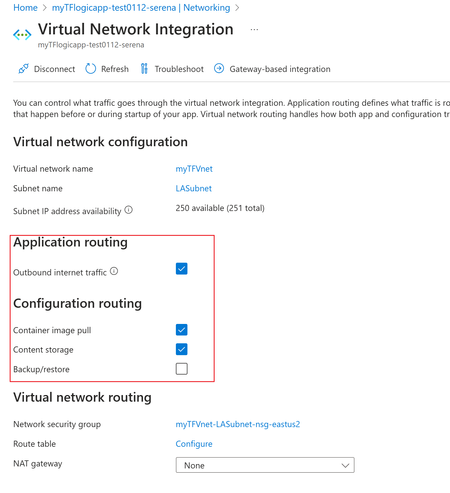
Due to Terraform's cross-cloud compatibility, automation, and efficient execution, among many other advantages, more and more customers use it to deploy integration solutions based on Azure Logic App standard. However, despite the extensive contributions from the community and individual contributors providing Terraform templates and supporting VNET integration solutions for Logic App standards, there are still very few terraform templates covering the "Application routing" and "Configuration routing" settings: This article shared a mature plan to deploy logic app standard then set the mentioned routing features automatically. It's based on Terraform template and Azure DevOps Pipeline. Code Reference: https://github.com/serenaliqing/LAStandardTerraformDeployment/tree/main/Terraform-Deployment-Demo About Terraform Template: Please kindly find the the template in directory Terraform/LAStandard.tf, it includes the terraform definitions for logic app standard, the backend storage account, application insights, virtual network and VNET integration settings. About VNET Routing Configuration Because there is no terraform examples available for VNET routing, we add VNET Settings by invoking "Patch" request to ARM RESTful API endpoint for interacting with logic app standard site: https://management.azure.com/subscriptions/<Your subscription id>/resourceGroups/$(deployRG)/providers/Microsoft.Web/sites/$(deployLA)?api-version=2022-03-01 We figured out the required request body in network trace as the following format: { "properties": { "vnetContentShareEnabled": false, "vnetImagePullEnabled": true, "vnetRouteAllEnabled": false, "vnetBackupRestoreEnabled": false } } Please find the YAML file in TerraformPipeline/logicappstandard-terraform.yml. Within the Yaml file , the "AzureCLI@2" task is used to send the request by Azure CLI command. task to send the patch request. Special Tips: To use the terraform task during Azure pipeline run, it's required to install terraform extension (which you can find in the following link): https://marketplace.visualstudio.com/items?itemName=ms-devlabs.custom-terraform-tasks Terraform tasks: Reference: Deploy Logic App Standard with Terraform and Azure DevOps pipelines https://registry.terraform.io/providers/hashicorp/azurerm/latest/docs/resources/app_service https://azure.microsoft.com/en-us/products/devops/pipelines605Views2likes0Comments
Unable to attach binary files for Azure DevOps REST API
I was trying to upload binary files using Azure DevOps REST API service. reference: https://docs.microsoft.com/en-us/rest/api/azure/devops/wit/attachments/create?view=azure-devops-rest-6.0#upload-a-binary-file I was trying to upload "ATTACHMENT_TEST.zip" ref : https://drive.google.com/file/d/15Y3IS0BWoCaMo7kjt6t1ZCdHNH_PGT65/view?usp=sharing Converted ATTACHMENT_TEST.zip to base64 UEsDBBQAAAAAALZIcVSXxhNiBAAAAAQAAAAIAAAAVEVTVC50eHRTSUREUEsBAhQAFAAAAAAAtkhxVJfGE2IEAAAABAAAAAgAAAAAAAAAAQAgAAAAAAAAAFRFU1QudHh0UEsFBgAAAAABAAEANgAAACoAAAAAAA== Tried to add base64 as json in payload. The URL produced by the output is giving me invalid zip Code import requests import json url = "https://dev.azure.com/{Organization}/{ProjectName}/_apis/wit/attachments?uploadType=Simple&api-version=6.0&fileName=app.zip" payload = json.dumps("[UEsDBBQAAAAAALZIcVSXxhNiBAAAAAQAAAAIAAAAVEVTVC50eHRTSUREUEsBAhQAFAAAAAAAtkhxVJfGE2IEAAAABAAAAAgAAAAAAAAAAQAgAAAAAAAAAFRFU1QudHh0UEsFBgAAAAABAAEANgAAACoAAAAAAA==]") headers = { 'Content-Type': 'application/json', 'Authorization': 'Basic $AuthKey', 'Cookie': 'VstsSession=%7B%22PersistentSessionId%22%3A%22fe6c3302-6671-4bfc-9cbe-0d33f145a31f%22%2C%22PendingAuthenticationSessionId%22%3A%2200000000-0000-0000-0000-000000000000%22%2C%22CurrentAuthenticationSessionId%22%3A%2200000000-0000-0000-0000-000000000000%22%2C%22SignInState%22%3A%7B%7D%7D' } response = requests.request("POST", url, headers=headers, data=payload) print(response.text)1.7KViews0likes0CommentsGetting News articles using REST API
Hello, We have a site for newsroom, where we are displaying all news articles. I need to create a rest API to read this information and display it on our REACT based app. I am unable to get hold of a URL that would provider me with this Information. I have tried following URLS but I am not getting the desired results https://<tenant>.sharepoint.com/sites/iNewsroom/_api/Web/Lists/getByTitle('Site%20Pages')/items?$select=* https://intermountainhealth.sharepoint.com/_api/search/query?querytext=%27IsDocument:True%20AND%20FileExtension:aspx%20AND%20PromotedState:2%27 https://<tenant>.sharepoint.com/search/_api/search/query?querytext=%27IsDocument:True%20AND%20FileExtension:aspx%20AND%20PromotedState:2%27\ Is there any other URL I can try to get the information? The newsroom site has a few sitep805Views0likes0Comments
Query web API and return JSON data
curl -X GET "https://api.server.com/v1/markets/quotes?symbols=AAPL,VXX190517P00016000&greeks=false" \ -H 'Authorization: Bearer <TOKEN>' \ -H 'Accept: application/json' How do i run this Rest Json API in sql server directly ? I believe its a combination of using he below, but i could not figure out the last syntax. sp_OACreate, sp_OAMethod sp_OAGetProperty Python version is here : # Version 3.6.1 import requests response = requests.get('https://api.server.com/v1/markets/quotes', params={'symbols': 'AAPL,VXX190517P00016000', 'greeks': 'false'}, headers={'Authorization': 'Bearer <TOKEN>', 'Accept': 'application/json'} ) json_response = response.json() print(response.status_code) print(json_response)1.2KViews0likes1Comment