resiliency
9 Topics
Announcing Azure Infrastructure Resiliency Manager Public Preview
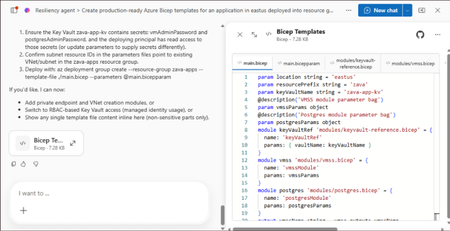
At Microsoft Build 2026, we are thrilled to announce that Azure Infrastructure Resiliency Manager is now available in public preview, open to all Azure customers. Azure Infrastructure Resiliency Manager is not a replacement for individual Azure resiliency features; it is the unifying layer that connects them into a coherent, goal-driven workflow. It leverages and complements Availability Zones, Azure Advisor, Azure Chaos Studio, Azure Monitor, and Azure Copilot, adding purposeful orchestration that turns isolated capabilities into a complete resiliency strategy. The preview already covers a broad range of Azure resource types and zone-redundant configurations, from virtual machines and databases to AKS clusters and networking with continued expansion planned. The new platform is built on a foundational belief: achieving application resilience is a continuous journey, not a one-time configuration task. That journey is organized into three actionable phases: Start Resilient, Get Resilient, and Stay Resilient. Each phase delivers measurable customer value such as reduced downtime risk, faster recovery, and greater operational confidence. Start resilient: Embedding resiliency from day one Starting resilient means treating resiliency as a fundamental architectural requirement, not an afterthought. Azure Infrastructure Resiliency Manager makes it straightforward to design zone-resilient applications from the outset, eliminating costly retrofits and reducing risk before your first deployment. Resiliency Agent: Your AI-powered architecture advisor The standout capability in this preview is the Resiliency Agent, a conversational, AI-powered assistant embedded directly in the Azure Portal. Designed for architects and developers, the Resiliency Agent allows teams to validate and refine resiliency strategies using plain language. For example, you might enter a prompt such as "I'm designing a three-tier web app with VMs, a Flexible PostgreSQL database, and a Standard Load Balancer" and ask the agent what zone-resiliency requirements apply. The Resiliency Agent analyzes your plan, identifies single points of failure, and recommends specific changes: enabling zone redundancy for the database, deploying VMs across zones, or upgrading to zone-redundant load balancers. It delivers a structured, per-resource summary that makes the path to resiliency explicit and actionable. Infrastructure-as-Code generation and validation Beyond design guidance, Infrastructure Resiliency Manager accelerates implementation. You can ask the Resiliency Agent to generate Infrastructure-as-Code (IaC) templates (ARM, Bicep, or Terraform) with all resiliency configurations pre-built and ready to deploy. A generated Bicep template, for example, automatically includes zone-redundant settings for databases, VMs, and load balancers aligned to your stated goals. The agent also validates existing IaC templates: upload a template and receive a natural language assessment of resiliency gaps, complete with targeted suggestions and code snippets to close them. This eliminates manual review overhead and ensures every new deployment starts with a resilient foundation by embedding resiliency into the design and deployment lifecycle from day one, organizations avoid expensive redesigns, accelerate time-to-market, and bring new services to production already meeting high-availability standards. Get resilient: Closing gaps in existing applications Most Azure customers have workloads built over months or years that may not fully meet today's resiliency requirements. Infrastructure Resiliency Manager delivers a centralized, goal-driven view of your current environment's resilience posture, along with prioritized, actionable recommendations to close every gap. Goal-driven resiliency posture Define what constitutes your application by grouping resources across regions, subscriptions, or resource groups, including tag-based grouping, using Service Groups. Once your application boundary is established, assign a resiliency goal: for example, zone-failure tolerance for all components, or specific data replication requirements for critical services. The platform assesses every resource against that goal and presents a clear, single-pane-of-glass resiliency posture showing which resources meet the goal, which are non-resilient, and which remain unevaluated. This goal-driven model ensures that all subsequent guidance is precisely calibrated to your target state, not generic best practices. Actionable, prioritized recommendations For every resource that falls short of the defined goal, Infrastructure Resiliency Manager generates targeted remediation recommendations powered by Azure Advisor. If a virtual machine lacks zone redundancy, the platform recommends converting it to an availability zone deployment. If a database is not zone-redundant, the recommendation specifies exactly how to enable it. Critically, every recommendation includes contextual decision-making information: impacted resources, implementation steps, and qualitative cost indicators (High, Medium, Low) that flag whether a fix requires additional service spend, downtime, or redeployment. This allows engineering teams to plan remediation in a business-informed, prioritized manner. Looking ahead, the platform will also integrate application health with infrastructure health, correlating Azure Monitor SLIs and Azure Health Model insights to surface resiliency gaps with even greater precision. Guided remediation with the resiliency agent Azure Advisor identifies resiliency gaps and surfaces prioritized recommendations. Infrastructure Resiliency Manager builds on this by making those recommendations actionable. Instead of stopping at insights, the platform provides guided execution. Each recommendation includes step-by-step portal flows, dependencies, and readiness checks required for remediation. The Resiliency Agent acts as the interactive layer on top, helping you interpret and act on these recommendations in context. For example, you can ask whether an App Service can be moved to zone-redundant storage, what downtime to expect, or what prerequisites are required and receive clear, workload-aware answers tailored to their environment. On request, the agent can generate remediation scripts or IaC snippets to implement specific changes, such as validating an existing Terraform template against Azure resiliency best practices. Importantly, the agent never makes changes autonomously: it provides information and code, while you retain full control over execution. This human-in-the-loop model accelerates remediation without sacrificing governance. The result: a curated, goal-oriented to-do list that replaces generic advice with targeted action, weighted by cost and feasibility - giving engineering leaders clear visibility into which investments will yield the greatest resilience gains. Stay resilient: Continuous validation and recovery Readiness Resilience is not just a configuration milestone; it is an ongoing operational discipline. The "Stay Resilient" phase ensures the resilience you've built performs under pressure and that your teams are prepared to respond when real incidents occur. Azure Infrastructure Resiliency Manager delivers resiliency drills and recovery orchestration to support continuous readiness. Resiliency drills enabled by Azure Chaos Studio A highlight of this public preview is the introduction of availability zone failure drills, enabled by Azure Chaos Studio. These drills simulate zone outages for your application in a controlled, safe environment: shutting down VMs in a target availability zone, forcing failover for zone-redundant databases, or stopping AKS node pools. Every fault action is based on Azure-recommended patterns for each supported resource type, providing a realistic approximation of an actual zone failure. Because Infrastructure Resiliency Manager understands which resources are intended to be zone-resilient, it automatically determines which fault actions to apply, eliminating manual configuration. For scenarios not covered out of the box, custom fault logic via Azure Automation runbooks is supported, providing the flexibility required for complex environments. Recovery orchestration Resiliency drills in the platform go beyond fault injection. It integrates with recovery plan to orchestrate the complete recovery sequence automatically after injecting faults: fault injection → failover → reprotection → failback. This full-cycle simulation measures the maximum potential downtime your application could experience during a zone outage and surfaces any recovery steps that did not execute as expected. Real-time health monitoring and drill insights Throughout each drill, the Infrastructure Resiliency Manager provides live health monitoring powered by Azure Monitor. A built-in metrics dashboard tracks each resource's health in real time revealing whether your application remains available and how performance holds under simulated stress. This immediate feedback surfaces resilience gaps that may not have been visible through static analysis. After each drill, the platform logs the results along with team notes and attestations, building a historical record of all resilience tests. Over time, this record demonstrates measurable improvement and supports compliance with organizational and regulatory resiliency requirements. "Stay Resilient" converts assumptions into evidence. When an actual zone outage occurs, your teams will not be executing a failover for the first time; they would have rehearsed it. The result is a culture of proactive resilience, and the organizational confidence that your systems will deliver on their availability commitments. Get started with the public preview Starting today, the public preview of Azure Infrastructure Resiliency Manager is open to all Azure customers. Access the new platform through the Azure Portal by searching for "Resiliency". We encourage you to evaluate it against a test application or a production workload to gain immediate visibility into your current resiliency posture. To get the most from Infrastructure Resiliency Manager, we recommend these three starting actions: Define a resiliency goal for a critical application and review the posture insights the platform surfaces; you may uncover gaps that were previously invisible. Engage the Resiliency Agent to tackle a few recommendations and experience firsthand how AI-guided remediation accelerates your team's workflow. Run a zone-down drill in a non-production environment to validate your failover and recovery processes under realistic conditions. We believe this holistic approach will help organizations achieve a new level of operational excellence, making resiliency actionable, measurable, and deeply embedded in cloud practices. As Infrastructure Resiliency Manager moves toward general availability, we will continue incorporating your feedback and expanding capabilities to meet the demands of real-world cloud architectures. Azure Infrastructure Resiliency Manager gives you the tools to reduce downtime risk, gain clarity over your resiliency posture, and build genuine readiness for the unexpected. Join the public preview today and take the next step toward applications that don't just survive disruptions; they thrive through them. Resources Azure Infrastructure Resiliency Manager — Overview Get Started with Service Groups — Microsoft Learn Introduction to Azure Advisor — Microsoft Learn What is Azure Chaos Studio? — Microsoft Learn What's New in Azure Monitor — Microsoft Learn Modern Azure Resilience with Mark Russinovich — Tech Community3.2KViews8likes0CommentsTech Accelerator: Mastering Azure and AI adoption
Join us to learn about the essential guidance, resources, products and tooling you need to accelerate your next Azure and AI project or enhance your existing Azure deployments. Get in-depth technical guidance from Microsoft experts to enhance the reliability, security and ongoing performance of your Azure workloads. Learn more about AMD products and solutions to accelerate cloud adoption. Now on demand! Best practices for secure and reliable Azure projects Govern, manage and secure your AI deployments How to run a successful Azure migration project Advance cloud infrastructure: Essentials with AMD on Azure Essentials to build and modernize AI applications on Azure Proactively design, deploy & monitor resilient Azure workloads Cloud platform security in an evolving threat landscape6.4KViews7likes4CommentsAzure Front Door: Resiliency Series – Part 3: Tenant isolation
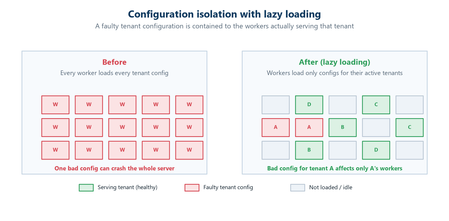
Abhishek Tiwari, Vice President of Engineering, Azure Networking Amit Srivastava, Partner Director of PM, Azure Networking Varun Chawla, Partner Director of Engineering, Azure Networking Azure Front Door serves hundreds of thousands of tenants from hundreds of edge locations, densely sharing the globally distributed edge fleet. That density is exactly what allows us to deliver global scale, performance, and cost efficiency. It also means that, without strong isolation, a single tenant’s incompatible configuration or anomalous traffic can, in the worst case, affect many other tenants. The October 2025 incidents reinforced how important it is to contain this class of risk. Our goal for this tenant isolation is simple to state and hard to achieve: no single tenant’s configuration or traffic should be able to impact any other tenant. In Part 1 of our three part mini blog series, we outlined our four‑pillar strategy for improving the resiliency of Azure Front Door: configuration resiliency, data plane resiliency, tenant isolation, and accelerated Recovery Time Objective (RTO). Part 1 detailed how we would make configuration propagation safer and how the data plane keeps serving from a ‘last‑known‑good’ (LKG) configuration, even if an incompatible configuration change is propagated to the data plane. Part 2 turned to recovery, showing how we bring the system back to full operation in an accelerated, predictable, and in a bounded timeframe. In this final part, we turn to the tenant isolation pillar that ensures that any single tenant configuration or traffic issues are limited in scope to that tenant alone and do not impact other tenants. We will also show how Azure Front Door achieves single-tenant containment through configuration isolation, lazy loading, and a micro-cellular layered ingress-sharding architecture. Repair status: all outstanding items now complete Before we dive into tenant isolation, here is a final update on the overall repair items from the two October 2025 incidents (you can review the details in our Azure Incident Retrospective sessions for the October 9th and October 29th incidents). We are pleased to report that all outstanding work across every pillar is now complete and fully deployed in production – including the tenant isolation work described in this post. With these safeguards in place, we have also returned configuration propagation latency to pre‑incident levels while keeping platform stability our top priority. In the table below, “Completed” means broadly deployed in production. Learning category Goal Repairs Status Safe customer configuration deployment Incompatible configuration never propagates beyond ‘EUAP or canary regions’ Control plane and data plane defect fixes; forced synchronous configuration processing; additional stages with extended bake time; early detection of crash state Completed Data plane resiliency Configuration processing cannot impact data plane availability Manage data‑plane lifecycle to prevent outages caused by configuration‑processing defects; isolated work‑process in every data plane server to process and load the configuration Completed 100% Azure Front Door resiliency posture for Microsoft internal services Microsoft operates an isolated, independent Active/Active fleet with automatic failover for critical Azure services Phase 1: onboarded critical services batch impacted on Oct 29th outage running on a day‑old configuration; Phase 2: automation & hardening of operations, auto‑failover and self‑management of onboarding for additional services Completed Recovery improvements Data plane crash recovery in under 10 minutes Data plane boot‑up time optimized via local cache; recovery time accelerated to under 10 minutes Completed Tenant isolation No configuration or traffic regression can impact other tenants Micro‑cellular Azure Front Door with ingress layered shards Completed Why isolation at edge scale is deceptively hard Traditional isolation techniques such as dedicating separate hardware to each tenant or running every tenant inside its own virtual machine are impractical at the edge. Edge sites are constrained on space, power, and capacity. The entire premise of a modern, multi-tenant application delivery platform is that any tenant can be served from any site closest to the user. We cannot simply partition hundreds of thousands of tenants onto dedicated machines without giving up either proximity, scale, or the efficiency that make the edge fast and cost efficient. Isolation therefore, must be achieved in software, inside a multi-tenant fleet. What we already do today Azure Front Door already includes several layers of tenant isolation and partitioning. However, the incidents in October clearly highlighted that these techniques were not enough. Prior to the incidents, our protection mechanisms included: Infrastructure partitioning. Edge sites were organized into physically isolated primary and fallback traffic rings. Noisy‑neighbor protection. Fair‑share resource allocation, rate limiting, and anomaly-based load protection kept any single tenant from monopolizing shared resources such as CPU, memory, or network bandwidth on an Azure Front Door server. Circuit breakers. Circuit breakers shed costly work first and can disable a risky per‑tenant feature before it exhausts shared resources on a server. Real‑time crash protection. A crash‑analysis system correlates crash signatures across machines and can pinpoint and block crash patterns caused by tenant IPs or traffic patterns. While these protections are valuable, many of them are reactive and proved insufficient during the October incidents. The next generation of isolation makes single‑tenant containment a fundamental part of the platform which governs how configurations are loaded, and how traffic is served. Configuration isolation: loading only what is needed Part 2 introduced ‘lazy loading’ as a recovery optimization technique. It is also an important configuration‑isolation mechanism. Historically, every worker on every edge server had to be ready to serve any tenant, which meant each worker loaded a large set of tenant configurations. A single incompatible configuration could therefore ripple across many workers. With lazy loading, a worker loads a tenant’s configuration and its TLS certificates only when it actually receives traffic for that tenant. The practical consequence for isolation is powerful: a faulty configuration can only affect the workers that have loaded that specific tenant, never the entire server or fleet. Combined with per‑tenant validation on load, and the Food Taster safeguard from Part 1 (a sacrificial process that pretests every configuration change in isolation), configuration problems are caught early and contained to the smallest possible footprint. Figure 1: With lazy loading, an incompatible configuration is contained to the workers serving that tenant, instead of poisoning the whole server. Tenant isolation: a micro-cellular, layered ingress sharding architecture Configuration isolation limits the blast radius of an incompatible configuration. Traffic isolation addresses the other half of the problem: a tenant whose anomalous traffic incident, like a sudden surge, a pathological request pattern, or malicious activity, could degrade a shared worker. Our approach is a micro‑cellular architecture that combines multiple concepts working together. Worker‑process isolation. Each edge server already runs many independent worker processes. Instead of letting every worker serve every tenant, we assign tenants to specific groups of workers. Those worker group (shards) become the unit of isolation: if a tenant destabilizes its shard, the impact is contained to that shard’s workers while the rest of the server keeps serving normally. Ingress sharding. Rather than a handful of fixed shards, we compose shards from overlapping subsets of a server’s workers. Even a modest number of workers can be combined into an enormous number of distinct, overlapping shards – giving us a very large number of fine‑grained fault domains without dedicating hardware to every tenant. Figure 2: Tenants are randomly assigned to different shards on each server (layer). Even when a good tenant shares the noisy tenant’s shard on one layer, routing steers its traffic to healthy shards on the others. Multi‑layer ingress sharding. This is where ‘layered’ comes in. Each edge server is treated as an independent layer, and each tenant is assigned to a different, randomly chosen shard on every server. Because assignments are independent from one server to the next, two tenants that happen to share a shard on one server are extremely unlikely to share a shard again on another server. The chance of any good tenant repeatedly colliding with a noisy tenant across many servers becomes vanishingly small. Intelligent ingress routing. Tying it together is a routing layer that terminates each incoming connection, identifies the tenant, and steers the request to that tenant’s assigned, healthy shard. If a shard is unhealthy or saturated, traffic is directed to the tenant’s healthy shards on other layers. Figure 3: Intelligent Ingress Routing The combined effect is that when a noisy tenant overwhelms or crashes its shard on one server, only that shard is affected. Because every other tenant is spread across a different, randomized set of shards, they continue to find healthy paths, and the routing layer moves their traffic accordingly. A worst-case availability problem is downgraded to, at most, a small and redistributable capacity problem, that the routing layer smooths over. An in-depth technical analysis of layered ingress sharding is available here for reference. Shrinking the blast radius Taken together, these mechanisms fundamentally change the shape of failure. In a uniform, fully shared fleet, an incompatible tenant can, in the worst case, affect a large share of the tenants on a machine, in an edge location, or beyond. With configuration isolation and layered ingress sharding, the same failure is confined to a subset of workers serving the offending tenant. Our target for this tenant isolation pillar is effectively single‑tenant containment: a configuration or traffic anomaly caused by one tenant should never cause issues to any other tenants. Figure 4: From a shared fleet where a single tenant can affect many, to micro‑cellular shards that confine impact to the offending tenant. Validating isolation in practice As with our recovery work, we don’t simply design these boundaries and assume they hold, we test them. Through deliberate fault‑injections, we have pushed noisy and faulty tenants into the system and confirmed that impact stayed contained to the offending shard, that healthy tenants kept serving, and that the routing layer steered around unhealthy shards as intended. This turns isolation from a design claim into a well-drilled, and repeatable outcome. Closing This post concludes our three-part mini blog series on Azure Front Door resiliency. We have shared how we are making configuration propagation safer (Part 1), recovering faster when failures do occur (Part 2), and containing the blast radius stemming from any single tenant through configuration isolation and a micro‑cellular, layered‑sharding architecture (Part 3). Resiliency, however, is not a project with an end date. It is an ongoing commitment. While this series concludes the blog series of our response to the October 2025 incidents, our investments in Azure Front Door’s resiliency, isolation, and recovery will continue. As we make further improvements, we will keep sharing them with you. We deeply value our customers’ trust in Azure Front Door. We remain committed to exceeding expectations for security, reliability, and transparency.1.6KViews4likes0CommentsAzure Front Door edge actions: programmable compute for a secure, resilient, AI-ready edge
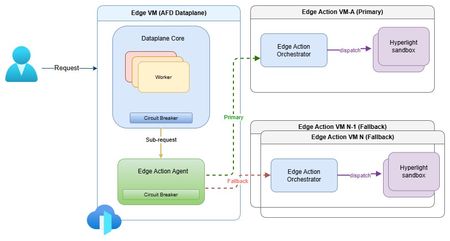
The need for secure edge programmability As modern web applications increasingly move decision-making closer to users, programmable compute at the edge is becoming a foundational capability for delivering low-latency, personalized, and intelligent experiences. Azure Front Door edge actions introduces lightweight customer-defined logic that executes close to users at Microsoft's global edge (https://aka.ms/edgeactionsblog). The engineering challenge extends well beyond moving code closer to the request path. It is about enabling edge programmability while preserving the core guarantees customers expect from a global edge platform: hyperscale performance and acceleration, strong security and tenant isolation, resiliency, and fast, controlled recovery. That sets up a much higher engineering bar than simply bringing a serverless runtime to the edge. Programmability introduces customer code, new execution paths, runtime dependencies, and additional failure modes directly into the critical request path. Architecture therefore must make flexibility a first-class capability without compromising the operational characteristics of a hyperscale edge platform. Preserving performance at hyperscale The first architectural challenge was preserving the performance characteristics of Azure Front Door while introducing programmable execution into the request path. Every additional execution step has the potential to increase latency, amplify failures, or reduce throughput at global scale. Edge actions was therefore designed to add programmability without changing the fundamental performance profile customers already expect from Azure Front Door. At request time, Azure Front Door evaluates the request, determines whether an edge action should be executed based on the associated rule, invokes the edge actions runtime, and applies the result inline. Because the runtime sits directly in the request path, every design decision was guided by a common principle: keep execution local whenever possible, bound latency when dependencies degrade, and ensure optional compute never becomes a platform-wide latency amplifier. Performance design principles Node-local execution keeps request processing on the same machine whenever possible, minimizing cross-node communications and preserving low latency. Minimized inter-node hops keep the common path compact while still enabling cluster-level fallback when local dependencies deteriorate. Connection reuse through Edge Action Agent reduces gRPC invocation overhead and improves hot path efficiency. Lightweight Hyperlight isolation provides strong tenant isolation with an execution model suitable for latency-sensitive edge workloads. Fast-fail and circuit-breaker protects latency by bounding waits on degraded dependencies and preventing cascading pressure. Together, these architectural choices introduce programmable compute without turning the Azure Front Door data plane into a distributed orchestration layer. The hot path remains local, predictable, and bounded, with fallback used only when necessary to preserve performance across the global edge. Security and tenant isolation by design Running customer-defined code on a shared global edge fundamentally changes the security model. Unlike traditional request processing, programmable execution introduces untrusted customer code directly into the request path, making strong isolation a foundational architectural requirement rather than an operational safeguard. For Azure Front Door edge actions, every execution is designed to run within a dedicated Hyperlight micro-VM, providing hardware-enforced isolation between customer workloads, the Azure Front Door data plane, and the underlying host environment. Security design principles Hypervisor-backed isolation ensures customer code executes within dedicated Hyperlight micro-VM boundaries rather than shared execution environments. Data plane separation isolates edge actions execution from Azure Front Door's core traffic-processing path. Minimal host surface area reduces the attack surface and limits privileged interactions. Restricted execution context exposes only the request information required to process a request. Reduced operational blast radius helps contain compromised or misbehaving workloads. These architectural boundaries extend beyond workload isolation. Azure Front Door's data plane remains physically separated from the edge actions orchestration service, while each execution receives only the minimum context required to perform its task. This defense-in-depth approach reduces both security risk and operational blast radius without compromising performance. Hyperlight: Security without sacrificing performance A key differentiator of Azure Front Door edge actions is its use of Hyperlight micro-VMs to provide hardware-backed isolation without introducing the traditional performance penalties associated with virtual machines. Hyperlight was designed to make VM-level protection practical for high-throughput function execution, enabling strong tenant isolation while remaining suitable for latency-sensitive edge workloads. Edge actions builds this foundation through the edge action orchestrator, which maintains a pool of warm Hyperlight sandboxes ready to serve requests. By reusing pre-initialized sandboxes instead of creating a new execution environment for every request, edge actions minimizes initialization overhead, reduces request latency, and sustains higher throughput under load. The result is a security model based on VM isolation that remains compatible with the performance expectations of a hyperscale edge platform. Critically, performance optimizations do not weaken isolation guarantees. After each execution, sandbox state is cleaned before reuse, ensuring that subsequent invocations cannot access data from prior executions while preserving the efficiency benefits of warm sandboxing. In internal benchmarking, lightweight edge actions executed in less than 2 ms inside Hyperlight, with approximately 1.27 ms of total sandbox overhead, demonstrating that strong isolation and high-performance edge execution can coexist. Security enables resiliency Security and resiliency are closely related architectural goals. Isolation helps contain malformed inputs, unexpected behavior, and execution failures, preventing individual workloads from affecting the broader platform. In a multitenant edge service, isolation is not only a security requirement; it is also a key resiliency mechanism. Resiliency built into the platform Strong isolation is not only a security property, but also a foundational resiliency mechanism. By containing malformed inputs, unexpected behavior, and execution failures within dedicated execution boundaries, the platform prevents individual workloads from affecting neighboring tenants or the broader service. At hyperscale, robust isolation is essential for maintaining customer trust and predictable platform reliability. Building on that foundation, Azure Front Door edge actions was designed around a simple operating principle: failures are inevitable, but their impact must be predictable, bounded, and recoverable. Because programmable compute introduces additional execution paths and runtime dependencies into the request path, resiliency must be built into the control points that determine when to execute, stop waiting, or fall back. The platform incorporates lessons learned from operating Azure services at a global scale, with a focus on minimizing blast radius, maintaining service continuity, and enabling controlled recovery when dependencies fail, overload, or time out. Resiliency principles Bound failure impact through isolation and containment. Recover predictably using health-aware routing and fallback paths. Protect customer availability first through graceful degradation. Fail fast rather than fail slowly to avoid latency amplification. Continuously validate assumptions through Game Days and fault injections. These principles translate into request-time behavior through deadlines, circuit breakers, fail-open behavior, and health-based fallback. Together, they ensure that optional programmable execution enhances application capabilities without compromising the stability of Azure Front Door's core request-processing pipeline. Continuous validation of resiliency assumptions Resilient architecture is credible only when validation becomes part of the operating model. For edge actions, Game Days and Fault Injections provide recurring opportunities to verify that architectural assumptions continue to hold under production-like stress. Validation includes chaos and failure injections, timeout and dependency-loss exercises, overload and queue-growth scenarios, mixed-workload testing, and interface fuzzing. These exercises answer practical production questions: Does fail-open behavior protect the request path? Do circuit breakers engage early enough? Does fallback routing preserve service continuity? Do malformed inputs remain contained? Repeated validation also strengthens operations. Detection improves, mitigation becomes more predictable, and recovery evolves from architectural intent into demonstrated operational capability. Built for future intelligent & modern workloads Edge actions is designed for lightweight programmable execution today, but the underlying architecture is intended to support increasingly intelligent decision-making over time. The engineering requirement remains unchanged: future intelligence workloads must operate within the same architectural constraints that govern today's request processing - bounded execution, strong isolation, predictable fallback, and protection of the common request path. Architectural implications for intelligence workloads Real-time AI inferencing for request classification and policy evaluation. Intelligent bot, abuse, and fraud detection closer to users. AI-assisted origin selection and traffic-routing decisions. Application-specific SLM-powered decision making at the edge. In that model, the objective is not simply to introduce more intelligence at the edge, but to ensure that intelligence inherits the same platform guarantees as every other component of the request path. Closing thoughts Programmable edge execution is becoming a foundational capability for modern distributed applications. The engineering challenge, however, extends far beyond running customer code closer to users. It is about preserving the system properties that customers already depend on while introducing a new execution surface into the critical request path. Edge actions demonstrates that edge programmability, performance, security, tenant isolation, and resiliency are not independent design goals - they are a single architectural problem that must be solved together. By keeping the common path protected, failures bounded, tenants strongly isolated, and recovery predictable, Azure Front Door edge actions extends the platform's capabilities without compromising the engineering principles that underpin a global hyperscale edge service. Learn more Introducing Hyperlight Edge actions samples: JavaScript request context481Views1like0CommentsOn-Demand Backups in Azure Database for PostgreSQL – Flexible Server Now Generally Available
We’re excited to announce the General Availability of On-Demand Backups in Azure Database for PostgreSQL – Flexible Server! In today’s dynamic data management landscape, ensuring the protection and recoverability of your databases is essential. Azure Database for PostgreSQL – Flexible Server streamlines this responsibility through comprehensive backup management, including automated, scheduled storage volume snapshots encompassing the entire database instance and all associated transaction logs. With the introduction of On-demand backups you now have the flexibility to initiate backups at any time, supplementing the existing scheduled backups. This capability is particularly valuable in scenarios involving high-risk operations, such as system upgrades or schema modifications, or when performing periodic data refreshes that do not align with the standard backup schedule. Benefits Instant Backup Creation: Trigger a full backup of your server on demand—no more waiting for the automated backup schedule. Cost Optimization: While Azure manages automated backups that cannot be deleted until the retention window is met, on-demand backups provide greater control over storage costs. Delete these backups once their purpose is served to avoid unnecessary storage expense. Enhanced Control & Safety: Take backups before schema changes, major deployments, or periodic refresh activities to meet your business requirements. Seamless Integration: Accessible via Azure Portal, Azure CLI, ARM templates, and REST APIs. Azure Database for PostgreSQL Flexible Server provides a comprehensive, user-friendly backup solution, giving you the confidence to manage your data effectively and securely. Let us explore how on-demand backups can elevate your database management strategy and provide peace of mind during high-stakes operations. Automated Backups vs On-Demand Backups Feature Automated Backups On-Demand Backups Creation Scheduled by Azure Manually initiated by the user Retention Based on the backup policy Based on the backup policy Deletion Managed by Azure User-controlled Use Cases Regular data protection High-risk operations, ad-hoc needs How to take On-Demand Backups using the portal. In the Azure portal, choose your Azure Database for PostgreSQL flexible server. Click Settings from the left panel and choose Backup and Restore. Click Backup and provide your backup name. Click Backup. A notification is shown that an On-demand backup trigger has been initiated. For more information: How to perform On-demand backups using Portal How to take On-Demand Backups using CLI. You can run the following command to perform an on-demand backup of a server. az postgres flexible-server backup create --resource-group <resource_group> --name <server> --backup-name <backup> Example: For more information: How to perform On-demand backups using CLI How to list all on-demand backups using CLI You can list currently available on-demand backups of a server via the az postgres flexible-server backup list command. az postgres flexible-server backup list --resource-group <resource_group> --name <server> --query "[?backupType=='Customer On-Demand']" --output table For more information: How to list all backups using Portal What's Next Once you have taken an on-demand backup based on your business needs, you can retain it until your high-risk operation is complete or use it to refresh your reporting or non-production environments. You can delete the backups to optimize storage costs when the backup is no longer needed. To restore or delete on-demand backups, you can use the Azure portal, CLI, or API for seamless management. Limitations & Considerations: SKU Support: On-demand backups are available for General Purpose and Memory-Optimized SKUs. Burstable SKUs are not supported. Storage Tier Compatibility: Currently, only the SSDv1 storage tier is supported. Support for SSDv2 is on our roadmap and will be introduced in a future update. You can take up to 7 on-demand backups per flexible server. This limit is intentional to help manage backup costs, as on-demand backups are meant for occasional use. The managed service already provides support for up to 35 backups in total, excluding on-demand backups. Take Control of Your Database Protection Today! The ability to create on-demand backups is critical for managing and safeguarding your data. Whether you're preparing for high-risk operations or refreshing non-production environments, this feature puts flexibility and control in your hands. Get started now: Create your first on-demand backup using the Azure Portal or CLI. Optimize your storage costs by deleting backups when no longer needed. Restore with ease to keep your database resilient and ready for any challenge. Protect your data effectively and ensure your database is always prepared for the unexpected. Learn more about Azure Database for PostgreSQL Flexible Server and explore the possibilities with on-demand backups today! You can always find the latest features added to Flexible server in this release notes page. We are eager to hear all the great scenarios this new feature helps you optimize, and look forward to receiving your feedback at https://aka.ms/PGfeedback.700Views1like0CommentsHow to Check Database Availability from the Application Tier
First published on MSDN on Jan 29, 2017 Reviewed by: Mike Weiner, Murshed ZamanA fundamental part of ensuring application resiliency to failures is being able to tell if the application database(s) are available at any given point in time.4.2KViews1like0Comments