reports
3 Topics
Intune Autopatch Reports - Expected Behavior
I utilize the Intune Autopatch Reports for Quality Updates to monitor the deployment of updates across our environment. We currently have a group of devices which have a 30-day deferral period due to the compliance/testing policy we have to follow. My Understanding is that the "Quality Update Status" Report will determine if the device is Up-to-Date based on if the device has the update that has been released to it but I am finding that all devices are marked as Not Up-to-Date even with the 2026.05 QU installed as the 2026.06 QU is not available for the devices. I am wondering if this is expected behavior or if this changed because before the changes to the reports in May (2026.05) it was showing correctly Thanks!376Views0likes4Comments
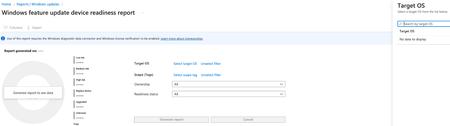
Problem running the Windows Feature Update Device Readiness Intune Report
I have a custom Intune role for our support staff. I want them to be able to run the Feature Update Device Readiness report. When they click on the Select target OS link, it shows "No data to display", instead of the OS list. They are able to click on Select scope tag and see a list of scope tags. Is there a permission they need that I'm missing? Here is what I have assigned for the custom role. Audit data Read Corporate device identifiers Create Delete Read Update Device compliance policies Read View Reports Device Configurations Read View Reports Endpoint Analytics Read Endpoint protection reports Read Enrollment programs Create device Delete device Read device Sync device Assign Profile Read Profile Managed apps Read Managed devices Delete Read Set Primary user Update View reports Organizations Read Remote tasks Clean PC Collect diagnostics Enable Windows IntuneAgent Get Filevault key Manage shared device users Reboot now Reset passcode Retire Set device name Sync devices Wipe Roles Read2.4KViews2likes6CommentsWindows 10 Report Feature Update failures
Hi I work in a co-managed enviroment where we have switched WUFB workload to Intune. The feature updates are working well but the reporting does not. We have 70% errors in the Windows 10 and later feature update report, all failures are: "Device Registration Invalid Azure AD Device Id". Now, the devices are Hybrid-AzureAD Joined and as mentioned Co-Managed with WUFB as Intune-managed workload. For what it's worth, I can see the Azure Device ID present in AzureAD. Anyone have any suggestions regarding how to solve this so we get that fancy piechart-report working? 🙂3.7KViews0likes1Comment