replication
39 TopicsSeptember 2025 Recap: Azure Database for PostgreSQL
Hello Azure Community, We are back with another round of updates for Azure Database for PostgreSQL! September is packed with powerful enhancements, from the public preview of PostgreSQL 18 to the general availability of Azure Confidential Computing, plus several new capabilities designed to boost performance, security, and developer experience. Stay tuned as we dive deeper into each of these feature updates. Before we dive into the feature highlights, let’s take a look at PGConf NYC 2025 highlights. PGConf NYC 2025 Highlights Our Postgres team was glad to be part of PGConf NYC 2025! As a Platinum sponsor, Microsoft joined the global PostgreSQL community for three days of sessions covering performance, extensibility, cloud, and AI, highlighted by Claire Giordano’s keynote, “What Microsoft is Building for Postgres—2025 in Review,” along with deep dives from core contributors and engineers. If you missed it, you can catch up here: Keynote slides: What Microsoft is Building for Postgres—2025 in Review by Claire Giordano at PGConf NYC 2025 Day 3 wrap-up: Key takeaways, highlights, and insights from the Azure Database for PostgreSQL team. Feature Highlights Near Zero Downtime scaling for High Availability (HA) enabled servers - Generally Available Azure Confidential Computing for Azure Database for PostgreSQL - Generally Available PostgreSQL 18 on Azure Database for PostgreSQL - Public Preview PostgreSQL Discovery & Assessment in Azure Migrate - Public Preview LlamaIndex Integration with Azure Postgres Latest Minor Versions GitHub Samples: Entra ID Token Refresh for PostgreSQL VS Code Extension for PostgreSQL enhancements Near Zero Downtime scaling for High Availability (HA) enabled servers – Generally Available Scaling compute for high availability (HA) enabled Azure Database for PostgreSQL servers just got faster. With Near Zero Downtime (NZD) scaling, compute changes such as vCore or tier modifications are now complete with minimal interruption, typically under 30 seconds using HA failover which maintains the connection string. The service provisions a new primary and standby instance with the updated configuration, synchronizes them with the existing setup, and performs a quick failover. This significantly reduces downtime compared to traditional scaling (which could take 2–10 minutes), improving overall availability. Visit our documentation for full details on how Near Zero Downtime scaling works. Azure Confidential Computing for Azure Database for PostgreSQL - Generally Available Azure Confidential Computing (ACC) Confidential Virtual Machines (CVMs) are now generally available for Azure Database for PostgreSQL. This capability brings hardware-based protection for data in use, ensuring your most sensitive information remains secure, even while being processed. With CVMs, your PostgreSQL flexible server instance runs inside a Trusted Execution Environment (TEE), a secure, hardware-backed enclave that encrypts memory and isolates it from the host OS, hypervisor, and even Azure operators. This means your data enjoys end-to-end protection: at rest, in transit, and in use. Key Benefits: End-to-End Security: Data protected at rest, in transit, and in use Enhanced Privacy: Blocks unauthorized access during processing Compliance Ready: Meets strict security standards for regulated workloads Confidence in Cloud: Hardware-backed isolation for critical data Discover how Azure Confidential Computing enhances PostgreSQL check out the blog announcement. PostgreSQL 18 on Azure Database for PostgreSQL – Public Preview PostgreSQL 18 is now available in public preview on Azure Database for PostgreSQL, launched the same day as the PostgreSQL community release. PostgreSQL 18 introduces new performance, scalability, and developer productivity improvements. With this preview, you get early access to the latest community release on a fully managed Azure service. By running PostgreSQL 18 on flexible server, you can test application compatibility, explore new SQL and performance features, and prepare for upgrades well before general availability. This preview release gives you the opportunity to validate your workloads, extensions, and development pipelines in a dedicated preview environment while taking advantage of the security, high availability, and management capabilities in Azure. With PostgreSQL 18 in preview, you are among the first to experience the next generation of PostgreSQL on Azure, ensuring your applications are ready to adopt it when it reaches full general availability. To learn more about preview, read https://aka.ms/pg18 PostgreSQL Discovery & Assessment in Azure Migrate – Public Preview The PostgreSQL Discovery & Assessment feature is now available in public preview on Azure Migrate, making it easier to plan your migration journey to Azure. Migrating PostgreSQL workloads can be challenging without clear visibility into your existing environment. This feature solves that problem by delivering deep insights into on-premises PostgreSQL deployments, making migration planning easier and more informed. With this feature, you can discover PostgreSQL instances across your infrastructure, assess migration readiness and identify potential blockers, receive configuration-based SKU recommendations for Azure Database for PostgreSQL, and estimate costs for running your workloads in Azure all in one unified experience. Key Benefits: Comprehensive Visibility: Understand your on-prem PostgreSQL landscape Risk Reduction: Identify blockers before migration Optimized Planning: Get tailored SKU and cost insights Faster Migration: Streamlined assessment for a smooth transition Learn more in our blog: PostgreSQL Discovery and Assessment in Azure Migrate LlamaIndex Integration with Azure Postgres The support for native LlamaIndex integration is now available for Azure Database for PostgreSQL! This enhancement brings seamless connectivity between Azure Database for PostgreSQL and LlamaIndex, allowing developers to leverage Azure PostgreSQL as a secure and high-performance vector store for their AI agents and applications. Specifically, this package adds support for: Microsoft Entra ID (formerly Azure AD) authentication when connecting to your Azure Database for PostgreSQL instances, and, DiskANN indexing algorithm when indexing your (semantic) vectors. This package makes it easy to connect LlamaIndex to your Azure PostgreSQL instances whether you're building intelligent agents, semantic search, or retrieval-augmented generation (RAG) systems. Explore the full guide here: https://aka.ms/azpg-llamaindex Latest Postgres minor versions: 17.6, 16.9, 15.13, 14.18 and 13.21 PostgreSQL minor versions 17.6, 16.9, 15.13, 14.18 and 13.21 are now supported by Azure Database for PostgreSQL. These minor version upgrades are automatically performed as part of the monthly planned maintenance in Azure Database for PostgreSQL. The upgrade automation ensures that your databases are always running the latest optimized versions without requiring manual intervention. This release fixes 3 security vulnerabilities and more than 55 bugs reported over the last several months. PostgreSQL minor versions are backward-compatible, so updates won’t affect your applications. For details about the release, see PostgreSQL community announcement. GitHub Samples: Entra ID Token Refresh for PostgreSQL We have introduced code samples for Entra ID token refresh, built specifically for Azure Database for PostgreSQL. These samples simplify implementing automatic token acquisition and refresh, helping you maintain secure, uninterrupted connectivity without manual intervention. By using these examples, you can keep sessions secure, prevent connection drops from expired tokens, and streamline integration with Azure Identity libraries for PostgreSQL workloads. What’s Included: Ready-to-use code snippets for token acquisition and refresh for Python and .NET Guidance for integrating with Azure Identity libraries Explore the samples repository on https://aka.ms/pg-access-token-refresh and start implementing it today. VS Code Extension for PostgreSQL enhancements A new version for VS Code Extension for PostgreSQL is out! This update introduces a Server Dashboard that provides high-level metadata and real-time performance metrics, along with historical insights for Azure Database for PostgreSQL Flexible Server. You can even use GitHub Copilot Chat to ask performance questions in natural language and receive diagnostic SQL queries in response. Additional enhancements include: A new keybinding for “Run Current Statement” in the Query Editor Support for dragging Object Explorer entities into the editor with properly quoted identifiers Ability to connect to databases via socket file paths Key fixes: Preserves the state of the Explain Analyze toolbar toggle Removes inadvertent logging of sensitive information from extension logs Stabilizes memory usage during long-running dashboard sessions Don’t forget to update to the latest version in the marketplace to take advantage of these enhancements and visit our GitHub repository to learn more about this month’s release. We’d love your feedback! Help us improve the Server Dashboard and other features by sharing your thoughts on GitHub . Azure Postgres Learning Bytes 🎓 Setting up logical replication between two servers This section will walk through setting up logical replication between two Azure Database for PostgreSQL flexible server instances. Logical replication replicates data changes from a source (publisher) server to a target (subscriber) server. Prerequisites PostgreSQL versions supported by logical replication (publisher/subscriber compatible). Network connectivity: subscriber must be able to connect to the publisher (VNet/NSG/firewall rules). A replication role on the publisher (or a role with REPLICATION privilege). Step 1: Configure Server Parameters on both publisher and subscriber: On Publisher: wal_level=logical max_worker_processes=16 max_replication_slots=10 max_wal_senders=10 track_commit_timestamp=on On Subscriber: wal_level=logical max_worker_processes=16 max_replication_slots=10 max_wal_senders=10 track_commit_timestamp=on max_worker_processes = 16 max_sync_workers_per_subscription = 6 autovacuum = OFF (during initial copy) max_wal_size = 64GB checkpoint_timeout = 3600 Step 2: Create Publication (Publisher) and alter role with replication privilege ALTER ROLE <replication_user> WITH REPLICATION; CREATE PUBLICATION pub FOR ALL TABLES; Step 3: Create Subscription (Subscriber) CREATE SUBSCRIPTION <subscription-name> CONNECTION 'host=<publisher_host> dbname=<db> user=<user> password=<pwd>' PUBLICATION <publication-name>;</publication-name></pwd></user></db></publisher_host></subscription-name> Step 4: Monitor Publisher: This shows active processes on the publisher, including replication workers. SELECT application_name, wait_event_type, wait_event, query, backend_type FROM pg_stat_activity WHERE state = 'active'; Subscriber: The ‘pg_stat_progress_copy’ table tracks the progress of the initial data copy for each table. SELECT * FROM pg_stat_progress_copy; To explore more details on how to get started with logical replication, visit our blog on Tuning logical replication for Azure Database for PostgreSQL. Conclusion That’s all for the September 2025 feature highlights! We remain committed to making Azure Database for PostgreSQL more powerful and secure with every release. Stay up to date on the latest enhancements by visiting our Azure Database for PostgreSQL blog updates link. Your feedback matters and helps us shape the future of PostgreSQL on Azure. If you have suggestions, ideas, or questions, we’d love to hear from you: https://aka.ms/pgfeedback. We look forward to sharing even more exciting capabilities in the coming months. Stay tuned!923Views4likes0CommentsEffectively troubleshoot latency in SQL Server Transactional replication: Part 2
Are you struggling with latency issues in SQL Server Transactional replication? Our comprehensive guide provides clear, step-by-step instructions to effectively troubleshoot and resolve these challenges. Dive into proven techniques and best practices that will help you enhance your SQL Server's performance and ensure seamless data replication. Don't let latency slow you down—master the art of SQL Server troubleshooting today! I hope you find this teaser engaging! If you need any adjustments or additional content, feel free to let me know.4.9KViews4likes2CommentsUnlocking AI-Driven Data Access: Azure Database for MySQL Support via the Azure MCP Server
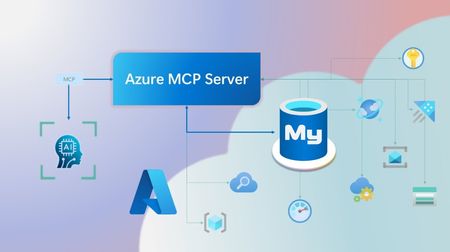
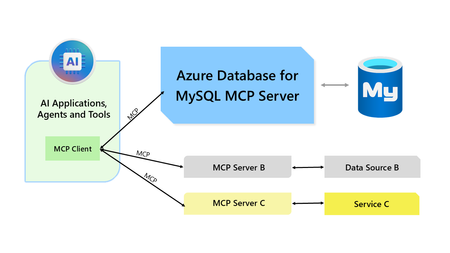
Step into a new era of data-driven intelligence with the fusion of Azure MCP Server and Azure Database for MySQL, where your MySQL data is no longer just stored, but instantly conversational, intelligent and action-ready. By harnessing the open-standard Model Context Protocol (MCP), your AI agents can now query, analyze and automate in natural language, accessing tables, surfacing insights and acting on your MySQL-driven business logic as easily as chatting with a colleague. It’s like giving your data a voice and your applications a brain, all within Azure’s trusted cloud platform. We are excited to announce that we have added support for Azure Database for MySQL in Azure MCP Server. The Azure MCP Server leverages the Model Context Protocol (MCP) to allow AI agents to seamlessly interact with various Azure services to perform context-aware operations such as querying databases and managing cloud resources. Building on this foundation, the Azure MCP Server now offers a set of tools that AI agents and apps can invoke to interact with Azure Database for MySQL - enabling them to list and query databases, retrieve schema details of tables, and access server configurations and parameters. These capabilities are delivered through the same standardized interface used for other Azure services, making it easier to the adopt the MCP standard for leveraging AI to work with your business data and operations across the Azure ecosystem. Before we delve into these new tools and explore how to get started with them, let’s take a moment to refresh our understanding of MCP and the Azure MCP Server - what they are, how they work, and why they matter. MCP architecture and key components The Model Context Protocol (MCP) is an emerging open protocol designed to integrate AI models with external data sources and services in a scalable, standardized, and secure manner. MCP dictates a client-server architecture with four key components: MCP Host, MCP Client, MCP Server and external data sources, services and APIs that provide the data context required to enhance AI models. To explain briefly, an MCP Host (AI apps and agents) includes an MCP client component that connects to one or more MCP Servers. These servers are lightweight programs that securely interface with external data sources, services and APIs and exposes them to MCP clients in the form of standardized capabilities called tools, resources and prompts. Learn more: MCP Documentation What is Azure MCP Server? Azure offers a multitude of cloud services that help developers build robust applications and AI solutions to address business needs. The Azure MCP Server aims to expose these powerful services for agentic usage, allowing AI systems to perform operations that are context-aware of your Azure resources and your business data within them, while ensuring adherence to the Model Context Protocol. It supports a wide range of Azure services and tools including Azure AI Search, Azure Cosmos DB, Azure Storage, Azure Monitor, Azure CLI and Developer CLI extensions. This means that you can empower AI agents, apps and tools to: Explore your Azure resources, such as listing and retrieving details on your Azure subscriptions, resource groups, services, databases, and tables. Search, query and analyze your data and logs. Execute CLI and Azure Developer CLI commands directly, and more! Learn more: Azure MCP Server GitHub Repository Introducing new Azure MCP Server tools to interact with Azure Database for MySQL The Azure MCP Server now includes the following tools that allow AI agents to interact with Azure Database for MySQL and your valuable business data residing in these servers, in accordance with the MCP standard: Tool Description Example Prompts azmcp_mysql_server_list List all MySQL servers in a subscription & resource group "List MySQL servers in resource group 'prod-rg'." "Show MySQL servers in region 'eastus'." azmcp_mysql_server_config_get Retrieve the configuration of a MySQL server "What is the backup retention period for server 'my-mysql-server'?" "Show storage allocation for server 'my-mysql-server'." azmcp_mysql_server_param_get Retrieve a specific parameter of a MySQL server "Is slow_query_log enabled on server my-mysql-server?" "Get innodb_buffer_pool_size for server my-mysql-server." azmcp_mysql_server_param_set Set a specific parameter of a MySQL server to a specific value "Set max_connections to 500 on server my-mysql-server." "Set wait_timeout to 300 on server my-mysql-server." azmcp_mysql_table_list List all tables in a MySQL database "List tables starting with 'tmp_' in database 'appdb'." "How many tables are in database 'analytics'?" azmcp_mysql_table_schema_get Get the schema of a specific table in a MySQL database "Show indexes for table 'transactions' in database 'billing'." "What is the primary key for table 'users' in database 'auth'?" azmcp_mysql_database_query Executes a SELECT query on a MySQL Database. The query must start with SELECT and cannot contain any destructive SQL operations for security reasons. “How many orders were placed in the last 30 days in the salesdb.orders table?” “Show the number of new users signed up in the last week in appdb.users grouped by day.” These interactions are secured using Microsoft Entra authentication, which enables seamless, identity-based access to Azure Database for MySQL - eliminating the need for password storage and enhancing overall security. How are these new tools in the Azure MCP Server different from the standalone MCP Server for Azure Database for MySQL? We have integrated the key capabilities of the Azure Database for MySQL MCP server into the Azure MCP Server, making it easier to connect your agentic apps not only to Azure Database for MySQL but also to other Azure services through one unified and secure interface! How to get started Installing and running the Azure MCP Server is quick and easy! Use GitHub Copilot in Visual Studio Code to gain meaningful insights from your business data in Azure Database for MySQL. Pre-requisites Install Visual Studio Code. Install GitHub Copilot and GitHub Copilot Chat extensions. An Azure Database for MySQL with Microsoft Entra authentication enabled. Ensure that the MCP Server is installed on a system with network connectivity and credentials to connect to Azure Database for MySQL. Installation and Testing Please use this guide for installation: Azure MCP Server Installation Guide Try the following prompts with your Azure Database for MySQL: Azure Database for MySQL tools for Azure MCP Server Try it out and share your feedback! Start using Azure MCP Server with the MySQL tools today and let our cloud services become your AI agent’s most powerful ally. We’re counting on your feedback - every comment, suggestion, or bug-report helps us build better tools together. Stay tuned: more features and capabilities are on the horizon! Feel free to comment below or write to us with your feedback and queries at AskAzureDBforMySQL@service.microsoft.com.556Views3likes0CommentsModel Context Protocol (MCP) Server for Azure Database for MySQL
We are excited to introduce a new MCP Server for integrating your AI models with data hosted in Azure Database for MySQL. By utilizing this server, you can effortlessly connect any AI application that supports MCP to your MySQL flexible server (using either MySQL password-based authentication or Microsoft Entra authentication methods), enabling you to provide your business data as meaningful context in a standardized and secure manner.2.9KViews3likes0CommentsAnnouncing Mirroring for Azure Database for PostgreSQL in Microsoft Fabric for Public Preview
Back at the first European Microsoft Fabric Community Conference in September 2024 we announced our Private Preview program for Mirroring for Azure Database for PostgreSQL in Microsoft Fabric. Today, in conjunction with 2025 edition of Microsoft Fabric Community Conference in Las Vegas, we're thrilled to announce our Public Preview milestone, giving customers the ability to leverage friction-free near-real time replication from Azure Database for PostgreSQL flexible server to Fabric OneLake in Delta tables, providing a solid foundation for reporting, advanced analytics, AI, and data science on operational data with minimal effort and impact on transactional workloads. Mirroring is setup from Fabric Data Warehousing experience by providing the Azure Database for PostgreSQL flexible server and database connection details, provide selections on what needs to be mirrored into Fabric, either all data or user selected eligible mirrored tables. And, just like that, mirroring is ready to go. Mirroring Azure Database for PostgreSQL flexible server creates an initial snapshot in Fabric OneLake, after which data is kept in sync in near-real time with every transaction. How mirroring to Fabric works in Azure Database for PostgreSQL flexible server Fabric mirroring in Azure Database for PostgreSQL flexible server is based on principles such as logical replication and the Change Data Capture (CDC) design pattern. Once Fabric mirroring is established for a database in Azure Database for PostgreSQL flexible server, an initial snapshot is created by a background process for selected tables to be mirrored. That snapshot is shipped to a Fabric OneLake's landing zone in Parquet format. A process running in Fabric, known as replicator, takes these initial snapshot files and creates tables in Delta format in the Mirrored database artifact. Subsequent changes applied to selected tables are also captured in the source database and shipped to the OneLake landing zone in batches. Those batches of changes are finally applied to the respective Delta tables in the Mirrored database artifact. For Fabric mirroring, the CDC pattern is implemented in a proprietary PostgreSQL extension called azure_cdc, which is installed and registered in source databases during Fabric mirroring enablement workflow. This guided process has a new dedicated page in Azure Portal and is setting up all required pre-requisites and is offering a simplified experience where you just need to select which databases you want to replicate to Fabric OneLake (default is up to 3). You can read additional details regarding the server enablement process and other critical configuration and monitoring options on a dedicated page in Azure Database for PostgreSQL flexible server product documentation. Explore advanced analytics and data engineering for PostgreSQL in Microsoft Fabric Once data is on OneLake, mirrored data in the delta format is ready for immediate consumption across all Fabric experiences and features, such as Power BI with new Direct Lake mode, Data Warehouse, Data Engineering, Lakehouse, KQL Database, Notebooks and Copilot, which work instantly. Direct Lake mode is a fast path to load the data from the lake with groundbreaking semantic model capability for analyzing very large data volumes in Power BI. As Direct Lake mode also supports reading Delta tables right from OneLake, the Mirrored PostgreSQL database is Power BI ready along with Copilot capabilities. Data across any mirrored database (either Azure Database for PostgreSQL, Azure SQL DB, Azure Cosmos DB or Snowflake) can be cross-joined as well, enabling querying across any database, warehouse or Lakehouse (either as a shortcut to AWS S3 or ADLS Gen 2 etc.). With the same approach, you can also have multiple PosgreSQL databases from multiple servers mirrored to OneLake like in a typical SaaS provider scenario, where each database belongs to a different tenant, and execute cross-database queries to aggregate and analyze critical business metrics. Data scientists and data engineers can work with the mirrored Azure Database for PostgreSQL data joined with other sources (see this example with CosmosDB data) that are created as shortcuts in Lakehouse. Read about endless possibilities when loading operational databases in OneLake and Microsoft Fabric in related section of our product documentation here. Getting started with Mirroring for Azure Database for PostgreSQL in Fabric To summarize, Mirroring Azure Database for PostgreSQL in Microsoft Fabric plays a crucial role in enabling analytics and driving insights from operational data by ensuring that the most recent data is available for analysis. This allows businesses to make decisions based on the most current situation, rather than relying on outdated information. Improving accuracy also reduces the risk of discrepancies between the source and the replicated data, leading to more accurate analytics and reliable insights. In addition, is essential for predictive analytics and AI models provide the most recent data to make accurate predictions and decisions. To get started and learn more about Mirroring Azure Database for PostgreSQL flexible server in Microsoft Fabric, its pre-requisites, setup, FAQ’s, current limitations, and tutorial, please click here to read all about it and stay tuned for more updates and new features coming soon. To get more updates also on overall Mirroring capabilities in Fabric, please read this other blog post where you will get the latest news.1.9KViews3likes4CommentsLesson Learned #110 Azure SQL Managed Instance and Azure DNS
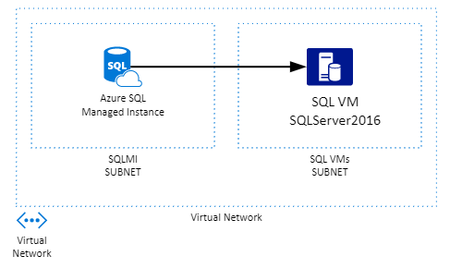
I got this recent case where customer wanted to create a transaction replication from Azure SQL Managed instance to another SQL Server inside the same virtual network, but in a different subnet, but all inside Azure. All communications that happens on Azure Network if not set a custom DNS will use Azure DNS to resolve name of resources inside the network. However there is something very important in the documentation https://docs.microsoft.com/en-us/azure/virtual-network/virtual-networks-name-resolution-for-vms-and-role-instances#azure-provided-name-resolution "Azure-provided name resolution Along with resolution of public DNS names, Azure provides internal name resolution for VMs and role instances that reside within the same virtual network or cloud service. VMs and instances in a cloud service share the same DNS suffix, so the host name alone is sufficient. But in virtual networks deployed using the classic deployment model, different cloud services have different DNS suffixes. In this situation, you need the FQDN to resolve names between different cloud services. In virtual networks deployed using the Azure Resource Manager deployment model, the DNS suffix is consistent across the virtual network, so the FQDN is not needed. DNS names can be assigned to both VMs and network interfaces. Although Azure-provided name resolution does not require any configuration, it is not the appropriate choice for all deployment scenarios, as detailed in the previous table." Consider a Azure Resource Manager deployment it would not be necessary to use FQDN, however the way that the deployment of Azure SQL Managed Instance happens it will not share the same DNS sufix and we can see connectivity errors There are some workarounds: use the private IP or the FQDN of the SQL VM. The default DNS sufix is documented in same article above ( https://docs.microsoft.com/en-us/azure/virtual-network/virtual-networks-name-resolution-for-vms-and-role-instances#name-resolution-that-uses-your-own-dns-server ) "When you are using Azure-provided name resolution, Azure Dynamic Host Configuration Protocol (DHCP) provides an internal DNS suffix (.internal.cloudapp.net) to each VM. This suffix enables host name resolution because the host name records are in the internal.cloudapp.net zone. When you are using your own name resolution solution, this suffix is not supplied to VMs because it interferes with other DNS architectures (like domain-joined scenarios). Instead, Azure provides a non-functioning placeholder (reddog.microsoft.com)." For this test I will create a linked server from SQL MI to SQL VM and we can see that I was able to connect with success to IP and VM.internal.cloudapp.net, but failing to simple VM name This behavior is also documented at https://docs.microsoft.com/en-us/azure/sql-database/sql-database-managed-instance-custom-dns "An Azure SQL Database Managed Instance must be deployed within an Azure virtual network (VNet). There are a few scenarios (for example, db mail, linked servers to other SQL instances in your cloud or hybrid environment) that require private host names to be resolved from the Managed Instance. In this case, you need to configure a custom DNS inside Azure. Since Managed Instance uses the same DNS for its inner workings, you need to configure the custom DNS server so that it can resolve public domain names. Important Always use fully-qualified domain names (FQDN) for the mail servers, SQL Servers, and other services even if they are within your private DNS zone. For example use smtp.contoso.com for mail server because simple smtp will not be properly resolved."6.5KViews2likes0CommentsScaling Write Throughput in Azure Database for MySQL Using Application-Level Sharding
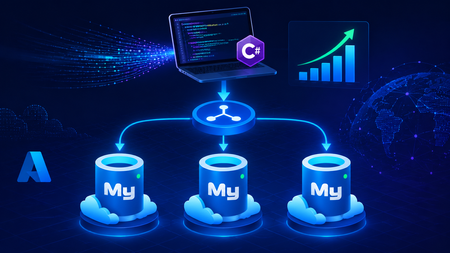
This blog post walks through scaling write throughput in Azure Database for MySQL using application level sharding. It starts with the why behind sharding and then builds a complete C# implementation that spreads writes across three Azure Database for MySQL Flexible Servers. Why Shard in the First Place? This post focuses specifically on scaling write throughput. A well-tuned single primary node can take you remarkably far, and techniques such as indexing strategies, write batching, redo log optimization, and vertical compute scaling each deliver real, lasting value. For many workloads, these optimizations are all you will ever need. That said, as write volume continues to grow, a single primary eventually approaches its practical capacity, and at that point the most durable way to keep scaling is to distribute the write workload across multiple primary instances. This architecture is what we call sharding. When you reach this inflection point, there are two primary patterns for managing multiple write nodes: Proxy or Middleware Layer Sharding: A sharding aware proxy sits between the application and a pool of Azure Database for MySQL instances, routing queries based on a shard key. While this abstracts the underlying topology from the application layer, it introduces an additional, complex component to operate, secure, scale, and patch. Application Layer Sharding: The application itself resolves the destination shard key and determines which of the N Azure Database for MySQL instances should receive a write before ever opening a database connection. Each backend target remains a completely standard, independent Azure Database for MySQL instance. This post explores the second approach. The core appeal of application layer sharding is architectural simplicity: it introduces zero infrastructure overhead and eliminates an extra network hop. Every shard behaves exactly like a standalone instance, meaning your existing backup, restore, monitoring pipelines, and the Azure portal function seamlessly without modification. The explicit tradeoff is that you forgo cross shard joins and distributed transactions in exchange for absolute predictability and control over data access patterns. The Plan We will build a small order management service that distributes its data across three Azure Database for MySQL instances that already exist. The application, written in C# on .NET 8, owns the partitioning logic. The premise: the three servers are already provisioned, the firewalls are configured, the network paths are established, and each server has its own administrative credentials. We are not provisioning infrastructure in this post. we are writing the application code that consumes it. mysql-shard-0.mysql.database.azure.com user: shard0_admin pwd: <secret-0> mysql-shard-1.mysql.database.azure.com user: shard1_admin pwd: <secret-1> mysql-shard-2.mysql.database.azure.com user: shard2_admin pwd: <secret-2> Each server hosts an identical appdb database with the same schema: CREATE TABLE users ( user_id BIGINT NOT NULL PRIMARY KEY, email VARCHAR(255) NOT NULL, created_at DATETIME NOT NULL DEFAULT CURRENT_TIMESTAMP, UNIQUE KEY uq_email (email) ); CREATE TABLE orders ( order_id BIGINT NOT NULL PRIMARY KEY, user_id BIGINT NOT NULL, amount_cents INT NOT NULL, created_at DATETIME NOT NULL DEFAULT CURRENT_TIMESTAMP, KEY ix_user (user_id) ); Two design decisions in this schema warrant explanation: No AUTO_INCREMENT for user_id or order_id. Two shards would otherwise generate the same value 42 independently. Instead, we assign identifiers in the application, using a scheme such as Snowflake, ULID, or UUIDv7. orders carries user_id, and we route by it. This is the single most important rule of sharding: choose a shard key that keeps related data colocated, so that the common queries remain on a single shard. A note on UNIQUE KEY uq_email. A unique index enforces uniqueness only within a single physical shard. Because we route by user_id, two users with different IDs and the same email may land on different shards, and both inserts will succeed. If you require globally unique emails, two options exist: (a) maintain a separate email → user_id lookup table on a single "directory" server and write to it first within an idempotent flow, or (b) shard the users table by a hash of email instead. We retain user_id routing throughout this post because it is the correct choice for orders, and we treat per shard email uniqueness as a best effort guard rather than a hard global invariant. How the Partitioning Works The naive approach to sharding is shard = hash(key) % N. This works until you need to add a fourth server, at which point roughly 75% of your data must move. In any system of meaningful size, that is prohibitively expensive. The established solution is virtual buckets. You hash the key into a large, fixed bucket space (here, 1024), then map buckets to physical shards. When you add capacity, you relocate only buckets; you never rehash the entire dataset. In production, the bucket_to_shard_map typically resides in a system such as Azure App Configuration or etcd, so that you can rebalance without redeploying. For this post, we keep it as an in-memory array seeded at startup, which is straightforward to replace later. The Project ShardingDemo/ ├── ShardingDemo.csproj ├── appsettings.json ├── Models.cs ├── ShardRouter.cs ├── UserRepository.cs └── Program.cs ShardingDemo.csproj <Project Sdk="Microsoft.NET.Sdk"> <PropertyGroup> <OutputType>Exe</OutputType> <TargetFramework>net8.0</TargetFramework> <Nullable>enable</Nullable> <ImplicitUsings>enable</ImplicitUsings> </PropertyGroup> <ItemGroup> <PackageReference Include="MySqlConnector" Version="2.6.0" /> <PackageReference Include="Microsoft.Extensions.Hosting" Version="8.0.0" /> <PackageReference Include="Microsoft.Extensions.Configuration.Binder" Version="8.0.0" /> </ItemGroup> <ItemGroup> <Content Include="appsettings.json" CopyToOutputDirectory="PreserveNewest" /> </ItemGroup> </Project> appsettings.json Shards is an ordered list, and a shard's position in the array is its logical ID. { "Shards": [ { "Host": "mysql-shard-0.mysql.database.azure.com", "Database": "appdb", "User": "shard0_admin", "Password": "REPLACE_ME_0" }, { "Host": "mysql-shard-1.mysql.database.azure.com", "Database": "appdb", "User": "shard1_admin", "Password": "REPLACE_ME_1" }, { "Host": "mysql-shard-2.mysql.database.azure.com", "Database": "appdb", "User": "shard2_admin", "Password": "REPLACE_ME_2" } ] } Models.cs namespace ShardingDemo; public sealed record User(long UserId, string Email, DateTime CreatedAt); public sealed record Order(long OrderId, long UserId, int AmountCents, DateTime CreatedAt); public sealed class ShardConfig { public required string Host { get; init; } public required string Database { get; init; } public required string User { get; init; } public required string Password { get; init; } } ShardRouter.cs using System.Security.Cryptography; using System.Text; using MySqlConnector; namespace ShardingDemo; public sealed class Shard : IAsyncDisposable { public int Id { get; } public MySqlDataSource DataSource { get; } public Shard(int id, ShardConfig cfg) { Id = id; var csb = new MySqlConnectionStringBuilder { Server = cfg.Host, Port = 3306, Database = cfg.Database, UserID = cfg.User, Password = cfg.Password, SslMode = MySqlSslMode.Required, Pooling = true, MinimumPoolSize = 2, MaximumPoolSize = 100, ConnectionTimeout = 10, DefaultCommandTimeout = 30, }; DataSource = new MySqlDataSourceBuilder(csb.ConnectionString).Build(); } public ValueTask DisposeAsync() => DataSource.DisposeAsync(); } public sealed class ShardRouter : IAsyncDisposable { private const int VirtualBuckets = 1024; private readonly IReadOnlyList<Shard> _shards; private readonly int[] _bucketToShardId; public ShardRouter(IEnumerable<ShardConfig> configs) { _shards = configs.Select((c, i) => new Shard(i, c)).ToList(); // Even distribution. Replace with a map loaded from your control plane for live rebalancing. _bucketToShardId = new int[VirtualBuckets]; for (int i = 0; i < VirtualBuckets; i++) _bucketToShardId[i] = i % _shards.Count; } public IReadOnlyList<Shard> AllShards => _shards; private static int BucketFor(long shardKey) { byte[] hash = MD5.HashData(Encoding.ASCII.GetBytes(shardKey.ToString())); // Use the first byte pair as an unsigned value, then map it into the bucket space. int value = (hash[0] << 8) | hash[1]; return value % VirtualBuckets; } public Shard ShardForKey(long shardKey) { int bucket = BucketFor(shardKey); return _shards[_bucketToShardId[bucket]]; } public async ValueTask DisposeAsync() { foreach (var s in _shards) await s.DisposeAsync(); } } UserRepository.cs Observe that every per user method calls ShardForKey(userId), even when inserting an order. This is the colocation rule at work. An order and its owning user always reside on the same shard, so queries for a single user only ever reach one shard. Only the cross-shard aggregate (TotalRevenueCentsAsync) must fan out. using MySqlConnector; namespace ShardingDemo; public sealed class UserRepository { private readonly ShardRouter _router; public UserRepository(ShardRouter router) { _router = router; } public async Task CreateUserAsync(long userId, string email, CancellationToken ct = default) { var shard = _router.ShardForKey(userId); await using var conn = await shard.DataSource.OpenConnectionAsync(ct); await using var cmd = conn.CreateCommand(); cmd.CommandText = "INSERT INTO users (user_id, email) VALUES (@id, Email)"; cmd.Parameters.AddWithValue("@id", userId); cmd.Parameters.AddWithValue("@email", email); await cmd.ExecuteNonQueryAsync(ct); } public async Task<User?> GetUserAsync(long userId, CancellationToken ct = default) { var shard = _router.ShardForKey(userId); await using var conn = await shard.DataSource.OpenConnectionAsync(ct); await using var cmd = conn.CreateCommand(); cmd.CommandText = "SELECT user_id, email, created_at FROM users WHERE user_id = ID"; cmd.Parameters.AddWithValue("@id", userId); await using var reader = await cmd.ExecuteReaderAsync(ct); if (!await reader.ReadAsync(ct)) return null; return new User(reader.GetInt64(0), reader.GetString(1), reader.GetDateTime(2)); } public async Task AddOrderAsync(long orderId, long userId, int amountCents, CancellationToken ct = default) { // Routed by user_id, so orders colocate with their owning user. var shard = _router.ShardForKey(userId); await using var conn = await shard.DataSource.OpenConnectionAsync(ct); await using var cmd = conn.CreateCommand(); cmd.CommandText = """ INSERT INTO orders (order_id, user_id, amount_cents) VALUES (@oid, @uid, amt) """; cmd.Parameters.AddWithValue("@oid", orderId); cmd.Parameters.AddWithValue("@uid", userId); cmd.Parameters.AddWithValue("@amt", amountCents); await cmd.ExecuteNonQueryAsync(ct); } public async Task<IReadOnlyList<Order>> GetOrdersForUserAsync(long userId, CancellationToken ct = default) { var shard = _router.ShardForKey(userId); await using var conn = await shard.DataSource.OpenConnectionAsync(ct); await using var cmd = conn.CreateCommand(); cmd.CommandText = """ SELECT order_id, user_id, amount_cents, created_at FROM orders WHERE user_id = @uid """; cmd.Parameters.AddWithValue("@uid", userId); var list = new List<Order>(); await using var reader = await cmd.ExecuteReaderAsync(ct); while (await reader.ReadAsync(ct)) { list.Add(new Order( reader.GetInt64(0), reader.GetInt64(1), reader.GetInt32(2), reader.GetDateTime(3))); } return list; } /// <summary>Cross shard fanout.</summary> public async Task<long> TotalRevenueCentsAsync(CancellationToken ct = default) { var tasks = _router.AllShards.Select(async shard => { await using var conn = await shard.DataSource.OpenConnectionAsync(ct); await using var cmd = conn.CreateCommand(); cmd.CommandText = "SELECT COALESCE(SUM(amount_cents), 0) FROM orders"; var result = await cmd.ExecuteScalarAsync(ct); return Convert.ToInt64(result); }); var perShard = await Task.WhenAll(tasks); return perShard.Sum(); } } Program.cs using Microsoft.Extensions.Configuration; using Microsoft.Extensions.DependencyInjection; using Microsoft.Extensions.Hosting; using ShardingDemo; var builder = Host.CreateApplicationBuilder(args); // Bind Shards:[] from appsettings.json (override with user-secrets / env vars / Key Vault) var shardConfigs = builder.Configuration .GetSection("Shards") .Get<List<ShardConfig>>() ?? throw new InvalidOperationException("No 'Shards' section configured."); if (shardConfigs.Count == 0) throw new InvalidOperationException("At least one shard must be configured."); builder.Services.AddSingleton(_ => new ShardRouter(shardConfigs)); builder.Services.AddSingleton<UserRepository>(); using var host = builder.Build(); var repo = host.Services.GetRequiredService<UserRepository>(); var router = host.Services.GetRequiredService<ShardRouter>(); (long Id, string Email)[] users = { (1001, "ada@example.com"), (2002, "linus@example.com"), (3003, "grace@example.com"), (4004, "alan@example.com"), }; foreach (var (id, email) in users) { await repo.CreateUserAsync(id, email); Console.WriteLine($"user {id} -> shard {router.ShardForKey(id).Id}"); } await repo.AddOrderAsync(orderId: 9001, userId: 1001, amountCents: 4999); await repo.AddOrderAsync(orderId: 9002, userId: 1001, amountCents: 1299); await repo.AddOrderAsync(orderId: 9003, userId: 2002, amountCents: 8800); Console.WriteLine($"\nAda: {await repo.GetUserAsync(1001)}"); Console.WriteLine($"Ada's orders: {(await repo.GetOrdersForUserAsync(1001)).Count}"); Console.WriteLine($"\nTotal revenue across 3 shards: " + $"${await repo.TotalRevenueCentsAsync() / 100m:F2}"); await router.DisposeAsync(); Tracing One Request End to End Consider GetOrdersForUserAsync(1001): ShardForKey(1001) → MD5("1001") → first two bytes as a number → % 1024 → a bucket in the range 0..1023. bucket % 3 → a physical shard → for example mysql-shard-2.mysql.database.azure.com. The MySqlDataSource provides a pooled, TLS encrypted connection authenticated as shard2_admin. The query runs against shard 2's local ix_user index, with no fan out and at single server speed. Every call with userId = 1001, whether GetUser, AddOrder, or GetOrdersForUser, lands on the same shard. That is why orders JOIN users ON orders.user_id = users.user_id WHERE user_id = 1001 executes within a single shard, with no cross-shard traffic. Conclusion The essential point is this. Once a single primary can no longer absorb your write load, sharding becomes a durable answer, and implementing it at the application layer keeps every part of the system explicit and comprehensible. When write volume or dataset size outgrows a single primary, application layer sharding provides several benefits. N independent Azure Database for MySQL instances, each absorbing 1/N of the write traffic. Queries by user that remain on a single shard and behave like an ordinary, modestly sized database. A bucket map approach that allows you to add a fourth, fifth, or Nth shard later by relocating slices of data rather than rehashing the entire dataset. A failure of one shard that affects 1/N of your users rather than all of them. These benefits come at a genuine cost. You must generate identifiers in the application, global uniqueness requires a secondary lookup table, and aggregate queries fan out across shards. A cross shard write, one that must atomically update data on two different shards, can no longer rely on a single database transaction. Instead it needs an orchestrated sequence of local transactions, where each step carries a compensating action that undoes its effect if a later step fails. None of these are insurmountable. They are simply responsibilities you now assume. Sharding is a deliberate step to take only once a single primary has genuinely exhausted its write headroom. When you reach that point, the implementation in this post is a representative blueprint. Stay Connected We welcome your feedback and invite you to share your experiences or suggestions at AskAzureDBforMySQL@service.microsoft.com Thank you for choosing Azure Database for MySQL!311Views2likes0Comments