rds
30 Topics
Remote Desktop Web Audio Not Passing (Correctly)
Hello! I manage an RDS farm (WEB/GW, CB, DB, HST etc) at work, and it's been working great aside from Audio Passthrough. Clients will connect to the RD Website and then launch a remote app of their choosing. However, when the client is on the remote app PC and uses their audio (via an app or just using mmsys.cpl) the remote session will just freeze and be unusable. All RDS Infra is on at least Win. Server 2019+. All GPO Settings have been properly configured, as well as collection, CAP/RAP, and browser settings. I have confirmed launching RDP (mstsc.exe) session from my local laptop to the remote app PC (through the HST) does work without any issue, so I am led to believe there is something wrong with RD Web. RD Web Client Pkg is on the latest version. Any advice is greatly appreciated as I am banging my head against the wall trying to get it to work with RD Web. Cheers284Views0likes1Comment
Users "Status" fields blank on RDS with Windows Server 2025
Hi, we have two RDS Server with Windows Server 2025 installed (In-Place Upgrade from Server 2019). In Task-Manager under the "Users" Tab all fields of the "Status" row are blank. We cant see if a user is connected or disconnected. In cmd with "query user" it works. Someone else discovered this problem?1.6KViews3likes7Comments
Remote Desktop Services Licensing Oddness
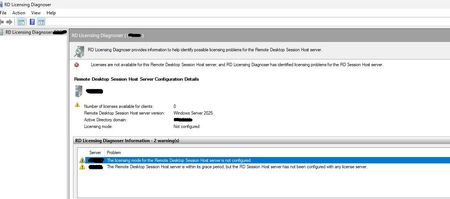
Hi all, hoping someone might have some insight on this. I configured a new remote desktop services setup on Windows Server 2025. Everything appears to be working just as it did in our previous RDS environment which was on 2016, and it seems like the licensing is/should be working properly, but I keep getting a warning when logging in on the broker/license server that a license will expire soon, etc. The license diagnoser seems to show the same or a similar warning. I want to ensure that we won't have any disruption in service. I believe I have everything configured properly, but maybe I've missed something? Or is this some sort of red herring message due to the built in temporary license? In RD licensing diagnoser I see this message: In the licensing manager everything appears like it should be good to go, though: Even shows the licenses being assigned to active connections: The license server is set within the RDS config as such: Thanks in advance for any help or advice. I've tried looking at everything I could find off general searching.164Views0likes0Comments
Windows Server 2025 Terminal Servers - start menu pinned icons
I'm designing the config for some terminal servers running Server 2025. I want to pin specific icons to the start menu. In Server 2022 (or Windows 10), this was simply a process of setting up the reference machine how I wanted it, then Export-StartLayout -Path "C:\Export\MStartMenuLayout.xml" to generate the config file, whcih was then applied using the GPO Computer Configuration\Policies\Administrative Templates\Start Menu and Taskbar\Start Layout - this worked fine. On Server 2025 (and Windows 11), however, it appears that this doesn't work the same any more. Although the export command works, it generates a JSON file now rather than an XML. OK, so I saved the file with the JSON extension, and copied the old GPO, amending the name of the config file to point to the new one. However, it still doesn't work and this documentation: https://learn.microsoft.com/en-us/windows/configuration/start/layout?tabs=intune-10%2Cintune-11&pivots=windows-11 Would appear to indicate that it can only be done using Intune. If it was Windows 11 I could do that, but as this is Server 2025 it isn't an option - Intune cannot manage server OSs even if I wanted to do that. Can anyone suggest any alternative methods of doing this? All I want to do is configure a common set of pinned apps for all users - I'm not bothered about configuring any other aspects of the start menu as the defaults are OK. Thanks1.5KViews2likes0CommentsRDS Farm with FIDO2 Key
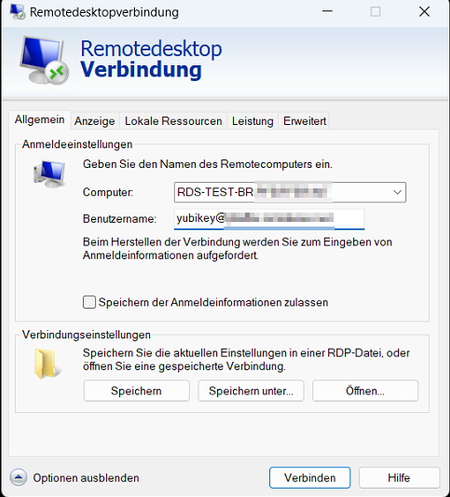
Hello everyone, I'm trying to install an RDS farm with fido2 (Yubikey). I think I have created the conditions. The farm is onPrem (hybrid joined), the FIDO2 key is registered in Entra. The farm works correctly with normal credentials. However, setting up the FIDO2 key is giving me a headache. If I log in directly to one of the session hosts, FIDO2 works. But if I want to log in via the session broker, as it should be. I am connected to the session broker as a host and not forwarded to the hosts. But I only found this out by chance when I added the user to the Remodesktopuser group on the broker as a test. Otherwise you just get the message: "Access to the session was denied" and the broker's event log says "Couldn't find the file" #################### redirectclipboard:i:1 redirectprinters:i:0 redirectcomports:i:1 redirectsmartcards:i:1 devicestoredirect:s:* drivestoredirect:s: session bpp:i:32 prompt for credentials on client:i:1 server port:i:3389 allow font smoothing:i:1 promptcredentialonce:i:1 gatewayusagemethod:i:2 gatewayprofileusagemethod:i:1 gatewaycredentialssource:i:4 full address:s:RDS-TEST-BR.xxxxxxxxxxxxx gatewayhostname:s:rds-test.xxxxxxxxxxxxx workspace id:s:RDS-Test-BR.xxxxxxxxxxxxx use redirection server name:i:1 loadbalanceinfo:s:tsv://MS Terminal Services Plugin.1.Test use multimon:i:1 alternate full address:s:RDS-TEST-BR.xxxxxxxxxxxxx screen mode id:i:2 desktopwidth:i:800 desktopheight:i:600 winposstr:s:0,3,0,0,800,600 compression:i:1 keyboardhook:i:2 audiocapturemode:i:0 videoplaybackmode:i:1 connection type:i:7 networkautodetect:i:1 bandwidthautodetect:i:1 displayconnectionbar:i:1 enableworkspacereconnect:i:0 disable wallpaper:i:0 allow desktop composition:i:0 disable full window drag:i:1 disable menu anims:i:1 disable themes:i:0 disable cursor setting:i:0 bitmapcachepersistenable:i:1 audiomode:i:0 redirectlocation:i:0 redirectwebauthn:i:1 redirectposdevices:i:0 autoreconnection enabled:i:1 authentication level:i:2 prompt for credentials:i:0 negotiate security layer:i:1 remoteapplicationmode:i:0 alternate shell:s: shell working directory:s: gatewaybrokeringtype:i:0 rdgiskdcproxy:i:0 kdcproxyname:s: enablerdsaadauth:i:1 username:s:yubikey@xxxxxxxxxxxxx ####################3.8KViews1like7CommentsUnable to install RDS roles on windows server 2019
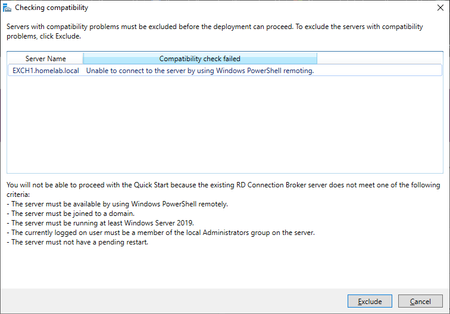
Problem: Per my knowledge all requirements listed above, checks out: Domain Admin is also member of local admin group: a) What is causing this problem? b) How can I fix it? C) This is a fresh install of server 2019 Any help would be appreciated, thanks!661Views0likes0Comments
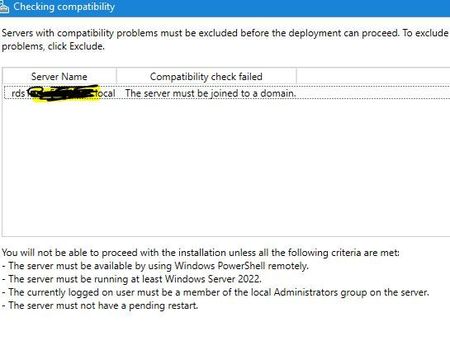
Unable to add RDS Session host server back into collection.
Hi, I have a remote Desktop deployment on Server 22, I removed a session host server as I was having some issues and when this was resolved I was unable to add the Server back to the collection. It keeps telling me the Server needs to be domain joined. The server is domain joined. I unjoined it from the domain , re added it. changed the server name, checked DNS and can not work out why this is happening. There are 4 servers, 2 are brokers and 2 are meant to be session host servers.1.1KViews0likes1Comment
Issue OneDrive OnDemand terminal, fslogix
Dear all, I searched a lot and cannot find a solution, so I hope someone here can help me. On several terminal servers (3 until now, different customers) OneDrive on Demand does not start when the checkbox to download on demand is checked. On a fist start all files are beiing downloaded and as soon checkbox is set OD crashes with error 0x801f000f The session Host role is installed on 2019 servers, last server updates installed, latest OneDrive installed with /allusers. FSLogix version on one server is 2.9.8228.50276, on another one it is 2.9.8361.52326 I even excluded OneDrive.exe from Antivirus to check if it changes everything. I am pretty lost, does anyone have an idea where should I look, or what to check ... Earlier (on servers installed couple of months ago) it worked, so I can't imagine what could be the problem. Best regards KaBi3.1KViews0likes4CommentsRemote Desktop Sevices and Storage Spaces Direct
Hi everyone. I am currently reconfiguring our RDS deployment, and would like some inputs on UPD. The RDS setup has a admin server running in Azure. This has the connection broker, web access, license server features. The rest of the setup is session hosts, which is used for shared access. The session host has a big disk (raid 1+0) for OS application etc. All the servers has a smaller disk which I was wondering if i could do anything smart with that in relation to the UPD. I had a quick look on storage spaces direct, and was wondering if that would be the way to go? The servers is connected with 10 gig and a 100 gig infiniband. Would it be a solution to run both the session host and the storage space direct or would that impact performance of the servers? Server spec: Windows server 2022 Datacenter Proliant DL385 gen10 CPU: 2x AMD EPYC 7502 (32 cores each) RAM: 1 TB Is there any better alternatives? BR.587Views0likes0Comments