rbac
2 Topics
Admin‑On‑Behalf‑Of issue when purchasing subscription
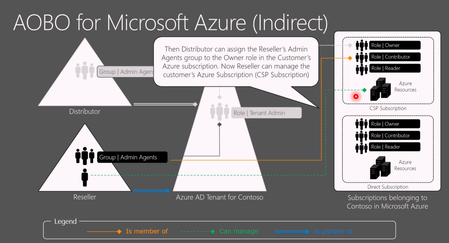
Hello everyone! I want to reach out to you on the internet and ask if anyone has the same issue as we do when creating PAYG Azure subscriptions in a customer's tenant, in which we have delegated access via GDAP through PartnerCenter. It is a bit AI formatted question. When an Azure NCE subscription is created for a customer via an Indirect Provider portal, the CSP Admin Agent (foreign principal) is not automatically assigned Owner on the subscription. As a result: AOBO (Admin‑On‑Behalf‑Of) does not activate The subscription is invisible to the partner when accessing Azure via Partner Center service links The partner cannot manage and deploy to a subscription they just provided This breaks the expected delegated administration flow. Expected Behavior For CSP‑created Azure subscriptions: The CSP Admin Agent group should automatically receive Owner (or equivalent) on the subscription AOBO should work immediately, without customer involvement The partner should be able to see the subscription in Azure Portal and deploy resources Actual Behavior Observed For Azure NCE subscriptions created via an Indirect Provider: No RBAC assignment is created for the foreign AdminAgent group The subscription is visible only to users inside the customer tenant Partner Center role (Admin Agent foreign group) is present, but without Azure RBAC. Required Customer Workaround For each new Azure NCE subscription, the customer must: Sign in as Global Admin Use “Elevate access to manage all Azure subscriptions and management groups” Assign themselves Owner on the subscription Manually assign Owner to the partner’s foreign AdminAgent group Only after this does AOBO start working. Example Partner tries to access the subscription: https://portal.azure.com/#@customer.onmicrosoft.com/resource/subscriptions/<subscription-id>/overview But there is no subscription visible "None of the entries matched the given filter" https://learn.microsoft.com/en-us/azure/role-based-access-control/elevate-access-global-admin?tabs=azure-portal%2Centra-audit-logs#step-1-elevate-access-for-a-global-administrator from the customer's global admin. and manual RBAC fix in Cloud console: az role assignment create \ --assignee-object-id "<AdminAgent-Foreign-Group-ObjectId>" \ --role "Owner" \ --scope "/subscriptions/<subscription-id>" \ --assignee-principal-type "ForeignGroup" After this, AOBO works as expected for delegated administrators (foreign user accounts). Why This Is a Problem Partners sell Azure subscriptions that they cannot access Forces resources from customers to involvement from customers Breaks delegated administration principles For Indirect CSPs managing many tenants, this is a decent operational blocker. Key Question to Microsoft / Community Does anyone else struggle with this? Is this behavior by design for Azure NCE + Indirect CSP? Am I missing some point of view on why not to do it in the suggested way?499Views0likes2CommentsWho Can Access What? Designing RBAC and Identity in Azure
Who should be allowed to access an Azure resource? Azure makes it easy to create resources. The harder question comes afterwards: who should be allowed to access them? A Function App may need to read secrets from Key Vault. A Logic App may need to call APIs through API Management. A developer may need to deploy to Dev but have no access to Production. A CI/CD pipeline may need to deploy infrastructure without becoming an Owner of the entire subscription. This is where Azure Role-Based Access Control (RBAC) and Managed Identity become critical. In this article, I look at how to design access around people, applications and deployment pipelines, while keeping permissions as narrow as practical. The article covers: Azure RBAC and access scopes Least-privilege access Managed Identities Developer vs Production access boundaries Application identities CI/CD deployment permissions RBAC vs API authentication Privileged access and PIM Common RBAC design mistakes One of the key principles is simple: Give an identity only the permissions it actually needs. For example, if a Function App only needs to read secrets from Key Vault, giving it Contributor access to the entire Resource Group solves the problem with a much broader permission than necessary. Good RBAC design is not about assigning more permissions. It is about understanding: Who needs access? Why do they need it? What exactly do they need to do? At what scope should access be granted? How can that access be managed securely over time? I would be interested to hear how others approach RBAC and identity design in enterprise Azure environments. Full article: https://www.linkedin.com/pulse/who-can-access-what-designing-rbac-identity-azure-chethan-raj-ud6gc/200Views0likes0Comments