rag
100 Topics
Azure AI Gateway is now generally available: Ship faster, stay in control
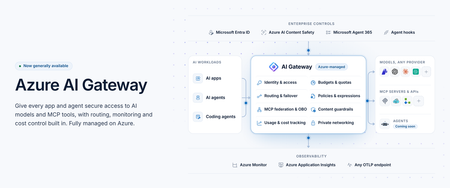
Today at Microsoft Ignite 2026, we're announcing the general availability of Azure AI Gateway, a fully managed Azure service that lets you set up a single, controlled path from your AI applications and agents to models and tools across providers. Developers build with the models and tools they choose, and platform teams manage access, enforce policies, control costs, and monitor usage from one place, without operating gateway infrastructure. Azure AI Gateway, previously in public preview as the AI Gateway tier of Azure API Management, is now a standalone product optimized for governing access to AI models and tools, with a roadmap focused entirely on AI. You can use it by itself with any app or agent, or together with Microsoft Foundry, where you build and run agents, and Microsoft Agent 365, where you manage them. Azure AI Gateway is available today in 17 Azure regions. To make it easy to get started, it offers a freemium, per-use pricing model with 10,000 free requests per gateway each month. Paid billing begins January 1, 2027. See the Regions and pricing section below for details. Why enterprise AI needs a unified governance layer Enterprise AI has moved beyond one app calling one model. Organizations use models from several providers, build agents that act through enterprise tools, and scale AI across teams. When each app manages its own credentials, routing, safety, and usage limits, governance becomes fragmented. Developers struggle to find approved models and tools, and platform teams can't see who is using what, what it costs, or which policies apply. Azure AI Gateway lets you move those controls out of individual apps and into one place, where they apply consistently to every app and agent you connect. How Azure AI Gateway works Apps and agents you connect call the gateway instead of calling each model or tool directly. On every request, the gateway authenticates the caller with Microsoft Entra ID or a gateway access key, enforces access rules and your policies, routes the request to the right model or tool, and records telemetry. Figure 1. Azure AI Gateway sits between callers and backends, governing every request that passes through it. What you can do with Azure AI Gateway Build with models and tools across providers Any model, one name: Use models from Microsoft Foundry, Azure OpenAI, OpenAI, Anthropic, Amazon Bedrock, Google Vertex AI, or any OpenAI-compatible endpoint. Apps call each model by an alias you define, so you can switch models without changing app code. Routing and failover: Route by priority, weight, or custom conditions, with configurable failover, or let Model Router (preview) choose by cost or quality. Consolidated tools: Federate MCP servers and turn OpenAPI specs, connectors, and API Management APIs into MCP tools. Multiple MCP spec versions are supported, including the latest (July 2026). The APIs you know: Call models through an OpenAI-compatible API or the Anthropic Messages API and connect agents to tools from any MCP client. Govern and observe AI interactions Access with Entra ID: Built-in roles control who can use models and tools. Provider keys and tool credentials never reach app code. Safety on every prompt: Screen prompts and responses with Azure AI Content Safety. Only approved tools: Curate and block tools at the gateway, or through Microsoft Agent 365 policies. Protection from poisoned tools (preview): Through the Microsoft Agent 365 integration, Microsoft Defender and Microsoft Purview inspect tool calls and results and block threats before an agent acts. Delegated identity: With on-behalf-of (OBO) authentication, tools act with the signed-in user’s own permissions. Every call on record: Record the caller, target, tokens, and outcome of each model and tool call, trace each call to its agent, and export the data over OpenTelemetry to Application Insights, Datadog, Splunk, Grafana Cloud, or any OTLP endpoint. Private by design: Private Link (preview) for inbound calls, VNet integration (preview) for private backends, IP filtering, and managed identity. Control AI spend as adoption scales See who spends what: Track tokens and estimated cost by user, team, app, agent, provider. Enforced budgets: Cost limits stop new requests once estimated spend reaches a budget. Fair sharing: Token and request limits keep one caller from crowding out the rest. Discover, build, and operate in your existing workflow Coding agent plugin: Developers find approved models and tools and connect their apps from their coding agent. Portal, CLI, Bicep, and REST API: Configure in the portal or with the CLI, then deploy the same setup as code from your CI/CD pipelines with Bicep or the REST API. See Azure AI Gateway in action From connecting models and MCP tools to securing access, controlling costs, and monitoring AI traffic, this demo shows how Azure AI Gateway helps you run AI applications with confidence. Extend AI governance across your Microsoft ecosystem Already using Microsoft Foundry, Microsoft Agent 365, or Azure API Management? Azure AI Gateway works with all three. Microsoft Foundry: Foundry has governance built in for its resources and projects. When AI spreads across teams, Foundry resources, subscriptions, and other providers, the gateway adds a shared layer on top. In a hub-and-spoke model, the gateway is the hub: a central platform team sets the rules once, and developers keep building in their Foundry projects, the spokes, using approved models and tools without managing credentials. Projects can share one deployment, including PTU, and fail over to another Foundry resource or provider. Foundry prompt agents can use gateway models through a model connection (preview), without code changes. Microsoft Agent 365: Agent 365 discovers the gateway’s MCP servers and lets you set tool policies. The gateway enforces those policies, alongside its own, on every tool call, with added threat protection (preview) from Defender and Purview. Regions and pricing Azure AI Gateway is available today in 17 Azure regions: East US, East US 2, East US 2 EUAP, West US, West US 2, Central US, North Central US, South Central US, Canada East, West Europe, North Europe, UK South, France Central, Sweden Central, Australia East, Japan East, and Southeast Asia. Azure AI Gateway offers a freemium, per-use pricing model with 10,000 free requests per gateway each month. Paid billing begins January 1, 2027. Monthly gateway requests Service fee Additional request charges Up to 10,000 Free None More than 10,000, up to 10 million $500 per month, per gateway, billed hourly None (includes 10 million requests) More than 10 million $500 per month, per gateway, billed hourly $20 per additional million requests, billed in increments of 10,000 requests Prices are in US dollars and may vary by region. Exact regional prices will be available when billing begins. Get started with Azure AI Gateway Create a gateway at ai.gateway.azure.com. It’s ready in about a minute and free to start. Then: Connect an existing model and give it an alias. Expose the MCP tools your agents need. Give your team access with an AI Gateway role. Set a cost limit. Point your app or agent at the gateway. Or start from your coding agent. Install the Azure AI Gateway plugin, and it finds approved models and tools and connects your app for you. Explore the documentation and quickstarts at ai.gateway.azure.com/docs.4.2KViews1like0CommentsTransforming Enterprise Documents into AI Knowledge with Agentic RAG
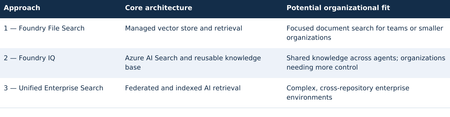
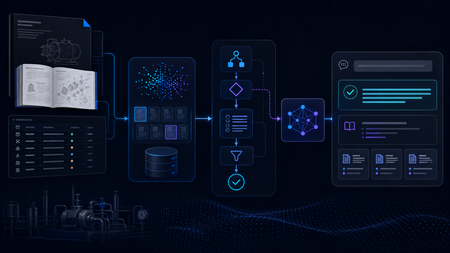
TECHNICAL RESEARCH PAPER Research Disclaimer: This article is a technical research paper intended solely for educational, research, and illustrative purposes. It reflects the author’s personal technical perspectives. All concepts, architectural designs, diagrams, and implementation approaches are provided “AS IS” for technical exploration and review, not as production-ready development guidance. Organizations considering implementing these approaches should consult their internal software development standards, enterprise architecture teams, corporate security policies, and governance requirements. Any production implementation must undergo appropriate end-to-end architectural, security, privacy, compliance, and responsible AI or ethics reviews, along with necessary testing and organizational approvals before deployment. Abstract. This research paper explores three independent approaches to transforming enterprise documents and knowledge repositories into AI-powered search experiences using Agentic Retrieval-Augmented Generation (RAG), Microsoft Foundry, and ASP.NET Core. Organizations can evaluate and adopt any one approach independently according to their business requirements, organizational size, document volume, technical complexity, available resources, and security considerations. Approach 1 — Microsoft Foundry File Search: A streamlined option with managed ingestion, vector storage, retrieval, and an optional ASP.NET Core/Blazor conversational web interface. It may be a sufficient standalone solution for focused document-search needs. Approach 2 — Microsoft Foundry IQ: A knowledge-centric option built around Azure AI Search and reusable knowledge bases, suitable for applications that need more configurable retrieval or shared knowledge across authorized agents. It does not require Approach 1 to be implemented first. Approach 3 — Unified Enterprise Agentic Search: A broader design combining federated and indexed retrieval across approved enterprise repositories, for organizations with extensive integration, authorization, governance, and cross-source search requirements. These are alternatives, not mandatory sequential stages. Approaches 1 and 2 may each be complete solutions. Organizations considering Approach 3 may optionally pilot Approach 1 or 2 to assess retrieval quality, citations, user experience, and operational readiness, but neither pilot is a prerequisite. The examples are research illustrations, not production-ready implementation instructions. 1. Three independent architectural approaches Select an approach based on organizational needs rather than following a required progression: Optional evaluation path: An enterprise exploring Approach 3 can run a focused File Search or Foundry IQ POC first. A small organization may stop at Approach 1 or 2 if its requirements are met. 2. Three independent implementations 3. How documents become AI-searchable For indexed sources, the broad workflow is similar across managed File Search and Foundry IQ-backed Azure AI Search, although ingestion details, formats, and service capabilities differ. Federated retrieval may query existing repositories without creating new embeddings. Indexed document processing and agent retrieval workflow The original document is not replaced by vectors alone: searchable text and source references are retained. Scanned PDFs and images may need OCR or multimodal processing. 3.1 Example: what happens to one PDF? Source: IIS-AppPool-Troubleshooting.pdf. Example passage: “If an IIS application pool repeatedly terminates, examine WAS events and investigate rapid-fail protection.” Illustrative document chunk, vector, and metadata A query such as “Why does my IIS application pool keep crashing?” may retrieve the relevant passage through semantic similarity. The agent uses the readable retrieved content to explain the issue and cite its source. Architecture note: This paper targets the new Microsoft Foundry Agent Service (Responses API-based), not classic Foundry agents or legacy Assistants API implementations. 4. Approach 1 — Microsoft Foundry File Search 4.1 Objective Explore a potentially standalone AI-powered search solution over 20 approved technical documents with limited ingestion configuration. Evaluate one Foundry File Search-enabled agent through the built-in Playground and/or a custom conversational web application. 4.2 Architecture flow Approach 1 — Microsoft Foundry File Search architecture 4.3 What is a managed vector store? A managed vector store exposes searchable passages, embeddings, and metadata while abstracting ingestion and retrieval. In standard Foundry Agent Service setup, files can remain in customer-managed Azure Storage and Azure AI Search can back the vector store; basic setup uses Microsoft-managed resources. Where supported, multiple agents in the same project can reference the same vector store ID through File Search tool configuration, subject to API and permission boundaries. 4.4 User experience options Option 1: Use the Foundry Agent Playground to ask questions, inspect citations, and evaluate multi-document synthesis. Option 2: Build an ASP.NET Core/Blazor portal using supported APIs/SDKs with multi-turn chat, streaming where supported, clickable citations, error handling, and Microsoft Entra ID sign-in. Keep privileged credentials on the server. 4.5 Illustrative implementation and deliverables • Prepare 20 approved documents and a fixed question set. • Configure a compatible Foundry project, model, agent, and File Search tool. • Upload files; verify managed processing and retrieval quality. • Test in the Playground; optionally implement and test the Blazor portal. • Evaluate answer grounding, citations, latency, ingestion behavior, and costs. Possible standalone deliverable: File Search agent, managed vector store, working selected interface(s), and an evaluation report. The custom portal is optional; Approach 2 is not required. 5. Approach 2 — Microsoft Foundry IQ 5.1 Objective Evaluate a reusable knowledge-base architecture with Azure AI Search-backed retrieval. This is an independent option: it can be built directly without first implementing Foundry File Search. For a comparative research exercise, the same 20 documents and questions may be reused. 5.2 Architecture flow Approach 2 — Microsoft Foundry IQ architecture 5.3 What is an Azure AI Search index? An Azure AI Search index is a structured, searchable collection of content extracted from enterprise data sources, including documents, websites, and other supported repositories. It stores searchable text, vector embeddings, metadata, and source references, enabling keyword, vector, hybrid, and semantic search to retrieve relevant information efficiently. During ingestion, documents can be processed, divided into smaller chunks, and converted into vector embeddings that represent their semantic meaning. When a user submits a natural-language question, Azure AI Search can combine keyword matching with vector similarity and semantic ranking to identify relevant passages, which an AI agent can use to generate grounded responses with citations to the original sources. 5.4 What Foundry IQ adds? Microsoft Foundry IQ builds on Azure AI Search by providing reusable knowledge bases and agentic retrieval capabilities across supported enterprise data sources. Multiple authorized AI agents can access the same knowledge base without duplicating document ingestion, while agentic retrieval can intelligently plan and execute searches to identify relevant information. Supported remote SharePoint knowledge sources can also be queried through the Copilot Retrieval API without creating a separate local vector index. This capability may require eligible Microsoft 365 Copilot licensing for end users, with access governed by source-specific permissions. For indexed content, document-level security trimming depends on supported knowledge-source capabilities and properly configured access control lists (ACLs) or security filters. 5.5 User experience and optional comparison A Foundry IQ solution may use the Agent Playground and/or its own ASP.NET Core/Blazor application. If an organization is comparing Approaches 1 and 2, it can optionally reuse a common web UI and provide an agent selector. Reusing Approach 1 is not a dependency. 5.6 Illustrative implementation and deliverables • Provision compatible Azure AI Search and Foundry resources. • Create the knowledge base and supported knowledge source; validate ingestion. • Connect a Foundry agent; evaluate retrieval and citations in the Playground. • Optionally build or reuse a Blazor interface for the same agent. • Measure relevance, knowledge reuse, latency, costs, and operational complexity. Direct-file ingestion may depend on preview, region, or API availability; Azure Blob ingestion may be needed. Possible standalone deliverable: reusable knowledge base, index, connected agent, selected interface(s), and evaluation report. 6. Foundry File Search versus Foundry IQ Section 6 — Foundry File Search versus Foundry IQ Key takeaway: Both File Search and Foundry IQ can support keyword, vector, and semantic relevance, with hybrid retrieval where supported. File Search emphasizes managed processing and search behavior; Foundry IQ provides reusable knowledge bases and more configurable Azure AI Search-backed sources. The distinction is control, source integration, and operations—not whether embeddings or semantic relevance exist. Both may be standalone solutions. 7. Approach 3 — Unified Enterprise Agentic Search 7.1 Objective Explore a comprehensive architecture for organizations requiring search across multiple repositories, with both federated and indexed retrieval, grounded answers, citations, and permission-aware access. This approach can be evaluated directly; smaller POCs are optional validation exercises, not prerequisites. 7.2 Unified enterprise architecture flow Section 7 — Unified Enterprise Agentic Search architecture 7.3 Option A — Federated enterprise search Query approved repositories through source APIs/connectors while retaining documents in place. Delegated access and source-native ACLs must be enforced for each connector. Remote SharePoint retrieval through Copilot Retrieval can require Microsoft 365 Copilot licenses for end users; source-specific permission behavior must be validated. Other repositories may require custom connectors or indexing. 7.4 Option B — Indexed enterprise AI search Index approved extracted text, vectors, metadata, and source references in Azure AI Search. Foundry IQ can provide reusable knowledge retrieval. OCR and complex layout extraction are not guaranteed by default File Search or every Foundry IQ knowledge source: test each format and add Azure AI Search OCR/Document Intelligence layout skills or other processing where needed. Derived indexed content requires explicit authorization and security trimming. 7.5 Combined example For “Find documentation explaining HTTP 503 errors in IIS and compare it with internal troubleshooting procedures,” the agent could retrieve current SharePoint guidance through Option A and indexed engineering articles through Option B, synthesize findings, and cite original sources. 8. A Unified UI for All Three Approaches: ASP.NET Core / Blazor Conversational Portal Section 8 — Unified ASP.NET Core/Blazor conversational portal for all three approaches The shared Blazor UI and ASP.NET Core backend can route requests to any of the three independent approaches. Approach 3 additionally coordinates federated and indexed retrieval; all paths return grounded answers and source citations. The retrieval router shown in the diagram is custom ASP.NET Core application/BFF logic, not a standalone Microsoft product. It selects the configured File Search, Foundry IQ, or federated/indexed enterprise path and normalizes citations. The architecture targets the new Microsoft Foundry Agent Service (Responses API-based). 9. Security and governance Section 9 — Security and governance Use approved noncustomer documents for initial research. Validate source permissions and prevent restricted content disclosure. Azure AI Search does not automatically preserve original repository ACLs when content is copied into an index. Indexed security trimming requires appropriate ACL fields and identity-aware filters or supported permission integration; not every knowledge source provides user-level trimming out of the box. Customer data requires organizational approvals. 10. Independent POC evaluation and success criteria Evaluate only the approach or approaches an organization is considering. A side-by-side comparison is optional, not a required sequence. If comparing File Search and Foundry IQ, use identical documents, questions, models, and prompts where possible. Section 10 — Independent POC evaluation and success criteria Illustrative acceptance target: at least 90% correct retrieval on a curated test set, valid citations for grounded responses, and reliable operation through the selected interface(s). These are proposed research criteria, not platform guarantees. Approach 3 additionally requires source-permission, cross-repository, and governance validation. 11. Independent estimates and potential deliverables Section 11 — Independent estimates and potential deliverables These are independent, illustrative POC estimates, not a cumulative rollout schedule. The Approach 2 estimate assumes compatible resources and an existing interface or Playground-only evaluation; building a new custom application can add effort. Approach 3 needs a separately scoped plan for connectors, access control, compliance reviews, testing, deployment, and operational readiness. 12. Research findings and needs-based architectural direction Approach 1: Consider Foundry File Search where a manageable document collection and simpler managed retrieval meet the organization’s requirements. Approach 2: Consider Foundry IQ where reusable knowledge, multiple agents, or greater search configurability are important. Approach 3: Consider unified enterprise retrieval where many systems, security boundaries, and content types must be integrated. No approach is universally preferred, and organization size alone is not a definitive selection criterion. A smaller organization may need advanced governance, while a large enterprise team may only need a focused File Search solution. Optional POCs using Approach 1 or 2 can inform an Approach 3 decision without becoming mandatory prerequisites. Envisioned outcome: A needs-appropriate, citation-grounded enterprise knowledge search experience built with Microsoft technologies, subject to technical validation, organizational security and privacy review, and responsible AI governance. The architectures remain independent research options rather than an endorsed implementation sequence. 13. Implementation notes and service lifecycle Current agent runtime: Target the current Microsoft Foundry Agent Service, not classic agents. Classic agents are deprecated and scheduled for retirement on March 31, 2027. Agentic retrieval: Foundry IQ query planning uses a supported model at low/medium reasoning effort. Minimal effort skips LLM query planning; model and API support must be checked. Availability and previews: Verify regional support, RBAC, API version, and GA-versus-preview status for File Search, Foundry IQ knowledge sources, and portal features before implementation. POC schedule: The illustrative estimates assume ready resources and a working Playground or reusable UI; region, permissions, and unsupported document formats can extend delivery. Technical validation: Microsoft Learn — Foundry File Search; Foundry IQ FAQ; Agentic Retrieval; Foundry Agent Service (classic) migration; Azure AI Search OCR and Document Layout skills.616Views0likes0CommentsBuilding a Fully Local Maintenance Assistant with Microsoft Foundry Local
Building the Local RAG System The system was designed as a fully local RAG pipeline, with both retrieval and model inference running on the same machine. The knowledge base came from two equipment manuals covering pump and motor operation, maintenance, and troubleshooting. Rather than treating every page as plain text, I kept different types of information in forms that matched their structure, including paragraphs, Q&A entries, tables, procedures, and fault–cause–remedy troubleshooting records. The final corpus contained 165 retrievable records. Each record was embedded locally with all-MiniLM-L6-v2 and stored in ChromaDB. At query time, the system retrieved the most relevant manual records and passed the selected evidence to Phi-4-mini, a small language model (SLM) running through Microsoft Foundry Local, for grounded response generation. Once the required models and resources were installed, the full retrieval and inference workflow could run on the local machine without depending on cloud inference. I began with a simple Single-Agent RAG baseline. For each query, the system retrieved relevant manual evidence and used a single Phi-4-mini call to generate a grounded response. That gave me a clear reference point before I started adding separate model-driven stages for query understanding, retrieval, and reasoning. The Experiment That Changed the Architecture The next version split the workflow into three roles: Query Understanding, Retrieval, and Reasoning. All three reused the same local Phi-4-mini model through Microsoft Foundry Local, but with different prompts and responsibilities. I expected this separation to give the system more control over how queries were interpreted and how evidence moved through the pipeline. In practice, the extra stages added a noticeable cost, so I profiled the pipeline to see where the time was going. The stage timings showed where the delay was coming from: Query Understanding: 15.469 s Evidence Selection: 11.557 s Reasoning: 8.251 s Vector search: 0.002 s Vector search was only a tiny part of the total time. Most of the latency came from the stages that repeatedly called the local model. The bottleneck was repeated model inference, not vector search. I therefore started looking for decisions that could be handled reliably without another SLM call. The end-to-end numbers matched the profile. The Single-Agent baseline averaged 23.1 seconds per query, compared with 33.0 seconds for the Initial Multi-Agent system, without a consistent improvement in answer quality. That shifted the focus of the project from making the pipeline more agentic to deciding where model reasoning was actually useful, and where simpler deterministic control would be enough. A Deterministic-First Hybrid Design The Hybrid redesign kept the same local retrieval stack and Phi-4-mini setup, but changed when the model was asked to make decisions. Clear, bounded routing decisions were handled deterministically first. Depending on the query, the system could proceed to retrieval, request clarification when required information was missing, or stop requests that depended on information outside the manuals. Phi-4-mini was used for query analysis only when these rules could not make a reliable decision. In the 12-case final evaluation, Phi-4-mini was needed for query analysis in only three cases. The remaining routing decisions were handled deterministically. The Hybrid pipeline also handled clearly multi-part requests differently. Instead of relying on a single retrieval query, the system could identify separate information needs and search them alongside the original request. For example, a two-part pump question could be handled like this: Multi-part Query │ ▼ "What should I check before starting the B114N pump, and what should I inspect if it fails to prime?" │ ▼ Deterministic Decomposition │ ┌──────────────────┼──────────────────┐ ▼ ▼ ▼ Original Query Pre-start Checks Failure-to-prime Search Search Search │ │ │ └──────────────────┼──────────────────┘ ▼ Combine Ranked Results │ ▼ Retain Component Provenance │ ▼ Candidate Evidence The decomposition was deliberately conservative. It handled clear structures such as multiple questions, comparisons, or lists of requested facts, and did not split a query simply because it contained a comma or the word “and.” Once candidate evidence had been retrieved, clear matches could be selected without another model call, while Phi-4-mini was used when the candidates required additional judgement. Candidate Evidence │ ▼ Can deterministic rules select the evidence? / \ Yes No │ │ ▼ ▼ Deterministic Selection Phi-4-mini Evidence Selection │ │ └───────┬────────┘ ▼ Selected Evidence │ ▼ Evidence Guard │ ┌────────────────┼────────────────┐ ▼ ▼ ▼ Sufficient More evidence Insufficient coverage already in the evidence │ candidate pool │ ▼ │ ▼ Response ▼ Stop Generation Retain additional evidence │ ▼ Re-check coverage │ └──────► Evidence Guard The Evidence Guard checked whether the selected records covered the information requested by the user. Supporting evidence already present in the retrieved candidate set could be added before checking coverage again. When the available evidence was still insufficient, the pipeline stopped instead of asking the model to fill the gap. The guard never triggered a new retrieval or SLM call. The final response stage used the model selectively as well. Some bounded cases, including clarification, out-of-scope requests, insufficient evidence, and selected structured answers, could be handled without another model call. When synthesis was still needed, Phi-4-mini generated a grounded response from the selected evidence, while citation formatting remained deterministic. What Changed? I evaluated the three architectures on the same frozen 12-case test set, using answer quality and end-to-end latency as the main comparison points. The Final Hybrid system produced the lowest average latency while maintaining answer quality at roughly the same level as the Single-Agent baseline. Architecture Quality score Mean latency Single-Agent RAG 7.00 / 10 22.709 s Initial Multi-Agent 6.50 / 10 33.454 s Final Hybrid 7.08 / 10 16.905 s The Initial Multi-Agent design was the slowest of the three and did not produce a consistent quality improvement over the simpler baseline. The Hybrid redesign reversed that trend: average latency fell to 16.9 seconds while the overall quality score remained comparable to the baseline. For this prototype, adding more model-driven stages was therefore less useful than being selective about where model reasoning was actually needed. The call counts show the same change. Across the 12 final cases, the Hybrid system made 12 stage-level SLM calls: three during query analysis, four during evidence selection, and five during reasoning. A pipeline that invoked the SLM at all three stages for every query would require 36 stage-level calls over the same 12 cases. This was only a small 12-case evaluation, so I would not treat it as a final measure of system performance. What it did show was that cutting unnecessary SLM calls made the local pipeline faster without hurting the quality score in this test. From Pipeline to Local Application I connected the Final Hybrid backend to a lightweight PySide6 desktop interface. The application lets a user enter a maintenance question, view the generated answer, and inspect the supporting manual sources. What I Learned The biggest lesson from the project was that adding more model-driven stages did not automatically make the system better. The Initial Multi-Agent design gave each stage a clearer role, but the extra SLM calls increased latency without consistently improving answer quality. I also found that good retrieval alone was not enough. The system still needed to decide whether the retrieved evidence actually covered the user’s request and whether another model call was necessary. This is where deterministic routing, evidence checks, and model reasoning worked well together. By the end of the project, the question was no longer how many agents to add, but where an SLM call was actually useful. In this system, the best result came from combining simple deterministic control with model reasoning only where it was needed. What Comes Next The next step would be to test the system on a larger and more varied set of maintenance questions, including more unseen cases and feedback from engineers. I would also like to compare different local models and hardware configurations to see how response quality, latency, and resource use change in practice. Beyond that, the same approach could be applied to a larger maintenance knowledge base or adapted to other equipment domains. One question I would like to explore further is whether the deterministic-first design still works as well when the corpus, query types, and deployment conditions become more varied. Resources Foundry Local documentation Get started with Foundry Local Foundry Local architecture overview501Views0likes0Comments
Vector search finds candidates. Reranking decides what your RAG app reads
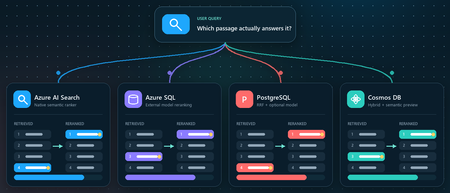
You ask a retrieval-augmented generation (RAG) application a question. Vector search returns ten passages that are clearly related to the topic. The passage that actually contains the answer, however, is ranked seventh, while the language model receives only the first five. Retrieval did not completely fail. It found the evidence, but ordered it below less useful context. Reranking addresses that gap between a passage that is semantically similar and a passage that is relevant to the user's specific question. This article demonstrates that pattern in four Azure services using the Stanford Question Answering Dataset (SQuAD). The goal is not to declare a winning service or publish a quality benchmark. It is to show where retrieval, rank fusion, and model-based reranking run in each architecture, and to illustrate how the position of a known source passage can change. What this demonstration establishes The examples show rank movement for three selected questions. They do not establish that one reranker or service is universally more accurate. A production decision requires a larger, representative query set and aggregate relevance, latency, and cost measurements. Get the full Python implementation: pauldj54/azure-vector-reranking-squad Retrieval and reranking are different stages A production search pipeline commonly uses two stages: Retrieve for recall. Fast retrieval narrows a large corpus to a bounded candidate set. It can use vector search, keyword search, or both. Rerank for precision. A more expensive model evaluates only those candidates against the original query and produces the final order. Reciprocal Rank Fusion (RRF) belongs between those two ideas. RRF is a model-free rank aggregation method that merges independent result lists, usually vector and keyword results. For a document d, a typical score is: RRF(d) = ∑ r ∈ R 1 k + rank r (d) Here, R is the set of ranked lists and k is commonly 60. RRF works with positions rather than raw scores, so it can combine signals such as cosine distance and BM25 without pretending their score scales are comparable. This gives a clearer three-part vocabulary: Stage Purpose Typical mechanism Retrieve Find broad candidate set Vector search, BM25, filters Fuse Combine independent rankings RRF Rerank Reassess query-document relevance Semantic ranker or cross-encoder RRF often improves hybrid retrieval when exact names, dates, identifiers, or terms matter. A learned reranker can then read the query and each candidate together, capturing interactions that separately generated embeddings can miss. The learned stage costs more, so it should operate on tens of candidates rather than the whole corpus. The following image describes the general process: Why use SQuAD for this demonstration? SQuAD 1.1 contains crowd-written questions over more than 500 Wikipedia articles. Its packaged splits contain 87,599 training rows and 10,570 validation rows. Each row includes a question, a context passage, and one or more answer spans inside that passage. That source-context mapping gives this demonstration a useful label: the context associated with a question is treated as its gold passage. We can then inspect whether each search stage moves that passage up or down. This is convenient, but it is not a perfect passage-ranking benchmark. SQuAD was designed for extractive question answering, and another passage in the corpus might also answer a question. The gold context is therefore a reproducible reference, not proof that every other passage is irrelevant. The results shown here use the 2,067 unique contexts in the SQuAD validation split and 1,536-dimensional embeddings. The repository default should be set to the same corpus size before treating the screenshots or rank transitions as directly reproducible. Three illustrative questions Question Expected answer Gold context According to game stats, which Super Bowl 50 quarterback had his worst year since his first NFL season? Peyton Manning 12, Super Bowl 50 What else did Tesla do for work at this time? Various electrical repair jobs 165, Nikola Tesla Who acts as laborer, paymaster, and design team for a renovation project? The property owner 1306, Construction Each notebook selects a seeded demonstration question when it runs. The three saved examples were collected across separate runs; the current notebooks do not execute all three questions in one pass. A benchmark harness should iterate over a fixed question list and save all stage results in one structured output. Capability boundaries at a glance Service Retrieval and Fusion Learned Reranking Boundary to Keep in Mind Azure AI Search Native keyword and vector retrieval with native RRF Built-in semantic ranker Semantic ranking only reorders the retrieved top 50 Azure SQL Database Exact vector retrieval in the current notebook External Cohere model invoked through native REST procedure SQL issues the HTTPS request; Foundry performs inference PostgreSQL Flexible Server pgvector plus hand-written SQL RRF over full-text search Optional external Cohere call from Python Retrieval primitives are native; this RRF query and Cohere path are application code Azure Cosmos DB for NoSQL Native vector search and native hybrid RRF SDK-integrated Semantic Reranker, currently preview Reranking is a separate inference call over at most 50 supplied documents Azure AI Search: native hybrid retrieval and semantic ranking How it works: Azure AI Search provides the most integrated pipeline in this demonstration. A hybrid query runs keyword and vector retrieval, combines the lists with RRF, and passes up to the top 50 results to the built-in semantic ranker. The semantic ranker assigns @search.rerankerScore values from 0 to 4 and can return extractive captions and answers. The semantic configuration identifies the fields that carry the meaning of each document: semantic_search = SemanticSearch( configurations=[ SemanticConfiguration( name=SEMANTIC_CONFIG, prioritized_fields=SemanticPrioritizedFields( title_field=SemanticField(field_name="title"), content_fields=[SemanticField(field_name="content")], ), ) ] ) This tells the semantic ranker which text fields to evaluate. The query then enables semantic ranking after hybrid retrieval: results = search_client.search( search_text=question, vector_queries=[vector_query], query_type="semantic", semantic_configuration_name=SEMANTIC_CONFIG, top=10, ) The important constraint is candidate recall. Semantic ranking does not search the corpus again. If the correct passage is absent from the hybrid top 50, the semantic stage cannot recover it. See 01_azure_ai_search_reranking.ipynb for the complete setup and query path. Test results for Azure AI Search These examples show that semantic reranking improves relevance selectively, not universally. It strongly helps the construction query, moving the correct passage from rank 4 to rank 1, but slightly degrades the Super Bowl and Tesla queries by one position. This reinforces that semantic ranking should be evaluated across a representative query set using aggregate metrics such as MRR or NDCG, rather than judged from a single result. Azure SQL Database: vector retrieval plus external Cohere reranking How it works. The Azure SQL notebook retrieves 20 candidates with exact cosine distance and sends their text to Cohere Rerank v4.0 Fast through sys.sp_invoke_external_rest_endpoint. The vector column and query vector must have the same dimensions. This repository uses 1,536-dimensional embeddings: SELECT TOP (@ candidate_count) context_id, title, content, 1 - VECTOR_DISTANCE( 'cosine', CAST(@ query_vector AS VECTOR(1536)), embedding ) AS similarity FROM dbo.documents ORDER BY similarity DESC; For reranking, we selected Cohere Rerank v4.0 Fast (Cohere-rerank-v4.0-fast), a fast version of Cohere’s fourth-generation relevance-ranking model. The model is deployed in Microsoft Foundry, where its Azure Direct inference endpoint is available in the deployment details within the Foundry portal. Azure SQL can call REST APIs directly using sp_invoke_external_rest_endpoint. Because Azure SQL allowlists Azure AI’s *.cognitiveservices.azure.com domain, we translate the equivalent Foundry endpoint from *.services.ai.azure.com while preserving the Cohere reranking route. from urllib.parse import urlsplit, urlunsplit def sql_compatible_endpoint(endpoint: str) -> str: """Convert an Azure Direct endpoint to Azure SQL's allowed hostname.""" parts = urlsplit(endpoint) if parts.hostname.endswith(".services.ai.azure.com"): resource = parts.hostname.removesuffix(".services.ai.azure.com") hostname = f"{resource}.cognitiveservices.azure.com" elif parts.hostname.endswith(".cognitiveservices.azure.com"): hostname = parts.hostname else: raise ValueError("Expected an Azure AI Services endpoint.") return urlunsplit( (parts.scheme, hostname, parts.path, parts.query, "") ) Then I defined a re-rank with cohere function, starting by loading the endpoint and setting the authentication: def rerank_with_cohere( cursor, question: str, candidates: list[dict], top_n: int = 10, ) -> list[dict]: """ Rerank candidate documents by calling Cohere through Azure SQL. Each candidate must contain a 'content' field. """ if not candidates: return [] sql_endpoint = sql_compatible_endpoint( os.environ["COHERE_RERANK_ENDPOINT"] ) model = os.environ["COHERE_RERANK_MODEL"] access_token = credential.get_token( "https://cognitiveservices.azure.com/.default" ).token headers = json.dumps({"Authorization": f"Bearer {access_token}"}) payload = json.dumps( { "model": model, "query": question, "documents": [row["content"] for row in candidates], "top_n": min(k, len(candidates)), }, ensure_ascii=False, ) cursor.execute( """ DECLARE @url NVARCHAR(4000) = CAST(? AS NVARCHAR(4000)); DECLARE @headers NVARCHAR(4000) = CAST(? AS NVARCHAR(4000)); DECLARE Payload NVARCHAR(MAX) = CAST(? AS NVARCHAR(MAX)); DECLARE Response NVARCHAR(MAX); DECLARE @status INT; EXEC @status = sys.sp_invoke_external_rest_endpoint @url = @url, @method = 'POST', @headers = @headers, Payload = Payload, @timeout = 60, @retry_count = 2, Response = Response OUTPUT; SELECT @status, Response; """, sql_endpoint, headers, payload, ) status, response_text = cursor.fetchone() if status != 0: raise RuntimeError(f"Reranker endpoint returned HTTP status {status}.") response = json.loads(response_text)["result"] You can see the complete implementation in the 02_azure_sql_reranking.ipynb notebook. Test results for Azure SQL Db Across the three sample questions, Cohere reranking consistently moved the correct SQuAD passage closer to the top: from rank 5 to 1 for the Super Bowl question, 3 to 2 for the Tesla question, and 8 to 1 for the construction question. These examples show how vector search provides a strong candidate set, while reranking applies deeper query-document relevance scoring to improve the final ordering. The results are illustrative rather than a complete quality benchmark, so broader evaluation across many queries is still recommended. Azure Database for PostgreSQL flexible server: pgvector, SQL RRF, and an optional model How it works: PostgreSQL makes the pipeline components explicit. The notebook uses pgvector for vector similarity, PostgreSQL full-text search for keyword retrieval, and SQL to implement RRF. Vector retrieval uses cosine distance: SELECT context_id, title, content, 1 - (embedding <= > % (query_vector) s:: vector) AS similarity FROM squad_docs ORDER BY embedding <= > % (query_vector) s:: vector LIMIT % (candidate_count) s; The hybrid query independently ranks vector and keyword hits, then combines positions rather than raw scores: SELECT d.context_id, COALESCE(1.0 / (60 + v.rank), 0) + COALESCE(1.0 / (60 + k.rank), 0) AS rrf_score FROM squad_docs AS d LEFT JOIN vector_hits AS v USING (context_id) LEFT JOIN keyword_hits AS k USING (context_id) WHERE v.context_id IS NOT NULL OR k.context_id IS NOT NULL ORDER BY rrf_score DESC; This is not a built-in PostgreSQL RRF operator. It is transparent, hand-written SQL over native retrieval primitives, which makes weighting and debugging flexible but leaves implementation and tuning with the application team. The notebook's optional learned stage sends the vector candidates from Python to a Foundry deployment of Cohere Rerank v4.0 Fast. This path was chosen because the tested Flexible Server azure_ai extension version expected the older serverless reranking endpoint contract. Microsoft documentation still describes azure_ai.rank() as a preview function whose default model is Cohere Rerank v3.5, even though that model retired on May 14, 2026. Treat this as a version-specific compatibility issue and verify current extension behavior before selecting an architecture. Azure HorizonDB is a different product path. Its AI Model Management feature can provision Cohere Rerank v4.0 Fast as default-reranker, but that management feature is currently a limited preview. It should not be described as a generally available Flexible Server capability. See 03_azure_postgres_reranking.ipynb for the full SQL and optional external model path. Test results for Azure SQL for PostgreSQL Flexible Server The tests show that PostgreSQL vector search provides a useful candidate set, SQL RRF can substantially improve results when keyword evidence is strong, and the Cohere semantic reranker is the most consistent overall: it moved the correct passage to rank 1 in two tests and from rank 3 to rank 2 in the Tesla test. RRF produced the biggest gain for the construction question, moving the correct passage from outside the vector top five to rank 1, but did not improve every query. The scores across stages are not directly comparable because cosine similarity, RRF score, and Cohere relevance use different scales. Azure Cosmos DB for NoSQL: hybrid search with built-in RRF How it works: Azure Cosmos DB for NoSQL supports native hybrid ranking with VectorDistance, FullTextScore, and RRF inside ORDER BY RANK: SELECT TOP K C.context_id, c.title, c.text FROM c ORDER BY RANK RRF( VectorDistance(c.vector, @query_vector), FullTextScore(c.text, @term1, @term2, @term3) ) The notebook extracts distinct terms from the question before building the full-text part of the query. That token selection is application logic and can materially affect the hybrid ranking, so production evaluation should test analyzers, languages, term extraction, and optional RRF weights. Cosmos DB Semantic Reranker is an SDK-integrated preview feature. The application first runs a query, serializes the resulting documents, and submits those documents with the user's context string: result = container.semantic_rerank( context=question, documents=documents, options={ "return_documents": False, "top_k": min(k, len(documents)), "sort": True, "document_type": "json", "target_paths": "title,text", }, ) The service accepts at most 50 documents per rerank call and returns relevance scores from 0 to 1, plus inference latency and token usage. It uses the Microsoft semantic ranking model also used by Azure AI Search. The reranking call requires Microsoft Entra authentication, the appropriate Semantic Reranker role, and an account-linked inference endpoint. The 04_azure_cosmosdb_reranking.ipynb in the shared repo contains and end-to-end implementation. Test results for Azure Cosmos Db The results show that vector search provides a strong baseline, while hybrid RRF and semantic reranking improve different queries in different ways. Hybrid RRF helps when exact keywords matter, moving the construction answer into the top results, while the semantic reranker delivers the strongest overall ordering, promoting the correct construction passage from hybrid rank 3 to rank 1 and improving the Super Bowl answer from rank 5 to rank 2. However, it does not always place the gold passage first, as seen in the Tesla example, confirming that reranking improves relevance but is query-dependent and should be evaluated across a larger test set. What the examples do and do not show The four services expose different ownership boundaries: • Azure AI Search owns hybrid fusion and learned semantic ranking inside the search service. • Azure SQL owns vector retrieval and outbound REST invocation in this example, while Foundry owns model inference. • PostgreSQL supplies vector and full-text primitives; the application owns the RRF SQL and optional Cohere call. • Cosmos DB provides native hybrid RRF and integrates a separate preview inference call through its SDK. Across three selected questions, the known source passage often moved substantially. That supports the practical value of testing a second-stage ranker. It does not prove that semantic reranking always improves top-1 accuracy, that RRF is universally beneficial, or that scores from different stages can be compared directly. Cosine similarity, RRF score, Azure AI Search reranker score, Cohere relevance, and Cosmos DB semantic relevance all have different definitions and scales. Compare rank positions and task-level metrics, not raw values across systems. Turn the demonstration into an evaluation For a production RAG system, convert the notebook pattern into a repeatable evaluation harness: Build a representative labeled query set from real user tasks. Freeze corpus, chunking, embedding model, dimensions, and candidate counts for each run. Record ranks after retrieval, fusion, and learned reranking. Measure Recall@k or Hit@k to verify that retrieval finds relevant evidence. Measure Mean Reciprocal Rank (MRR) when the position of the first relevant result matters. Use NDCG when judgments include multiple passages or graded relevance. Record latency percentiles, inference usage, request cost, and failure rates. Evaluate the generated answer separately for correctness, citation support, and refusal behavior. Also test the operational cases that a three-question demonstration cannot cover: empty keyword results, missing gold passages, long documents, multilingual text, filters, partial outages, token expiration, throttling, model retirement, and low-confidence scores. Practical guidance Retrieve broadly enough that the correct evidence can reach the learned stage. Use RRF when vector and keyword retrieval provide complementary signals. Rerank a bounded candidate set, commonly 20 to 50 passages, and measure the latency cost. Keep citations and source identifiers through every rank transformation. Version the corpus, embedding model, dimensions, query set, and reranker deployment. Do not hard-code assumptions about model endpoints or lifecycle dates. Verify current service documentation and the deployed extension or SDK version. Add thresholds or fallback behavior only after calibrating scores on your own data. Judge the full RAG chain. Better passage order is valuable only when it improves grounded answers for users. Vector search is built to find plausible candidates quickly. Rank fusion can reconcile retrieval signals, and a learned reranker can decide which candidates best address the question. The right architecture depends on where your data lives, which service boundaries you want to operate, and what your evaluation says about quality, latency, and cost. Resources Companion repository Azure AI Search semantic ranker Azure SQL VECTOR_DISTANCE Azure SQL sp_invoke_external_rest_endpoint Azure Database for PostgreSQL AI functions Microsoft Foundry model retirement schedule Azure Cosmos DB hybrid search Azure Cosmos DB Semantic Reranker SQuAD dataset card Dataset attribution Rajpurkar, P., Zhang, J., Lopyrev, K., and Liang, P. (2016). SQuAD: 100,000+ Questions for Machine Comprehension of Text. EMNLP 2016. SQuAD 1.1 is distributed under CC BY-SA 4.0.Join our free livestream series on using Microsoft IQ with Python
Join us for a new 3-part livestream series where we take a deep technical look at Microsoft IQ, the knowledge layer for the next generation of AI experiences. You'll learn how Foundry IQ, Work IQ, and Fabric IQ can be used to ground AI systems in organizational knowledge, workplace context, and structured business data. Our series will cover: Foundry IQ for multi-source agentic retrieval on search indexes, SharePoint, websites, and more Work IQ for user-specific retrieval of M365 data, like Teams chats, emails, and calendar events Fabric IQ for retrieval of data stored in OneLake, via Fabric ontologies and data agents Building agents with Microsoft Agent Framework to connect to Foundry IQ, Fabric IQ, and Work IQ Throughout the series, we’ll use Python for all examples and share full code so you can run everything yourself in your own Foundry projects. 👉 Register for the full series. In addition to the live streams, you can also join the Microsoft Foundry Discord to ask follow-up questions after each stream. If you are new to generative AI with Python, start with our 9-part Python + AI series, which covers topics such as LLMs, embeddings, RAG, tool calling, MCP, and agents. If you are new to Microsoft Agent Framework, watch our 6-part Python + Agent series which dives deep into agents and workflows. To learn more about each live stream or register for individual sessions, scroll down: Day 1: Foundry IQ 28 July, 2026 | 5:00 PM - 6:00 PM (UTC) Coordinated Universal Time Register for the stream on Reactor In the first session of our Microsoft IQ Deep Dive with Python series, we’ll kick things off with an introduction to the Microsoft IQ family: Foundry IQ, Work IQ, Fabric IQ, and Web IQ. We’ll then take a deeper look at Foundry IQ (Azure AI Search), exploring how it helps agents and applications work with curated knowledge and organizational context. We'll build a knowledge base and connect it to multiple knowledge sources, including the new IQs, MCP servers, and search indexes built from ingested data. Then we'll perform multi-source agentic retrieval on the knowledge base, which executes queries in parallel and merges the results with state-of-the-art ranking models. Finally, we will build an agent in Python using Microsoft Agent Framework and ground the agent's responses in results from the Foundry IQ knowledge base. All code demos will use Python and will be available in an open-source repository for you to deploy yourself. After the stream, join office hours in the Microsoft Foundry Discord to ask follow-up questions. Day 2: Work IQ 29 July, 2026 | 5:00 PM - 6:00 PM (UTC) Coordinated Universal Time Register for the stream on Reactor In the second session of our Microsoft IQ Deep Dive with Python series, we’ll focus on Work IQ and how it brings workplace context into AI-powered experiences. We’ll explore how developers can use Work IQ through APIs, A2A patterns, MCP integration, and tool-based workflows. We’ll look at two practical tool examples, then show how Work IQ can be used from Copilot and from a Microsoft Agent Framework agent. All code demos will use Python and will be available in an open-source repository for you to deploy yourself. After the stream, join office hours in the Microsoft Foundry Discord to ask follow-up questions. Day 3: Fabric IQ 30 July, 2026 | 5:00 PM - 6:00 PM (UTC) Coordinated Universal Time Register for the stream on Reactor In the final session of our Microsoft IQ Deep Dive with Python series, we’ll explore Fabric IQ and how it connects AI experiences to structured business data. We’ll introduce the key concepts behind Fabric IQ, including ontologies and data agents, and show how they help describe, organize, and reason over operational data stored in OneLake. We’ll use the Microsoft Fabric API SDK in Python to connect to Fabric IQ, so that we can programmatically configure ontologies and answer questions about our data. All code demos will use Python and will be available in an open-source repository for you to deploy yourself. After the stream, join office hours in the Microsoft Foundry Discord to ask follow-up questions.Building Agentic Systems on Azure: Microsoft Foundry Agents SDK vs Microsoft Agent Framework
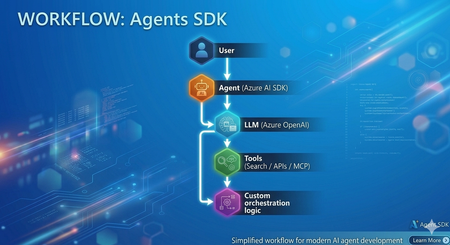
In my recent experience as a Senior Consultant at Microsoft, I’ve been actively involved in designing and delivering AI-driven solutions, with a strong focus on building intelligent agents using modern frameworks. Along the way, I've built agents using both Microsoft Foundry Agents SDK (hereafter "Agents SDK") and Microsoft Agent Framework (MAF) Both approaches are powerful and capable. However, once you move beyond simple proofs of concept, the developer experience and architectural patterns start to differ significantly. This article provides a practical comparison based on real implementation experience and aims to help developers choose the right approach. Approach 1: Agents SDK Agents SDK provides a straightforward way to create agents with integrated tools and models. Example: Creating an Agent from azure.ai.projects import AIProjectClient from azure.ai.agents.models import AzureAISearchTool, AzureAISearchQueryType from azure.identity import DefaultAzureCredential client = AIProjectClient(credential=DefaultAzureCredential(), endpoint=os.getenv("AZURE_AI_PROJECT_ENDPOINT")) # Configure tools ai_search = AzureAISearchTool( index_connection_id=conn_id, index_name="my-index", query_type=AzureAISearchQueryType.SEMANTIC, ) # Create agent (persisted in Foundry portal) agent = client.agents.create_agent( model=os.getenv("AZURE_AI_AGENT_DEPLOYMENT_NAME"), name="MyAgent", instructions="You are a helpful assistant.", tool_resources=ai_search.resources, tools=ai_search.definitions, ) # Run conversation thread = client.agents.threads.create() client.agents.messages.create(thread_id=thread.id, role="user", content="Hello") run = client.agents.runs.create(thread_id=thread.id, agent_id=agent.id) What this approach provides Native integration with Azure AI services (OpenAI, AI Search, MCP) Managed execution environment Simple and quick agent setup Conceptually, this approach can be summarized as: Model + Tools + Execution Strengths ✅ Rapid development and onboarding ✅ Strong integration within the Azure ecosystem ✅ Well-suited for single-agent or tool-driven use cases ✅ Minimal infrastructure overhead Challenges observed in practice As the complexity of scenarios increases, certain limitations become more visible: Multi-agent workflows require custom orchestration logic Agent handoffs must be implemented manually Context sharing across agents requires additional design effort While this approach offers flexibility, it shifts orchestration complexity to the developer. Approach 2: Microsoft Agent Framework (MAF) Microsoft Agent Framework introduces a higher-level abstraction, focused on agent orchestration and system design. Creating an Agent from agent_framework import Agent, WorkflowBuilder, Message from agent_framework.foundry import FoundryChatClient from azure.identity import DefaultAzureCredential client = FoundryChatClient( project_endpoint=os.getenv("FOUNDRY_PROJECT_ENDPOINT"), model=os.getenv("FOUNDRY_MODEL_DEPLOYMENT_NAME"), credential=DefaultAzureCredential(), ) # Create agents (in-process only, not persisted in portal) researcher = Agent(client, name="ResearcherAgent", instructions="Research topics thoroughly.") writer = Agent(client, name="WriterAgent", instructions="Write concise summaries.") # Build and run multi-agent workflow workflow = WorkflowBuilder(start_executor=researcher).add_edge(researcher, writer).build() async for event in workflow.run(Message("user", "Summarize migration best practices"), stream=True): print(event.content) What this approach provides Built-in orchestration capabilities Native support for multi-agent workflows Structured agent lifecycle management Context and memory handling Conceptually, this can be viewed as: Agents + Orchestration + System Design Observations from implementation When implementing similar use cases using MAF: Agent responsibilities became clearly defined Routing and delegation patterns were significantly simplified Overall system architecture became easier to maintain and scale This approach encourages thinking in terms of agent ecosystems rather than isolated agents. Architecture Comparison Agents SDK Microsoft Agent Framework (MAF) Choosing the Right Approach Use Agents SDK when: You need rapid development for a single-agent use case The workflow is relatively straightforward You prefer flexibility and lower-level control Use Microsoft Agent Framework when: You are designing multi-agent systems Your solution requires routing, delegation, or handoffs Long-term scalability and maintainability are essential Pros and Cons Summary Agents SDK Pros Easy to get started Strong Azure integration Flexible design Cons Manual orchestration required Limited native multi-agent support Complexity increases as scenarios grow Microsoft Agent Framework (MAF) Pros Built-in orchestration Native multi-agent support Scalable and structured architecture Cons Learning curve for new developers More opinionated framework design Reduced low-level control compared to SDK-based approach References and Repositories 🔗 Microsoft Agent Framework (MAF) Microsoft Agent Framework – GitHub Repository Microsoft Agent Framework Samples – Tutorials & Examples Workflow Samples (Multi-agent patterns) FoundryChatClient sample (Python) Agent Framework demos - GitHub Source 📘 Documentation Microsoft Agent Framework Overview (Microsoft Learn) Agent Framework + Microsoft Foundry provider docs 🔗 Azure AI Projects / Agents SDK Azure AI Projects SDK – Python (GitHub Source) Azure AI Projects Agents (.NET SDK repo) 📘 Documentation Azure AI Projects SDK (Python) – Microsoft Learn Azure AI Agents SDK – Microsoft Learn Conclusion Azure AI Projects and Microsoft Agent Framework both play important roles in the modern agent development landscape. Agents SDK enables quick and flexible agent development Microsoft Agent Framework enables structured, scalable agent systems In practice, the choice depends on whether you are building a single agent feature or a multi-agent system. Final Thought Agents SDK helps you get started quickly. Microsoft Agent Framework helps you scale with confidence In a follow-up blog, I’ll dive into how the M365 Agents SDK compares with Microsoft Agent Framework, especially in the context of enterprise productivity and Copilot experiences.
Building an End-to-End Azure RAG Strategy Agent with MS Foundry
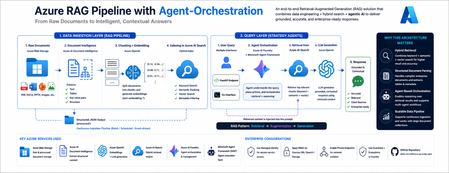
High-Level Architecture This architecture represents an end-to-end Retrieval-Augmented Generation (RAG) pipeline where raw documents are ingested from Azure Blob Storage, processed using Document Intelligence, transformed into embeddings via Azure OpenAI, and indexed in Azure AI Search for hybrid retrieval. A Foundry/MAF-based agent orchestrates query processing by combining user input with relevant search results and generates contextual responses, which are exposed through a FastAPI or CLI interface. This solution is composed of two main layers: 1. Data Ingestion Layer (RAG Pipeline) This layer transforms raw enterprise documents into searchable knowledge. Flow: Raw documents stored in Azure Blob Storage Supported formats: PDF, DOCX, PPTX, images, etc. Document Intelligence extraction Extracts: Text Tables Key-value pairs Structure Writes output as structured JSON back to Blob (processed/) Chunking + Embedding Documents are split into chunks Each chunk is embedded using Azure OpenAI (text-embedding-*) Indexing into Azure AI Search Creates a hybrid index: Keyword search Semantic ranking Vector search Enables flexible retrieval strategies 2. Query Layer (Strategy Agents) This layer enables intelligent query answering. Flow: User sends a query via: FastAPI endpoint CLI interface Query is handled by: Microsoft Agent Framework (MAF) agent Running on Azure AI Foundry Agent: Queries Azure AI Search Retrieves top relevant chunks Injects them into LLM prompt LLM generates grounded response This follows the standard RAG pattern: Retrieval → Augmentation → Generation End-to-End Flow Key Azure Services Used Service Purpose Azure Blob Storage Raw + processed document storage Azure AI Document Intelligence Extract structured content Azure OpenAI Embeddings + LLM generation Azure AI Search Hybrid retrieval engine Azure AI Foundry Agent orchestration Microsoft Agent Framework Agent execution layer Why this Architecture Matters This solution goes beyond basic RAG and provides: Hybrid Retrieval Combines keyword + semantic + vector search Improves recall and accuracy Structured Document Parsing Handles complex enterprise documents Extracts tables and metadata Agent-Based Orchestration Enables reasoning over retrieval results Extensible for multi-agent workflows Scalable Data Pipeline Supports continuous ingestion Works with large document collections Enterprise Considerations Use Managed Identity for secure service access Apply RBAC on Cosmos DB / Search / Storage Enable Private Endpoints for network isolation Use Guardrails + Evaluations in Foundry Summary This repository demonstrates a production-ready Azure RAG architecture: Ingest → Extract → Chunk → Embed → Index Retrieve → Reason → Generate Powered by Azure AI Foundry + Agent Framework By combining data engineering + AI orchestration, it enables enterprise AI systems that are: Accurate Grounded Extensible Repo: https://github.com/snd94/azure-rag-strategy-agent Please refer to the Microsoft Learn Documentation for further information: Azure AI Search documentation - Azure AI Search | Microsoft Learn Document Intelligence documentation - Quickstarts, Tutorials, API Reference - Foundry Tools | Microsoft Learn How to generate embeddings with Azure OpenAI in Microsoft Foundry Models - Microsoft Foundry | Microsoft Learn How to generate embeddings with Azure OpenAI in Microsoft Foundry Models - Microsoft Foundry | Microsoft Learn Microsoft Agent Framework Overview | Microsoft Learn What is Microsoft Foundry? - Microsoft Foundry | Microsoft LearnWhen RAG Hits the Wall: Designing Systems That Scale from 1,000 to 1 million Documents
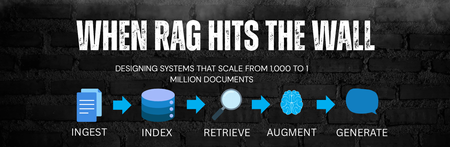
Introduction Retrieval-Augmented Generation (RAG) has quickly become the default architecture for grounding Large Language Models (LLMs) in enterprise data. And at small scale, it works exceptionally well. 100 documents → Excellent accuracy 1,000 documents → Still predictable With around 100 documents, RAG systems tend to produce highly accurate responses. Even at 1,000 documents, behavior remains predictable and reliable. However, as systems grow beyond tens of thousands - and especially into the range of hundreds of thousands or millions of documents - many implementations begin to degrade in surprising ways. Latency begins to rise nonlinearly. Retrieval precision declines, costs increase, and responses grow inconsistent. What looks like a model issue is usually an architectural one. The Hidden Theory Behind Early RAG Success Early RAG systems work well not because they are perfectly designed, but because small datasets are forgiving. In smaller corpora, irrelevant retrieval is naturally rare. Semantic similarity remains tightly clustered, and noise does not overwhelm signal. This creates an illusion of robustness - systems seem accurate even when the underlying retrieval strategy is weak. As scale increases, this illusion disappears. Breaking Point #1: Chunk Explosion (Entropy Growth) What Happens Most ingestion pipelines rely on token-based chunking: Document -> Fixed-size chunks -> Embed everything As document count increases, the system experiences entropy growth: The number of chunks grows faster than the number of documents, leading to a dense and noisy vector space. Similar information becomes fragmented, and retrieval precision drops. This is a manifestation of the curse of dimensionality - as the number of vectors increases, distance metrics lose meaning, and “nearest neighbors” stop being truly relevant. The Shift: Structural Information Retrieval To solve this production-grade RAG systems reintroduce structure. Instead of blindly splitting text, semantic chunking aligns content with logical boundaries like headings and sections. This preserves meaning and improves retrieval quality. Deduplication removes repeated templates and boilerplate, reducing unnecessary noise in the system. Hierarchical indexing allows retrieval to operate at multiple levels - document, section, and chunk - making search both more efficient and more accurate. These changes restore order in the vector space and significantly improve retrieval performance. Breaking Point #2: Vector Search Saturation What Happens As data grows, latency becomes one of the biggest bottlenecks. Many systems rely on runtime-heavy operations such as generating embeddings on demand or querying large, unpartitioned indexes. This leads to unbounded computation and poor scalability. Over time, retrieval cost trends toward linear complexity. Cache inefficiencies increase, and tail latency begins to dominate the user experience. The Shift: Systems Thinking Scaling RAG requires applying distributed systems principles. Partitioned indexes reduce the search space, allowing queries to operate on smaller, more relevant subsets of data. Precomputed embeddings shift expensive computation to ingestion time, eliminating runtime overhead. Caching strategies, informed by real-world usage patterns, significantly improve performance by reusing frequent query results. Together, these changes make latency predictable and systems more cost-efficient. The Final Trap: Context does not equal to Intelligence What Happens A common mistake in RAG systems is assuming that more context leads to better answers. In reality, LLMs are attention limited. As more tokens are added, attention becomes diluted, and the model struggles to focus on what matters. Excessive context introduces noise, reducing the overall quality of responses. The Shift: Information Compression Effective systems focus on quality over quantity. By limiting retrieval to the most relevant chunks, summarizing context, and grounding responses with citations, RAG systems achieve higher information density and better reasoning performance. What a Scalable RAG System Actually Represent At scale, RAG is no longer an LLM feature. It becomes a retrieval system with an LLM as a reasoning layer. Prototype RAG Production RAG Token chunking Structured IR Vector-only search Hybrid retrieval No ranking theory Reranking models Runtime-heavy Precomputed pipelines More context Information compression Final Insight Scaling RAG is not primarily a machine learning problem. It is a combination of information retrieval and distributed systems engineering, with the LLM acting as the final layer. Closing Thought If your RAG system works with 1,000 documents, you’ve validated an idea. If it works with 1 million documents, you’ve respected theory - and built an architecture. References RAG and Generative AI - Azure AI Search | Microsoft Learn Chunk and Vectorize by Document Layout - Azure AI Search | Microsoft Learn Chunk Documents - Azure AI Search | Microsoft Learn Hybrid Search Overview - Azure AI Search | Microsoft Learn
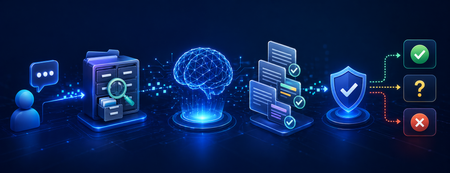
Confidence-Aware RAG: Teaching Your AI Pipeline to Acknowledge Uncertainty
Introduction Retrieval-Augmented Generation (RAG) has become the standard architecture for grounding Large Language Models (LLMs) with enterprise data. By retrieving relevant documents before generating a response, RAG helps reduce hallucinations compared to relying on model knowledge alone. However, an important limitation remains in most implementations: RAG systems can produce confident-sounding answers even when the underlying data is incomplete, irrelevant, or missing. This happens when: • Retrieved documents are loosely related to the query • The answer exists partially but lacks key details • Retrieved sources contradict each other • The query falls entirely outside the knowledge base In enterprise environments, this behavior carries real risk. A reliable AI system must not only answer well - it must also know when not to answer. This article presents a practical confidence-aware RAG architecture using three layered strategies: retrieval confidence scoring, citation validation, and LLM-based abstention - all implemented with Azure AI Search and Azure OpenAI. The Problem: Confident Hallucination Consider a real-world enterprise scenario. An employee asks: "What is our company's parental leave policy for contractors?""What is our company's parental leave policy for contractors?" The knowledge base contains parental leave policies for full-time employees - but nothing specific to contractors. A standard RAG pipeline retrieves the closest matching document and confidently presents full-time employee policy as the answer. This outcome is worse than returning no answer. The user trusts the system, acts on incorrect information, and the error may not surface until real consequences follow. This pattern is sometimes called hallucination laundering - the RAG architecture creates the appearance of factual grounding while the response is not actually supported by the retrieved evidence. Fixing this requires deliberate confidence checkpoints at each stage of the pipeline. Architecture Overview A standard RAG pipeline follows a simple path: User Query → Retrieve Documents → Generate Answer A confidence-aware pipeline adds two explicit decision checkpoints: Each layer catches failures the previous one may miss. Together, they form a defense-in-depth approach to output reliability. Strategy 1: Retrieval Confidence Scoring The first checkpoint evaluates whether retrieved documents are genuinely relevant before passing them to the LLM. Azure AI Search returns a @search.rerankerScore when semantic ranking is enabled - a value on the 0-4 scale that reflects how well each document matches the query intent, not just keyword overlap. from azure.search.documents import SearchClient from azure.identity import DefaultAzureCredential search_client = SearchClient( endpoint=AZURE_SEARCH_ENDPOINT, index_name="enterprise-knowledge-base", credential=DefaultAzureCredential() ) def retrieve_with_confidence(query: str, threshold: float = 1.5, top_k: int = 5): results = search_client.search( search_text=query, query_type="semantic", semantic_configuration_name="default", top=top_k, select=["content", "title", "source"] ) confident_results = [] for result in results: reranker_score = result.get("@search.rerankerScore", 0) if reranker_score >= threshold: confident_results.append({ "content": result["content"], "title": result["title"], "source": result["source"], "score": reranker_score }) return confident_results If no documents clear the threshold, the pipeline abstains rather than forcing a low-quality answer: results = retrieve_with_confidence(user_query, threshold=1.5) if not results: return { "answer": ( "I don't have enough information in the knowledge base to answer " "this question. Please contact the relevant team for assistance." ), "status": "abstained_retrieval" } Threshold tuning: Start at 1.5 on the 0-4 scale. Evaluate against a labeled test set and adjust based on your precision/recall requirements. Higher thresholds reduce false positives but may increase abstention on edge cases. Strategy 2: Citation Validation Even when retrieval scores are high, the LLM may synthesize information that does not exist in the retrieved context. Citation validation addresses this by requiring the model to ground every factual claim in a specific named source - and then programmatically verifying those citations exist in the retrieved set. from openai import AzureOpenAI client = AzureOpenAI( api_key=AZURE_OPENAI_API_KEY, azure_endpoint=AZURE_OPENAI_ENDPOINT, api_version="2025-12-01-preview" ) ANSWER_WITH_CITATIONS_PROMPT = """ You are an enterprise assistant. Answer the question using ONLY the provided context. RULES: 1. Every factual claim MUST include a citation in the format [Source: <title>]. 2. If the context does not contain enough information, respond with: "I don't have sufficient information to answer this question." 3. Do NOT infer, assume, or use knowledge outside the provided context. 4. If context partially answers the question, state what you know and explicitly note what information is missing. Context: {context} Question: {question} Answer: """ def generate_answer(question: str, context: str, sources: list) -> dict: prompt = ANSWER_WITH_CITATIONS_PROMPT.format( context=context, question=question ) response = client.chat.completions.create( model=AZURE_DEPLOYMENT_NAME, messages=[{"role": "user", "content": prompt}], temperature=0 ) answer = response.choices[0].message.content.strip() validation = validate_citations(answer, sources) return {"answer": answer, "citation_check": validation} The validation function checks that every citation in the answer maps to a document that was actually retrieved: import re def validate_citations(answer: str, sources: list) -> dict: cited = re.findall(r'\[Source:\s*(.+?)\]', answer) source_titles = {s["title"].lower().strip() for s in sources} valid, invalid = [], [] for citation in cited: if citation.lower().strip() in source_titles: valid.append(citation) else: invalid.append(citation) return { "total_citations": len(cited), "valid": valid, "invalid": invalid, "is_trustworthy": len(invalid) == 0 and len(cited) > 0 } If is_trustworthy is False, the pipeline flags the response for review or suppresses it: if not generation["citation_check"]["is_trustworthy"]: return { "answer": "I found related information but cannot provide a reliable answer based on the available sources.", "status": "abstained_citation" } Strategy 3: LLM-Based Abstention Scoring The third layer adds a second LLM call that acts as a quality judge - explicitly evaluating whether the generated answer is well-supported by the retrieved context, independent of citation formatting. ABSTENTION_JUDGE_PROMPT = """ You are an answer quality judge. Given a question, retrieved context, and a generated answer, evaluate whether the answer is fully supported by the context. Respond ONLY in JSON format: {{ "verdict": "supported" | "partial" | "unsupported", "confidence": <float between 0.0 and 1.0>, "reasoning": "<brief explanation>" }} Question: {question} Context: {context} Answer: {answer} """ def judge_answer(question: str, context: str, answer: str) -> dict: import json prompt = ABSTENTION_JUDGE_PROMPT.format( question=question, context=context, answer=answer ) response = client.chat.completions.create( model=AZURE_DEPLOYMENT_NAME, messages=[{"role": "user", "content": prompt}], temperature=0 ) return json.loads(response.choices[0].message.content.strip()) Integrate the judge with a confidence threshold of 0.6: judgement = judge_answer(user_query, context, generation["answer"]) if judgement["verdict"] == "unsupported" or judgement["confidence"] < 0.6: return { "answer": "I don't have sufficient information to answer this question confidently.", "status": "abstained_judge" } if judgement["verdict"] == "partial": generation["answer"] += ( "\n\nNote: This answer may be incomplete. " "Some aspects of your question were not covered in the available documents." ) End-to-End Pipeline Combining all three strategies gives a complete confidence-aware pipeline: def confidence_aware_rag(user_query: str) -> dict: # Layer 1: Retrieve with confidence gating results = retrieve_with_confidence(user_query, threshold=1.5) if not results: return { "answer": "I don't have enough information in the knowledge base to answer this.", "status": "abstained_retrieval" } context = "\n\n".join(r["content"] for r in results) # Layer 2: Generate with citation requirements generation = generate_answer(user_query, context, results) if not generation["citation_check"]["is_trustworthy"]: return { "answer": "I found related information but cannot provide a reliable answer.", "status": "abstained_citation" } # Layer 3: Judge the answer judgement = judge_answer(user_query, context, generation["answer"]) if judgement["verdict"] == "unsupported" or judgement["confidence"] < 0.6: return { "answer": "I don't have sufficient information to answer this question confidently.", "status": "abstained_judge" } if judgement["verdict"] == "partial": generation["answer"] += ( "\n\nNote: This answer may be incomplete. " "Some aspects of your question were not covered in available documents." ) return { "answer": generation["answer"], "status": "answered", "confidence": judgement["confidence"], "sources": [r["source"] for r in results[:3]] }def confidence_aware_rag(user_query: str) -> dict: # Layer 1: Retrieve with confidence gating results = retrieve_with_confidence(user_query, threshold=1.5) if not results: return { "answer": "I don't have enough information in the knowledge base to answer this.", "status": "abstained_retrieval" } context = "\n\n".join(r["content"] for r in results) # Layer 2: Generate with citation requirements generation = generate_answer(user_query, context, results) if not generation["citation_check"]["is_trustworthy"]: return { "answer": "I found related information but cannot provide a reliable answer.", "status": "abstained_citation" } # Layer 3: Judge the answer judgement = judge_answer(user_query, context, generation["answer"]) if judgement["verdict"] == "unsupported" or judgement["confidence"] < 0.6: return { "answer": "I don't have sufficient information to answer this question confidently.", "status": "abstained_judge" } if judgement["verdict"] == "partial": generation["answer"] += ( "\n\nNote: This answer may be incomplete. " "Some aspects of your question were not covered in available documents." ) return { "answer": generation["answer"], "status": "answered", "confidence": judgement["confidence"], "sources": [r["source"] for r in results[:3]] } Choosing the Right Strategies for Your Use Case Each strategy adds a layer of safety at a different cost. The right combination depends on the stakes involved in your deployment. Strategy Added Cost Latency Best For Retrieval Confidence Scoring None (uses existing search scores) None All RAG applications - this should be universal Citation Validation Minimal (regex post-processing) Negligible Regulated industries, compliance, audit trails LLM Abstention Judge One additional LLM call +1-3 seconds High-stakes decisions - financial, legal, medical For most enterprise applications, combining retrieval scoring and citation validation provides a strong baseline with minimal overhead. The judge layer is most valuable when incorrect answers carry significant business or compliance risk. Threshold calibration There is a meaningful tradeoff in threshold selection. Setting thresholds too high reduces hallucination but increases abstention - the system may refuse to answer even when reliable information is available. The recommended approach is to build a labeled evaluation set of query/answer pairs, run the pipeline at multiple threshold values, and select the point that meets your precision/recall requirements for the specific domain. When to Apply This Pattern Confidence-aware RAG is most valuable in deployments where: Data coverage is uneven - the knowledge base may have detailed coverage in some areas and gaps in others, making it difficult to predict when retrieval will be reliable Errors carry downstream consequences - healthcare documentation, legal and compliance search, financial reporting, and regulated industries where a wrong answer is worse than no answer Users have varying expertise - non-expert users may not recognize a plausible-sounding but incorrect response, making transparent uncertainty signals especially important Audit or traceability requirements apply - the ability to trace each answer back to a specific source with a confidence signal supports governance and review workflows Conclusion Building a RAG system that retrieves documents and generates responses is relatively straightforward. Building one that understands the limits of its own knowledge requires deliberate design. The three strategies covered here - retrieval confidence scoring, citation validation, and LLM-based abstention - form a layered defense against the most common failure mode in production RAG systems: the confident, well-formatted, completely unreliable answer. The most dangerous AI system is not one that fails openly. It is one that fails silently, with confidence. Teaching your pipeline to say "I don't know" is not a limitation. It is a feature that builds user trust and makes enterprise AI adoption sustainable over time.From Test Cases to Trust: Elevating Enterprise Quality with GitHub Copilot
The Traditional QA Bottleneck In complex enterprise systems, QA teams often face familiar challenges: Time‑consuming test case creation from evolving requirements Repetitive automation scripting and refactoring Heavy regression cycles under tight release timelines Limited bandwidth for deeper risk analysis and exploratory testing None of these issues are caused by lack of skill—they’re symptoms of scale and complexity. This is where GitHub Copilot entered our workflow—not as a “magic button,” but as a thinking partner. Where GitHub Copilot Actually Helped Used responsibly, Copilot added value in very specific QA scenarios: Faster Test Design from Requirements Transforming business or technical requirements into structured test scenarios is intellectually demanding but time-intensive. Copilot helped accelerate: Initial test scenario drafting Gherkin-style acceptance criteria Coverage identification for edge and negative cases The result wasn’t “auto-generated tests,” but faster starting points, reviewed and refined by humans. Accelerating Automation Without Losing Control Whether working with UI automation or API tests, a significant portion of effort goes into boilerplate code, assertions, and structuring. Copilot assisted with: Suggesting test skeletons Refactoring repetitive code Improving readability and consistency This freed engineers to focus on test intent, not syntax. Supporting Debugging and Maintenance Automation maintenance is often underestimated. Copilot helped: Identify potential fixes during test failures Suggest improvements during refactoring Reduce turnaround time during regression cycles Again, nothing was auto‑merged. Human review remained non‑negotiable. The Most Important Shift: QA Mindset The real impact of Copilot wasn’t just efficiency—it changed how QA engineers spent their time. Instead of: Writing repetitive scripts Manually expanding similar test cases The team could focus more on: Risk‑based testing Failure pattern analysis Cross‑team quality discussions Improving test strategy and coverage depth In short, AI didn’t remove QA effort—it redirected it to higher‑value work. Responsible AI Was Not Optional In an enterprise setup, responsible AI usage matters. Key principles we followed: No blind acceptance of AI suggestions Strict human validation of all test logic Awareness of data sensitivity and compliance boundaries Treating Copilot as an assistant, not an authority This balance ensured quality and trust were never compromised in the pursuit of speed. What This Means for QA Teams From this experience, one thing became clear: AI won’t replace QA engineers. But QA engineers who use AI effectively will redefine quality. GitHub Copilot helped shift QA from execution to enablement—from writing tests faster to thinking about quality better. For enterprise teams, this is a powerful evolution. Final Thoughts Quality engineering is no longer just about finding defects—it’s about enabling confidence in delivery. Tools like GitHub Copilot, when used responsibly, can become catalysts in that transformation. The future of QA isn’t manual vs automation. It’s human judgment amplified by AI assistance. And that’s where real quality lives. References Create and manage manual test cases - Azure Test Plans | Microsoft Learn What is Azure Test Plans? Manual, exploratory, and automated test tools. - Azure Test Plans | Microsoft Learn Create and manage test plans - Azure Test Plans | Microsoft Learn