quick access toolbar
1 TopicNew Bug in Word Word (Version 2607 Build 16.0.20228.20124): QAT is not saved in template?
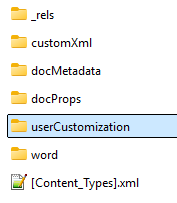
I often make template-specific customizations to the Quick Access Toolbar (QAT). As of today (August 04, 2026), these customizations are suddenly no longer being saved in a Word template. My tests revealed the following: For the customizations to be saved in a template, the UI-based process must create a “UserCustomization” subfolder in the template file (see the ZIP version of the file): The QAT customizations are saved in the “customUI.xml” file within this subfolder. In addition, the “.rels” file in the “_rels” subfolder receives a new entry: <Relationship Id="rId2" Type="http://schemas.microsoft.com/office/2006/relationships/ui/userCustomization" Target="userCustomization/customUI.xml"/> The UI-based process no longer creates the “User Customization” subfolder—an annoying bug! As a result, template-based QAT customizations are lost when a template is closed and reopened. Workaround: Make the described changes manually in the template file—this worked for me—but I hope Microsoft will fix this annoying bug! My Word Version: German UI, Version 2607 Build 16.0.20228.20124, 64 Bit. Can anyone confirm or disagree with this result? DieterG300Views1like8Comments