python
114 TopicsMeet the Hosted Skills Canvas: Build, Run, and Debug in GitHub Copilot
Build, run, and debug event-driven AI apps right inside GitHub Copilot. The new Azure Functions Hosted Skills canvas brings instructions, triggers, and live results into one workspace—so you can spend less time switching tools and more time building. 901Views2likes0Comments
Load testing Copilot Studio agents with Locust and Azure Load Testing
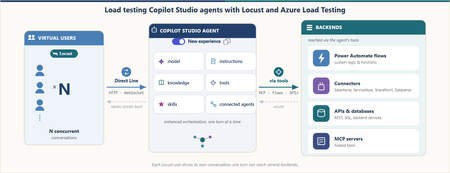
A conversational agent doesn't answer like an API. You send one message. The server returns 200 OK. And then nothing happens. The real answer is still coming, streaming back over a WebSocket as one reply or several. It might take two seconds, or three minutes while the agent thinks, calls a tool, or even builds another agent. So how do you load test an answer that isn't ready when the request says it is? This post builds that test — and one 30-minute run answered it: 253 conversations and 3,212 requests with zero failures, including an agent-creation turn that took 8.68 seconds to reply and 163.71 seconds to finish. Why load test a Copilot Studio agent Conversational agents built with Copilot Studio run on a platform that automatically scales to support increases in demand and load, as documented in Microsoft's performance-testing guidance. That scaling is not infinite. It stays within the environment's capacity, quotas, throttling, and service limits. A turn can also reach custom logic, connectors, and backend services with separate operating limits. Concurrent load can expose latency or failures in either part of the request path. Start by taking a single turn apart. A turn is one user message and everything the agent does to answer it, up to the moment it signals turn.complete. The elapsed time spans several parts of the request path, including the Copilot Studio-managed path and external dependencies. The green zone is the path managed by Copilot Studio: the Direct Line channel that accepts the message, the enhanced orchestration runtime that reasons over the agent's parts (its model, instructions, knowledge, tools, skills, and connected agents), and the reply that streams back one message at a time. The platform automatically scales to support increases in demand and load while coordinating those parts within those same limits. Constraints in this zone can also contribute latency or failures. The amber zone covers everything a turn reaches beyond that managed path. From inside the green zone, the agent's tools call out to these dependencies: custom logic and Power Automate flows; connectors to systems like Salesforce, ServiceNow, SharePoint, and Dataverse; backend APIs and databases; and hosted MCP servers. (A2A connections to remote agents on other platforms existed only for classic agents at the time of this test, so they're out of scope here.) Each dependency has its own configuration and limits. Under load, any part of either zone can add latency or fail; full-agent timings alone do not identify the source. Test each component in isolation Component-level tests help isolate constraints before a full-agent run. Apply representative load directly to the cloud flow, connector, backend API, and MCP server one at a time. The results can show the request rate at which latency rises, throttling appears, or requests begin to fail for that dependency. An isolated run turns a vague "the agent felt slow" into measured component behavior. A full-agent run can then be compared with those results without assuming in advance which part caused the delay. Why test the complete agent under load Testing each component helps find its limit. But users experience the complete conversation, not one component at a time. The agent may take a different path for each message. It may return one reply or several replies. Some steps may also take much longer than others. This is true even when the agent does not call an external system. A load test shows how the complete agent behaves when many users are active. The results help set realistic expectations for response time and reliability: More users can mean slower replies. An agent may respond quickly for one tester but slow down when many conversations run at the same time. Different conversations take different paths. Some work starts only after a user makes a certain choice. A one-message test may never reach that work. The full answer takes longer than the send request. Sending a message is only the start. The response time ends when the agent has returned its last reply for the turn. Real results support better targets. Measured response times and error rates provide a clear baseline for production planning. What this post does This post shows how to build a Python load test for a conversational agent built with Copilot Studio using Locust, a Python load-testing framework that simulates concurrent users. The test communicates with the agent through the Direct Line API, the channel used by the tested client application to exchange messages with the published agent. Direct Line uses HTTP requests to get a token, start a conversation, and send a message. Replies arrive over a WebSocket connection. Each Locust virtual user follows this same path, sends a series of messages, and measures the time until the agent completes each turn. The same Python workload file runs locally and in Azure Load Testing without code changes. Environment-specific settings come from locust.conf locally and locust.azure.conf in Azure. The local validation below uses four virtual users for 15 minutes. The cloud run uses the same two user classes with 16 virtual users for 30 minutes, including text conversations, attachment intake, and selective agent creation. In this post, I: Explain how a conversation works over Direct Line and WebSockets. Build the Locust client one step at a time. Handle complete turns, errors, and file uploads. Run both conversation paths under load: users describing requirements in chat and users submitting requirements as file attachments. Run the same test locally and in Azure Load Testing. The agent under test. The examples use Automatic Agent Creator, a demonstration Copilot Studio agent that reads a business request, asks follow-up questions, and either recommends an integration approach or creates and publishes a new agent. The Direct Line flow can be adapted to other published agents, but conversation behavior, events, and response shapes must be validated for each agent, client, channel configuration, and product version. How a Copilot Studio agent talks over Direct Line The tested agent and client used this shape: open a session, exchange messages while it is alive, and read replies until the agent signals that the turn is done. This load test reproduces that flow end to end so its timings include the reply path, not only the message-send request. Direct Line can deliver replies through a WebSocket stream or HTTP GET polling. Microsoft's performance-testing guidance says to use WebSockets when the client-facing application uses them; HTTP GET remains available when it does not. The tested client used WebSockets, so this harness does too. The base host in every request below is a Direct Line regional endpoint. Get a token Before a client can start a conversation, it needs a conversation token. A Direct Line secret is sent to the token endpoint to request one. Direct Line returns a token for one conversation and an expires_in value that gives the number of seconds until it expires. The client uses this token for the conversation requests that follow. POST {host}/v3/directline/tokens/generate Authorization: Bearer «Direct Line secret» → 200 { "conversationId": "…", "token": "eyJhbGci…", "expires_in": «seconds until expiry» } The tested conversations completed before their returned token expiry. A longer-lived client must use the returned expires_in value and refresh the token before it expires. Start a conversation and open the socket To start a conversation, the client sends the token to Direct Line in an HTTP request. Direct Line returns two important values: a conversationId, which identifies the conversation, and a streamUrl, which is the WebSocket address used to receive replies. The client opens the WebSocket and keeps it open until the conversation ends. POST {host}/v3/directline/conversations Authorization: Bearer «token» → 201 { "conversationId": "…", "streamUrl": "wss://…/stream", "token": "eyJhbGci…" } WS CONNECT wss://…/stream → socket open (HTTP 101) Send a message With the conversation started and the WebSocket open, the client can send the first user message. In Direct Line, a message is represented as an activity. The client sends this activity through an HTTP POST, while the agent's replies return through the open WebSocket. POST {host}/v3/directline/conversations/{id}/activities Authorization: Bearer «token» { "type": "message", "from": { "id": "user-…" }, "text": "…", "locale": "en-US" } → 200 { "id": "…" } The 200 response contains the ID assigned to the activity. It confirms that Direct Line accepted the message, but it does not contain the agent's answer or mean that the agent has finished processing the message. The answer arrives separately through the WebSocket connection. Receive replies until turn.complete After Direct Line accepts the message activity, the agent's replies arrive through the open WebSocket. A turn may contain one agent message or several. When the agent finishes the turn, the stream sends an event named turn.complete. The client ends the read for the current turn when this event arrives. The WebSocket remains open for the next message. Two measurements describe the response time. Although TTFB usually means time to first byte, this harness uses the label for the time to the first complete agent message: TTFB is the time from the start of the send request to the first agent message. ResponseTime is the time from the start of the send request to the last agent message. Note. In this post, TTFB means the time to the first complete agent message, not the first network byte. Typing activities and the turn.complete event are not used as timing endpoints. The first and last agent messages set the measurements. For a turn with one agent message, TTFB and ResponseTime are equal. When the agent first sends an acknowledgment and later sends the completed result, ResponseTime is longer than TTFB. In the Azure run reported later, the agent-creation turn averaged 8.68 seconds to the first message and 163.71 seconds to completion. Note. Direct Line does not provide a general "last message" marker. The standard performance-testing guidance uses replyToId to match replies to the sent message and an inactivity timeout to decide when the response has ended. The new agent experience adds turn.complete as an explicit end-of-turn signal. This client uses that event as the normal stopping point, keeps an overall deadline as a safety check, and uses sender ID because from.role may be missing. Implement one virtual-user conversation One virtual user repeats a small cycle: open a Direct Line conversation, send a turn, receive the replies, record the timing, pause, and close. The excerpts below implement that cycle before Locust adds concurrency. Note. These focused excerpts omit some hardening, debug logging, transcript details, and upload internals. The complete client contains them. The important imports are shown once and reused below: import json # Python standard library: decode WebSocket frames import time # Python standard library: measure turn duration import websocket # websocket-client: open and read the WebSocket from locust import FastHttpUser, between from locust.exception import StopUser json and time come from Python. websocket comes from websocket-client. Locust supplies FastHttpUser, between, and StopUser. Uppercase names such as REPLY_DEADLINE are constants in new_chat_client.py. Open the session: connect() At the top of every task, connect() gives the virtual user a unique id, gets a token, starts a conversation, and opens the WebSocket. The unique id matters later: it's how the client tells the agent's replies apart from its own echoed message. def connect(self): """Get a token, start a conversation, and open the WebSocket.""" self._user_id = "user-" + str(id(self)) self._turn = 0 self._token = self._get_token() if not self._token: raise StopUser() started = self._start_conversation() if not started: raise StopUser() self.conversation_id, stream_url = started self._ws = websocket.create_connection(stream_url, timeout=WS_CONNECT_TIMEOUT) self._ws.settimeout(WS_RECV_TIMEOUT) # each recv() polls for at most a second The token and start calls are ordinary HTTP, wrapped so Locust records each one and marks a bad status as a failure. def _get_token(self): url = self.directline + "/v3/directline/tokens/generate" headers = {"Authorization": "Bearer " + self.direct_line_secret} with self.client.post(url, headers=headers, name=self.label + " token", catch_response=True) as response: if response.status_code != 200: response.failure("token HTTP " + str(response.status_code)) return None body = parse_json(response) if not body or not body.get("token"): response.failure("token response missing 'token'") return None return body["token"] def _start_conversation(self): url = self.directline + "/v3/directline/conversations" with self.client.post(url, headers=self._auth_header(), name=self.label + " start", catch_response=True) as response: if response.status_code not in (200, 201): response.failure("start HTTP " + str(response.status_code)) return None body = parse_json(response) or {} conversation_id = body.get("conversationId") stream_url = body.get("streamUrl") if not conversation_id or not stream_url: response.failure("start response missing conversationId or streamUrl") return None if body.get("token"): self._token = body["token"] return conversation_id, stream_url One turn: say() say() owns one turn: start the clock, send the activity, receive replies, record both timings, and return the last non-empty agent message. metric_name labels the Locust rows, deadline limits the whole turn, and attach selects the upload path. def say(self, text, metric_name=None, deadline=REPLY_DEADLINE, attach=None): """Send one message, wait for the reply, and return the reply text.""" self._turn += 1 start = time.perf_counter() posted_id = self._send(text, attach) if posted_id is None: self._record(start, None, None, metric_name, "", "send failed") raise StopUser() result = self._receive(start, deadline) self._record(start, result.t_first, result.t_final, metric_name, result.text, result.error) if result.error: raise StopUser() return result.text Earlier replies still set the timing boundaries, but result.text contains only the last non-empty message. _send() posts a normal message unless attach selects the upload path explained later. def _send(self, text, attach=None): if attach: return self._send_file(text, attach) # explained in the attachment section activity = {"type": "message", "from": {"id": self._user_id}, "text": text, "locale": "en-US"} url = (self.directline + "/v3/directline/conversations/" + self.conversation_id + "/activities") with self.client.post(url, json=activity, headers=self._auth_header(), name=self.label + " send", catch_response=True) as response: if response.status_code != 200: response.failure("send HTTP " + str(response.status_code)) return None body = parse_json(response) if not body or not body.get("id"): response.failure("send response missing activity id") return None return body["id"] The returned activity ID confirms acceptance, not an answer. The answer arrives on the WebSocket, while Locust records the POST as a separate send row. Read WebSocket frames until the turn ends _receive() reads JSON frames from the open socket. TurnResult keeps the latest text, the first and final message times, and any error: class TurnResult: def __init__(self): self.text = "" # last non-empty agent message self.t_first = None # first agent-message time self.t_final = None # latest agent-message time self.error = "" # non-empty when the turn fails The one-second socket timeout keeps each read responsive; the overall deadline limits the complete turn, including the HTTP send. def _receive(self, start, max_wait=REPLY_DEADLINE): """Read frames until the agent signals 'turn.complete' or the deadline passes.""" result = TurnResult() deadline = start + max_wait while time.perf_counter() < deadline: try: frame = self._ws.recv() except websocket.WebSocketTimeoutException: continue # no data this second; keep waiting if not frame or not frame.strip(): continue payload = json.loads(frame) for activity in payload.get("activities", []): if self._handle_activity(activity, result): return self._finish(result) # saw turn.complete if result.t_final is None and not result.error: result.error = "no final reply (timeout)" return self._finish(result) Each activity has one job: Activity Client action User message echo Ignore it because it came from the virtual user typing Ignore it for response-time measurements Agent message Set the first and latest message times; keep the latest non-empty text trace with an ErrorCode Store the structured turn error event named turn.complete End the read for this turn; keep the WebSocket open _handle_activity() applies the table. _is_bot_reply() filters the user echo and is explained next. def _handle_activity(self, activity, result): activity_type = activity.get("type") if activity_type == "message" and self._is_bot_reply(activity): now = time.perf_counter() if result.t_first is None: result.t_first = now # first reply -> TTFB result.t_final = now # every reply -> ResponseTime result.text = activity.get("text") or result.text return False if activity_type == "trace": code = self._error_code(activity) if code and not result.error: result.error = "bot error: " + describe_error_code(code) return False if activity_type == "event" and activity.get("name") == "turn.complete": return True return False Normally turn.complete ends the read. The deadline is the fallback; a turn with no agent message fails. Record the latency _record() emits TTFB and ResponseTime for a successful turn. A failed turn emits one failed ResponseTime entry instead of a latency value. def _record(self, start, t_first, t_final, metric_name, text, error): name = self.label + " " + (metric_name or ("t" + str(self._turn))) fire = self.environment.events.request.fire if error: fire(request_type="CHAT", name=name + " [ResponseTime]", response_time=None, response_length=0, exception=Exception(error), context={}) return fire(request_type="CHAT", name=name + " [TTFB]", response_time=((t_first or t_final) - start) * 1000, response_length=0, exception=None, context={}) fire(request_type="CHAT", name=name + " [ResponseTime]", response_time=(t_final - start) * 1000, response_length=len(text), exception=None, context={}) Pause between turns and close the conversation The scenario pauses between messages and closes the WebSocket in finally, even when a turn fails. try: self.connect() self.say(requirement, "T01 requirement") self.think(20, 30) self.say("ok", "T02 confirm") finally: self.close() That completes one conversation. Note. This is a trimmed two-turn illustration (T01 requirement then T02 confirm). The demo text scenario reported later runs five turns: T01 requirement, T02 source, T03 target, T04 action (only some conversations reach this branch), and T05 confirm. Assemble the reusable Locust user In new_chat_client.py, the methods above belong to WebSocketChatClient. The class extends FastHttpUser and holds their shared configuration: class WebSocketChatClient(FastHttpUser): """Direct Line WebSocket load client for a new-experience Copilot Studio agent.""" abstract = True host = DIRECTLINE wait_time = between(2, 6) directline = DIRECTLINE direct_line_secret = None # secret mode label = "ws" abstract = True prevents Locust from running the base directly. A scenario subclass supplies the secret, metric label, and messages. wait_time pauses between complete scenario runs, while explicit think() calls pause between turns. Locust can then create many scenario instances that reuse the same conversation methods. Handling the new experience Three behaviors of the new agent experience would quietly break a naive client. Each is a few lines in the methods above. Preview notice. As of July 13, 2026, the Copilot Studio new agent experience is a production-ready preview. Microsoft identifies its documentation as prerelease and subject to change, and states that production-ready previews are subject to the Supplemental Terms of Use for Microsoft Azure Previews. Replies may omit a role In the classic channel, an agent message carries from.role = "bot". In the new experience some replies arrive with only from.id and no role at all. Keying off role == "bot" would drop those messages and report "no reply." The fix treats any message that isn't the client's own echo as a reply: def _is_bot_reply(self, activity): """True if the message is from the agent (role may be missing), not the client's echo.""" sender = activity.get("from") or {} role = sender.get("role") if role == "bot": return True if role == "user": return False return sender.get("id") != self._user_id # role missing -> not the echo -> a reply turn.complete is an explicit end-of-turn event Reading it (rather than waiting out a timeout) is what lets a fast turn finish in a couple of seconds instead of idling. It's the event branch in _handle_activity() above. Errors come back as a structured code When something goes wrong, the agent can send a trace activity carrying a locale-independent ErrorCode. The client maps it against the official code list so a run reports why it failed, not just that a reply never came: def _error_code(self, activity): if activity.get("valueType") != "ErrorCode": return None value = activity.get("value") if isinstance(value, dict) and value.get("ErrorCode"): return value["ErrorCode"] return "error" Attach files with a multipart upload A file-reading turn exercises work that a text-only turn does not. This harness sends one or more files through the Direct Line /upload endpoint as multipart/form-data, with an optional message activity in the same request. The multipart request The request contains one activity part and one file part per attachment: POST {host}/v3/directline/conversations/{id}/upload?userId={from.id} Authorization: Bearer «token» Content-Type: multipart/form-data; boundary=----loadtest-«random» ------loadtest-«random» Content-Disposition: form-data; name="activity" Content-Type: application/vnd.microsoft.activity { "type": "message", "from": { "id": "user-…" }, "text": "" } ------loadtest-«random» Content-Disposition: form-data; name="file"; filename="requirement.csv" Content-Type: text/csv «raw file bytes» ------loadtest-«random»-- → 200 { "id": "…" } (same shape as a normal send) The required userId query parameter identifies the sender. The harness uses the same per-instance ID in userId and activity.from.id, so the echoed activity has the sender ID expected by the reply filter. The activity JSON contains no attachments array. Direct Line adds the separate file parts as attachments to that activity before sending it to the agent. A successful upload returns the same { "id": "…" } shape as a text send, so the existing WebSocket receive and timing path remains unchanged. Building the body by hand Locust's FastHttpUser has no explicit requests-style files= helper. The client therefore assembles the multipart body as bytes. A fresh UUID-based boundary is used for each request, every file is read before the POST begins, and each attachment gets its own file part. The implementation uses four additional standard-library modules: import mimetypes import os import urllib.parse import uuid def _send_file(self, text, attach): """Upload one or more files (optionally with a message) via Direct Line /upload.""" paths = attach if isinstance(attach, list) else [attach] files = [] # read every file first for path in paths: with open(path, "rb") as handle: data = handle.read() name = os.path.basename(path) extension = os.path.splitext(path)[1].lower() mime = UPLOAD_MIME.get(extension) or mimetypes.guess_type(path)[0] or "application/octet-stream" files.append((name, mime, data)) activity = json.dumps({"type": "message", "from": {"id": self._user_id}, "text": text or ""}) boundary = "----loadtest-" + uuid.uuid4().hex # fresh boundary per request dash = ("--" + boundary).encode("utf-8") parts = [ dash + b"\r\n", b'Content-Disposition: form-data; name="activity"\r\n', b"Content-Type: application/vnd.microsoft.activity\r\n\r\n", activity.encode("utf-8") + b"\r\n", ] for name, mime, data in files: # one part per file disposition = _content_disposition("file", name) parts.append(dash + b"\r\n") parts.append(("Content-Disposition: " + disposition + "\r\n").encode("utf-8")) parts.append(("Content-Type: " + mime + "\r\n\r\n").encode("utf-8")) parts.append(data + b"\r\n") parts.append(dash + b"--\r\n") url = (self.directline + "/v3/directline/conversations/" + self.conversation_id + "/upload?userId=" + self._user_id) headers = self._auth_header() headers["Content-Type"] = "multipart/form-data; boundary=" + boundary with self.client.post(url, data=b"".join(parts), headers=headers, name=self.label + " upload", catch_response=True) as response: if response.status_code != 200: response.failure("upload HTTP " + str(response.status_code)) return None posted = parse_json(response) if not posted or not posted.get("id"): response.failure("upload response missing activity id") return None return posted["id"] The media type comes from a small known-types table, then Python's mimetypes, then application/octet-stream. This labels unknown extensions without claiming that every file type or size can be processed by the agent. The client sends the basename in the multipart header; exact preservation of non-ASCII filenames is not assumed. Use the same turn API Scenarios continue to call say(...). _send() chooses the ordinary message endpoint or multipart /upload: def _send(self, text, attach=None): if attach: return self._send_file(text, attach) # multipart /upload # … otherwise the ordinary text Send Activity from earlier Text only — the ordinary Send Activity. Text and a file — a message plus one attachment. A file with no message — pass text="" with an attachment. Several files — pass a list, and each becomes its own file part in one upload. Because /upload returns the same activity-ID shape as a text send, an upload turn is received and timed by the same say() path: # A conversation that hands the agent a requirements file instead of typing it self.say("Here is my requirement", "T01 requirement", attach="requirement_intake.csv") Validate the workload locally first Before running the larger test in Azure, the workload ran locally in one Python process with locust.conf: four virtual users for 15 minutes, starting one user every 30 seconds. This verified both conversation paths, file uploads, pacing, transaction names, and diagnostics. Azure Load Testing then used the same Python workload with locust.azure.conf, increasing the profile to 16 virtual users for 30 minutes and omitting local result paths. The Python environment used three dependencies beyond the standard library: python -m pip install "locust==2.42.6" "python-dotenv>=1.0,<2.0" "websocket-client==1.9.0" The Direct Line secret came from an environment variable in a local .env file, which kept it out of source control: DL_IA_SECRET=<Direct Line secret> The local run-time included the ramp period. The complete profile lived in locust.conf: locustfile = locustfile_discovery_demo.py headless = true users = 4 spawn-rate = 0.0333333333 run-time = 15m stop-timeout = 1200 only-summary = true csv = results/local-15m html = results/local-15m.html The local launch was then two lines: New-Item -ItemType Directory -Force results | Out-Null python -m locust --config locust.conf The 1,200-second stop timeout was an upper bound, not a fixed extension. When the 15-minute window closed, Locust allowed an in-flight conversation to complete instead of interrupting a turn. This mattered because the optional agent-creation turn had a 300-second reply deadline. Each completed conversation wrote a readable transcript under transcripts/; frame-level JSONL was written under transcripts/directline-debug/ because DL_DEBUG_LOG was enabled. Locust reported the token, conversation-start, send, and upload HTTP calls alongside the [TTFB] and [ResponseTime] chat measurements. Transaction names described logical steps rather than individual system combinations, which kept route variants in the same result rows. The local validation completed successfully. Both conversation paths, file uploads, and optional agent creation finished with zero failures or exceptions. Scale the test in Azure Load Testing The Azure test used one engine to run 16 virtual users for 30 minutes. Eight users followed the text conversation scenario and eight followed the file-attachment scenario. Locust started one user every 30 seconds and kept the configured 20–30 second pause between messages. Upload the test files to an Azure Load Testing resource. The YAML disables client-generated transcripts and JSONL files because Azure Load Testing publishes only its supported artifacts: engine logs, raw result CSV, and a dashboard report. version: v0.1 testId: copilot-studio-directline-load displayName: Copilot Studio Direct Line load test description: Load test with text and file conversation scenarios testPlan: locustfile_discovery_demo.py testType: Locust engineInstances: 1 configurationFiles: - new_chat_client.py - requirements.txt - test_attachment/high_route_requirement.docx - test_attachment/high_route_requirement.pdf - test_attachment/high_route_requirement.png properties: userPropertyFile: locust.azure.conf env: - { name: LOCUST_USERS, value: "16" } - { name: LOCUST_SPAWN_RATE, value: "0.0333333333" } - { name: LOCUST_RUN_TIME, value: "1800" } - { name: LOCUST_STOP_TIMEOUT, value: "1200" } - { name: TEXT_USERS, value: "8" } - { name: FILE_USERS, value: "8" } - { name: ATTACHMENT_DIR, value: "." } - { name: DL_TRANSCRIPT, value: "0" } - { name: DL_DEBUG_LOG, value: "0" } failureCriteria: - percentage(error) > 0 Before creating the test, store the Direct Line secret in Azure Key Vault, enable the Azure Load Testing resource's system-assigned managed identity, and grant that identity permission to read the secret. The Azure Load Testing secret guidance covers the identity and Key Vault access steps. In the current Azure CLI, the literal value null (not an omitted or empty argument) tells --keyvault-reference-id to use the load-testing resource's own system-assigned identity. Azure CLI preview. The az load test and az load test-run commands need the load extension and Azure CLI 2.66.0 or later (currently in preview). Check the current Azure CLI load test reference before running them. Create the test definition from the YAML and set that Key Vault reference identity: az load test create ` --load-test-resource "<load-test-resource>" ` --resource-group "<resource-group>" ` --test-id copilot-studio-directline-load ` --load-test-config-file azure-loadtest.yaml ` --keyvault-reference-id null For a new run, pass the Key Vault secret identifier through Azure Load Testing's dedicated --secret parameter. Locust receives a configured secret as an environment variable with the same name, so the Python workload can continue to read DL_IA_SECRET without code changes: $runId = "copilot-azure-$(Get-Date -Format 'yyyyMMdd-HHmmss')" $directLineSecretUri = "https://<key-vault-name>.vault.azure.net/secrets/<secret-name>" $runEnv = @( "LOCUST_USERS=16" "LOCUST_SPAWN_RATE=0.0333333333" "LOCUST_RUN_TIME=1800" "LOCUST_STOP_TIMEOUT=1200" "TEXT_USERS=8" "FILE_USERS=8" "ATTACHMENT_DIR=." "DL_TRANSCRIPT=0" "DL_DEBUG_LOG=0" ) $runSecrets = @("DL_IA_SECRET=$directLineSecretUri") az load test-run create ` --load-test-resource "<load-test-resource>" ` --resource-group "<resource-group>" ` --test-id copilot-studio-directline-load ` --test-run-id $runId ` --env $runEnv ` --secret $runSecrets ` --only-show-errors ` --output none Azure's test-run debug mode was deliberately left off. Debug-mode runs are capped at 10 minutes regardless of the configured Locust duration. After the run command completes, download the engine logs, raw results, and dashboard report: az load test-run download-files ` --load-test-resource "<load-test-resource>" ` --resource-group "<resource-group>" ` --test-run-id $runId ` --path "results/azure/$runId" ` --log --result --report --force The download command creates logs.zip, csv.zip, and reports.zip in the target directory. Security note. The command passes a Key Vault secret identifier, not the Direct Line secret value. Azure Load Testing stores the identifier, retrieves the secret with the configured managed identity for each run, and exposes it to the Locust process as DL_IA_SECRET. Keep --env for non-sensitive settings only. The 2026-07-12 Demo Run passed the secret through --env, which can expose it in run metadata; the recommended command above avoids that. In CI/CD, the Azure Load Testing task or action can instead receive the value through its secrets input from the pipeline's secret store. What the 30-minute Demo Run produced The completed Azure execution is referred to below as the Demo Run. It ran on 2026-07-12 using a single Azure Load Testing engine, with 16 virtual users split evenly between the text and file paths. Treat the Demo Run as a baseline at this load, not a capacity ceiling. The Demo Run completed with a PASSED verdict and no service error details. The Locust engine ran its configured 30-minute window, then allowed in-flight conversations to finish. It reached all 16 users after 7 minutes 30 seconds, then held exactly 16 for the rest of the run. It hit the run-time limit at 10:23:22Z, a steady window of about 22 minutes 30 seconds, and exited cleanly about 1 minute 50 seconds later. Measure Result Virtual users 16: 8 text and 8 file Locust run-time window 30 minutes Full-load window About 22 minutes 30 seconds Completed conversations 253 Text conversations 98 File conversations 155 Recorded request samples 3,212 Failed samples 0 Completed agent-creation turns 5 The 3,212 samples include Direct Line HTTP calls plus the custom [TTFB] and [ResponseTime] entries emitted for chat turns. Every text conversation that started reached T05 confirm, and every file conversation reached T03 confirm. Path Conversations Recorded samples Failures Text discovery 98 1,507 0 File attachment 155 1,705 0 Total 253 3,212 0 Azure Load Testing packages an offline dashboard with per-minute charts, sampler statistics, and error details. The download command in the previous section saves it as reports.zip. Extract the archive and open reports/index.html. For the Locust-based Demo Run, the downloaded dashboard is also published as the Demo Run report and can be viewed directly. The two cards below summarize latency for the text and file scenarios. Teal shows average TTFB, blue shows average ResponseTime, and orange extends from the average ResponseTime to p90. Text conversation latency re within a section, not across sections. Observation. The regular text path peaked at 18.93 seconds p90 for the requirement turn, while agent creation returned its first message in 8.68 seconds on average but needed 163.71 seconds on average, and 202.37 seconds at p90, to complete. File conversation latency Observation. Attachment processing was the slowest file turn at 22.19 seconds average and 27.80 seconds p90; token, conversation-start, send, and upload calls remained at or below 220 milliseconds p90. What the numbers suggest Agent work dominated the measured latency During the Demo Run, Direct Line token, conversation-start, send, and upload operations all stayed below 220 milliseconds p90. Complete chat turns took seconds, while the agent-creation branch took minutes. This shows that most of the measured end-to-end time accumulated after Direct Line accepted the message. The results do not separate orchestration, model, tool, or downstream-service time. TTFB did not describe the complete answer Some turns returned one message, so TTFB and ResponseTime were equal. Others acknowledged the request and kept working. The target turn averaged 3.08 seconds to first reply and 6.62 seconds to completion. The conditional action turn averaged 3.29 seconds to first reply and 9.46 seconds to completion. Agent creation widened that gap to more than two and a half minutes on average. Measuring only the first reply would hide the expensive part of those turns. Equal users did not produce equal conversation totals The user allocation was eight and eight, but the file path completed 155 conversations while the text path completed 98. That difference is consistent with the longer multi-turn text flow and its occasional agent-creation branch. Virtual-user allocation describes concurrency; completed iterations also depend on scenario duration. Assumptions and guardrails A few deliberate choices bound what these numbers mean: Baseline scale, on purpose. The four-user local validation and 16-user Azure profile generate baselines, not a stress test. The guidance warns that load exceeding real user behavior can trigger message-consumption overage and environment throttling, so the Demo Run stayed within confirmed traffic and quota boundaries. WebSocket transport with secret auth. The client uses Direct Line over WebSockets to match the tested client application and exchanges a Direct Line secret for a token. A test for a client that receives activities through HTTP GET should reproduce that transport instead. One agent, one region. The numbers describe a single agent on one Direct Line regional endpoint; a different agent, model, or region will have its own signature. New-experience behavior observed in this run. The client relies on the turn.complete event and role-optional replies observed during the test. Both the product status and response shapes can change while the experience remains in preview. Capacity confirmed first. A larger run requires prior confirmation that the agent, environment, and connected services support the peak throughput, with a limit increase requested when estimates exceed defaults. Limitations Single Azure engine, light load. Sixteen virtual users provide a baseline, not a capacity ceiling. Characterizing saturation needs higher concurrency and multiple Azure Load Testing engines. One Demo Run. The results describe this 30-minute window and should be compared with repeated runs before setting a service-level target. Chat turns only. The harness measures the message turn. It doesn't exercise sign-in cards, adaptive-card submits, or streamed token-by-token rendering. No Azure transcripts. The cloud profile intentionally disabled readable transcripts and client JSONL, so the five agent-creation turns prove completed responses but not an independent resource inventory. One operational note Operational note. Confirm the Copilot Studio environment's quotas and the capacity of every connected dependency before increasing users or engine count. The workload should model expected traffic rather than use production systems as an unrestricted stress target. Wrap-up For the tested Copilot Studio new-experience agent and WebSocket client, a small reusable Locust client captured the observed Direct Line flow. It matched the client's WebSocket transport, treated non-echo messages as replies, stopped on the turn.complete event emitted by the tested product build, and recorded both first-reply and last-reply times so a multi-message turn did not hide behind its acknowledgment. The same Python workload runs unchanged from a laptop and from Azure Load Testing engines. Local settings come from locust.conf; Azure settings come from locust.azure.conf and the test YAML. The Direct Line secret is supplied at run time, and a failureCriteria gate can support a release pipeline. The four-user local run validated the scripts and diagnostics; the Demo Run then held its full steady concurrency with 3,212 samples and zero failures. Further tests can add repeated baselines, more users and engines for saturation, additional attachment types, and a longer soak. Learn more Plan and create a conversational agent performance test — the planning method, workload model, and test-plan structure this post follows. Best practices for improving conversational agent performance — quotas, and the agent-side levers for cutting latency. Agents overview (new experience) — the orchestration model, instructions, knowledge, tools, and connected agents. Locust documentation — the load-testing framework this harness builds on. Azure Load Testing documentation — the managed load-testing service. Get the code The complete runnable example is available in kroy92/copilot-studio-load-testing. The repository contains new_chat_client.py, the two-class locustfile_discovery_demo.py workload, three attachment fixtures, local and Azure Locust configuration files, requirements.txt, and azure-loadtest.yaml. The Direct Line secret stays in the ignored .env file locally. For new Azure Load Testing runs, the recommended command retrieves it from Azure Key Vault through the dedicated secret parameter. The same Python workload runs in both environments, with locust.conf used locally and locust.azure.conf used in Azure.895Views2likes1CommentHow to build long-running MCP tools on Azure Functions
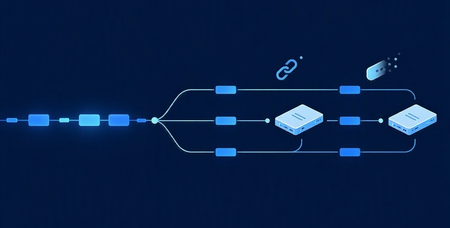
Recently, a customer building servers with the Azure Functions MCP extension reached out and asked: How do I handle tools that take longer than the client is willing to wait? This becomes especially relevant when tool calls move beyond simple request/response into multi-step workflows and long-running operations. At the same time, MCP is evolving to address exactly this. The Tasks extension is introduced in the 2026-07-28 release candidate, defining a standard way to model long-running work. In this post, we’ll walk through how to build long-running MCP tools on Azure Functions using Durable Functions , a framework for authoring stateful, long-running workflows as ordinary code, with checkpointing, scaling, and recovery handled automatically. MCP tools today Today, MCP tools are fundamentally request/response: the client issues a tools/call the server returns a result This works well for fast operations, but breaks down when: workflows take minutes execution depends on multiple steps latency is unpredictable In practice, clients enforce their own tool-call timeouts. These aren't standardized by the MCP spec and vary per client, but they're often in the ~30–60 second range. If a tool exceeds that window: In practice, clients often enforce short timeouts. If a tool exceeds that window: the client times out the agent observes a failed call the underlying work may still be running So the core issue is that you have synchronous tool calls don’t naturally model long-running work. The MCP Tasks extension The Tasks extension to address this. With the extension, a server can respond to a tools/call with an asynchronous task handle instead of a final result, and the client drives the lifecycle from there: tasks/get: poll the task's status tasks/update: submit input back to the server if the task reaches input_required tasks/cancel: cancel an in-flight task A task carries a status ("working", "input_required", "completed", "failed", or "cancelled") and on completion, the final result. Task creation is server-directed: the client advertises support by including the extension in its per-request capabilities, and the server decides per request whether to return a task. A server won't return a task to a client that hasn't advertised support. It's important to note that Tasks rely on ecosystem support. Clients must advertise the extension, and MCP SDKs must implement the task lifecycle, before servers can use it. So while Tasks is now a defined extension, broad client and SDK support is still in progress. Implement long-runng tasks with Durable Functions today Until the Tasks extension is broadly supported across clients, we need a pattern that works with existing request/response clients and supports long-running execution. The following samples show how, using Durable Functions: Python NET The long-running work in this sample mines a short chain of blocks. Each block requires solving a computational puzzle where the system keeps trying different inputs until it finds one that produces a result matching a specific pattern (for example, starting with a certain number of zeros). Because this involves lots of trial and error, it naturally takes time, making it a good example of a long-running workflow. The server in the sample exposes two tools: start_mining Starts a Durable Functions orchestration to mine the blocks Waits briefly (within a configurable budget) Returns result inline if completed within budget OR returns workflow_id if still running get_mining_result Takes the workflow_id Returns the current state, e.g. "completed", "running", "failed", or "not_found" To ensure that the agent calls the tools in the right order, workflow_id is a required parameter of get_mining_result, so the agent can't poll without starting a mining run first. Also, the "running" response carries a poll_after_seconds and a next instruction, ensuring the agent to poll again if work is not done rather than give up or assume completion. Even so, the poll path still relies on the agent correctly remembering, and not hallucinating, the workflow_id it was handed. If it garbles or invents an id, the poll lands on the wrong instance or none at all (which is why get_mining_result returns "not_found" rather than guessing). What changes with the Tasks extension Once the Tasks extension is fully implemented across clients and SDKs, the model becomes simpler and more reliable: the server returns a Task handle, the client manages the polling and lifecyle calls, and the SDK tracks execution state. This removes a key limitation of today’s solution, which requires the agent to remember and correctly pass identifiers like workflow_id. Call to action Try out the sample and let us know whether it addresses your MCP needs around long-running or workflow type tools!740Views0likes0CommentsMCP Just Went Stateless — What the 2026 Spec Changes About Scaling on App Service
A couple of months ago I wrote about scaling MCP servers behind App Service's built-in load balancer. The trick back then was to lean on stateless HTTP transport so any instance could serve any request — and to make sure you turned off ARR affinity so the load balancer was actually free to spread traffic around. That post still works. But the MCP spec just caught up to it in a big way. The 2026-07-28 release candidate is the largest revision of the Model Context Protocol since it launched, and the headline change is exactly the thing we were working around: MCP is now stateless at the protocol layer. The handshake is gone, the session header is gone, and the sticky-routing-and-shared-session-store dance that horizontal deployments used to need is no longer part of the protocol at all. If you're hosting an MCP server on App Service, this is good news — and it means a few of the steps from my last post are now things the protocol does for you. Here's what changed, and what (if anything) you need to do about it. Here's the before and after, straight from the spec. In 2025-11-25 , the client POST s an initialize call to /mcp first and gets a session ID back: {"jsonrpc":"2.0","id":1,"method":"initialize", "params":{"protocolVersion":"2025-11-25","capabilities":{}, "clientInfo":{"name":"my-app","version":"1.0"}}} Heads up on timing: 2026-07-28 is a release candidate as I write this; the final spec ships July 28, 2026. It contains breaking changes, so treat this as "get ready" guidance rather than "rip everything out today." Quick recap: how we scaled MCP before In the original post, the recipe looked like this: Run the MCP server in stateless HTTP mode (the 2025-11-25 transport). Scale App Service out to N instances (the sample used three). Set clientAffinityEnabled: false so there's no ARR affinity cookie pinning a client to one instance. If you genuinely needed cross-request state, externalize it — typically into Azure Cache for Redis — so every instance saw the same data. Watch traffic spread across instances in Application Insights via cloud_RoleInstance . The catch: even in "stateless HTTP" mode, the 2025-11-25 protocol still started every connection with an initialize handshake and handed back an Mcp-Session-Id that the client had to send on every follow-up request. That session ID pinned a client to whichever instance issued it — so to scale cleanly you either kept affinity on (and gave up even load balancing) or did real work to share session state across instances. That's the part the 2026 spec deletes. What the 2026 spec actually changes The handshake and the session are gone Two proposals do the heavy lifting: SEP-2575 removes the initialize / initialized handshake. The protocol version, client info, and client capabilities that used to be exchanged once at connect time now ride along in _meta on every request. A new server/discover method lets a client ask for server capabilities when it actually wants them. SEP-2567 removes the Mcp-Session-Id header and the protocol-level session that came with it. With both gone, any MCP request can land on any instance. The sticky routing and shared session stores that horizontal deployments needed before just aren't required at the protocol layer anymore. Here's the before and after, straight from the spec. In 2025-11-25 , the client POST s an initialize call to /mcp first and gets a session ID back: {"jsonrpc":"2.0","id":1,"method":"initialize", "params":{"protocolVersion":"2025-11-25","capabilities":{}, "clientInfo":{"name":"my-app","version":"1.0"}}} …then every later call has to carry the Mcp-Session-Id header the server handed back, which pins it to that instance: {"jsonrpc":"2.0","id":2,"method":"tools/call", "params":{"name":"search","arguments":{"q":"otters"}}} In 2026-07-28 , the same tool call is one self-contained request that any instance can answer. The routing info rides in headers — MCP-Protocol-Version , Mcp-Method , and Mcp-Name — and the body carries everything else: {"jsonrpc":"2.0","id":1,"method":"tools/call", "params":{"name":"search","arguments":{"q":"otters"}, "_meta":{"io.modelcontextprotocol/clientInfo":{"name":"my-app","version":"1.0"}}}} No handshake, no session ID, nothing to pin. Traffic you can route and cache at the edge A few smaller changes make this traffic much friendlier to the infrastructure App Service already gives you: Routable headers (SEP-2243): Streamable HTTP now requires Mcp-Method and Mcp-Name headers, so load balancers, gateways, and rate-limiters can route or throttle on the operation without cracking open the request body. (Servers reject requests where the headers and body disagree.) Cacheable lists (SEP-2549): tools/list and resource-read results now carry ttlMs and cacheScope , modeled on HTTP Cache-Control . Clients know exactly how long a tool list is fresh and whether it's safe to share across users — no more holding an SSE stream open just to learn the list changed. Traceable calls (SEP-414): W3C Trace Context ( traceparent , tracestate , baggage ) propagation in _meta is now documented with fixed key names. A trace that starts in the host app can follow a tool call through the client SDK, your MCP server, and whatever it calls downstream — and show up as one span tree in any OpenTelemetry backend, including Application Insights. That last one pairs really nicely with the App Insights setup from the original sample, which already tags spans with cloud_RoleInstance . Why this is easier on App Service now App Service's built-in load balancer has always wanted to round-robin your requests. The thing stopping it from doing that cleanly with MCP was the protocol's own session affinity. Now that the protocol is stateless: No affinity tuning to reason about. You still want clientAffinityEnabled: false , but there's no longer a protocol session fighting it. Any instance serves any request, for real. Scale from 3 to 10 instances and the load balancer just spreads the work — no shared session store required for protocol state. Less Redis glue. In the old model, Redis was often there to share protocol session state. That reason is gone (see the next section for what Redis is still great for). "Stateless protocol" doesn't mean "stateless app" This is the part I want to be really clear about, because it's easy to over-read the headline. Removing the protocol session does not mean your application can't have state. It means the protocol stops carrying state for you. If your server needs to remember something across calls, you do what HTTP APIs have always done: mint an explicit handle and let the model pass it back as an argument. The spec calls this the explicit-handle pattern. A tool returns a basket_id (or browser_id , or whatever), and later calls include that ID as a normal parameter: // 1) create returns a handle {"name": "create_basket", "arguments": {}} // -> { "basket_id": "b_12345" } // 2) later calls pass it back as an ordinary argument {"name": "add_item", "arguments": {"basket_id": "b_12345", "sku": "ABC"}} The nice side effect: the model can see the handle, compose it across tools, and hand it off between steps — in ways that session state hidden in transport metadata never really allowed. So where does Redis fit now? Exactly where it always belonged — your application's data, not the protocol's plumbing: Backing store for those explicit handles (what's actually in basket b_12345 ). Caching expensive lookups or model responses across instances. App-level conversation memory or rate-limit counters. Stateless protocol, stateful application. You externalize state because your app needs it shared, not because the transport forces you to. Migrating an existing MCP server on App Service If you deployed the original sample (or something like it), here's the punch list to get to the 2026 model. The good news: the App Service / infra side barely changes — most of the work is in the protocol layer your SDK handles for you. App Service config — mostly already done: Keep clientAffinityEnabled: false . (Still the right call.) Keep scaling out to N instances. Nothing here changes. Keep Application Insights + OpenTelemetry — and lean into the new Trace Context key names for cleaner end-to-end traces. Protocol layer — the real work: Update to an SDK build that speaks 2026-07-28 . The handshake and session handling go away; your server reads protocol version and client info from _meta per request instead of from an initialize exchange. Emit ttlMs / cacheScope on tools/list and resource reads so clients (and your gateway) can cache them. Make sure your server honors / validates the Mcp-Method and Mcp-Name headers. If you were storing anything keyed off Mcp-Session-Id , move it to the explicit-handle pattern (handle in, handle out, state in Redis/Cosmos/etc.). Audit for the breaking bits: tasks/list is removed, Roots/Sampling/Logging are deprecated, and the "resource not found" error code moves from -32002 to the standard -32602 . I built a standalone companion sample for exactly this — the 2026-07-28 version of the original, with the handshake gone, everything read from _meta , server/discover implemented, and the explicit-handle pattern shown in a real tool. Link below. Try it yourself I built a companion sample for this post: a FastAPI MCP server that speaks 2026-07-28 natively — no handshake, no session — running on three App Service instances behind the built-in load balancer, with a staging slot, App Insights, a spec-compliant client, and a k6 load test: 👉 seligj95/app-service-mcp-stateless-scale-2026-python azd auth login azd up That provisions a Premium v3 plan with capacity: 3 , the web app with clientAffinityEnabled: false , a staging slot, and Log Analytics + Application Insights. No initialize , no Mcp-Session-Id anywhere — discovery is a single server/discover call, and every request carries its own protocol version and client info in _meta . The part I like best is the tally tool. It keeps a running total across calls using an explicit, signed handle instead of a session — so you can watch the total stay correct even as the load balancer routes each call to a different instance: +10 -> total=10 served_by=2103650c... +5 -> total=15 served_by=08fc7022... (different instance, total still right) +100 -> total=115 served_by=08fc7022... That's the stateless handle pattern from earlier, made concrete: state travels with the request, not the connection. Then watch the load spread in Application Insights: requests | where timestamp > ago(15m) | where name contains "/mcp" | summarize count() by cloud_RoleInstance Want the 2025-11-25 version for comparison? That's the original Part 1 sample: seligj95/app-service-mcp-stateless-scale-python. Diff the two main.py files and you can see the handshake and session handling simply disappear. The takeaway When I wrote the first post, "make MCP stateless so App Service can load-balance it" was a pattern you had to apply. With the 2026 spec, it's just how MCP works. The protocol deleted the exact friction we were routing around — which means hosting a horizontally scaled MCP server on App Service is now closer to "deploy a normal web app and scale it out" than ever. If you're already running MCP on App Service: you did the hard part early. The spec just made it official. Got an MCP server running on App Service? I'd love to hear how the migration goes — drop a comment.3.6KViews0likes0CommentsWhat's new in Azure App Service at #MSBuild 2026
At Microsoft Build 2026, Azure App Service introduced a powerful set of updates designed to help organizations accelerate their journey into AI, without increasing complexity or cost. These innovations focus on one clear business outcome: enabling teams to build, deploy, and scale AI-powered applications and agents faster, more securely, and with greater operational efficiency. A key highlight is the new Easy AI experience, which allows existing web apps to become AI-ready with no rearchitecting required. With capabilities like built-in Model Context Protocol (MCP), developers can instantly expose app functionality as agent-ready endpoints, enabling AI agents to interact with business logic securely and seamlessly. This dramatically reduces development time, allowing teams to move from idea to intelligent application in a fraction of the usual effort. Security and compliance are also strengthened with the general availability of Isolated v4 for Azure App Service Environments, delivering improved performance for customers that need single-tenant isolation and strong data residency guarantees. For enterprises operating in regulated industries, this ensures AI applications meet strict governance requirements without sacrificing scalability or speed. For modernization scenarios, Managed Instance on Azure App Service simplifies the migration of legacy applications, including those with OS-level dependencies. Faster restarts, enhanced diagnostics, and AI-assisted migration workflows help organizations modernize existing systems cost-effectively—avoiding expensive rewrites while unlocking AI capabilities. Recent updates include an AI-assisted approach to migrating legacy IIS applications using a multi-agent workflow powered by MCP. Managed Instance is supported on both Premium v4 and Isolated v4, laying the foundation for a modern compute infrastructure across the board. Operational efficiency is further enhanced through platform and CLI improvements designed for the “agent era.” From structured deployment diagnostics to optimized Python pipelines delivering faster deployments, these updates reduce friction and infrastructure overhead, lowering total cost of ownership. Together, these innovations position Azure App Service as a future-ready platform where businesses can rapidly build intelligent, agent-driven applications securely, efficiently, and at scale. 👉 Learn more in the full announcement: Deep dive into Azure App Service Build 2026 updates1.7KViews0likes0CommentsAnyscale on Azure: Powering Enterprise AI at Massive Scale on Azure Kubernetes Service
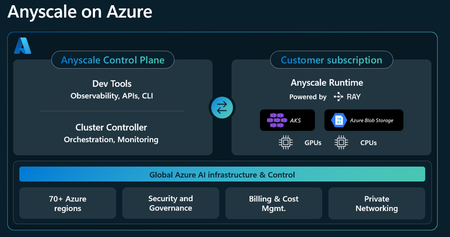
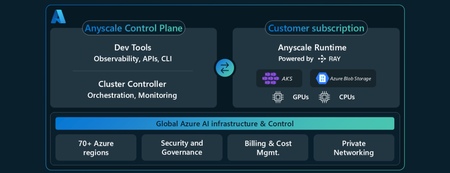
Somewhere on your AI platform team, an engineer is on call this weekend — not for the model, not for the training run, but for the integration code holding five separate AI processing systems together. Data preparation on one. Training on a second. Evaluation on a third. Serving on a fourth. Observability bolted on across all of it. The glue between them has quietly evolved into a production system of its own, complete with its own failure modes and its own pager. This is what running AI at scale looks like for most enterprises in 2026. To process the full breadth of AI workloads, teams don’t have one platform, but a stack of multiple compute engines — stitched together and monitored around the clock. Training failures become increasingly costly as multi-node GPU clusters remain underutilized and difficult to operate. Inference costs climb in a straight line when they should be bending the other way. And the accelerators underneath, at six figures a year per node, sit at 30–40% utilization. None of this is a model problem. It is a systems problem, and it exposes a divide that is widening across the industry. The AI shift: Moving from API inference calls only to end-to-end AI Most enterprises start an AI journey by calling hosted model APIs. It’s the fastest way to experiment and ship. But as adoption grows, inference costs scale in a straight line while differentiation remains limited. The organizations pulling ahead are doing more than consuming models. They are customizing them with proprietary data, operating them at scale, and owning the infrastructure between their data and their models. Their unit economics improve as they scale. The dividing line isn’t budget. It isn’t ambition. It is a single architectural decision: whether the layer between your data and your models is something you rent in pieces or run as a single system. That unified system for end-to-end AI, almost without exception, is built on one runtime: Ray, an open-source framework widely adopted by AI-natives such as Cursor, Mistral and xAI to act as the engine that powers many of their workloads from multimodal data processing to reinforcement learning. Anyscale on Azure: Build and run end-to-end AI on your Azure subscription Anyscale on Azure brings the distributed compute runtime the AI industry has converged on — Ray— into your Azure tenant as an Azure Native service, that includes purpose-built developer tooling and unified pane for cluster management, built through deep engineering collaboration between Anyscale and Microsoft. Unlike other processing engines which either only support one hardware type (e.g. CPUs) or focus on a single workload (e.g. inference), Ray turns a heterogeneous cluster of CPUs and GPUs into a single Python runtime composing data preparation, distributed training, fine-tuning, reinforcement learning, high-throughput inference, and agentic execution as one program, not five interlocking systems. Anyscale created Ray and stewards the open-source Ray project, now governed by the PyTorch Foundation; the Anyscale Runtime is the production-grade layer that enterprises can utilize on critical paths from day one, bringing managed cluster operations, enterprise-grade support, and the operational reliability needed to run AI and data workloads at scale. On Azure, that runtime executes on your Azure Kubernetes Service (AKS) clusters, inside your subscription, and under Microsoft Entra ID workload identity. Your data, models, and weights never leave your cloud, and consumption is billed through Azure with drawdown against your existing Azure commitment (MACC). Sovereignty isn't a label bolted on after the fact. It is the architectural starting point: customer-owned data and models in the customer-owned tenant and governance boundary. The variable per-token economics of hosted APIs are replaced with compute you govern directly. Your proprietary data becomes a compounding advantage rather than a payload shipped to a third-party endpoint. A single runtime for the full AI lifecycle The cost profile of enterprise AI is largely architectural. Fragmented stacks — separate systems for prep, training, evaluation, and serving — produce a predictable set of failure modes such as Idle GPU time, Integration code and cross-system data movement. The result: production GPU utilization only in the 30–40% range, against accelerators that cost six figures per node per year. On the same fleet, Anyscale customers run those accelerators at 80%+ sustained utilization and report 40–60% lower GPU spend versus static, single-tenant clusters — driven by fractional GPU allocation (down to 0.2 of a device), bin-packing across complementary memory and compute profiles, gang scheduling for distributed training, priority-aware preemption that lets production inference take precedence over ad-hoc training, and spot integration with checkpoint-aware preemption so long-running jobs survive reclamation without lost work. Anyscale on Azure replaces this with a single Ray-powered runtime that spans the lifecycle as one distributed computation graph: Ray Data (distributed preparation) → Ray Train (fault-tolerant training) → Ray Tune (hyperparameter search) → Ray Serve (inference) — under one managed control plane. On top of open-source Ray, the Anyscale Runtime adds fault-tolerant training with checkpoint/restart, optimized scheduling, faster cluster bring-up, inference-aware autoscaling, and per-stage observability. Ray is the unifying layer that, rather than replacing, streamlines distributed processing of the framework stack the AI industry already uses: PyTorch, Hugging Face Transformers, FSDP, DeepSpeed, and Megatron for training, vLLM and SGLang for high-throughput inference with continuous batching, paged attention, and speculative decoding. Ray Train orchestrates the three parallelism patterns modern training requires — data parallel, model parallel, and hybrid 3D parallel (data + tensor + pipeline) — for trillion-parameter models, without requiring teams to write custom distributed code. The architectural payoff is direct: a single Python program defines a graph spanning CPU-heavy preparation and GPU-heavy training. The model produced by Ray Train is served by Ray Serve in the same cluster, against the same storage. The operational, identity, and observability surface is unified instead of fragmented. What enterprises deploy with Anyscale on Azure There are five workloads that power the development of modern AI systems, spanning data processing, training, inference, and simulation. But in most environments, each depends on separate engines, frameworks, and orchestration layers. The resulting fragmentation drives up infrastructure spend, latency, and engineering complexity. This makes a single Ray-based runtime under Anyscale’s managed control plane the operationally rational choice. Anyscale on Azure provides a complete platform to build and deploy AI applications using the same APIs as open-source Ray. While the data plane runs inside the customer’s AKS cluster, the managed control plane provides a unified interface for development, debugging, and cluster operations. AI in your trust boundary by design: the architecture Anyscale on Azure is an Azure Native product — discoverable via the Azure portal and provisioned through Azure Resource Manager with every resource tagged, scoped, and policy‑bound like any other in your subscription. Anyscale on Azure is a split-plane deployment: Control plane (managed by Anyscale) — scheduling, jobs, services, workspaces, and observability. Data plane (your Azure subscription) — Ray clusters run on your AKS, in your VNet, on your storage (Azure Blob / ADLS Gen2 via BlobFuse2). The trust boundary is what matters — more than any individual data plane feature — for regulated workloads (financial services, healthcare, public sector) and any enterprise where proprietary data is the differentiation. The execution model: Workloads run inside your AKS cluster — your subscription, your VNet. Model weights, training data, KV caches, checkpoints, and inference traffic never leave the boundary. Provisioning is ARM-native — resources tag, scope, and inherit Azure Policy like anything else in the subscription. Identity is Microsoft Entra ID end to end — workload identity issues pod credentials; RBAC governs access. No long-lived keys, no parallel secret store. Network controls are yours — Private Link, NSGs, Cilium-based Azure CNI policies, and customer-managed encryption keys via Key Vault. Audit is the Azure Activity Log — the same surface your compliance team already monitors. The Anyscale Operator is the only Anyscale-controlled component in your environment — it runs inside your AKS, communicates with the control plane via egress only, and accepts no inbound access from Anyscale. The result: code and data stay in your Azure subscription. Your existing compliance posture, audit surface, and data residency certifications carry forward — nothing new to attest. Billing rolls through the same Azure invoice with MACC drawdown — no second invoice, no parallel procurement. Production evidence Xoople planetary‑scale satellite imagery on Anyscale on Azure; multimodal AI turns spectral data into operational intelligence. "Anyscale lets our teams focus on models and outcomes rather than infrastructure, dramatically accelerating the path from experimentation to deployment," — Milos Colic, VP of Engineering, Xoople. Wayve trains the next generation of autonomous‑driving foundation models on Anyscale on Azure, running distributed ML and data pipelines across large CPU and GPU fleets. The operational driver is GPU‑capacity aggregation at a scale that no single region or cluster can deliver. Beyond Anyscale on Azure, the same Ray runtime is used in production at Cursor, Physical Intelligence, xAI, Coinbase, Bedrock Robotics, and Runway. Bedrock Robotics scaled compute 85x on Anyscale without linearly increasing costs. Currently with 12M+ weekly downloads (+400% YoY) and 42K+ GitHub stars and now openly governed under the PyTorch Foundation (Linux Foundation), Ray is becoming the de-factor open-source standard and is not a single-vendor runtime. Pricing Pricing is usage‑based and consolidates onto the same Azure invoice as the rest of the customer's subscription, including drawdown against existing Azure commitment (MACC): Azure infrastructure — standard Azure compute and GPU charges for the AKS substrate the workload runs on, scaling directly with actual usage. Anyscale service layer — pay‑as‑you‑go through Azure service meters with no upfront commitment, priced by CPU, memory, and GPU type. Where Anyscale on Azure fits Base-model intelligence is converging. Enterprises can buy access to the same frontier models, so the model itself is no longer the moat. What separates the enterprises pulling ahead is the layer underneath: how efficiently they run the full AI lifecycle at scale, how much compounding leverage they extract from their proprietary data, and whether they own the runtime that ties it all together. Anyscale on Azure is the Azure Native runtime layer for that posture — bringing the open-source distributed compute standard the AI industry has converged on into the same Azure governance, identity, and procurement model as the rest of the tenant. The shape of enterprise AI is settling. The teams pulling ahead are not the ones renting the most intelligence through APIs — they are the ones building and operating AI systems inside their own cloud, on their own data, under their own governance, and scaling those systems on the open distributed runtime the industry has already converged on. Anyscale on Azure is that runtime, delivered as an Azure Native product: Ray, productionized — the open‑source distributed compute standard for AI, hardened with the Anyscale Runtime, a managed control plane, and observability designed for foundation‑model‑scale workloads. One runtime, the full AI lifecycle — data preparation, training, fine‑tuning, reinforcement learning, inference, and agentic workloads in a single Python program, on a single substrate, with no cross‑system glue. Inside your Azure tenant, on the AKS you already run — customer‑owned data, customer‑owned models, customer‑owned governance. Entra identity, Azure RBAC, Private Link, Activity Log audit, and customer‑managed keys end to end. One Azure invoice — usage‑based pricing through the Marketplace with MACC drawdown; no parallel procurement, no second vendor contract. If your team is wrestling with GPU utilization, fragmented data‑to‑serving stacks, training jobs that exceed any single region's capacity, or hosted‑API costs that scale faster than your usage — this is the runtime built for that problem. Try it now Provision your first Anyscale Cloud by navigating to the Azure portal. Click on "Create" to begin creating the Anyscale cloud resource and link the necessary Azure resources. your Anyscale Cloud directly from Azure Portal. e. Explore the quickstart guides and documentation on Microsoft Learn to get started. For architectural deep‑dives, capacity planning, or a hands‑on workshop with the Anyscale on Azure solution architects, reach out through your Microsoft account team. Deepen your expertise and deep dive on best practices in the upcoming virtual webinar. Register here. The infrastructure for the next decade of enterprise AI is here. Build on it. Links and Resources Press Release: Anyscale Launches on Microsoft Azure as a Native Integration for Enterprises Announcing Anyscale on Azure public preview: Powered by Ray on AKS Youtube Video: Anyscale on Azure: Scale Python AI workloads with managed Ray on AKS Azure on Anyscale overview Architecture Create an Anyscale Cloud in Azure Portal Pricing Support model Terms and Conditions Frequently asked questions511Views0likes0CommentsAzure Functions MCP Extension: What's New at Build 2026
The Azure Functions MCP extension has had a breakout year! Since its initial preview, the extension has grown from a single trigger type into a full-featured platform for building remote MCP servers: with tool, resource, and prompt triggers across multiple languages, MCP Apps for interactive UIs, built-in MCP authentication, and feature enhancements. Here's what's new and what it means for developers building MCP servers on Azure Functions. The full MCP primitive set: Tools, resources, and prompts When the MCP extension first shipped, it supported tool triggers. Declare a function as an MCP tool, and any MCP client can discover and call it. That was the starting point. Since then, we've shipped the remaining MCP primitives: Resource triggers: expose a function as an MCP resource. Prompt triggers: expose a function as an MCP prompt, letting clients request structured prompt templates from your server. Like tool triggers, resource and prompt triggers are supported in multiple languages including .NET, Java, Python, TypeScript, and JavaScript. MCP Apps: interactive UI from your MCP server MCP Apps let your tools return interactive user interfaces instead of plain text. Combine tool triggers with resource triggers, and your MCP server can serve rich, rendered experiences to MCP-aware clients. The Azure Functions MCP extension supports MCP Apps natively, meaning the same function app that exposes tools and resources can also serve UI components. The launch blog post on the Azure Apps Blog walked through the pattern in detail. For .NET developers, the new fluent builder API (available in the latest NuGet release) makes it easier to compose MCP Apps by chaining tool and resource definitions in a declarative style. MCP authentication The extension supports built-in MCP authentication, implementing the requirements of the MCP auth spec. All samples in the aka.ms/remote-mcp repo enable built-in MCP auth by default with Microsoft Entra ID as the identity provider. Samples have also been updated to demonstrate how to exchange tokens in the On-Behalf-Of (OBO) flow, so your MCP tools can access downstream APIs using the invoking user's identity. Auth configuration in the Azure portal: Preview at Build is a one-click experience in the Azure portal for configuring built-in MCP auth. No more manual app registration creating, configuration and wiring to the server. Just open your server app on the portal and click to enable MCP auth. Try it out! Feature enhancements Beyond the headline primitives and auth, the extension has shipped a steady stream of capabilities the past few months. The following are the notable additions. Structured content Structured content lets you return machine-readable JSON metadata alongside your tool's response via the `structuredContent` field. Clients that support it can programmatically consume the data (e.g. parse fields, render tables, drive downstream logic) rather than just displaying text. Clients that don't support it still get the regular content blocks as a fallback. Rich content types Tools aren't limited to returning plain text. The extension supports the full set of MCP content block types, e.g. `TextContent`, `ImageContent`, `AudioContent`, `ResourceLink`, and `EmbeddedResource`, so your tools can return images, audio clips, references to resources, and inline file content alongside text. Input and output schemas `WithInputSchema` and `WithOutputSchema` give you explicit control over the JSON schemas advertised for your tools. This is especially useful when the auto-generated schema from function parameters doesn't capture the full contract. For example, when your tool accepts a complex nested object or returns a specific shape that clients depend on. Input and output schemas are currently supported in .NET, with support for other languages coming soon. builder.ConfigureMcpTool("SearchDocs") .WithOutputSchema(""" { "type": "object", "properties": { "results": { "type": "array", "items": { "type": "string" } }, "query": { "type": "string" } }, "required": ["results", "query"] } """); Fluent configuration APIs in .NET A set of fluent builder APIs that let you configure MCP primitives declaratively in `Program.cs`: ConfigureMcpTool: add properties, metadata, input/output schemas, or promote a tool to an MCP App ConfigureMcpResource: attach metadata to resources ConfigureMcpPrompt: define prompt arguments and metadata builder.ConfigureMcpTool("sayhello") .WithProperty("name", McpToolPropertyType.String, "Name of the user", required: true) .WithMetadata("ui", new { resourceUri = "ui://index.html" }); What's next Usage of the MCP extension has grown steadily since its preview launch. Tool execution volume has increased 15x over the past several months as more customers move from experimentation to production. As adoption grows, so do the expectations. Developers building production MCP servers are hitting real friction around auth complexity, client configuration, and observability. We're continuing to invest in the extension to address these gaps and help customers be more successful building and hosting MCP servers on Azure Functions. Here's where we're focusing next. Continued auth simplification Auth remains the biggest barrier to getting an MCP server into production. We'll work on: Smoother client setup: making it easier to connect any MCP client to an authenticated Azure Functions MCP server, not just VS Code. Simplified OBO flow: streamlining the experience of On-Behalf-Of authentication so developers can delegate user identity to downstream services with less configuration. Our goal: the secure path should be the easy path. Deeper integration with Microsoft Foundry We'll build tighter integration between Azure Functions MCP servers and Microsoft Foundry. This includes surfacing MCP servers in Foundry Toolbox, a new feature introduced to help Foundry agents discover and consume tools from a single endpoint. Developers will be able to publish an MCP server from Functions and have it available to Foundry agents through Toolbox without manual endpoint configuration. Continued feature enhancement We prioritize based on feedback from the community raised in our GitHub repo. For example, support for streaming output and pagination are top items in our backlog today based on user demand. We also track the MCP spec's evolution closely and will continue shipping support for strategic features as they land. Examples of proposals we're following: MCP Tasks: the Tasks extension (SEP-2663) defines a standard pattern for async, long-running tool calls with durable task handles. This replaces hand-rolled polling patterns and aligns well with Functions' execute-and-return model. Stateless MCP: SEP-2575 proposes removing the mandatory initialization handshake, which is a natural fit for serverless platforms like Azure Functions where fresh instances can handle any request. Have something you'd like us to prioritize? Let us know by filing a request on GitHub. Get started Samples: Samples showcasing most up-to-date features: aka.ms/remote-mcp Documentation: Model Context Protocol for Azure Functions MCP Extension GitHub repo: Azure Functions MCP Extension807Views1like0CommentsAnnouncing Anyscale on Azure public preview: Powered by Ray on AKS
Today, I’m excited to announce the public preview of Anyscale on Azure, bringing Anyscale’s managed Ray platform and the Anyscale Runtime natively to Azure, all running on Azure Kubernetes Service (AKS). It is the fastest path I have seen from a single notebook to a multi-region distributed AI job, running on the AKS clusters your platform team already operates.915Views1like0Comments