python
86 TopicsBuilding a Multi-Agent On-Call Copilot with Microsoft Agent Framework
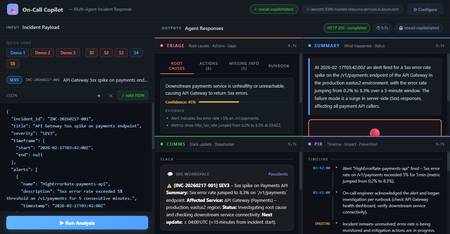
Four AI agents, one incident payload, structured triage in under 60 seconds powered by Microsoft Agent Framework and Foundry Hosted Agents. Multi-Agent Microsoft Agent Framework Foundry Hosted Agents Python SRE / Incident Response When an incident fires at 3 AM, every second the on-call engineer spends piecing together alerts, logs, and metrics is a second not spent fixing the problem. What if an AI system could ingest the raw incident signals and hand you a structured triage, a Slack update, a stakeholder brief, and a draft post-incident report, all in under 10 seconds? That’s exactly what On-Call Copilot does. In this post, we’ll walk through how we built it using the Microsoft Agent Framework, deployed it as a Foundry Hosted Agent, and discuss the key design decisions that make multi-agent orchestration practical for production workloads. The full source code is open-source on GitHub. You can deploy your own instance with a single azd up . Why Multi-Agent? The Problem with Single-Prompt Triage Early AI incident assistants used a single large prompt: “Here is the incident. Give me root causes, actions, a Slack message, and a post-incident report.” This approach has two fundamental problems: Context overload. A real incident may have 800 lines of logs, 10 alert lines, and dense metrics. Asking one model to process everything and produce four distinct output formats in a single turn pushes token limits and degrades quality. Conflicting concerns. Triage reasoning and communication drafting are cognitively different tasks. A model optimised for structured JSON analysis often produces stilted Slack messages—and vice versa. The fix is specialisation: decompose the task into focused agents, give each agent a narrow instruction set, and run them in parallel. This is the core pattern that the Microsoft Agent Framework makes easy. Architecture: Four Agents Running Concurrently On-Call Copilot is deployed as a Foundry Hosted Agent—a containerised Python service running on Microsoft Foundry’s managed infrastructure. The core orchestrator uses ConcurrentBuilder from the Microsoft Agent Framework SDK to run four specialist agents in parallel via asyncio.gather() . All four panels populated simultaneously: Triage (red), Summary (blue), Comms (green), PIR (purple). Architecture: The orchestrator runs four specialist agents concurrently via asyncio.gather(), then merges their JSON fragments into a single response. All four agents The solution share a single Azure OpenAI Model Router deployment. Rather than hardcoding gpt-4o or gpt-4o-mini , Model Router analyses request complexity and routes automatically. A simple triage prompt costs less; a long post-incident synthesis uses a more capable model. One deployment name, zero model-selection code. Meet the Four Agents 🔍 Triage Agent Root cause analysis, immediate actions, missing data identification, and runbook alignment. suspected_root_causes · immediate_actions · missing_information · runbook_alignment 📋 Summary Agent Concise incident narrative: what happened and current status (ONGOING / MITIGATED / RESOLVED). summary.what_happened · summary.current_status 📢 Comms Agent Audience-appropriate communications: Slack channel update with emoji conventions, plus a non-technical stakeholder brief. comms.slack_update · comms.stakeholder_update 📝 PIR Agent Post-incident report: chronological timeline, quantified customer impact, and specific prevention actions. post_incident_report.timeline · .customer_impact · .prevention_actions The Code: Building the Orchestrator The entry point is remarkably concise. ConcurrentBuilder handles all the async wiring—you just declare the agents and let the framework handle parallelism, error propagation, and response merging. main.py — Orchestrator from agent_framework import ConcurrentBuilder from agent_framework.azure import AzureOpenAIChatClient from azure.ai.agentserver.agentframework import from_agent_framework from azure.identity import DefaultAzureCredential, get_bearer_token_provider from app.agents.triage import TRIAGE_INSTRUCTIONS from app.agents.comms import COMMS_INSTRUCTIONS from app.agents.pir import PIR_INSTRUCTIONS from app.agents.summary import SUMMARY_INSTRUCTIONS _credential = DefaultAzureCredential() _token_provider = get_bearer_token_provider( _credential, "https://cognitiveservices.azure.com/.default" ) def create_workflow_builder(): """Create 4 specialist agents and wire them into a ConcurrentBuilder.""" triage = AzureOpenAIChatClient(ad_token_provider=_token_provider).create_agent( instructions=TRIAGE_INSTRUCTIONS, name="triage-agent", ) summary = AzureOpenAIChatClient(ad_token_provider=_token_provider).create_agent( instructions=SUMMARY_INSTRUCTIONS, name="summary-agent", ) comms = AzureOpenAIChatClient(ad_token_provider=_token_provider).create_agent( instructions=COMMS_INSTRUCTIONS, name="comms-agent", ) pir = AzureOpenAIChatClient(ad_token_provider=_token_provider).create_agent( instructions=PIR_INSTRUCTIONS, name="pir-agent", ) return ConcurrentBuilder().participants([triage, summary, comms, pir]) def main(): builder = create_workflow_builder() from_agent_framework(builder.build).run() # starts on port 8088 if __name__ == "__main__": main() Key insight: DefaultAzureCredential means there are no API keys anywhere in the codebase. The container uses managed identity in production; local development uses your az login session. The same code runs in both environments without modification. Agent Instructions: Prompts as Configuration Each agent receives a tightly scoped system prompt that defines its output schema and guardrails. Here’s the Triage Agent—the most complex of the four: app/agents/triage.py TRIAGE_INSTRUCTIONS = """\ You are the **Triage Agent**, an expert Site Reliability Engineer specialising in root cause analysis and incident response. ## Task Analyse the incident data and return a single JSON object with ONLY these keys: { "suspected_root_causes": [ { "hypothesis": "string – concise root cause hypothesis", "evidence": ["string – supporting evidence from the input"], "confidence": 0.0 // 0-1, how confident you are } ], "immediate_actions": [ { "step": "string – concrete action with runnable command if applicable", "owner_role": "oncall-eng | dba | infra-eng | platform-eng", "priority": "P0 | P1 | P2 | P3" } ], "missing_information": [ { "question": "string – what data is missing", "why_it_matters": "string – why this data would help" } ], "runbook_alignment": { "matched_steps": ["string – runbook steps that match the situation"], "gaps": ["string – gaps or missing runbook coverage"] } } ## Guardrails 1. **No secrets** – redact any credential-like material as [REDACTED]. 2. **No hallucination** – if data is insufficient, set confidence to 0 and add entries to missing_information. 3. **Diagnostic suggestions** – when data is sparse, include diagnostic steps in immediate_actions. 4. **Structured output only** – return ONLY valid JSON, no prose. """ The Comms Agent follows the same pattern but targets a different audience: app/agents/comms.py COMMS_INSTRUCTIONS = """\ You are the **Comms Agent**, an expert incident communications writer. ## Task Return a single JSON object with ONLY this key: { "comms": { "slack_update": "Slack-formatted message with emoji, severity, status, impact, next steps, and ETA", "stakeholder_update": "Non-technical summary for executives. Focus on business impact and resolution." } } ## Guidelines - Slack: Use :rotating_light: for active SEV1/2, :warning: for degraded, :white_check_mark: for resolved. - Stakeholder: No jargon. Translate to business impact. - Tone: Calm, factual, action-oriented. Never blame individuals. - Structured output only – return ONLY valid JSON, no prose. """ Instructions as config, not code. Agent behaviour is defined entirely by instruction text strings. A non-developer can refine agent behaviour by editing the prompt and redeploying no Python changes needed. The Incident Envelope: What Goes In The agent accepts a single JSON envelope. It can come from a monitoring alert webhook, a PagerDuty payload, or a manual CLI invocation: Incident Input (JSON) { "incident_id": "INC-20260217-002", "title": "DB connection pool exhausted — checkout-api degraded", "severity": "SEV1", "timeframe": { "start": "2026-02-17T14:02:00Z", "end": null }, "alerts": [ { "name": "DatabaseConnectionPoolNearLimit", "description": "Connection pool at 99.7% on orders-db-primary", "timestamp": "2026-02-17T14:03:00Z" } ], "logs": [ { "source": "order-worker", "lines": [ "ERROR: connection timeout after 30s (attempt 3/3)", "WARN: pool exhausted, queueing request (queue_depth=847)" ] } ], "metrics": [ { "name": "db_connection_pool_utilization_pct", "window": "5m", "values_summary": "Jumped from 22% to 99.7% at 14:03Z" } ], "runbook_excerpt": "Step 1: Check DB connection dashboard...", "constraints": { "max_time_minutes": 15, "environment": "production", "region": "swedencentral" } } Declaring the Hosted Agent The agent is registered with Microsoft Foundry via a declarative agent.yaml file. This tells Foundry how to discover and route requests to the container: agent.yaml kind: hosted name: oncall-copilot description: | Multi-agent hosted agent that ingests incident signals and runs 4 specialist agents concurrently via Microsoft Agent Framework ConcurrentBuilder. metadata: tags: - Azure AI AgentServer - Microsoft Agent Framework - Multi-Agent - Model Router protocols: - protocol: responses environment_variables: - name: AZURE_OPENAI_ENDPOINT value: ${AZURE_OPENAI_ENDPOINT} - name: AZURE_OPENAI_CHAT_DEPLOYMENT_NAME value: model-router The protocols: [responses] declaration exposes the agent via the Foundry Responses API on port 8088. Clients can invoke it with a standard HTTP POST no custom API needed. Invoking the Agent Once deployed, you can invoke the agent with the project’s built-in scripts or directly via curl : CLI / curl # Using the included invoke script python scripts/invoke.py --demo 2 # multi-signal SEV1 demo python scripts/invoke.py --scenario 1 # Redis cluster outage # Or with curl directly TOKEN=$(az account get-access-token \ --resource https://ai.azure.com --query accessToken -o tsv) curl -X POST \ "$AZURE_AI_PROJECT_ENDPOINT/openai/responses?api-version=2025-05-15-preview" \ -H "Authorization: Bearer $TOKEN" \ -H "Content-Type: application/json" \ -d '{ "input": [ {"role": "user", "content": "<incident JSON here>"} ], "agent": { "type": "agent_reference", "name": "oncall-copilot" } }' The Browser UI The project includes a zero-dependency browser UI built with plain HTML, CSS, and vanilla JavaScript—no React, no bundler. A Python http.server backend proxies requests to the Foundry endpoint. The empty state. Quick-load buttons pre-populate the JSON editor with demo incidents or scenario files. Demo 1 loaded: API Gateway 5xx spike, SEV3. The JSON is fully editable before submitting. Agent Output Panels Triage: Root causes ranked by confidence. Evidence is collapsed under each hypothesis. Triage: Immediate actions with P0/P1/P2 priority badges and owner roles. Comms: Slack card with emoji substitution and a stakeholder executive summary. PIR: Chronological timeline with an ONGOING marker, customer impact in a red-bordered box. Performance: Parallel Execution Matters Incident Type Complexity Parallel Latency Sequential (est.) Single alert, minimal context (SEV4) Low 4–6 s ~16 s Multi-signal, logs + metrics (SEV2) Medium 7–10 s ~28 s Full SEV1 with long log lines High 10–15 s ~40 s Post-incident synthesis (resolved) High 10–14 s ~38 s asyncio.gather() running four independent agents cuts total latency by 3–4× compared to sequential execution. For a SEV1 at 3 AM, that’s the difference between a 10-second AI-powered head start and a 40-second wait. Five Key Design Decisions Parallel over sequential Each agent is independent and processes the full incident payload in isolation. ConcurrentBuilder with asyncio.gather() is the right primitive—no inter-agent dependencies, no shared state. JSON-only agent instructions Every agent returns only valid JSON with a defined schema. The orchestrator merges fragments with merged.update(agent_output) . No parsing, no extraction, no post-processing. No hardcoded model names AZURE_OPENAI_CHAT_DEPLOYMENT_NAME=model-router is the only model reference. Model Router selects the best model at runtime based on prompt complexity. When new models ship, the agent gets better for free. DefaultAzureCredential everywhere No API keys. No token management code. Managed identity in production, az login in development. Same code, both environments. Instructions as configuration Each agent’s system prompt is a plain Python string. Behaviour changes are text edits, not code logic. A non-developer can refine prompts and redeploy. Guardrails: Built into the Prompts The agent instructions include explicit guardrails that don’t require external filtering: No hallucination: When data is insufficient, the agent sets confidence: 0 and populates missing_information rather than inventing facts. Secret redaction: Each agent is instructed to redact credential-like patterns as [REDACTED] in its output. Mark unknowns: Undeterminable fields use the literal string "UNKNOWN" rather than plausible-sounding guesses. Diagnostic suggestions: When signal is sparse, immediate_actions includes diagnostic steps that gather missing information before prescribing a fix. Model Router: Automatic Model Selection One of the most powerful aspects of this architecture is Model Router. Instead of choosing between gpt-4o , gpt-4o-mini , or o3-mini per agent, you deploy a single model-router endpoint. Model Router analyses each request’s complexity and routes it to the most cost-effective model that can handle it. Model Router insights: models selected per request with associated costs. Model Router telemetry from Microsoft Foundry: request distribution and cost analysis. This means you get optimal cost-performance without writing any model-selection logic. A simple Summary Agent prompt may route to gpt-4o-mini , while a complex Triage Agent prompt with 800 lines of logs routes to gpt-4o all automatically. Deployment: One Command The repo includes both azure.yaml and agent.yaml , so deployment is a single command: Deploy to Foundry # Deploy everything: infra + container + Model Router + Hosted Agent azd up This provisions the Foundry project resources, builds the Docker image, pushes to Azure Container Registry, deploys a Model Router instance, and creates the Hosted Agent. For more control, you can use the SDK deploy script: Manual Docker + SDK deploy # Build and push (must be linux/amd64) docker build --platform linux/amd64 -t oncall-copilot:v1 . docker tag oncall-copilot:v1 $ACR_IMAGE docker push $ACR_IMAGE # Create the hosted agent python scripts/deploy_sdk.py Getting Started Quickstart # Clone git clone https://github.com/microsoft-foundry/oncall-copilot cd oncall-copilot # Install python -m venv .venv source .venv/bin/activate # .venv\Scripts\activate on Windows pip install -r requirements.txt # Set environment variables export AZURE_OPENAI_ENDPOINT="https://<account>.openai.azure.com/" export AZURE_OPENAI_CHAT_DEPLOYMENT_NAME="model-router" export AZURE_AI_PROJECT_ENDPOINT="https://<account>.services.ai.azure.com/api/projects/<project>" # Validate schemas locally (no Azure needed) MOCK_MODE=true python scripts/validate.py # Deploy to Foundry azd up # Invoke the deployed agent python scripts/invoke.py --demo 1 # Start the browser UI python ui/server.py # → http://localhost:7860 Extending: Add Your Own Agent Adding a fifth agent is straightforward. Follow this pattern: Create app/agents/<name>.py with a *_INSTRUCTIONS constant following the existing pattern. Add the agent’s output keys to app/schemas.py . Register it in main.py : main.py — Adding a 5th agent from app.agents.my_new_agent import NEW_INSTRUCTIONS new_agent = AzureOpenAIChatClient( ad_token_provider=_token_provider ).create_agent( instructions=NEW_INSTRUCTIONS, name="new-agent", ) workflow = ConcurrentBuilder().participants( [triage, summary, comms, pir, new_agent] ) Ideas for extensions: a ticket auto-creation agent that creates Jira or Azure DevOps items from the PIR output, a webhook adapter agent that normalises PagerDuty or Datadog payloads, or a human-in-the-loop agent that surfaces missing_information as an interactive form. Key Takeaways for AI Engineers The multi-agent pattern isn’t just for chatbots. Any task that can be decomposed into independent subtasks with distinct output schemas is a candidate. Incident response, document processing, code review, data pipeline validation—the pattern transfers. Microsoft Agent Framework gives you ConcurrentBuilder for parallel execution and AzureOpenAIChatClient for Azure-native auth—you write the prompts, the framework handles the plumbing. Foundry Hosted Agents let you deploy containerised agents with managed infrastructure, automatic scaling, and built-in telemetry. No Kubernetes, no custom API gateway. Model Router eliminates the model selection problem. One deployment name handles all scenarios with optimal cost-performance tradeoffs. Prompt-as-config means your agents are iterable by anyone who can edit text. The feedback loop from “this output could be better” to “deployed improvement” is minutes, not sprints. Resources Microsoft Agent Framework SDK powering the multi-agent orchestration Model Router Automatic model selection based on prompt complexity Foundry Hosted Agents Deploy containerised agents on managed infrastructure ConcurrentBuilder Samples Official agents-in-workflow sample this project follows DefaultAzureCredential Zero-config auth chain used throughout Hosted Agents Concepts Architecture overview of Foundry Hosted Agents The On-Call Copilot sample is open source under the MIT licence. Contributions, scenario files, and agent instruction improvements are welcome via pull request.
The Future of Agentic AI: Inside Microsoft Agent Framework 1.0
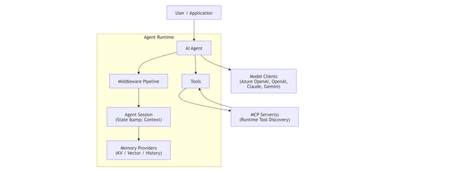
Agentic AI is rapidly moving beyond demos and chatbots toward long‑running, autonomous systems that reason, call tools, collaborate with other agents, and operate reliably in production. On April 3, 2026, Microsoft marked a major milestone with the General Availability (GA) release of Microsoft Agent Framework 1.0, a production‑ready, open‑source framework for building agents and multi‑agent workflows in.NET and Python. [techcommun...rosoft.com] In this post, we’ll deep‑dive into: What Microsoft Agent Framework actually is Its core architecture and design principles What’s new in version 1.0 How it differs from other agent frameworks When and how to use it—with real code examples What Is Microsoft Agent Framework? According to the official announcement, Microsoft Agent Framework is an open‑source SDK and runtime for building AI agents and multi‑agent workflows with strong enterprise foundations. Agent Framework provides two primary capability categories: 1. Agents Agents are long‑lived runtime components that: Use LLMs to interpret inputs Call tools and MCP servers Maintain session state Generate responses They are not just prompt wrappers, but stateful execution units. 2. Workflows Workflows are graph‑based orchestration engines that: Connect agents and functions Enforce execution order Support checkpointing and human‑in‑the‑loop scenarios This leads to a clean separation of responsibilities: Concern Handled By Reasoning & interpretation Agent Execution policy & control flow Workflow This separation is a foundational design decision. High‑Level Architecture From the official overview, Agent Framework is composed of several core building blocks: Model clients (chat completions & responses) Agent sessions (state & conversation management) Context providers (memory and retrieval) Middleware pipeline (interception, filtering, telemetry) MCP clients (tool discovery and invocation) Workflow engine (graph‑based orchestration) Conceptual Flow 🌟 What’s New in Version 1.0 Version 1.0 marks the transition from "Release Candidate" to "General Availability" (GA). Production-Ready Stability: Unlike the earlier experimental packages, 1.0 offers stable APIs, versioned releases, and a commitment to long-term support (LTS). A2A Protocol (Agent-to-Agent): A new structured messaging protocol that allows agents to communicate across different runtimes. For example, an agent built in Python can seamlessly coordinate with an agent running in a .NET environment. MCP (Model Context Protocol) Support: Full integration with the Model Context Protocol, enabling agents to dynamically discover and invoke external tools and data sources without manual integration code. Multi-Agent Orchestration Patterns: Stable implementations of complex patterns, including: Sequential: Linear handoffs between specialized agents. Group Chat: Collaborative reasoning where agents discuss and solve problems. Magentic-One: A sophisticated pattern for task-oriented reasoning and planning. Middleware Pipeline: The new middleware architecture lets you inject logic into the agent's execution loop without modifying the core prompts. This is essential for Responsible AI (RAI), allowing you to add content safety filters, logging, and compliance checks globally. DevUI Debugger: A browser-based local debugger that provides a real-time visual representation of agent message flows, tool calls, and state changes. Code Examples Creating a Simple Agent (C#) From Microsoft Learn : using Azure.AI.Projects; using Azure.Identity; using Microsoft.Agents.AI; AIAgent agent = new AIProjectClient( new Uri("https://your-foundry-service.services.ai.azure.com/api/projects/your-project"), new AzureCliCredential()) .AsAIAgent( model: "gpt-5.4-mini", instructions: "You are a friendly assistant. Keep your answers brief."); Console.WriteLine(await agent.RunAsync("What is the largest city in France?")); This shows: Provider‑agnostic model access Session‑aware agent execution Minimal setup for production agents Creating a Simple Agent (Python) from agent_framework.foundry import FoundryChatClient from azure.identity import AzureCliCredential client = FoundryChatClient( project_endpoint="https://your-foundry-service.services.ai.azure.com/api/projects/your-project", model="gpt-5.4-mini", credential=AzureCliCredential(), ) agent = client.as_agent( name="HelloAgent", instructions="You are a friendly assistant. Keep your answers brief.", ) result = await agent.run("What is the largest city in France?") print(result) The same agent abstraction applies across languages. When to Use Agents vs Workflows Microsoft provides clear guidance: Use an Agent when… Use a Workflow when… Task is open‑ended Steps are well‑defined Autonomous tool use is needed Execution order matters Single decision point Multiple agents/functions collaborate Key principle: If you can solve the task with deterministic code, do that instead of using an AI agent. 🔄 How It Differs from Other Frameworks Microsoft Agent Framework 1.0 distinguishes itself by focusing on "Enterprise Readiness" and "Interoperability." Feature Microsoft Agent Framework 1.0 Semantic Kernel / AutoGen LangChain / CrewAI Philosophy Unified, production-ready SDK. Research-focused or tool-specific. High-level, developer-friendly abstractions. Integration Deeply integrated with Microsoft Foundry and Azure. Varied; often requires more glue code. Generally cloud-agnostic. Interoperability Native A2A and MCP for cross-framework tasks. Limited to internal ecosystem. Uses proprietary connectors. Runtime Identical API parity for .NET and Python. Primarily Python-first (SK has C#). Primarily Python. Control Graph-based deterministic workflows. More non-deterministic/experimental. Mixture of role-based and agentic. 🛠️ Key Technical Components Agent Harness: The execution layer that provides agents with controlled access to the shell, file system, and messaging loops. Agent Skills: A portable, file-based or code-defined format for packaging domain expertise. Implementation Tip: If you are coming from Semantic Kernel, Microsoft provides migration assistants that analyze your existing code and generate step-by-step plans to upgrade to the new Agent Framework 1.0 standards. Microsoft Agent Framework Version 1.0 | Microsoft Agent Framework Agent Framework documentation 🎯 Summary Microsoft Agent Framework 1.0 is the "grown-up" version of AI orchestration. By standardizing the way agents talk to each other (A2A), discover tools (MCP), and process information (Middleware), Microsoft has provided a clear path for taking AI experiments into production. For more detailed guides, check out the official Microsoft Agent Framework DocumentationMicrosoft Agent Framework - .NET AI Community StandupGenerative AI for Beginners - Full Videos Series Released!
With so many new technologies, tools and terms in the world of Generative AI, it can be hard to know where to start or what to learn next. "Generative AI for Beginners" is designed to help you on your learning journey no matter where you are now. We are happy announce that the "Generative AI for Beginners" course has received a major refresh - 18 new videos for each lesson.Learn how to build MCP servers with Python and Azure
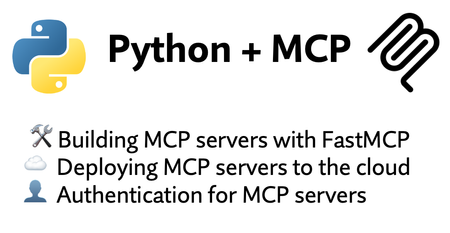
We just concluded Python + MCP, a three-part livestream series where we: Built MCP servers in Python using FastMCP Deployed them into production on Azure (Container Apps and Functions) Added authentication, including Microsoft Entra as the OAuth provider All of the materials from our series are available for you to keep learning from, and linked below: Video recordings of each stream Powerpoint slides Open-source code samples complete with Azure infrastructure and 1-command deployment If you're an instructor, feel free to use the slides and code examples in your own classes. Spanish speaker? We've got you covered- check out the Spanish version of the series. 🙋🏽♂️Have follow up questions? Join our weekly office hours on Foundry Discord: Tuesdays @ 11AM PT → Python + AI Thursdays @ 8:30 AM PT → All things MCP Building MCP servers with FastMCP 📺 Watch YouTube recording In the intro session of our Python + MCP series, we dive into the hottest technology of 2025: MCP (Model Context Protocol). This open protocol makes it easy to extend AI agents and chatbots with custom functionality, making them more powerful and flexible. We demonstrate how to use the Python FastMCP SDK to build an MCP server running locally. Then we consume that server from chatbots like GitHub Copilot in VS Code, using it's tools, resources, and prompts. Finally, we discover how easy it is to connect AI agent frameworks like Langchain and Microsoft agent-framework to the MCP server. Slides for this session Code repository with examples: python-mcp-demos Deploying MCP servers to the cloud 📺 Watch YouTube recording In our second session of the Python + MCP series, we deploy MCP servers to the cloud! We walk through the process of containerizing a FastMCP server with Docker and deploying to Azure Container Apps. Then we instrument the MCP server with OpenTelemetry and observe the tool calls using Azure Application Insights and Logfire. Finally, we explore private networking options for MCP servers, using virtual networks that restrict external access to internal MCP tools and agents. Slides for this session Code repository with examples: python-mcp-demos Authentication for MCP servers 📺 Watch YouTube recording In our third session of the Python + MCP series, we explore the best ways to build authentication layers on top of your MCP servers. We start off simple, with an API key to gate access, and demonstrate a key-restricted FastMCP server deployed to Azure Functions. Then we move on to OAuth-based authentication for MCP servers that provide user-specific data. We dive deep into MCP authentication, which is built on top of OAuth2 but with additional requirements like PRM and DCR/CIMD, which can make it difficult to implement fully. We demonstrate the full MCP auth flow in the open-souce identity provider KeyCloak, and show how to use an OAuth proxy pattern to implement MCP auth on top of Microsoft Entra. Slides for this session Code repository with Container Apps examples: python-mcp-demos Code repository with Functions examples: python-mcp-demosBuilding AI Agents with Microsoft Foundry: A Progressive Lab from Hello World to Self-Hosted
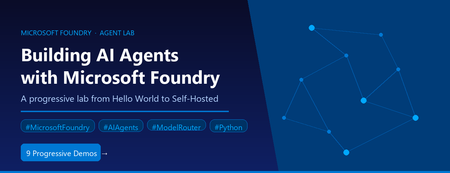
AI agent development has a steep on-ramp. The combination of new SDKs, tool-calling patterns, model selection decisions, retrieval-augmented generation, and deployment concerns means most developers spend more time wiring things together than actually building anything useful. The Microsoft Foundry Agent Lab is a structured, open-source demo series designed to change that — nine self-contained demos, each adding exactly one new concept, all built on the same Microsoft Foundry SDK and a single model deployment. This post walks through what the lab contains, how each demo works under the hood, and the architectural decisions that make it a useful reference for AI engineers building production agents. Why a Progressive Lab? Agent frameworks can be overwhelming. A developer who opens a rich example with RAG, tool-calling, streaming, and a custom UI all at once has no clear line of sight to which parts are essential and which are embellishments. The Foundry Agent Lab takes the opposite approach: start with the absolute minimum and introduce one new primitive per demo. By the time you reach Demo 8, you have seen every major capability — not in one monolithic sample, but in a layered sequence where each addition is visible and understandable. # Demo New Concept Tool Used UX 0 hello-demo Agent creation, Responses API, conversations None Terminal 1 tools-demo Function calling, tool-calling loop, live API FunctionTool Terminal 2 desktop-demo UI decoupling — same agent, different surface None Desktop (Tkinter) 3 websearch-demo Server-side built-in tools, no client loop WebSearchTool Terminal 4 code-demo Code execution in sandbox, Gradio web UI CodeInterpreterTool Web (Gradio) 5 rag-demo Document upload, vector stores, RAG grounding FileSearchTool Terminal 6 mcp-demo MCP servers, human-in-the-loop approval MCPTool Terminal 7 toolbox-demo Centralized tool governance, Toolbox versioning Toolbox Terminal 8 hosted-demo Self-hosted agent with Responses protocol Custom server Terminal + Agent Inspector The Model Router: One Deployment to Rule Them All Before diving into the demos, it is worth understanding the one architectural decision that ties the entire lab together: every agent uses model-router as its model deployment. MODEL_DEPLOYMENT=model-router Model Router is a Microsoft Foundry capability that inspects each request at inference time and routes it to the optimal available model — weighing task complexity, cost, and latency. A simple factual question goes to a fast, cheap model. A complex tool-calling chain with code generation gets routed to a frontier model. You write zero routing logic. The lab's MODEL-ROUTER.md file contains empirical observations from running all nine demos. A sample of what the router selected: Demo Query Task Type Model Selected hello "What's the capital of WA state?" Factual recall grok-4-1-fast-reasoning hello "Summarize our conversation" Summarization gpt-5.2-chat-2025-12-11 tools "What's the weather in Seattle?" Tool-using gpt-5.4-mini-2026-03-17 code Data analysis with code generation Code generation + execution gpt-5.4-2026-03-05 rag HR policy document question Retrieval + synthesis gpt-5.3-chat-2026-03-03 This is the strongest signal in the lab: you do not need to reason about model selection. You declare what your agent needs to do; the router handles the rest, and it chooses correctly. Demo 0: The Minimum Viable Agent The hello-demo establishes the baseline pattern used by every subsequent demo. Two files: one to register the agent, one to chat with it. Registering the agent from azure.identity import DefaultAzureCredential from azure.ai.projects import AIProjectClient from azure.ai.projects.models import PromptAgentDefinition credential = DefaultAzureCredential() project = AIProjectClient(endpoint=PROJECT_ENDPOINT, credential=credential) agent = project.agents.create_version( agent_name=AGENT_NAME, definition=PromptAgentDefinition( model=MODEL_DEPLOYMENT, instructions="You are a helpful, friendly assistant.", ), ) Authentication uses DefaultAzureCredential , which works with az login locally and with managed identity in production — no API keys anywhere in the code. Chatting with the agent # Create a server-side conversation (persists history across turns) conversation = openai.conversations.create() # Each turn sends the user message; the agent sees full history response = openai.responses.create( input=user_input, conversation=conversation.id, extra_body={"agent_reference": {"name": AGENT_NAME, "type": "agent_reference"}}, ) print(response.output_text) The conversation object is server-side. You pass its ID on every turn; the history lives in Foundry, not in a local list. This is the Responses API pattern — distinct from the older Completions or Chat Completions APIs. Demo 1: Function Tools and the Tool-Calling Loop Demo 1 adds function calling against a real weather API. The key insight here is that the model does not execute the function — it requests the execution, and your code executes it locally, then feeds the result back. Declaring a function tool from azure.ai.projects.models import FunctionTool, PromptAgentDefinition func_tool = FunctionTool( name="get_weather", description="Get the current weather for a given city.", parameters={ "type": "object", "properties": {"city": {"type": "string", "description": "City name"}}, "required": ["city"], }, strict=True, ) agent = project.agents.create_version( agent_name=AGENT_NAME, definition=PromptAgentDefinition( model=MODEL_DEPLOYMENT, tools=[func_tool], instructions="You are a weather assistant...", ), ) The tool-calling loop response = openai.responses.create(input=user_input, conversation=conversation.id, ...) # Loop while the model is requesting tool calls while any(item.type == "function_call" for item in response.output): input_list = [] for item in response.output: if item.type == "function_call": args = json.loads(item.arguments) result = get_weather(args["city"]) # execute locally input_list.append(FunctionCallOutput(call_id=item.call_id, output=result)) # Send results back to the agent response = openai.responses.create(input=input_list, conversation=conversation.id, ...) print(response.output_text) The strict=True parameter on FunctionTool enforces structured outputs — the model must return arguments that match the declared JSON schema exactly. This eliminates argument parsing errors in production. Demo 2: UI Is Not Your Agent Demo 2 runs the exact same agent as Demo 1 but surfaces it in a Tkinter desktop window. The point is pedagogical: your agent definition, conversation management, and tool-calling logic are entirely independent of your UI layer. Swapping from terminal to desktop requires changing only the presentation code — nothing in the agent or conversation path changes. This is a principle worth internalising early: agent logic and UI logic should never be entangled. The lab enforces this separation structurally. Demo 3: Server-Side Built-In Tools The web search demo introduces a sharp contrast with Demo 1. With WebSearchTool , the tool-calling loop disappears entirely from client code: from azure.ai.projects.models import WebSearchTool agent = project.agents.create_version( agent_name="Search-Agent", definition=PromptAgentDefinition( model=MODEL_DEPLOYMENT, tools=[WebSearchTool()], instructions="You are a research assistant...", ), ) The agent decides when to search, executes the search server-side, and returns a grounded response with citations. Your client code looks identical to Demo 0 — a simple responses.create() call with no tool loop. The distinction matters architecturally: Function tools (Demo 1) — tool execution happens on your client; you control the code, the API call, the error handling. Built-in tools (Demo 3+) — tool execution happens inside Foundry; you get results without managing execution. Demo 4: Code Interpreter and the Gradio Web UI Demo 4 attaches CodeInterpreterTool , which gives the agent a sandboxed Python execution environment inside Foundry. The agent can write code, run it, observe output, and iterate — all server-side. Combined with a Gradio web interface, this demo shows an agent that can perform data analysis, generate charts, and explain results through a browser UI. Model Router is particularly interesting here: the empirical data shows it selects a more capable frontier model ( gpt-5.4-2026-03-05 ) for code-generation tasks, while simpler conversational turns stay on lighter models. Demo 5: Retrieval-Augmented Generation with FileSearchTool Demo 5 introduces RAG. The setup phase uploads a document, creates a vector store, and attaches it to the agent: # Upload document and create a vector store vector_store = openai.vector_stores.create(name="employee-handbook-store") with open("data/employee-handbook.md", "rb") as f: openai.vector_stores.files.upload_and_poll( vector_store_id=vector_store.id, file=f ) # Attach the vector store to the agent agent = project.agents.create_version( agent_name="RAG-Agent", definition=PromptAgentDefinition( model=MODEL_DEPLOYMENT, tools=[FileSearchTool(vector_store_ids=[vector_store.id])], instructions="Answer questions using only the provided documents...", ), ) At query time, the agent embeds the question, searches the vector store semantically, retrieves matching chunks, and generates an answer grounded in the retrieved content — entirely server-side. The client code remains a plain responses.create() call. An important detail: the .vector_store_id file is written to disk during setup and read back during the chat session, so the demo survives process restarts without re-uploading the document. The .gitignore excludes this file from source control. Demo 6: Model Context Protocol Demo 6 connects the agent to a GitHub MCP server, giving it access to repository and issue data via the open Model Context Protocol standard. MCP servers expose tools over a standardised wire protocol; the agent discovers and calls them without any client-side function declarations. The demo also demonstrates human-in-the-loop approval: before executing any MCP tool call, the agent surfaces the proposed action and waits for the user to confirm. This is an important safety pattern for agents that can trigger side effects on external systems. Demo 7: Toolbox — Centralised Tool Governance Where Demo 6 connects to a single MCP server directly, Demo 7 uses a Toolbox — a managed Microsoft Foundry resource that bundles multiple tools into a single, versioned, MCP-compatible endpoint. The Toolbox in this demo exposes both GitHub Issues and GitHub Repos tools, curated into an immutable versioned snapshot. This pattern is significant for production multi-agent systems: Centralised governance — one team owns the tool definitions; all agents consume them via a single endpoint. Versioned snapshots — promoting a new Toolbox version is explicit; agents pin to a version and upgrade intentionally. MCP compatibility — any MCP-capable agent or framework can connect, not just Foundry SDK agents. from azure.ai.projects.models import McpTool toolbox_tool = McpTool( server_label="toolbox", server_url=TOOLBOX_ENDPOINT, allowed_tools=[], # empty = all tools in the Toolbox version headers={"Authorization": f"Bearer {token}"}, ) Demo 8: Self-Hosted Agent with the Responses Protocol The final demo departs from the prompt-agent pattern. Instead of registering a declarative agent in Foundry, Demo 8 implements a custom agent server using the Responses protocol. The server exposes a streaming HTTP endpoint; Foundry's Agent Inspector can connect to it and route user turns to it just as it would to a hosted prompt agent. This demo includes a Dockerfile and an agent.yaml , enabling deployment to Foundry's container hosting service. It uses gpt-4.1-mini directly rather than the model router, because the custom server owns the entire inference path. When to consider this pattern: Your agent requires custom pre- or post-processing logic that cannot be expressed in a system prompt. You need to integrate with infrastructure that is not reachable through MCP or built-in tools. You want to own the inference call for cost control, A/B testing, or compliance reasons. You are building a multi-agent orchestrator that needs to expose itself as an agent to other orchestrators. Getting Started The lab requires Python 3.10 or higher, an Azure subscription with a Microsoft Foundry project, and the Azure CLI. 1. Clone and set up the virtual environment git clone https://github.com/microsoft-foundry/Foundry-Agent-Lab.git cd Foundry-Agent-Lab # Create and activate the virtual environment python -m venv .venv # Windows Command Prompt .venv\Scripts\activate.bat # Windows PowerShell .venv\Scripts\Activate.ps1 # macOS / Linux source .venv/bin/activate pip install -r requirements.txt 2. Configure a demo copy hello-demo\.env.sample hello-demo\.env # Edit hello-demo\.env and set PROJECT_ENDPOINT Your PROJECT_ENDPOINT is on the Overview page of your Foundry project in the Azure portal. It takes the form https://your-resource.ai.azure.com/api/projects/your-project . 3. Run the demo az login 0-hello-demo Each numbered batch file at the root activates the virtual environment, runs create_agent.py , and launches chat.py . Append log to capture the full session transcript: 0-hello-demo log Reset between runs hello-demo\reset.bat Every demo includes a reset.bat that deletes the registered agent and any associated resources (vector stores, uploaded files). Demos are fully repeatable. Architecture Principles Demonstrated Across the nine demos, the lab illustrates a set of design principles that apply directly to production agent systems: Keyless authentication throughout Every demo uses DefaultAzureCredential . No API keys appear anywhere in the code. Locally, az login provides credentials. In production, managed identity takes over automatically — same code, no secrets to rotate. Server-side conversation state The Responses API stores conversation history server-side. Your application passes a conversation ID; Foundry maintains the thread. This eliminates the common bug of truncating history due to local list management and makes multi-process or multi-instance deployments straightforward. Client-side vs server-side tool execution The lab makes the distinction explicit. Function tools execute in your process — you control the code, the external call, and the error handling. Built-in tools (WebSearch, CodeInterpreter, FileSearch) execute inside Foundry — you get results without managing execution infrastructure. MCP tools (Demo 6, 7) fall between these: they execute in a separately deployed server, with the protocol mediating the call. Progressive tool introduction Each demo's create_agent.py registers the agent once. The chat.py file handles the conversation loop. These two responsibilities are always separate, making it easy to update agent definitions without modifying conversation logic, and vice versa. Security Considerations When building agents for production, keep the following in mind: Never commit .env files. The .gitignore excludes them, but verify this before pushing. Use Azure Key Vault or environment variable injection in CI/CD pipelines. Use managed identity in production. DefaultAzureCredential automatically picks up managed identity when deployed to Azure, eliminating the need for any stored credentials. Apply human-in-the-loop for side-effecting tools. Demo 6 demonstrates this pattern for MCP tool calls. Any agent that can modify external state (create issues, send emails, write files) should surface proposed actions for confirmation. Validate tool outputs before use. Treat data returned by external tools (weather APIs, search results, document retrieval) as untrusted input. Prompt injection through tool results is a real attack surface; grounding instructions in your system prompt reduce but do not eliminate this risk. Scope Toolbox permissions narrowly. When using a Toolbox (Demo 7), use allowed_tools to restrict which tools the agent can call, rather than granting access to all tools in a Toolbox version. Key Takeaways Start with the minimum. A prompt agent with no tools requires fewer than 30 lines of code using the Foundry SDK. Add tools only when the use case demands them. Use model-router unless you have a specific reason not to. The empirical data in the lab shows the router selects appropriate models across all task types — factual, creative, tool-calling, RAG, and code generation. Understand the client/server tool boundary. Function tools give you control; built-in tools give you simplicity. MCP and Toolbox give you governance and interoperability. Choose based on where you need control and where you need scale. Conversation state belongs on the server. Do not maintain conversation history in application memory if you can avoid it. The Responses API conversation object is designed for this. The hosted-demo pattern is for when you need to own the inference path. For most use cases, a declarative prompt agent is sufficient and far simpler to operate. Next Steps Explore the repo: github.com/microsoft-foundry/Foundry-Agent-Lab Microsoft Foundry SDK documentation: learn.microsoft.com/azure/ai-studio/ Responses API quickstart: Prompt agent quickstart Model Router conceptual documentation: Model Router for Microsoft Foundry Model Context Protocol: modelcontextprotocol.io Azure Identity SDK (DefaultAzureCredential): azure-identity Python SDK The Foundry Agent Lab is open source under the MIT licence. Contributions, bug reports, and feature requests are welcome through GitHub Issues. See CONTRIBUTING.md for guidelines.