pwa
27 TopicsNotification badges for PWAs pinned to the taskbar
If possible, it would be good to see notification badges on taskbar for the pinned website like Twitter and other social media platforms we already get some sort of hint when there is notification available on Twitter on Edge favorites toolbar, (using Edge canary 83 at the moment) notice the small red dot. it disappears when I go to Twitter and check my notifications or mark them as read. i think this is great and needs to be visible on the Taskbar pinned items too.9.2KViews5likes9CommentsNew Feature: Launch Taskbar Pinning Wizard in Edge insider
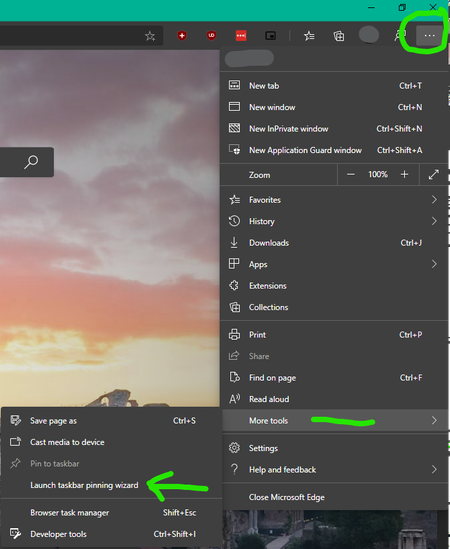
There is a new feature added in Edge insider Version 81.0.367.0 (Official build) canary (64-bit) called "Taskbar Pinning Wizard" you can find it from the ellipsis menu => more tools Edge will generate suggestions based on your usage Then offer some useful websites from Microsoft to you, you can either choose them or ignore and proceed to next step You're all set the icons get added to your Taskbar And Start Menu You will be able to uninstall them whenever you want from the Apps page Right-click on any apps to see these options8.8KViews2likes6CommentsProblem/Bug with PWAs keeping Edge tabs open on relaunch
I added Spotify web player as a PWA (Progressive Web App) because that's what it is, a full featured Spotify player on the web. whenever I want to listen to music, I only click on the Spotify icon on the taskbar and treat it as an standalone app, I don't touch Edge browser. now the problem is, when the Spotify app (PWA) is open, Edge browser remembers all open tabs when I close Edge window. so instead of loading a new tab page for me on launch, when I click on the Edge browser icon, it remembers and brings back all of the tabs I had open when I last time closed Edge window. and this happens while this option is set in the settings: You see this shouldn't happen. Edge should detect there is a PWA running somewhere else and be smart enough about it not to confuse it with a normal Edge browser window. the way it is now, is annoying and totally ruins the whole point of using PWAs. now I have to close all of the open tabs one by one (usually 15 tabs) so that Edge won't reopen them again when I launch it next time. hope this Bug gets fixed. Edge Insider Version 79.0.283.0 (Official build) canary (64-bit) Windows 10 build 18985Solved7.8KViews0likes8CommentsAdd Syncing of PWAs between devices | sites that are installed as apps in Edge browser
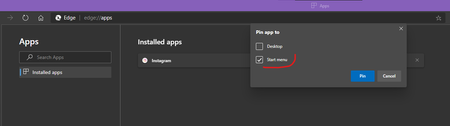
I usually add a bunch of sites and social medias to Edge as PWA and install them in Edge: edge://apps/ I would like them to sync with my Microsoft account and to be available on all of my devices, other Windows and Mac devices, so I won't have to install them one by one again.Solved7.3KViews8likes19Comments
PWA icon?
Hi, What does Edge use as a icon, when creating a PWA from a website? We created some PWA's of our websites for testing, but all of the PWA's just show a letter on a gray background. In Android, I can move a test website to the Home Screen, and it will show the correct icon. So I know the manifest & image is loading correctly from the index.html. I created some other PWA's from random sites, and they seem to work. So I'm a bit of a loss here what Edge is looking for, and where the image needs to be. cheers! rob7KViews0likes7CommentsLove the new optional tab strip for PWAs
Edge Version 88.0.692.0 (Official build) dev (64-bit) the flag for this new feature is: edge://flags/#enable-desktop-pwas-tab-strip you will be asked if you want tab strip for your PWA upon installation These are the kind of prompts you receive if the website offers the install option on the address bar. if a website does not offer the install option in the address bar, and you try to install it using: (ellipsis menu => Apps => install this site as an app) then the prompt will look like this, a 3rd option will be offered.6.9KViews5likes7CommentsExpose each Edge's tab and PWAs sounds to Windows sound control separately
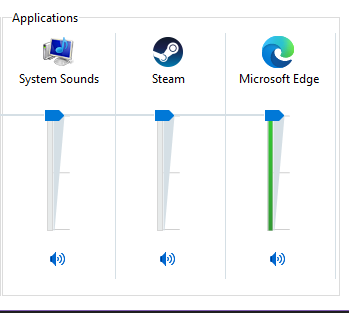
Expose each Edge's tab and PWAs sounds to Windows sound control separately so we can set different volume level for each of them When I install YouTube, Spotify web player or similar sites as a PWA (progressive web app) in Edge, or use them in different tabs, I want to be able to control each of their volumes separately using Windows sound control or the audio widget of Xbox Game bar, for more convenience and control over the sound we hear. currently, everything is shown and combined under "Edge". you can also upvote in feedback hub: https://aka.ms/AAckqfh6.7KViews2likes5CommentsProblem with PWA icons on Start menu on Edge dev
When installing a website, such as Instagram, as PWA in Edge dev (Version 88.0.685.3), the Instagram icon appears in the apps list of Start menu, at the top under "recently added" list (not pinned yet). when you drag & drop it on the Start menu to Pin it, it will have a small centered icon. but if you go to edge://apps/ and Pin Instagram's icon from there then Instagram's icon will be in normal big size in the Start menu Left side is big and normal, right side is very small pea-sized icon created by drag & drop. Instagram is one of the websites used as example, the same thing happens to Twitter, YouTube, Bing etc (tried all of them). see if you can reproduce it and send feedback through browser (preferably with "recreate my problem") Windows 10 20H2 latest version5.9KViews1like6CommentsMake Share function in Edge more useful
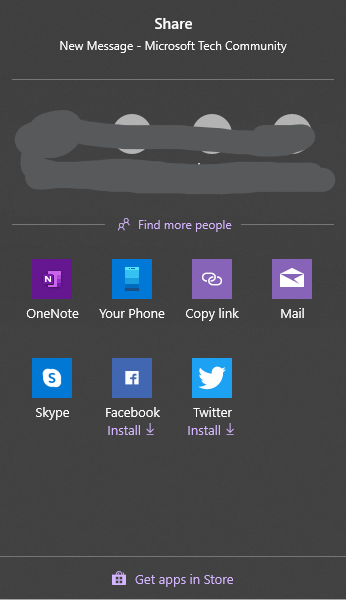
posting from latest available Edge Version 82.0.418.0 (Official build) canary (64-bit) the Share looks like this so it expects user to have the UWP apps installed. there are problems with that: UWP is not available on all platforms. on Windows 8.1, on Mac, and soon on Linux. also some popular apps like Instagram, their UWP version haven't been updated in ages. Facebook app is also old. also my installed app list in Edge (PWAs) look like this: You see, I've added my favorite social network websites as apps in Edge, PWAs are better, they do not require installation and experience is the same in all platforms. so now when I want to share something on Twitter, Facebook, Reddit etc, I have to use the method that I've been using since 15 years ago. the old copy paste method. because the Share functionality is totally useless at the current state. my suggestion: make Share functionality in Edge to detect the installed PWA apps, websites added as an app, and then offer them on the Share window as options. when I have Twitter added as PWA in Edge, I obviously don't want it double on my system by installing the UWP version. the same applies to the rest of the social networks.Solved4.7KViews9likes13Comments
[Wayland] PWAs no longer appear as separate app windows — all group under main Edge icon
Hi, Since around 2025-09-07 to 2025-09-10, I’ve noticed that on GNOME (Wayland) all installed PWAs (even across different profiles) now appear grouped under the main Edge browser icon in the GNOME Shell dash/taskbar. Previously, each PWA would open in its own window group with its own icon. This is still the behavior in Chromium/Brave/Chrome, and can be restored there by editing the PWA’s .desktop file to set: StartupWMClass=<same value as Icon> However, Edge now seems to ignore StartupWMClass completely on Wayland, breaking workspace separation and making task switching hard. Environment: Ubuntu 25.04 GNOME 48.0 / Mutter (Wayland) Kernel 6.14.0-29 Intel Iris Xe GPU Edge (latest stable, observed post 2025-09-13) Repro steps: Install any PWA (e.g. Outlook, Teams, Spotify) from Edge Launch it (from any profile) Observe that it appears grouped under the main Edge browser icon Expected: PWA shows under its own icon and window group like in Chromium-based browsers Actual: All PWAs are bundled into the main Edge window group Editing StartupWMClass in the .desktop file no longer helps This regression makes PWAs much harder to manage on Wayland. Please route to the Linux/Wayland team if possible. Thanks!4.6KViews13likes20Comments