purview
84 TopicsUsing Copilot in Sensitive Healthcare Teams Meetings - Without Recording or Transcription
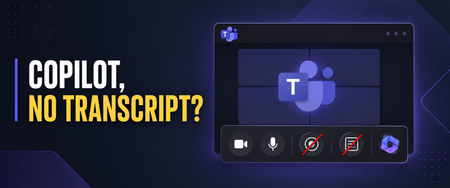
Healthcare organizations want the productivity benefits of Microsoft 365 Copilot, but those benefits must be balanced with privacy, security, and compliance requirements. I recently worked with a healthcare customer whose compliance team was concerned about persistent meeting artifacts. They wanted users to benefit from Copilot during Microsoft Teams meetings, but they did not want every conversation recorded or a transcript available afterward—especially for meetings involving sensitive operational, workforce, legal, compliance, or patient-related discussions. Microsoft Teams provides an option that can help with this scenario: allowing Copilot only during the meeting while disabling recording and transcription. Important: This article describes a technical configuration and customer scenario. It is not legal or compliance advice. Your privacy, security, compliance, records-management, and legal teams should determine whether this configuration is appropriate for your organization and specific meeting types. Why This Matters in Healthcare Healthcare organizations conduct many meetings where the discussion may include sensitive information: Patient care coordination Quality and safety reviews Compliance investigations Workforce and employee matters Security incidents Legal or risk-management discussions Research and clinical program planning A recording or transcript can become an additional persistent information asset that must be appropriately protected, retained, governed, and eventually disposed of. The HIPAA Security Rule requires covered entities and business associates to implement reasonable and appropriate administrative, physical, and technical safeguards for electronic protected health information. This includes evaluating risk, controlling access, implementing audit controls, and periodically reviewing security measures. The U.S. Department of Health and Human Services provides an overview of these requirements here. HIPAA’s minimum necessary standard also generally calls for organizations to limit unnecessary access to protected health information, although important exceptions apply—including certain disclosures for treatment. HHS provides additional guidance on the minimum necessary requirement. Turning off recording and transcription does not automatically make a meeting compliant. However, reducing the creation of unnecessary meeting artifacts can be one useful part of a broader, risk-based healthcare data-governance strategy. Copilot Without a Persistent Transcript When a Teams meeting is configured for Only during the meeting, Copilot can use temporary speech-to-text data to understand the active conversation. A traditional meeting transcript does not need to be started. Users can ask Copilot to: Summarize what has been discussed Identify decisions List open questions Capture action items Explain areas of disagreement Help someone catch up after joining late Microsoft explains that Copilot must be manually started by a participant in this configuration. Copilot can then provide insights based on the conversation taking place while it is active. See Microsoft’s guidance for using Copilot without recording or transcribing a Teams meeting. There are two important limitations users must understand. First, Copilot does not automatically start when the meeting begins. If someone activates it five minutes into the meeting, it will not have the same context it would have had if it had been started at the beginning. Second, users should capture anything they need before leaving the meeting. Without transcription, they will not have the same post-meeting Copilot conversation history or transcript-based recap. Microsoft recommends copying any Copilot content users want to keep before the meeting ends. Watch the Complete Walkthrough In the following video, I demonstrate the user experience, the corresponding Teams administrative policies, the Facilitator consideration, and several lessons I learned while implementing this for a healthcare customer. How to Use Copilot in Teams Without Recording or Transcription: Admin Setup & Gotchas The Administrative Configuration For this scenario, the goal was to create a scoped Teams meeting policy that: Prevented users from recording meetings Prevented users from starting transcription Allowed Copilot to operate during the meeting Avoided enabling a transcript-dependent post-meeting Copilot experience The settings are managed through Teams meeting policies in the Teams admin center. In the video, I walk through the relevant recording, transcription, and Copilot controls and show the resulting experience from a user’s perspective. For a healthcare organization, I would normally begin with a limited population instead of immediately applying a new policy globally. A pilot group gives the organization an opportunity to test the technical behavior and evaluate it with stakeholders from: Privacy and compliance Information security Legal and risk management Records management Clinical or operational leadership Microsoft 365 administration End-user training and adoption The appropriate configuration may differ between clinical, administrative, research, legal, HR, and general collaboration scenarios. A single organization-wide meeting policy may not be the right answer for every healthcare meeting. “No Transcript” Does Not Mean “No Compliance Data” This distinction is critical. Although participants may not receive a traditional meeting recording or transcript, Copilot prompts and responses can still be subject to Microsoft Purview retention policies. Depending on the organization’s configuration, those interactions may also be discoverable through Microsoft Purview eDiscovery. Microsoft explicitly notes that Copilot prompts and responses may be retained for compliance purposes even when recording and transcription are disabled. Microsoft’s Purview training covers auditing, retention, eDiscovery, and compliance controls for Copilot interactions. Healthcare organizations should therefore evaluate more than the visible Teams recap. The governance review should include: Copilot interaction retention Microsoft Purview Audit eDiscovery requirements Data Loss Prevention policies Sensitivity labels Records-management obligations Access to saved notes or exported Copilot responses Organizational policies governing the entry of PHI into AI-assisted experiences The user experience may feel temporary, but the organization’s compliance controls can still operate behind the scenes. The Lesson We Almost Missed: Facilitator Still Creates Loop Artifacts This was one of the most important lessons from my recent engagement. While working to Copilot to operate only during the meeting. Recording was disabled, transcription was disabled, and users did not receive the traditional transcript-based recap we were trying to avoid. But Loop files were still appearing. That initially seemed inconsistent with the policy design. After investigating, we discovered that the files were not being created by the personal Copilot experience—they were being generated because Microsoft Facilitator was enabled. This distinction is easy to miss: Copilot only during the meeting gives an individual user private, real-time assistance without requiring a persistent transcript. Facilitator is a shared meeting agent that can generate collaborative notes and other meeting artifacts. Microsoft documents that Facilitator’s meeting data is stored as a .loop file in the Meetings folder of the OneDrive account belonging to the user who initiated Facilitator. The data is treated as meeting transcript data for governance purposes. Facilitator notes may also be available to meeting participants through Notes and the meeting recap. Microsoft documents Facilitator’s behavior, storage, and administrative controls here. For a healthcare organization, that Loop file is not simply a convenient set of notes. Depending on what was discussed, it could contain sensitive operational information, workforce information, security details, or protected health information. It becomes another persistent artifact that must be considered in the organization’s access, sharing, retention, eDiscovery, lifecycle-management, and data-protection strategy. Copilot and Facilitator Require Separate Governance Decisions Disabling recording and transcription while allowing Copilot during the meeting does not automatically prevent Facilitator from producing shared meeting content. Healthcare organizations should make separate decisions about: Whether users should have access to Copilot during meetings. Whether users should be allowed to initiate Facilitator. Which meeting types are appropriate for shared AI-generated notes. Which users or groups should be allowed to use Facilitator. How the resulting Loop files should be stored, accessed, retained, labeled, and disposed of. Facilitator can be extremely useful for approved operational meetings where collaborative notes, decisions, and follow-up actions are valuable. However, it may not be appropriate for every sensitive clinical, compliance, legal, HR, or incident-response meeting. Microsoft allows administrators to control whether Facilitator is available across the organization or only to selected groups of users through Teams app policies and app-centric management. One important administrative nuance is that access to Facilitator can be scoped, while Microsoft’s control for turning off AI-generated meeting notes is currently tenant-wide rather than user-specific. That makes intentional scoping particularly important. Instead of assuming every Copilot-licensed user should also be able to initiate Facilitator, organizations can identify the populations and meeting scenarios where persistent collaborative notes have a defined business purpose and an approved governance model. The practical lesson is simple: If your goal is to use Copilot without creating persistent meeting artifacts, do not stop after validating the recording, transcription, and Copilot policies. Verify whether Facilitator is enabled and inspect the resulting Loop behavior as part of your testing. The Meeting Option That Can Cause Confusion and Broke Things For Us One of the most important lessons from this implementation involved the meeting organizer’s Copilot setting. If an organizer changes the meeting from Only during the meeting to During and after the meeting, Copilot expects transcription to be available. If the organization’s policy prevents transcription, the user may receive an error indicating that Copilot cannot access the meeting. From the user’s perspective, that can look like a licensing problem or a broken Copilot deployment. In reality, it may simply be a mismatch between: The organization’s transcription policy The Copilot meeting option selected by the organizer The type of Copilot experience the user is attempting to start Microsoft’s meeting guidance confirms that During and after the meeting requires transcription, while Only during the meeting can operate without it. Review the current Copilot behavior in Microsoft Teams meetings. This is why user education is just as important as the policy itself. A Healthcare Deployment Checklist Before introducing this configuration more broadly, consider the following: Classify the meeting scenarios. Determine where in-meeting Copilot is appropriate and where AI assistance should be restricted entirely. Engage compliance early. Validate the design with privacy, security, legal, records-management, and compliance stakeholders. Use scoped policies. Pilot with specific users or groups before considering a broader rollout. Review more than recordings and transcripts. Evaluate Purview retention, auditing, eDiscovery, DLP, sensitivity labels, and exported Copilot content. Evaluate and scope Facilitator separately. Determine which users should be able to initiate Facilitator and which meeting scenarios justify shared AI-generated notes. Test where the resulting Loop files are stored, who can access them, and how retention, sensitivity labels, eDiscovery, sharing, and lifecycle controls apply. Test for unexpected artifacts. After a pilot meeting, inspect the organizer’s and initiator’s OneDrive, the meeting chat, Notes, Recap, Loop, and relevant Purview experiences. Confirm that the meeting produces only the artifacts your governance team expects. Train meeting organizers. Explain the difference between Only during the meeting and During and after the meeting. Prepare users for the temporary experience. Users should capture approved action items or summaries before the meeting ends. Test the complete workflow. Validate the experience using representative accounts, policies, licenses, meeting types, and organizational controls. Review the configuration periodically. Microsoft Teams and Copilot capabilities continue to evolve, and healthcare organizations should reassess their controls as features change. Finding the Right Balance Healthcare organizations do not necessarily have to choose between disabling Copilot completely and generating a recording and transcript for every meeting. The Only during the meeting option provides another path: users can receive real-time assistance while the organization limits the creation of traditional post-meeting artifacts. It is not a substitute for a complete healthcare compliance strategy. It is a technical control that can support a broader strategy built around risk assessment, appropriate access, retention, auditing, training, and clearly defined meeting scenarios. The Facilitator lesson also demonstrates why organizations must test the entire meeting experience—not just the most visible policy settings. Copilot may be operating as expected while another enabled capability is still creating shared, persistent content. For the healthcare customer that inspired this video, the technical settings were only part of the solution. The real success came from understanding the user experience, finding the unexpected Loop artifacts, separating Copilot governance from Facilitator governance, and teaching organizers how the different options behave. That is the lesson I hope this walkthrough helps other healthcare organizations apply.Compliance Meets AI: Wrapping Up an Incredible Series and Looking Ahead
Over the past six sessions, the Compliance Meets AI webinar series has taken us on a journey through the evolving landscape of compliance, security, and generative AI. From SharePoint advanced management and data security posture for AI to eDiscovery, auditing, and communication compliance, we’ve explored how Microsoft Purview and Copilot can transform governance strategies. Today’s final session, Deep Dive: Insider Risk for Copilot, was a powerful close to the series. Led by Kevin Uy and supported by our team, we unpacked how Insider Risk Management (IRM) helps organizations detect and mitigate risky behaviors—intentional or accidental—before they become costly incidents. Key highlights included: Risky AI Usage Policies: How to monitor prompts and responses for sensitive data exposure across Copilot and third-party AI tools. Policy Templates & Indicators: Leveraging built-in templates for data leaks, health record misuse, and AI-specific risks. Integration with DLP: Understanding how IRM complements real-time blocking by providing investigative context. Adaptive Protection: Moving from passive monitoring to proactive enforcement by linking IRM insights with DLP policies. If you missed today's session: No worries you can watch the recording here https://aka.ms/Compliance-Meets-Ai-Session-Six We also shared practical tips on policy configuration, threshold tuning, and privacy controls, plus a sneak peek at forensic evidence and case escalation workflows. Why This Series Matters Compliance isn’t just about meeting regulatory requirements—it’s about building trust in an era of AI-driven innovation. This series brought together experts and practitioners to demystify complex topics and provide actionable strategies for safeguarding sensitive data while enabling productivity. What’s Next? The conversation doesn’t stop here. We’re thrilled to announce that Compliance Meets AI will return in 2026 with new topics, deeper demos, and fresh insights into governance for emerging technologies. Expect sessions on advanced AI risk scenarios, cross-cloud compliance, and automation strategies that redefine security operations. Stay tuned for registration links early next year—and in the meantime, revisit all six recorded sessions here and follow me on LinkedIn for ongoing updates. Thank you to everyone who joined us for this series. Your engagement and feedback shape what comes next. Here’s to a future where compliance and AI work hand in hand to empower secure innovation.🚀 Compliance Meets AI: Communication Compliance for Copilot – What You Missed!
Last Friday’s session was a game-changer for anyone looking to keep AI use safe, ethical, and compliant. We didn’t just talk theory—we showed real-world strategies for monitoring Copilot interactions and protecting sensitive data with Microsoft Purview Communication Compliance. Missed the session? No worries we have you covered. You can watch it here https://aka.ms/Compliance-Meets-Ai-Session-Five 🔥 Top Highlights The Big Picture Copilot is transforming productivity—but with great power comes great responsibility. Communication Compliance helps you spot risky prompts, prevent data leaks, and enforce ethical AI use across Copilot, Copilot Chat, Agents and Copilot Studio. Policy Power Moves Learn how to build smart policies that detect sensitive info like MRNs, credit card numbers, or custom keywords. We explored trainable classifiers for prompt injection attacks and inappropriate content—plus tips for scoping policies to specific teams or roles. From Alerts to Action Tag it. Resolve it. Escalate it. Even kick off Power Automate workflows for instant notifications. We showed how to turn alerts into actionable compliance steps that keep your organization secure. Insights That Matter Dive into dashboards that reveal top triggered policies, sensitive data trends, and user activity—so you can make informed decisions and strengthen governance. ✅ Next Up: Insider Risk Management for Copilot 📅 Date: 11.7.25 🎤 Host: Kevin Uy 👉 https://aka.ms/ComplianceMeetsAI Don’t miss this one—we’re taking compliance to the next level!1.5KViews0likes0CommentsCompliance Meets AI: Deep Dive into Sensitivity Labels and DLP for Copilot
Last Friday’s session was packed with insights on Data Loss Prevention (DLP) and Sensitivity Labels in Microsoft Purview, and how they integrate with Copilot for M365 to keep your data secure while enabling productivity. If you missed the session, we have you covered you can watch it here https://aka.ms/Compliance-Meets-Ai-Session-Three Key Highlights: Sensitivity Labels & Copilot: We explored how labels inherit across Copilot-generated content, why label priority matters, and the critical role of extract permissions for Copilot responses. Endpoint DLP: Ben Perkins walked us through onboarding endpoints, using Purview clients, and applying policies to prevent sensitive data egress to browsers, USB devices, and even generative AI sites. Policy Design Tips: From inline browser protection to advanced classification scanning, we covered best practices for creating robust DLP rules without sacrificing Copilot’s power. Licensing & Integration: E5 licensing simplifies DLP coverage across Exchange, SharePoint, OneDrive, Teams, and endpoints—plus integration with Microsoft Defender for Cloud Apps for cloud-based controls. Upcoming Features: Expect expanded support for sensitive information types in Copilot DLP policies soon, and adaptive protection tied to insider risk levels. Ben’s live demo showcased real-world configurations, including auto-labeling, simulation mode, and advanced rule tuning. The Q&A touched on practical challenges like encrypted PDFs, trainable classifiers, and overlapping policies with MDCA. What’s Next? Don’t miss our next session on Retention and Unified Audit Logs—critical for compliance and Copilot investigations. We’ll also dive into eDiscovery strategies. 📅 Next Session: Friday, October 24 🕛 Time: Noon Eastern ✅ Register here: Compliance Meets Ai: Microsoft Purview in the Age of Ai | Microsoft Community Hub1.7KViews0likes0CommentsMicrosoft deployment blueprint - Address oversharing concerns for your M365 Copilot deployment
Optimized deployment leverages advanced compliance and automation capabilities available in Microsoft 365 E5. This episode outlines how E5 customers can proactively secure data and enhance Copilot performance.Microsoft deployment blueprint - Address oversharing concerns for your M365 Copilot deployment
In regulated industries, internal oversharing can compromise data integrity and Copilot effectiveness. This episode defines what “Foundational” means for Microsoft 365 E3 customers and outlines actionable steps to mitigate oversharing risks during Copilot deployment.1.7KViews0likes0CommentsMicrosoft Purview: New data security controls for the browser & network
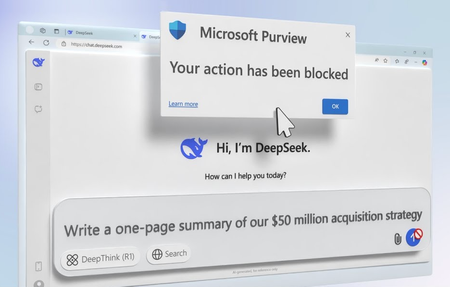
Protect your organization’s data with Microsoft Purview. Gain complete visibility into potential data leaks, from AI applications to unmanaged cloud services, and take immediate action to prevent unwanted data sharing. Microsoft Purview unifies data security controls across Microsoft 365 apps, the Edge browser, Windows and macOS endpoints, and even network communications over HTTPS — all in one place. Take control of your data security with automated risk insights, real-time policy enforcement, and seamless management across apps and devices. Strengthen compliance, block unauthorized transfers, and streamline policy creation to stay ahead of evolving threats. Roberto Yglesias, Microsoft Purview Principal GPM, goes beyond Data Loss Prevention Keep sensitive data secure no matter where it lives or travels. Microsoft Purview DLP unifies controls across Microsoft 365, browsers, endpoints, and networks. See how it works. Know your data risks. Data Security Posture Management (DSPM) in Microsoft Purview delivers a 360° view of sensitive data at risk, helping you proactively prevent data leaks and strengthen security. Get started. One-click policy management. Unify data protection across endpoints, browsers, and networks. See how to set up and scale data security with Microsoft Purview. Watch our video here. QUICK LINKS: 00:00 — Data Loss Prevention in Microsoft Purview 01:33 — Assess DLP Policies with DSPM 03:10 — DLP across apps and endpoints 04:13 — Unmanaged cloud apps in Edge browser 04:39 — Block file transfers across endpoints 05:27 — Network capabilities 06:41 — Updates for policy creation 08:58 — New options 09:36 — Wrap up Link References Get started at https://aka.ms/PurviewDLPUpdates Unfamiliar with Microsoft Mechanics? As Microsoft’s official video series for IT, you can watch and share valuable content and demos of current and upcoming tech from the people who build it at Microsoft. Subscribe to our YouTube: https://www.youtube.com/c/MicrosoftMechanicsSeries Talk with other IT Pros, join us on the Microsoft Tech Community: https://techcommunity.microsoft.com/t5/microsoft-mechanics-blog/bg-p/MicrosoftMechanicsBlog Watch or listen from anywhere, subscribe to our podcast: https://microsoftmechanics.libsyn.com/podcast Keep getting this insider knowledge, join us on social: Follow us on Twitter: https://twitter.com/MSFTMechanics Share knowledge on LinkedIn: https://www.linkedin.com/company/microsoft-mechanics/ Enjoy us on Instagram: https://www.instagram.com/msftmechanics/ Loosen up with us on TikTok: https://www.tiktok.com/@msftmechanics Video Transcript: -As more and more people use lesser known and untrusted shadow AI applications and file sharing services at work, the controls to proactively protect your sensitive data need to evolve too. And this is where Data Loss Prevention, or DLP, in Microsoft Purview unifies the controls to protect your data in one place. And if you haven’t looked at this solution in a while, the scope of protection has expanded to ensure that your sensitive data stays protected no matter where it goes or how it’s consumed with controls that extend beyond what you’ve seen across Microsoft 365. Now adding browser-level protections that apply to unmanaged and non-Microsoft cloud apps when sensitive information is shared. -For your managed endpoints, today file system operations are also protected on Windows and macOS. And now we are expanding detection to the network layer. Meaning that as sensitive information is shared into apps and gets transmitted over web protocols, as an admin, you have visibility over those activities putting your information at risk, so you can take appropriate action. Also, Microsoft Purview data classification and policy management engines share the same classification service. Meaning that you can define the sensitive information you care about once, and we will proactively detect it even before you create any policies, which helps you streamline creating policies to protect that information. -That said, as you look to evolve your protections, where do you even start? Well, to make it easier to prioritize your efforts, Data Security Posture Management, or DSPM, provides a 360 degree view of data potentially at risk and in need of protection, such as potential data exfiltration activities that could lead to data loss, along with unprotected sensitive assets across data sources. Here at the top of the screen, you can see recommendations. I’ll act on this one to detect sensitive data leaks to unmanaged apps using something new called a Collection Policy. More on how you can configure this policy a bit later. -With the policy activated, new insights will take up to a day to reflect on our dashboard, so we’ll fast forward in time a little, and now you can see a new content category at the top of the chart for sensitive content shared with unmanaged cloud apps. Then back to the top, you can see the tile on the right has another recommendation to prevent users from performing cumulative exfiltration activities. And when I click it, I can enable multiple policies for both Insider Risk Management and Data Loss Prevention, all in one click. So DSPM makes it easier to continually assess and expand the protection of your DLP policies. And there’s even a dedicated view of AI app-related risks with DSPM for AI, which provides visibility into how people in your organization are using AI apps and potentially putting your data at risk. -Next, let me show you DLP in action across different apps and endpoints, along with the new browser and network capabilities. I’ll demonstrate the user experience for managed devices and Microsoft 365 apps when the right controls are in place. Here I have a letter of intent detailing an upcoming business acquisition. Notice it isn’t labeled. I’ll open up Outlook, and I’ll search for and attach the file we just saw. Due to the sensitivity of the information detected in the document, it’s fired up a policy tip warning me that I’m out of compliance with my company policy. Undeterred, I’ll type a quick message and hit send. And my attempt to override the warning is blocked. -Next, I’ll try something else. I’ll go back to Word and copy the text into the body of my email, and you’ll see the same policy tip. And, again, I’m blocked when I still try to send that email. These protections also extend to Teams chat, Word, Excel, PowerPoint and more. Next, let me show you how protections even extend to unmanaged cloud apps running in the Edge browser. For example, if you want to use a generative AI website like you’re seeing here with DeepSeek, even if I manually type in content that matches my Data Loss Prevention policy, you’ll see that when I hit submit, our Microsoft Purview policy blocks the transmission of this content. This is different from endpoint DLP, which can protect file system operations like copy and paste. These Edge browser policies complement existing endpoint DLP protections in Windows and macOS. -For example, here I have the same file with sensitive information that we saw before. My company uses Microsoft Teams, but a few of our suppliers use Slack, so I’ll try to upload my sensitive doc into Slack, and we see a notification that my action is blocked. And since these protections are on the file and run in the file system itself, this would work for any app. That said, let’s try another operation by copying the sensitive document to my removable USB drive. And here I’m also blocked. So we’ve seen how DLP protections extend to Microsoft 365 apps, managed browsers, and file systems. -Additionally, new protections can extend to network communication protocols when sharing information with local apps running against web services over HTTPS. In fact, here I have a local install of the ChatGPT app running. As you see, this is not in a browser. In this case, if I unintentionally add sensitive information to my prompt, when it passes the information over the network to call the ChatGPT APIs, Purview will be able to detect it. Let’s take a look. If I move over to DSPM for AI in Microsoft Purview, as an admin, I have visibility into the latest activity related to AI interactions. If I select an activity which found sensitive data shared, it displays the user and app details, and I can even click into the interaction details to see exactly what was shared in the prompt as well as what specifically was detected as sensitive information on it. This will help me decide the actions we need to take. Additionally, the ability to block sharing over network protocols is coming later this year. -Now, let’s switch gears to the latest updates for policy creation. I showed earlier setting up the new collection policy in one click from DSPM. Let me show you how we would configure the policy in detail. In Microsoft Purview, you can set this up in Data Loss Prevention under Classifiers on the new Collection Policies page. These policies enable you to tailor the discovery of data and activities from the browser, network, and devices. You can see that I already have a few created here, and I’ll go ahead and create a new one right from here. -Next, for what data to detect, I can choose the right classifiers. I have the option to scope these down to include specific classifiers, or include all except for the ones that I want to exclude. I’ll just keep them all. For activities to detect, I can choose the activities I want. In this case, I’ll select text and files shared with a cloud or AI app. Now, I’ll hit add. And next I can choose where to collect the data from. This includes connected data sources, like devices, Copilot experiences, or Enterprise AI apps. The unmanaged cloud apps tab uses the Microsoft Defender for Cloud Apps catalog to help me target the applications I want in scope. -In this case, I’ll go ahead and select all the first six on this page. For each of these applications, I can scope which users this policy applies to as a group or separately. I’ll scope them all together for simplicity. Here I have the option to include or exclude users or groups from the policy. In this case, I’ll keep all selected and save it. Next, I have the option of choosing whether I want AI prompt and responses that are detected to be captured and preserved in Purview. This enabled the experience we saw earlier of viewing the full interaction. -Finally, in mode, you can turn the policy on. Or if you leave it off, this will save it so that you can enable it later. Once I have everything configured, I just need to review and create my policy, and that’s it. In addition, as you create DLP policies, you’ll notice new corresponding options. Let me show you the main one. For each policy, you’ll now be asked what type of data you want to protect. First is data stored in connected sources. This includes Microsoft 365 and endpoint policies, which you’re likely already using now. The new option is data in browser and network activity. This protects data in real-time as it’s being used in the browser or transmitted over the network. From there, configuring everything else in the policy should feel familiar with other policies you’ve already defined. -To learn more and get started with how you can extend your DLP protections, check out aka.ms/PurviewDLPUpdates. Keep checking back to Microsoft Mechanics for all the latest updates and thanks for watching.3.1KViews1like0Comments
Microsoft Purview - Compliance Score (Part 1) - Overview
Blog Series Part 1 - Microsoft Purview - Compliance Score (Part 1) - Overview Part 2 - Microsoft Purview - Compliance Score (Part 2) - Sample Assessment Scoring Part 3 - Microsoft Purview - Compliance Score (Part 3) - HITRUST Part 4 - Microsoft Purview - Compliance Score (Part 4) - HIPAA / HITECH Part 5 - Microsoft Purview - Compliance Score (Part 5) - GDPR Part 6 - Microsoft Purview - Compliance Score (Part 6) - CCPA Part 7 - Microsoft Purview - Compliance Score (Part 7) - Data Protection Baseline Part 8 - Microsoft Purview - Compliance Score (Part 😎 - ARMA GARP Part 9 - Microsoft Purview - Compliance Score (Part 9) - NIST Privacy Framework Part 10 - Microsoft Purview - Compliance Score (Part 10) - ISO 15489 Disclaimer This document is not meant to replace any official documentation, including those found at docs.microsoft.com. Those documents are continually updated and maintained by Microsoft Corporation. If there is a discrepancy between this document and what you find in the Compliance User Interface (UI) or inside of a reference in docs.microsoft.com, you should always defer to that official documentation and contact your Microsoft Account team as needed. Links to the docs.microsoft.com data will be referenced both in the document steps as well as in the appendix. All of the following steps should be done with test data, and where possible, testing should be performed in a test environment. Testing should never be performed against production data. Target Audience This blog series is aimed at Security and Compliance officers who need to understand how the Microsoft Purview Compliance Manager assessments can help them meet their regulatory and certification needs. Document Scope This document will be covering: the goal of this blog series discussing Compliance Manager assessment at a high level and how to leverage them to meet a business need such as HIPAA, GDPR, CCPA, NIST, etc Out-of-Scope This document does not cover any other aspect of Microsoft E5 Purview, including: Compliance Manager (configuration) Data Classification Information Protection Data Protection Loss (DLP) for Exchange, OneDrive, Devices Data Lifecycle Management (retention and disposal) Records Management (retention and disposal) eDiscovery Insider Risk Management (IRM) Priva Advanced Audit Microsoft Cloud App Security (MCAS) Information Barriers Communications Compliance Licensing For details on licensing (ie. which components and functions of Purview are in E3 vs E5) you will need to contact your Microsoft Security Specialist, Account Manager, or certified partner. We will not be walking through the HITRUST assessment step-by-step. For more information on running an assessment in Compliance Manager, you should reference the corresponding documentation listed in the Appendix and Links section below. You can also find a blog series covering how to do this and how to run other Purview functions at the following link: Microsoft Purview- Paint By Numbers Series (Part 0) - Overview - Microsoft Tech Community Overview of Document We will be walking through: the goal of this blog series Compliance Manager and What it does Compliance Score Compliance Manager – finding applicable Microsoft Solutions Use Case Using Compliance Manager assessments to meeting government regulations or industry certifications. Definitions Actions– the things that need to be done to mark a Control as completed and Assessments – these help you implement data protection controls specified by compliance, security, privacy, and data protection standards, regulations, and laws. Assessments include actions that have been taken by Microsoft to protect your data, and they're completed when you take action to implement the controls included in the assessment. Assessment Templates – these templates track compliance with over 300 industry and government regulations around the world. Compliance Score - Compliance Manager awards you points for completing improvement actions taken to comply with a regulation, standard, or policy, and combines those points into an overall compliance score. Each action has a different impact on your score depending on the potential risks involved. Your compliance score can help prioritize which action to focus on to improve your overall compliance posture. You receive an initial score based on the Microsoft 365 data protection baseline. This baseline is a set of controls that includes key regulations and standards for data protection and general data governance. Controls – the various requirements in your tenant that must be met to meet a part of an assessment Control Family – a grouping of Controls Microsoft Actions – These are actions that Microsoft has performed in side of your tenant to help it meet a specific assessment. Progress – each assessment has a progress chart to help you visualize the progress you are making to meet the requirements of the assessment Your Improvement Actions – These are actions that you and your organization must perform to meet a specific assessment. Regulations – the regulations or standards pertaining to the action (Microsoft) Solutions – the solution where you can go to perform the action Action Types – indicates whether the improvement action is technical, meaning it can be implemented within a solution or product, or non-technical, which would be implemented outside of a technical solution Group - the group to which you assigned the action Categories – the related data protection category (such as, protect information, manage devices, etc.) Notes None Pre-requisites You should have a basic understanding of Compliance Manager and how it works. You can find this information in the blog named “Paint By Numbers” and the official Microsoft documentation found at docs.microsoft.com. You an find links to these in the section below labeled Appendix and Links. Overview of this blog series This blog will review specific Microsoft Compliance Manager Assessments and how they relate to Microsoft Purview solutions. Here is a list of the specific assessments: HITRUST for Microsoft 365 HIPAA/HITECH for Microsoft 365 GDPR for Microsoft 365 California Consumer Privacy Act (CCPA) for Microsoft 365 Data Protection Baseline for Microsoft 365 This is not meant to be an exhaustive list as there are 700+ assessments in Compliance Manager as of the writing of this blog. Overview of Compliance Manager and What it does Here is the official answer as listed in docs.microsoft.com “Microsoft Purview Compliance Manager is a feature in the Microsoft Purview compliance portal that helps you manage your organization’s compliance requirements with greater ease and convenience. Compliance Manager can help you throughout your compliance journey, from taking inventory of your data protection risks to managing the complexities of implementing controls, staying current with regulations and certifications, and reporting to auditors.” Compliance Manager – What does it scan and track? Each assessment in Microsoft Purview Compliance Manager tracks all the regulatory/certification requirements relative to your Microsoft 365/Office 365 environment. Here is a visualization on how this scanning and tracking works. Compliance Score Here is the official definition as found in docs.microsoft.com. The URL can be found in t Appendix and Links section below. “Compliance Manager awards you points for completing improvement actions taken to comply with a regulation, standard, or policy, and combines those points into an overall compliance score. Each action has a different impact on your score depending on the potential risks involved. Your compliance score can help prioritize which action to focus on to improve your overall compliance posture. Compliance Manager gives you an initial score based on the Microsoft 365 data protection baseline. This baseline is a set of controls that includes key regulations and standards for data protection and general data governance.” Compliance Manager – Finding Applicable Microsoft Solutions Built into Compliance Manager is a way to review which Microsoft Solutions will be applicable to each certification/regulation along with the Compliance Score that each of these solutions will bring to your organization. Go to Compliance Manager -> Solutions Here you will see all the Microsoft solutions that are applicable to the assessments you have run. On the right hands side, click Filters You can filter these solutions based on various criteria: Regulations – the regulations or standards pertaining to the action (Microsoft) Solutions – the solution where you can go to perform the action Action Types – indicates whether the improvement action is technical, meaning it can be implemented within a solution or product, or non-technical, which would be implemented outside of a technical solution Group - the group to which you assigned the action Categories – the related data protection category (such as, protect information, manage devices, etc.) You can filter any of these criteria, but we will choose Regulation -> Data Protection Baseline for purposes in this blog. This will narrow ALL Microsoft Solutions down to just the ones relevant to a particular Assessment/Regulation/Certification. You can narrow this further by Categories. Here I will select the categories relevant to Purview/Compliance workloads: Discover and Respond, Govern information, Manage compliance, Privacy Management, and Protect information. For now, we will not run any other filters inside the Compliance Manager -> Solutions section. Returning to the Solutions page, we will now look at the two columns relevant to your Compliance Score: Current score contribution and Potential score remaining. These will allow you to know which Microsoft Solutions will provide the most value to meeting your regulation/certification needs. We are now done with looking at the Compliance Manager – Solutions page. Microsoft Managed Scoring Compliance Manager keeps track of both 1) the organizations responsibilities (ie. Your organization) and 2) Microsoft’s responsibilities, as they pertain each assessment, and then maps a score to those responsibilities. Here is an example of where you would find both of these scores in a Compliance Manager assessment that I have already run. I have gone to Compliance Manager -> Assessment -> HITRUST Then go to Progress tab on the right side to find the Your points achieved score and Microsoft managed points achieved score. Thank Yous Before finishing this overview, I want to thank the members of the Microsoft Health Life Sciences Purview Technical Specialist team (HLS Purview TS) team for their assistance in creating, researching and developing this blog series. This includes, but is not limited to: Erfan Setork, Ken Sicinski, and Chad Lightfoot. Appendix and Links Microsoft Purview Compliance Manager - Microsoft Purview (compliance) | Microsoft Docs Working with improvement actions in Microsoft Purview Compliance Manager - Microsoft Purview (compliance) | Microsoft Docs Build and manage assessments in Microsoft Purview Compliance Manager - Microsoft Purview (compliance) | Microsoft Docs About the Microsoft Purview Compliance Manager premium assessment trial - Microsoft Purview (compliance) | Microsoft Docs Microsoft Purview Compliance Manager alerts and alert policies - Microsoft Purview (compliance) | Microsoft Docs Get started with Microsoft Purview Compliance Manager - Microsoft Purview (compliance) | Microsoft Docs Compliance score calculation - Microsoft Purview (compliance) | Microsoft Learn Working with improvement actions in Microsoft Purview Compliance Manager - Microsoft Purview (compliance) | Microsoft Learn Microsoft Purview- Paint By Numbers Series (Part 0) - Overview - Microsoft Tech Community Note: This solution is a sample and may be used with Microsoft Compliance tools for dissemination of reference information only. This solution is not intended or made available for use as a replacement for professional and individualized technical advice from Microsoft or a Microsoft certified partner when it comes to the implementation of a compliance and/or advanced eDiscovery solution and no license or right is granted by Microsoft to use this solution for such purposes. This solution is not designed or intended to be a substitute for professional technical advice from Microsoft or a Microsoft certified partner when it comes to the design or implementation of a compliance and/or advanced eDiscovery solution and should not be used as such. Customer bears the sole risk and responsibility for any use. Microsoft does not warrant that the solution or any materials provided in connection therewith will be sufficient for any business purposes or meet the business requirements of any person or organization.Microsoft 365 Administration Cookbook: Essential Recipes for IT Pros
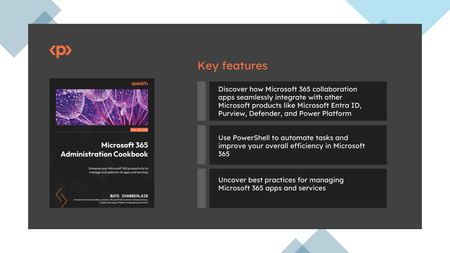
I'm excited to announce the release of my 10th book, Microsoft 365 Administration Cookbook: Enhance Your Microsoft 365 Productivity to Manage and Optimize Its Apps and Services. This fully updated second edition cookbook is packed with recipes to spice up and streamline your Microsoft 365 administration and features a foreword by Karuana Gatimu, Director of Microsoft's M365 Customer Advocacy Group. Key Features: Manage Identities and Roles: Efficiently handle Microsoft 365 identities, groups, and permissions. Streamline Communication and Teamwork: Optimize Microsoft Teams, Exchange Online, and SharePoint for seamless collaboration. Enhance Productivity and Knowledge Sharing: Leverage Microsoft Search, SharePoint, and OneDrive for effective information retrieval and document management. Automate with PowerShell: Master PowerShell to automate tasks and manage roles, improving service efficiency. Optimize Security and Compliance: Strengthen your environment with Microsoft Defender and manage compliance with Microsoft Purview. This cookbook provides step-by-step recipes for app configurations and administrative tasks, offering strategies for managing Microsoft 365 apps and services. It covers new features and capabilities introduced in this edition and guides you through navigating Microsoft 365 subscription options and services. Whether you're a seasoned IT professional or new to Microsoft 365, this book is designed to enhance your skills with practical insights and best practices. Purchase your copy today. Thanks for your support, Nate Chamberlain1.6KViews1like1Comment