preview
10 TopicsPreview of multiparty analytics with Azure Confidential Clean Rooms
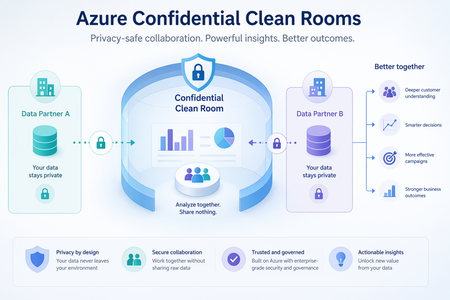
Today, we are excited to announce the preview of multiparty analytics feature of Azure Confidential Clean Rooms, a fully managed service that allows customers and their partners to securely analyze privacy-sensitive datasets from multiple parties. It uses confidential compute enabled Apache Spark-based big-data analytics (Spark SQL) which helps protect their raw data from other collaborators and from the Azure operator by performing computations in a Trusted Execution Environment (TEE). Privacy-sensitive datasets include personally identifiable information (PII), protected health information (PHI) and cryptographic secrets. Organizations across industries are increasingly looking to supplement their data with data from business partners, to build a complete view of their business. For example, brands, publishers, and their partners need to collaborate using datasets containing Intellectual Property (IP) to improve the relevance of their campaigns. Confidential data clean rooms help solve this challenge by enabling organizations to share and analyze granular datasets in a secure environment that helps prevent raw data exfiltration—protecting intellectual property, preserving customer privacy, and addressing concerns around regulatory compliance. You can sign up for the preview here Key Features Fully Managed: Azure takes care of the infrastructure provisioning and scaling with no user intervention. This significantly reduces your onboarding effort allowing you to focus on the queries and insights, not on infra management. Confidential Spark SQL: Spark SQL allows you to query large datasets and run complex queries in a distributed computing environment. In the confidential computing enabled version, the Spark driver and executors are fully attested policy-governed enclaves running as virtual nodes on confidential Azure Container Instances (ACI) which helps prevent exfiltration of collaborators’ data during query execution. Governance: Helps manage membership to cleanrooms, enables and verifies approval for queries from relevant collaborators before executing them and verifies consent to access sensitive collaborator data. It also helps generate tamper-resistant audit trails containing salient clean room events. This is made possible with the help of an implementation of the Confidential Consortium Framework (CCF). Telemetry: Throughout every clean-room run, detailed logs are streamed out in real time to monitor performance, troubleshoot issues, and keep the analytics healthy — all without ever exposing the collaborators’ data at any time. Verifiable trust: Cryptographic remote attestation viz. full attestation based on confidential hardware reports allows independent verification of the TEE along with along with all components that are part of it, without just trusting the cloud provider, before sensitive data and decryption keys are made available to the TEE Open-source containers: All Microsoft provided cleanroom containers and sidecars are open-sourced here and can be verified for provenance and integrity guarantees using GitHub artifact attestation Use Cases Multi-party confidential big-data analytics unlocks value in scenarios where data sensitivity, regulatory pressure, or competitive concerns previously blocked collaboration. These are some early scenarios that can benefit from this. Media & Advertising Collaboration of advertiser CRM data with publisher data for audience targeting and segment activation. Collaboration of audience data with measurement partners for measurement and attribution. Banking & Finance Collaboration between banks and insurance firms to upsell relevant products to existing bank customers without sharing raw data from either side Collaboration with retailers to generate customized offers for bank customers, without exposing either party’s underlying data. Government & Public Sector Secure collaboration of data across government departments to deliver better citizen welfare outcomes. Secure collaboration between government and private enterprises on shared-interest workloads such as traffic monitoring and weather systems. Healthcare Enable healthcare firms — including biopharma organizations — to combine their data with third-party institutions to accelerate clinical development, like identifying eligible participants for a clinical trial, without exposing underlying patient data. Combine patient datasets across hospitals to study disease patterns or outcomes without exposing sensitive protected health information. "A higher standard for protecting user privacy and trust, the phase-out of third-party cookies, and global regulations demand more sophisticated data collaboration tools to support advertising marketplaces. Azure Confidential Cleanrooms (ACCR) provides a secure, feature-rich, and flexible foundation to implement privacy-preserving functions and enable insights without sharing privacy-sensitive data outside of organization boundaries. Built on the Azure Confidential Compute (ACC) platform and offering cohesion with Azure's diverse set of services, ACCR offers the attestation, audit, fine-grained access control, and verifiable trust tools required for secure and privacy-safe data collaboration in today's world." — Andrei Mackenzie, Engineering Manager, Microsoft AI "Azure Confidential Clean Rooms enabled our team to evaluate how clean room capabilities can support secure, governed data collaboration at scale. Through the Proof-of-Concept (PoC), we explored how privacy-preserving workflows, trusted access controls, and scalable compute can create a stronger foundation for responsibly leveraging first-party data. This helps reduce operational friction while supporting business growth, improving customer engagement, and enabling more relevant customer experiences." — Nic Dregne, Director, Microsoft AdTech Engineering Beyond Spark SQL Realizing other multi-party scenarios like custom analytics, ML training and inferencing on Azure Confidential Clean Rooms is in our roadmap. If you have such a scenario to be realized, you can fill in and submit the preview signup form with the details of your scenario and we’ll get back to you. Learn More · Signup for the preview of Azure Confidential Clean Rooms for Analytics · Confidential Consortium Framework (CCF) · Virtual Nodes on Azure Container InstancesSecuring Confidential VM Backups with Azure Recovery Services Vault and Private Endpoints
When working with Confidential VMs (CVMs) in Azure, ensuring secure backups is just as important as protecting workloads in use. Confidential VMs use hardware-based Trusted Execution Environments (TEEs) such as AMD SEV-SNP or Intel TDX to keep your data safe. But how do you securely back up this data without exposing it to the public internet? The answer lies in combining Azure Recovery Services Vault (RSV) with Private Endpoints. In this blog, we’ll walk through why this setup matters, how to configure it, and what challenges you should watch out for. Note: This blog specifically deals with CVMs encrypted with Confidential OS Encryption on the OS Disk. As of now, Azure Backup for CVMs is in Private Preview, so make sure to engage with your Microsoft Account Team or Product Team for access. Why Use Private Endpoints for RSV? By default, the Recovery Services vault communicates over public endpoints. With private endpoints, all traffic between your Confidential VM and RSV flows over the secure Microsoft backbone instead of the public internet. This adds an extra layer of isolation and protection — a perfect match for sensitive workloads. What You’ll Need (Prerequisites) Before jumping in, make sure you have: An Azure Subscription and appropriate permissions (Owner/Contributor for RSV, DNS Zone Contributor for DNS). A Confidential VM on supported SKUs. A Recovery Services Vault in the same or a peered region. A Virtual Network and Subnet: Use a dedicated subnet for private endpoints. A private endpoint connection for Backup uses 11 private IPs (including Azure Backup storage). This may be higher in certain regions. Recommended subnet size: /25 to /27 to ensure sufficient private IP availability. Private DNS Zones: privatelink.backup.windowsazure.com (for the vault itself) privatelink.blob.core.windows.net (staging and recovery data) privatelink.queue.core.windows.net (backup operations queue) privatelink.table.core.windows.net (metadata storage) Azure Backup for CVMs supports only the 3-blob layout, which is now generally available. As a result, all new deployments on versions v5 and v6 SKUs will have 3-blob configuration by default instead of the previous 2-blob setup. Older deployments that did not enable the Preview Feature may need to be redeployed to align with this change. Azure Backup Private Preview Feature enabled on the subscription-level in collaboration with the Azure Product Team. Up-to-date Backup Extension on the VM. Step-by-Step: Configuring Backup with Private Endpoints Request Product Team Enablement: Work with Microsoft support/product team to enable the Azure Backup Private Preview Feature for your subscription. Create the Recovery Services Vault in the desired region. Add a Private Endpoint: Go to RSV → Networking → Private Endpoint connections. Select your VNet and subnet (ensure enough private IPs: /25 to /27 recommended). Link to the required private DNS zones. Enable Backup on the Confidential VM: Open the VM → Backup. Select the RSV. Choose or create an Enhanced policy (required for CVMs). Trigger the initial backup. Key Considerations for Confidential VM Backup Enhanced Policies Only: CVM backup supports only Enhanced policies. Backup support for CVM with confidential OS disk encryption using CMK is only available with Enhanced policies. Zone-Redundant Recovery Services Vault (ZRS): Consider deploying RSV as ZRS if you want to restore CVMs across zones. Restores from other zones are possible only via vault; snapshot restores are not supported across zones. CVM Backup with CMK Support: Currently available only under Private Preview on an enrollment basis. Key Vault and Managed HSM Permissions: When configuring via Azure Portal, access to Key Vault/Managed HSM is granted automatically. When using PowerShell, CLI, or REST API, access issues occur because Azure Backup requires explicit permissions. Fix: Assign Permissions to Azure Backup: For Key Vault: Grant Get, List, Backup key permissions (no secret permissions needed). For Managed HSM: Go to Managed HSM → Local RBAC → Add Role Assignment. Assign one of the following: Built-in Role: Managed HSM Crypto User Custom Role: Ensure dataActions include: Microsoft.KeyVault/managedHsm/keys/read/action Microsoft.KeyVault/managedHsm/keys/backup/action Set scope to the specific key (or All Keys). Assign role to Backup Management Service. Once permissions are configured, proceed with CVM backup setup as usual. Restore Options and Limitations When restoring a Confidential VM, Azure Backup provides several restore paths — each with certain caveats due to the confidential computing model: Restore to Original Location You can restore the CVM directly to the same subscription, resource group, and network configuration. Ideal for operational recovery after accidental deletion or corruption. Restore to Alternate Location You can restore the backup to a different resource group, virtual network, or availability zone. Limitations: Only supported when RSV is deployed as Zone-Redundant (ZRS). Snapshot restore is not supported when restoring to other zones. Disk-Level Restore Allows restoring specific managed disks (OS or data disks) from the backup vault. Restored disks can be used to recreate CVMs manually. Limitations: Replacement of OS Disk on the existing VM is not supported. Point-in-Time Restore (Enhanced Policy Only) Available for Enhanced Backup Policies with configurable retention settings. Restore Limitations Encryption Constraints: Restores for CVMs with CMK require the same Key Vault access and permissions to be valid at restore time. Private DNS Dependency: Incorrect or missing DNS resolution for blob or backup endpoints can cause restore failures. Feature Availability: All restore capabilities mentioned above are still evolving under the Azure Backup Private Preview program. Security Benefits Network Isolation: All communication between CVMs, the Recovery Services Vault, and backup storage occurs over private IPs using private endpoints — no exposure to the public internet. End-to-End Encryption: Backup data is encrypted both at rest and in transit. Use Customer-Managed Keys (CMK) in Azure Key Vault or Managed HSM for greater control over encryption. Role-Based Access Control (RBAC): Fine-grained access management ensures only authorized users and services can trigger or restore backups. Managed Identities for Authentication: Reduces key management complexity and enhances security posture. Known Issues and Limitations DNS Misconfiguration: Missing or misconfigured private DNS zones for backup, blob, queue, or table endpoints often lead to failed backups or restores. Limited Regional Support: Confidential VM backups with private endpoints are currently available in selected Azure regions only. Extension Compatibility: Ensure that the latest Azure Backup extension version is installed on the CVM. Older versions may not support CVM encryption. Feature Dependencies: Azure Backup for CVMs (Private Preview) must be manually enabled at the subscription level by the Azure Product Team. Performance Overhead: Due to attestation and encryption validation, backup operations may experience slight latency. Best Practices Test Restore Scenarios Regularly: Validate both backup and restore processes to ensure end-to-end functionality. Subnet Planning: Reserve adequate IP addresses in your subnet (/25 or /27) to accommodate private endpoints. ZRS Deployment: Use Zone-Redundant Recovery Services Vault (ZRS) for better resiliency and zone-to-zone restore capability. Use Enhanced Backup Policies: Enhanced policies ensure point-in-time recovery and support for CMK-based encryption. DNS Hygiene: Keep private DNS zones properly configured and linked to ensure uninterrupted connectivity. Permission Management: Verify Key Vault and Managed HSM permissions before initiating backup/restore through PowerShell or REST API. Network Segmentation: Use dedicated subnets for private endpoints to avoid IP conflicts and simplify network management. Automate with IaC: Use Bicep or Terraform templates for repeatable, auditable deployments of RSVs, private endpoints, and DNS configurations. Monitor Health and Alerts: Enable Azure Monitor and Backup Center to track job statuses, failures, and performance. Engage Product Team Early: Contact the Microsoft Product Team early in your project to ensure required preview feature (Azure Backup for CVMs) is enabled in time. Final Thoughts Backing up Confidential VMs with Azure Recovery Services vault over private endpoints gives you the best of both worlds: confidential computing protections for your workloads and secure, compliant backups that never leave the private network. By carefully planning DNS, subnet sizing, enabling subscription features with product team help, and configuring permissions properly, you can avoid common pitfalls and strengthen your data protection strategy. Note: This blog specifically deals with CVMs encrypted with Confidential OS Encryption on the OS Disk. Tip: If you’re just getting started, reach out to the Azure Product Team to enable the required features, deploy a test CVM, link it to an RSV with private endpoints, and run a backup/restore cycle to validate your configuration end-to-end.Preview of Azure Confidential Clean Rooms for secure multiparty data collaboration
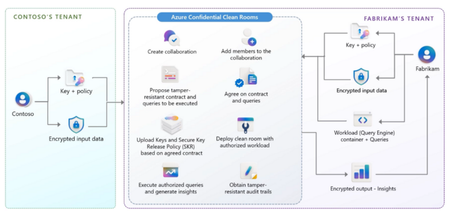
Today, we are excited to announce the preview of Azure Confidential Clean Rooms, a cutting-edge solution designed for organizations that require secure multi-party data collaboration. With Confidential Clean Rooms, you can share privacy sensitive data such as personally identifiable information (PII), protected health information (PHI) and cryptographic secrets confidently, thanks to robust trust guarantees that help ensure that your data remains protected throughout its lifecycle from other collaborators and from Azure operators. This secure data sharing is powered by confidential computing, which helps protect data in-use by performing computations in hardware-based, attested Trusted Execution Environments (TEEs). These TEEs help prevent unauthorized access or modification of application code and data during use. Organizations across industries need to perform multi-party data collaboration with business partners, outside organizations, and even within company silos to improve business outcomes and bolster innovation. Confidential Clean Rooms help derive true value from such collaborations by enabling granular and private data to be shared while providing safeguards on data exfiltration hence protecting the intellectual property of the organization and the privacy of its customers and addressing concerns around regulatory compliance. Whether you’re a data scientist looking to securely fine-tune your ML model with sensitive data from other organizations, or a data analyst wanting to perform secure analytics on joint data with your partner organizations, Confidential Clean Rooms will help you achieve the desired results. You can sign up for the preview here Key Features Secure Collaboration and Governance: Allows collaborators to create tamper-resistant contracts that contain the constraints which will be enforced by the clean room. Governance verifies validity of those constraints before allowing data to be released into clean rooms and helps generate tamper-resistant audit trails. This is made possible with the help of an implementation of the Confidential Consortium Framework CCF). Enhanced Data Privacy: Provides a sandboxed execution environment which allows only authorized workloads to execute and prevents any unauthorized network or IO operations from within the clean room. This helps keep your data secure throughout the workload execution. This is possible with the help of deploying clean rooms in confidential containers on Azure Container Instances (ACI) which provides container group level integrity with runtime enforcement of the same. Verifiable trust at each step with the help of cryptographic remote attestation forms the cornerstone of Confidential Clean Rooms. Salient Use Cases Azure Confidential Clean Rooms caters to use cases spanning multiple industries. Healthcare: For fine-tuning and inferencing with predictive healthcare machine-learning (ML) models and for joint data analysis for advancing pharmaceutical research. This can help protect the privacy of patients and intellectual property of organizations while demonstrating regulatory compliance. Finance: For financial fraud detection through analysis of combined data across banks and other financial institutions and for providing personalized offers to customers through secure analysis of transaction data and purchase data in retail outlets Media and Advertising: For improving marketing campaign effectiveness by combining data across advertisers, ad-techs, publishers and measurement firms for audience targeting and attribution and measurement Retail: For enhanced personalized marketing and improved inventory and supply chain management Government and Public Sector Organizations: For analysis of high security data across multiple government and public sector organizations to streamline benefits for citizens Customer Testimonials We are already partnering with several organizations to accelerate their secure multi-party collaboration journey with confidential clean rooms. Confidential computing in healthcare allows secure data processing within isolated environments, called 'clean rooms', protecting sensitive patient data during AI model development, validation and deployment. Apollo Hospitals uses Azure Confidential Clean Rooms to enhance data privacy, encrypt data, and securely train AI models. The benefits include secure collaboration, anonymized patient privacy, intellectual property protection, and enhanced cybersecurity. Apollo’s pilot with Confidential Clean Rooms showed promising results, and future efforts aim to scale secure AI solutions, ensuring patient safety, privacy, and compliance as the healthcare industry advances technologically. - Dr. Sujoy Kar, Chief Medical Information Officer and Vice President, Apollo Hospitals Azure Confidential Clean Rooms is a game changer to make collaborations on sensitive data both seamless and secure. When combined with Sarus, any data processing job is automatically analyzed using the most advanced privacy technology. Once validated, they are processed securely in Confidential Clean Rooms protecting both the privacy of data and the confidentiality of the analysis itself. This eliminates administrative overheads and makes it very easy to build advanced data processing pipelines. With our partner EY, we're already leveraging it to help international banks improve AML practices without compromising privacy. - Maxime Agostini, CEO & Cofounder of Sarus Read here to learn more about how Sarus is using Confidential Clean Rooms. As co-leaders on this Data Consortium Pilot, we are thrilled to be working with industry partners, Sarus and Microsoft, to drive this initiative forward. By combining Sarus’ privacy preserving technologies and Microsoft’s Azure Confidential Clean Rooms, not only does this project push the edge of technology innovation, but it strives to address a pivotal issue that affects us as Canadians. Through this work, we aim to help financial services organizations and regulators navigate the complexities of private and personal data sharing, without compromising the integrity of the data, and adhering to all relevant privacy regulations. For the purposes of this pilot, we are focusing our efforts on how this technology can play a pivotal role in helping better detect cases of human trafficking, however, we recognize that it can be used to help organizations for multiple other use cases, and cross industries, including health care and government & public sector. - Jessica Hansen, Privacy Partner EY Canada, and Dana Ohab, AI & Data Partner EY Canada Retrieval-Augmented Generation (RAG) applications accessing Large Language Models (LLMs) are common in private AI workflows, but managing secure access to sensitive data can be complex. SafeLiShare’s integration of its LLM Secure Data Proxy (SDP) with Azure Confidential Clean Rooms (ACCR) simplifies access control and token management. The joint solution helps ensure runtime security through advanced Public Key Infrastructure (PKI) and centralized policy management in Trusted Execution Environments (TEEs), enforcing strict access policies and admission controls to guarantee authorized access to sensitive data. This integration establishes trust bindings between the Identity Provider (IDP), applications, and data, safeguarding each layer without compromise. It also enables secure creation, sharing, and management of applications and data assets, ensuring compliance in high-performance AI environments. - Cynthia Hsieh, VP of Marketing, SafeLiShare Read here to learn more about how SafeLiShare is using Confidential Clean Rooms. Learn More Signup for the preview of Azure Confidential Clean Rooms Confidential Consortium Framework (CCF) Confidential containers on Azure Container Instances (ACI)
Protecting Azure customers with the power of Azure confidential ledger
The Azure confidential ledger Basic SKU preview will allow select customers using other Azure products to uplevel integrity protection by storing periodic data, blobs, and application signatures in Azure confidential ledger as a point-in-time source of truth. The Basic SKU will have limited transactions per second compared to the existing Standard SKU. It is ideal for cases where periodic hash digests are sent to the Azure confidential ledger for advanced integrity protection of your main data source. The Basic SKU will be free of charge for the duration of the gated preview.5.1KViews0likes0CommentsTry new Azure confidential ledger features, including an Azure Blob Storage Marketplace application
To support customers in regulated industries and compliance scenarios who asked about higher integrity protection of storage blobs, the Azure confidential ledger team has launched a preview of a managed Marketplace application that will further protect data: Blob Storage Digests Backed by Confidential Ledger (Preview)..... The Azure confidential ledger team has also launched new features to enhance product and auditing experience: The Azure confidential ledger Portal experience has been improved with a new Ledger Explorer feature that allows observing transactions and validating the cryptographic proofs of ledger transactions...4.2KViews2likes0CommentsConfidential Computing is Child's Play with ACI
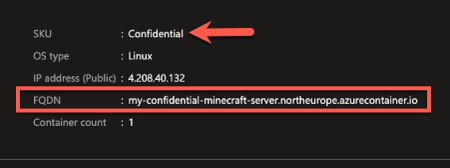
In this fun example we’ll be using a containerised version of the Minecraft game server to demonstrate how easy it is to take an existing container and deploy it unmodified using Azure Confidential Containers on Azure Container Instances to give you the tools you need to try this with ‘real’ workloads in your environment.Aligning with Kata Confidential Containers to achieve zero trust operator deployments with AKS
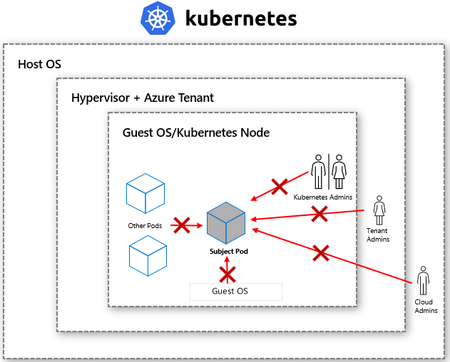
Confidential containers on Azure Kubernetes Service (AKS) leveraging Kata confidential containers open-source project are coming soon to Azure. If you would like to be part of the preview, please express your interest here https://aka.ms/cocoakspreviewMicrosoft introduces preview of Azure Managed Confidential Consortium Framework
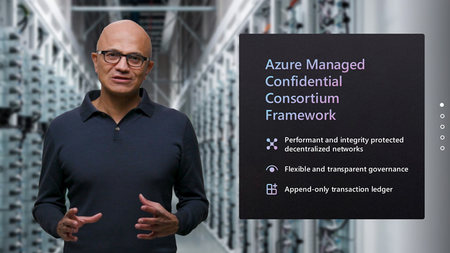
Today we are pleased to announce the preview of Azure Managed Confidential Consortium Framework, a hosted version of the Confidential Consortium Framework (CCF) which leverages the isolation and attestation capabilities of Trusted Execution Environments provided by Azure confidential computing. The framework design decouples node provisioning and operation from network and application governance, making it possible for the solution provider to maintain the set of nodes executing the transactions, without having any access to their contents.36KViews3likes0CommentsConfidential VM node pool with AMD SEV-SNP protection available on AKS in public preview
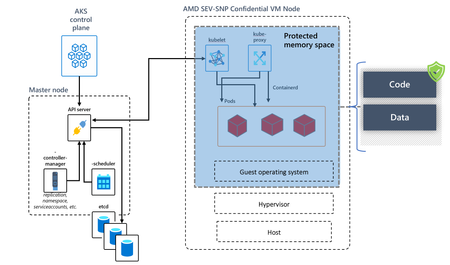
AKS node pools now support the generally available confidential VM sizes (DCav5/ECav5). Confidential VMs with AMD SEV-SNP support bring a new set of security features to protect date-in-use with full VM memory encryption. This enables confidential VM node pools to target the migration of highly sensitive container workloads to AKS without any code refactoring while benefiting from the full AKS feature support.8.6KViews2likes0Comments