preston romney
4 TopicsImplementing Azure Lighthouse: A Technical Guide for Service Providers and Enterprises (part 1 of 3)
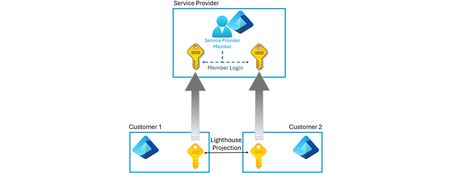
Managing resources across multiple tenants is a common challenge for managed service providers (MSPs) and large enterprises. There are many scenarios where you may need to manage resources in many tenants, whether those tenants belong to your organization or they belong to your customers. Without a unified approach, administrators must create accounts in each customer tenant or rely on guest identities, which increases credential sprawl and makes it hard to enforce consistent governance. This also doesn’t scale, as an administrator who needs to manage many customers would need to separately login to each customer tenant in order to view and work on subscription resources across tenants. This is cumbersome and time consuming. Without a delegated access model such as Azure Lighthouse, this is how most organizations manage resources across tenants. While the focus of this article is Azure Lighthouse, there are other delegated access models available which I will compare further below. See Part 2 - Azure Lighthouse: Bring Your Partner In, Without Letting Their Identities In (part 2 of 3) See Part 3 - Should You Use the New Microsoft Entra Tenant Governance or Azure Lighthouse? (part 3 of 3) Microsoft’s Azure Lighthouse addresses the challenge of managing resources across tenants at scale by allowing service providers and customers to delegate access to specific scopes in the customer’s tenant. Users sign in to their own tenant and manage delegated resources across all customers through a logical projection model. These subscriptions appear as if they are in the service providers’ tenant and they no longer have to login to each separate tenant. This article introduces the core architecture and operational model of Azure Lighthouse and provides guidance for implementers along with lesser-known tips to help you succeed. For clarity and simplicity, this article uses variations of two consistent terms. The Service Provider refers to the managing entity, or the tenant that contains the identities used to manage resources in another tenant. The Customer refers to the entity whose resources are being managed. Accordingly, the tenant hosting those managed resources is referred to as the Customer Tenant, while the tenant hosting the managing identities is the Service Provider Tenant. Understanding Azure Lighthouse Azure Lighthouse isn’t a separate management portal, it’s a set of delegated resource management capabilities that operate through Azure Resource Manager (ARM) and the Azure portal. When a customer delegates a subscription or resource group, two resources are created in the customer tenant: Registration definition – describes the managing tenant, the built-in role assignments (principal IDs + roles) and metadata for the managed service offer. One definition exists per subscription. Registration assignment – binds the registration definition to a specific scope (subscription or resource group). Azure Resource Manager verifies the presence of these two resources when a user in the service provider’s tenant performs an operation on customer resources. The customer’s resources are logically projected into the managing tenant, so users can stay signed in to their own tenant and still manage delegated resources without switching directories. All activity performed by managing-tenant users is logged in the customer’s activity log, enabling accountability. Onboarding Customers to Azure Lighthouse Methods There are two supported onboarding methods: ARM template deployment – The service provider creates a JSON template specifying the managedByTenantId (the provider’s tenant), an authorizations array containing principal IDs and built-in role IDs, and optional metadata (offer name/description). The provider then delivers the template to the customer, who deploys it into their subscription or resource group. You must know the customer’s tenant ID and subscription ID (or resource group names) and the provider’s tenant ID. Each authorization requires the principal ID (user, group or service principal) and the built-in role definition ID. Managed service offer via Azure Marketplace – Partners who meet competency requirements can publish public or private offers in the Azure Marketplace. Customers accept the offer via the Marketplace, which automatically deploys the registration definition and assignment into their tenant. Offers apply identically across all purchasers. To customize roles for specific customers, you must publish separate private offers or use the ARM template method. Once deployed, these resources produce a logical projection of the delegated subscriptions/resource groups. Scope and Role Considerations Tenant and subscription IDs – When deploying via ARM, you must know the tenant ID of both the service provider and the customer, plus the subscription ID(s) or resource group names you intend to onboard. Role definitions – Any Azure built-in role except Owner is supported; custom roles and classic administrator roles are not supported. Roles containing DataActions (e.g., storage listKeys) or certain Microsoft.Authorization actions aren’t allowed. Always assign roles that follow the principle of least privilege; for example, use Reader for monitoring tasks, Contributor for VM management or custom roles where data access isn’t needed. Assigning the Managed Services Registration Assignment Delete Role is recommended so that service-provider users can remove their own access later. Group vs. individual assignments – It’s best practice to assign permissions to Microsoft Entra security groups or service principals rather than individual users. This allows you to add or remove users without redeploying the delegation and simplifies the management of large teams. Ensure the group type is set to Security. Eligible authorizations (just-in-time) – Azure Lighthouse supports Azure Privileged Identity Management (PIM). You can create eligible authorizations that require users to activate their role for a defined duration (up to eight hours) and optionally require approval or multi-factor authentication. This model reduces the number of permanent privileged assignments. Working with Delegated Resources Navigating the Azure Portal Service providers manage delegated tenants through the My customers blade in the Azure portal. Users must have at least the Reader role to access this view. From My customers, you can: View all customers that have delegated subscriptions or resource groups to your tenant. Inspect customer details, offers and delegations; drill down to see which subscriptions or resource groups have been delegated and which roles are assigned. Review delegation change activity; the activity log lists every delegation and removal (requires Monitoring Reader at root scope). Remove delegations – If the delegation was created with the Managed Services Registration Assignment Delete Role, your users can revoke their own access via the trash-can icon; otherwise, only the customer can remove the delegation. Within other Azure services, you can work directly in the context of a delegated subscription. Use the Directories + subscriptions filter to choose delegated subscriptions and resource groups (turn off Advanced filters) and set them as your default scope. The portal will automatically scope your operations (e.g., creating VMs, assigning policies) to the selected delegated subscription. CLI and API Support All Azure Resource Manager APIs and management tools (Azure CLI, Azure PowerShell, Terraform, etc.) work with delegated resources. Use Get-AzSubscription in PowerShell or az account list in CLI to list your subscriptions; these commands include homeTenantId and managedByTenantIds fields to differentiate between your own and delegated subscriptions. If you do not see these fields, run az account clear then log in again. Cross-Tenant Scenarios and Services Azure Lighthouse enables cross-tenant management across many services as long as the user has the appropriate role. Example scenarios include: Azure Arc – Onboard servers, Kubernetes clusters and SQL resources outside Azure into delegated subscriptions; enforce consistent policy and use GitOps across customers. Azure Backup – View and manage backups across delegated subscriptions. Backup center and Backup Explorer provide aggregated views for delegated resources. Azure Automation / Functions – Use automation accounts or serverless functions in your tenant to run tasks against delegated resources. Cost Management – CSP partners can view consumption costs (pre-tax, retail rates) for delegated subscriptions. Key Vault and Kubernetes – Create Key Vaults in customer tenants and manage AKS clusters; monitor container performance across customer tenants. These services reflect only a subset of supported capabilities; most ARM-based operations will work cross tenant. Security and Governance Best Practices Implementing Azure Lighthouse is not just about technology; it requires strong governance: Require multi-factor authentication (MFA) – Users in your managing tenant should always be subject to Microsoft Entra MFA. Encourage customers to do the same. Conditional Access Policies: Conditional access policies defined in the customer tenant do not apply to delegated users; only the managing tenant’s policies are enforced. For example, it would be wrong for a customer to assume that if they enforce an MFA conditional access policy, that a delegated user from the service providers tenant would be forced to use MFA when accessing customer resources. MFA would need to be enforced in the service providers tenant to ensure that delegated users would access the customer resources with MFA. Principle of least privilege – Use Azure RBAC roles with the minimum permissions necessary. Limit the number of users with high privileges and regularly review memberships. Use groups / service principals – Assign roles to security groups or service principals instead of individuals; this simplifies management when people join or leave your team. Assign the Registration Assignment Delete role – Always include the built-in Managed Services Registration Assignment Delete Role in your authorizations so that your users can remove their own access without customer intervention. Understand role limitations – The Owner role isn’t supported; neither are roles with DataActions permissions (e.g., retrieving storage account keys). Roles with specific Microsoft.Authorization actions are also not allowed. Monitor activity and use logs – The customer’s activity log records all write and action operations performed by delegated users. Encourage customers to review these logs and ensure compliance. Opt for eligible authorizations – Where practical, use Azure PIM to create eligible authorizations for just-in-time elevation. Pay attention to subscription transfers – If a delegated subscription is transferred to another Microsoft Entra tenant, the registration definition and assignment remain so long as the subscription hasn’t been delegated to that tenant before. If it has, the delegation resources for that tenant are removed and access via Azure Lighthouse stops. Comparing Delegation and Packaging Models Azure Lighthouse, Administer on behalf of (AOBO), and Azure Managed Applications are all Azure delegation models that enable one organization to manage resources owned by another without fully transferring ownership. Each is designed to support scenarios where a service provider, partner, or central IT team needs some level of administrative control over customer or business unit subscriptions. They share a common goal of simplifying operations while maintaining separation between the managing party and the resource owner. However, they differ substantially in how access is granted, how permissions are scoped and enforced, and whether the focus is ongoing environment administration or tightly controlled application management. Understanding these differences is essential for choosing the right model for governance, security, and scale. Azure Lighthouse is designed for cross-tenant, large-scale management, allowing a service provider or central IT team to manage multiple customer or internal tenants through Azure RBAC-based delegation without adding guest accounts; permissions are explicit, least-privilege, auditable, and can span subscriptions, resource groups, or management groups. AOBO is an older, Commerce-era mechanism primarily tied to CSP subscriptions that allows partners to administer customer subscriptions, but it relies on broad, often implicit permissions and Entra ID guest access, lacks fine-grained RBAC control, and does not scale well for modern governance scenarios. Azure Managed Applications, by contrast, focus on application lifecycle control rather than general administration: they allow a publisher to deploy and manage specific Azure resources on a customer’s behalf while the customer retains ownership, with access restricted to only the managed resource group defined by the application. Architectural differences AOBO – The provider logs in as a guest into the customer’s Azure AD tenant and is assigned RBAC roles manually. The provider must switch directories to operate within each customer’s environment. Azure Lighthouse – Delegated assignments are created at the ARM control plane. No guest accounts are needed; the provider uses its own Microsoft Entra tenant and can see delegated subscriptions under My customers. The customer remains in full control and can remove the delegation at any time. Azure Managed Applications – The provider packages an entire solution into an ARM template and publishes it privately or publicly via a service catalog or marketplace. When deployed, Azure creates a managed resource group in the customer’s subscription. That resource group is hidden from the customer; only an application resource and configurable parameters are exposed. The provider automatically receives owner access on the managed resource group to operate the solution Access and control AOBO – Access is granted via individual RBAC assignments to guest users. Providers juggle multiple customer tenants and must maintain least privilege manually. Customers must remove each role assignment if they want to revoke access to services. Azure Lighthouse – Access is granted via delegated roles defined in an offer or through portal‑based delegation. Providers work under their own tenant context, and customers can revoke the entire delegation in one action. Operations by the provider are logged in the customer’s activity logs and are subject to the customer’s policies. Azure Managed Applications – Access is tied to the managed resource group; Management is done in the provider tenant and not the customer tenant. Customers cannot see underlying resources or modify them directly. Providers control the life‑cycle of the solution (deployment, updates, operations). Customers interact with the application through exposed parameters and can remove it by deleting the application resource, which cleans up the managed resource group. AOBO Azure Lighthouse Azure Managed Applications Access model Guest accounts with manual role assignments in the customer tenant; cross‑tenant administration is done via individual RBAC assignments. Delegated resource management assignments created at the control plane through ARM; provider uses its own tenant identity. ARM templates package resources into a managed resource group; provider gets owner access to that group via the Managed Application’s authorization definition. Scalability Manual; each tenant must assign roles per provider user; difficult to scale across many customers. High; one offer can onboard many customers and delegated scopes appear automatically in the provider portal. Scalable for packaging repeatable solutions; each deployment creates its own managed resource group but does not provide cross‑tenant visibility. Governance Hard to enforce least privilege; guest users may accumulate high‑privilege roles and require per‑user, per‑subscription revocation. Strong governance; customers can remove the entire delegation with one action and providers request only the roles they need. Provider controls a hidden managed resource group; customers have limited oversight but can delete the application to remove the solution. Identity management Providers manage multiple guest accounts and switch Azure AD directories. Providers remain in their own Azure AD tenant; no guest accounts; context switching is eliminated. Providers operate via a service principal with owner access on the managed resource group; customers interact via an application resource. Billing / commerce None; AOBO is purely an access model with no built‑in billing. Can be combined with private or Marketplace plans for management services. Pricing defined in the Marketplace or service catalog; supports usage‑based or flat‑rate charges for the packaged solution. Purpose Historical mechanism for delegated admin in partner programs; largely superseded by Lighthouse. Delegate access to existing resources across tenants for operations such as monitoring, compliance and support. Deliver packaged solutions to run in the customer’s subscription as a managed service under provider control. Resource location Existing resources remain in the customer’s subscription; no separate resource groups created. Existing resources remain in the customer’s subscription; no new resource groups are created by the delegation. Resources are deployed into a dedicated managed resource group that is hidden from the customer. Customer control The customer holds full control but must revoke individual role assignments; risk of lingering privileges. The customer retains full visibility and can revoke the entire delegation at any time. The customer’s control is limited to application parameters; underlying resources are hidden but can be removed by deleting the application. Provider control Provider’s access depends on assigned roles; may result in over‑privileged guest users. Provider’s access is scoped by delegated roles; cannot exceed what is granted by the customer; operations are audited. Provider has owner access to the managed resource group and manages the entire solution life‑cycle. Common scenarios Legacy cross‑tenant administration patterns in partner programs, now considered less secure and hard to scale. Multi‑tenant monitoring, patching, policy enforcement, security posture management or support services for existing workloads. Turnkey Marketplace offerings, SaaS extensions, complex enterprise architectures or packaged infrastructure solutions. Lesser-Known Features and Tips Partner ID linkage for earned credit – Members of the Microsoft AI Cloud Partner Program can associate their Partner ID with a service principal or user account. This allows Microsoft to identify partners driving Azure success and earn Partner Earned Credit (PEC). The account linked to the Partner ID must have access to every onboarded subscription. Azure Resource Graph – Use Azure Resource Graph (ARG) to query resources across all delegated subscriptions from a single endpoint. For example, query compliance status of virtual machines across your customer base using Resources | where type =~ 'Microsoft.Compute/virtualMachines' along with tags or policy states. ARG provides aggregated visibility at scale. Cost management nuances – Cost management via Azure Lighthouse displays pre-tax consumption at retail rates; purchases and discounts are not included. Ensure that your organization is aware of this when providing cost reporting to customers. Role updates and deprecations – Roles can change over time; if a previously supported role gains DataActions permissions, it becomes ineligible for new delegations, though existing assignments remain. Always review role definitions when updating templates. Support for ISVs and multiple delegations – Customers can delegate the same subscription or resource group to multiple service providers. This allows independent software vendors (ISVs) to project their own management resources into the customer tenant while other service providers manage operations. Conclusion Azure Lighthouse provides a robust and secure framework for multi-tenant management. By logically projecting delegated resources into a managing tenant, service providers and enterprises gain centralized visibility and automation while customers retain control over scopes and roles. Implementing Azure Lighthouse requires careful design of role assignments, adherence to security best practices, and continuous governance. For further reading and template samples, consult the Azure Lighthouse documentation.Subscription Governance: The Relationships and Dependencies Involved with Managing Subscriptions
In this article Introduction Relationships and dependencies between Entra ID, Billing Accounts and Subscriptions Identity and Roles Billing Account and Subscription Creation Summary Introduction In cloud governance, the relationships between Entra ID, Billing Accounts, Subscriptions, and User Permissions are frequently misunderstood even by experienced practitioners. Many organizations assume these components form a simple hierarchy or that permissions and associations are inherited in certain ways. In reality, these elements are loosely associated, and their dependencies are far more nuanced. Misunderstanding these relationships and dependencies poses a challenge to governance and can allow subscription sprawl. For example, assuming that billing accounts and subscriptions are always tied to the same Entra ID tenant, or that user roles in Entra ID automatically confer billing permissions, can result in misconfigured access controls and the creation of subscriptions outside of your corporate procurement and deployment processes. There can also be confusion about where to go to manage permissions. Is it Entra ID, is it in the resource RBAC, is it in the billing account? Effective governance requires clarity on: How Entra ID tenants, billing accounts, and subscriptions are associated and how these associations can be changed. Which roles have the authority to create or manage subscriptions and billing accounts, and where those roles are found. How the type of billing account (EA, MCA, MOSP, Partner) determines who can create subscriptions and what controls are available. By understanding these foundational relationships and the specific permissions required, organizations can avoid common pitfalls and build a governance model that is both secure and flexible. Relationships and dependencies between Entra ID, Billing Accounts and Subscriptions In order to manage subscriptions, it is key to understand the components and dependencies related to subscriptions. Let’s first understand the relationship between subscriptions, billing accounts and Entra ID tenants. Do not think of the tenant as a container for billing accounts which are containers for subscriptions. Think of the relationship between these components as “associations” rather than a hierarchy. A billing account is typically associated with a single Entra ID tenant. However, with MCA billing accounts you can configure Associated Billing Tenants which allow users from multiple tenants to have billing permissions on a single billing account. Entra ID can have many different billing accounts of different types. A billing account can be associated with many subscriptions, but a subscription can only be associated with a single billing account. An Entra ID tenant can be associated with many subscriptions, but a subscription can only be associated with a single tenant. A subscription is first associated with the tenant in which the user is logged in, which isn’t always the same tenant for which the associated billing account belongs to. These relationships or associations can also be changed later. For example, Subscription Owners can change the association of the subscription’s Entra ID tenant to ANY other Entra ID tenant in which they have access. They don’t need elevated permissions in the target tenant. One of the most important things to know is that the billing account that is associated with a subscription does not need to be associated with the same Entra ID tenant for which the subscription is associated with. See the following example associations: Identity and Roles Entra ID is a directory of user identities and other objects. A user identity can be associated with many Entra ID tenants. While the primary account belongs to a single tenant, users can be invited as guest users to any number of Entra ID tenants using B2B collaboration. There are three places that house roles/permissions that are mapped to those user identities: Entra ID roles, Azure Resource Manager (ARM) Role Based Access Control (RBAC), and Billing Accounts. Entra ID Roles Entra ID roles manage directory level objects such as user identities. The Global Administrator is the most well-known role within Entra ID. Entra ID roles are typically limited to managing the directory, however there is the ability to elevate access so that the Global Administrator can access and assign RBAC and Billing roles to themselves or others (two exceptions are that the Global Admin cannot elevate billing permissions for EA or MOSP billing accounts). Entra ID roles assigned to a user in one tenant do not follow them when they gain access to another tenant. ARM RBAC RBAC is a function of the ARM and is scoped to either management groups, subscriptions, resource groups or resources. RBAC is inherited from parent scopes. The RBAC assigned for a user in one tenant, is not shared with any another tenant as the mappings are maintained by ARM for each resource in the tenant. As each tenant has unique resources, the RBAC mapping the user has for resources in one tenant logically cannot exist in another tenant. While user identity is handled by Entra ID, the RBAC is handled at the resource level. Billing Roles Billing roles are a part of the billing/commerce engine and depend on the billing account type. For example, with an MCA billing account you manage them in Cost Management + Billing instead and not in Entra ID. These billing roles are different depending on the billing account type. While billing roles manage access to billing details, they also control the creation of subscriptions. If you have the correct billing role, you can create subscriptions under that billing account. Subscription creation is not managed by Entra ID roles nor RBAC. Billing Accounts There are 4 main billing account types: Enterprise Agreements (EA): Legacy contractual model for large enterprises. Provides volume licensing discounts, centralized invoicing, and long-term pricing commitments but is gradually being replaced by MCA. Billing roles to create subscriptions: Enterprise Administrator, Account Owner Microsoft Customer Agreements (MCA) The modern default billing model for enterprise customers. Free trial and pay-go subscriptions are supported. Invoice-based or credit card billing, supports multiple billing profiles and invoice sections. Billing roles to create subscriptions: Billing Account Owner/Contributor, Billing Profile Owner/Contributor, Billing Invoice Owner/Contributor, Subscription Creator Microsoft Online Services Program (MOSP) Agreements Tied to a single user, lacks enterprise governance features, and is the most common source of subscription sprawl. Typically used by individuals or small businesses and supports free trial, pay-go and Visual Studio subscriptions. Billing role to create subscriptions: Account Administrator Microsoft Partner Agreements (MPA) A billing account owned and managed by a Microsoft partner. Subscriptions billed under CSP appear in your tenant but financially roll up under the partner’s agreement. Control over invoicing and some subscription-level actions is delegated to the CSP, not directly to corporate IT. Billing role to create subscriptions: Admin agent role in the CSP partner organization Billing Account and Subscription Creation As the roles within the billing account provide the permissions to create subscriptions it is important to understand who can create these billing accounts. Because whoever can create a billing account, is also able to create a subscription. And remember, subscriptions do not need to be associated with the same Entra ID tenant as the billing account. Billing accounts are created in the following ways: Enterprise Agreements (EA) An individual at your company works with Microsoft to set up an EA contract. An EA billing account is created for them, and they become the Enterprise Administrator for that billing account. Microsoft Customer Agreements (MCA) An individual at your company works with Microsoft to set up an MCA contract. An MCA billing account is created for them, and they become the Billing Account Owner for that billing account. Microsoft Online Services Program (MOSP) Agreements Any individual can perform a self-signup for a pay-go or free-trial subscription. When they do this, a billing account is created for them, and they become the Account Administrator for that billing account. This can be done in any Entra ID tenant for which they have an identity (including guest accounts). Microsoft Partner Agreements A Microsoft Partner registers and manages the CSP billing account on behalf of a customer. They become the Admin agent. Summary Understanding the associations between Entra ID tenants, identity, permissions, billing accounts, and subscriptions is foundational for effective governance. With these building blocks in place, you can design for and establish governance that will ensure your environment aligns with your corporate strategy and reduce opportunity for subscription sprawl.Should You Use the New Microsoft Entra Tenant Governance or Azure Lighthouse? (part 3 of 3)
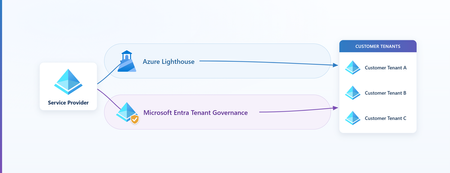
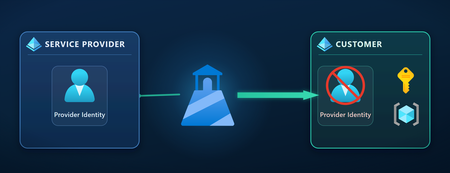
In Part 1 we built Azure Lighthouse the technical way. In Part 2, "Bring Your Partner In, Without Letting Their Identities In," we made the security case for it: let a service provider operate a customer's Azure resources without creating any identity in the customer's tenant. This third part introduces another, newly available delegation model Microsoft Entra Tenant Governance and helps you to answer the question: which one do I use, and when?. If you already know Lighthouse, you have everything you need to follow along - If not, catch up on the previous two articles. While most of the focus will be on Microsoft Entra Tenant Governance, we will compare and contrast it with Azure Lighthouse. There's one idea that makes the whole comparison click: the two models project access in opposite directions. 1. Azure Lighthouse, and its boundary As a brief refresher, Azure Lighthouse lets a service provider manage a customer's Azure resources (subscriptions and resource groups) from the provider's own tenant. The provider's users never get an account in the customer's directory and never become guests there; instead, the customer's subscriptions and resource groups are delegated to the provider through Azure Resource Manager, and the provider operates them with their home credentials (Azure Lighthouse architecture). No identity sprawl, no extra license, no charge (Azure Lighthouse overview). Lighthouse is scoped to the Azure Resource Manager control plane. It delegates resources from subscriptions or resource groups such as virtual machines, storage, networking, policy, and Sentinel workspaces. It does not grant Microsoft Entra directory roles, it does not reach resource data planes such as Storage blob data or Key Vault secrets, and it doesn't reach Microsoft 365 (cross-tenant management experience). But it leaves a real question open. What happens when the partner (or an enterprise with multiple tenants) legitimately needs access to the directory, to read identity configuration, run security operations, administer users, or govern identities, and not just the resource estate? Lighthouse, by design, can't take you there. That's the gap the second model fills. 2. Two directions of projection The easiest way to keep the two models straight is to consider the following: Azure Lighthouse projects the customer's resources up into the provider's tenant. The provider manages those resources from its own context. The customer's subscription is, in effect, presented inside the provider's Azure portal. Microsoft Entra Tenant Governance projects the provider's identity down into the customer's tenant. A principal from the provider tenant becomes usable inside the customer, and a provider user or service principal uses it there to do the work. Each delegate cross-tenant access without local accounts, but the thing that moves is opposite. And who moves strongly shapes whose rules apply. When the customer's resources come up to the provider, the work happens in the provider's context. When the provider's identity goes down to the customer, the work happens in the customer's context. Think of the word "projection" as a way to reason about trust direction, not a literal claim that objects are copied between tenants. Lighthouse is delegated management from the provider's context; Tenant Governance creates a governed principal in the customer's context that can hold directory roles and Azure RBAC. 3. What is Microsoft Entra Tenant Governance? Microsoft Entra Tenant Governance is the capability that lets one tenant securely administer another. The connection between a specific pair of tenants is called a governance relationship: a directional link in which one tenant, the governing tenant (the provider), administers another, the governed tenant (the customer) (set up a governance relationship). Throughout, this article is written from the provider's vantage point: when it says you, it means the provider (governing) side, and the other tenant is always referred to explicitly as the customer. The topics discussed here apply equally to Enterprises needing to manage many of their own tenants as well as Service Providers who manage many customer tenants. You set it up in two steps: A policy template in the provider tenant that declares which principal will be projected and which Entra roles it should receive. Note that RBAC assignments are not part of the governance relationship and must be completed by the customer in their tenant. A handshake between the two tenants that establishes the trust boundary and provisions the access. Now let’s dive into the details: what gets projected, and how it gets its powers. 4. What actually gets projected: one proxy principal In the provider tenant you start with something completely ordinary, a security group (say, your "Cloud Operators" group), or a custom multitenant application. When you form the governance relationship, a proxy of that principal is created in the customer tenant: A security group is projected in as a remote tenant group. An application (a custom multitenant app) is projected in as a service principal, when the relationship is established, Tenant Governance automatically creates a service principal with the same permissions in the customer tenant (no manual step on the customer's side): "Tenant Governance creates a service principal with the same permissions in the governed tenant" (governance policy templates). It’s important to keep two things straight, neither is a local account or a guest: The proxy, the remote tenant group (or, for an app, the service principal), is a new principal created in the customer tenant by the relationship. It is not a copy of the provider's group, not a local group created in the customer, and not a guest. It exists only because the relationship projects it, and it is what the provider grants roles to. The people and apps that use it, the provider's users and service principals, stay in the provider tenant. They never receive a member account or a guest invitation in the customer; they reach the customer through the proxy. Here is what that provider user or service principal is and isn't, from the customer's point of view: The provider user or service principal is NOT… …it IS… A local member account created in the customer's directory An identity that stays in the provider tenant and authenticates with provider credentials A B2B guest invited into the customer Reachable only through the projected proxy, a signed-in user shows in the customer's logs as the provider tenant's name + Technician (e.g. Contoso Technician) A standing, permanent object listed among the customer's users Present only as a governed session or principal, scoped by the relationship and revocable by the customer To work in the customer tenant, a provider user opens a supported admin portal (Entra or Azure) and appends the customer's tenant ID, for example https://entra.microsoft.com/{customer-tenant-id}, then signs in with their provider-tenant credentials. The customer's logs then show them a directory display name of user_{object-id} (the provider object ID without dashes), and, in sign-in and audit logs, the provider tenant's name followed by Technician, so for a provider tenant named Contoso the entry reads Contoso Technician (use cross-tenant delegated administration). No local account, no guest object, the resource-plane property Lighthouse provides, now on the directory plane (cross-tenant delegated administration). A note on the two projection mechanics, because they differ in a way worth understanding. A group projects as a remote tenant group, a cross-tenant reference back to the provider's group, with no new local membership stored in the customer. An application projects as a real service principal that is actually created in the customer with the consented permissions. Same idea, a governed proxy of a provider principal, but a group is a reference, while an app is an instantiated object. 5. How the proxy gets its powers: roles attach to the one principal The proxy is one principal. You don't create separate identities for "directory access" and "resource access." Instead, you grant roles to that single proxy, and the roles can come from two different planes: Directory roles govern the customer's Microsoft Entra directory. Think of well-known ones such as Global Reader (read-only across the directory), Global Administrator, or User Administrator, selected as built-in roles in the policy template (governance policy templates). Azure RBAC roles govern the customer's Azure resources. Think of the familiar Reader, Contributor, or a service-specific roles like Virtual Machine Contributor, assigned to the remote tenant group at a subscription or resource-group scope. This is not done as part of the governance relationship as the Entra directory role is. This must be assigned after the relationship is established likely by a privileged customer admin. The bridge from directory to resources is the remote tenant group itself: because the projected group can be referenced by Azure RBAC, the same proxy that holds Global Reader in the directory can also hold Reader or Contributor on a resource group. Critically, these are not separate identities, they are both roles held by the one remote tenant group, as the diagram above shows. And the directory role grants no Azure access on its own; the resource rights come entirely from the explicit RBAC assignment you choose. That single design choice, roles branch off one proxy, is what lets one projected principal span both planes: the same remote tenant group can hold a directory role and a separate, explicit Azure RBAC grant, without ever issuing a local account. What do these identities actually look like in the customer tenant? The only place you will see the security group is in the governance relationship. You will not find it among your other Entra groups. t For RBAC purposes, you can find the proxy security group under resource Access Control (IAM) as a foreign group. 6. The building blocks, and how they depend on each other Now that the concept is in place, here's the assembly order. Each block depends on the one before it. A role-assignable security group in the provider tenant, the principal you intend to project. A policy template that selects which directory roles that group should receive when projected (governance policy templates). A governance relationship, established by a handshake. In the standard three-step flow the customer invites, the provider requests (carrying the template), and the customer accepts; a streamlined two-step flow (request → accept) applies when the two tenants already share a qualifying signal, such as a billing relationship or an existing governance relationship. At acceptance, the role assignments are provisioned in the customer (set up a governance relationship). The template's role set is projected onto the relationship, so later template edits require a fresh request and re-approval, the customer always gets to review what changes. The projected proxy plus its role assignments in the customer, the remote tenant group (or service principal), now holding the directory and/or Azure RBAC roles you granted. Under the hood: this cross-tenant delegation is powered by granular delegated admin privileges (GDAP), the same delegation technology behind Partner Center (cross-tenant delegated administration). You don't configure it directly; the relationship and the template do it for you. That's all you need to know about the plumbing. The whole flow is also scriptable through the Microsoft Graph Tenant Governance APIs (API overview), and a default template can bring new add-on tenants under governance automatically at creation (deployment guide). 7. Key Features Because the proxy can hold both directory roles and Azure RBAC, Tenant Governance unlocks delegated administration across the entire surface a partner might legitimately need: Directory administration, read or manage the customer's Microsoft Entra directory with least-privileged built-in roles, using home credentials, no local accounts. Identity governance, run access reviews, entitlement management, and lifecycle workflows across many customer tenants from one place. Security operations, operate security and compliance tooling centrally. Microsoft Defender XDR and Microsoft Sentinel multitenant management for MSSPs is one prominent example built on this model (governance relationships for unified SecOps). Azure resource management, the remote tenant group can carry Azure RBAC for any Azure service, exactly the way a local group would. That covers the management (control) plane only; neither model delegates the resource data plane (for example, blob data or Key Vault secrets), so those operations still require an identity native to the customer tenant. Application management, project a custom multitenant app as a service principal with consistent, least-privileged permissions across tenants (governance policy templates). The provider's users and service principals use their provider-tenant identities, and no local or B2B account is ever planted in the customer. The one object the customer does gain is in the application case, a governed service principal of the projected app, created and maintained through the relationship rather than as a standing local login. 8. Comparing Tenant Governance with Azure Lighthouse Now that both models are understood, the comparison is straightforward. They operate on different planes and point in different directions. Dimension Azure Lighthouse Microsoft Entra Tenant Governance Direction of projection Customer resources → provider Provider identity → customer Where the provider identity operates From the provider tenant (customer resources projected up; no customer sign-in) In the customer tenant, authenticated by the provider home tenant — as {Provider} Technician Planes reached Azure resource (ARM) plane only Directory plane and Azure resource plane Data-plane access (e.g., blob data, Key Vault secrets) Not supported (control/ARM plane only) Not supported (the proxy can hold a DataActions role, but cannot obtain a data-plane token) Identity footprint in customer None A projected proxy principal, no local or guest object Conditional Access Only the provider's policies apply (security practices) The customer's policies apply, the customer is the resource tenant for the technician's sign-in (lab-verified; see below) Where the privileged assignment lives Provider tenant (JIT approvers in the provider) (eligible authorizations) Customer tenant (the role assignment is owned customer-side) Audit of provider actions Customer Activity Log (view activity) Customer audit log records the provider user’s actions; the authentication sign-in is recorded provider-side, it appears in the customer's sign-in log only when the customer's CA fires Role types Azure built-in roles only, no custom roles; Owner and roles with DataActions excluded, and Microsoft.Authorization/* writes excluded except User Access Administrator for managed-identity assignments (role rules) Directory roles and Azure RBAC (including custom RBAC) on the proxy Setup ARM template / Marketplace offer (onboard) Relationship handshake (invitation → request → acceptance) Revocation Remove the delegation, either party (remove) Terminate the relationship, either party Operational view Single pane of glass, every delegated customer's resources surface in the provider's own portal Per-customer, the admin signs in to each customer tenant individually Best for Scaled Azure resource operations Directory / identity / security delegation plus resources The sign-in, Conditional Access, footprint, and audit rows describe the human delegated-administration path (a projected group). In the application case the customer instead gets a governed service principal, so those rows read differently. Direction of projection, the root cause. Everything else in the table is a consequence of this one row. Lighthouse brings the customer's resources up to the provider; Tenant Governance places a governed proxy of the provider's identity down in the customer. Decide which direction your scenario actually needs, and the rest mostly answers itself. Conditional Access, the cleanest inverse. With Lighthouse, provider users authenticate in their own tenant, so the customer's Conditional Access never reaches them, "Only policies set on the managing tenant apply"(recommended security practices). With Tenant Governance the provider actually signs in to the customer tenant (use cross-tenant delegated administration), which makes the customer the resource tenant that evaluates Conditional Access, so the customer's policies govern the inbound provider login, not the provider's policies. Two nuances to keep in mind: When the provider logs into the customer tenant, the authentication still happens with the provider’s tenant, but the conditional access policy applied to the login is in the customer tenant. Where privileged access lives. Lighthouse offers just-in-time elevation through eligible authorizations, and the approvers sit in the provider (managing) tenant, "up to 10 users or user groups in the managing tenant who can approve"(create eligible authorizations). Tenant Governance inverts the ownership: the proxy's role assignment lives in the customer tenant, so privileged-access governance over that assignment is anchored customer-side. The useful contrast is simply where the assignment lives and who governs it, provider-side for Lighthouse, customer-side for Tenant Governance. Audit and identity footprint. With Lighthouse, provider actions land in the customer's Azure Activity Log under a named user, with no customer sign-in and no directory object (view provider activity). Tenant Governance is more subtle. The provider user's authentication is handled and logged in the provider (home) tenant, so the bare sign-in appears there, not in the customer tenant. What does get logged in the customer directory is the provider user’s actions, in its audit log, where the actor shows as the <provider tenant's name + Technician> (e.g. Contoso Technician) (use cross-tenant delegated administration). A sign-in entry from the provider user only appears in the customer's logs when the customer's Conditional Access evaluates the session, for example, an MFA challenge. Without such a policy, that sign-in is only logged on the provider side. Either way, the customer keeps a full audit of what the technician does and gains no standing local or guest object (cross-tenant delegated administration). <provider name> Technician" One console vs. many: Operational reach. Because Lighthouse projects the customer's resources up, the provider works from a single pane of glass, every delegated customer's subscriptions appear in the provider's own Azure portal, and cross-tenant tooling, Azure Resource Graph, Microsoft Sentinel, Azure Policy, Azure Monitor, can span all of them at once. Tenant Governance points the other way: the provider's identity projects down into each customer, so day-to-day administration is per-customer, the admin signs in to each customer tenant in turn. (Service consoles such as Microsoft Defender XDR add their own aggregated multitenant views on top, but the underlying delegated-admin model is per-tenant.) When operating many customers' Azure estates from one console is the priority, that single-pane reach is a distinct Lighthouse strength. 9. Where the two models overlap As is the case with other delegated access models, there is clear overlap between Azure Lighthouse and Tenant Governance: Both eliminate local and B2B accounts in the customer. The partner's people stay in the provider tenant either way (Lighthouse architecture, cross-tenant delegated administration). Both can ultimately place Azure RBAC on customer resources, Lighthouse directly through the delegation, Tenant Governance via the remote tenant group. Both are limited to the control (management) plane, neither delegates resource data-plane access (for example, blob data or Key Vault secrets); that still requires an identity native to the customer tenant. Both keep the customer in control of the audit record, provider actions are written to the customer's logs. Both are revocable by either party, remove the delegation, or terminate the relationship. 10. What is complimentary with the two models? Because they sit on different planes and point in opposite directions, you can use one or both. Deciding between the two delegated access models: Need only to operate the customer's Azure resources, especially across many customers? Choose Azure Lighthouse, no extra license or charge, a broad set of Azure built-in roles (Owner and custom roles excluded), just-in-time elevation with provider-side approval, zero directory footprint, and a single pane of glass: because customer resources project up into the provider's tenant, the provider manages every customer's estate from their own portal, with cross-tenant tooling spanning all of them at once. Need directory, identity, or security reach, not just resources? Choose Microsoft Entra Tenant Governance, directory roles and Azure RBAC on one projected principal, with the customer's own sign-in controls in the loop. Because the provider's identity projects down into each customer, administration is per-customer: the admin signs in to each customer tenant in turn rather than from one aggregated console. Need both on the same tenant? Use both. They coexist because they operate on different planes, Lighthouse for the resource estate, Tenant Governance for directory and security. 11. Key points to remember about Entra Tenant Governance Least privilege. A directory role grants no Azure access, and an Azure RBAC role grants no directory access. Each plane is an explicit grant to the proxy, start with read-only (e.g., Global Reader in the directory, Reader on resources) and add only what's needed. Directory ≠ resource. The two planes are independent. If the partner needs to operate Azure resources, that comes from an explicit RBAC assignment on the remote tenant group, not from any directory role. That RBAC is control-plane only; neither Tenant Governance nor Lighthouse delegates the resource data plane (for example, blob data or Key Vault secrets), which still requires an identity native to the customer tenant. Tenant discovery is irreversible. Enabling related-tenant discovery is permanent (deployment guide). For a controlled pilot, run the handshake by tenant ID and skip discovery. Azure Lighthouse, by contrast, coexists with a governance relationship on the same customer, different mechanism, different plane. Conditional Access is the customer's to enforce. Because the provider signs in to the customer tenant, the customer's Conditional Access governs that access. 12. Summary Azure Lighthouse and Microsoft Entra Tenant Governance are two delegation models pointing in opposite directions. Lighthouse brings the customer's resources up to the provider and keeps the provider's Azure access clean and identity-free. Tenant Governance places a governed proxy of the provider down in the customer, extending the very philosophy from Parts 1–2, govern the relationship, not the people, from the resource plane all the way into the directory. Choose by the direction the trust needs to flow: bring the resources to you (Azure Lighthouse), or place a governed proxy of yourself in the customer (Microsoft Entra Tenant Governance). When you need both, use both.Azure Lighthouse: Bring Your Partner In, Without Letting Their Identities In (part 2 of 3)
See part 1 – Implementing Azure Lighthouse: A Technical Guide for Service Providers and Enterprises (part 1 of 2) See part 3 – Should You Use the New Microsoft Entra Tenant Governance or Azure Lighthouse? (part 3 of 3) The three traditional ways in, and what each leaves behind When a provider needs to operate your Azure resources, there are three common patterns. Microsoft’s own cross‑tenant management guidance describes the starting point bluntly: “an administrator in the customer’s tenant must create and manage user accounts for the service provider.” (cross‑tenant management experience) B2B guest accounts. You invite each provider engineer into your tenant through Microsoft Entra External ID and assign them Azure roles. A real user object is created in your directory (its UPN carries the #EXT# marker) and it can be “managed like an employee, for example, added to groups or assigned to applications.” Convenient, but now it’s your object to track, review, and eventually delete. Member (local) accounts. You create internal accounts, sometimes licensed, for provider staff. Microsoft’s secure external access guidance lists the drawbacks of these “local credentials” plainly: “Access continues after external user terminates,” the Member user type “grants too much default access,” and you take on “password and multifactor authentication management… [and] identity cleanup.” Member users also receive broad default directory permissions, they can enumerate users, create security groups, and register applications. Service principals with shared secrets. You register an app and hand the provider a client secret or certificate. Microsoft’s app‑registration security guidance is explicit: “Don’t use password credentials… they are often mismanaged and can be easily compromised,” and you must “roll over credentials frequently.” And because an app object and its service principal are governed separately from the Azure role assignments they hold, deleting the app won’t revoke the access it was granted in your subscriptions, those assignments persist as separate objects until you remove them. Each of these makes the provider’s identity your operational problem, and the bill grows with every new vendor. The hidden cost: you inherit an identity‑lifecycle problem External identities have no HR signal inside your tenant. Microsoft’s identity governance overview notes that lifecycle automation is normally “tied to the representation of that person in an HCM or HR system”, but the provider’s joiners, movers, and leavers live in their HR system, not yours. When an engineer leaves the provider, nothing in your tenant knows. So you compensate with machinery. To keep guest sprawl in check you run access reviews and entitlement management, capabilities that require a Microsoft Entra ID Governance or Entra Suite license. You watch for stale guest accounts, which Microsoft flags only after a 90‑day inactivity default. Because partner devices aren’t managed by you, device‑based Conditional Access blocks them whenever you enforce such a policy, so you build per‑partner exclusion lists. And you rotate service‑principal secrets on a schedule. Now multiply all of that by every vendor. Every vendor adds external identities, guests, members, and service principals, into your own Microsoft Entra tenant, where they become your responsibility to govern. The result is external‑identity debt. Microsoft’s access‑reviews guidance warns that “excessive access rights can lead to compromises… [and] audit findings as they indicate a lack of control over access.” And it runs against Zero Trust, which treats identity as the primary security perimeter: every external account you hold is a piece of attack surface you now own. A lesser‑known exposure: identities that can create subscriptions There’s a subtler reason to keep external partners out of your directory, and it has nothing to do with the roles you assign them. By default, any identity that exists in your tenant, including a guest or a member account, can create new subscriptions in your tenant, or bring external ones into it, without holding any Azure permission you granted. Those subscriptions land inside your tenant and inherit your directory, yet they originate outside your procurement, billing, and governance, and it’s surprisingly easy to miss that it happened. It’s a real gap, and closing it takes deliberate, tenant‑wide controls that many organizations simply haven’t put in place. (The specifics are best worked through privately with your Azure and billing administrators.) The point that matters here is about where the partner’s identity lives: the exposure exists only because there is an account in your tenant to exercise it. A Lighthouse provider has no identity in your tenant at all, so this entire class of exposure simply doesn’t apply to them. It’s one more thing you never have to govern when the partner never becomes a resident of your directory. A better model: Azure Lighthouse Azure Lighthouse takes a different approach called Azure delegated resource management. Instead of importing the provider’s people into your directory, it lets authorized users who remain entirely in the provider’s own tenant operate on your resources, “without having an account in that customer’s Microsoft Entra tenant or being a co‑owner of the customer’s tenant.” Azure Lighthouse projects the provider’s identities onto your subscriptions through Azure Resource Manager. The only objects created in your tenant are two ARM resources you can audit and remove. Mechanically, you (specifically, an Owner or equivalent in your tenant) deploy a small Azure Resource Manager template, or accept a private Marketplace offer, that creates two resources in your subscription: a registration definition (which managing tenant, and which built‑in roles for which provider principals) and a registration assignment (binding that to a subscription or resource group). From then on, when a provider user acts on your resources, Azure Resource Manager checks those two resources and authorizes the request. Access is one‑directional, from the managing tenant to yours, and it exists only because you deployed it. Crucially, no provider user, guest, member, or service‑principal object is ever created in your directory. Provider identities, and the MFA, Conditional Access, and device‑compliance policies that govern them, stay where the provider already manages them. There is also no extra charge for Azure Lighthouse itself. Conditional Access Policy Considerations Because provider users authenticate in their tenant, your Conditional Access policies do not apply to them. Microsoft states it directly in the recommended security practices: “Conditional access policies on customer tenants don’t apply to users who access the customer’s resources through Azure Lighthouse. Only policies set on the managing tenant apply.” That’s a natural consequence of the identity living with the provider. It just means the controls move from “policies you enforce” to “controls you require and verify”: insist the provider enforces MFA and Conditional Access on its own users, write it into the contract, and use Azure Policy to restrict which managing tenants can ever be delegated to. Think of it as a shared‑responsibility split: You control The provider controls Joint Delegated scope (subscription or resource group) User lifecycle (joiner/mover/leaver) Evidence & audit cadence Which managing tenant is approved MFA / Conditional Access Incident response process The exact built‑in roles granted PIM activation policy Security‑review schedule Azure Policy guardrails, monitoring, log export Device posture & group membership Revocation, at any time Side‑by‑side: it’s about who owns the work The strongest argument for Lighthouse isn’t that it can do things the alternatives can’t, a well‑run B2B program can also use named identities, access reviews, and PIM. The difference is who owns the operational burden, and how much of it lands in your directory. Consideration B2B guest Member account Service principal Azure Lighthouse Identity object in your directory Yes (#EXT#) Yes Yes (app + SP) None Identity‑lifecycle owner You You You The provider Offboard the Azure access Manual cleanup Manual cleanup Manual + rotate secret Remove delegation (one action) Privilege‑escalation prevention Depends on roles + your IAM Depends Depends Blocked by the platform Per‑person audit trail (ARM) Yes (named guest) Yes No (shared identity) Yes (your Activity Log) JIT for privileged roles Possible, you configure & license Possible, you configure Usually not Possible, provider configures Your IAM blade stays clean No No No Yes Governance‑licensing owner You (Entra ID Governance) You You The provider (for JIT) The rest of this article walks the Azure Lighthouse column. Benefit 1, Identity lifecycle stays with the provider Because the identity lives in the provider’s tenant, the provider’s own joiner‑mover‑leaver process governs it automatically. When an engineer leaves, the provider disables that account in their directory, and the person’s access to your delegated scope is gone, with no lingering object in your tenant to find and remove. The best practice of assigning access to a security group makes this even cleaner: the provider adds and removes individuals from the group on their side, and you never touch the delegation. Contrast that with the member‑account drawback, “access continues after external user terminates”, and the difference is stark. Provider turnover stops creating identity‑cleanup work in your directory; your job shifts to governing the delegation and verifying the provider’s lifecycle controls. Benefit 2, Least privilege you don’t have to police Azure Lighthouse won’t even let a provider hold the roles that would let them take over. Per the role‑support rules, delegation supports the Azure built‑in roles except: The Owner role can’t be delegated. Custom roles and classic administrator roles aren’t supported. Roles with DataActions (data‑plane) permissions aren’t supported. Roles carrying Microsoft.Authorization/* write/delete actions (role assignments, role definitions, locks, deny assignments) aren’t supported. User Access Administrator is allowed only for the narrow purpose of assigning roles to managed identities, and you specify exactly which. The practical effect: a delegated provider cannot grant itself more access, edit your role assignments, set resource locks, create deny assignments, or lock you out of your own resources. Least privilege here is enforced by the platform, not by your vigilance. One honest nuance to scope carefully: Lighthouse operates at the Azure Resource Manager control plane only and grants no direct data‑plane access, no reading blob contents or Key Vault secret values, as the cross‑tenant documentation explains. But a few control‑plane actions can surface data indirectly (for example, a role that allows listKeys can return storage account keys), so choose the built‑in roles you delegate deliberately. Benefit 3, One action ends it, for either party Offboarding a whole vendor is normally a scavenger hunt across guests, accounts, secrets, and scattered role assignments. With Lighthouse it’s a single step. As the remove‑delegation guidance puts it, after a delegation is removed “no users in the service provider’s tenant will be able to access the resources that had been previously delegated.” When a project ends, removing the single delegation instantly cuts off the provider’s access to your scope, and leaves nothing behind in your directory. Either party can perform the removal. And importantly, either party can end it. You, an Owner in your tenant, can remove the offer from the Service providers page at any time, without involving the provider. The provider can also remove the delegation from their side when the engagement wraps up, provided they were granted the Managed Services Registration Assignment Delete Role during onboarding (a recommended practice). Removal is unilateral on either side, takes effect for all of the provider’s users at once, and touches only the Lighthouse delegation, any other access a vendor holds is separate. Benefit 4, Complete, named visibility Delegation doesn’t mean flying blind. Every action a provider takes is recorded in your Azure Activity Log, and the “Event initiated by” column shows the specific provider user by name, the same place you see your own administrators’ actions. Logs are retained 90 days in‑portal and can be exported for longer, and you can set activity‑log alerts on critical operations. Interestingly, those provider users don’t clutter your Access Control (IAM) blade, “these users and their role assignments don’t appear in Access Control (IAM).” You manage them in the dedicated Service providers experience instead, so your native role assignments stay clean. You can also use built‑in Azure Policy definitions to audit existing delegations or deny delegation to any managing tenant that isn’t on your approved list. Benefit 5, Just‑in‑time access, not standing privilege Standing privileged access is a well‑documented risk: with a permanent assignment, as Microsoft’s PIM documentation describes, “a user can always use the role without performing any actions.” Lighthouse supports a better pattern through eligible authorizations, which use Microsoft Entra Privileged Identity Management so a provider user must activate a privileged role just‑in‑time. Activation is time‑bound (between 30 minutes and 8 hours), can require MFA, and can require approval. Just‑in‑time elevation flows through Microsoft Entra PIM. When approval is required, the approver is in the provider’s tenant, not yours. Your safeguards are MFA, the bounded activation window, review at onboarding, and full Activity‑Log visibility. Per the eligible‑authorizations documentation, you can designate “up to 10 users or user groups in the managing tenant who can approve or deny requests.” In other words, approval, when required, is granted by the provider’s own approvers, not by the customer. That’s a deliberate design choice, and your safeguards are real and layered: customers can “review all role assignments, including those in eligible authorizations, before the onboarding process,” you can require MFA on activation, the activation window is capped, and every elevation appears in your Activity Log. (Two practical notes: eligible authorizations need the provider to hold an Entra ID Governance/PIM license, and they aren’t supported in national clouds.) Benefit 6, Scale without sprawl Because each provider is a separate delegation, the model scales cleanly: add a vendor by adding a delegation, remove one without touching the others, and govern them all from one place. And the management happens with the Azure tools you already use, cross‑tenant. The cross‑tenant management experience spans Microsoft Sentinel, Microsoft Defender for Cloud, Azure Policy at scale, Azure Arc for hybrid servers and Kubernetes, and Azure Monitor, none of which require importing identities to make work. For managed security providers in particular, this is significant: a single SOC can manage Sentinel workspaces across many customer tenants while each customer’s data stays in their own tenant, and the provider’s queries and playbooks stay in theirs. Govern delegations, not people Step back and the deepest benefit comes into focus. The traditional model asks you to govern external people, accounts, and secrets, forever, inside your directory. Lighthouse changes the unit of governance to a single approved delegation: a managing tenant, a scope, a set of roles, and a revocation switch. That shift has four consequences worth internalizing: Vendor turnover never becomes your identity churn. Your directory doesn’t accumulate vendor identities as your vendor list grows. Privilege escalation is blocked by the platform, not policed by your team. The identity lifecycle, and the PIM/governance licensing for just‑in‑time access, sits with the provider, the party that actually employs the people. “But we’ve already built all this” If your team has invested in JML automation, recurring access reviews, Conditional Access exclusion lists, secret‑rotation pipelines, and entitlement management, that’s real and valuable work, and it works. The reframe is simple: those processes manage a problem that Lighthouse removes for Azure control‑plane partner access. You can keep spending effort, licensing, and residual risk to govern people you don’t employ, or you can retire that specific machinery for this use case. Keep your governance program for your own workforce; stop extending it to other companies’ staff. Deploy it well: secure‑by‑design guardrails Treat these as part of the design, not as caveats: Require and verify provider MFA/PIM, your Conditional Access doesn’t apply to their users, so make it a contractual obligation and ask for evidence. Delegate least privilege, use the narrowest built‑in roles, and avoid roles that can surface keys unless you truly need them. Restrict approved managing tenants with Azure Policy (audit or deny). Export Activity Logs beyond the 90‑day window to meet your retention requirements, and alert on critical operations. Prefer JIT (eligible authorizations) for any privileged role. Mind the boundaries, some scenarios (such as Microsoft Defender for Cloud) require whole‑subscription delegation, and Lighthouse can’t span a national cloud and the public cloud. Where Lighthouse stops, and what to use instead Lighthouse is deliberately scoped to the Azure Resource Manager control plane. It does not grant Microsoft Entra ID directory roles (like Global Administrator) and it does not cover Microsoft 365 workloads such as Exchange, SharePoint, Teams, or Intune. When a provider genuinely needs to manage identities consider Microsoft Entra Tenant Governance as described in part 3, or for managing Microsoft 365 the companion product is Microsoft 365 Lighthouse, a separate service with its own model. Beyond MSPs: it’s not only for service providers Two adjacent scenarios are worth knowing about: Enterprises with multiple tenants. If your own organization spans several Microsoft Entra tenants (through acquisitions, or separation of dev/test from production), you can use Azure Lighthouse within the enterprise to manage resources across them from one place, the same delegation model, applied internally. CSP partners. For partners transacting through the Cloud Solution Provider program, Lighthouse narrows the broad “Admin Agent” AOBO model. Instead of every Admin Agent having sweeping access to every customer, Lighthouse “helps improve security by limiting broad access” with granular, per‑customer, per‑role assignments. Getting started: a low‑risk pilot You don’t have to commit your production estate to prove the model. A sensible first step: Delegate one non‑production subscription to the provider’s tenant. Grant least‑privilege built‑in roles, with JIT (eligible authorizations) for anything privileged. Require MFA for your own admins, and require the provider to enforce MFA on its delegated users (your Conditional Access doesn’t reach them). Turn on activity‑log alerts and an Azure Policy that restricts approved managing tenants. Review after 30 days, then expand. The provider builds the onboarding ARM template (Microsoft publishes ready‑to‑use samples on GitHub), and you deploy it with an Owner account. Because you can remove the delegation at any time, the downside is bounded and reversible, while the upside compounds with every vendor you onboard this way. Summary Letting a partner operate your Azure environment doesn’t have to mean adopting their people into your directory. With Azure Lighthouse, the provider brings their own governed identities, you grant a scoped and fully revocable delegation that you approve, every action is attributed in your own logs, the platform itself prevents privilege escalation, and the identity‑lifecycle burden stays with the company that employs the staff. You stop governing other people’s employees, and start governing one clean, auditable relationship. That’s a better deal for your security team, your auditors, and your partners alike. Further reading Azure Lighthouse What is Azure Lighthouse? Azure Lighthouse architecture Cross‑tenant management experiences Tenants, users, and roles Recommended security practices Create eligible authorizations (JIT/PIM) Onboard a customer Remove a delegation Monitor service‑provider activity View and manage service providers Enterprise (multi‑tenant) scenarios Azure Lighthouse and the CSP program Azure Lighthouse samples (GitHub) Microsoft Entra, RBAC & Zero Trust B2B collaboration overview Properties of a B2B guest user Plan secure external access Access reviews Entitlement management Privileged Identity Management Default user permissions Clean up stale guest accounts App‑registration security best practices Azure RBAC overview Azure identity management & Zero Trust