powershell
42 TopicsAzure Landing Zones Accelerators for Bicep and Terraform. Announcing General Availability!
Azure Landing Zones Accelerators are designed to simplify the process of onboarding your Infrastructure as Code into a robust CI / CD pipeline with Azure DevOps or GitHub. Learn more about what the Accelerator can do for you and why you should be using it.33KViews12likes5Comments
Introduction to Az.Tools.Installer
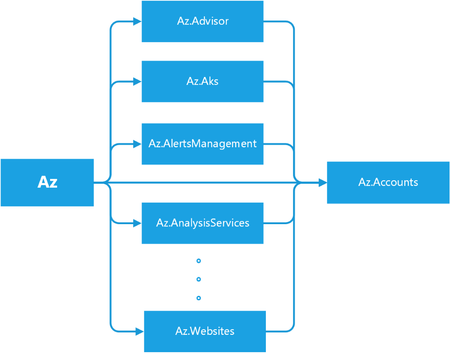
I. Background Azure PowerShell is a faster iterative product. We expect our customers to update their locally installed versions constantly to stay up to date. The most common way to update it is to use PowerShellGet, a tool built-in to PowerShell for module management. Usually, you run “Install-Module -Name Az” to install the latest versions of Azure PowerShell modules. When you run “Install-Module -Name $moduleName” to install a specific Az module, you’ll find both the target module and Az.Accounts are installed. Figure –1 Dependencies among Az Modules From the behaviors, you will find Az is a bundle of several modules, which depends on all sub-modules of Az rather than a simple single module. When running Install-Module, PowerShellGet fetches Az’s dependencies from the PowerShell gallery and installs the module itself with all the modules it depends on. Meanwhile, each sub-module of Az, for example, Az.Compute, also depends on Az.Accounts. That’s why Az.Accounts is always installed regardless of what Azure PowerShell module is installed. Figure 1, as shown above, illustrates the relationship between the Azure PowerShell modules. II. Problems 1. Uninstaller’s Negligence You might expect uninstallation to be a reverse process of installation. Unfortunately, it is not. “Uninstall-Module -Name Az” only removes the Az module without removing the sub-modules. A similar installation and uninstallation process happens to AzureRM. That’s why many people who are migrating from AzureRM to Az have difficulty removing the AzureRM modules. The package’s dependency information is stored in the original NuGet package but discarded when unpacking the package downloaded during the installation process. When uninstalling the Az module, PowerShellGet doesn’t know the relationship between Az and its sub-modules. Therefore, it only uninstalls the Az module and not the sub-modules. 2. Forgotten Preview Modules Azure PowerShell often adds new modules. When a new module first onboards, it is in preview mode. This allows for breaking changes in the subsequent versions. At this stage, its version starts with zero, such as 0.1.0. We have released 104 Az sub-modules, 45 of them are in preview mode. When a module goes stable, we upgrade its version to start with a non-zero value, such as 1.0.0, which means it is a general release. After generally released, a module can still release preview versions to include new unstable features. Almost every module contains a preview version before or now. For convenience, we refer to both as being in preview mode and the modules’ preview versions as preview modules. Most users are unaware of preview modules because they are released independently, not part of the Az module bundle. Sometimes it is difficult to find preview modules, especially the modules without general release versions unless you know their exact names. Since they are not in the Az module bundle, you can only install them individually. 3. Risky Update If you have several scripts based on Az modules, you need to check whether the upcoming update contains a breaking change (the upgrade of the major version number). “Update-Module” helps you to do the update, but it does everything silently. You must perform the verification manually before running it. III. Our solution: Az.Tools.Installer To solve the problems mentioned above, we are launching a new tool, Az.Tools.Installer. It’s based on PowerShellGet and solves the issues we’ve found with it. The first version has three cmdlets which cover installation, uninstallation, and updating. Compared to PowerShellGet, Az.Tools.Installer perceives the relationship between Az and sub-modules and can manipulate them as a bundle. It collects the information via “Find-Module” from PowerShellGet, which returns the dependency relationship between modules. We also use the cmdlet to retrieve the preview modules. As Az.Tools.Installer performs the search before the writing operation which causes its cmdlets to take more time to run than similar ones in PowerShellGet. A local cache might shorten the running time though. However, we’re not currently using local caching because it’s easily invalidated since Azure PowerShell changes rapidly. 1. Install-AzModule Table-1 The Syntax of Install-AzModule Install-AzModule [-MaximumVersion <String>] [-MinimumVersion <String>] [-RequiredVersion <String>] -Repository <String> [-RemovePrevious] [-RemoveAzureRm] [-Force] [-Name <String[]>] [-SkipPublisherCheck] [-WhatIf] [-Confirm] [<CommonParameters>] Install-AzModule -Repository <String> [-RemovePrevious] [-RemoveAzureRm] [-Force] -AllowPrerelease [-Name <String[]>] [-SkipPublisherCheck] [-WhatIf] [-Confirm] [<CommonParameters>] 1.1 Clear the Environment and Install Az with the Specific Version Install-AzModule -RequiredVersion 4.5.0 -Repository PSGallery –RemovePrevious – RemoveAzureRm [-Name Storage,Network] You can uninstall everything related to Azure PowerShell and AzureRM on your local machine and install all the modules from a target Az release easily with Install-AzModule. If “-RemovePrevious” is present, the cmdlet removes all the modules that the previous version installed. If “-RemoveAzureRm”, it removes all the modules from AzureRM. You can install modules with the Az release version by specifying “-RequiredVersion” or with module names by specifying "-Name". Note: Install-AzModule only installs Az sub-modules without the Az module itself. Please don’t add the “Az.” prefix when specifying the module name. The cmdlets in Az.Tools.Installer add this prefix automatically. 1.2 Install All Az Modules in both General and Preview Release Install-AzModule -Repository PSGallery –AllowPrerelease [-Name Storage,Network] This cmdlet also provides an easy way to install preview modules with the parameter “-AllowPrerelease”. When this parameter is present, the cmdlet installs all the Az modules with the latest versions whether they are in general release or preview without parameter “-Name”. It tries to retrieve all the Az modules in the target repository before the installation and consequently takes more time to run. The "-Name" parameter allows you to limit the installation of preview modules to only the ones specified. Note: The preview version of Az.Accounts is not going to be installed because it contains breaking changes which break other modules. 2. Uninstall-AzModule Table-2 The Syntax of Uninstall-AzModule Uninstall-AzModule [-RemoveAzureRm] [-Force] [-Name <String[]>] [-WhatIf] [-Confirm] [<CommonParameters>] Uninstall-AzModule [-MaximumVersion <String>] [-MinimumVersion <String>] [-RequiredVersion <String>] [-RemoveAzureRm] [-Force] [-Name <String[]>] -Repository <String> [-WhatIf] [-Confirm] [<CommonParameters>] Uninstall-AzModule [-RemoveAzureRm] [-Force] -AllowPrerelease [-Name <String[]>] - AllVersion [-WhatIf] [-Confirm] [<CommonParameters>] Uninstall-AzModule [-RemoveAzureRm] [-Force] -AllowPrerelease [-Name <String[]>] [-WhatIf] [-Confirm] [<CommonParameters>] Uninstall-AzModule [-RemoveAzureRm] [-Force] [-Name <String[]>] -AllVersion -Repository <String> [-WhatIf] [-Confirm] [<CommonParameters>] 2.1 Uninstall the Modules Attached to a Specific Az Uninstall-AzModule -Repository PSGallery [-RequiredVersion 4.6.1] [-Name Storage,Network] As an enhancement of Uninstall-Module, Uninstall-AzModule helps to uninstall the numerous modules related to Az. Firstly, you can uninstall the modules attached to a release version of Az using “-RequiredVersion” or “-MinimumVersion” or “-MaximumVersion”. If any of these are specified, by default the cmdlet removes all the modules attached to the Az version that fills the condition. If “-Name” is specified, the cmdlet removes the modules attached to the Az version for the specified name or list of names. If no version condition is provided explicitly, the latest Az version in the repository provided (PSGallery in the example above) is used. 2.2 Uninstall all the Az Modules Installed Uninstall-AzModule -Repository PSGallery –AllVersion [-Name Storage,Network] To remove all the Az modules on your local machine, you can specify “-AllVersion”. You can provide a list of modules with “-Name” to remove all the versions of the specified modules. 2.3 Uninstall Preview Modules Uninstall-AzModule -AllowPrerelease [-Name Storage,MySql] [-AllVersion] The cmdlet also enables you to remove preview modules in three different ways. By default, when “-AllowPrerelease” is specified, it removes all the modules’ latest version whether they’re in general release or preview. By using “-Name”, you can limit the uninstallation to the specified modules. Further, -AllVersion removes all versions of the modules related to Az. Note the difference between “Uninstall-AzModule -AllowPrerelease –AllVersion” and “Uninstall-AzModule –AllVersion”. The later only removes the modules in general release. If you want to clean up your environment thoroughly, you can run “Uninstall-AzModule -RemoveAzureRm -AllowPrerelease –AllVersion”. 3. Update-AzModule Table-3 The Syntax of Update-AzModule Update-AzModule [-Name <String[]>] [-RemovePrevious] [-Force] [-WhatIf] [-Confirm] [<CommonParameters>] 3.1 Generate a Report on What to Update Update-AzModule -WhatIf [-Name Accounts,Storage, Network] The advance of “Update-AzModule” compared to “Update-Module” is to provide you with a table of what modules to update and how to update them. “-WhatIf” prevents the cmdlet from performing the operation on the modules. It can be used to generate a report of what would happen without performing the operation. With “-Name”, you can check only the modules you are interested in. This also makes it complete faster. Table 1 shows an example of the “To-Update” report. Table-4 The Report of Modules Can be Updated Name ---- InstalledVersion ---------------- Repository ---------- VersionToUpgrade ---------------- Az.Accounts 1.9.2 PSGallery 1.9.3 Az.Automation 1.3.7 PSGallery 1.4.0 Az.Compute 4.2.1 PSGallery 4.3.1 Az.DataFactory 1.9.0 PSGallery 1.10.0 Az.DesktopVirtualization 1.0.0 PSGallery 2.0.0 Az.HDInsight 3.4.0 PSGallery 3.5.0 Az.KeyVault 2.0.0 PSGallery 2.1.0 Az.Maintenance 1.0.0 PSGallery 1.1.0 Az.Monitor 2.0.2 PSGallery 2.1.0 Az.RecoveryServices 2.11.1 PSGallery 2.12.0 Az.Resources 2.4.0 PSGallery 2.5.0 Az.Storage 2.4.0 PSGallery 2.5.0 3.2 Perform a replacement Update Update-AzModule [-Name Compute,Storage,Network] [-RemovePrevious] After viewing the report, you would like to perform the update. If you only want to update some of the modules, you can provide a list of module names with “-Name”. If you want to update all the modules that have newer versions, you can run “Update-AzModule”. If you want to replace the currently installed version with the latest version, specify “-RemovePrevious". Note that “Update-AzModule” only updates the modules currently installed. If you provide the name of a module not on your local machine, the cmdlet does nothing. Note: This cmdlet cannot be used to update preview modules. If, for example, Az.Storage releases a preview version newer than the existing general release version, run “Install-AzModule –Name Storage -Repository PSGallery –AllowPrerelease” to install the latest preview. IV. Limitation and Future Work PowerShell Core can import modules from the Windows PowerShell path, however, it has no rights to write to that path. This causes a conflict when you are trying to install a module with a version existing in the Windows PowerShell path. Therefore, Az.Tools.Installer warns you of the installation of Azure PowerShell in the Windows PowerShell path when you use it in PowerShell Core. One solution is to grant PowerShell Core administrator rights and another way is only to use Azure PowerShell either in Windows PowerShell or PowerShell Core. Further, PowerShell Core is recommended. Another obvious issue of Az.Tools.Installer is the performance. As it accesses the remote repository frequently to fetch the information and install the modules, you experience a delay for several minutes while the cmdlet runs. We are going to optimize it in a future release. Your feedback on Az.Tools.Installer is important to us. If you have any questions or suggestions, feel free to reach out to us on GitHub.18KViews2likes14CommentsAnnouncing a new login experience with Azure PowerShell and Azure CLI
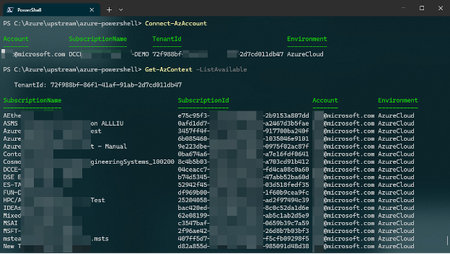
“You never get a second chance to make a first impression” said Will Rogers, this also applies to the Azure CLI and Azure PowerShell with the first command to execute. After hearing from our customers, our team spent the last few months improving the first experience of the Azure client tools. The new experience prioritizes access to usable information and shorter path to selecting your subscription.13KViews3likes16CommentsAnnouncing General Availability of Terraform Azure Verified Modules for Platform Landing Zone (ALZ)
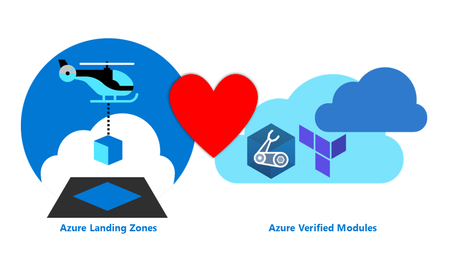
Azure Verified Modules ALZ ❤️ AVM. We are moving to a more modular approach to deploying your platform landing zones. In line with consistent feedback from you, we have now released a set of modules that together will deploy your platform landing zone architecture (ALZ). Azure Verified Modules for Platform Landing Zones (ALZ) is collection of Azure Verified Modules that are composed together to create your Platform Landing Zone. This replaces the existing CAF Enterprise Scale module that you may already be familiar with. The core Azure Verified Modules that are composed together are: Management Groups and Policy Pattern Module: avm-ptn-alz Management Resources Pattern Module: avm-ptn-management-alz Hub Virtual Networking Pattern Module: avm-ptn-hubnetworking Virtual Network Gateway Pattern Module: avm-ptn-vnetgateway Virtual WAN Networking Pattern Module: avm-ptn-virtualwan Private DNS Zone for Private Link Pattern Module: avm-ptn-network-private-link-private-dns-zones This means that you can now choose your own adventure by selecting only the modules that you need. It also means we can add new features faster and allows us the opportunity to do more rigorous testing of each module. To improve deployment reliability, we now use our own Terraform provider. The provider generates data for use by the module and does not directly deploy any resources. The move to a provider allows us to add many more features and checks to improve your deployment reliability. ALZ IaC Accelerator updates for Terraform The Azure Landing Zones IaC Accelerator is our recommended approach for deploying the Terraform Azure Verified Modules for Platform Landing Zone (ALZ). The Azure Verified Modules for Platform Landing Zone is now our default selection for the Terraform ALZ IaC Accelerator. This module will be the focus of our development and improvement efforts moving forward. The module implements best practices by default, including multi-region and availability zones for resiliency. The ALZ IaC Accelerator bootstrap continues to implement best practices, such as version control and Workload identity federation security. Along with supporting the Azure Verified Modules for Platform Landing Zone (ALZ) approach, we have also made many enhancements to the ALZ IaC Accelerator process. A summary of the improvements include: We now support HCL (HashiCorp Configuration language) tfvars file as the platform landing zone configuration file format We have introduced a Phase 0 to help you plan for your ALZ IaC Accelerator deployment We have introduced the concepts of Scenarios and Options to simplify the decisions you need to make Platform landing zone configuration file Before the introduction of the Azure Verified Modules for Platform Landing Zone (ALZ) starter module the platform landing zone configuration file was supplied in YAML format. Due to the lack of support for YAML in Terraform, we had to then convert this to JSON. Once converted to JSON the configuration file lost all it's ordering, formatting and comments. This made day 2 updates to the configuration very cumbersome. With the support for the tfvars file (in HashiCorp Configuration Language format), we are now able to pass the configuration file in its original format to the version control system repository. This makes for a much easier day 2 update process as the file retains it's ordering, comments and formatting as defined by you. Phase 0 Phase 0 is a new planning phase we have added to the documentation. This phase takes you through 3 sets of decisions you need to make about the ALZ IaC Accelerator deployment: Bootstrap decisions Platform Landing Zone Scenarios Platform Landing Zone Options In order to assist with this, we also provide a downloadable Excel checklist , which lists all the decisions so you can consider them up front prior to completing any configuration file updates. Phase 0 guides you through this process and provides explanations of the decisions. The Bootstrap decisions relate to the resources deployed to Azure and the configuration of your Version Control System required for the Continuous Delivery pipeline. These decisions are not new to the ALZ IaC Accelerator, but we now provide more structured guidance. Platform Landing Zone Scenarios The Scenarios are a new concept introduced for the Azure Verified Modules for Platform Landing Zone (ALZ) starter module. We aim to cover the most common Platform landing zone use cases we hear requested from partners and customers with the ALZ IaC Accelerator. These include: Multi-Region Hub and Spoke Virtual Network with Azure Firewall Multi-Region Virtual WAN with Azure Firewall Multi-Region Hub and Spoke Virtual Network with Network Virtual Appliance (NVA) Multi-Region Virtual WAN with Network Virtual Appliance (NVA) Management Groups, Policy and Management Resources Only Single-Region Hub and Spoke Virtual Network with Azure Firewall Single-Region Virtual WAN with Azure Firewall For each scenario we provide an example Platform landing zone configuration file that is ready to deploy immediately. We know that customers will want to modify some of the settings and that is where Options come in. NOTE: At the time this blog post was published, we support the 7 Scenarios listed above. We may update or add to these Scenarios based on feedback we hear from you, so keep an eye on our documentation. Platform Landing Zone Options The Options build on the Scenarios. For each Scenario, you can choose to customise it with one or more Options. Each Options includes detailed instructions of how to update the Platform landing zone configuration file or introduce library files to implement to the option. The Options are: Customise Resource Names Customize Management Group Names and IDs Turn off DDOS protection plan Turn off Bastion host Turn off Private DNS zones and Private DNS resolver Turn off Virtual Network Gateways Additional Regions IP Address Ranges Change a policy assignment enforcement mode Remove a policy assignment Turn off Azure Monitoring Agent Deploy Azure Monitoring Baseline Alerts (AMBA) Turn off Defender Plans Implement Zero Trust Networking NOTE: At the time this blog post was published, we support the 14 Options listed above. We may update or add to these Options based on feedback we hear from you, so keep an eye on our documentation. Azure Landing Zones Library Another new offering is the Azure Landing Zones Library. This is an evolution of the library concept in the caf-enterprise-scale module. Principally, the Library allows us to decouple the update cycle of the ALZ architecture, from the module and provider. We are separating the data from the deployment logic. This allows you to update the module to take advantage of a bug fix, without having to change the policies that are deployed. Something that wasn't easily possible before. Conversely, you are able to update to the latest policy refresh of Azure Landing Zones without updating the module itself. The Library has its own documentation site, which introduces the concepts. We plan to make the library the single source of truth for all Azure Landing Zones implementation options (e.g. Portal, Terraform and Bicep) in the future. Azure Landing Zones Documentation Site Furthermore, we have a new place to go for all technical documentation for Azure Verified Modules for Platform Landing Zones (ALZ). With the move to multiple modules, and the new accelerator all having multiple GitHub repositories, we felt the need to centralize the documentation to make it the one place to go to get technical details. We currently have documentation for the Accelerator and Terraform, with Bicep coming soon. The new vanity URL is: https://aka.ms/alz/tech-docs. Please let us know what you think! What about ALZ-Bicep? Finally, some of you may be wondering what the future for our Bicep implementation option (ALZ Bicep) for Azure Verified Modules for Platform Landing Zones (ALZ) may be with this evolution on the Terraform side. And we have good news to share! Work is underway to also build the next version of ALZ in Bicep, which will be known as “Bicep Azure Verified Modules for Platform Landing Zone (ALZ)”. This will also use the new Azure Landing Zones Library and be built from Azure Verified Modules (where appropriate). We are currently looking to complete this work before August 2025, if not a lot sooner than this; as we are making good progress as we speak! But for now, for Bicep you do not do anything and continue to use ALZ Bicep via the ALZ IaC Accelerator and we will provide more updates on the next version of Bicep ALZ in the coming months! Staying up-to-date We highly recommend joining, or watching back, our quarterly Azure Landing Zones Community Calls, to get all the latest and greatest from the ALZ team. Our next one is on the 29th January 2025 and you can find the link to sign up to attend or watch back previous ones at: aka.ms/ALZ/Community We look forward to seeing you all there soon!10KViews14likes0Comments