powershell
29 TopicsShould I use automation account workbook or a azure function?
I have a powershell script I want to run daily (change language and region settings for onedrive mysites) I'm wondering what the best approuch would be: use a workbook with azure automation? Or maybe use an Azure function? thanks for any inputSolved38KViews0likes2CommentsAzure DevOps - How to monitor the files & folders placed into the Build Pipeline Workfolder
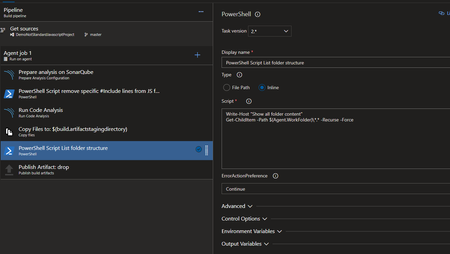
When we are building a new Pipeline into Azure DevOps, we don't have any visibility on the server itself and his content placed into work folder. In many situation, like debugging, that vision is really useful to find a file or a path to apply into another task (like Code Coverage report path). To do that, the simplest option is to place into the pipeline flow one PowerShell step with this simple execution. In Yaml mode: - powershell: | Write-Host "Show all folder content" Get-ChildItem -Path $(Agent.WorkFolder)\*.* -Recurse -Force errorActionPreference: continue displayName: 'PowerShell Script List folder structure' continueOnError: true In visual editor mode: At the next execution, you will have into the Pipeline execution log all folders and files placed into the agent workplace like: You can use the search button or View raw log option to look the file or folder you are looking for. That task could be disable in standard usage, and enable only when you need to debug. Fabrice Romelard29KViews0likes0Comments
Azure Powershell DSC vs Ansible
Hey Guys, I just want to find out what are you using for Desired State Configuration on Azure. Do you use built in Powershell DSC or you are using Ansible with DSC enabled for Windows Machines? I am in the process of deciding which solution should the best for us. Also I would like to automate on-prem infrastructure. Which solution do you use? Regards, Wojciech22KViews0likes7Comments
Get AzADGroupMembers from nested groups
Hi, I'm trying to get all members of a group (including nested groups members) to add to a teams private channel. We have a script to add members of a group to a private channel, but it will not add nested groups members. $members = Get-AzADGroupMember -ObjectId 'source_groupID_here' | select mail $tal = 0 foreach ($member in $members) { $User = $member.mail Add-TeamChannelUser -GroupId 'teams_groupID_here' -DisplayName 'Private_channel_name' -user $User $tal += 1 } $tal Is there a way to add those who are members of the nested groups without having to add each nested group individually?19KViews1like3CommentsConnect-AzAccount with Managed Service Identity
I'm running PowerShell in the context of an Azure Web App that has a System Managed Service Identity configured. Currently, I can access the Key Vault by doing this: $MsiHeader = @{'Secret' = $env:MSI_SECRET} $VaultResource = "<a href="https://vault.azure.net" target="_blank">https://vault.azure.net</a>" $ApiVersion = "2017-09-01" $VaultUri = "{0}?resource={1}&api-version={2}" -f $env:MSI_Endpoint, $VaultResource, $ApiVersion $VaultHeader = @{ Authorization = "Bearer $($VaultAuth.access_token)" } $Secret = Invoke-RestMethod "<a href="https://MyVault.vault.azure.net/secrets/testsecret?api-version=7.0" target="_blank">https://MyVault.vault.azure.net/secrets/testsecret?api-version=7.0</a>" -Headers $VaultHeader This works just fine for accessing the vault, but is it possible to use the MSI to connect to Azure resources using the Az PowerShell module? If so, how can this be done? I can't quite seem to figure out how to do this properly. I've tried hacking at it like this: $MsiHostName,$MsiPort = $env:MSI_ENDPOINT -replace 'http://' -replace '/MSI/token/' -split ':' $null = Connect-AzAccount -ManagedServiceHostName $MsiHostName -ManagedServicePort $MsiPort -ManagedServiceSecret $env:MSI_SECRET But this doesn't seem to work and I can't find any examples of this on the web. Any help with this is much appreciated!17KViews0likes1Comment
List ALL ARM and ASM/Classic resources with AzureRM PowerShell?
I've noticed that the PowerShell cmdlet Get-AzureRMResource (from AzureRM module v6.12.0) returns some classic resources types, which is great and helps for what I need to do (get an inventory of all resources across all of our subscriptions). However, I'm hoping to find out if this is a dependable and complete listing of all classic resources in the subscription? or are there still classic resources that are not exposed to the ARM cmdlets/API? Some of the resource types returned are Microsoft.ClassicCompute/domainNames Microsoft.ClassicCompute/virtualMachines Microsoft.ClassicStorage/storageAccounts Note: I'm running the commands under as an ARM "Reader" RBAC role holder at the subscription level, but I do not have ASM 'administrator' or 'co-administrator' rights.9.5KViews0likes3Comments
Azure Automation Runbooks using Powershell: Push notifications error?
I'm trying to run some PnP PowerShell commands in an Azure Runbook (e.g. Get-PnPContentType, Apply-PnPProvisioningTemplate, etc. ) over a SharePoint site, but it keeps returning the error below: The Push Notifications feature is not activated on the site The correct modules have been imported and it only errors on some commands. Running the commands in a PowerShell window with the same credentials doesn't produce any errors, and activating the 'Push Notifications' feature manually and retriggering the Runbook won't produce any error output, but will say that the Runbook failed to run 3 times.4.3KViews0likes1CommentHow to authenticate PowerShell cmdlets in Runbooks with managed identities?
Hi there. This is regarding Azure Automation Runbooks. I'm attempting to replace AzureRunAs connections with user/system managed identities. One problem I ran into with this is that I have no idea how to get the PowerShell cmdlet's used in those Runbooks to authenticate. For example for a Runbook that relies on the ExchangeOnline cmdlet's I was able to use the AzureRunAs connections credentials via Get-AutomationConnection –Name "AzureRunAsConnection". Since this AzureRunAs connection is also an App Registration in Azure, I could assign API permissions to them, like for ExchangeOnline. The AzureRunAs connection also comes with a certificate that I could make use of for authentication purposes. On way I thought I could achieve this is for example with: Copy Connect-ExchangeOnline -ManagedIdentity -Organization <tenant>.onmicrosoft.com -ManagedIdentityAccountId <id> So to summarize, my question is: How should I authenticate PowerShell cmdlet's without AzureRunAs connections in Runbooks? Thanks for your help.2.4KViews0likes2Comments
Azure Pipeline - Powershell Task Output
Hello all, I am looking to leverage Azure Pipelines to replace an existing scheduled task that I have running on an on-premise server. Today, my script connects to a SQL database using the dbatools PowerShell module, runs a few queries, and dumps the files to a specific file format. Then uploads these files to an SFTP server. My repository contains the SQL files to run, the Get-Data.ps1 script that connects to the database, retrieves the data, and exports it to the format necessary. I also have a Send-Data.ps1 which takes the files created from Get-Data.ps1 and SFTPs them to an SFTP server. I've got 1 PowerShell script to retrieve and output the data to files, and another to SFTP the files to an SFTP server. My Send-Data.ps1 script has 3 parameters - localpath, remotepath and credential. I am curious how I could have the Get-Data.ps1 script write as output the data required for "localpath" parameter, and then pass this to the Send-Data.ps1 as a 2nd task in the pipeline? Additionally, is there a recommended way to pass credentials into PowerShell scripts in a pipeline? I saw where I can leverage the library to store a username and password to pass into a script. But this isn't a PSCredential object. Would I do this by using Azure Keyvault? Could I do it using the library and the inline script part of the pipeline? Or read it in from the key vault/library, create the PSCredential object, store that as a variable(?) and pass it into the PowerShell script task? Thanks in advance for any input. Steve2.4KViews0likes0Comments
How to pass ARM Variable as parameter of PowerShell in ARM
Hi There, I am working on a ARM template and it is working fine however I want to pass ARM variable(s) should be passed in the argument rather hardcoding. Like same storage account name should be used in the arguments. I want to pass the same variable storage account name in the line number 192 -storageaccount Here is the ARM { "$schema": "https://schema.management.azure.com/schemas/2019-04-01/deploymentTemplate.json#", "contentVersion": "1.0.0.0", "parameters": { "functionAppName": { "type": "string", "defaultValue": "[format('func-{0}', uniqueString(resourceGroup().id))]", "metadata": { "description": "The name of the Azure Function app." } }, "storageAccountType": { "type": "string", "defaultValue": "Standard_LRS", "allowedValues": [ "Standard_LRS", "Standard_GRS", "Standard_RAGRS" ], "metadata": { "description": "Storage Account type" } }, "location": { "type": "string", "defaultValue": "[resourceGroup().location]", "metadata": { "description": "Location for all resources." } }, "functionWorkerRuntime": { "type": "string", "defaultValue": "node", "allowedValues": [ "dotnet", "node", "python", "java" ], "metadata": { "description": "The language worker runtime to load in the function app." } }, "functionPlanOS": { "type": "string", "defaultValue": "Windows", "allowedValues": [ "Windows", "Linux" ], "metadata": { "description": "Specifies the OS used for the Azure Function hosting plan." } }, "functionAppPlanSku": { "type": "string", "defaultValue": "S1", "allowedValues": [ "S1", "S2", "S3" ], "metadata": { "description": "Specifies the Azure Function hosting plan SKU." } }, "createfunctionkey": { "type": "string" }, "apimanagementkey": { "type": "securestring", "defaultValue": "[base64(newGuid())]" }, "linuxFxVersion": { "type": "string", "defaultValue": "", "metadata": { "description": "Only required for Linux app to represent runtime stack in the format of 'runtime|runtimeVersion'. For example: 'python|3.9'" } }, "useridentity": { "type": "string" }, "scriptname": { "type": "string" } }, "variables": { "hostingPlanName": "[parameters('functionAppName')]", "storageAccountName": "[concat(uniquestring(resourceGroup().id), 'azfunctions')]", "functionhostkey": "[parameters('apimanagementkey')]", "isReserved": "[if(equals(parameters('functionPlanOS'), 'Linux'), true(), false())]" }, "resources": [ { "type": "Microsoft.Storage/storageAccounts", "apiVersion": "2021-02-01", "name": "[variables('storageAccountName')]", "location": "[parameters('location')]", "sku": { "name": "[parameters('storageAccountType')]" }, "kind": "Storage" }, { "type": "Microsoft.Web/serverfarms", "apiVersion": "2021-02-01", "name": "[variables('hostingPlanName')]", "location": "[parameters('location')]", "sku": { "tier": "Standard", "name": "[parameters('functionAppPlanSku')]", "family": "S", "capacity": 1 }, "properties": { "reserved": "[variables('isReserved')]" } }, { "condition": "[equals(parameters('createfunctionkey'), 'yes')]", "type": "Microsoft.Web/sites/host/functionkeys", "apiVersion": "2020-06-01", "dependsOn": [ "[resourceId('Microsoft.Web/sites', parameters('functionAppName'))]" ], "name": "[concat(parameters('functionAppName'),'/default/apiManagementKey')]", "properties": { "name": "apiManagementKey", "value": "[variables('functionhostkey')]" } }, { "type": "Microsoft.Web/sites", "apiVersion": "2021-02-01", "name": "[parameters('functionAppName')]", "location": "[parameters('location')]", "kind": "[if(variables('isReserved'), 'functionapp,linux', 'functionapp')]", "dependsOn": [ "[resourceId('Microsoft.Web/serverfarms', variables('hostingPlanName'))]", "[resourceId('Microsoft.Storage/storageAccounts', variables('storageAccountName'))]" ], "properties": { "reserved": "[variables('isReserved')]", "serverFarmId": "[resourceId('Microsoft.Web/serverfarms', variables('hostingPlanName'))]", "siteConfig": { "alwaysOn": true, "linuxFxVersion": "[if(variables('isReserved'), parameters('linuxFxVersion'), json('null'))]", "appSettings": [ { "name": "AzureWebJobsStorage", "value": "[concat('DefaultEndpointsProtocol=https;AccountName=', variables('storageAccountName'), ';EndpointSuffix=', environment().suffixes.storage, ';AccountKey=',listKeys(resourceId('Microsoft.Storage/storageAccounts', variables('storageAccountName')), '2019-06-01').keys[0].value)]" }, { "name": "FUNCTIONS_EXTENSION_VERSION", "value": "~4" }, { "name": "FUNCTIONS_WORKER_RUNTIME", "value": "[parameters('functionWorkerRuntime')]" }, { "name": "WEBSITE_NODE_DEFAULT_VERSION", "value": "~14" }, { "name": "WEBSITE_RUN_FROM_PACKAGE", "value": "1" } ] } } }, { "type": "Microsoft.Resources/deploymentScripts", "name": "[parameters('scriptname')]", "apiVersion": "2020-10-01", "location": "[parameters('location')]", "kind": "AzurePowerShell", "identity": { "type": "UserAssigned", "userAssignedIdentities": { "[parameters('useridentity')]": { } } }, "properties": { "azPowerShellVersion": "3.0", "primaryScriptUri": "https://raw.githubusercontent.com/INGourav/Azure-Resources/master/KeyVaultSecretUsingSAS.ps1", "arguments": "-azsub 'Goukumar' -rg 'pstest' -keyvault 'pstestk' -storageaccount 'pstests' -secretname 'secretarm333'", "timeout": "PT30M", "forceUpdateTag": "utcNow()", "retentionInterval": "PT1H", "cleanupPreference": "OnSuccess" } } ] }Solved2.4KViews0likes1Comment