power query
50 Topics
Changes in date after importing från query in excel
Hi! I've got an excel file with data (different measurements for water quality) from january 1980 to december 2018. I open the table in power query från excel to make quick changes in format in a few columns and deleting empty rows etc. When I save and apply the changes the dates in the table ain't the same as before. I can see that for example the dates starts with january 1984 and ends in year 2022... The new rows still has data in the rest of the columns. When I check a random other year, for example april 2014, the measurements ain't the same as in the original file for that date either. I know that the file, when it was first brought to use a number of years ago, was made in Mac-format for the dates, and now we use PC. I've heard that Mac and PC have different start-dates in their formats, but even if that is what's wrong I don't know how to fix it. I have also added "19" in the date-column in the rows before year 2000 because the users had only been writing "801012" instead of "19801012". I don't know if adding 19 by merging two columns matters here. The pivoted table is about one million rows, so its quite big which gives me a little to none overview of the data which makes it even harder to see if there is a pattern to the changes. I've been struggling with this for many hours now and would be greatful for any guess in how to solve this! /Mary933Views0likes1Comment
Power Query: Enable "Use fuzzy matching to perform the merge" Option
Hello, I am using Excel 2016 version with the Fuzzy Lookup Add in already installed. For some reasons, I can not see the option "Use fuzzy matching to perform the merge" under the Join Kind"'s Merge field, at the Power Query Merge to join two tables. Please, let me know how I can enable this Fuzzy merging in the Powerquery. Thank you, Sala.12KViews0likes5CommentsExcel formatting cells missing
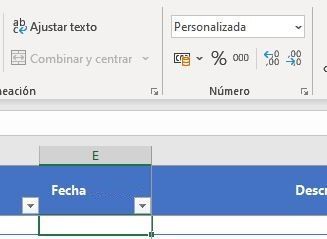
Hi, After migrating to suite Office365, we have faced some issues with the custom format applied for some cells in our excel files. I´ll try to explain it next: We have a table with all my columns formatted, is like a template for us, the column/cells with the problem has a custom format like 'dd/mm/aaaa h:mm': *Personalizada = Customized/Custom This table is supposed to be fill it with some data extracted from our Oracle DB. Once we import data using powerquery and loaded it to the table we miss the format: We used to use this "template" before to update the Office suite to "Office 365" and we had no problem, the custom format was maintained. We was wondering if it could be related to the new version of Excel and if exists some solution to be applied... Thanks in advance.5.1KViews0likes0Comments
Power Query Request to external Sharepoint / Log-In fails
Hi, I'm trying to make a Power Query to an external (client) Sharepoint. The URL identify the document and the connection is established... but no data is loaded. In then Navigator the table preview shows the header "Kind/Name/Children/Text" (?) and the Web Preview shows the Log-In dialog. I assume... the Log-In is the problem... but where to fill in the Log-In data for the query? Thx Goetz1KViews0likes1CommentPower Query Data Table Scheduled Refresh
Hello, I have created a custom Power Query that is retrieving database information from several tables. This data is mostly text based and I'd like a nicer way to present it. I believe this is possible using Microsoft Flow with Word Templates. My vision for this Flow is to have it run once per week based on a refreshed version of the spreadsheet. I am able to create a flow to access the rows of this data but in order for it to be fully automated I would need the Power Query data to be updated once a week. Is there a way to allow the spreadsheet to refresh itself weekly ahead of the execution of the Flow? In order for this to be truly seamless, I'd like to remove all manual aspects of it. I have seen some info about using Sharepoint for this purpose but I do not see any options for a scheduled refresh of the back-end data. Is there any solutions out there for this purpose?972Views0likes0CommentsMerge Question Between Data Tables with Shared Column
Hello Everyone, I am fairly new to Excel Power Query but I am really liking this tool and what it can do. I am currently using it to access an SQL database. I am familiar with how to Merge queries of two different tables around a shared column. My question is regarding something I haven't encountered up to now. To be more specific my company uses a maintenance tracking program that is backed up with the SQL table. I can pretty easily access the table I need to get basic information about a particular job ("WO" for Work Order). There are a couple fields I am after though that involve written descriptions of the problem and work done to repair the issue. This is represented in the first table by a unique identifier. These terms are a 9-digit number and they are respectively called "Description_ID" and "Findings_ID". To obtain the actual text data, I need to head over to a separate table called "WO_Remarks". It is a 2-column data table with a 9-digit number in the first column and the actual raw text in the second. As it turns out, this table has combined both "Description_ID" and "Findings_ID" into a single column all mixed together. My question is, is there a way for Power Query to parse out the text entries for each of the columns in the first table. Ideally I'd like to merge them so that the larger and more descriptive "WO" table would include the "description" and "findings" text for reporting purposes. Let me know if any of this is unclear and I'd be happy to provide some screen shots. Rgds, RobSolved2.2KViews0likes5Comments