postgres
144 TopicsAnnouncing a new IDE for PostgreSQL in VS Code from Microsoft
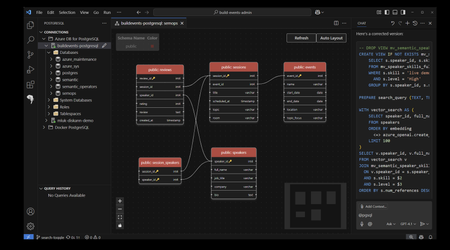
We are excited to announce the public preview of the brand-new PostgreSQL extension for Visual Studio Code (VS Code), designed to simplify PostgreSQL database management and development workflows. With this extension, you can now manage database objects, draft queries with intelligent assistance from context-aware IntelliSense and our ‘@pgsql’ GitHub Copilot agent—all without ever leaving your favorite code editor. Addressing Developer Challenges Many of you face hurdles in managing time effectively, with 41% of developers struggling with task-switching, according to the 2024 StackOverflow Developer Survey. Additionally, the 2024 Stripe Developer Coefficient Report reveals that developers spend up to 50% of their time debugging and troubleshooting code and databases. These inefficiencies are further compounded by the absence of integrated tools that unify database management and application development. The PostgreSQL extension for VS Code addresses these challenges head-on by integrating Postgres database tools and the @pgsql GitHub Copilot agent, providing a unified application development and database management experience. By integrating robust features such as Entra ID authentication for centralized identity management and deep Azure Database for PostgreSQL integration, this extension empowers you to focus on building innovative applications rather than wrestling with fragmented workflows. Key Features The public preview release of the PostgreSQL extension for VS Code introduces a suite of powerful new capabilities that enhance productivity and streamline development for application developers working with Postgres. Schema Visualization Schema visualization is a breeze with our ‘right-click’ context menu options. o Right-click on the database entry in the Object Explorer and select “Visualize Schema” Single click to expand. Database aware GitHub Copilot AI assistance directly within VS Code providing PostgreSQL database context reduces the PostgreSQL learning curve and improves developer productivity. Simplified interaction with PostgreSQL databases and development tools using natural language. Commands such as "@pgsql" enable you to query databases, optimize schemas, and execute SQL operations with ease. Context menus, such as “Rewrite Query”, “Explain Query”, “Analyze Query Performance” provide AI Intelligence inside the query editor window. Real-time, expert-level guidance to help keep PostgreSQL databases performant and secure and improve code quality. PostgreSQL Copilot Context Menu Options Single click to expand. Using the PostgreSQL Copilot Context Menu, Single click to expand. GitHub Copilot Chat Agent Mode GitHub Copilot Chat agent mode provides a database context aware intelligent assistant that can perform multi-stage tasks, moving beyond the question-and-answer chat experience. Agent mode allows the Copilot to bring in additional context from your workspace and, with permission, it can write and debug code on its own. Agent mode transforms PostgreSQL development by providing real-time, AI-driven guidance that simplifies complex tasks like app prototyping, debugging, schema optimization, and performance tuning. In this example, we’ll ask the agent to create a new database on a specific server in my Saved Connections and enable the PostGIS extension. Single click to expand. The @pgsql agent begins by listing the server connections, connecting to the server ‘postgis’, drafts the script to modify the database and waits for permission to continue before making changes. Database modifications require explicit permission from the user. Add Database Connections with Ease Simplified connection management for local and cloud-hosted PostgreSQL instances. Support for multiple connection profiles and connection string parsing for easy setup. Direct browsing and filtering of Azure Database for PostgreSQL deployments. Integration with Entra ID for centralized security and identity management. Connect with ease to your existing Azure Database for PostgreSQL deployments with the “Browse Azure” option in the “Add New Connection” menu. Single click to expand. Connect to local Docker deployments with the Parameters or Connection String option. Single click to expand. Password-less authentication with Entra Id Streamlined Authentication: Eliminates the need for manual login, offering a seamless integration experience for you. Automatic Token Refresh: Ensures uninterrupted connectivity and minimizes the risk of authentication timeouts during development. Enhanced Security: Provides robust protection by leveraging Entra-ID's secure authentication protocols. Time Efficiency: Reduces overhead by automating token management, allowing you to focus on coding rather than administrative tasks. Enterprise Compatibility: Aligns with corporate security standards and simplifies access to PostgreSQL databases in enterprise environments. User Consistency: You can use your existing Entra-ID credentials, avoiding the need to manage separate accounts. Database Explorer Provides a structured view of database objects such as schemas, tables, and functions. Enables creation, modification, and deletion of database objects. Single click to expand. Query History Session query history is available below the Object Explorer. This allows you to quickly review previously run queries for reuse. Single click to expand. Query Editing with Context-aware IntelliSense Context-aware IntelliSense for auto-completion of SQL keywords, table names, and functions. Syntax highlighting and auto-formatting for improved query readability. Query history tracking for reusing previously executed queries. Single click to expand. What Sets the PostgreSQL Extension for VS Code Apart? The PostgreSQL extension for VS Code stands out in the crowded landscape of developer database management tools due to its unparalleled functionality and intuitive design. Here’s what makes it special: Enhanced Productivity: Features like context-aware IntelliSense and SQL formatting save time and minimize errors. pgsql GitHub Copilot Chat agent: Database and workspace context awareness, enabling smarter and more contextually relevant assistance for developers – combined with the ability to perform multi-step tasks. Streamlined Onboarding: The Connection Manager ensures you can get started within minutes. Improved Security: Entra ID integration provides robust access control and centralized identity management, including the ability to browse your Azure Database for PostgreSQL instances. Comprehensive Toolset: You can manage database objects, execute queries, and deploy instances all within VS Code. Seamless Cloud Integration: Deep integration with Azure Database for PostgreSQL simplifies cloud database management. Getting Started with the PostgreSQL extension for Visual Studio Code Installing the PostgreSQL extension for VS Code is simple: Open the Extensions view in VS Code. Search for "PostgreSQL" in the Extensions Marketplace. Select and install the Preview PostgreSQL extension with the blue elephant seen in the screenshot below. xtension ID: (ms-ossdata.vscode-pgsql) Also available in the online Visual Studio Code Marketplace. Enabling the PostgreSQL GitHub Copilot Chat You will need the GitHub Copilot and GitHub Copilot chat extensions installed in VS Code to be able to log into their GitHub Account and use "@pgsql" in the chat interface to interact with their PostgreSQL database. Feedback and Support We value your insights. Use the built-in feedback tool in VS Code to share your thoughts and report issues. Your feedback will help us refine the extension and ensure it meets the needs of the developer community. Regarding the standard preview license language included in this first release - Our goal is to ensure this extension is widely available and consumable by all Postgres users equally. We’re going to update the license. Stay tuned for updates. Get Started The PostgreSQL extension for VS Code offers significant enhancements to development efficiency and productivity. We encourage you to explore the public preview today and experience improved workflows with PostgreSQL databases. To learn more and get started, visit: https://aka.ms/pg-vscode-docs Special thanks to Jonathon Frost, Principal PM for all of his work on the @pgsql GitHub Copilot.173KViews34likes16Comments
End-to-end workload observability with Query Store for primary and replicas
Query performance doesn’t stop at the primary Most PostgreSQL architectures don’t run on a single node anymore. Reads get offloaded. Replica chains grow. And when performance issues hit, the hardest part is often simple: where did the queries actually run? With the latest query store capabilities in Azure Database for PostgreSQL flexible server, you can now capture workload executed not just on the primary, but also on read replicas—including cascading read replicas—and export the captured runtime stats, wait stats, and query text into Azure Monitor Logs (Log Analytics workspace / LAWS). See the real hotspot: isolate which node (primary vs replica) is slow. Know why: break down time by waits (CPU, I/O, locks) per query. Connect the dots: correlate query IDs to query text, and inspect sampled parameters locally in azure_sys on the primary when you need input context (parameters aren’t exported to LAWS). Centralize analysis: query everything with KQL in LAWS, across servers. What you’ll build This post walks through a reproducible demo that provisions a primary server, a read replica, and a cascading read replica, then runs a TPC-H–based workload across all three to generate query store data you can analyze locally and in Log Analytics. Enable query store capture (including query text) and parameter sampling for parameterized queries. Enable wait sampling so query store can record wait statistics. Export runtime stats, wait stats, and SQL text to LAWS using resource-specific tables. Validate capture on read replicas and cascading read replicas (not just the primary). Prerequisites Azure CLI logged in (az login) and permission to create a resource group, Log Analytics workspace, and PostgreSQL flexible servers. psql and curl available on your machine. PostgreSQL flexible server on General Purpose or Memory Optimized tier (query store and replicas aren’t supported on Burstable). PostgreSQL 14+ to test out cascading replicas. Networking: the script opens firewall access broadly for demos—tighten for production. Architecture (primary + replica chain + LAWS) You’ll deploy four resources: Primary server: read/write node. Read replica (level 1): read-only node created from the primary. Cascading read replica (level 2): read-only node created from replica level 1. Log Analytics workspace (LAWS): central place to query Query Store telemetry across all nodes. If Diagnostic Settings is properly configured, each server streams query store telemetry to LAWS—but how it’s kept locally differs by role. On the primary, query store data is recorded in-memory, then persisted locally in the azure_sys database, and then exported to LAWS. On read replicas (including cascading replicas), query store data is recorded in-memory only and then exported to LAWS. Bottom line: use LAWS for fleet-wide visibility, and use the primary’s azure_sys when you need deep local inspection (like parameter samples). Deploy the demo environment The fastest way to reproduce the scenario is to run the end-to-end bash script which you can download from https://raw.githubusercontent.com/Azure-Samples/azure-postgresql-query-store/refs/heads/main/may2026/script/query_store_demo.sh Save the file to a local directory in your Linux shell, and name the file query_store_demo.sh. To invoke the script, at minimum, you must assign a string password for the administrator login of the instances of the flexible servers it creates, and invoke the script like this: ADMIN_PASSWORD=<Your_Strong_Password> ./query_store_demo.sh Optionally, you can also override default values for other environment variables used by the script: Variable Purpose Default SUBSCRIPTION_ID Azure subscription ID to use (current default subscription) BASE_NAME Base name for all resources (used in naming servers, resource groups, etc.) pgqswait{YYYYMMDDHHMMSS} RESOURCE_GROUP Azure resource group name rg-{BASE_NAME} LOCATION Azure region for resources southeastasia PRIMARY_SERVER Name of primary PostgreSQL server {BASE_NAME}-primary REPLICA_1 Name of first-level read replica {BASE_NAME}-readreplica REPLICA_2 Name of second-level cascading read replica {BASE_NAME}-cascadereadreplica LOG_ANALYTICS_WORKSPACE Log Analytics workspace name law-{BASE_NAME} LOG_ANALYTICS_LOCATION Azure region for Log Analytics workspace southeastasia ADMIN_USER PostgreSQL admin username pgadmin ADMIN_PASSWORD PostgreSQL admin password (REQUIRED) SKU_NAME PostgreSQL server SKU (compute tier) Standard_D4ds_v5 TIER PostgreSQL pricing tier GeneralPurpose STORAGE_SIZE Storage size in GB 64 VERSION PostgreSQL version (minimum 14 for cascading replicas) 17 PRIMARY_DATABASE Initial database name postgres SQL_BASE_URL Base URL for downloading SQL scripts https://raw.githubusercontent.com/Azure-Samples/azure-postgresql-query-store/refs/heads/main/may2026/script/query_store_demo.sh TPCH_DDL_URL URL for TPC-H schema DDL file {SQL_BASE_URL}/schema/tpch_ddl.sql WORKLOAD_REPETITIONS Number of times to execute each workload query (minimum 5) 10 AUTO_APPROVE Skip confirmation prompt and proceed automatically false If, for example, you want to not only pass the ADMIN_PASSWORD but also override the LOCATION, you could do it like this: ADMIN_PASSWORD=<Your_Strong_Password> LOCATION=canadacentral ./query_store_demo.sh In a bit over 1 hour, the script will do the following steps: Step 1 — Provision first part of the infrastructure The infrastructure provisioned in this phase consists of: A resource group in which all resources are deployed. An instance of Log Analytics workspace, where all flexible server instances will send their query store related logs. A primary (read-write) flexible server. Step 2 — Configure primary server Now it's time to configure one new server parameters on your primary server so that query store emits query text to LAWS, so that we can correlate quey IDs to something recognizable. Query IDs are great for aggregation—but you still need the SQL. Turn on query text emission so you can correlate runtime and waits back to the actual statement text. Do this by setting pg_qs.emit_query_text to on. Refer to our documentation to learn how to set the value of a server parameter. Step 3 — Provision second part of the infrastructure The infrastructure provisioned in this phase consists of: A read replica (read-only) whose source is the primary server. A cascade read replica (read-only), whose source is the previously created read replica. Notice that when read replicas are created, they inherit the server parameter values from their source server. Because we have configured query store related settings on the primary server already, the intermediate read replica inherits its server parameters from that primary, and the cascade read replica inherits them from the intermediate replica. Step 4 — Export query store to Log Analytics (LAWS) Now for the payoff, we want to stream the data to Log Analytics so you can query across nodes, build dashboards, and alert. The script configures diagnostic settings on the primary and both replicas to send logs to a Log Analytics workspace using resource-specific tables. This is the key to cross-node visibility: each server exports its own captured telemetry, and you can slice by resource in a single KQL query. Query store runtime stats: execution counts, elapsed time, and other performance counters. Query store wait stats: wait breakdown attributed to queries. Query store SQL text: query text to decode query IDs. Note: Query store parameter samples are not included in the Log Analytics export. Parameters are stored locally per server in azure_sys, and on read replicas azure_sys is read-only—so don’t depend on replicas for parameter inspection. LAWS receives runtime stats, wait stats, and query text. Diagnostics settings for an instance of flexible server can be configured via portal. In the resource menu, under Monitoring, select Diagnostic settings. Add a new diagnostic setting, select a destination Log Analytics workspace, and the individual log catergories which you want to stream to that LAWS, and save the changes. For Destination table it's highly recommended to use Resource specific (one table per signal with proper schema) over Azure diagnostics (legacy one table for everything). With Azure diagnostics, all logs from all resource types land into a single table (AzureDiagnostics). It's a wide table with many columns. New columns get added as services emit new fields. If the 500 column limit is hit, extra fields go into the AdditionalFields column (a dynamic JSON). Querying on attributes stored in that column might have huge performance and query cost impact. The schema is inconsistent and difficult to discover. You must always filter events in that table by ResourceType and Category. On the other hand, with Resource specific, logs are written to separate tables per resource type and category. Therefore, each table has a well-defined schema and columns are strongly typed. Tables are smaller and faster to query. Queries on these tables are simpler don't need filtering by ResourceType and Category. Performance-wise, they also support faster ingestion and faster querying. They also support selecting different table plans and retention settings for each table. And, more importantly, role-based access control (RBAC) permissions can be applied at table level, allowing you to control access to telemetry in a more granular way. Note: If you want to see any of the images in this article in better quality, click on them to see them in their original size. This can also be configured using Azure CLI command az monitor diagnostic-settings create. Make sure that the --export-to-resource-specific parameter is set to true, which is the equivalent of selecting Resource specific for Destination table in portal UI. Setting this parameter to false, would mean that you want to use AzureDiagnostics as the destination table, which we don't recommend using. Step 5 — Run some workload In this phase the script loads a TPC-H schema and executes workload SQL across different nodes so that you can prove replica capture. Query it in Log Analytics Once the workload completed and data was streamed to Log Analytics, you can open your Log Analytics workspace, and start querying the relevant tables. If you don't know how to start issuing queries in a Log Analytics workspace, refer to Get started with log queries in Azure Monitor Logs. In your Log Analytics workspace, when you select Logs in the resource menu, you can access the Queries hub. By default, it should open automatically unless you have configured it to not show, in which case you can open by selecting Queries hub on the top right corner of the Logs home screen. If you add a filter in the queries hub for Resource type equals Azure Database for PostgreSQL Flexible Server, you'll be able to access multiple examples of queries which might help you get started querying the log categories we support for our service. You can run any of them by selecting Run on the summarization card that describes the query or, if you hover the mouse over the card, you can select Load to editor so that the query is copied over to the active query window, and you can run it or modified it further. Following, there are a few more query examples which can be useful to analyze the workload executed in this experiment. Top queries by total time (across all nodes) To get the list of 10 queries with higher duration from the ones that ran on any of the three nodes. KQL PGSQLQueryStoreRuntime | summarize total_time_ms = sum(TotalExecDurationMs) by QueryId, LogicalServerName | top 10 by total_time_ms desc Results Important: Results might be slightly different on each execution of the experiment. Where queries wait on each node List the most frequent wait events observed on user initiated queries across all nodes. KQL PGSQLQueryStoreWaits | join kind=inner (PGSQLQueryStoreRuntime) on QueryId | summarize total_waits_sampled = sum(Calls) by Event, EventType, LogicalServerName | order by total_waits_sampled desc Results Important: Results might be slightly different on each execution of the experiment. Decode query IDs (join runtime stats with SQL text) Top 20 queries the most frequent wait events observed on user initiated queries across all nodes. KQL PGSQLQueryStoreRuntime | join kind=inner (PGSQLQueryStoreQueryText) on QueryId | where QueryType == 'select' | project LogicalServerName, QueryId, TotalExecDurationMs, QueryText | top 20 by TotalExecDurationMs desc Results Important: Results might be slightly different on each execution of the experiment. Compare primary vs replicas (workload distribution) Find total number of query executions and accumulated duration of all those executions for each node. KQL PGSQLQueryStoreRuntime | summarize execs = sum(Calls), total_time_ms = sum(TotalExecDurationMs) by LogicalServerName | order by total_time_ms desc Results Important: Results might be slightly different on each execution of the experiment. Replica-only hotspots (find what’s slow off the primary) Find top 10 queries executed by their aggregated duration, focusing on what was executed on read replicas only. KQL let Replicas = dynamic(["pgqswait20260505220501-readreplica", "pgqswait20260505220501-cascadereadreplica"]); PGSQLQueryStoreRuntime | where LogicalServerName in (Replicas) | summarize total_time_ms = sum(TotalExecDurationMs) by QueryId, LogicalServerName | top 10 by total_time_ms desc Results Important: Results might be slightly different on each execution of the experiment. QPI now supports query store stats collected on replicas You can now use Query Performance Insight workbooks to analyze query store information not only on your primary server, as you were used to, but you can also get that valuable information on your read replicas. Why replica workload capture is a big deal This is the unlock: you can now answer performance questions in replica-heavy architectures without stitching together partial signals. Per-node truth: see the slow queries on the node where they actually ran (primary vs replica vs cascading replica). Faster root cause: runtime + waits gives you “slow” and “why” in one place. Replica tuning that sticks: identify replica-specific bottlenecks (I/O saturation, lock waits, CPU pressure) and tune with evidence. Centralized observability: export to LAWS so you can build dashboards, alerts, and cross-server comparisons with KQL. Unlock query visibility: Access query text without database permissions. Fine grain control on who can view query text: Using resource specific tables in LAWS, you can decide which users can access the table in which text of the queries is kept. Parameter-aware debugging: sampled parameters can help reproduce issues and explain plan changes, but they’re stored locally in azure_sys and not exported to LAWS. In practice, rely on the primary for parameter inspection (replicas have read-only azure_sys). Operational notes (quick but important) Expect a delay: Query store stats and LAWS ingestion aren’t instant. Give it a few minutes after running workload. Mind retention: Query store retention and Log Analytics retention are separate knobs. Tune them to balance troubleshooting value and cost. Production hygiene: don’t use wide-open firewall rules outside of a demo. Clean up When you’re done, delete the resource group: az group delete --name <RESOURCE_GROUP> --yes --no-wait Bottom line Query store in Azure Database for PostgreSQL flexible server now matches how modern architectures run—across primary, read replicas, and cascading replicas—and LAWS gives you a single place to query, compare, and act.676Views13likes0CommentsSupporting ChatGPT on PostgreSQL in Azure
Affan Dar, Vice President of Engineering, PostgreSQL at Microsoft Adam Prout, Partner Architect, PostgreSQL at Microsoft Panagiotis Antonopoulos, Distinguished Engineer, PostgreSQL at Microsoft The OpenAI engineering team recently published a blog post describing how they scaled their databases by 10x over the past year, to support 800 million monthly users. To do so, OpenAI relied on Azure Database for PostgreSQL to support important services like ChatGPT and the Developer API. Collaborating with a customer experiencing rapid user growth has been a remarkable journey. One key observation is that PostgreSQL works out of box for very large-scale points. As many in the public domain have noted, ChatGPT grew to 800M+ users before OpenAI started moving new and shardable workloads to Azure Cosmos DB. Nevertheless, supporting the growth of one of the largest Postgres deployments was a great learning experience for both of our teams. Our OpenAI friends did an incredible job at reacting fast and adjusting their systems to handle the growth. Similarly, the Postgres team at Azure worked to further tune the service to support the increasing OpenAI workload. The changes we made were not limited to OpenAI, hence all our Azure Database for PostgreSQL customers with demanding workloads have benefited. A few of the enhancements and the work that led to these are listed below. Changing the network congestion protocol to reduce replication lag Azure Database for PostgreSQL used the default CUBIC congestion control algorithm for replication traffic to replicas both within and outside the region. Leading up to one of the OpenAI launch events, we observed that several geo-distributed read replicas occasionally experienced replication lag. Replication from the primary server to the read replicas would typically operate without issues; however, at times, the replicas would unexpectedly begin falling behind the primary for reasons that were not immediately clear. This lag would not recover on its own and would grow to a point when, eventually, automation would restart the read replica. Once restarted, the read replica would once again catch up, only to repeat this cycle again within a day or less. After an extensive debugging effort, we traced the root cause to how the TCP congestion control algorithm handled a higher rate of packet drops. These drops were largely a result of high point-to-point traffic between the primary server and its replicas, compounded by the existing TCP window settings. Packet drops across regions are not unexpected; however, the default congestion control algorithm (CUBIC) treats packet loss as a sign of congestion and does an aggressive backoff. In comparison, the Bottleneck Bandwidth and Round-trip propagation time (BBR) congestion control algorithm is less sensitive to packet drops. Switching to BBR, adding SKU specific TCP window settings, and switching to fair queuing network discipline (which can control pacing of outgoing packets at hardware level) resolved this issue. We’ll also note that one of our seasoned PostgreSQL committers provided invaluable insights during this process, helping us pinpoint the issue more effectively. Scaling out with Read replicas PostgreSQL primaries, if configured properly, work amazingly well in supporting a large number of read replicas. In fact, as noted in the OpenAI engineering blog, a single primary has been able to power around 50+ replicas across multiple regions. However, going beyond this increases the chance of impacting the primary. For this reason, we added the cascading replica support to scale out reads even further. But this brings in a number of additional failure modes that need to be handled. The system must carefully orchestrate repairs around lagging and failing intermediary nodes, safely repointing replicas to new intermediary nodes while performing catch up or rewind in a mission critical setup. Furthermore, disaster recovery (DR) scenarios can require a fast rebuild of a replica and as data movement across regions is a costly and time-consuming operation, we developed the ability to create a geo replica from a snapshot of another replica in the same region. This feature avoids the traditional full data copy process, which may take hours or even days depending on the size of the data, by leveraging data for that cluster that already exists in that region. This feature will soon be available for all our customers as well. Scaling out Writes These improvements solved the read replica lag problems and read scale but did not help address the growing write scale for OpenAI. At some point, the balance tipped and it was obvious that the IOPs limits of a single PostgreSQL primary instance will not cut it anymore. As a result OpenAI decided to move new and shardable workloads to Azure Azure Cosmos DB, which is our default recommended NoSQL store for fully elastic workloads. However, some workloads, as noted in the OpenAI blog are much harder to shard. While OpenAI is using Azure Database for PostgreSQL flexible server, several of the write scaling requirements that came up have been baked into our new Azure HorizonDB offering, which entered private preview in November 2025. Some of the architectural innovations are described in the following sections. Azure HorizonDB scalability design To better support more demanding workloads, Azure HorizonDB introduces a new storage layer for Postgres that delivers significant performance and reliability enhancements: More efficient read scale out. Postgres read replicas no longer need to maintain their own copy of the data. They can read pages from the single copy maintained by the storage layer. Lower latency Write-Ahead Logging (WAL) writes and higher throughput page reads via two purpose-built storage services designed for WAL storage and Page storage. Durability and high availability responsibilities are shifted from the Postgres primary to the storage layer, allowing Postgres to dedicate more resources to executing transactions and queries. Postgres failovers are faster and more reliable. To understand how Azure HorizonDB delivers these capabilities, let’s look at its high‑level architecture as shown in Figure 1. It follows a log-centric storage model, where the PostgreSQL writeahead log (WAL) is the sole mechanism used to durably persist changes to storage. PostgreSQL compute nodes never write data pages to storage directly in Azure HorizonDB. Instead, pages and other on-disk structures are treated as derived state and are reconstructed and updated from WAL records by the data storage fleet. Azure HorizonDB storage uses two separate storage services for WAL and data pages. This separation allows each to be designed and optimized for the very different patterns of reads and writes PostgreSQL does against WAL files in contrast to data pages. The WAL server is optimized for very low latency writes to the tail of a sequential WAL stream and the Page server is designed for random reads and writes across potentially many terabytes of pages. These two separate services work together to enable Postgres to handle IO intensive OLTP workloads like OpenAI’s. The WAL server can durably write a transaction across 3 availability zones using a single network hop. The typical PostgreSQL replication setup with a hot standby (Figure 2) requires 4 hops to do the same work. Each hop is a component that can potentially fail or slow down and delay a commit. Azure HorizonDB page service can scale out page reads to many hundreds of thousands of IOPs for each Postgres instance. It does this by sharding the data in Postgres data files across a fleet of page servers. This spreads the reads across many high performance NVMe disks on each page server. 2 - WAL Writes in HorizonDB Another key design principle for Azure HorizonDB was to move durability and high availability related work off PostgreSQL compute allowing it to operate as a stateless compute engine for queries and transactions. This approach gives Postgres more CPU, disk and network to run your application’s business logic. Table 1 summarizes the different tasks that community PostgreSQL has to do, which Azure HorizonDB moves to its storage layer. Work like dirty page writing and checkpointing are no longer done by a Postgres primary. The work for sending WAL files to read replicas is also moved off the primary and into the storage layer – having many read replicas puts no load on the Postgres primary in Azure HorizonDB. Backups are handled by Azure Storage via snapshots, Postgres isn’t involved. Task Resource Savings Postgres Process Moved WAL sending to Postgres replicas Disk IO, Network IO Walsender WAL archiving to blob storage Disk IO, Network IO Archiver WAL filtering CPU, Network IO Shared Storage Specific (*) Dirty Page Writing Disk IO background writer Checkpointing Disk IO checkpointer PostgreSQL WAL recovery Disk IO, CPU startup recovering PostgreSQL read replica redo Disk IO, CPU startup recovering PostgreSQL read replica shared storage Disk IO background, checkpointer Backups Disk IO pg_dump, pg_basebackup, pg_backup_start, pg_backup_stop Full page writes Disk IO Backends doing WAL writing Hot standby feedback Vacuum accuracy walreceiver Table 1 - Summary of work that the Azure HorizonDB storage layer takes over from PostgreSQL The shared storage architecture of Azure HorizonDB is the fundamental building block for delivering exceptional read scalability and elasticity which are critical for many workloads. Users can spin up read replicas instantly without requiring any data copies. Page Servers are able to scale and serve requests from all replicas without any additional storage costs. Since WAL replication is entirely handled by the storage service, the primary’s performance is not impacted as the number of replicas changes. Each read replica can scale independently to serve different workloads, allowing for workload isolation. Finally, this architecture allows Azure HorizonDB to substantially improve the overall experience around high availability (HA). HA replicas can now be added without any data copying or storage costs. Since the data is shared between the replicas and continuously updated by Page Servers, secondary replicas only replay a portion of the WAL and can easily keep up with the primary, reducing failover times. The shared storage also guarantees that there is a single source of truth and the old primary never diverges after a failover. This prevents the need for expensive reconciliation, using pg_rewind, or other techniques and further improves availability. Azure HorizonDB was designed from the ground up with learnings from large scale customers, to meet the requirements of the most demanding workloads. The improved performance, scalability and availability of the Azure HorizonDB architecture make Azure a great destination for Postgres workloads.5.1KViews11likes0CommentsPostgreSQL for the enterprise: scale, secure, simplify
This week at Microsoft Ignite, along with unveiling the new Azure HorizonDB cloud native database service, we’re announcing multiple improvements to our fully managed open-source Azure Database for PostgreSQL service, delivering significant advances in performance, analytics, security, and AI-assisted migration. Let’s walk through nine of the top Azure Database for PostgreSQL features and improvements we’re announcing at Microsoft Ignite 2025. Feature Highlights New Intel and AMD v6-series SKUs (Preview) Scale to multiple nodes with Elastic Clusters (GA) PostgreSQL 18 (GA) Realtime analytics with Fabric Mirroring (GA) Analytical queries inside PostgreSQL with the pg_duckdb extension (Preview) Adding Parquet to the azure_storage extension (GA) Meet compliance requirements with the credcheck, anon & ip4r extensions (GA) Integrated identity with Entra token-refresh libraries for Python AI-Assisted Oracle to PostgreSQL Migration Tool (Preview) Performance and scale New Intel and AMD v6 series SKUs (Preview) You can run your most demanding Postgres workloads on new Intel and AMD v6 General Purpose and Memory Optimized hardware SKUs, now availble in preview These SKUs deliver massive scale for high-performance OLTP, analytics and complex queries, with improved price performance and higher memory ceilings. AMD Confidential Compute v6 SKUs are also in Public Preview, enabling enhanced security for sensitive workloads while leveraging AMD’s advanced hardware capabilities. Here’s what you need to know: Processors: Powered by 5th Gen Intel® Xeon® processor (code-named Emerald Rapids) and AMD's fourth Generation EPYC™ 9004 processors Scale: VM size options scale up to 192 vCores and 1.8 TiB IO: Using the NVMe protocol for data disk access, IO is parallelized to the number of CPU cores and processed more efficiently, offering significant IO improvements Compute tier: Available in our General Purpose and Memory Optimized tiers. You can scale up to these new compute SKUs as needed with minimal downtime. Learn more: Here's a quick summary of the v6 SKUs we’re launching, with links to more information: Processor SKU Max vCores Max Mem Intel Ddsv6 192 768 GiB Edsv6 192 1.8 TiB AMD Dadsv6 96 384 GiB Eadsv6 96 672 GiB DCadsv6 96 386 GiB ECadsv6 96 672 GiB Scale to multiple nodes with Elastic clusters (GA) Elastic clusters are now generally available in Azure Database for PostgreSQL. Built on Citus open-source technology, elastic clusters bring the horizontal scaling of a distributed database to the enterprise features of Azure Database for PostgreSQL. Elastic clusters enable horizontal scaling of databases running across multiple server nodes in a “shared nothing” architecture. This is ideal for workloads with high-throughput and storage-intensive demands such as multi-tenant SaaS and IoT-based workloads. Elastic clusters come with all the enterprise-level capabilities that organizations rely upon in Azure Database for PostgreSQL, including high availability, read replicas, private networking, integrated security and connection pooling. Built-in sharding support at both row and schema level enables you to distribute your data across a cluster of compute resources and run queries in parallel, dramatically increasing throughput and capacity. Learn more: Elastic clusters in Azure Database for PostgreSQL PostgreSQL 18 (GA) When PostgreSQL 18 was released in September, we made a preview available on Azure on the same day. Now we’re announcing that PostgreSQL 18 is generally available on Azure Database for PostgreSQL, with full Major Version Upgrade (MVU) support, marking our fastest-ever turnaround from open-source release to managed service general availability. This release reinforces our commitment to delivering the latest PostgreSQL community innovations to Azure customers, so you can adopt the latest features, performance improvements, and security enhancements on a fully managed, production-ready platform without delay. ^Note: MVU to PG18 is currently available in the NorthCentralUS and WestCentralUS regions, with additional regions being enabled over the next few weeks Now you can: Deploy PostgreSQL 18 in all public Azure regions. Perform in-place major version upgrades to PG18 with no endpoint or connection string changes. Use Microsoft Entra ID authentication for secure, centralized identity management in all PG versions. Enable Query Store and Index Tuning for built-in performance insights and automated optimization. Leverage the 90+ Postgres extensions supported by Azure Database for PostgreSQL. PostgreSQL 18 also delivers major improvements under the hood, ranging from asynchronous I/O and enhanced vacuuming to improved indexing and partitioning, ensuring Azure continues to lead as the most performant, secure, and developer-friendly PostgreSQL managed service in the cloud. Learn more: PostgreSQL 18 open-source release announcement Supported versions of PostgreSQL in Azure Database for PostgreSQL Analytics Real-time analytics with Fabric Mirroring (GA) With Fabric mirroring in Azure Database for PostgreSQL, now generally available, you can run your Microsoft Fabric analytical workloads and capabilities on near-real-time replicated data, without impacting the performance of your production PostgreSQL databases, and at no extra cost. Mirroring in Fabric connects your operational and analytical platforms with continuous data replication from PostgreSQL to Fabric. Transactions are mirrored to Fabric in near real-time, enabling advanced analytics, machine learning, and reporting on live data sets without waiting for traditional batch ETL processes to complete. This approach eliminates the overhead of custom integrations or data pipelines. Production PostgreSQL servers can run mission-critical transactional workloads without being affected by surges in analytical queries and reporting. With our GA announcement Fabric mirroring is ready for production workloads, with secure networking (VNET integration and Private Endpoints supported), Entra ID authentication for centralized identity management, and support for high availability enabled servers, ensuring business continuity for mirroring sessions. Learn more: Mirroring Azure Database for PostgreSQL flexible server Adding Parquet support to the azure_storage extension (GA) In addition to mirroring data directly to Microsoft Fabric, there are many other scenarios that require moving operational data into data lakes for analytics or archival. The complexity of building and maintaining ETL pipelines can be expensive and time-consuming. Azure Database for PostgreSQL now natively supports Parquet via the azure_storage extension, enabling direct SQL-based read/write to Parquet files in Azure Storage. This makes it easy to import and export data in Postgres without external tools or scripts. Parquet is a popular columnar storage format often used in big data and analytics environments (like Spark and Azure Data Lake) because of its efficient compression and query performance for large datasets. Now you can use the azure_storage extension to can skip an entire step: just issue a SQL command to write to and query from a Parquet file in Azure Blob Storage. Learn more: Azure storage extension in Azure Database for PostgreSQL Analytical queries inside PostgreSQL with the pg_duckdb extension (Preview) DuckDB’s columnar engine excels at high performance scans, aggregations and joins over large tables, making it particularly well-suited for analytical queries. The pg_duckdb extension, now available in preview for Azure Database for PostgreSQL combines PostgreSQL’s transactional performance and reliability with DuckDB’s analytical speed for large datasets. Together pg_duckdb and PostgreSQL are an ideal combination for hybrid OLTP + OLAP environments where you need to run analytical queries directly in PostgreSQL without sacrificing performance., To see the pg_duckdb extension in action check out this demo video: https://aka.ms/pg_duckdb Learn more: pg_duckdb – PostgreSQL extension for DuckDB Security Meet compliance requirements with the credcheck, anon & ip4r extensions (GA) Operating in a regulated industry such as Finance, Healthcare and Government means negotiating compliance requirements like HIPAA and PCI-DSS, GDPR that include protection for personalized data and password complexity, expiration and reuse. This week the anon extension, previously in preview, is now generally available for Azure Database for PostgreSQL adding support for dynamic and static masking, anonymized exports, randomization and many other advanced masking techniques. We’ve also added GA support for the credcheck extension, which provides credential checks for usernames, and password complexity, including during user creation, password change and user renaming. This is particularly useful if your application is not using Entra ID and needs to rely on native PostgreSQL users and passwords. If you need to store and query IP ranges for scenarios like auditing, compliance, access control lists, intrusion detection and threat intelligence, another useful extension announced this week is the ip4r extension which provides a set of data types for IPv4 and IPv6 network addresses. Learn more: PostgreSQL Anonymizer credcheck – PostgreSQL username/password checks IP4R - IPv4/v6 and IPv4/v6 range index type for PostgreSQL The Azure team maintains an active pipeline of new PostgreSQL extensions to onboard and upgrade to Azure Database for PostgreSQL For example, another important extension upgraded this week is pg_squeeze which removes unused space from a table. The updated 1.9.1 version adds important stability improvements. Learn more: List of extensions and modules by name Integrated identity with Entra token-refresh libraries for Python In a modern cloud-connected enterprise, identity becomes the most important security perimeter. Azure Database for PostgreSQL is the only managed PostgreSQL service with full Entra integration, but coding applications to take care of Entra token refresh can be complex. This week we’re announcing a new Python library to simplify Entra token refresh. The library automatically refreshes authentication tokens before they expire, eliminating manual token handling and reducing connection failures. The new python_azure_pg_auth library provides seamless Azure Entra ID authentication and supports the latest psycopg and SQLAlchemy drivers with automatic token acquisition, validation, and refresh. Built-in connection pooling is available for both synchronous and asynchronous workloads. Designed for cross-platform use (Windows, Linux, macOS), the package features clean architecture and flexible installation options for different driver combinations. This is our first milestone in a roadmap to add token refresh for additional programming languages and frameworks. Learn more, with code samples to get started here: https://aka.ms/python-azure-pg-auth Migration AI-Assisted Oracle to PostgreSQL Migration Tool (Preview) Database migration is a challenging and time-consuming process, with multiple manual steps requiring schema and apps specific information. The growing popularity, maturity and low cost of PostgreSQL has led to a healthy demand for migration tooling to simplify these steps. The new AI-assisted Oracle Migration Tool preview announced this week greatly simplifies moving from Oracle databases to Azure Database for PostgreSQL. Available in the VS Code PostgreSQL extension the new migration tool combines GitHub Copilot, Azure OpenAI, and custom Language Model Tools to convert Oracle schema, database code and client applications into PostgreSQL-compatible formats. Unlike traditional migration tools that rely on static rules, Azure’s approach leverages Large Language Models (LLMs) and validates every change against a running Azure Database for PostgreSQL instance. This system not only translates syntax but also detects and fixes errors through iterative re-compilation, flagging any items that require human review. Application codebases like Spring Boot and other popular frameworks are refactored and converted. The system also understands context by querying the target Postgres instance for version and installed extensions. It can even invoke capabilities from other VS Code extensions to validate the converted code. The new AI-assisted workflow reduces risk, eliminates significant manual effort, and enables faster modernization while lowering costs. Learn more: https://aka.ms/pg-migration-tooling Be sure to follow the Microsoft Blog for PostgreSQL for regular updates from the Postgres on Azure team at Microsoft. We publish monthly recaps about new features in Azure Database for PostgreSQL, as well as an annual blog about what’s new in Postgres at Microsoft.4KViews9likes0CommentsAnnouncing Azure HorizonDB
Affan Dar, Vice President of Engineering, PostgreSQL at Microsoft Charles Feddersen, Partner Director of Program Management, PostgreSQL at Microsoft Today at Microsoft Ignite, we’re excited to unveil the preview of Azure HorizonDB, a fully managed Postgres-compatible database service designed to meet the needs of modern enterprise workloads. The cloud native architecture of Azure HorizonDB delivers highly scalable shared storage, elastic scale-out compute, and a tiered cache optimized for running cloud applications of any scale. Postgres is transforming industries worldwide and is emerging as the foundation of modern data solutions across all sectors at an unprecedented pace. For developers, it is the database of choice for building new applications with its rich set of extensions, open-source API, and expansive ecosystems of tools and libraries. At the same time, but at the opposite end of the workload spectrum, enterprises around the world are also increasingly turning to Postgres to modernize their existing applications. Azure HorizonDB is designed to support applications across the entire workload spectrum from the first line of code in a new app to the migration of large-scale, mission-critical solutions. Developers benefit from the robust Postgres ecosystem and seamless integration with Azure’s advanced AI capabilities, while enterprises can gain a secure, highly available, and performant cloud database to host their business applications. Whether you’re building from scratch or transforming legacy infrastructure, Azure HorizonDB empowers you to innovate and scale with confidence, today and into the future. Azure HorizonDB introduces new levels of performance and scalability to PostgreSQL. The scale-out compute architecture supports up to 3,072 vCores across primary and replica nodes, and the auto-scaling shared storage supports up to 128TB databases while providing sub-millisecond multi-zone commit latencies. This storage innovation enables Azure HorizonDB to deliver up to 3x more throughput when compared with open-source Postgres for transactional workloads. Azure HorizonDB is enterprise ready on day one. With native support for Entra ID, Private Endpoints, and data encryption, it provides compliance and security for sensitive data stored in the cloud. All data is replicated across availability zones by default and maintenance operations are transparent with near-zero downtime. Backups are fully automated, and integration with Azure Defender for Cloud provides additional protection for highly sensitive data. All up, Azure HorizonDB offers enterprise-grade security, compliance, and reliability, making it ready for business use today. Since the launch of ChatGPT, there has been an explosion of new AI apps being built, and Postgres has become the database of choice due in large part to its vector index support. Azure HorizonDB extends the AI capabilities of Postgres further with two key features. We are introducing advanced filtering capabilities to the DiskANN vector index which enable query predicate pushdowns directly into the vector similarity search. This provides significant performance and scalability improvements over pgvector HNSW while maintaining accuracy and is ideal for similarity search over transactional data in Postgres. The second feature is built-in AI model management that seamlessly integrates generative, embedding, and reranking models from Microsoft Foundry for developers to use in the database with zero configuration. In addition to enhanced vector indexing and simplified model management to build powerful new AI apps, we’re also pleased to announce the general availability of Microsoft’s PostgreSQL Extension for VS Code that provides the tooling for Postgres developers to maximize their productivity. Using this extension, GitHub Copilot is context aware of the Postgres database which means less prompting and higher quality answers, and in the Ignite release, we’ve added live monitoring with one-click GitHub Copilot debugging where Agent mode can launch directly from the performance monitoring dashboard to diagnose Postgres performance issues and guide users to a fix. Alpha Life Sciences are an existing Azure customers “I’m truly excited about how Azure HorizonDB empowers our AI development. Its seamless support for Vector DB, RAG, and Agentic AI allows us to build intelligent features directly on a reliable Postgres foundation. With Azure HorizonDB, I can focus on advancing AI capabilities instead of managing infrastructure complexities. It’s a smart, forward-looking solution that perfectly aligns with how we design and deliver AI-powered applications.” Pengcheng Xu, CTO Alpha Life Sciences For enterprises that are modernizing their applications to Postgres in the cloud, the security and availability of Azure HorizonDB make it an ideal platform. However, these migrations are often complex and time consuming for large legacy codebase conversions. To simplify this and reduce the risk, we’re pleased to announce the preview of GitHub Copilot powered Oracle migration built into the PostgreSQL Extension for VS Code. Built into VS Code, teams of engineers can work with GitHub Copilot to automate the end-to-end conversion of complex database code using rich code editing, version control, text authoring, and deployment in an integrated development environment. Azure HorizonDB is the next generation of fully managed, cloud native PostgreSQL database service. Built on the latest Azure infrastructure with state-of-the-art cloud architecture, Azure HorizonDB is ready to for the most demanding application workloads. In addition to our portfolio of managed Postgres services in Azure, Microsoft is deeply invested into the open source Postgres project and is one of the top corporate upstream contributors and sponsors for the PostgreSQL project, with 19 Postgres project contributors employed by Microsoft. As a hyperscale Postgres vendor, it’s critical to actively participate in the open-source project. It enables us to better support our customers down to the metal in Azure, and to contribute our learnings from running Postgres at scale back to the community. We’re committed to continuing our investment to push the Postgres project forward, and the team is already active in making contributions to Postgres 19 to be released in 2026. Ready to explore Azure HorizonDB? Azure HorizonDB is initially available in Central US, West US3, UK South and Australia East regions. Customers are invited to apply for early preview access to Azure HorizonDB and get hands-on experience with this new service. Participation is limited, apply now at aka.ms/PreviewHorizonDB